Adobe Analytics, General, google analytics, Technical/Implementation

Fork in the Road: The Big Questions Organizations are Trying to Answer

In a normal year, we’d be long past the point in the calendar where I had written a blog post on all of the exciting things I had seen at Adobe Summit. Unfortunately, nothing about this spring has been normal other than that Summit was in person again this year (yay!), because I was unable to attend. Instead, it was my wife and 3 of my kids that headed to Las Vegas the last week in March; they saw Taylor Swift in concert instead of Run DMC, and I stayed home with the one who had other plans.

And boy, does it sound like I missed a lot. I knew something was up when Adobe announced a new product analytics-based solution to jump into what has already been a pretty competitive battle. Then, another one of our partners, Brian Hawkins, started posting excitedly on Slack that historically Google-dominant vendors were gushing about the power of Analytics Workspace and Customer Journey Analytics (CJA). Needless to say, it felt a bit like three years of pent-up remote conference angst went from a simmer to a boil this year, and I missed all the action. But, in reading up on everyone else’s takes from the event, it sure seems to track with a lot of what we’ve been seeing with our own clients over the past several months as well.

Will digital analytics or product analytics win out?

Product analytics tools have been slowly growing in popularity for years; we’ve seen lots of our clients implement tools like Heap, Mixpanel, or Amplitude on their websites and mobile apps. But it has always been in addition to, not as a replacement for traditional digital analytics tools. 2022 was the year when it looked like that might change, for two main reasons:

  • Amplitude started adding traditional features like marketing channel analysis into its tool that had previously been sorely lacking from the product analytics space;
  • Google gave a swift nudge to its massive user base, saying that, like it or not, it will be sunsetting Universal Analytics, and GA4 will be the next generation of Google Analytics.

These two events have gotten a lot of our clients thinking about what the future of analytics looks like for them. For companies using Google Analytics, does moving to GA4 mean that they have to adopt a more product analytics/event driven approach? Is GA4 the right tool for that switch?

And for Adobe customers, what does all this mean for them? Adobe is currently offering Customer Journey Analytics as a separate product entirely, and many customers are already pretty satisfied with what they have. Do they need to pay for a second tool? Or can they ditch Analytics and switch to CJA without a ton of pain? The most interesting thing to me about CJA is that it offers a bunch of enhancements over Adobe Analytics – no limits on variables, uniques, retroactivity, cross-channel stitching – and yet many companies have not yet decided that the effort necessary to switch is worth it.

Will companies opt for a simple or more customizable model for their analytics platform?

Both GA4 and Amplitude are on the simpler side of tools to implement; you track some events on your website, and you associate some data to those events. But the data model is quite similar between the two (I’m sure this is an overstatement they would both object to, but in terms of the data they accept, it’s true enough). On the other hand, for CJA, you really need to define the data model up front – even if you leverage one of the standard data models Adobe offers. And any data model is quite different from the model used by Omniture SiteCatalyst / Adobe Analytics for the better part of the last 20 years – though it probably makes far more intuitive sense to a developer, engineer, or data scientist.

Will some companies answer to the “GA or Adobe” question be “both?”

One of the more surprising things I heard coming out of Summit was the number of companies considering using both GA4 and CJA to meet their reporting needs. Google has a large number of loyal customers – Universal Analytics is deployed on the vast majority of websites worldwide, and most analysts are familiar with the UI. But GA4 is quite different, and the UI is admittedly still playing catchup to the data collection process itself. 

At this point, a lot of heavy GA4 analysis needs to be done either in Looker Studio or BigQuery, which requires SQL (and some data engineering skills) that many analysts are not yet comfortable with. But as I mentioned above, the GA4 data model is relatively simple, and the process of extracting data from BigQuery and moving it somewhere else is straightforward enough that many companies are looking for ways to keep using GA4 to collect the data, but then use it somewhere else.

To me, this is the most fascinating takeaway from this year’s Adobe Summit – sometimes it can seem as if Adobe and Google pretend that the other doesn’t exist. But all of a sudden, Adobe is actually playing up how CJA can help to close some of the gaps companies are experiencing with GA4.

Let’s say you’re a company that has used Universal Analytics for many years. Your primary source of paid traffic is Google Ads, and you love the integration between the two products. You recently deployed GA4 and started collecting data in anticipation of UA getting cut off later this year. Your analysts are comfortable with the old reporting interface, but they’ve discovered that the new interface for GA4 doesn’t yet allow for the same data manipulations that they’ve been accustomed to. You like the Looker Studio dashboards they’ve built, and you’re also open to getting them some SQL/BigQuery training – but you feel like something should exist between those two extremes. And you’re pretty sure GA4’s interface will eventually catch up to the rest of the product – but you’re not sure you can afford to wait for that to happen.

At this point, you notice that CJA is standing in the corner, waving both hands and trying to capture your attention. Unlike Adobe Analytics, CJA is an open platform – meaning, if you can define a schema for your data, you can send it to CJA and use Analysis Workspace to analyze it. This is great news, because Analysis Workspace is probably the strongest reporting tool out there. So you can keep your Google data if you like it – keep it in Google, leverage all those integrations between Google products – but also send that same data to Adobe and really dig in and find the insights you want.

I had anticipated putting together some screenshots showing how easy this all is – but Adobe already did that for me. Rather than copy their work, I’ll just tell you where to find it:

  • If you want to find out how to pull historical GA4 data into CJA, this is the article for you. It will give you a great overview on the process.
  • If you want to know how to send all the data you’re already sending to GA4 to CJA as well, this is the article you want. There’s already a Launch extension that will do just that.

Now maybe you’re starting to put all of this together, but you’re still stuck asking one or all of these questions:

“This sounds great but I don’t know if we have the right expertise on our team to pull it off.”

“This is awesome. But I don’t have CJA, and I use GTM, not Launch.”

“What’s a schema?”

Well, that’s where we come in. We can walk you through the process and get you where you want to be. And we can help you do it whether you use Launch or GTM or Tealium or some other tag management system. The tools tend to be less important to your success than the people and the plans behind them. So if you’re trying to figure out what all this industry change means for your company, or whether the tools you have are the right ones moving forward, we’re easy to find and we’d love to help you out.

Photo credits: Thumbnail photo is licensed under CC BY-NC 2.0

General

Our campaign to raise money for Black Girls CODE

A little more than a week ago I could not sleep. I was about to ask the analytics community for money at what has proven to be a tough time for many, and I was about to make a statement about the values that our company holds. It’s a little nerve-wracking I admit.

I shouldn’t have worried in retrospect.

Jason Thompson of 33 Sticks and I set out to raise $40,000 for Black Girls CODE by agreeing to match up to $20,000 in donations. We gave ourselves two weeks to raise the money and meet our goal.

It took three days.

I just want to say I am personally HUGELY GRATEFUL for the support we have received from the digital measurement community in this campaign.  Nearly 100 individual donations large and small have pushed us past our goal and now we are well on our way to raising over $50,000.

We still welcome your donations, instructions to do that are pasted below, but again, from the bottom of my heart … thank you all. Thank you for thinking beyond your own lives and considering the lives of others. Thank you for recognizing that racism is present even if we personally do not see it. Thank you for sharing our desire to have a more diverse, more equitable, and more balanced technology landscape over time.

You are all awesome.


If you’d like to make a donation as part of the Demystified/33 Sticks campaign for Black Girls CODE:

  1. Decide how much you can contribute, knowing that Jason and I are matching you dollar for dollar
  2. Go to donorbox.org/support-black-girls-code and make your donation
  3. When you get your email confirmation of the donation, which is also your tax donation receipt, forward that to either blm@analyticsdemystified.com or blm@33sticks.com. If you want to redact the email and remove your personal info that is totally fine, we just need to know how much you donated!
  4. Track our collective progress online at https://tinyurl.com/demystified-33sticks
General

Analytics Demystified Supports Black Lives Matter

I have white privilege.

I was born into it, and throughout my life I have been given opportunities simply because I am white. I don’t want to say I have taken advantage of that, but I honestly don’t know that I haven’t … because I don’t know what it’s like to not be white and live in a system that treats otherwise qualified, talented, hard working individuals differently because of the color of their skin.

I didn’t ask for it, but it’s there, and so watching the scenes unfold across the media in the wake of George Floyd’s killing makes me feel ashamed of the system that has given me so much. And I am frustrated that in a day and age that has seen so many amazing technological advancements, we have not as a society managed to further the causes of equality, humanity, and compassion.

I’d like to start to help fix that.

If you have followed my career — from my founding of the Web Analytics Forum, to my publishing Web Analytics Demystified and The Big Book of Key Performance Indicators, to my co-founding of Web Analytics Wednesdays, or the creation and fostering of the Analysis Exchange — you will see that I have tried to be there for the digital analytics community. My efforts have not always been wholly altruistic, I admit that, but in the end I like to believe that I have had some positive impact on our industry as a whole.

Today I want to ask the analytics community to help me give back.

On behalf of Analytics Demystified, I am donating to Black Girls CODE, a 501(c)(3) non-profit that is working to increase the number of women of color in the digital space by empowering girls of color ages 7 to 17 to become innovators in STEM fields, leaders in their communities, and builders of their own futures through exposure to computer science and technology. I chose Black Girls CODE as a recipient because their efforts speak directly to me as a technologist, a business leader, and as a father.

But I am not alone in my efforts.

Jason Thompson, the CEO and co-founder of 33 Sticks, has generously agreed to match my donation to Black Girls CODE.  While technically Jason and I compete, I reached out to him because I respect his work ethic and his continual efforts to remind us all that it’s not what we do but how we do it that matters. He is one of the “good guys” in digital measurement, and I knew before I even asked him that he would help if he could.

And Jason and I … would like your help.

We are asking each of you reading this who work in the analytics industry and who have comparatively good lives to join us in donating to Black Girls CODE. And to encourage your donations, Jason and I will match up to a total of $20,000 USD in donations over the next 14 days.

Our goal is to work with you, the global digital measurement community, to raise $40,000 USD for Black Girls CODE to help them bring more diverse voices into technology. By expanding the range of experiences shaping our industry, Jason and I have little doubt that digital analytics, and by extension, the technology community, will be better for it.

To help us, and to take advantage of our matching efforts is super simple:

  1. Decide how much you can contribute, knowing that Jason and I are matching you dollar for dollar
  2. Go to donorbox.org/support-black-girls-code and make your donation
  3. When you get your email confirmation of the donation, which is also your tax donation receipt, forward that to either blm@analyticsdemystified.com or blm@33sticks.com. If you want to redact the email and remove your personal info that is totally fine, we just need to know how much you donated!
  4. Track our collective progress online at https://tinyurl.com/demystified-33sticks

No donation is too small!  If you can give $5 it’s like giving $10! If you can give $50 it’s like giving $100!! Jason and I are confident that if we are able to rally the digital analytics community to raise $40,000 for Black Girls CODE, that together we can have a positive and meaningful impact on their efforts to make our little corner of the world a more diverse, a more inclusive, and an overall better place.

I welcome any questions you might have about this effort, and on behalf of everyone at Analytics Demystified I sincerely hope that all is well for you and yours during these uncertain times.

P.S. Please feel free to share this post with anyone and everyone you think may want to contribute. 

Featured, General

Analytics Demystified Interview Service Offering

Finding good analytics talent is hard! Whether you are looking for technical or analysis folks, it seems like many candidates are good from afar, but far from good! As someone who has been part of hundreds of analytics implementations/programs, I can tell you that having the right people makes all of the difference. Unfortunately, there are many people in our industry who sound like they know Adobe Analytics (or Google Analytics or Tealium, etc…), but really don’t.

One of the services that we have always provided to our clients at Demystified is the ability to have our folks interview prospective client candidates. For example, if a client of ours is looking for an Adobe Analytics implementation expert, I would conduct a skills assessment interview and let them know how much I think the candidate knows about Adobe Analytics. Since many of my clients don’t know the product as well as I do, they have found this to be extremely helpful.  In fact, I even had one case where a candidate withdrew from contention upon finding out that they would be interviewing with me, basically admitting that they had been trying to “BS” their way to a new job!

Recently, we have had more and more companies ask us for this type of help, so now Analytics Demystified is going to open this service up to any company that wants to take advantage of it. For a fixed fee, our firm will conduct an interview with your job candidates and provide an assessment about their product-based capabilities. While there are many technologies we can assess, so far most of the interest has been around the following tools:

  • Adobe Analytics
  • Google Analytics
  • Adobe Launch/DTM
  • Adobe Target
  • Optimizely
  • Tealium
  • Ensighten
  • Optimize
  • Google Tag Manager

If you are interested in getting our help to make sure you hire the right folks, please send an e-mail to contact@analyticsdemystified.com.

Adobe Analytics, Analytics Strategy, Conferences/Community, General

Don’t forget! YouTube Live event on Adobe Data Collection

March is a busy month for all of us and I am sure for most of you … but what a great time to learn from the best about how to get the most out of your analytics and optimization systems! Next week on March 20th at 11 AM Pacific / 2 PM Eastern we will be hosting our first YouTube Live event on Adobe Data Collection. You can read about the event here or drop us a note if you’d like a reminder the day of the event.

Also, a bunch of us will be at the Adobe Summit in Las Vegas later this month.  If you’d like to connect in person and hear firsthand about what we have been up to please email me directly and I will make sure it happens.

Finally, Senior Partner Adam Greco has shared some of the events he will be at this year … just in case you want to hear first-hand how your Adobe Analytics implementation could be improved.


General

Tim Patten joins the team at Analytics Demystified

I am extremely excited to be joining the talented team of Analytics Demystified partners.  I am truly humbled to be working alongside some of the brightest industry veterans Digital Analytics has to offer, and I am looking forward to adding my expertise to the already broad offering of services that we provide. My focus will be on the technical and implementation related projects, however I will also assist with any analysis needs that my clients have, as well.

While joining the partner team is a new role for me, I have been working with Analytics Demystified for the past three years as a contractor through Team Demystified.  Prior to this, I was Principal Consultant and Director of Global Consulting Services at Localytics, a mobile analytics company.  My 10+ years of experience in Digital Analytics, as a consultant, vendor and practitioner, puts me in a great position to help our clients reach their maximum potential with their analytics investments.

On a personal note, I currently live in the Portland, Oregon area with my girlfriend and energetic Golden Retriever pup.  I’m a native Oregonian and therefore love the outdoors (anything from hiking to camping to snowboarding and fishing).  I’m also a big craft beer enthusiast (as is anyone from the Portland area) and can be found crafting my own concoctions during the weekends.

I can be reached via email at tim.patten(AT)analyticsdemystified.com, via Measure Slack, or Twitter (@timpatten).  

Featured, General

My First MeasureCamp!

Last Saturday, I attended my first MeasureCamp! It was the inaugural MeasureCamp for Brussels and it had about 150 people there and those people came from as far away as Russia to attend! About 40% of the attendees where not local, but being in central Europe, it was easy for people to come from France, UK, Germany, etc. (I was the lone American there).

Over the years, I have heard great things about MeasureCamp (and not just from Peter!), but due to scheduling conflicts and relatively few having taken place in the US, had not had an opportunity to attend. Now that I have, I can see what all of the fuss is about. It was a great event! While giving up a Saturday to do more “work” may not be for everyone, those who attended were super-excited to be there! Everyone I met was eager to learn and have fun! Unlike traditional conferences, MeasureCamp, being an “un-conference,” has a format where anyone can present whatever they want. That means you don’t just hear from the same “experts” who attend the same conferences each year (like me!). I was excited to see what topics were top of mind for the attendees and debated whether I wanted to present anything at all for my first go-round. But as I saw the sessions hit the board, I saw that there were some slots open, so at the last minute, I decided to do a “lessons learned” session and a small “advanced Adobe Analytics tricks” session. I attended sessions on GDPR, AI, visitor engagement,  attribution and a host of other topics.

Overall, it was great to meet some new analytics folks and to hear different perspectives on things. I love that MeasureCamp is free and has no selling aspects to it. While there are sponsors, they did a great job of helping make the event happen, while not pitching their products.

For those who have not attended and plan to, here is my short list of tips:

  1. Think about what you might want to present ahead of time and consider filling out the session forms ahead of time if you want to make sure you get on the board. Some folks even made pretty formatting to “market” their sessions!
  2. Be prepared to be an active participant vs. simply sitting in and listening. The best sessions I attended were the ones that had the largest number of active speakers.
  3. Bring business cards, as there may be folks you want to continue conversations with!

I am glad that Peter has built such a great self-sustaining movement and I look forward to seeing it more in the US in the future. I recommend that if you have a chance to attend a MeasureCamp, that you go for it!

Adobe Analytics, Featured, General, google analytics, Technical/Implementation

Can Local Storage Save Your Website From Cookies?

I can’t imagine that anyone who read my last blog post set a calendar reminder to check for the follow-up post I had promised to write, but if you’re so fascinated by cookies and local storage that you are wondering why I didn’t write it, here is what happened: Kevin and I were asked to speak at Observepoint’s inaugural Validate conference last week, and have been scrambling to get ready for that. For anyone interested in data governance, it was a really unique, and great event. And if you’re not interested in data governance, but you like outdoor activities like mountain biking, hiking, fly fishing, etc. – part of what made the event unique was some really great networking time outside of a traditional conference setting. So put it on your list of potential conferences to attend next year.

My last blog post was about some of the common pitfalls that my clients see that are caused by an over-reliance on cookies. Cookies are critical to the success of any digital analytics implementation – but putting too much information in them can even crash a customer’s experience. We talked about why many companies have too many cookies, and how a company’s IT and digital analytics teams can work together to reduce the impact of cookies on a website.

This time around, I’d like to take a look at another technology that is a potential solution to cookie overuse: local storage. Chances are, you’ve at least heard about local storage, but if you’re like a lot of my clients, you might not have a great idea of what it does or why it’s useful. So let’s dive into local storage: what it is, what it can (and can’t) do, and a few great uses cases for local storage in digital analytics.

What is Local Storage?

If you’re having trouble falling asleep, there’s more detail than you could ever hope to want in the specifications document on the W3C website. In fact, the W3C makes an important distinction and calls the actual feature “web storage,” and I’ll describe why in a bit. But most people commonly refer to the feature as “local storage,” so that’s how I’ll be referring to it as well.

The general idea behind local storage is this: it is a browser feature designed to store data in name/value pairs on the client. If this sounds a lot like what cookies are for, you’re not wrong – but there are a few key differences we should highlight:

  • Cookies are sent back and forth between client and server on all requests in which they have scope; but local storage exists solely on the client.
  • Cookies allow the developer to manage expiration in just about any way imaginable – by providing an expiration timestamp, the cookie value will be removed from the client once that timestamp is in the past; and if no timestamp is provided, the cookie expires when the session ends or the browser closes. On the other hand, local storage can support only 2 expirations natively – session-based storage (through a DOM object called sessionStorage), and persistent storage (through a DOM object called localStorage). This is why the commonly used name of “local storage” may be a bit misleading. Any more advanced expiration would need to be written by the developer.
  • The scope of cookies is infinitely more flexible: a cookie could have the scope of a single directory on a domain (like http://www.analyticsdemystified.com/blogs), or that domain (www.analyticsdemystified.com), or even all subdomains on a single top-level domain (including both www.analyticsdemystified.com and blog.analyticsdemystified.com). But local storage always has the scope of only the current subdomain. This means that local storage offers no way to pass data from one subdomain (www.analyticsdemystified.com) to another (blog.analyticsdemystified.com).
  • Data stored in either localStorage or sessionStorage is much more easily accessible than in cookies. Most sites load a cookie-parsing library to handle accessing just the name/value pair you need, or to properly decode and encode cookie data that represents an object and must be stored as JSON. But browsers come pre-equipped to make saving and retrieving storage data quick and easy – both objects come with their own setItem and getItem methods specifically for that purpose.

If you’re curious what’s in local storage on any given site, you can find out by looking in the same place where your browser shows you what cookies it’s currently using. For example, on the “Application” tab in Chrome, you’ll see both “Local Storage” and “Session Storage,” along with “Cookies.”

What Local Storage Can (and Can’t) Do

Hopefully, the points above help clear up some of the key differences between cookies and local storage. So let’s get into the real-world implications they have for how we can use them in our digital analytics efforts.

First, because local storage exists only on the client, it can be a great candidate for digital analytics. Analytics implementations reference cookies all the time – perhaps to capture a session or user ID, or the list of items in a customer’s shopping cart – and many of these cookies are essential both for server- and client-side parts of the website to function correctly. But the cookies that the implementation sets on its own are of limited value to the server. For example, if you’re storing a campaign ID or the number of pages viewed during a visit in a cookie, it’s highly unlikely the server would ever need that information. So local storage would be a great way to get rid of a few of those cookies. The only caveat here is that some of these cookies are often set inside a bit of JavaScript you got from your analytics vendor (like an Adobe Analytics plugin), and it could be challenging to rewrite all of them in a way that leverages local storage instead of cookies.

Another common scenario for cookies might be to pass a session or visitor ID from one subdomain to another. For example, if your website is an e-commerce store that displays all its products on www.mystore.com, and then sends the customer to shop.mystore.com to complete the checkout process, you may use cookies to pass the contents of the customer’s shopping cart from one part of the site to another. Unfortunately, local storage won’t help you much here – because, unlike cookies, local storage offers no way to pass data from one subdomain to another. This is perhaps the greatest limitation of local storage that prevents its more frequent use in digital analytics.

Use Cases for Local Storage

The key takeaway on local storage is that there are 2 primary limitations to its usefulness:

  • If the data to be stored is needed both on the client/browser and the server, local storage does not work – because, unlike cookies, local storage data is not sent to the server on each request.
  • If the data to be stored is needed on multiple subdomains, local storage also does not work – because local storage is subdomain-specific. Cookies, on the other hand, are more flexible in scope – they can be written to work across multiple subdomains (or even all subdomains on the same top-level domain).

Given these considerations, what are some valid use cases when local storage makes sense over cookies? Here are a few I came up with (note that all of these assume that neither limitation above is a problem):

  • Your IT team has discovered that your Adobe Analytics implementation relies heavily on several cookies, several of which are quite large. In particular, you are using the crossVisitParticipation plugin to store a list of each visit’s traffic source. You have a high percentage of return visitors, and each visit adds a value to the list, which Adobe’s plugin code then encodes. You could rewrite this plugin to store the list in the localStorage object. If you’re really feeling ambitious, you could override the cookie read/write utilities used by most Adobe plugins to move all cookies used by Adobe (excluding visitor ID cookies of course) into localStorage.
  • You have a session-based cookie on your website that is incremented by 1 on each page load. You then use this cookie in targeting offers based on engagement, as well as invites to chat and to provide feedback on your site. This cookie can very easily be removed, pushing the data into the sessionStorage object instead.
  • You are reaching the limit to the number of Adobe Analytics server calls or Google Analytics hits before you bump up to the next pricing tier, but you have just updated your top navigation menu and need to measure the impact it’s having on conversion. Using your tag management system and sessionStorage, you could “listen” for all navigation clicks, but instead of tracking them immediately, you could save the click information and then read it on the following page. In this way, the click data can be batched up with the regular page load tracking that will occur on the following page (if you do this, make sure to delete the element after using it, so you can avoid double-tracking on subsequent pages).
  • You have implemented a persistent shopping cart on your site and want to measure the value and contents of a customer’s shopping cart when he or she arrives on your website. Your IT team will not be able to populate this information into your data layer for a few months. However, because they already implemented tracking of each cart addition and removal, you could easily move this data into a localStorage object on each cart interaction to help measure this.

All too often, IT and analytics teams resort to the “just stick it in a cookie” approach. That way, they justify, we’ll have the data saved if it’s ever needed. Given some of the limitations I talked about in my last post, we should all pay close attention to the number, and especially the size, of cookies on our websites. Not doing so can have a very negative impact on user experience, which in turn can have painful implications for your bottom line. While not perfect for every situation, local storage is a valuable tool that can be used to limit the number of cookies used by your website. Hopefully this post has helped you think of a few ways you might be able to use local storage to streamline your own digital analytics implementation.

Photo Credit: Michael Coghlan (Flickr)

Analysis, Featured, General, Presentation

Foundational Social Psychology Experiments (And Why Analysts Should Know Them) – Part 5 of 5

Digital Analytics is a relatively new field, and as such, we can learn a lot from other disciplines. This post continues exploring classic studies from social psychology, and what we analysts can learn from them.

Jump to an individual topic:

False Consensus

Experiments have revealed that we tend to believe in a false consensus: that others would respond similarly to the way that we would. For example, Ross, Greene & House (1977) provided participants with a scenario, with two different possible ways of responding. Participants were asked to explain which option they would choose, and guess what other people would choose. Regardless of which option they actually chose, participants believed that other people would choose the same one.

Why this matters for analysts: As you are analyzing data, you are looking at the behaviour of real people. It’s easy to make assumptions about how they will react, or why they did what they did, based on what you would do. But our analysis will be far more valuable if we can be aware of those assumptions, and actively seek to understand why our actual customers did these things – without relying on assumptions.

Homogeneity of the Outgroup

There is a related effect here: the Homogeneity of the Outgroup. (Quattrone & Jones, 1980.) In short, we tend to view those who are different to us (the “outgroup”) as all being very similar, while those who are like us (the “ingroup”) are more diverse. For example, all women are chatty, but some men are talkative, some are quiet, some are stoic, some are more emotional, some are cautious, others are more risky… etc.

Why this matters for analysts: Similar to the False Consensus Effect, where we may analyse user behaviour assuming everyone thinks as we do, the Homogeneity of the Outgroup suggests that we may oversimplify the behaviour of customers who are different to us, and fail to fully appreciate the nuance of varied behaviour. This may seriously bias our analyses! For example, if we are a large global company, an analysis of customers in another region may be seriously flawed if we are assuming customers in the region are “all the same.” To overcome this tendency, we might consider leveraging local teams or local analysts to conduct or vet such analyses.

The Hawthorne Effect

In 1955, Henry Landsberger analyzed several studies conducted between 1924 and 1932 at the Hawthorne Works factory. These studies were examining the factors related to worker productivity, including whether the level of light within a building changed the productivity of workers. They found that, while the level of light changing appeared to be related to increased productivity, it was actually the fact that something changed that mattered. (For example, they saw an increase in productivity even in low light conditions, which should make work more difficult…) 

However, this study has been the source of much criticism, and was referred to by Dr. Richard Nisbett as a “glorified anecdote.” Alternative explanations include that Orne’s “Demand Characteristics” were in fact at work (that the changes were due to the workers knowing they were a part of the experiment), or the fact that the changes were always made on a Sunday, and Mondays normally show increased productivity, due to employee’s having a day off. (Levitt & List, 2011.)

Why this matters for analysts: “Demand Characteristics” could mean that your data is subject to influence, if people know they are being observed. For example, in user testing, participants are very aware they are being studied, and may act differently. Your digital analytics data however, may be less impacted. (While people may technically know their website activity is being tracked, it may not be “top of mind” enough during the browsing experience to trigger this effect.) The Sunday vs. Monday explanation reminds us to consider other explanations or variables that may be at play, and be aware of when we are not fully in control of all the variables influencing our data, or our A/B test. However, the Hawthorne studies are also a good example where interpretations of the data may vary! There may be multiple explanations for what you’re seeing in the data, so it’s important to vet your findings with others. 

Conclusion

What are your thoughts? Do these pivotal social psychology experiments help to explain some of the challenges you face with analyzing and presenting data? Are there any interesting studies you have heard of, that hold important lessons for analysts? Please share them in the comments!

Analysis, Featured, General, Presentation

Foundational Social Psychology Experiments (And Why Analysts Should Know Them) – Part 4 of 5

Digital Analytics is a relatively new field, and as such, we can learn a lot from other disciplines. This post continues exploring classic studies from social psychology, and what we analysts can learn from them.

Jump to an individual topic:

The Bystander Effect (or “Diffusion of Responsibility”)

In 1964 in New York City, a woman name Kitty Genovese was murdered. A newspaper report at the time claimed that 38 people had witnessed the attack (which lasted an hour) yet no one called the police. (Later reports suggested this was an exaggeration – that there had been fewer witnesses, and that some had, in fact, called the police.)

However, this event fascinated psychologists, and triggered several experiments. Darley & Latane (1968) manufactured a medical emergency, where one participant was allegedly having an epileptic seizure, and measured how long it took for participants to help. They found that the more participants, the longer it took to respond to the emergency.

This became known as the “Bystander Effect”, which proposes that the more bystanders that are present, the less likely it is that an individual will step in and help. (Based on this research, CPR training started instructing participants to tell a specific individual, “You! Go call 911” – because if they generally tell a group to call 911, there’s a good chance no one will do it.)

Why this matters for analysts: Think about how you present your analyses and recommendations. If you offer them to a large group, without specific responsibility to any individual to act upon them, you decrease the likelihood of any action being taken at all. So when you make a recommendation, be specific. Who should be taking action on this? If your recommendation is a generic “we should do X”, it’s far less likely to happen.

Selective Attention

Before you read the next part, watch this video and follow the instructions. Go ahead – I’ll wait here.

In 1999, Simons and Chabris conducted an experiment in awareness at Harvard University. Participants were asked to watch a video of basketball players, where one team was wearing white shirts, and the other team was wearing black shirts. In the video, the white team and black team respectively were passing the ball to each other. Participants were asked to count the number of passes between players of the white team. During the video, a man dressed as a gorilla walked into the middle of the court, faced the camera and thumps his chest, then leaves (spending a total of 9 seconds on the screen.) Amazingly? Half of the participants missed the gorilla entirely! Since then, this has been termed “the Invisible Gorilla” experiment. 

Why this matters for analysts: As you are analyzing data, there can be huge, gaping issues that you may not even notice. When we focus on a particular task (for example, counting passes by the white-shirt players only, or analyzing one subset of our customers) we may overlook something significant. Take time before you finalize or present your analysis to think of what other possible explanations or variables there could be (what could you be missing?) or invite a colleague to poke holes in your work.

Stay tuned

More to come!

What are your thoughts? Do these pivotal social psychology experiments help to explain some of the challenges you face with analyzing and presenting data?

Analysis, Featured, General, Presentation

Foundational Social Psychology Experiments (And Why Analysts Should Know Them) – Part 3 of 5

Digital Analytics is a relatively new field, and as such, we can learn a lot from other disciplines. This post continues exploring classic studies from social psychology, and what we analysts can learn from them.

Primacy and Recency Effects

The serial position effect (so named by Ebbinghaus in 1913) finds that we are most likely to recall the first and last items in a list, and least likely to recall those in the middle. For example, let’s say you are asked to recall apple, orange, banana, watermelon and pear. The serial position effect suggests that individuals are more likely to remember apple (the first item; primacy effect) and pear (the final item; recency effect) and less likely to remember orange, banana and watermelon.

The explanation cited is that the first item/s in a list are the most likely to have made it to long-term memory, and benefit from being repeated multiple times. (For example, we may think to ourselves, “Okay, remember apple. Now, apple and orange. Now, apple, orange and banana.”) The primacy effect is reduced when items are presented in quick succession (probably because we don’t have time to do that rehearsal!) and is more prominent when items are presented more slowly. Longer lists tend to see a decrease in the primacy effect (Murdock, 1962.)

The recency effect, that we’re more likely to remember the last items, is explained because the most recent item/s are recalled, since they are still contained within our short-term memory (remember, 7 +/- 2!) However, the items in the middle of the list benefit from neither long, nor short, term memory, and therefore are forgotten.

This doesn’t just affect your recall of random lists of items. When participants are given a list of attributes of a person, their order appears to matter. For example, Asch (1964) found participants told “Steve is smart, diligent, critical, impulsive, and jealous” had a positive evaluation of Steve, whereas participants told “Steve is jealous, impulsive, critical, diligent, and smart” had a negative evaluation of Steve. Even though the adjectives are the exact same – only the order is different!

Why this matters for analysts: When you present information, your audience is unlikely to remember everything you tell them. So choose wisely. What do you lead with? What do you end with? And what do you prioritize lower, and save for the middle?

These findings may also affect the amount of information you provide at one time, and the cadence with which you do so. If you want more retained, you may wish to present smaller amounts of data more slowly, rather than rapid-firing with constant information. For example, rather than presenting twelve different “optimisation opportunities” at once, focusing on one may increase the likelihood that action is taken.

This is also an excellent argument against a 50-slide PowerPoint presentation – while you may have mentioned something in it, if it was 22 slides ago, the chance of your audience remembering are slim.

The Halo Effect

Psychologists have found that our positive impressions in one area (for example, looks) can “bleed over” to our perceptions in another, unrelated area (for example, intelligence.) This has been termed the “halo effect.”

In 1977, Nisbet and Wilson conducted an experiment with university students. The two students watched a video of the same lecturer deliver the same material, but one group saw a warm and friendly “version” of the lecturer, while the other saw the lecturer present in a cold and distant way. The group who saw the friendly version rated the lecturer as more attractive and likeable.

There are plenty of other examples of this. For example, “physically attractive” students have been found to receive higher grades and/or test scores than “unattractive” students at a variety of ages, including elementary school (Salvia, Algozzine, & Sheare, 1977; Zahr, 1985), high school (Felson, 1980) and college (Singer, 1964.) Thorndike (1920) found similar effects within the military, where a perception of a subordinate’s intelligence tended to lead to a perception of other positive characteristics such as loyalty or bravery.

Why this matters for analysts: The appearance of your reports/dashboards/analyses, the way you present to a group, your presentation style, even your appearance may affect how others judge your credibility and intelligence.

The Halo Effect can also influence the data you are analysing! It is common with surveys (especially in the case of lengthy surveys) that happy customers will simply respond “10/10” for everything, and unhappy customers will rate “1/10” for everything – even if parts of the experience differed from their overall perception. For example, if a customer had a poor shipping experience, they may extend that negative feeling about the interaction with the brand to all aspects of the interaction – even if only the last part was bad! (And note here: There’s a definite interplay between the Halo Effect and the Recency Effect!)

Stay tuned

More to come soon!

What are your thoughts? Do these pivotal social psychology experiments help to explain some of the challenges you face with analyzing and presenting data?

General

Comparing Adobe and Google Analytics (with R)

Raise your hand if you’re running Adobe Analytics on your site. Okay, now keep your hands up if you also are running Google Analytics. Wow. Not very many hands went down there!

There are lots of reasons that organizations find themselves running multiple web analytics platforms on their sites. Some are good. Many aren’t. Who’s to judge? It is what it is.

But, when two platforms are running on a site, it can be handy to know whether they’re comparably deployed and in general agreement on the basic metrics. (Even knowing they count some of those metrics a bit differently, and the two platforms may even be configured for different timezones, we’d still expect high-level metrics to be not only in the same ballpark, but possibly even in the infield!)

This is a good use case for R (although there are certainly other platforms that can do the same thing). Below is a (static) snapshot of part of the report I built using R and RMarkdown for the task (using RSiteCatalyst and googleAnalyticsR to get the data out of the relevant systems, and even leaning on dartistics.com a bit for reference):

aa-ga-compare

One of the great things about a platform like R is that it’s very easy to make that code shareable:

  • You can check out a full (and interactive) version of the report here.
  • You can see/download/use the R script used to generate the report from Github here.

The code is easily customizable to use different date ranges, as well as to add other metrics (like, say, orders or revenue — but the site this demo report uses isn’t an eCommerce site). It’s currently just a static report, as my initial need for it was a situation where we’ll only occasionally run it (it was actually requested as a one-time deal… but we know how that goes!). I know of at least one organization that checks this data daily, and even the report shown above shows some sort of hiccup on October 26th where the Google Analytics traffic dipped (or, in theory, the Adobe Analytics data spiked, but it looks more like a dip in a simple visual inspection). In that case, the same script could be used, but it would have to be scheduled (likely using a “cron job,”) and there would either need to be an email pushed out or, at the very least, the refresh of a web page. R is definitely extensible for that sort of thing, but I kept the scope more limited for the time being with this one.

What do you think? Does this look handy to you?

General

Getting A Cross-Device View of the User is a Behavior Problem, Not A Technology Problem

This post was inspired by a recent conversation on Measure Slack, where Andrew Richardson posed the question:

measureslack1

One discussed shift is the desire businesses have to understand a customer along their entire journey (online/offline/marketing touch points/across devices/etc,) These discussions led to my comment, regarding the cross-device challenge:

measureslack2

In this post, I hope to expand on these thoughts.

Now, on with the post…

Regardless of the business model, organisations commonly express a desire to be able to track the “holistic customer journey”, tackle the “cross device challenge” or “get a 360 degree customer view.” (Congrats! You just won Buzzword Bingo!) This is a complex challenge and even starting “simple” (for example, by trying to first tie behavior across devices) encounters hurdles.

It is common to treat cross-device identification as if it were a technology problem: we just don’t have the easy, magical, perfect tools to do this with ease. However, I would argue that the most common barrier is a user behavior problem. (Or, most accurately, a user benefit problem.)

To be able to successfully tie user behavior across devices, the user needs to self-identify (typically via login.) Technology can get around this but attempts to do so are reliant upon a lot of assumptions, a less-than-explicit opt-in, or downright “creepy” methods (“zombie cookies”, anyone?)

The businesses that successfully track multi-device behavior either:

  1. Have a business model that requires login to use core functionality (for example, Facebook, Netflix or Bank of America), or
  1. Provide such benefit to logging in that it’s a no-brainer for the user (for example, Amazon, Zappos or Twitter.)

(Spoiler alert: Not every business is Amazon or Netflix.)

A click-bait content site, on the other hand, is unlikely to be successful tying together multi-device behavior, as there’s no real benefit to logging in. Users see a page view or two, but then they leave, with no real loyalty to the site.

Instead of focusing on the technology and how to implement cross-device tracking without opt-in, I would recommend business stakeholders ask themselves two questions:

  1. What are we offering that would make it attractive for a user to identify him/herself?
  2. How can we make it easy for users to do so?

Starting from a position of “What can we offer our customer?” instead of “What stealthy technology can we use?” sets your business up for a relationship of trust with the consumer – a critical component to a long-term relationship.  

Some business models will be able to provide a solid benefit in exchange for self-identification. Those businesses will be best served by expanding on those benefits, and making the ease-of-use the best they can.

Other businesses may struggle, because, despite their best efforts to manufacture one, the benefit simply isn’t there. So, what if you are one of those businesses that struggles to offer enough incentive for self-identification? What should you do?

Unless you have a well defined strategy for exactly how you will act on your cross-device user view, and how that strategy will drive actual revenue, I would recommend focusing your analytics efforts on a project with more tangible returns, and revisiting cross-device at a later date. It is tempting to chase the holy grail of the “360 view”, but its value doesn’t lie in the “interesting insights” or in getting a true de-duped user count. It lies in the actions you’ll take, based on knowing I’m the same user, moving from screen to screen. Like all projects, it should be undertaken to drive the business, so start from how you’ll act on this data.

What are your thoughts? Share in the comments! 

Not on Measure Slack? Come join us! join.measure.chat 

Analytics Strategy, Conferences/Community, Featured, General

I am the Luckiest Guy in Analytics!

Last week I had the rare opportunity to bring nearly 20 of the best minds in the Analytics industry to a private retreat in Maui, Hawaii. In between events and some well deserved R&R we discussed how our work, the field, and digital marketing as a whole have changed in the near decade since I founded Web Analytics Demystified.

Three things stood out for me after the conversation:

  1. This is not your father’s analytics industry. The analytics industry I entered in 2000 is gone — the conferences, the Yahoo! groups, the social gatherings — have all gone by the wayside. In the early days we had an analytics community, built largely around the Yahoo! group I founded but supported by the Emetrics Conference, Web Analytics Wednesday gatherings, and even an active conversation on Twitter. Today that community seems fragmented at best across increasingly niche conferences, #channels, and events … and it was not clear to me or anyone else in the room what we could or should do to bring the community back together.
  2. The more things change, the more they stay the same. Given the changes we see in the broader digital marketing industry one would rationally expect a general maturation of the overall use of analytics in the Enterprise. We see that, especially in our best clients, but I think we are all a little surprised to still see so many entry level questions and “worst of breed” uses of digital analytics out there. To be fair, as consultants we recognize this as job security, but it is still a little amazing that nearly 20 years into the practice of digital measurement we see the type of poorly planned and badly executed analytics implementations that seem to cross my desk on a weekly basis.
  3. I am the luckiest guy in the analytics industry! Personally the conversation reminded me that because of (or despite) my career in the industry I now find myself surrounded by many of the best minds digital analytics has to offer. Little did I imagine when we built our Team Demystified staff augmentation practice that it would bring the amazing individuals to our door that we have today, each contributing their collective experience and expertise to the broader footprint that Analytics Demystified has built and maintains.

On the last point, after realizing how much Team folks wanted to share, we have created an entirely new blog for our Team Demystified folks that you can subscribe to here:

http://analyticsdemystified.com/category/team-demystified/

With that I will remind you that if you are tired of your current job and want to explore  Team Demystified I am always open to the conversation. We wouldn’t be able to talk face-to-face on an awesome catamaran in the Pacific Ocean off of Maui … but you have to start somewhere, right?

img_1369

General

Digital Analytics: R and staTISTICS -> dartistics.com

Are you hearing more and more about R and wondering if you should give it a closer look? If so, there is a new resource in town: dartistics.com!

The site is the outgrowth of a one-day class that Mark Edmondson and I taught in Copenhagen last week and is geared specifically towards digital analysts. So, the examples and discussion, to the extent possible, are based on web analytics scenarios, and, in many cases, they are scenarios that you can follow along with using your own data.

A few highlights from the site:

Oh…and the site is built entirely using R (specifically, RMarkdown… and, yeah, there’s an intro to that, too, on the site), which, in and of itself, is kind of neat.

So, what are you still doing on this post? Hop over to dartistics.com and check it out!

General

Six Rules for Nailing Digital Analytics

[Originally published at Inc.com]

It doesn’t matter if you are a small startup, or a large organization, these six tips will help you succeed with digital analytics, whether it be for your website, mobile app, marketing or social media data.

1. Nail the basics, before you try to get fancy

videostill2At Analytics Demystified, many organizations come to us with lofty near-term goals. For example, wanting to implement comprehensive, cross-device tracking of their customers, that they can link to their personalized marketing data and point of sale system…. But they can’t even get basic digital analytics tracking correctly implemented on their website.

For example, a large travel company we worked with had aspirations of doing deep segmentation and customized content… but couldn’t get simple Order and Revenue tracking correct. Or, a global B2B company who wanted an integrated data warehouse, from anonymous website visit through to lead through to customer… but couldn’t even get accurate counts of the number of lead forms submitted on their site.

The corporate advantage from analytics absolutely comes from being able to get an integrated view of your customer. However, you have to nail the basics before you try to get fancy. The fundamentals are fundamental for a reason. If you don’t have a solid foundation, with accurate data collected across all your systems, your integrated data will be flawed, leading to poor decision making. Accept that your organization will take time to crawl, walk, then run.

2. Perfect is the enemy of progress

While you build your solid foundation and move towards more advanced analytics, don’t get discouraged because you can only do some of the things you want. There are still plenty of gains to be made from careful analysis of your web analytics data, or your email or social or mobile app data, before they are fully integrated with your other systems and CRM.

Just because you’re not at your dreamed end-state doesn’t mean you can’t gain valuable insight along the way.

3. There is no “right” and “wrong” way. There’s only “appropriate for your business.”

hackersmemeRecently I attended a webinar, where the speaker was asked “What is the best report in Google Analytics?” He proceeded to name a specific report and why he felt it was so valuable.

My first thought? “Wrong! The best report is the one that answers the business question.” There is no “right” answer, no “one” report. Solid analytics comes from using data to answer a business question. So what reports you should be using, what data you should be collecting and what analysis you should be doing depends on your business requirements. There is no “one size fits all” approach, and “best practices” may not be best for your business at all.

4. People. Not Technology.

kaylee-memeSpending on people matters far more than buying shiny new tools. (But every vendor selling you on “shiny” will argue otherwise!) You can do far more with a smart team, and free or inexpensive tools, than with all the bells and whistles, but no team to use them properly.

Unfortunately, we commonly work with large enterprise organizations with little or even no analytics resources. (For example, a large, Fortune 100 company with twenty individual brands and no internal resources devoted to analytics!) Your chance of gaining anything valuable from analytics … without analysts? Slim to none.

Why is this so common? Unfortunately, in most organizations, it is easier to get budget for technology than additional headcount. It’s easier to get budget for agencies and consultants, than headcount! As consultants, we at Analytics Demystified certainly benefit from this. But ultimately, we see the greatest success from our clients when they invest in their internal resources, and we therefore arm clients with justification to build out their internal team.)

When does it become about the technology…? When your awesome team are breaking the limits of what can be done with inexpensive solutions.

5. The grass is not greener

Is your analytics not helping you? Is your data a mess, the subject of deep distrust, and your implementation a disaster?

“I know! The problem is Adobe Analytics / Google Analytics / [Insert Vendor Name here]! If we change to [Some Other Vendor] things will be perfect.”

At Analytics Demystified, we have seen countless clients with a poor analytics implementations of Adobe Analytics, who jump ship to Google Analytics (or vice versa) under the assumption that the problem is the vendor. (Normally, we see those clients again a few years later when they repeat the process and switch again…)

It’s easy to think that the grass is greener, and that a vendor switch will cure all your ills. However, what actually solves problems in a vendor switch is not the new vendor per se, but rather, the time you spend redesigning, tidying and correcting your implementation while you are in the process of implementing the new vendor.

A vendor switch is not a good fix, because in a year or two, your shiny panacea will be in as much disarray as its predecessor. After all, you still have the same technical resources, the same back-end systems, and the same processes (or lack thereof!) that led to the mess in the first place. You just will have wasted a lot of time and money… and will probably switch tools again and repeat the cycle.

Rather than starting from scratch with a new solution, go back to the foundation with what you have. Revisit and reimplement your current tools, and see if you can make them work before trading them out. And this time, address the systemic issues that brought you to this place, rather than being swayed by fancy demos.

6. “You can’t manage what you don’t measure.” But, don’t bother measuring if you’re not willing to manage it!

“I want to track every single link and button our site! This is critical. How else will we know what people did?”

Before requesting in-depth tracking of the minutiae of your website or your app, stop and ask yourself: “What action will I take based on this data?” And even more importantly: “How will that action affect the bottom line?”

A “let’s just track everything” approach can be indicative of a lazier approach to analytics, where stakeholders aren’t willing to separate what’s important from what’s nice to know. And while it can seem easier to track everything (“just in case we need it”) there is a high opportunity cost to doing so: your analysts are likely to spend more providing tracking instructions, QAing and monitoring data, and less of the valuable work: analysis!

That’s not to say more in-depth data can’t be valuable. A client of mine has multiple links to their trial signup flow. One in the global navigation, one in the body of the site, and one at the bottom of the page. They wanted to be able to differentiate trials coming from each button. Was this tracking worth implementing? Absolutely! Why? Because they actually use this data to optimize the placement of each button, the color and call to action, the number of buttons on the page (and more) via A/B and Multivariate testing.

If you want to track clicks to every button on your site, you had better be ready to move, or remove, calls to action based on their performance. You’d better be ready to look at the data frequently and put it to good use. After all, if you aren’t ready or willing to make a change based on what the data tells you, why bother having it at all? Data should enable decision making, not be merely informational.

What do you think?

What has been critical for your organization to draw value from your digital analytics? Leave your thoughts in the comments!

General

Should Digital Analysts Become More Data Scientific-y?

The question asked in this post started out as a simpler (and more bold) question: “Is data science the future of digital analytics?”  It’s a question I’ve been asking a lot, it seems, and we even devoted an episode of the Digital Analytics Power Hour podcast to the subject. It turns out, it’s a controversial question to ask, and the immediate answers I’ve gotten to the question can be put into three buckets:

  • “No! There is a ton of valuable stuff that digital analysts can and should do that is not at all related to data science.”
  • “Yes! Anyone who calls themselves an analyst who isn’t using Python, R, SPSS, or SAS is a fraud. Our industry is, basically, a sham!”
  • “‘Data science’ is just a just buzzword. I don’t accept the fundamental premise of your question.”

I’m now at the point where I think the right answer is…all three.

What Is Data Science?

It turns out that “data science” is no more well-defined than “big data.” The Wikipedia entry seems like a good illustration of this, as the overview on the page opens with:

Data science employs techniques and theories drawn from many fields within the broad areas of mathematics, statistics, operations research, information science, and computer science, including signal processing, probability models, machine learning, statistical learning, data mining, database, data engineering, pattern recognition and learning, visualization, predictive analytics, uncertainty modeling, data warehousing, data compression, computer programming, artificial intelligence, and high performance computing.

Given that definition, I’ll insert my tongue deeply into my cheek and propose this alternative:

Data science is a field that is both broad and deep and is currently whatever you want it to be, as long as it involves doing complicated things with numbers or text.

In other words, the broad and squishy definition of the term itself means it’s dangerous to proclaim with certainty whether the discipline is or is not the future of anything, including digital analytics.

But Data Science Is Still a Useful Lens

One way to think about digital analytics is as a field with activity that falls across a spectrum of complexity and sophistication:

ds_1

I get that “Segmentation” is a gross oversimplification of “everything in the middle,” but it’s not a bad proxy. There are many, many analyses we do that, in the end, boil down to isolating some particular group of customers, visitors, or visits and then digging into their behavior, right? So, let’s just go with it as a simplistic representation of the range of work that analysts do.

Traditionally, web analysts have operated on the left and middle of the spectrum:

ds_2

We may not love the “Basic Metrics” work, but there is value in knowing how much traffic came to the site, what the conversion rate was, and what the top entry pages are. And, in the Early Days of Web Analytics, the web analysts were the ones who held the keys to that information. We had to get it into an email or a report of some sort to get that information out to the business.

Over the past, say, five years, though, business users and marketers have become much more digital-data savvy, the web analytics platforms have become more accessible, and digital analysts have increasingly built automated (and, often, interactive) reports and dashboards that land in marketers’ inboxes. The result? Business users have become increasingly self-service on the basics:

ds_3

So, what does that mean for the digital analyst? Well, it gives us two options:

  • Just do more of the stuff in “the middle” — this is a viable option. There is plenty of work to be done and value to be provided there. But, there is also a risk that the spectrum of work that the analyst does will continue to shrink as the self-service abilities of the marketers (combined with the increasing functionality of the analytics platforms) grow.
  • Start to expand/shift towards “data science — as I’ve already acknowledged, there are definitional challenges with this premise, but let’s go ahead and round out the visual to illustrate this option:

ds_4


So…You ARE Saying We Need to Become Data Scientists?

No. Well…not really. I’m claiming that there are aspects of what many people would say are aspects of data science where digital analysts should consider expanding their skills. Specifically:

  • Programming with Data — this is Python or R (or SPSS or SAS). We’re used to the “programming” side of analytics being on the data capture front — the tag management / jQuery / JavaScript / DOM side of things. Programming with data, though, means using text-based scripting and APIs to: 1) efficiently get richer data out of various systems (including web analytics systems), 2) combining that data with data from other systems when warranted, and 3) performing more powerful manipulations and analyses on that data. And…being more equipped to resuse, repurpose, and extend that work on future analytical efforts.
  • Statistics — moving beyond “% change” to variance, standard deviation, correlation, t tests (one-tailed and two-tailed), one-way ANOVA, factorial ANOVA, repeated-measures ANOVA (which, BTW, I think I understand to be a potentially powerful tool for pre-/post- analyses), regression, and so on. Yes, the analytics and optimization platforms employ these techniques and try to do the heavy lifting for us, but that’s always seemed a little scary to me. It’s like the destined-to-fail analyst who, 2-3 years into their role, still doesn’t understand the basics of how a page tag captures and records data. Those analysts are permanently limited in their ability to analyze the data, and my sense is that the same can be said for analysts who rattle off the confidence level provided by Adobe Target without an intuitive understanding of what that means from a statistical perspective.
  • (Interactive and Responsive) Data Visualization — programming (scripting) with data, provides rich capabilities for visualizations to react to the data that it is fed. A platform like R can take in raw (hit-level or user-level) data and determine how many “levels” a specific “factor” (dimension) has. If the data has a factor with four levels, that’s four values for a dimension of a visualization. If that factor gets refreshed and suddenly has 20 levels, then the same visualization — certainly much richer than anything available in Excel — can simply “react” and re-display with that updated data. I’m still struggling to articulate this aspect of data science and how it’s different from what many digital analysts do today, but I’m working on it.

So…You’re Saying I Need to Learn Python or R?

Yes. Either one. Or both. Your choice.

How’s That R Stuff Working Out for You in Practice?

I’ve now been actively working to build out my R skills since December 2015. The effort goes in fits and starts (and evenings and weekends), and it’s definitely a two-steps-forward-and-one-step-back process. But, it has definitely delivered value to my clients, even when they’re not explicitly aware that it has. Some examples:

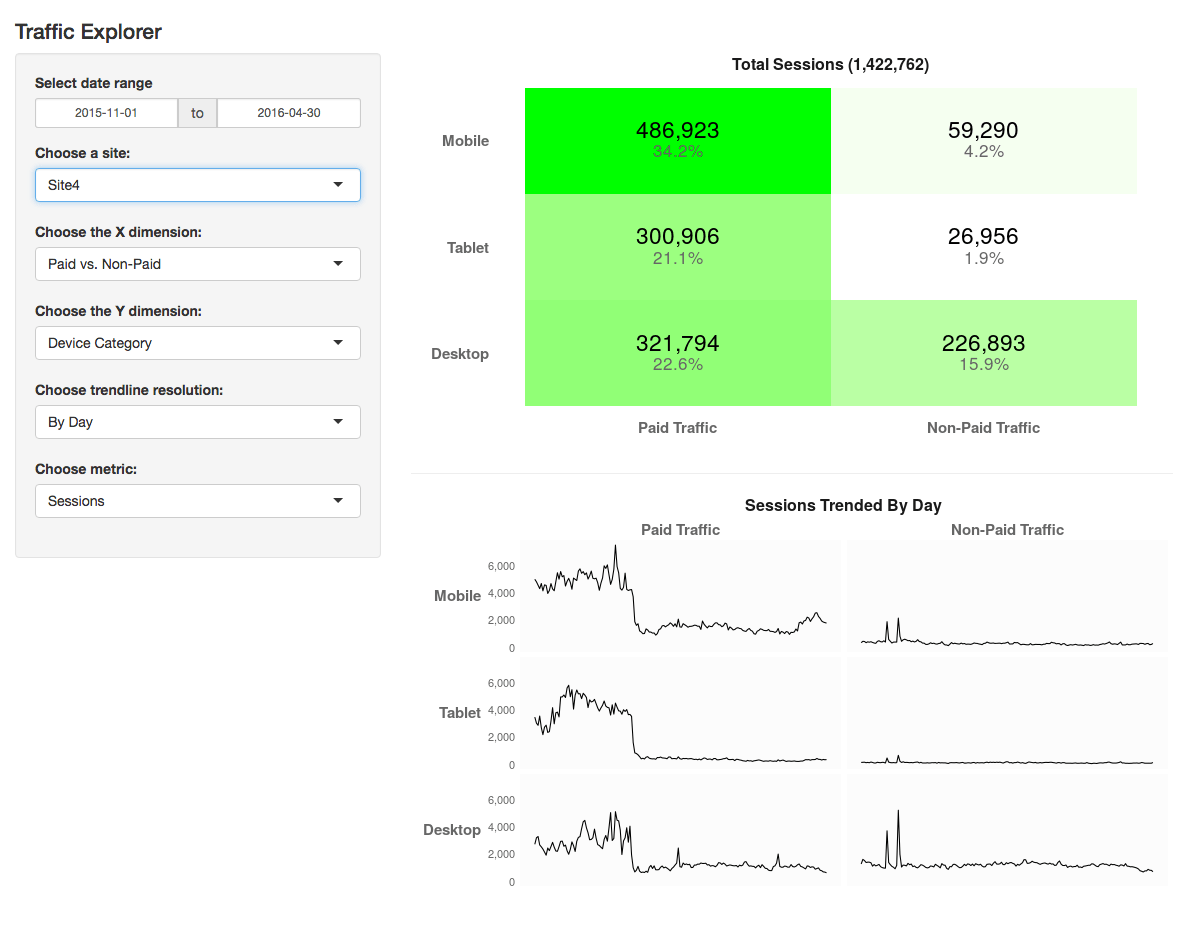
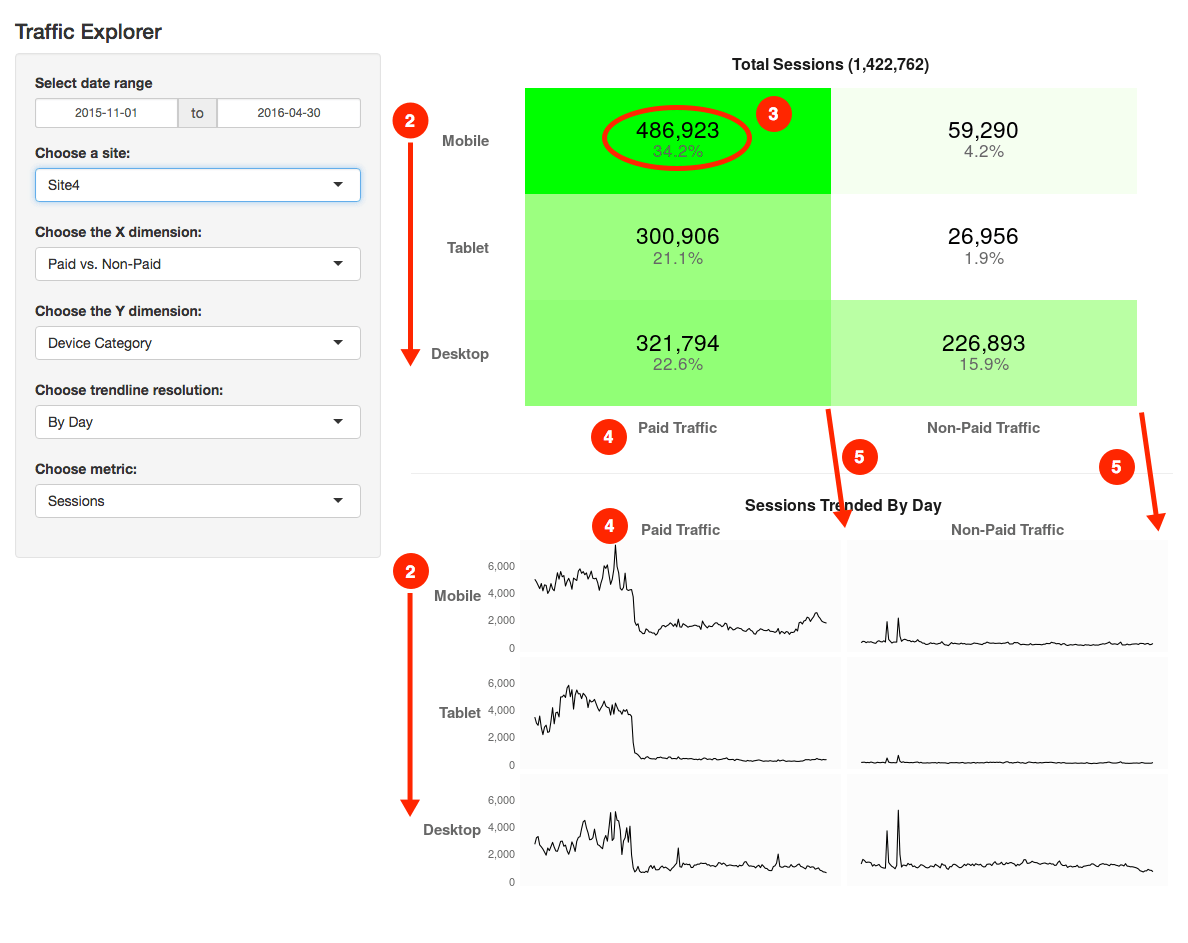
  • Dynamic Segment Generation and Querying — I worked on an analysis project for a Google Analytics Premium client where we had a long list of hypotheses regarding site behavior, and each hypothesis, essentially, required a new segment of traffic. The wrinkle was that we also wanted to look at each of those segments by device category (mobile/tablet/desktop) and by high-level traffic source (paid traffic vs. non-paid traffic). By building dynamic segment fragments that I could programmatically swap in and out with each other, I used R to cycle through and do a sequence of data pulls for each hypothesis (six queries per hypothesis: mobile/paid, tablet/paid, desktop/paid, mobile/non-paid, etc.). Ultimately, I just had R build out a big, flat data table that I brought into Excel to pivot and visualize…because I wasn’t yet at the point of trying to visualize in R.
  • Interactive Traffic Exploration Tool — I actually wrote about that one, including posting a live demo. This wasn’t a client deliverable, but was a direct outgrowth of the work above.
  • Interactive Venn Diagrams — I built a little Venn Diagram that I can use when speaking to show an on-the-fly visualization. That demo is available, too, including the code used to build it. I also pivoted that demo to, instead, pull web analytics data to visually illustrate the overlap of visitors to two different areas of a web site. Live demo? Of course!
  • “Same Data” from 20 Views — this was also a Google Analytics project — or, string of projects, really — for a client that has 20+ brand sites, and each brand has it’s own Google Analytics property. All brands feed into a couple of “rollup” properties, too, but, there have been a succession of projects where the rollup views haven’t had the necessary data that we wanted to look at for by site for all sites. I have a list of the Google Analytics view IDs for all of those sites, so I’ve now had many cases where I’ve simply adjusted the specifics of what data I need for each site and then kicked off the script.
  • Adobe Analytics Documentation Template Builder — this is a script that was inspired by an example script that Randy Zwitch built to pull the configuration information out of Adobe Analytics and get it into a spreadsheet (using the RSitecatalyst package that Randy and Jowanza Joseph built). I wanted to extend that example to: 1) clean up the output a bit, and 2) to actually bring in data for the report suite IDs so that I could easily scan through and determine, not only which variables were enabled, but which ones had data and what did that data look like. I had an assist from Adam Greco as to what makes the most sense on the output there, and I’m confident the code is horrendously inefficient. But, it’s worked across three completely different clients, and it’s heavily commented and available for download (and mockery) on Github.
  • Adobe Analytics Anomaly Detection…with Twitter Horsepower — okay…so this one isn’t quite built to where I want it…yet. But, it’s getting there! And, it is (will be!), I think, a good illustration of how programming with data can give you a big leg up on your analysis. Imagine a three-person pyramid, and I’m standing on top with a tool that will look for anomalies in my events, as well as anomalies in specified eVar/event combinations I specify (e.g., “Campaigns / Orders”) to find odd blips that could signal either an implementation issue (the initial use case) or some expected or unexpected changes in key data. This…was what I think a lot of people expected from Adobe’s built-in Anomaly Detection when it rolled out a few years ago…but that requires specifying a subset of metrics of interest. Conceptually, though, I’m standing on top of a human pyramid and doing something similar. So, who am I standing on? Well, one foot is on the shoulder of RSitecatalyst (so, really, Randy and Jowanza), because I need that package to readily get the data that I want to use out of Adobe Analytics. My other foot is standing on…Twitter. The Twitter team built and published an R Anomaly Detection package that takes a series of time-series inputs and then identifies anomalies in that data (and returns them in a plot with those anomalies highlighted). That’s a lot of power! (I know…I’m cheating… I don’t have the publishable demo of this working yet.)

What Are Other People Doing with R?

The thing about everything that I listed above is that…I’m still producing pretty lousy code. Most of what I do in 100 lines of code, someone who knows their way around in R could often do in 10 lines. On the one hand, that’s not the end of the world — if the code works, I’m just making it a little slower and a bit harder to maintain. It is generally still much faster than doing the analysis through other means, and my computer has yet to complain about me feeding it inefficient code to run.

One of the reasons I suspect my code is inefficient is because more and more R-savvy analysts are posting their work online. For instance:

The list goes on and on, but you get the idea. And, of course, everything I listed above is for R, but there are similar examples for Python. Ultimately, I’d love to see a centralized resource for these (which analyticsplaybook.org may, ultimately become), but it’s still in its relatively early days.

And I had no idea this post would get this long (but I’m not sure I should be surprised, either). What do you think? Are you convinced?


General

What Happens When You Combine Analytics and Pregnancy?

What Happens When You Combine Analytics and Pregnancy?

Headed to BodyPump on the day I went in to labor

Those of who know me might have noticed I have been suspiciously quiet. (Let’s be honest, that’s not the norm for me!) I wanted to explain a little about where I’ve been, and how I manage to make everything in my life about analytics.

If it wasn’t obvious from some of my previous posts and presentations, I have an interest in “quantified self” – essentially, tracking and applying analytics to every day life. So, when my partner and I were expecting a baby, of course I had to turn this in to an opportunity to analyze what happens to physical activity levels during pregnancy.

As background: I’m a pretty active person. I teach Les Mills group fitness classes (4-5 classes/week) and work out 6-7 days a week. Because I was so active before pregnancy, I was able to keep doing everything I had been doing, all the way up until the day I went in to labor. However, even with a focus on continued activity, I found there was still a “slow down” that happens in pregnancy.

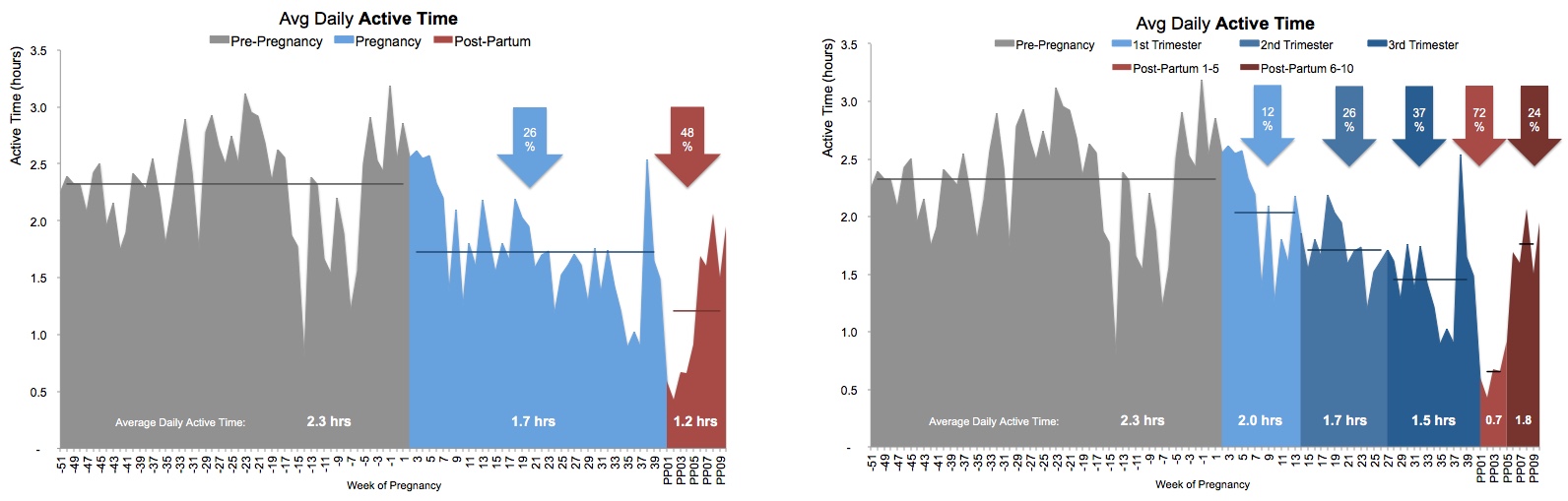
I tracked my steps and “active time” (which includes any exercise, even if it’s not “steps based” – for example, this would include activities like swimming or yoga, that aren’t easily measured by “steps”) throughout pregnancy, as well as during the postpartum period. This gave me data I could use to examine the changes to activity levels at different stages of pregnancy, and after birth.

What I found

Here is what I found…

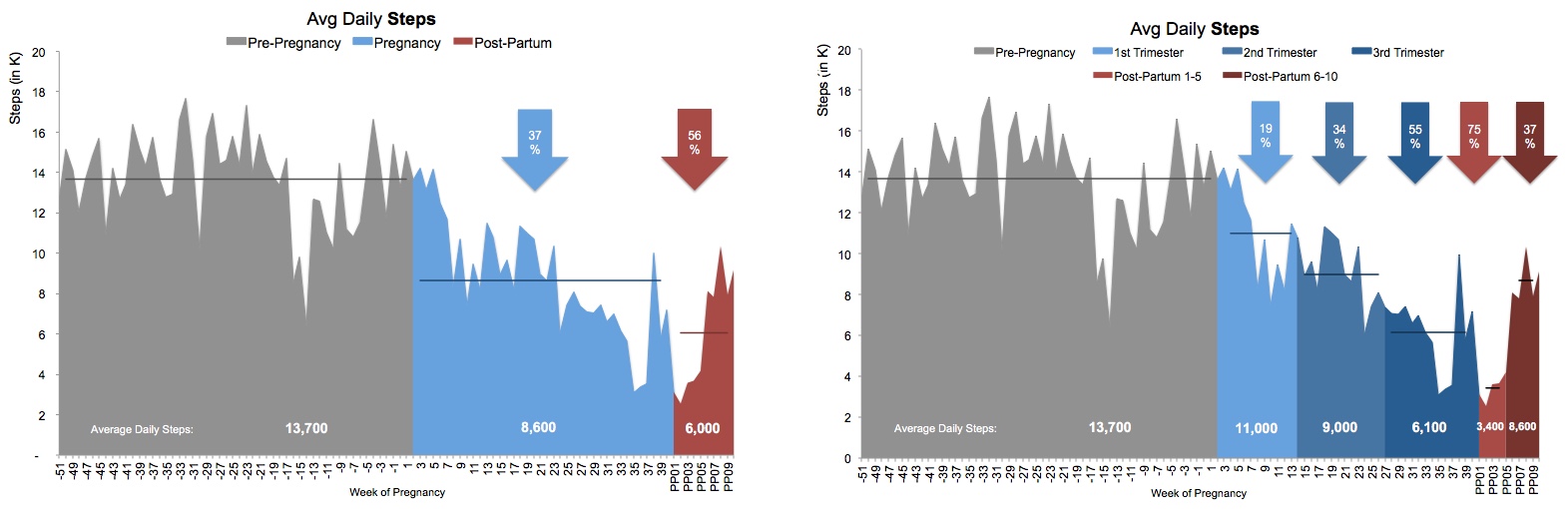
  1. Pregnancy definitely decreased my average daily step count, with the heaviest “hit” to my steps occurring in the third trimester.
    • I went from 13,700 steps per day to 8,600 during pregnancy (a -37% drop.)
    • The first trimester wasn’t a huge change. I was still taking 11,000 steps a day! (A -19% drop.) However, I was pretty lucky. I had an easy first trimester with no nausea. A lot of women are actually very inactive during the first trimester due to exhaustion and morning sickness.
    • The second trimester I dropped to 9,000 steps per day. (Given the recommendation is 10,000 steps per day, 9,000 seemed pretty respectable for pregnancy, if you ask me!)
    • The third trimester was my lowest, with 6,100 steps/day. If you look at the charts, you may notice a large drop around Week 35-37. That actually coincides with my partner heading out of town, to Adobe Summit. I was intentionally laying low to avoid going in to labor while he was gone! (I considered excluding this data as outlier, but decided to keep it in since it is accurate data.)
  2. However, the biggest drop was actually in the “post-partum” period immediately after birth, where I only took an average 6,000 steps/day (a -56% drop compared to before pregnancy.) For those who don’t know, you’re not supposed to do much of anything in the six weeks after birth. (It’s really boring.)
    • The first five weeks after birth drove most of this, with only 3,400 steps/day.
    • After six weeks I was able to return to teaching and a lot more activity, and am averaging back up at 8,600 (and continuing to trend up!)
  3. Pregnancy also decreased my “active time”, but not as significantly as my steps. Essentially, I was still staying active, but sometimes non-ambulatory activities like swimming, yoga, weight training etc were taking priority over activities like running (which I gave up towards the end of the second trimester.)
    • While my steps decreased -37% in pregnancy, my active time only decreased -26%. So, I was keeping active, just in other ways.
    • During the first trimester I was still managing an average of 2 hours of active time per day!
    • This dropped to 1.7 hours in the second trimester, and 1.5 hours in the third.
    • Similar to steps, the biggest drop was in the post-partum period, where I averaged only 1.2 hours of active time per day (a -48% drop.) The lowest of this was during Weeks 1-5 (only 0.7 hours/day), with 6 weeks post-partum seeing an increase in activity again – up to 1.8 hours/day and climbing!

In case you’re into charts:


Steps 2

Active Time 2

How I tracked this

For years now I have used Jawbone UP products to record my step, activity and sleep data. I have IFTTT connected, which automatically sends my UP data to a Google Spreadsheet. That’s the data I used for this analysis.

Why no sleep analysis, you might wonder? Two reasons:

  1. The way Jawbone exports the sleep data is really unfriendly for analysis and would require so much data cleanup, I simply don’t have the time. (You’ve probably heard: babies can be time consuming!)
  2. Let’s be honest: Seeing how little sleep I’m getting, or how fragmented it is, would be a totally bummer. My partner is pretty awesome about sharing night duty 50/50, so I choose to not look to closely at my sleep, since I know it’s actually pretty darn good for a new parent!

Baby TrackerWhat’s next?

Yes, there is actually such a thing as a Quantified Baby. My partner and I use the Baby Tracker app to record our son’s sleep, feeds, medication etc, which gives us amazing little charts we can use to detect patterns and respond accordingly. For example, choosing an appropriate bed time based on the data of his sleep cycles. There’s probably not a post coming out of that, but yes, the tracking does continue on!

Thanks for tuning in!

I undertook this analysis mainly because I found it interesting (and I’m a nerd, and it’s what I do.) Pregnancy was such a unique experience, I wanted some way to quantify and understand the changes that take place. Most people probably won’t be too interested, but if you have any questions or want to discuss, please don’t hesitate to leave me a note in the comments!

General

Nine Years Demystifying (Web) Analytics … a Look Back

Last week my inbox blew up all the sudden with email from LinkedIn with subjects like “congrats” and “well done, old man!” At first I assumed this was just more of the same SPAM I seem to get from that platform … but upon further inspection I realized that LinkedIn had told folks that it has been nine years since I quit my cushy job at Visual Sciences, threw caution to the wind, and founded (Web) Analytics Demystified!

Nine years!

It is positively mystifying to me how much the Demystifiers and I have accomplished in this relatively short amount of time. Seven Senior Partners with seven books between us, hundreds of marquee clients, thousands of blog posts helping to shape the industry, and millions of miles flown in an effort to help amazing individuals and organizations make the most from their investment in digital analytics and optimization. We have watched giants fall, competitors fold, and thought leaders simply stop thinking … while simply doing what we do best: demystifying analytics.

It’s not to say we haven’t transformed our business, far from it.

If you look back at my writing from nine years ago you can see that we have gone from being almost exclusively strategic to being a full-service shop. Engagements that start strategically with Adam and John quickly expand into tactics with Brian, Kevin, and Josh and ultimately insights with Tim and Michele. Clients are now able to leverage the experience of the Senior Partners on an ongoing basis, allowing the best in the industry to make their own people better.

What’s more, with the addition of Team Demystified we are more deeply embedded than ever and fully invested in our client’s success and able to deliver implementation support and insights on a truly full-time basis. This decision, in retrospect, may turn out to be one of the best I have ever made given that it has allowed Demystified to grow in a scalable and sustainable way, creating amazing opportunities for some of the best young talent in the analytics field. If you’re interested in learning more about joining Team Demystified or adding Team members to your analytics staff please email me directly.

Another change some of you may have noticed is that I personally don’t do any consulting anymore.

Two years ago I made the decision to take more of a behind-the-scenes management role, growing Team Demystified and making sure that the Senior Partners were given the support they needed to deliver client value commensurate with our reputation. At that point I established a single key performance indicator for the entire business and set everyone working towards it: client satisfaction.

No great surprise but this turns out to be the one KPI that matters in a consulting business.

Everything we have today is a direct result of going as far as necessary for each client … and then one step further. It has led to a lot of early mornings, late nights, and worked weekends, but at the end of the day we know that our business is only as good as our reputation. What’s more, since it is common knowledge that we are often the most expensive option in analytics consulting — increasingly by a factor of two to three as other shops seem to be in a race towards the bottom — the onus stays on us to do the job right the first time, every time, for every client.

That’s not to say we have kept every client we have ever taken on.

One of the big “ah ha” moments for me in the past two years has been that our KPI is also a function of the client being willing and able to be satisfied. We have had to essentially fire almost a half-dozen clients — and trust me, as a business owner this is painful — when we found them unwilling or unable to actually follow the advice we gave. That said we now have much better qualification filters for new clients in an effort to make sure that before we let them hire us for our transformation expertise … that they actually want (and are able) to be transformed.

Sigh. I guess web analytics is still hard …

Having started in the late ’90s at Webtrends I have personally watched this industry grow from almost nothing to the point where the best digital leaders wouldn’t even consider making a decision without analytics data to back them up. Together the Demystified Partners and I have watched the vendor landscape mature to the logical two-horse race we see today, and that has allowed us to focus our efforts to provide the best possible service. And at the end of the day I am grateful for the experience, my amazing Partners, our incredible Team members, and of course, our clients.

General

Shiny Web Analytics with R

It’s been a a couple of months since I posted about my continued exploration of R. In part, that’s because I found myself using it primarily as a more-powerful-than-the-Google-Analytics-Chrome-extension access point for the Google Analytics API. While that was useful, it was a bit hard to write about, and there wasn’t much that I could easily show (“Look, Ma! I exported a .csv file that had data for a bunch of different segments in a flat table! …which I then brought into Excel to work with!”). And, overall, it’s only one little piece of where I think the value of the platform ultimately lies.

The Value of R Explored in This Post

goldbricksI’d love to say that the development of this app (if you’re impatient to get to the goodies, you can check it out here or watch a 3.5-minute demo here) was all driven up front by these value areas…but my nose would grow to the point that it might knock over my monitor if I actually wrote that. Still, these are the key aspects of R that I think this application illustrates:
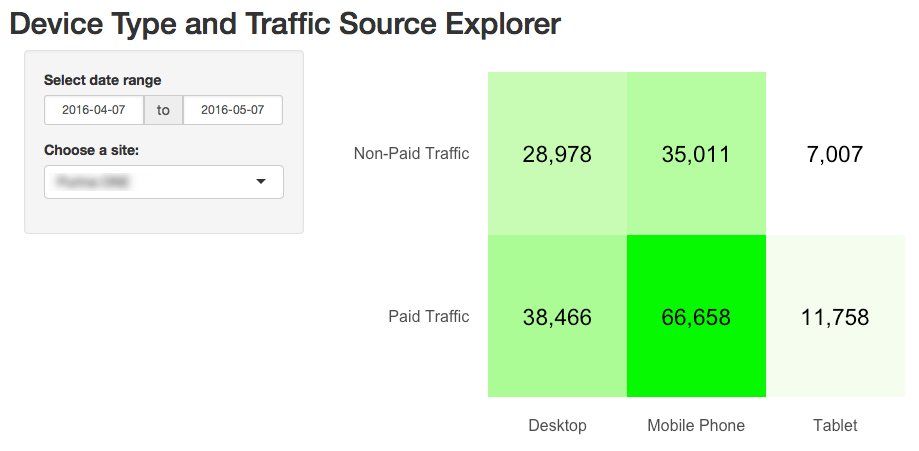
  • Dynamically building API calls — with a little bit of up front thought, and with a little bit of knowledge of Google Analytics dynamic segments, R (or any scripting language) can be set up to quickly iterate through a wide range of data sets. The web interface for Google Analytics starts to quickly feel clunky and slow once you’re working with text-based API calls.
  • Customized data visualization — part of what I built came directly from something I’d done in Excel with conditional formatting. But, I was able to extend that visualization quite a bit using the ggplot2 package in R. That, I’m sure was 20X more challenging for me than it would have been in something like Tableau, but it’s hard for me to know how much of that challenge was from me still being far, far from grokking ggplot2 in full. And, this is an interactive data visualization that required zero out-of-pocket costs. So, there was no involvement of procurement or “expense pre-approval” required. I like that!
  • Web-based, interactive data access — I had to get over the hump of “reactive functions,” in Shiny (which Eric Goldsmith helped me out with!), but then it was surprisingly easy to stand up a web interface that actually seems to work pretty well. This specific app is posted publicly on a (free) hosted site, but, a Shiny server can be set up on an intranet or behind a registration wall, so it doesn’t have to be publicly accessible. (And, Shiny is by no means the only way to go. Check out this post by Jowanza Joseph for another R-based interactive visualization using an entirely different set of R features.)
  • Reusable/extensible scripting — I’m hoping to get some, “You should add…” or, “What about…?” feedback on this (from this post or from clients or from my own cogitation), as, for a fairly generic construct, there are many ways this basic setup could go. I also hope that a few readers will download the files (more complete instructions at the end of this post), try it out on their own data, and either get use from it directly or start tinkering and modifying it to suit their needs. This could be you! In theory, this app could be updated to work with Adobe Analytics data instead of Google Analytics data using the RSiteCatalyst (which also allows text-based “dynamic” segment construction…although I haven’t yet cracked the code on actually getting that to work).

Having said all of that, there are a few things that this example absolutely does not illustrate. But, with luck, I’ll have another post in a bit that covers some of those!

Where I Started, Where I Am Now

Nine days ago, I found myself with a free hour one night and decided to take my second run at Shiny, which is “a web application framework for R” from RStudio. Essentially, Shiny is a way to provide an interactive, web-based experience with R projects and their underlying data. Not only that, Shiny apps are “easy to write,” which is not only what their site says, but what one of my R mentors assured me when he first told me about Shiny. “Easy” is a relative term. I pretty handily flunked the Are you ready for shiny? quiz, but told myself that, since I mostly understood the answers once I read them, I’d give it a go. And, lo’ and behold, inside of an hour, I had the beginnings of a functioning app:

First Shiny App

This was inspired by some of that “just using R to access the API” work that I’d been doing with R — always starting out by slicing the traffic into the six buckets in this 3×2 matrix (with segments of specific user actions applied on top of that).

I was so excited that I’d gotten this initial pass completed, that my mind immediately raced to all of the enhancements to this base app that I was going to quickly roll out. I knew that I’d taken some shortcuts in the initial code, and I knew I needed to remedy those first. And I quickly hit a wall. After several hours of trying to get a “reactive function” working correctly, I threw up my hands and asked Eric Goldsmith to point me in the right direction, which he promptly and graciously did. From there, I was off to the races and, ultimately, wound up with an app that looks like this:

shiny2

This version cleaned up the visualizations (added labels of what metric was actually being used), added the sparkline blocks, and added percentages to the heatmap in addition to the raw numbers. And, more importantly, added a lot more user controls. Not counting the date ranges, I think this version has more than 1,000 possible configurations. You can try it yourself or watch a brief video of the app in action. I recommend the former, as you can do that without listening to my dopey voice, but you just do whatever feels right.

What’s Going On Behind the Scenes

What’s going on under the hood here isn’t exactly magic, and it’s not even something that is unique to R. I’m sure this exact same thing (or something very similar) could be done with Python — probably with some parts being easier/faster and other parts being more complex/slower. And, it’s even probably something that could be done with Tableau or Domo or Google Data Studio 360 or any number of other platforms. But, how it’s working here is as follows (and the full code is available on Github):

  • Data Access: I put my Google Analytics API client ID and client secret, as well as a list of GA view IDs into variables in the script
  • Dynamic Segments: I built a matrix where each row had the value that shows up in the dropdown, and then a separate row for each segment that goes into that group that has both the name of the segment (Mobile, Desktop, Tablet, New Visitors, etc.) and the dynamic segment syntax for that segment of traffic. This list can be added to at any time and the values then become available in the application.
  • Trendline Resolution: This is another list that simply provides the label (e.g., “By Day”) and the GA dimension name (e.g., “ga:date”); this could be modified, too, although I’m not sure what other values would make sense beyond the three included there currently.
  • Metrics: This is also a list — very similar to the one above — that includes the metric name and the GA API name for each metric. Additional metrics could be added easily (such as specific goals).
  • Linking the Setup to the Front End: This was another area where I got an Eric Goldsmith assist. The app is built so that, as values get added in the options above, they automatically get surfaced in the dropdowns.
  • “Reactive” Functions: One of the key concepts/aspects of Shiny is the ability to have the functions in the back end figure out when they need to run based on what is changed on the front end. (As I was writing this post, Donal Phipps pointed me to this tutorial on the subject; I’ll need to go through it another 8-10 times before it sinks in fully.)
  • Pull the Data with RGA’s get_ga() Function: Using the segment definitions, a couple of nested loops cycle through and, based on the selected values, pull the data for each heatmap “block” in the final output. This data gets pulled with whatever “date” dimension is selected. Basically, it pulls the data for the sparklines in the small multiples plot.
  • Plot the Data: I started with a quick refresher on ggplot2 from this post by Tom Miller. For the heatmap, the data gets “rolled up” to remove the date dimension. The heatmap uses a combination of geom_tile() and geom_text() plots from the ggplot2 pacakge. The small multiples at the bottom use a facet_grid() with geom_line().
  • Publish the App: I just signed up for a free shinyapps.io account and published the app, which went way more smoothly than I expected it to! (And I then promptly hit up Jason Packer with some questions about what I’d done.)

And that’s all there is to it. Well, that’s “all” there is to it. This actually took me ~17 hours to get working. But, keep in mind that this was my first Shiny app, and I’m still early on the R learning curve.

The Most Challenging Things Were Least Expected

If someone had told me this exercise would take me ~17 hours of work to complete, I would have believed it. But, as often is the case for me with R, I would have totally muffed any estimate of where I would spend that time. A few things that took me much longer to figure out than I’d expected were:

  1. (Not Shown) Getting the reactive functions and calls to those functions set up properly. As mentioned above, I spun my wheels on this until I had an outside helping hand point me in the right direction.
  2. Getting the y-axis for the two visualizations in the same order. This seems like it would be simple, but geom_tile() and facet_grid() are two very different beasts, it seems.
  3. Getting the number and the percentage to show up in the top boxes. Once I realized that I just needed to do two different geom_text() calls for the values and “nudge” one value up a bit and the other value down a bit, this worked out.
  4. Getting the x-axis labels above the plot. This turned out to be pretty easy for the small multiples at the bottom, but I ultimately gave up on getting them moved in the heatmap at the top (the third time I stumbled across this post when looking for a way to do this, I decided I could give up an inch or two on my pristine vision for the layout).
  5. Getting the “boxes” to line up column-wise. They still don’t line up! They’re close, though!

shiny3

The Least Challenging Things Were Delightful Surprises

On the flip side, there were some aspects of the effort that were super easy:

  • There is no hard-coding of “the grid.” The layout there is completely driven by the data. If I had an option that had 5 different breakouts, the grid — both the heatmap and the small multiples — would automatically update to have five buckets along the selected dimension.
  • The heatmap. Getting the initial heatmap was pretty easy (and there are lots of posts on the interwebs about doing this). scale_fill_gradient() FTW!
  • ggplot2 “base theme.” This was something I clicked to the last time I made a run at using ggplot2. Themes seem like a close cousin to CSS. So, I set up a “base theme” where I set out some of the basics I wanted for my visualizations, and then just selectively added to or overrode those for each visualization.
  • Experimentation with the page layout. This was super-easy. I actually started with the selection options along the left side, then I switched them to be across the top of the page, and then I switched them back. I really did very little fiddling with the front end (the ui.R file). It seems like there is a lot of customization through HTML styles that can be done there, but this seemed pretty clean as is.

Try it Yourself?

Absolutely, one of the things I think is most promising about R is the ability to re-purpose and extend scripts and apps. In theory, you can fairly easily set up this exact app for your site (you don’t have to publish it anywhere — you can just run it locally; that’s all I’d done until yesterday afternoon):

  1. Make sure you have a Google Analytics API client ID and client secret, as well as at least one view ID (see steps 1 through 3 in this post)
  2. Create a new project in RStudio as an RShiny project. This will create a ui.R and a server.R file
  3. Replace the contents of those files with the ui.R and server.R files posted in this Github repository.
  4. In the server.R file, add your client ID and client secret on rows 9 and 10
  5. Starting on row 18, add one or more view IDs
  6. Make sure you have all of the packages installed (install.packages(“[package name]”)) that are listed in the library() calls at the top of server.R.
  7. Run the app!
  8. Leave a comment here as to how it went!

Hopefully, although it may be inefficiently written, the code still makes it fairly clear as to how you can readily extend it. I’ve got refinements I already want to make, but I’m weighing that against my desire to test the hypothesis that the shareability of R holds a lot of promise for web analytics. Let me know what you think!

Or, if you want to go with a much, much more sophisticated implementation — including integrating your Google Analytics data with data from a MySQL database, check out this post by Mark Edmondson.

General

So, R We Ready for R with Adobe Analytics?

A couple of weeks ago, I published a tutorial on getting from “you haven’t touched R at all” to “a very basic line chart with Google Analytics data.” Since then, I’ve continued to explore the platform — trying like crazy to not get distracted by things like the free Watson Analytics tool (although I did get a little distracted by that; I threw part of the data set referenced in this post…which I pulled using R… at it!). All told, I’ve logged another 16 hours in various cracks between day job and family commitments on this little journey. Almost all of that time was spent not with Google Analytics data, but, instead, with Adobe Analytics data.

The end result? Well (for now) it is the pretty “meh” pseudo-heatmap shown below. It’s the beginning of something I think is pretty slick…but, for the moment, it has a slickness factor akin to 60 grit sandpaper.

What is it? It’s an anomaly detector — initially intended just to monitor for potential dropped tags:

  • 12 weeks of daily data
  • ~80 events and then total pageviews for three different segments
  • A comparison to the total for each metric for the most recent day to the median absolute deviation (MAD) for that event/pageviews for the same day over the previous 12 weeks
  • “White” means the event has no data. Green means that that day of the week looks “normal.” Red means that day of the week looks like an outlier that is below the typical total for that day. Yellow means that day of the week look like an outlier that is above the typical total for that day (yellow because it’s an anomaly…but unlikely to be a dropped tag).

r_anomalyDetection

On my most generous of days, I’d give this a “C” when it comes to the visualization. But, it’s really a first draft, and a final grade won’t be assessed until the end of the semester!

It’s been an interesting exercise so far. For starters, this is a less attractive, clunkier version of something I’ve already built in Excel with Report Builder. There is one structural difference between this version and the Excel version, in that the Excel version used the standard deviation for the metric (for the same day of week for the previous 12 weeks) to detect outliers. (MAD calculations in Excel require using array formulas that completely bogged down the spreadsheet.) I’m not really scholastically equipped to judge…but, from the research I’ve done, I think MAD is a better approach (which was why I decided to tackle this with R in the first place — I knew R could handle MAD calculations with ease).

What have I learned along the way (so far)? Well:

  • RSiteCatalyst is a kind of awesome package. Given the niche that Randy Zwitch developed it to serve, and given that I don’t think he’s actively maintaining it… I had data pulling into R inside of 30 minutes from installing the package. [Update 04-Feb-2016: See Randy’s comment below; he is actively maintaining the package!]
  • Adobe has fewer security hoops to get data than Google. I just had to make sure I had API access and then grab my “secret” from Adobe, and I was off and running with the example scripts.
  • ggplot2 is. A. Bear! This is the R package that is the de facto standard for visualizations. The visualization above was the second real visualization I tried with R (the first was with Google Analytics data and some horizontal bar charts), and I have yet to even grok it in part (much less grok it in full). From doing some research, the jury’s still a little out (for me) as to whether, once I’ve fully internalized themes and aes() and coord_flip and hundreds of other minutia, whether I’ll feel like that package (and various supplemental packages) really give me the visualization control that I’d want. Stay tuned.
  • Besides ggplot2, R, in general, has a lot of nuances that can be very, very confusing (“Why isn’t this working? Because it’s a factor? And it shouldn’t be a factor? Wha…? Oh. And what do you mean that number I’m looking at isn’t actually a number?!”). These nuances, clearly, make intuitive sense to a lot of people… so I’m continuing to work on my intuition.
  • Like any programming environment (and even like Excel…as I’ve learned from opening many spreadsheets created by others), there are grotesque and inefficient ways to do things in R. The plot above took me 199 lines of code (including blanks and extensive commenting). That’s really not that much, but I think I should be able to cut it down by 50% easily. If I gave it to someone who really knows R, they would likely cut it in half again. If it works as is, though, why would I want to do that? Well…
  • …because this approach has the promise of being super-reusable and extensible. To refresh the above, I click one button. The biggest lag is that I have to make 6 queries of Adobe (there’s a limit of 30 metrics per query). It’s set up such that I have a simple .csv where I list all of the events I want to include, and the script just grabs that and runs with it. That’s powerful when it comes to reusability. IF the visualization gets improved. And IF it’s truly reusable because the code is concise.

Clearly, I’m not done. My next steps:

  • Clean up the underlying code
  • Add some smarts that allow the user to adjust the sensitivity of the outlier detection
  • Improve the visualization — at a minimum, remove all of the rows that either have no data or no outliers, but the red/green/yellow paradigm doesn’t really work, and I’d love to be able to drop sparklines into the anomaly-detected cells to show the actual data trend for that day.
  • Web-enable the experience using Shiny (click through on that link… click the Get Inspired link. Does it inspire you? After playing with a visualization, check out how insanely brief the server.R and ui.R files are — that’s all there is for the code on those examples!)
  • Start hitting some of the educational resources to revisit the fundamentals of the platform. I’ve been muddling through with extensive trial and error and Googling, but it’s time to bolster my core knowledge.

And, partly inspired by my toying with Watson Analytics, as well as the discussion we had with Jim Sterne on the latest episode of the Digital Analytics Power Hour, I’ve got some ideas for other things to try that really wouldn’t be doable in Excel or Tableau or even Domo. Stay tuned. Maybe I’ll have an update in another couple of weeks.

General

Is On-Demand Radio the Next Big Digital Channel?

The title of this post is really two questions:

  • Is on-demand radio the next big channel?
  • Is using “on-demand radio” instead of “podcast” in the title really just a sleezy linkbait move?

I’ll answer the second question first: “Maybe.”

Now, moving on to the first question. This post is in two parts: the first part is digital marketing prognostication, which isn’t tied directly to analytics. The second part is what the first part could mean for analysts.

The Second Life of Podcasts

No, I’m not referring to SecondLife (which, BTW, is still around and, apparently, still has life in it). I’m referring to the fact that podcasts just turned ten, and there are a lot of signs that they might be one of the “next big things” in digital. Earlier this year, when I wrote a post announcing the launch of the Digital Analytics Power Hour podcast, I listed three examples as to how  it seemed like podcasts were making a comeback:

The fact that I felt like podcasts were experiencing a resurgence should have been a death knell for the medium — predicting the future of technology has never been my forte (I distinctly remember proclaiming with certainty that SaaS-based CRM would never work when Salesforce.com launched! I said the same thing about SaaS-based web analytics!).

But, this past week brought another bullet for my list: The Slate Group launched Panoply, a podcast network where they’re partnering with Big Names In Media (think Huffington PostThe New York Times Magazine, HBO, Popular Science…) to produce high quality podcasts. Slate feels like they bring their experience (producers) and the technology (studio setups, audio mixing chops)to produce high quality podcasts. Many of the organizations who are joining the platform have a strong background in journalism, print, and digital publishing, but don’t necessarily have podcasting expertise. This seems like big news.

Here’s my list of why it makes sense to me that professionally-produced podcasts are poised for dramatic growth:

  • On-demand TV has definitely gone mainstream with Hulu, Netflix, and Amazon Instant Video — while it’s odd to think that “radio” would lag behind “television” when it comes to innovation, TV seemed to be what had more advertiser focus (I don’t have a source to back that up), and the fact that it was video reasonably made it more attractive to startups/innovators; but, now that consumers are watching their television shows when and where (not just on a TV!) they want, it seems like they’re primed to forego the commercial-laden, live stream of traditional radio
  • According to Andy Bowers (the long-time executive producer of all of Slate’s podcasts, and the main guy overseeing Panoply), the cost-per-user to reach a podcast listener with an ad is higher than even a Super Bowl ad; admittedly, it’s still a much smaller audience, but advertisers are starting to go in for podcasts, so media producers are picking up on that and looking to fill the space with advertising-worthy content
  • Why are advertisers keen on the space? For now, at least, it’s a fairly captive audience. I’ll be the first to admit that I hit the “jump 15/30 seconds ahead” button when I hit the ads on many of the podcasts I listen to (although I also happily have paid to be a Slate+ member to avoid the ads on their podcasts), it’s still hard to miss the repetition of messages there. I wound up as a Carbonite subscriber for several years, and I became aware of them solely through podcast advertising. MailChimp is a perpetual advertiser, and these days, Cone, the “thinking music player,” seems to be betting on the medium.
  • Not only are podcast listeners a reasonably captive audience, they can generally be reached on a consistent basis (like appointment TV viewing of days past), and, I suspect, are starting to fall into a pretty dreamy demographic for a lot of advertisers
  • What’s in it for consumers? We’re getting more and more accustomed to a constant bombardment by media that has been algorithm-tailored or explicitly controlled by us to deliver information we want to see or read. Yet, when we get into the car or step out to mow the lawn (or shovel the driveway!), our vision is off-limits as a sense. The radio is the easiest stimulus to access that is an auditory-only experience…and that experience can often be pretty lousy. Podcasts give the consumer a much more self-tailored experience.

I get it. Being a podcast junkie myself, I have some inherent bias. But, the launch of Gimlet Media and Panoply has me thinking that it’s not just me.

So, What This Could Mean for Analysts

This, unfortunately, is going to be brief…and not particularly optimistic. The kicker with podcasts is that they are, fundamentally, powered with pretty crude technology:

  • The podcaster creates an audio file and is responsible for hosting it somewhere (iTunes does not actually host podcasts — they maintain a library of pointers to the podcast audio files that are hosted wherever the podcaster has put them; Soundcloud actually hosts and delivers podcasts…but I agree with this skeptic about Soundcloud as a good platform for that)
  • The podcaster updates an RSS feed — that’s right…RSS — that includes some basic meta data about the episode, including a link to the audio file
  • Podcast hosting services get that updated feed and pass it through to the podcast platforms that their users use (the iTunes podcast app, Stitcher, TuneIn, etc.)
  • The user’s local device gets that updated feed and downloads the audio file
  • The user may or may not ever listen to the file, but it’s just an audio file — there is no universal mechanism to provide any data back to the podcaster about the number of times the podcast was actually listened to, much less how much of the podcast was listened to
  • There is no universal concept of a “subscriber.” That’s something that is actually managed by the podcasting application. As such, any count of “subscribers” is, inherently, just an estimate

This explanation is just a way of saying, “This is why most podcasting advertisers harken back to direct mail by providing an ‘enter the offer code XYZ when you go to the site to get a special discount’ call-to-action.” There simply is not good data available as to the actual reach of any given podcast at any point in time.

I’m sure this is part of the reason that, occasionally, someone proposes that a fundamentally new technology should be introduced for podcasts. So far, though, that hasn’t happened. Yet, publishers are charging ahead with new content, anyway.

As analysts, we’re going to stuck with, essentially, three imperfect measurement tools:

  • Download-counting — this isn’t bad, but it’s analogous to counting “hits” on the web (or, really, page views — it’s not quite as bad as the days of “hits” of any and all assets on a web page); it gives us a general sense of scale of the reach of the content, and it can provide some basic level of “who” based on the details included in the header of the request for the content.
  • Offer redemptions — as I noted above, if the advertiser has a good CTA they can use where the listener will be incentivized to implicitly tell the advertiser “what prompted me to buy,” then there is a pretty strong link from a podcast listen to a purchase; unfortunately, the number of organizations where there would make any sense, while large, is by no means universal.
  • Asking — several podcasts I listen to periodically embed a CTA in an occasional episode to go fill out a survey. I’m a fan of the voice of the customer, so I’m totally cool with that. But it requires reaching a sufficient volume of listeners to where a meaningful set of data can be collected that way. And, of course, there is a major self-selection bias risk — the listeners who are most likely to take the time to go to a link and fill out a survey are their most loyal listeners, rather than a representative sample of all of their listeners.

I predict this will be an interesting space to watch over the next few years. As a rabid podcast listener, I’m excited about the possibilities for the medium. As an analyst, I’m afraid I’ll be feeling deja vu when marketers first get serious about wanting to measure the impact of their investments in the medium.

What do you think?

Photo Credit: Patrick Breitenbach (Flickr)

Analysis, General

I Believe in Data*

* [Caveats to follow]

Articles about analytics tend to take two forms. One style exalts data as a cure-all panacea.

Another style implies that people put too much faith in the power of their data. That there are limitations to data. That data can’t tell you everything about how to build, run and optimize your business. I agree.

My name is Michele Kiss, I am an analytics professional, and I don’t believe that data solves everything.

I believe in the appropriate use of data. I don’t believe that clickstream data after you redesign your site can tell you if people “like” it. I believe that there are many forms of data, that ultimately it is all just information, and that you need to use the right information for the right purpose. I do not believe in torturing a data set to extract an answer it is simply not equipped to provide.

I believe in the informed use of data. Data is only valuable when its i) definitions and its ii) context are clearly understood. I believe there is no such thing as pointing an analyst to a mountain of data and magically extracting insights. (Sorry, companies out there hiring data scientists with that overblown expectation.)

When a nurse tells your doctor, “150” and “95” those numbers are only helpful because your doctor knows that i) That’s your blood pressure reading and ii) Has a discussion with you about your diet, exercise, lifestyle, stress, family/genetic history and more. That data is helpful because it’s definition is clear, and your doctor has the right contextual information to interpret it.

I believe that the people and processes around your data determine success more than the data itself. A limited data set used appropriately in an organization will be far more successful than a massive data set with no structure around its use.

I believe data doesn’t have to be perfect to be useful, but I also believe you must understand why imperfections exist, and their effect. Perfect data can’t tell you everything, but outright bad data can absolutely lead you astray!

I believe that data is powerful, when the right data is used in the right way. I believe it is dangerously powerful when misused, either due to inexperience, misunderstanding or malice. But I don’t believe data is all powerful. I believe data is a critical part of how businesses should make decisions. But it is one part. If used correctly, it should guide, not drive.

Data can be incredibly valuable. Use it wisely and appropriately, along with all the tools available to your business.

“There are more things in heaven and earth, Horatio,
Than are dreamt of in your [big data set].”
– Analytics Shakepeare

Adobe Analytics, General

The Right Use for Real Time Data

Vendors commonly pitch the need for “real-time” data and insights, without due consideration for the process, tools and support needed to act upon it. So when is real-time an advantage for an organization, and when does it serve as a distraction? And how should analysts respond to requests for real-time data and dashboards?

There are two main considerations in deciding when real-time data is of benefit to your organization.

1. The cadence at which you make changes

The frequency with which you look at data should depend on your organization’s ability to act upon it. (Keep in mind – this may differ across departments!)

For example, let’s say your website release schedule is every two weeks. If, no matter what your real-time data reveals, you can’t push out changes any faster than two weeks, then real-time data is likely to distract the organization.

Let’s say real-time data revealed an alarming downward trend. The organization is suddenly up in arms… but can’t fix it for another two weeks. And then… it rights itself naturally. It was a temporary blip. No action was taken, but the panic likely sidetracked strategic plans. In this case, real-time served as a distraction, not an asset.

However, your social media team may post content in the morning, and re-post in the afternoon. Since they are in a position to act quickly, and real-time data may impact their subsequent posts, it may provide a business advantage for that team.

When deciding whether real-time data is appropriate, discuss with stakeholders what changes would be made in response to observed shifts in the data, how quickly those changes could be made, and what infrastructures exists to make the changes.

2. The technology you have in place to leverage it

Businesses seldom have the human resources needed to act upon trends in real-time data. However, perhaps you have technologies in place to act quickly. Common examples include real-time optimization of advertising, testing and optimization of article headlines, triggered marketing messages (for example, shopping cart abandonment) and on-site (within-visit) personalization of content.

If you have technology in place that will actually leverage the real-time data, it will absolutely provide your organization an advantage. Technology can spot real-time trends and make tweaks far more quickly than a human being can, and can be a great use of real-time information.

But if you have no such technology in place, and real-time is only so executives can see “how many people are checking out right now”, this is unlikely to prove successful for the business, and will draw resources away from making more valuable use of your full data set.

Consider specific, appropriate use cases

Real-time data is not an “all” or “nothing.” There may be specific instances where it will be advantageous for your organization, even if it’s not appropriate for all uses.

A QA or Troubleshooting Report (Otherwise known as the “Is the sky falling?!” report) can be an excellent use of real-time data. Such a report should look for site outages or issues, or breaks in analytics tracking, to allow quick detection and fixes of major problems. This may allow you to spot errors far sooner than during monthly reporting.

The real-time data can also inform automated alerts, to ensure you are notified of alarming shifts as soon as possible.

Definitions matter

When receiving a request for “more real-time” data, dashboards or analysis, be sure to define with stakeholders how they define “real-time.”

Real-time data can be defined as data appearing in your analytics tool within 1 minute of the event taking place. Vendors may consider within 15 minutes to be “real-time.” However, your business users may request “real-time” when all they really mean is “including today’s partial data.”

It’s also possible your stakeholders are looking for increased granularity of the data, rather than specifically real-time information. For example, perhaps the dashboards currently available to them are at a daily level, when they need access to hourly information for an upcoming launch.

Before you go down the rabbit hole of explaining where real-time is, and is not, valuable, make sure that you understand exactly the data they are looking for, as “real time” may not mean the same thing to them as it does to you.

Analysis, Featured, General

The Curse of Bounce Rate and ‘Easy’ Metrics (And Why We Can Do Better)

One of the benefits of having a number of friends in the analytics industry is the spirited (read: nerdy) debates we get in to. In one such recent discussion, we went back and forth over the merits of “bounce rate.”

I am (often vehemently) against the use of “bounce rate.” However, when I stepped back, I realised you could summarise my argument against bounce rate quite simply:

Using metrics like ‘bounce rate’ is taking the easy way out, and we can do better

Bounce rate (at its simplest) is the percentage of visits that land on your site that don’t take a second action. (Don’t see a second page, don’t click the video on your home page, etc.)

My frustration: bounce rate is heavily dependent upon the way your site is built, and your analytics implementation (do you have events tracking that video? how are the events configured? is your next page a true page load?) Thus, bounce rate varies as to what exactly it represents. (Coupled with the fact that most business users don’t, of course, understand the nuances, so may misuse a metric they don’t understand.)

So let’s take a step back. What are we trying to answer with “bounce rate”?

Acquisition analysis (where bounce rate is commonly used) compares different traffic sources or landing pages by which do the best job of “hooking” the user and getting them to take some next action. You are ultimately trying to decide what does the best job of driving the next step towards business success.

Let’s use that!

Instead of bounce rate, what are the conversion goals for your website? What do you want users to do? Did they do it? Instead of stopping at “bounce rate”, compare your channels or landing pages on how they drive to actual business conversions. These can be early-stage (micro) conversions like viewing pricing, or more information, or final conversions like a lead or a purchase.

So, what is better than bounce rate?

  • Did they view more information or pricing? Download a brochure?
  • Did they navigate to the form? Submit the form?
  • Did they view product details? Add to cart? Add the item to a wish list?
  • Did they click related content? Share the article?

Using any of these will give you better insight into the quality of traffic or the landing pages you’re using, but in a way that truly considers your business goals.

But let’s not stop there…. what other “easy metrics” do we analysts fall back on?

What about impressions?

I frequently see impressions used as a measure of “awareness.” My partner, Tim Wilson, has already detailed a pretty persuasive rant on awareness and impressions that is well worth reading! I’m not going to rehash it here. However the crux of this is:

Impressions aren’t necessarily ‘bad’ – we can just do a better job of measuring awareness.

So what’s better than impressions?

  • At least narrow down to viewable impressions. If we are honest with ourselves, an impression below the fold that the user doesn’t even see does not affect their awareness of your brand!

  • Even measuring clicks or click-through is a step up, since the user at least took some action that tells you they truly “saw” your ad – enough to engage with it.

  • A number of vendors provide measures of true awareness lift based on exposure to ad impressions, by withholding and measuring against a control group. This is what you truly want to understand!

What about about page views per visit or time on site?

Page views per visit or time on site is commonly used in content sites as a measure of “engagement.” However (as I have ranted before) page views or time can be high if a user is highly engaged – but they can also be high if they’re lost on the site!

So what’s better than just measuring time or page views?

So why do we do this?

In short: Because it’s easy. Metrics like bounce rate, page views, time on site and impressions are basic, readily available data points provided in standard reports. They’re right there when you load a report! They are not inherently ‘bad’. They do have some appropriate use cases, and are certainly better than nothing, in the absence of richer data.

However, analysis is most valuable when it addresses how your actions affect your business goals. To do that, you want to focus on those business goals – not some generic data point that vendors include by default.

Thoughts? Leave them in the comments!

Conferences/Community, General

Happy New Year from Web Analytics and Team Demystified

Happy belated new year to everyone reading this blog — on behalf of everyone at Analytics Demystified and Team Demystified I sincerely hope you had a wonderful and relaxing holiday season and that you’re ready to wade back into the analytical and optimization fray! Since I last wrote a few cool things have happened:

  • Michele Kiss has been promoted to Senior Partner in the firm. Michele, as you likely know, is amazing and has more than earned her promotion by virtue of her dedication, enthusiasm, and general tolerance of “the boys” … please help me congratulate Michele on, as she says, “teh Twittahs” @michelejkiss
  • We continue to expand our Team Demystified program. Team Demystified has exceeded everyone’s expectations and has positively transformed how Analytics Demystified is able to provide service to our clients. I am more than happy to discuss how the program works, and we are actively looking for resources in Northern California if you’d like to talk about joining our Team.
  • Web Analytics Wednesday is in the process of being “freed.” As you likely know Web Analytics Wednesday has been a phenomenally popular social networking event since 2005 when June Dershewitz came up with the idea and I provided some support for execution. That said, all good things must come to an end, and so as of January 1st we are no longer supporting or facilitating WAW events.

Regarding the “freeing” of Web Analytics Wednesday, basically with the DAA and other local efforts that are now reasonably well established we have decided it doesn’t make sense for us to be the gateway to WAW events anymore. We also aren’t going to be able to sponsor/help pay for events any longer … the analytics world is changing and we are changing with it!

We will gladly link to local event web sites/meetup pages/etc. so send them to wednesday@analyticsdemystified.com or comment them below.

On our Team Demystified program, one thing we all hope to do in the New Year is to provide our Team members an opportunity to have their voice heard. The following is a post from one of our rock-stars, Nancy Koons. Please feel free to respond to Nancy via this blog post or you can find her in Twitter @nancyskoons.


5 Tips for Onboarding a new Analyst to your Team

Nancy Koons, Team Demystified

The New Year may bring new resources to your organization. Hurray! Beyond the typical on-boarding tasks like securing a desk, computer, and systems access, here are Five Tips for ensuring a new analyst is set up for success.

1)   Introductions: Try to facilitate personal, face-to-face introductions to everyone they will be supporting. An analyst needs to build relationships with many people- ensuring they have met their stakeholders face to face is a great way to help get those relationships off to a solid start.

2)   Prioritize your Data: Train a new analyst on when, where & why data is collected with the goal of introducing the priority of your organization’s data.  Yes, you may be collecting 99 pieces of information from every web visit, but most likely there’s a much shorter list of core metrics that are critical. The sooner your analyst understands which metrics are most important, the better she will be able to field requests and advise stakeholders successfully.

3)   Embed to Learn: Discuss a plan to “embed” the analyst with the team(s) they will be supporting most closely – go beyond basic introductions with the goal being to get your analyst as knowledgeable about that team and their function as possible.  This could include attending goal-planning meetings, 1-on-1 time with key individuals learning about the team, or regular status meetings for a span of time. A strong analyst is able to provide better support when he is knowledgeable about what a team does, and it’s overall goals and objectives.

4)   Train on Process, not just Technology: Walking a new analyst through your solution design document and tagging framework is important- but equally important is making sure they know HOW to get things done. Who do they talk to when things break? How and when are requests for implementation queued up and prioritized? Who will be looking for reports first thing on Monday?

5)   Ongoing Support: Plan on providing support to your analyst for several months.  The larger and more complex the organization, the more your analyst needs to learn about overall business climate, seasonality, diverse sets of teams, and the people, processes and tools used within the organization. All of these can take several weeks or months to internalize and process.

Congratulations on adding a new resource, and best of luck to you as your team grows!


Thanks Nancy! As always we welcome your comments and feedback.

Adobe Analytics, Analytics Strategy, General, google analytics

How Google and Adobe Identify Your Web Visitors

A few weeks ago I wrote about cookies and how they are used in web analytics. I also wrote about the browser feature called local storage, and why it’s unlikely to replace cookies as the primary way for identifying visitors among analytics tools. Those 2 concepts really set the stage for something that is likely to be far more interesting to the average analyst: how tools like Google Analytics and Adobe Analytics uniquely identify website visitors. So let’s take a look at each, starting with Google.

Google Analytics

Classic GA

The classic Google Analytics tool uses a series of cookies to identify visitors. Each of these cookies is set and maintained by GA’s JavaScript tracking library (ga.js), and has a name that starts with __utm (a remnant from the days before Google acquired Urchin and rebranded its product). GA also allows you to specify the scope of the cookie, but by default it will be for the top-level domain, meaning the same cookie will be used on all subdomains of your site as well.

  • __utma identifies a visitor and a visit. It has a 2-year expiration that will be updated on every request to GA.
  • __utmb determines new sessions and visits. It has 30-minute expiration (same as the standard amount of time before a visit “times out” in GA) that will be updated on every request to GA.
  • __utmz stores all GA traffic source information (i.e. how the visitor found your site). If you look closely at its value, you’ll be able to spot campaign query parameters or search engine referring domains, or at the very least the identifier of a “direct” visit. It has an expiration of 6 months that is updated on every request to GA.
  • __utmv stores GA’s custom variable data (visitor-level only). It has an expiration of 2 years that is updated on every request to GA.

ga

That was a mouthful – you might want to read through it again to make sure you didn’t miss anything! There are even a few cookies I didn’t list because GA sets them but they don’t contribute at all to visitor identification. If that looks like a lot of data sitting in cookies to you, you’re exactly right – and it helps explain why classic GA offers a much smaller set of reports than some of the other tools on the market. While I’m sure GA does a lot of work on the back-end, with all those cookies storing traffic source and custom variable data, there’s definitely a lot more burden being placed on the browser to keep a visitor’s “profile” up-to-date than on other analytics tools I’ve used. Understanding how classic GA used cookies is important to understanding just what an advancement Google’s Universal Analytics product really is.

Universal Analytics

Of all the improvements Google Universal Analytics has introduced, perhaps none is as important as the way it identifies visitors to your website. Now, instead of using a set of 4 cookies to identify visitors, maintain visit state, and store traffic source and custom variable data, GA uses just one, called _ga, with a 2-year expiration, and the same default scope as with Classic GA (top-level domain). That single cookie is set by the Universal Analytics JavaScript library (analytics.js) and used to uniquely identify a visitor. It contains a value that is relatively short compared to everything Classic GA packed into its 4 cookies. Universal Analytics then uses that one ID to maintain both visitor and visit state inside its own system, rather than in the browser. This reduces the amount of cookies being stored on the visitor’s computer, and opens up all kinds of new possibilities in reporting.

ua

One final note about GA’s cookies – and this applies to both Classic and Universal – is that there is code that can be used to pass cookie values from one domain to another. This code passes GA’s cookie values through the query string onto the next page, for cases where your site spans multiple domains, allowing you to preserve your visitor identification across sites. I won’t get into the details of that code here, but it’s useful to know that feature exists.

Many of the new features introduced with Universal Analytics – including additional custom dimensions (formerly variables) and metrics, enhanced e-commerce tracking, attribution, etc. – are either dependent upon or made much easier by that simpler approach to cookies. And the ability to identify your own visitors with your own unique identifier – part of the new “Measurement Protocol” introduced with Universal Analytics – would have fallen somewhere between downright impossible and horribly painful with Classic GA.

This one change to visitor identification put GA on a much more level playing field with its competitors – one of whom we’re about to cover next.

Adobe Analytics

Over the 8 years or so that I’ve been implementing Adobe Analytics (and its Omniture SiteCatalyst predecessor), Adobe’s best-practices approach to visitor identification has changed many times. We’ll look at 4 different iterations – but note that with each one, Adobe has always used a single ID to identify visitors, and then maintained visitor and visit information on its servers (like GA now does with Universal Analytics).

Third-party cookie (s_vi)

Originally, all Adobe customers implemented a third-party cookie. This is because rather than creating its visitor identifier in JavaScript, Adobe has historically created this identifier on its own servers. Setting the cookie server-side allows them to offer additional security and a greater guarantee of uniqueness. Because the cookie is set on Adobe’s server, and not on your server or in the browser, it is scoped to an Adobe subdomain, usually something like companyname.112.2o7.net or companyname.dc1.omtrdc.net, and is third-party to your site.

This cookie, called s_vi, has an expiration of 2 years, and is made up of 2 hexadecimal values, surrounded by [CS] and [CE]. On Adobe’s servers, these 2 values are converted to a more common base-10 value. But using hexadecimal keeps the values in the cookie smaller.

First-party cookie (s_vi)

You may remember from an earlier post that third-party cookies have a less-than-glowing reputation, and almost all the reasons for this are valid. Because third-party cookies are much more likely to be blocked, several years ago, Adobe started offering customers the ability to create a first-party cookie instead. The cookie is still set on Adobe’s servers – but using this approach, you actually allow Adobe to manage a subdomain to your site (usually metrics.companyname.com) for you. All Adobe requests are sent to this subdomain, which looks like part of your site – but it actually still just belongs to Adobe. It’s a little sneaky, but it gets the job done, and allows your Adobe tracking cookie to be first-party.

s_vi

First-party cookie (s_fid)

In most cases, using the standard cookie (either first- or third-party) works just fine. But what if you’re using a third-party cookie and you find that a lot of your visitors have browser settings that reject it? Or what if you’re using a first-party cookie, but you have multiple websites on completely different domains? Do you have to set up subdomains for first-party cookies for every single one of them? What a hassle!

To solve for this problem where companies are worried about third-party cookies – but can’t set up a first-party cookie for all their different websites – a few years ago Adobe began offering yet another alternative. This approach uses the standard cookie, but offers a fallback method when that cookie gets rejected. This cookie is called s_fid, and it is set with JavaScript and has a 2-year expiration. Whenever the traditional s_vi cookie cannot be set (either because it’s the basic Adobe third-party cookie, or you have multiple domains and don’t have first-party cookies set up for all of them), Adobe will use s_fid to identify your visitors. Note that the value (2 hexadecimal values separated by a dash) looks very similar to the value you’d find in s_vi. It’s a nice approach for companies that just can’t set up first-party cookies for every website they own.

Adobe Marketing Cloud ID

The current iteration of Adobe’s visitor identification is a brand-new ID that allows for a single ID across Adobe’s entire suite of products (called the “Marketing Cloud”). That means if you use Adobe Analytics and Adobe Target, they can now both identify your visitors the exact same way. It must sound crazy that Adobe has owned both tools for over 6 years and that functionality is only now built right into the product – but it’s true!

amc

This new Marketing Cloud ID works a little differently than any approach we’ve looked at so far. A request will be made to Adobe’s server, but the cookie won’t be set there. Instead, an ID is created and returned to the page as a snippet of JavaScript code. That code can then be used to write the ID to a first-party cookie by Adobe’s JavaScript library. That cookie will have the name of AMCV_, followed by your company’s unique organization ID at Adobe, and it has an expiration of 2 years. The value is much more complex than with either s_vi or s_fid, but I’ll save more details about the Marketing Cloud ID until next time. It offers a lot of new functionality and has some unique quirks that probably deserve their own post. We’ve covered a lot of ground already – so check back soon and we’ll take a much more in-depth look at Adobe’s Marketing Cloud!

Analytics Strategy, Featured, General

A Primer on Cookies in Web Analytics, Part 2: What about Web Storage?

Last week I wrote about cookies, and how they are used in web analytics.  That post was really just the first in a series of posts I wanted to write about how cookies are used by web analytics tools to identify visitors to your site, and I’ll get to that shortly. But a few readers reached out to me and asked why I hadn’t mentioned web storage, so I wanted to mention it briefly before moving on.

Web storage is a feature built into modern browsers that allows a developer to store information in the browser about the site and the user, without using a cookie. This storage can be persistent (via the localStorage JavaScript object) or session-based (via the sessionStorage JavaScript object). It was included in the HTML5 spec by the W3C years ago, and any browser versions released in the last 5 years or so include it – even Internet Explorer 8, the current bane of web developers everywhere! Note that there are a few exceptions (like Compatibility Mode in IE8), but suffice to say that web storage has been available to developers for quite awhile. However, while it is an incredibly cool idea in theory, my experience has been that it is less widely used in practice – especially when it comes to web analytics. Why is this?

  1. Cookies are included with every HTTP request, but web storage is only available to the browser. So for tools that need to communicate with the server and give it access to client-side data (like many analytics tools), cookies are still the best solution – even though they clutter up the network as they get passed back and forth, and are limited to about 4KB of data.
  2. Cookies can be shared across subdomains of the same website, but web storage is subdomain-specific. That means that a cookie with scope of analyticsdemystified.com can be read by my blog or any of my partners – but a value stored in web storage is available only to my blog, josh.analyticsdemystified.com. For a company that operates many subdomains and tries to track their users across each one, this is a major limitation of web storage.

When I worked at salesforce.com, that second reason had a major impact on the reason we used a cookie to store all sorts of cool personalization data about our visitors, rather than local storage. In fact, at one point I was challenged by my manager with migrating that cookie to local storage – a really exciting project for me because I got to try out some really new technology. But after all our initial testing passed, I remember frantically having to revert all my code prior to our next code release because my own visitor history disappeared once I started browsing our staging site instead of our development site!

So keep that in mind when thinking about whether to use local storage or cookies. Web storage is much more considerate of your users, and much for forward thinking, since it’s utilizing the latest and greatest technology built into browsers. But there are some things it can’t do, so keep it in your toolbelt but remember that there are many times when cookies are still the best way to solve your analytics challenges.

Analytics Strategy, General

A Primer on Cookies in Web Analytics

Some of you may have noticed that I don’t blog as much as some of my colleagues (not to mention any names, but this one, this one, or this one). The main reason is that I’m a total nerd (just ask my wife), but in a way that is different from most analytics professionals. I don’t spend all day in the data – I spend all data writing code. And it’s often hard to translate code into entertaining blog posts, especially for the folks that tend to spend a lot of time reading what my partners have to say.

But I recently came upon a fairly broad topic that I think will lend itself to a nice series of posts, on something that I continually see confuse analysts and developers alike – cookies! Over the next few weeks, I’m hoping to dive into cookies, how they’re used in web analytics, and specifically how the 2 web analytics tools you probably use the most (Adobe Analytics and Google Analytics) use cookies to identify visitors to your website. There are subtle differences in how these tools identify website visitors, and I’ve found that most people really don’t understand those differences very well.

What is a cookie?

From the most reliable and trusted source on the Internet, a cookie is defined as:

a small piece of data sent from a website and stored in a user’s browser while the user is browsing that website

I disagree with a few key points in that definition:

  1. A cookie can be sent from a website (i.e. a web server), but it can also be set or manipulated in the browser once the page has loaded in the browser and communication has more-or-less stopped with the server.
  2. Cookies are stored in a user’s browser – but the duration of this storage can (and usually does) last beyond the time the user browses that website.

So let’s start by redefining what a cookie is – or at least my opinion of what a cookie is: A cookie is a small piece of data about a website, as well as the user browsing that website. It is stored in the user’s browser for an amount of time determined by the code used to set the cookie, and can be set and modified either on the server or in the browser. There are several important attributes to a cookie:

  • A name: This is a friendly name for the cookie, usually reflecting what data it is storing (like a username, or a preferred content language).
  • A value: This is the actual data to be stored, and is always a string – but it could contain a numeric string, or JSON data converted to a string, or any type of data that can easily be converted from a string to some other format.
  • An expiration date/time: This is a readable UTC date string (not a timestamp). If this date is omitted, the cookie expires when the browser closes (i.e. a session cookie). If the date is included, the cookie is persistent.
  • A domain: This is the website in which the cookie has scope (meaning where it can be read and written). For example, on my blog I can set a cookie that has scope of analyticsdemystified.com or josh.analyticsdemystified.com. I cannot set a cookie that has scope of adam.analyticsdemystified.com, or for any other website.
  • A path: Once the domain has been specified, I can also choose to restrict it to a certain path or directory on my website – like maybe only anything in /products. The path is rarely specified.
  • Security and other access controls: These include whether the cookie can be read on both secure and non-secure pages, and (in newer browsers) whether a cookie should be readable by JavaScript. These settings are also rarely used.

 A day in the life of a cookie

You may use a tool like Firebug to inspect your cookies, and be familiar with seeing cookies represented like this:

However, you may be less familiar with what a cookie actually “looks” like. But it’s just a string that is saved as a text file somewhere in your browser’s application data (you can find these text files if you search for where your browser’s cache is located on your computer). For the same example above, the text string looks something like this:

userid=12345; expires=Wed, 31 Dec 2014 23:59:59 UTC; path=/; domain=josh.analyticsdemystified.com

So lets take a deep dive into this particular cookie and how it ends up being available for your analytics tools to use. This cookie gives me a unique user ID on my blog. It is set to expire on the last day of 2014, and has scope anywhere on my blog domain. But what led to this cookie showing up in the list of cookies in my browser?

First, a cookie must be set. This can occur on the web server that responds to your request for a given page – or it can occur with JavaScript code setting a new cookie once the page is rendered in your browser. The code setting the cookie must specify all the details above.

Now, every time I request a new page on my blog, this cookie will be sent back to the server with that request. The server may modify it, and then the cookie will be available to the browser with the rest of the page. Any JavaScript loaded onto the page can then read it, overwrite it, and do whatever it wants to it. But if I leave and go to Eric’s blog, my cookie will not be sent anymore – it will stay stored in my browser, waiting until New Years’ Eve, just hoping that I come back.

cookies

This issue of cookie scope is a particularly tricky topic, so let’s take a closer look. Because I set my cookie with the scope of josh.analyticsdemystified.com, it will be included any time one of my blog posts is served. But if I set it with the scope of webanalyticsdemytified.com, it will be included for any of my partners’ posts as well – because we all share that top-level domain. I cannot set my cookie with any other scope – I can use my subdomain or the top-level domain – but other subdomains or other domains (like google.com) are not allowed. And my code will never be allowed to read cookies on those other domains, either. The same is true of the “path” component of a cookie as well – so you can see how path and domain combine to limit which cookies a a site can read, and which ones it cannot read. They essentially act as a bouncer, controlling which parts of this big party called the web my site has access to.

First-party vs. Third-party

Another major issue of confusion when dealing with cookies in web analytics is the idea of first-party vs. third-party cookies. A first-party cookie simply means that the domain of the cookie matches the domain of the website in the browser. In the example above, a cookie whose domain is josh.analyticsdemystified.com or analyticsdemystified.com is first-party on my blog. It will be included in all requests to the server, and returned to the browser where JavaScript can use it.

However, the average page normally includes many assets – like images or scripts – that are hosted on a different domain than my site. For example, my blog loads the jQuery library from Google’s CDN, ajax.googleapis.com, and our Google Analytics tracking requests are sent back to http://www.google-analytics.com. Any cookies my browser has for either of those domains (note: if you look, you will not see any – this is just an example) will be sent back to each of those servers, because they have scope there – but when the requests come back to my browser, the page waiting to receive the assets has a different domain – so it can neither read  from nor write to any of those cookies. They are what we call third-party.

Third-party cookies have a bad reputation, because some companies use them maliciously, and also because it can be annoying to have cookies you never asked for cluttering up your browser cache and passing data back to places you never knew about. But in most cases, cookies – even third-party cookies – contribute to making the most positive user-experience possible. However, because maintaining privacy is important to everyone, most modern browsers offer users the ability to choose whether third-party cookies should be allowed or not. Most browsers allow third-party cookies by default, and most users never modify those settings. But if third-party cookies are disabled, it means that the server will try to set a cookie, and the browser will immediately reject or delete it. And even when third-party cookies are allowed, they can never be used by the site in the browser – nor can the third-party site read any first-party cookies, either. For example, when this page loaded, a cookie was set by disqus.com, the tool we use for comments and discussions. My blog cannot read or modify that disqus.com cookie – and disqus.com can’t read any analyticsdemystified.com cookies, either. Developers reading this post are now shaking their heads, as there are obviously exceptions to this – but most readers probably aren’t interested in cross-site scripting and other hacking techniques that are the exceptions to this rule.

Some browsers like Safari even allow you to select an option that says “Only accept cookies from sites I visit,” which blocks some, but not all, third-party cookies. For example, when I worked at salesforce.com, http://www.salesforce.com was the entry point to all our websites, but we had other websites (like http://www.force.com) that we linked to on that website. Because http://www.force.com included images from http://www.salesforce.com, those cookies with http://www.salesforce.com scope would not be deleted, even though the domain didn’t match that of the page in the browser – because I had previously been to that site. The browser used my history as an implicit acceptance of those third-party cookies. However, even though the cookies would not be deleted, they couldn’t be used by http://www.force.com, either.

I often have clients ask me how they can take advantage on one site of a cookie they set on another one of their sites. Unfortunately, even though they “own” both sites, and the same developers manage both sites, there is no way of doing this without taking the risk that those cookies will be deleted by your users blocking third-party cookies. There are some “hacks” to accomplish this, but they rarely outweigh the risks you’re taking.

Conclusion

Hopefully, you now understand the basics of cookies a little better – because I’ll be back soon with a closer look about how analytics tools make use of them. The next topic I plan to address is how Adobe and GA use cookies to identify your visitors. Then, the concluding topic in this series will be about Adobe’s new Marketing Cloud visitor ID, and how it differs from the other ways Adobe has historically managed visitor identification.

Conferences/Community, General

Wearable Tech, Quantified Self & Really Personal Data: eMetrics 2014

This week I had the pleasure of speaking at eMetrics Boston about a recent pet project of mine: what wearable and fitness technology (including consumer collection and use of data) means for analysts, marketers and privacy.

First, a little background… In April 2013, I was having a lot of trouble with sleep, so I purchased Jawbone UP to better understand how I was sleeping, and make improvements. This quickly became an exploration of the world of fitness and related wearable tech, as I explored my data, via devices and apps like Fitbit Force, Garmin Vivosmart, Whistle, Withings, Runkeeper, Strava, Map My Fitness, My Fitness Pal and Tom Tom Multisport. I leveraged IFTTT to connect this data, output raw data and even link to devices like Nest.

qs-ecosystem

In the course of doing so, I noticed some striking similarities between the practice of “self quantification” and the practice of digital analytics, and started to think about 1) What opportunities these devices afford to marketers and 2) What the considerations and cautions we should be aware of, from a privacy perspective.

You can check out the presentation on Prezi if you are interested.

prezi-screenshot

I would love to hear any thoughts, questions, or your own experiences in the comments!

Analytics Strategy, General, Social Media

Top 5 Metrics You're Measuring Incorrectly … or Not

Last night as I was casually perusing the days digital analytics news — yes, yes I really do that — I came across a headline and article that got my attention. While the article’s title (“Top 5 Metrics You’re Measuring Incorrectly”) is the sort I am used to seeing in our Buzzfeed-ified world of pithy “made you click” headlines, it was the article’s author that got my attention. Whereas these pieces are usually authored by well-meaning startups trying to “hack growth” … this one was written and published by Jodi McDermot, a Vice President at comScore and the current President of the Digital Analytics Association.

I have known Jodi for many years and we were co-workers at Visual Sciences back in the day. I have tremendous respect for Jodi and the work she has done, both at comScore and in the industry in general. That said, her blog post is the kind of vendor-centric FUD that, at least when published by a credible source like comScore, creates unnecessary consternation within Enterprise leadership that has the potential to trickle down to the very analysts she is the champion for at the DAA.

Gross.

Jodi does not mince words in her post, opening with the following (emphasis mine):

“With the availability of numerous devices offering web access, daily usage trends, and multi-device ownership by individual consumers, traditional analytics are not only misleading, but often flat out wrong.”

While open to interpretation, it is not unreasonable to believe that Jodi is saying that companies who have invested heavily in analytics platforms from Adobe, Google, Webtrends, IBM, etc. are just wasting money and, worse, the analysts they pay good salaries to are somehow allowing this to happen. She goes on to detail a handful of metrics that are negatively impacted by the multi-platform issue, essentially creating fear, uncertainty, and doubt about the data that we all recognize is core to any digital analytics effort in the Enterprise.

Now, at this point it is worth pointing out that I don’t fundamentally disagree with Jodi’s main thesis; multi-device fragmentation is happening, and if not addressed, does have the potential to impact your digital analytics reporting and analysis efforts. But making the jump from “potential” to “traditional analytics are not only misleading, but often flat out wrong” is a mistake for several reasons:

  1. Assuming analysts aren’t already taking device fragmentation into account is likely wrong. It’s not as if multi-device fragmentation is a new problem … we have been talking about issues related to the use of multiple computers/browsers/devices for a very, very long time. Jodi’s post seems to imply that digital analysts (and DAA members) are ignoring the issue and simply puking data into reports.
  2. Assuming consumers are doing the same thing on different devices is likely wrong. This is a more gray area since it does depend on what the site is designed to do, but when Jodi says that “conversion rate metrics must follow the user, not the device” she is making the assumption that consumers are just as likely to make a purchase on a small screen as a large one. I am sure there is more recent data, but a quick Google search finds that less than 10% of the e-commerce market was happening on mobile devices in Q2 2013.
  3. Assuming the technology exists to get a “perfect” picture of cross-device behavior is flat-out wrong. This is my main beef with Jodi’s post; while she never comes out and says “comScore Digital Analytix is the solution to all of these problems” you don’t have to read between the lines very much to get to that conclusion. The problem is that, while many companies are working on this issue from an analytical perspective (e.g., Google, Adobe, Facebook, etc.), the consensus is that a universal solution has yet to emerge and, if you’re an old, jaded guy like me, is unlikely to emerge anytime soon.

I don’t fault Jodi for being a fangirl for comScore — that is her job — but implying that all other technology is broken and (by extension) analysts not using comScore technology are misleading their business partners is either unfair, irresponsible, or both. The reality is, at least within our client base, this is a known issue that is being addressed in multiple ways. Through sampling, segmentation, the use of technologies like Digital Analytix, and good old fashioned data analysis, our clients have largely been able to reconcile the issues Jodi describes such that the available data is treated as gospel within the digital business.

What’s more, while comScore data can be useful for very large sites, in my experience sites that don’t have massive traffic volumes (and thusly representation in the comScore panel) often fail the basic “sniff” test for data quality at the site-level. I do admit, however, that as a firm we don’t see Digital Analytix all that often among our Enterprise-class clients, so perhaps there are updates we are not privy to that address this issue.

What do you think? Are you an analyst who lays awake at night, sweating and stressing over multi-device consumers? Do you dread producing analysis knowing that the data you are about to present is “misleading and flat out wrong?” Or have you taken consumer behavior into account and continue to monitor said behavior for other potential business and analysis opportunities?

Comments are always welcome. Or, if you want to debate this in person, meet me in person at ACCELERATE 2014 in Atlanta, Georgia on September 18th.

Analytics Strategy, Conferences/Community, General

Welcome to Team Demystified: Nancy Koons and Elizabeth Eckels!

I am delighted to announce that our Team Demystified business unit is continuing to expand with the addition of Nancy Koons and Elizabeth “Smalls” Eckels.

  • Nancy has been working in digital analytics for over a decade, most recently at Vail Resorts, and has been a long-time contributor to Analytics Demystified’s Analysis Exchange effort. Nancy is also a three time finalist for the DAA’s prestigious “Practitioner of the Year Award” and a frequent presenter at industry conferences. You can find Nancy in Twitter @nancyskoons.
  • Elizabeth has been working in the industry for half-a-dozen years but has  managed to “punch above her weight class” and has established herself as a rising star in the digital analytics industry through her participation in local Columbus events, national conferences, and on Twitter. Elizabeth was the recipient of the DAA’s “Rising Star” award in 2013 and, like Nancy, is a long-time contributor to the Analysis Exchange. You can find Elizabeth in Twitter @smallsmeasures.

Our Team Demystified efforts are exceeding all expectation and are allowing Analytics Demystified to provide truly world-class services to our Enterprise-class clients at an entirely new scale.

And did we mention that our Team members get to have fun?  Yeah, @iamchrisle is pretty into the work he is doing for an “anonymous” global client …

We believe that being able to focus 100% on a single client while maintaining direct access to Adam, John, Brian, and the rest of the Analytics Demystified Partners and Senior Partners creates a unique value proposition for the analytics practitioner. The addition of industry rock-stars like Nancy and Elizabeth validate that, as does the rate at which we continue to sign up new clients who are leveraging our Team Demystified resources.

Elizabeth, Nancy, Chris, and the entire Team Demystified group will be at ACCELERATE in Atlanta on September 18th. Register using our “Meet the Team” discount code and save 25% off conference registration!

Welcome Nancy and Elizabeth!

General

5 Tips for #ACCELERATE Exceptionalism

Next month’s ACCELERATE conference in Atlanta on September 18th will be the fifth — FIFTH!!! — one. I wish I could say I’d attended every one, but, sadly, I missed Boston due to a recent job change at the time. I was there in San Francisco in 2010, I made a day trip to Chicago in 2011, and I personally scheduled fantastic weather for Columbus in 2013.

This will be my second ACCELERATE as a partner at Analytics Demystified, and I’m really looking forward to it, so I thought I’d take a run at 5 tips for making the conference as fruitful and memorable as possible — the most non-subtle of homages to the “10 Tips in 20 Minutes” format of the event.

Tip 1: Register!

Obviously, you can’t really help make the event fantastic if you’re not there. It’s $99, for Pete’s sake! Did you know that the first ACCELERATE was actually free? What Eric, John, and Adam learned with that was that “free” meant people would register without even checking their calendars for availability. So, they went the “nominal fee” route to ensure registrants had the teensiest bit of skin in the game. You can actually read more about the philosophy behind the event pricing here — it goes to what makes the conference different from other analytics conferences! For fun, I’ve actually finagled a nominal discount on that nominal fee. Use the promo code “gilligan” when you register and you’ll get a little discount. It was going to be an amount that matches the last two digits of the year I graduated from high school…but then we got crazy and decided to make it match the year I finished second grade.

Tip 2: Set a Conversion Rate Target

We’ve got 10 speakers each providing 10 tips. You can check out the speakers and topics here (scroll down after clicking through the link). That’s 100 tips! We’re not brazen enough to claim that every one of those tips is going to knock your socks off. The fact that you’re getting out there and reading blog posts and attending industry events means you’re already in the mode of learning from your peers. That’s great! Take a look at the topics that we’ll be covering. How many tips are you aiming to pick up that you can take back and apply immediately when you get back to the office? Set a target. Leave a comment here with what it is. Tweet it with the #ACCELERATE hashtag. Then, let me know how you did!

Tip 3: Identify Your Biggest Analytics Challenge

Between the speakers, the Demystified team, and the several hundred of your peers who will be attending, you have a great resource to tap into during the breaks at the conference. Whether you seek out a specific person who you know will be there, or whether you will just be mingling with a random mix of people, tee up in your head the thing you’re struggling with the most. Toss it out for discussion and see if you can track down a bonus tip or two that is specific to your circumstance. You’re allowed to count any tips you pick up that way as conversions, too!

Tip 4: Be Social

Dust off your Twitter account and get ready to help us capture the essence of the event and the most popular takeaways. We’ll be tracking the tweets that use the #ACCELERATE, and so will many of the attendees. Tweet the tips that you find the most useful (this is also an easy way for you to tally up your conversion rate after the event — just review your own feed). Tweet your additions/enhancements to the tips. Tweet when you disagree with a tip or a tweet, or when you have an amusing, related anecdote. It’s not about volume, and it’s not a competition. Well…maybe it is a little about competition. There is definitely a bit of cachet that goes with being the author of one of the most retweeted tweets of the event. Either Michele Kiss or I will certainly tweet out the most RT’d tweets of the day at the end of the event.

Tip 5: Be Sociable

This is the countervailing tip to Tip 4. This is a one-day conference. Set your out-of-office message that you are out for the day. One. DAY! Email can wait for the flight back. Set a goal to know not only the names of everyone at your table, but where they work, what they do, and what their biggest challenges are (see Tip 3). Introduce yourself to the person in front of or behind you in line at lunch. Sidle up to a small group and join the conversation.

I’m looking forward to what I know is going to be another great event. I hope to see you there!

Analytics Strategy, General

Team Demystified Update from Wendy Greco

(The following is a guest post from Wendy Greco, General Manager of our Team Demystified business unit. You can meet Wendy and learn more about Team Demystified at our ACCELERATE conference in Atlanta, Georgia on September 18th — learn more about ACCELERATE and register today!)

When Eric Peterson asked me to lead Team Demystified a year ago, I couldn’t say no! Having seen how hard all of the Analytics Demystified partners work and that they are still not able to keep up with the demand of clients for their services, it made sense for Analytics Demystified to find another way to scale their services. Since the Demystified team knows all of the best people in our industry and has tons of great clients, it is not surprising that our new Team Demystified venture has taken off as quickly as it has. As a reminder, the purpose of “Team Demystified is for Analytics Demystified to help its clients add web analysis and technical resources to current Analytics Demystified projects by employing qualified and proven independent contractors known to the Demystified partners.

So far, our clients have loved working with Team Demystified. They get the opportunity to accelerate projects by adding additional qualified resources who they can trust due to the oversight of Analytics Demystified partners.  Team Demystified resources are currently managing global Adobe Analytics rollouts at leading brands, helping interpret Google Analytics and Adobe Analytics data for top retailers and helping implement web analytics and tag management tools across large enterprises.

At the same time that our clients are loving our Team Demystified resources, our team members are also benefiting from being part of the Analytics Demystified family. First and foremost, our Team Demystified resources get to work with the partners at Analytics Demystified. Whether it is learning SiteCatalyst from Adam Greco, testing tools from Brian Hawkins or web analysis strategies from Michele Kiss and Tim Wilson, Team Demystifiers get to learn from the best in the business on a daily basis. In addition, all Team Demystifiers were given an all expense paid trip to Portland, Oregon where they attended a full two day training from many of the Analytics Demystified partners so they could build up and round out their web analysis skills.

In addition to classroom training, Team Demystified members participate in a weekly Google hangout in which they get to learn from each other and share tips and best practices. On a monthly basis, we provide a special “brown-bag” lunch and learn Google hangout in which Analytics Demystified partners or Team Demystifiers can present a topic that relates to their expertise. We also have an internal collaboration tool that allows Team Demystifiers to post any questions they have and get answers from other team members and/or Analytics Demystified partners. Finally, all of our Team Demystifiers are receiving an all-expense paid trip to Atlanta to attend our upcoming ACCELERATE conference and some are even presenting at the conference!

As you can see, we are investing heavily in Team Demystified and believe that it is both great for our clients and for the contractors who join us as well. In fact, we don’t think there is any other opportunity in the web analytics field that compares to Team Demystified for those who want to learn as much as possible about the web analytics industry, while also having the freedom and flexibility that comes with working as an independent contractor.

Our model has been so successful with our clients that our biggest roadblock is finding more qualified contractors to join our team. Therefore, if you would like to learn more, we are actively looking for US-based talent in the following areas:

  • Front-End Developers who are well-familiar with analytics tags, tag management, and popular coding platforms
  • Analysts and Senior Analysts, skilled with either Google Analytics, Adobe Analytics, or both
  • Analytics Managers, with demonstrated experience growing analytics teams of their own

If you fit this role, even if you are not actively looking now, I would love to talk to you. You can contact me directly via email (wendy@analyticsdemystified.com) and I can explain more about how Team Demystified works.  Thanks!


Analysis, General

7 Tips For Delivering Better Analytics Recommendations

As an analyst, your value is not just in the data you deliver, but in the insight and recommendations you can provide. But what is an analyst to do when those recommendations seem to fall on deaf ears?

1. Make sure they’re good

Too often, analysts’ “recommendations” are essentially just half-baked (or even downright meaningless) ideas. This is commonly due to poor process, and expectation setting between the business and analytics team. If the business expects “monthly recommendations”, analysts will feel pressured to just come up with something. But what ends up getting delivered is typically low value.

The best way to overcome this is to work with the business to clearly set expectations. Recommendations will not be delivered “on schedule”, but when there is a valuable recommendation to be made.

2. Make sure you mean it

Are you just throwing out ideas? Or do you truly believe they are an opportunity to drive revenue, or improve the experience? Product Managers have to stand by their recommendations, and be willing to answer to initiatives that don’t work. Make sure you would be willing to do the same!

3. Involve the business

Another good way to have your recommendations fall on deaf ears is if they 1) Aren’t in line with current goals / objectives; or 2) Have already been proposed (and possibly even discussed and dismissed!)

Before you just throw an idea out there, discuss it with the business. (We analysts are quick to fault the business for not involving us, but should remember this applies both ways!) This should be a collaborative process, involving both the business perspective and data to validate and quantify.

4. Let the data drive the recommendation

It is typically more powerful (and less political…!) to use language like, “The data suggests that…” rather than “I propose that…”

5. Consider your distribution method

The comments section of a dashboard or report is not the place for solid, well thought out recommendations. If the recommendation is valuable, reconsider your delivery methods. A short (or even informal) meeting or proposal is likely to get more attention than the footnote of a report.

6. Find the right receiver

Think strategically about who you present your idea to. The appropriate receiver depends on the idea, the organisation (and its politics…) and the personalities of the individuals! But don’t assume the only “right” person is at the top. Sometimes your manager, or a more hands-on, tactical stakeholder, may be better able to bring the recommendation into reality. Critically evaluate the appropriate audience is, before proposing it to just anyone.

Keep in mind too: Depending on who your idea gets presented to, you should vary the method and level of detail you present. You wouldn’t expect your CMO to walk through every data point and assumption of your model! But your hands-on marketer might want to go through and discuss (and adjust!) each and every assumption.

7. Provide an estimate of the potential revenue impact

In terms of importance, this could easily be Tip #1. However, it’s also important enough for an entire post! Stay tuned …

What about you?

What have you found effective in delivering recommendations? Share your tips in the comments!

Analytics Strategy, General

The Recent Forrester Wave on Web Analytics … is Wrong

Having worked as an industry analyst back in the day I still find myself interested in what the analyst community has to say about web analytics, especially when it comes to vendor evaluation. The evaluations are interesting because of the sheer amount of work that goes into them in an attempt to distill entire companies down into simple infographics, tables, and single paragraph summaries. Huge spreadsheets of data, long written answers, and multiple calls and product demos … all munged down into a single visualization designed to tell the large Enterprise which vendors to call and which to avoid.

In the early days of web analytics having access to these evaluations could be a huge time-saver. At the time there were dozens of vendors all embroiled in a battle for market-share, and so the vendor summary provided an “at a glance” view of the landscape that had the potential to save the Enterprise time and money. Plus, during the early growth period in web analytics, no one vendor had hegemony over the market and so any errors or inconsistencies in the results could easily be swept under the rug based on this being “an emerging market …”

Today, however, the web analytics market is functionally mature, and two vendors have emerged as “market leaders” based on their particular strengths and business models. I don’t even have to tell you who these vendors are; if you work in this industry or you are paying any level of attention to the technology landscape, you already know who they are … and who they are not … which brings me to the main topic I wanted to discuss:

The most recently published Forrester Wave on Web Analytics (Q2 2014) authored by James McCormick is wrong.

You can get a free copy of this report from Adobe, and I would encourage you to have a look yourself, but based on hundreds of implementations, vendor evaluations, RFP processes, and thousands of hours of work on our part, the Partners at Analytics Demystified and I can assure you that only one of the vendors dubbed a “leader” in this document is truly leading in the market today. Additionally, another vendor labeled a “strong performer” has consistently demonstrated more leadership and commitment to digital analytics than any of the vendors evaluated.

[At this point you may be asking yourself “why isn’t he naming names?” … which is a fair question. The old me was kind of a dick; the new me is trying to be less of a dick. I suspect that I am doing a poor job at that, but I am trying …]

I would encourage you, if you are interested, to review the scoring for the Wave reported in Figure 3 on page 9 … and ask yourself “do these results and, more importantly, these weightings, make sense?” For example:

  • A zero weighting for “Market Presence” … despite the fact that two vendors have an increasing lock on the market in 2014, especially when you look at wins and losses in the last twelve months.
  • The “Product” and “Corporate” strategy … which to me seem arbitrary at best, reporting that Google’s product and corporate strategy is “average” while that of a company that is on their third CEO and umpteenth head of Marketing is second only to A) a true market leader who is tied with B) a behemoth who is buying great companies but struggling to retain key employes who truly understand the market.
  • “Application usability and administration” … reporting that again Google is behind a vendor who has not updated their core analytics application for an estimated ten years.
  • The inclusion in the report of not one but two vendors whose names have not come up in Enterprise web analytics circles for years …

Take a look when you have a chance and see what you think. Maybe I’m the one who is wrong, and perhaps after 100+ collective years in this industry it is my Partners and I who have completely lost our connection to the web analytics vendor landscape …

At Analytics Demystified we rather enjoy the mature technology market we are working in today. With our clients increasingly standardizing on one, the other, or both of the true market leaders, our ability to move beyond the technology to how the technology is used effectively and efficiently in the business context is made that much easier. When analytics is put to use properly … good things happen.

I welcome your comments and feedback.

Adobe Analytics, Analytics Strategy, Conferences/Community, General

The Reinvention of Your Analytics Skills!

Last week, myself and 7,000+ of my friends attended Adobe’s Summit 2014 in Salt Lake City. The overarching theme of the event was “the reinvention of marketing”, which got me thinking about how digital analytics professionals can continue to reinvent themselves and their skills.

Digital analytics is a rapidly evolving field, progressing swiftly from log files, to basic page tagging, to cross-device tracking. The “web analysts” of just a few years ago have progressed from pulling basic reports to advanced segmentation, optimisation and personalisation and modeling in R.

So as technology continues to develop, how can analysts and marketers stay up to date on their skills?

1. Attend trainings and conferences like Adobe Summit. These events are a great opportunity to learn how other companies are leveraging technologies, and spark creative ideas. If you struggle to justify budget, propose attending low cost events like DAA Symposiums or our ACCELERATE, or consider submitting a speaking submission to share your own insights (as speaking normally earns you a free conference pass.)

2. Read up! There is no shortage of blogs and articles that discuss new trends in digital. Try to carve out a small amount of time each day or week to read a few.

3. Network and discuss. Local events like DAA Symposiums, Web Analytics Wednesdays and Meet Ups are great places to meet people and discuss trends and challenges.

4. Join the social conversation. If you can’t attend local events (or, not as often as you would like) use social media as another source of inspiration and conversation. Twitter, Linked In groups or the new DAA forums are great places to start.

5. Online courses. Lots of vendors offer free webinars that can help you stay up to date with your skills. Or, consider taking a Coursera, Khan Academy or similar online course to learn something new.

6. Experiment. Playing can be learning! If you hear of a new tool, social channel or technology, try getting your hands on it to see how it works.

What other tips do you have for keeping skills fresh? Share them in the comments!

General

A Guide to Segment Sharing in Adobe Analytics

Update 5/23/2014: This post should now be unnecessary and no longer accurate as of the May 2014 Adobe Analytics release. See this post by Ben Gaines for details on the segmentation feature updates released then.

Update 3/27/2014: Following the Sneaks session at the 2014 Adobe Summit in Salt Lake City, this post is going to have a very short half-life. Segments are getting much more shareable! I’ll get this updated once I’ve got my hands on the update and can speak to it accurately.

In honor of Adobe Summit 2014 coming up next week, I’ve got an Adobe-related tactical post!

Over the past year, I’ve run into situations multiple times where I wanted an Adobe Analytics segment to be available in multiple Adobe Analytics platforms. It turns out…that’s not as easy as it sounds. I actually went multiple rounds with Client Care once trying to get it figured out. And, I’ve found “the answer” on more than one occasion, only to later realize that that answer was a bit misguided.

To be fair, there is actually a tall order for Adobe here: three fairly distinct data reporting/analysis/extraction platforms (Reports & Analytics, Data Warehouse, and Ad Hoc Analysis), and an ideal state where all three can be used for segment creation such that any of the other two can then use that segment! Some analysts are (inexplicably) still clinging to Reports & Analytics (SiteCatalyst) as their primary analysis platform, which is a little silly, given the increased speed and flexibility of Ad Hoc Analysis (Discover). But, I get that the Discover interface has a steeper learning curve, so Reports & Analytics is probably not going anywhere any time soon (although…who knows what will be announced next week? I don’t!).

Anyway, I finally sat down a few weeks ago and created a grid of all the different places a segment could be created, and then where that segment would be available. I ran that past a few people and got some feedback. It’s not going to be a surprise to anyone who is interested in this post that Adam Greco was the biggest contributor of that feedback.

Here are the main highlights (unpleasant ones, unfortunately) from this investigation:

  • Segments created in the Reports & Analytics (SiteCatalyst) Admin Console are not available in Ad Hoc Analysis (Discover)
  • Segments created in Ad Hoc Analysis (Discover), even if saved in a Shared Folder, are not available in Data Warehouse

A Google spreadsheet with more detail (the grid shown below) is located at http://bit.ly/segmentSharing or by clicking on the image below:

Adobe Analytics Segment Sharing


This grid represents a work in progress, but Adobe has done a great job in the last year or two trying to get parity between the different tools and I expect that it will keep getting better. It may yet have some inaccuracies (although one of my Adobe heroes has blessed it since I initially published it), so, if you spot any, please let me know and I’ll do some further testing and validation!

Analytics Strategy, General

The 80/20 Rule for Analytics Teams

I had the pleasure last week of visiting with one of Analytics Demystified’s longest-standing and, at least from a digital analytical perspective, most successful clients. The team has grown tremendously over the years in terms of size and, more importantly, stature within the broader multi-channel business and has become one of the most productive and mature digital analytics groups that I personally am aware of across the industry. Their leader has the attention of senior-most stakeholders, all the way up to the company’s CEO, and her evangelism has led to the widespread acceptance of the inherent value of digitally collected data to the broader business, both online and off.

A true success story … but not one that came easily.

While much has been said about “maturity” in the digital analytics industry, my Partners and I have long been skeptical about this term and it’s application. That isn’t to say we don’t believe that maturation happens … but rather that it isn’t something that can be forced. Yes, companies can make better or worse decisions about where to invest their time and money when it comes to analytics and optimization, and yes, having a written plan governing this decision making process is a tremendous help, but nearly all of our experience over the past fifteen years — including the past five in partnership with the aforementioned client — leads us to believe that certain milestones simply need to happen over time and cannot be avoided, accelerated, or otherwise forced.

Why do we believe this? Experience.

In the past three years we have seen amazing things. We have watched an organization, largely recognized as being “the best of the best” in analytics crumble under it’s own weight; we have worked with one of the best recognized software companies in the world to make fundamental (even simple) analytical decisions; we have helped billion dollar digital organizations add hundreds of millions of incremental dollars through testing … and watched other, similarly sized companies fail to take advantage of even the most rudimentary analysis solutions.

Through all of this work — and trust me, with nearly 100 clients worldwide, the previous list only touches the tip of the iceberg — three things have stood out:

  1. Leadership counts. Perhaps the single most clear differentiator between “the best” and “all the rest” has been the quality, character, and experience of the day-to-day leader of a company’s analytical efforts. This differentiator cuts across dozens of dimensions — hiring and team development, evangelism up and down in the org, critical examination of analytical output, you name it … your organization is going to be massively more successful with digital analytics if you have an experienced resource that leadership trusts to produce insights and recommendations (as opposed to data and information.)
  2. You need to have a plan. While cynics will accuse me of being self-serving in this regard given that I have built a multi-million dollar consultancy based almost exclusively on the creation and adherence to a strategic plan for analytics, the proof is clear. Our clients (and other companies) that approach analytics and optimization armed with a clear and concise plan to drive understanding, adoption, and use of digital insights are far more successful than those who still incorrectly believe that “web analytics is easy” and that analysis will simply happen if the tools are provided.
  3. Your analysts are your greatest asset. Even if you have an amazing plan and a great leader for analytics, if you aren’t able to hire, train, and retain great analysts you will still be dead in the water. Tons has been written about the advantage that bright, articulate, passionate analysts and optimization specialists confer to the Enterprise, and the importance of finding the right talent has become so paramount that Analytics Demystified has started actively helping our clients hire digital analytics and optimization specialists. We have long said that web analytics is about “people, process, and technology” … and there is a reason we mention “people” first.

The last point brings me back around to the title of my post: the 80/20 Rule for Analytics Teams.

Great analysts, unsurprisingly, love to analyze data. I am honored to know some of the best analysts in the industry, and I can say with absolute certainty that few work-related things please them more than having the time to hunker down and leverage the available data to produce impactful recommendations. Yes, they will produce reports; yes, they will explain the Adobe Analytics UI for the umpteenth time; and yes, they will drop what they are doing to get you that “one number” you need for a presentation due to your boss … in an hour. But that is not what they love to do, and that is not their passion.

Their passion is analysis.

The problem with this fairly obvious: within most companies there simply aren’t enough analysts to meet the ever-expanding data and information needs of the business. Even in companies that are well-staffed, while great analysis and recommendations are frequently produced, more often than not the output is constrained by either time, specific business need, technology limitations, or all of the above. So we are closer … but we are not there yet.

In thinking about this I was reminded of a program that Google has or had: their “20% time.” Basically the opportunity for programmers to spend twenty percent of their time — a day a week — working on whatever they thought might be good for the business. I’m not sure how much value this effort delivered back to Google and their share-holders, the idea that staff could be trusted to take initiative and focus on opportunities that they believed could be valuable is brilliant (and the program certainly gathered press and accolades for Google.)

What if you gave your analysts the same trust and freedom that Google gave their engineers, only with a few more parameters … what do you think would happen? What if you told your Senior Analysts and Analytics Managers that they were free to spend 20% of their time producing analysis that they thought could benefit the business? And what if you gave them a venue to present this information so that, if their analysis was robust and their recommendations solid, the analysis would make its way up the ranks?

Think about that for a minute.

While not easy to pull off both from a logistical and resource-allocation perspective, I personally think that giving analysts “20% time” has potential that is three-fold:

  1. It would create very happy, engaged, and loyal analysts. Remember: analysts love to produce analysis. By taking the constraints of time, business need, and technology off the table and simply saying “provide analysis that you believe can practically and reasonably help drive the business forward” you are turning your team loose to do the thing they love (and potentially helping the business at the same time.) Happy analysts, in turn, help with recruiting and retention — both of which are challenging to say the least.
  2. It would further reinforce the value of digital data to the broader business. Readers are well aware of the value that digitally-collected data has to their companies, both online and off, but the same cannot be said for the majority of most companies. Especially in multi-channel and traditional offline organizations, web data is new, confusing, and often suspect. By giving your best analysts additional opportunities to use said data to help improve the overall business you logically increase the visibility and awareness of digital analytics across the Enterprise in it’s “most valuable” form (e.g., insights and recommendations.)
  3. It would provide a unique, data informed view of the business. Analysts usually have a very unique perspective on how the business is run given that A) they don’t typically “belong” to a single business unit and B) they are trained to be objective whenever possible. Over the years I have seen amazing analyses produced by digital analysts who aren’t constrained by programs that have been planned, monies that have been committed, or “the way we have always done things.” By giving your analysts the opportunity to take a step back and leverage their knowledge of the business informed by the available data … you might be surprised by what you learn.

Now yes, the devil is in the details. Carving out one day per week and having your analysts work on “whatever” has the potential to slow down projects and further strain resources, giving analysts carte blanche to suggest changes to infrastructure and long-term business plans has the potential to backfire, and given that the analysis would not originate with the business, serious thought would need to be given to the way the insights were socialized.  Still:

  • By carving out time for analysis … you are further reinforcing the need to create valuable work product (versus the “spreadsheets and data” output that is so common …)
  • By removing barriers … you are increasing the odds of finding insights that have the potential to truly move the needle (versus small, incremental wins and losses …)
  • By creating new venues to present analysis … you are both further demonstrating the value of digital analytics and giving your analysts additional experience presenting to leaders

Honestly this isn’t that radical of an idea; it is likely your best analysts have been producing independent analysis all along … they just haven’t had any formal way to share what they have learned with the rest of the business.

So what do you think?

As always I welcome your thoughts and comments. Have you tried something like this in the past? Are you an analyst who doesn’t get nearly enough time to produce recommendations and insights? Do you think this idea is great or simply awful?

Analysis, General

What Marketing/Analytics Can Learn from Mythbusters

Earlier this month, I gave a presentation at the Columbus Web Group meetup that I titled Mythbusters: Analytics Edition. The more I worked on the presentation — beating the same drums and mounting the same soapboxes I’ve mounted for years — the more I realized that the Discovery Channel show is actually a pretty useful analog for effective digital analytics. And, since I’m always on the lookout for new and better ways to talk to analysts and marketers about how to break out of the soul-sucking and money-wasting approaches that businesses have developed for barfing data and gnashing teeth about the dearth of “actionable insights,” this one seemed worth trying to write down.

Note: If you’re not familiar with the show…you can just bail on this post now. It’s written with the assumption that the reader actually knows the basic structure and format of the program.

Mythbusters - Analytics Edition

First, a Mythbusters Episode Produced by a Typical Business

When I do a thought experiment of putting an all-too-typical digital marketer and their analytics team in charge of producing a Mythbusters episode, here’s what happens:

mythbusters_jamie_armorThe show’s opening credits roll. Jamie and Adam stand in their workshop and survey the tools they have: welding equipment, explosives, old cars, Buster, ruggedized laptops, high-speed cameras, heavy ropes and chain, sheet metal, plexiglass, remote control triggers, and so on. They chat about which ones seem would be the most fun to do stuff with, and then they head their separate ways to build something cool and interesting.

[Commercial break]

Jamie and Adam are now out in a big open space. They have a crane with an old car suspended above it. They have an explosive device constructed with dynamite, wire, and a bunch of welded metal. They have a pole near the apparatus with measurements marked on it. They have a makeshift bomb shelter. They have high-speed cameras pointed at the whole apparatus. They get behind the bomb shelter, trigger the crane to drop the car and, right as it lands on the explosive device, the device goes off and blows the car up into the air.

[Commercial break]

Jamie and Adam are now reviewing the footage of the whole exercise. They play and replay videos in slow motion from different angles. They freeze-frame the video at the peak of the old car’s trajectory and note how high it went. Then, the following dialogue ensues:

Adam: “That was soooooo cool.”

Jamie: “Yeah. It was. What did we learn?”

Adam: “Well, the car was raised 7’2″ into the air.”

Jamie: “Right. So, how are we going to judge this myth? Busted, plausible, or confirmed?”

Adam: “Um… what was the myth we were trying to bust?”

Jamie: “Oh. I guess we didn’t actually identify one. We just came up with something cool and did it.”

Adam: “And we measured it!”

Jamie: “That’s right! We measured it! So… busted, plausible, or confirmed?!”

Adam: “Hmmm. I don’t know. I don’t think how high the car went really tells us anything. How loud do you think the explosion was?”

Jamie: “It was pretty loud. Did we measure the sound?”

Adam: “No. We probably should have done that. But…man…that was a bright flash when it blew up! I had to shield my eyes!”

Jamie: “Aha! We have software that will measure the brightness of the flashes from the video footage! Let’s do that!”

[They measure the brightness.]

Adam: “Wow. That’s pretty bright.”

Jamie: “Yeah. So, have we now done enough analysis to call the myth busted, plausible, or confirmed?”

Adam: “Well…we still don’t know what ‘it’ is. What’s the myth?”

Jamie: “Oh, yeah. I forgot about that.” [turns to the camera] “Well, we’re about out of time. We’ll be back next week! You know the format, folks! We’ll do this again next week — although we’ll come up with something else we think is cool to build and blow up. Hopefully, we’ll be able to make a busted, plausible, or confirmed call on that episode!”

[Credits roll]

This is how we’ve somehow managed to train ourselves to treat digital analytics!!!

We produce weekly or monthly reports and expect them to include “analysis and insights.” Yet, like the wrongheaded Mythbusters thought experiment above, we don’t actually ask questions that we want answered.

Sure, We Can Find Stuff Just by Looking

Keeping with the Mythbusters theme and, actually, lifting a slide straight from the presentation I did, what happens — in reality — when we simply point a web analyst to the web analytics platform and tell them to do some analysis and provide some insights for a monthly report? Poking around, clicking into reports, correlating data, even automatically detecting anomalies, we can turn up all sorts of things that don’t help the marketer one whit:

mythbusters_anomaly

To be clear, the marketer (Jamie) is complicit here. He is the one who expects the analyst to simply dig into the data and “find insights.” But, week in and week out, month in and month out, he gets the report, the report includes “analysis” of the anomalies in the data and other scattershot true-but-not-immediately-relevant findings, but he doesn’t get information that he can immediately and directly act on. (At which point we invoke Einstein’s definition of insanity: “doing the same thing over and over again and expecting different results.”)

“Insights” that are found this way, more often than not, have a perfectly logical and non-actionable explanation. This is what analysis becomes when the analyst is told to simply dig into the data and produce a monthly report with “analysis and insights.”

The Real Mythbusters Actually Gets It Right

Let’s look at how the real Mythbusters show runs:

  1. A well-known (or obscure) belief, urban legend, or myth is identified.
  2. The Mythbusters team develops a plan for testing that myth in a safe, yet scientifically valid, way.
  3. They experiment/construct/iterate as they implement the plan.
  4. They conclude with a one-word and unequivocal assessment of the result: “Confirmed,” “Plausible,” or “Busted.”

Granted, the myths they’re testing aren’t ones that lead to future action (just because they demonstrate that a lawn chair with a person on it can be lifted by balloons if you tie enough of them on doesn’t mean they’re going to start promoting a new form of air travel). But, aside from that, the structure of their approach is exactly where marketers could get the most value. It is nothing more and nothing less than a basic application of the scientific method.

Sadly, it’s not an approach that marketers intuitively follow (they’re conditioned not to by the legacy of bloated recurring reports). And, even worse, it’s not an approach that many analysts embrace and push themselves.

Outlining those same exact steps, but in marketing analytics terms:

  1. A marketer has an idea about some aspect of their site that, if they’re right, would lead them to make a change. (This is a hypothesis, but without the fancy label.)
  2. The analyst assesses the idea and figures out the best option for testing it, either through digging into historical web analytics or voice of the customer data or by conducting an A/B test.
  3. The analyst does the analysis or conducts the test
  4. The analyst clearly and concisely communicates the results of the analysis back to the marketer, who then takes action (or doesn’t, as appropriate)

So clear. So obvious. Yet…so NOT the mainstream reality that I see. I have a lot of theories as to why this is, and it’s becoming a personal mission to change that reality. Are you on board to help? It will be the most mundane revolution, ever…but, who knows? Maybe we’ll at least come up with a cool T-shirt.

Jamie armor photo courtesy of TenSafeFrogs

Excel Tips, General, Presentation

Excel: Charting Averages without Adding Columns

I was recently building out a pretty involved dashboard where, ultimately, I had about 50 different metrics that were available through various drilldowns in Excel. Beyond just the number of metrics (from multiple data sources), I wanted users of the dashboard to be able to select the report timeframe, whether to display the data trended weekly or monthly, and how many periods they wanted in the historical trend of the data. So, there was already some pretty serious dynamic named range action going on. But, I realized it would also be useful to include an average line on the metric charts to illustrate the mean (a target line is a related use case for this — that’s equally applicable and addressed at the end of the post). Basically, getting to a chart like this:

Chart Average

Now, the classic way to do this is to add a new column to the underlying data, put a formula in that column to calculate the average and repeat it in every cell. Then, simply add that data to the chart (a clustered column chart), select the average column and change the chart series type to be a line and “Voila!” there is the chart.

Plotting an Average - The Usual Way

But…50 metrics…built on multiple tabs of underlying data from different sources…that were relying on pivot tables and clever formula-age to change the timeframe, data granularity, and trend length… and my head started spinning. That was going to get messy! So, I figured out a way to accomplish the same thing without taking up any additional cells in the spreadsheet.

In a nutshell, there are just three steps to pull this off:

  1. Make the core data that is being plotted a named range (I was doing this already)
  2. Make a new named range that calculates the average of that named range and repeats it a many times as the original named range has it
  3. Add that new named range to the chart as a line

It’s the second step that is either a brilliant piece of baling wire or a shiny piece of duct tape, but no amount of Googling turned up a better approach, so I ran with it. If you know a better way, please comment!

Let’s break it down to a bit more detail.

Make the Data a Named Range

Okay, this is the easy part, and, in this example, it’s just a dumb, static range. But, more often than not, this would be a slicker — at least a column of a table or a dynamic named range of one flavor or another. But, that’s not really the point of this post, so let’s go with a simple named range called WidgetsSold:

Static Named Range

Make a New Named Range that Is the Average Line

Now, here’s where the fun happens. I made a second named range called “WidgetsSold_AverageLine” that looks like this:

Chart Average Named Range


See what that does? Let’s break it down:

  • WidgetsSold*0 — since WidgetsSold is a multicell range, it’s, essentially, an array. Multiplying that range by 0 makes an array of the same length with zeros for all of the values (whether it’s really an array in Excel-land, I don’t know — I tried to actually insert array formulas in the definition of the named range with no luck). Think of it as being an array that looks like this: {0,0,0,0,0,0,0,0,0,0,0,0}
  • +AVERAGE(WidgetsSold) — this actually takes the average of the WidgetsSold range and adds that to each of the zero values, so now we have a list/array/range where each value is the average of the original named range: {15493,15493,15493,15493,15493,15493,15493,15493,15493,15493,15493,15493}

Make sense? Cool, right?

Add that Line to the Chart

Now, it’s just a matter of adding a new data series to the chart referencing that named range. Remember that you have to include the name of your workbook in the Series values box:

Adding the Average Line to the Chart

And, there you have it!

A Few More Notes about This Approach

This post didn’t cover the step-by-step details on how to actually get the chart to play nice, but there are scads of posts that go into that. Heck, there are scads of posts on Jon Peltier’s site alone (like this one). But, here are a couple of other thoughts on this approach:

  • Because the average line named range is based solely off of the named range for the chart itself, it’s pretty robust — no matter how complex and dynamic you make the base named range, the formula for the average line named range stays exactly the same.
  • Having said that, in my dashboard, I actually made the formula a bit more complex, because I didn’t want to include the last period in the charted range in average (e.g., if I was viewing data for October and had data trended from June to October, I only wanted the average to be for June through September). That’s a pretty straightforward adjustment, but this post is already long enough!
  • This example was for the average, but, what if, instead, you wanted to plot a target line, where the target for the data was a fixed number? The same approach applies, and you’re not stuck duplicating your target data across multiple cells.

What do you think? Do you have a simpler way?

[Update] And…a (Brief) Case Cautioning Against this Approach

Jon Peltier pointed out that, while named ranges, when used to refer to ranges of data, make a lot of sense, named formulas like the one described in this post have some downsides. Compiling the multi-part tweet where he described these:

You can used named formulas (“Names”) in Excel worksheets and charts. Named formulas are clever, dynamic, and flexible. Names are also hidden, “magical.” and hard to create, modify, understand, and maintain. In 6 months, try to recall how your Name works. Or someone else’s. Try to explain Names to the Sarbox auditors. Using worksheet space (“helper” columns) is cheap, fast, visible, traceable, easy to work with. Whenever possible, limit use of Names to those that reference regions of the worksheet.

Excellent points!


General

DAA SF Symposium Presentation Now Available

My presentation from the Digital Analytics Association San Francisco Symposium is now available on SlideShare:

What the ‘Quantified Self’ movement and really, really personal data means for marketing, analytics and privacy?

At the intersection of fitness, analytics and social media, a new trend of “self-quantification” is emerging. Devices and applications like Jawbone UP, Fitbit, Runkeeper, Foursquare and more make it possible for individuals to collect tremendous detail about their lives, creating a wealth of incredibly personal data. What does this intersection of “”big data”” and very small, very personal data teach us about the practice of analytics? And what cautions must marketers heed with respect to targeting and privacy in trying to seize upon this trend?

View on Slideshare.

Adobe Analytics, Analytics Strategy, General

The problem with "Big Data" …

A lot has been written about “big data” in the past two or three years — some say too much — and it is clear that the idea has taken hold in the corner offices and boardrooms of corporate America. Unfortunately, in far too many cases, “big data” projects are failing to meet expectations due to the sheer complexity of the challenge, lack of over-arching strategy, and a failure to “start small” and expand based on demonstrated results.

At Analytics Demystified we have been counseling our clients to think differently about this opportunity, encouraging the expanding use of integrated data and increasingly complex systems via an incremental approach based initially on digitally collected information.  We refer to the approach, somewhat tongue-in-cheek, as “little big data” and recently had an opportunity to write a full-length white paper on the subject (sponsored by Tealium.)

You can download the white paper freely from Tealium:

Free White Paper: Digital Data Distribution Platforms in Action

The central thesis of the paper is that through careful and considered digital data integration — in this case powered by emerging Digital Data Distribution (D3P) platforms like Tealium’s AudienceStream — the Enterprise is able to develop the skills and processes necessary for true “big data” projects on reasonably sized and integrated data sets (hence, “little” big data.) The same types of complex, integrated analyses are possible using the same systems and data storage platforms, but by simplifying the process of collection and integration via D3P companies can focus on generating results and proving value … rather than spinning their wheels creating massive data sets.

I will be delivering a webcast with Tealium on this white paper and subject on Wednesday, October 16th at 10 AM Pacific / 1 PM Eastern if you’re interested in learning more:

Free Webinar: Digital Data Distribution Platforms in Action

If you are struggling with “big data” or are interested in how D3P might help your business better understand the integrated, multi-channel consumer, please join us.

Analytics Strategy, General

Announcing "Team Demystified" Analytics Staffing Services

Last week at our annual ACCELERATE conference Analytics Demystified announced our new “Team Demystified” web analytics and optimization staffing and contractor services offering. In a nutshell, “Team Demystified” is a response to the profound unmet need for experienced analytical professionals within our client base, a need that we have repeatedly been asked to help fulfill. And while this need is nothing new — staffing is one of the oldest problems in the digital measurement and optimization space — Analytics Demystified has patiently waited to help resolve the challenge until we were confident that we had a value-added way to do it.

When we asked our clients why it was so difficult to hire we consistently heard two things:

  1. Internal HR departments didn’t have the knowledge, time, and depth of network to find truly qualified individuals
  2. External recruiting firms had lists of individuals who look good on paper but often lack real experience in the field

Based on this we realized that we already had the solution in place:

  • We have the world’s largest network of analytics and optimization professionals thanks to our longstanding investment in Web Analytics Wednesday, Analysis Exchange, the Digital Analytics Association, ACCELERATE, and the Web Analytics Forum at Yahoo! Groups
  • We don’t lack for qualification when it comes to carefully vetting talent, thanks to the experience of the Demystified Partners and Senior Partners

Still, just knowing people and being able to carefully vet them didn’t seem like enough … and so we put our thinking caps back on and worked out figure out an approach that would truly differentiate our staffing efforts.

“Team Demystified”

At the end of the day we determined that we didn’t really have an appetite for creating another “find ’em and forget ’em” FTE placement and contractor model — the norm in the industry today where follow-up contact with placed resources is little more than “call me when you’re ready for a new gig so I can make some more money off of you.” Instead we set out to create a program that continually created value for both our clients and “Team Demystified” associates … the result includes:

  • The ability to work side-by-side with Analytics Demystified Partners and Senior Partners at amazing clients
  • Ongoing communication with Analytics Demystified Senior Partners to ensure quality work and analyst development
  • Weekly check-ins with Demystified staff to continually monitor for focus, adherence to detail, and overall excellence
  • Monthly face-to-face’s with Demystified Senior Partners to continue to develop Team resources capabilities and competencies
  • Invitations to our annual ACCELERATE conference and a special annual “Team Demystified” education day
  • Invitations to many more special opportunities Analytics Demystified has access to in the industry

In short, the “Team Demystified” effort allows us to find the best talent in the industry, place them with our already great clients, and have them work side-by-side with Analytics Demystified on forward-thinking analytics and optimization projects. We believe this approach is truly unique and we love that we can deliver value to both sides of the equation simultaneously.

You can learn more about Team Demystified on the new Analytics Demystified web site.

Analysis, General

Better ways to measure content engagement than time metrics

I spent five years responsible for web analytics for a major ad-monetised content site, so I’m not immune to the unique challenges of measuring a “content consumption” website. Unlike an eCommerce site (where there is a more clear “conversion event”) content sites have to struggle with how to measure nebulous concepts like “engagement.” It can be tempting to just fall back on measures like “time on site”, but these metrics have significant drawbacks. This post outlines those, as well as proposing alternatives to better measure your content site.

So … what’s wrong with relying on time metrics?

1. Most business users don’t understand what they really mean

The majority of business users, and perhaps even newer analysts, may not understand the nuance of time calculations in the typical web analytics tool.

In short, time is calculated from subtracting two time stamps. For example:

Time on Page A = (Time Stamp of Page B) – (Time Stamp of Page A)

So time on page is calculated by subtracting what time you saw the next page from what time you saw the page in question. Time on site works similarly:

Time on Site = (Time Stamp of last call) – (Time Stamp of first call)

A call is often a page view, but could be any kind of call – an event, ecommerce transaction, etc.

Can you spot the issue here? What if a user doesn’t see a Page B, or only sends one call to your web analytics tool? In short: those users do not count in time calculations.

So why does that skew your data?

Let’s take a page, or website, with a 90% bounce rate. Time metrics are only based on 10% of traffic. Aka, time metrics are based on traffic that has already self-selected as “more interested”, by virtue of the fact that they didn’t bounce!

2. They are too heavily influenced by implementation and technical factors unrelated to user behaviour

The way your web analytics solution is implemented can have a significant impact on time metrics.

Consider these two implementations and sets of behaviour:

  • I arrive on a website and click to expand a menu. This click is not tracked as event. I then leave.
  • I arrive on a website and click to expand a menu. This click is tracked as an event. I then leave.

In the first example, I only sent one call to analytics. I therefore count as a “bounce”, and my time on the website does not count in “Time on Site”. In the second example, I have two calls to analytics, one for the page view and one for the event. I no longer count as a bounce, and my time on the website counts as “Time on Site.” My behaviour is the same, but the website’s time metrics are different.

You have to truly understand your implementation, and the impact of changes made to it, before you can use time metrics.

However, it’s not even just your site’s implementation that can affect time metrics. Tabbed browsing – default behaviour for most browsers these days – can skew time, since a user who keeps a tab open will keep “ticking” until the session times out in 30 mins.

Even the time of day your customers choose to browse can also impact time on site, as many web analytics tools end visits automatically at midnight. This isn’t a problem for all demographics, but perhaps the TechCrunches and the Mashables of the world see a bigger impact due to “night owls”!

3. They are misleading

It’s easy to erroneously determine ‘good’ and ‘bad’ based on time on site. However, I may spend a lot of time on a website because I’m really interested in the content, but I can also spend a lot of time on a website because the navigation is terrible and I can’t find what I need. There is nothing about a time metric that tells you if the time spent was successful, yet companies too often consider “more time” to indicate a successful visit. Consider a support site: a short time spent on site, where the user immediately got the help they needed and left, is an incredibly successful visit, but this wouldn’t be reflected by relying on time measures.

So what should you use instead?

Rather than relying on “passive” measures to understand engagement with your website, consider how you can measure engagement via “active” measures: aka, measuring the user’s actions instead of time passing.

Some examples of “active” measures on a content site:

  • Content page views per visit. A lot of my concerns about regarding time measures also apply to “page views per visit” as a measure. (Did I consume lots of page views because I’m interested, or because I couldn’t find what I was looking for?) For a better “page views per visit” measure of engagement, track content page views, and calculate consumption of those per visit. This would therefore exclude navigational and more “administrative” pages and reflect actual content consumption. You can also track what percentage of your traffic actually sees a true content page, vs. just navigational pages.
  • Ad revenue per visit. While this is less a measure of “engagement”, businesses do like to get paid, so this is definitely an important measure for most content sites! It can often be difficult to measure via your analytics tool, since you need to not only take in to account the page views, but what kind of ad the user saw, whether the space was sold or not and what the CPM was. However, it’s okay to use informed estimates. For example:Click-through rate to other articles. A lot of websites will include links to “related articles” or “you also might be interested in….” Track clicks to these links and measure click rate. This will tell you that users not only read an article, but were interested enough to click to read another.
    • I saw 2 financial articles during my visit. We sell financial article pages at an average $10CPM and have an estimated 80% sell through rate. My visit is therefore worth 2/1000*$10*80% = 1.6 cents. This can be a much more helpful measure than “page views per visit” since not all page views are created equal. Having insight in to content consumed and its value can help drive decisions like what to promote or share.
  • Number of shares or share rate. If sharing is considered important to your business, clearly highlight this call to action, and measure whether users share content, and what they share. Sharing is a much stronger indicator of engagement than simply viewing. (You won’t be able to track all shares, for example, copy-and-pasting URLs won’t be tracked, but tracking shares will still give you valuable information about content sharing trends.)
  • Download rate. For example, downloading PDFs.
  • Poll participation rate or other engaging activities.
  • Video Play rate. Even better, track completion rate and drop-off points.
  • Sign up and/or Follow on social.
  • Account creation and sign in.

If you’re already doing a lot of the above, consider taking it a step further and calculating visit scores. For example, you may decide that each view of a content article is 1 point, a share is 5 points, a video start is 2 points and a video complete is 3 points. This allows you to calculate a total visit score, and analyse your traffic by “high” vs “low” scoring visitors. What sources bring high scoring visitors to the site? What content topics do they view more? This is more helpful than “1:32min time on site”!

By using these active measures of user behaviour, you will get better insight than through passive measures like time, which will enable better content optimisation and monetisation.

Is there anything else you would add to the list? What key measures do you use to understand content consumption and behaviour?

Analytics Strategy, General

Data Privacy: It’s not an all or nothing!

Recently I have been exploring the world of “self quantification”, using tools like Jawbone UP, Runkeeper, Withings and more to measure, well, myself. Living in a tech-y city like Boston, I’ve also had a chance to attend Quantified Self Meet Ups and discuss these topics with others.

In a recent post, I discussed the implications of a movement like self quantification on marketing and privacy. However, it’s easy for such conversations to to stay fairly simply, without necessarily addressing the fact that privacy is not an all or nothing: there are levels of privacy and individual permissions.

Let’s take self quantification as an example. On an on-going basis, the self quantification tools I use track:

  • My every day movement (steps taken, as well as specific exercise activities)
  • Additional details about running (distance, pace, elevation and more)
  • Calorie intake and calorie burn
  • Heart rate, both during exercise (via my Polar heart rate monitor or Tom Tom running watch) and standing resting heart rate (via my Withings scale)
  • Weight, BMI and body fat
  • Sleep (including duration and quality)

That’s a ton of data to create about myself every day!

Now think about the possible recipients of that data:

  • Myself (private data)
  • My social network (for example, my Jawbone UP “team” can see the majority of my data and comment or like activities, or I can share my running stats with my Facebook friends)
  • Medical professionals like my primary care physician
  • Researchers
  • Corporations trying to market to me

It’s so easy to treat “privacy” as an all or nothing: I am either willing to share my data or I am not. However, consumers demand greater control over their privacy precisely because there are different things we’re willing to share with different groups, and even within a group, specific people or companies we’re willing to share with.

For example, I may be willing to share my data with my doctor, but not with corporations. Or I may be willing to share my data with Zappos and Nike, but not with other corporations. I may be willing to share my running routes with close friends but not my entire social network. I may be willing to share my data with researchers, but only if anonymised. I may be willing to share my activity and sleep data with my social network, but not my weight. (C’mon, I won’t even share that with the DMV!)

This isn’t a struggle just for self quantification data, but rather, a challenge the entire digital ecosystem is facing. The difficulty in dealing with privacy in our rapidly changing digital world is that we don’t just need to allow for a share/do not share model, but specific controls that address the nuance of privacy permissions. And the real challenge is managing to do so in a user-friendly way!

What should we do? While a comprehensive system to manage all digital privacy may be a ways off (if ever), companies can get ahead by at least allowing for customisation of privacy settings for their own interactions with consumers. For example, allowing users to opt out of certain kinds of emails, not just “subscribe or unsubscribe”, or providing feedback that which targeted display ads are unwelcome, or irrelevant. (And after you’ve built those customisation options, ask your dad or your grandma to use them to gauge complexity!)

Want to hear more? I have submitted to speak about these issues and more at SXSW next year. Voting closes EOD Sun 9/8, so if you’re interested in learning more, please vote for my session! http://bit.ly/mkiss-sxsw

Conferences/Community, General

ACCELERATE your analysis skills in Columbus OH!

It’s no secret that ours is a new and rapidly evolving industry. Skills are often acquired on-the-job, and training is critical to building a successful analytics practice and career.

That’s why I’m so excited about ACCELERATE in Columbus, OH. Even before I joined Demystified, ACCELERATE was my favourite event of the year. As my prodigious use of Twitter would suggest, I have been accused of having a short (140-character!) attention span, and ACCELERATE is the perfect format for delivering rapid-fire insights without even a split second to get bored. On top of that, ACCELERATE has hosted some fantastic speakers, many who don’t typically speak at analytics conferences, giving us a fresh perspective.

This year however, ACCELERATE raises the bar, with two days of training preceding the event. With specific trainings on testing & optimisation, social analytics, analysis practice and career development, Adobe SiteCatalyst, Discover, ReportBuilder and Advanced Google Analytics, there’s a training to help you grow, no matter your level.

I’m personally pretty excited to get a chance to discuss analysis and analytics career development. Here’s a little sneak peak of what you can expect to hear about in my analysis practice training:

  • A guide to using analytics for performance measurement, whether it be on-going performance or for a specific initiative
  • A guide to ad-hoc analysis for hypothesis testing
  • Communication tips and tricks
  • Best practices for communicating analytics results, including:
    • Tailoring to different learning styles
    • Tips for data visualisation
  • What a career in analytics can look like, and how to choose your path
  • How to successfully recruit for analytics
  • How to grow and retain your analysts

And shhhhh: Don’t tell Eric, but I snuck you all a discount. Use the code blog-michele (or just click through that link) for 10% off ACCELERATE trainings and the event itself.

For more information, check out analyticsdemystified.com/accelerate/. Or, just go ahead and sign up now. You know you want to.

Analytics Strategy, General

Want to be part of Analytics Demystified?

Likely you have noticed that Analytics Demystified has grown significantly in the past twelve months, adding Kevin, Michele, Josh, and Tim to the team … and we’re ready to grow our resources again. We have a handful of clients who need help — both technical and analytical — and so we are actively looking for talented individuals who would like to work side-by-side with our team at some of the most amazing brands on the planet.

Immediate needs include:

  • Front-End Developers who are well-familiar with analytics tags, tag management, and popular coding platforms
  • Analysts and Senior Analysts, skilled with either Google Analytics, Adobe Analytics, or both
  • Analytics Managers, with demonstrated experience growing analytics teams of their own

Plusses include the obvious: Excel skills, presentation chops, experience with testing and optimization platforms, and at least three years of hands-on work in the analytics industry. Willingness to travel is a big plus … but not a hard-and-fast requirement for several of the opportunities we have.

Compensation is commensurate with experience. Benefits include regular contact with the entire Analytics Demystified team, discounts to ACCELERATE and other conferences, and more!

If you are interested — or you know someone who is — please have them email me directly. All conversations will be treated as highly confidential.

Analytics Strategy, General

Self-Quantification: Implications for marketing & privacy

At the intersection of fitness, analytics and social media, a new trend of “self-quantification” is emerging. Devices and Applications like Jawbone UP, Fitbit, Nike Fuel Band, Runkeeper and even Foursquare are making it possible for individuals to collect tremendous detail about their lives: every step, every venue visited, every bite, every snooze. What was niche, or reserved for professional athletes or the medically-monitored, has become mainstream, and is creating a wealth of incredibly personal data.

In my previous post, I discussed what this kind of tracking could teach us about the practice of analytics. Now, I’d like to consider what it means for marketing, targeting and the privacy debate.

Implications for marketing, personalisation & privacy

I have argued for some time that for consumers to become comfortable with this new data-centric world, they need to see the benefits of data use.

There are two sides to this:

1. Where a business is using consumers’ data, they need to provide the consumer a benefit in exchange. A great way is to actually share that data back to the consumer.

Some notable examples:

  • Recommendations: “People who looked at Product X also looked at Product Y”, as seen on sites like Amazon.com.
  • Valuation and forecasts: Websites like True Car, Kelley Blue Book and Zillow crunch data from thousands of transactions and provide back to consumers, to help them understand how the pricing they are looking at compares to the broader market.
  • Credit scores: Companies like Credit Karma offer a wealth of data back to consumers to understand their credit and help them make better financial decisions.
  • Ratings and Reviews: Companies like CNet inform customers via their editorial reviews, and a wealth of sites like Amazon and Newegg provide user ratings to help inform buying decisions.

2. Outside of business data, consumers’ own collection and use of data helps increase the public understanding of data. The more comfortable individuals get with data in general, the easier it is to explain data use by organisations. The coming generations will be as fluent with data as millennials today are fluent with social media and technology.

This type of data is a huge opportunity for marketers. Consider the potential for brands like Nike or Asics to deliver truly right-time marketing: “Congratulations on running 350 miles in the last quarter! Did you know that running shoes should be replaced every 300-400 miles? Use this coupon code for 10% off a new pair.” Or McDonalds to use food intake data to tell them that 1) The consumer hasn’t yet eaten lunch (and it’s 30mins past their usual lunch time), 2) The consumer has been following a healthy diet and 3) The consumer is on the road driving past a McDonalds, and promote new healthy items from their menu. These are amazing examples of truly personalised marketing to deliver the right offer at the right time to the right person.

However, it is also using incredibly personal data and raises even newer privacy concerns than simple online ad targeting. Even if a marketer could do all of that today, the truth is, it would probably be construed as “creepy” or, worse, a disturbing invasion of privacy. After all, we’re not even comfortable sharing our weight with the DMV. Can you imagine if you triggered a Weight Watchers ad in response to your latest Withings weigh-in?!

So how must marketers tread with respect to this “self-quantification” data and privacy?

1. We need to provide value. This might sound obvious – of course marketers need to provide value. However, I would argue that when consumers are trusting us with what amounts to every detail of their lives, we must deliver something that is of more value to the consumer than it is to us. This all comes down to the idea of marketing as a service: it should be so helpful you’d pay for it.

2. There has to be consent. This technology is too new, and there are too many concerns about abuse, for this to be anything but opt-in. (The idea of health insurance companies rejecting consumers based on lifestyle is a typical argument used here.) If marketers provide for (and respect) opt-in and -out, and truly deliver the right messaging, they’ll earn the right to broaden their reach.

3. It requires crystal-clear transparency. Personalisation and targeting today is already considered “creepy.” Use of this incredibly personal data requires absolutely transparency to the end user. For example, when being shown an offer, consumers should know exactly what they did to trigger it, and be able to give feedback on the targeted message.

This already exists in small forms. For example, the UP interface already gives you daily “Did you know?”s with fun facts about your data vs the UP community. Users can like or flag tips, to give feedback on whether they are helpful. There has to be this kind of functionality, or users only option to targeting will be to revoke access via privacy settings.

4. We need to speak English. No legalese privacy policies and no burying what we’re really doing on page 47 of a document we know no one will ever read. Consumers will be outraged that we didn’t tell them the truth about what you were doing, and we’ll never regain that trust.

5. We have to get it right. And by that, I mean, right by the consumer’s perspective. There will be no second chances with this kind of data. That requires careful planning and really mapping out what data we need, how we’ll get consent, how we’ll explain what we’re doing and ensuring the technology works flawlessly. Part of the planning process has to be dotting every i and crossing every t and truly vetting a plan for this data use. If marketers screw this up, we will never get that permission again.

This includes getting actual consumer feedback. A small beta release with significant qualitative feedback can help us discover whether what we’re doing is helpful or creepy.

6. Don’t get greedy. If marketers properly plan this out, we should be 100% clear on exactly what data we need, and not get greedy and over collect. Collecting information we don’t need will hurt opt-in. This may involve, for example, clearly explaining to consumers what data we collect for their use, and what we use for targeting.

7. Give users complete control. This will include control over what, of their data, is shared with the company, what is shared with other users, what is shared anonymously, what is used for targeting. There has to be an exhaustive (but user friendly) level of control to truly show respect for informed and control opt-in. This includes the ability to give feedback on the actual marketing. Without the ability to continually tell a business what’s creepy and not, we end up in a binary system of either “consenting” or “not”, rather than an on-going conversation between consumer and business about what is acceptable.

Think about the user reaction every time Facebook changes their privacy policy or controls. People feel incredible ownership over Facebook (it’s “their” social world!) even though logically we know Facebook is a business and does what suits their goals. The tools of the future are even more personal: we’re talking about tracking every minute of sleep, or tracking or precise location. This data is the quantification of who we are.

With opportunity comes responsibility

This technology is an amazing opportunity for marketers and consumers, if done well. However, marketers historically have a habit of “do first, ask permission later.” To be successful, we need to embark on this with consumers’ interests and concerns put first, or we’ll blow it before we even truly begin.

Analytics Strategy, General

What Self-Quantification Teaches Us About Digital Analytics

At the intersection of fitness, analytics and social media, a new trend of “self-quantification” is emerging. Devices and Applications like Jawbone UP, Fitbit, Nike Fuel Band, Runkeeper and even Foursquare are making it possible for individuals to collect tremendous detail about their lives: every step, every venue visited, every bite, every snooze. What was niche, or reserved for professional athletes or the medically-monitored, has become mainstream, and is creating a wealth of incredibly personal data.

These aren’t the only areas that technology is creeping in to. You can buy smart phone controls for your home alarm system, or your heating/cooling system. “Smart” fridges are no longer a crazy futuristic concept. Technology is creeping in to every aspect of our lives. This can be wonderful for consumers, and a huge opportunity for marketers, but it has to be done right.

In this series of blog posts, I will explore what this proliferation of tools and data looks like, how it relates to analytics, and what it means for marketing, targeting and the privacy debate.

What Self-Quantification Teaches Us About Digital Analytics

Since April, myself and a surprising number of the digital analytics community have been exploring devices like Jawbone UP and Fitbit. Together with apps and tools like Runkeeper, Withings, My Fitness Pal, Foursquare and IFTTT, I have created a data set that tracks all my movements (including, often, the precise location and route), every workout, every bite and sip I’ve consumed, every minute of sleep, my mood and energy levels, and every venue I’ve visited.

Amidst the explosion of “big data”, this is a curious combination of “big data” (due to the sheer volume created from multiple users tracking these granular details) and “small data” (incredibly detailed, personal data tracking every nuance of our lives.)

Why would one go to all this trouble? Well, “self-quantifiers” are looking to do with their own “small data” exactly what we propose should be done with “big data”: be better informed, and use data to make more educated decisions. Over the past few months, I have found that my personal data use reveals surprisingly applicable learnings for analytics.

Learning 1: Like all data and analytics, this effort is only worthwhile and the data is only valuable if you use it to make better decisions.

Example: My original reason for trying Jawbone UP was for insight into my sleep patterns. Despite getting a reasonable amount of sleep, I struggled to wake up in the morning. A few weeks of UP sleep data told me that my current wakeup time was set right in the middle of a typical “deep sleep” phase. Moving my wakeup time one hour earlier, meant waking in a lighter phase of sleep and made getting up significantly easier. This sleep data wasn’t just “fun to know” – I literally used it to make decisions, with positive results.

Learning 2: Numbers without context are useless.

Using UP, I track my daily movements, using a proxy of “steps.” Every UP user sets a daily “step goal” (by default, 10,000 steps.) Without a goal, 8,978 would just be a number. With a goal, it means something (I am under my goal) and gives me an action to take (move more.)

Learning 3: Good decisions don’t always require perfect data

Steps is used as a proxy for all movement. It’s not a perfect system. After all, it struggles to measure activities like cycling, and doesn’t take into account things like heart rate. (Note though that these devices do typically give you a way to manually input activities like cycling, to take into account a broader spectrum of activity.)

However, while imperfect, this data certainly gives you insight: Have I moved more today than yesterday? How am I tracking towards my goal? Am I slowly increasing how active I am? Did I beat last week? Good decisions don’t always involve perfect data. Sometimes, good directional data and trends provide enough insight to allow you to confidently use the data.

Learning 4: Not all tools are created equal, and it’s important to use the right tool for the job

On top of Jawbone UP, I also heavily use Runkeeper, as well as a Polar heart rate monitor. While UP is great for monitoring my daily activity (walking to the store, taking the stairs instead of the escalator), Runkeeper gives me deeper insight into my running progress. (Is my pace increasing? How many miles did I clock this week? What was my strongest mile?) UP and Runkeeper are different but complementary tools, and each has a purpose. Which data set I use depends on the question at hand.

Learning 5: Integration is key

One of things I enjoy the most about UP is the ability to integrate other solutions. For example, Runkeeper pushes information about my runs to UP, including distance, pace, calorie burn and a map of the route. I have Foursquare integrated via IFTTT (If This Then That) to automatically push gym check-ins to UP. Others have their Withings scale or food journals integrated.

Depending on the question at hand, UP or Runkeeper might have the data I need to answer it. However, there’s huge value for me in having everything integrated into the UP interface, so I can view a summary of all my data in one place. One quick glance at my UP dashboard tells me whether I should rest and watch some TV, or go for an evening walk.

Learning 6: Data isn’t useful in a vacuum

The Jawbone UP data feed is not just about spitting numbers at you. They use customisable visualisations to help you discover patterns and trends in your own data.

For example, is there a correlation between how much deep sleep you get and how many steps you take? Does your active time align with time taken to fall asleep?

While your activity data, or sleep data, or food journal alone can give you great insight, taking a step back, and viewing detailed data as a part of a greater whole, is critical to informed analysis.

The bigger picture

In the end, data analysis is data analysis, no matter the subject of the data. However, where this “self-quantification” trend really shakes things up is in the implications for marketing. In my next post, I will examine what the proliferation of personal data means for targeting, personalisation and the privacy debate.

2015-05-06_18-05-45

Conferences/Community, Featured, General

ACCELERATE 2013 is better than ever!

Now that Summer is here I personally am getting increasingly excited about Analytics Demystified’s upcoming ACCELERATE event in Columbus, Ohio September 26th. This year we will be at Columbus’s Center for Science and Industry (COSI) and have what I believe is our “best ever” lineup of speakers including Matt Jauchis, Chief Marketing Officer at Nationwide Insurance, and representatives from Google, Nestle Purina, Home Depot, Best Buy, Experian, FedEx, and many, many more.

» You can see our current lineup at the ACCELERATE site.

One small change this year is that we are charging a nominal fee for ACCELERATE ($99 USD). We decided to do this for one simple reason — our analysis of past events revealed that attendees who paid even a small fee were far more likely to attend the event! We set the fee low so that nobody would be excluded, and if you’d like to attend and really cannot pay please let me know and we will work something out.

As with years past we have limited seating at ACCELERATE so I would encourage you to visit EventBrite and sign up today!

» Sign up to attend ACCELERATE 2013!

What’s more, we have added two days of special “Advanced Analytics Education” on September 24th and 25th — classes taught by the Analytics Demystified staff. These half- and full-day sessions are provided at our best possible rate and promise to be intimate opportunities to learn from and get to know the Analytics Demystified team. Course descriptions are provided below and you can learn more and sign up for classes via our ACCELERATE Advanced Analytics Education page.

If you have questions about the conference please let us know via email or comments below. We look forward to seeing you in Columbus!

Advanced Analytics Education Class Descriptions for ACCELERATE 2013

If you have any questions about our classes or would like to register via phone please contact Analytics Demystified directly. We do offer discounts for multiple registrations.

Adam Greco’s “Adobe SiteCatalyst Top Gun”
Full-day class offered on September 24th and 25th

Adobe SiteCatalyst, while being an extremely powerful web analytics tool, can be challenging to master. It is not uncommon for organizations using SiteCatalyst to only take advantage of 30%-40% of its functionality. If you would like your organization to get the most out its investment in Adobe SiteCatalyst, this “Top Gun” training class is for you. Unlike other training classes that cover the basics about how to configure Adobe SiteCatalyst, this one-day advanced class digs deeper into features you already know and also covers many features that you may not have used.

Michele Kiss and Tim Wilson “Building Analytics Teams”
Half-day class offered September 24th

During this half-day session, Analytics Demystified Partner Michele Kiss will share best practices for developing a world-class analytics practice, including recruiting, training and structuring a team, communication and presentation methods and hands-on tips and tricks. If you are challenged with developing, hiring, and managing web analytics teams of any size, this class if for you!

Key topics will include:

  • Team structure and career path for digital analytics teams
  • Optimizing digital analytics recruiting
  • Strategies for training, up-skilling and analyst development
  • Communication and presentation best practices
  • Digital analytics in practice: tips and tricks

Brian Hawkins “Testing Demystified”
Half-day class offered September 24th

Brian Hawkins will cover the full range of requirements for testing, optimization, and personalization in the Enterprise.  Everything from the basics (implementation), approaches to test design, profiling, segmentation, and targeting will be covered.  Integrations with third party tool sets will also be covered.

Participants in this course will receive optimization best practices that they can apply to organization no matter what testing platform is being used.  Participants will walk away with a list of action items that will allow them to make a big impact on their optimization efforts.

Kevin Willeitner “Adobe Discover Secrets”
Half-day class offered September 24th and September 25th

Kevin Willeitner has worked with Discover for 6 years, acted as the Discover Subject Matter Expert at Adobe, and has presented on Discover at conferences. During this training students will gain hands-on experience with Discover and will learn how your company can super-charge their analysis capabilities beyond SiteCatalyst. This session will give you a practical understanding of how Discover works and you will learn the tricks necessary to get the most out of the tool.

During this session we will cover the following topics and more:

  • Basic and advanced segmentation scenarios
  • Proficiency with table builder for scalable analysis
  • Advanced segmented metrics
  • Discover-specific reports and metrics
  • Report types and what goes beyond SiteCatalyst
  • Managing analysis assets
  • Comparison methodology
  • Scenario-based exercises

Kevin Willeitner “Adobe ReportBuilder Secrets”
Half-day class offered September 24th and September 25th

Kevin Willeitner has long been recognized as a Report Builder expert and wrote the Report Builder chapter of Adam Greco’s book The Adobe SiteCatalyst Handbook. This ReportBuilder training will provide attendees an intimate knowledge of ReportBuilder’s functionality as well as the Excel skills needed to take full advantage of Report Builder’s most advanced features.

During this training students will gain a working experience in how to:

  • Fully utilize all of Report Builder’s features
  • Create scalable reports
  • Learn the tips to creating reports more quickly
  • Apply Excel techniques to make more dynamic and impressive dashboards
  • Learn approaches for creating analytics tools (not just reports)
  • Leverage publishing lists for sophisticated report distribution

Josh West and Michele Kiss “Advanced Google Analytics”
Half-day class offered September 25th

The team at Analytics Demystified is helping some of the best-known companies on the Internet get the most out of Google Analytics and we will be sharing our tips-and-tricks at ACCELERATE 2013. Josh West and Michele Kiss will be leading this half-day class covering:

  • Basic and advanced implementation tips
  • The use of cookies in Google and Universal Analytics
  • Event tracking
  • Debugging and the use of modern debuggers
  • Custom Google Analytics features
  • Google Analytics and Google Tag Manager together

John Lovett “Advanced Social Analytics”
Half-day class offered September 25th

During this half-day session, Analytics Demystified Senior Partner John Lovett will share his tested secrets for developing a social media measurement program that aligns corporate goals with social analytics measures of success. If your organization is participating in social media today, this is a must-attend workshop for quantifying the success of your social initiatives. All workshop attendees will receive a copy of John’s book Social Media Metrics Secrets.

Key topics will include:

  • Strategic alignment of corporate objectives and social success
  • Social media metrics that matter to your business
  • Recommendations for social media data collection and analysis
  • Business user training on the value of measuring social
  • Developing a scalable social analytics framework
Analytics Strategy, General, Technical/Implementation

Five Tips to Help Speed Up Adoption of your Analytics Tool

New technologies are easier bought than adopted…

All too often, expensive “simple, click of a button” analytics tools are purchased with the best of intentions, but end up a niche solution used by a select few. If you think about this on a “cost per user” basis, or (better yet) a “cost per decision” basis, suddenly your return on investment doesn’t seem as good as the mass-adopted, enterprise-wide solution you were hoping for.

So what can you do to better disseminate information and encourage use of your analytics investments? Here are five quick tips to help adoption in your organisation.

1. Familiarity breeds content

I am the first to admit that I can be pedantic about data visualization and information presentation. However, where possible (aka, where it will adequately convey the point) I will intentionally use the available visualisations in the analytics “system of record” when sharing information with business users. While I could often generate better custom visuals, seeing charts, tables and visualisations from their analytics tool can help increase users’ comfort level with the system, and ultimately help adoption. When users later log in for themselves, things look “familiar” and they feel more equipped to explore the information in front of them.

2. Coax them in

Just as standard visualisations don’t always float my boat in many analytics tools, I am often underwhelmed by custom reporting and dashboarding capabilities. Yet despite limitations, they do have inherent value: they get users to log in.

So while it can be tempting to exclusively leverage Excel plugins or APIs or connections to Tableau to deliver information outside of the primary reporting tool, don’t overlook the value of building dashboards within your analytics solution. Making it clear that your analytics solution is the home of critical information can help with adoption, by getting users to log in to view results pertinent to them.

3. Measure your measurement

If you want to drive adoption, you need to be measuring adoption! A lot of analytics tools will give administrators visibility into who is using the tool, how recently and how often. Keep an eye on this, and be on the lookout for users who might benefit from a little extra attention and help. For example, users who never log in, yet always ask for basic information from your analytics team.

If your solution doesn’t offer this kind of insight, there are still things you can do to understand usage. Consider sending out a user survey to help you understand what people use and don’t use, and why. Do you have an intranet or other internal network for sharing analytics findings? Even though this won’t reflect tool usage, consider implementing web analytics tracking to understand engagement with analytics content more generally. (If you post all this information via intranet and no one ever views it, it’s likely they don’t log in to your analytics tool either!)

Want to take it a step further? Set an adoption rate goal for your team, and a reward if it’s met. (Perhaps a fun off-site activity, or happy hour or lunch as a team.)

4. Training, training, training

Holding (and repeating!) regular trainings is critical for adoption. Even very basic training can help users feel comfortable logging in to their analytics solution (where perhaps they would have been otherwise tempted to just “ask Analytics.”)

But don’t just make this a one-time thing. Repeat your trainings, and consider recording them for “on-demand” access. After all, new team members join all the time, and existing employees often need a “refresher.”

Don’t be afraid to get creative with your training delivery methods! “Learn in the Loo” signs in bathrooms can be a sneaky way to grab available attention.

5. Pique their interest

While as analysts we absolutely need to be focused on actionable data, sometimes “fun facts” can intrigue business users and get them to engage with your analytics tool. Consider sharing interesting tidbits, including links to more details in your analytics solution. Quick soundbytes (“Guess what, we saw a 15% lift in visits driven by this Tumblr post!”) can be shared via internal social networks, intranet, email, or even signs posted around the office.

What are some of your tips for helping grow adoption?

General

5 Reasons Columbus is Great for ACCELERATE

I’m closing in on six full years since I moved from Austin to Columbus. Because I’m a native Texan, I’ll never truly “go native” in Columbus (there’s a Natural Law of Hillbilliness that dictates that), but, with ACCELERATE 2013 rapidly approaching, it seemed like a good time to rattle off why the town is a great place to be for digital analytics.

The town itself, like me, has long-struggled with a bit of an inferiority complex:

  • On more than one occasion, a long-time local has pointed out to me that, when talking to people from other large cities, the city name itself suffices: LA, Houston, San Francisco, New York, Chicago, Cleveland, Cincinnati. But, Columbus residents always feel like they have to provide a little more detail: “Columbus, Ohio” (it’s true!).
  • A first-time visitor to the town recently flew in from Austin and assumed he was just flying over an “actual Ohio city” as he descended into Columbus: “It’s a real city! Bigger than I expected!”

So, with my tongue occasionally inserted into my cheek as I type, below are five reasons that Columbus is actually a great town for digital analytics!

#1: Birthplace of Presidents…and Digital Analytics?

Virginia is the “Mother of Presidents,” in that 8 U.S. Presidents were born there. That makes sense — it was a hotbed of colonial activism. 4 of the first 5 presidents, actually, were from Virginia. After that, though things tapered off a bit for the state. Ohio, though, wasn’t even a colony, and, yet, is the birthplace of 7 presidents. Not bad!

On the digital analytics front, did you know that:

  • Eric Peterson was born in Ohio, just like those 7 presidents (well, presumably, not “just like,” as some of them were born when medical techniques were more primitive).
  • Avinash Kaushik got his MBA at The Ohio State University, so he spent some seriously formative business years in the town
  • Jim Sterne put his wife through law school selling lots of software to GE and Wright Patterson AFB in Ohio.

Super-compelling anecdotes like this can’t be sheer coincidences, can they? (Don’t answer that.)

#2: Big Brands with <groan>Big Data</groan>

A number of major brands were founded in Columbus (and stayed), relocated to Columbus as they grew, or have a major presence here. Those companies have a wealth of consumer and digital data…and they rely on sharp analysts to help them put that data to profitable use.

Some logos you might recognize of brands that were founded and continue to be based here (or have been headquartered here long enough that they might as well have been):

Columbus Brand Logos

That doesn’t include the fact that JPMorgan Chase has a massive presence in Columbus, as does Abbott Labs. And Thirty-One Gifts is now based here and growing like a weed. And P&G is just down the road…

You get the idea.

#3: Same Right Size as Austin… but Definitely Cooler

Austin and Columbus are just about the same size. They’re both easily in the top 20 cities in the U.S. by population. Everyone thinks of Austin as being a cool town — hipsters abound, keepin’ it weird, and so on. And it is a cool town. It just turns out that Columbus is cooler:

2012 Max Temps - Austin vs. Columbus

At the same time, the frigidness of Columbus in the winter tends to be exaggerated. Notice in the chart above that the temperature didn’t drop below freezing and just stay there for a long period of time. Columbus is in central Ohio, which means it’s far enough from Lake Erie that the “lake effect” that dumps snow early and often on cities like Cleveland and Detroit actually tapers out before getting down to Columbus.

Climate-wise, it’s actually pretty mild.

And, no, this doesn’t really directly have anything to do with digital analytics…but it did include a chart with real data (courtesy of NOAA)!

#4: When Big Blue Does <groan…again>Big Data</groan…again> They Do It In Columbus

IBM. Ever heard of ’em? Well, let me tell you a little story: when they decided to open a client center devoted to advanced analytics, they looked high, then they looked low, then someone said, “Why don’t you look in Ohio?” In the end, they landed in Columbus. The combination of talent, brands, and local government support made it a no-brainer (whether or not it being cooler than Austin may or may not have factored in).

#5: Our Analysts Like to Hang Out and Drink Beer

Digital analysts in Columbus get together about once a month to hang out, eat good food, drink good beer (except for Liz Smalls — she drinks Budweiser), and swap tips and ideas at Web Analytics Wednesday. We’ve had over 50 WAWs in Columbus in the last 5 years, and those will keep on keeping on!

So, what are you waiting for?

Seriously. What are you waiting for? Sign up now for ACCELERATE 2013 so you can check out a bit of this analytically awesome spot!


General

EXACTLY Where I've Wanted to Be

Ask a career coach how to land your dream job and they’ll tell you: 1) figure out what your dream job is, and 2) develop a plan to get there.* I never consciously did either one, but I realized several years ago that I have the most fun when I’m helping companies figure out how to “do” digital analytics effectively.  I even caught myself with a pretty tight description of what that looked like in my ideal form: it looked like what Eric, John, and Adam (just the three of them at the time) were doing over at Analytics Demystified. The fact that I got to know them personally, both at conferences and through social media, as well as the rest of the stellar crew of talent they’ve added since then, did nothing but reinforce my beliefs.

And now…I’ll be joining that team in a couple of weeks! As someone that Eric Peterson once referred to as “The Grandmaster of Grump,” I’ve been dealing with an unfamiliar emotion: giddiness. I’m looking forward to joining a fantastic and talented team, including having them all in my adopted home town of Columbus in a few months for ACCELERATE!


* I’ve never actually had a career coach. I tried to read What Color Is Your Parachute?  years ago and didn’t make it past the second chapter.

Conferences/Community, General

Help me welcome our newest Demystifier, Tim Wilson!


I am delighted to announce that Analytics Demystified has grown our analysis group again, this time adding a long-time friend of the firm and extraordinary Web Analytics Wednesday coordinator, Tim Wilson. Tim will be working with Michele Kiss to build out our analysis and analyst mentoring practice, focusing on helping clients establish internal best practices, governance, and recruiting strategies to build Enterprise-class digital analytics teams. He will be officially on-board and ready to work with clients in July of this year — and of course a big part of September’s ACCELERATE event in Columbus, Ohio — so let me know if you’d like to discuss how Tim can help you accelerate your use of analytics!

In case you don’t already know Tim, here is a little bit about him:

“Tim Wilson has been working in digital analytics for over 12 years in a diverse range of environments and with a wide range of analytics platforms. He has been a consistent contributor of pragmatic thinking on digital analytics topics for almost six years through his highly regarded blog at gilliganondata.com, and, for the past year, as a monthly contributor to practicalecommerce.com. He has become a regular and sought after speaker at industry events, including ACCELERATE, eMetrics, and Digital Analytics Association (DAA) Symposiums, and he started and continues to run monthly Web Analytics Wednesdays in Columbus, Ohio, one of the country’s most active and engaged analytics social networks.

Tim has also worked client side, both at Nationwide Insurance and at National Instruments, a high tech B2B company, where he led the Business Intelligence group and was the business owner and lead analyst for the web analytics platform (Webtrends). He holds a B.S. in Architecture from the Massachusetts Institute of Technology and an M.B.A. from The University of Texas at Austin.”

Those of you who are paying attention will likely note that Analytics Demystified is growing like crazy. I’m proud to say that Adam, John, and I have managed this growth fully in the spirit of the firm — only hiring the best, most qualified individuals who provide our clients access to a depth of experience unmatched in the digital analytics space. At last count we were eight Partners with over 150 clients, poised to author our sixth and seventh books, and helping our clients deliver hundreds of millions of incremental dollars annually though great analysis and optimization.

Tim is on Twitter as @tgwilson so I hope you will help me welcome him to Team Demystified! His blog will be online soon, and I suspect if you visit him over at gilliganondata.com he will have something to say.

General

A Glimpse of the Future at IBM’s Global Smarter Commerce Summit

This week I was one of 3,500 people from 26 countries to attend IBM’s Global Smarter Commerce Summit in Nashville Tennessee. While I also enjoy attending more specialised, analytics-focused conferences, I find events like Smarter Commerce a fantastic opportunity to take a step back and look at the big picture.

After all, IBM is in the process of building out an enormous picture. In the marketing and analytics space alone, acquisitions like Coremetrics, Unica, SPSS, Tealeaf, DemandTech and Netezza are being brought together for integrated marketing and business success, not to mention integration with the entire spectrum of IBM products.

The interesting thing to me is always the themes that emerge from events like these. For those who did not have an opportunity to attend, let me recap a few.

Big Data … use

I know what you’re thinking – “big data, haven’t heard of that before…</sarcasm>” But what I found interesting about the discussion of big data at Smarter Commerce was that the discussion has evolved. No ifs, ands or buts about it – big data isn’t just coming, it’s already here and already being used. It’s no longer being touted as “the next big thing” or useful in and of itself. Rather, the conversation is moving to the application of insights from this data. Data is the way in which we can get to know our customers, and to delight customers we must first know them. (-Best Buy) (And for some enjoyable irony: consider the fact that we are using massive volumes of data to treat people as more than a number. (-Jay Baer))

Companies are not the only ones to be leveraging larger data sets. The power has moved from the boardroom to the living room (-Porter Gale) and this new era of the informed customer has consumers looking at more data than ever. In 2010, consumers used an average of 5.3 sources of information to make a decision. One short year later, that was already at 10.4. Why? Because the more information that is available, the more information is considered necessary for consumers to feel they have conducted a thorough review. (-Jay Baer)

Marketing as a Service

What data and technology allow us to do is to provide “Youtility”: Marketing so helpful that people would pay for it. (-Jay Baer) After all, we all know what bad marketing looks like. But good marketing is seamless – you don’t even know it’s happening. (-John Lovett.) What enables that is integrated efforts across channels, with the right message to the right person at the right time in the right way. It comes at the intersection of data and action across channels.

Omnichannel

Not only are there a plethora of channels within digital, there is the physical side of the world to consider. (Look out your window – it’s still there!) It’s not enough for companies to think of physical or digital – it’s about digital and physical. (-Jay Baer) For the consumer, the physical and digital experiences are not separate, and companies need to exploit the convergence of these. (-Paul Papas)

The reality is, the world is forever changed by the rapid adoption of digital technology. Digital has created a new consumer and a new mindset. However, this is an opportunity! In retail, digital is often viewed as the enemy, or the downfall of the physical. (Think of concerns such as showrooming and the impact on mobile on price competition.) However, while mobile is often rumoured to be the “death” of physical stores, mobile is in fact an asset – it is a bridge between the physical and digital worlds. (-Philip McKoy, Target)

Opportunity in Chaos

Companies have two choices in our new hyper-connected world: They can be fearful of change, or embrace it and re-invent their approach. Companies that take smart risks in the new world will thrive. (-Philip McKoy, Target)

And much as this is a new world, this isn’t truly new, nor the first time this has happened! Massive brands like IBM, Disney, CNN, Apple, Fed Ex and more were formed by seizing opportunities during difficult economic times. (-Jeremy Gutsche) Industries have been re-invented over and over again throughout history.

In the end, it is about seizing upon the opportunities our changing world provides, and focusing on the customer. As Sir Terry Leahy, former CEO of Tesco, said, “When I learned to follow the customer, I stopped having to look for growth.”

Brave New World

Events like Smarter Commerce are great previews of the future of marketing and technology. Craig Hayman spoke of the evolution of computing technology, from tabulating to programmable to cognitive. Cognitive technology like IBM’s Watson is in itself an evolutionary step: cognitive technology learns, so it gains value over time rather than becoming quickly outdated. (-Craig Hayman.) Innovations like Watson, Jaguar/LandRover’s virtual vehicle experience or IBM’s augmented location services are just a hint of the amazing things to come, and I for one am excited.

Adobe Analytics, General, Technical/Implementation

Big vs. Little Implementations [SiteCatalyst]

Over the years, I have worked on Adobe SiteCatalyst implementations for the largest of companies and the smallest of companies. In that time, I have learned that you have to have a different mindset when it comes to each type of implementation. Implementing both the same way can lead to issues. Big implementations (which can be either large due to complexity or traffic volume) are not inherently better or worse, just different. For example, an implementation at a company like Expedia is going to be very different than an implementation at a small retail website. Personally, I find things that excite me about both types. When working with a large website, the volume of traffic can be amazing and your opportunities to improve conversion are enormous. One cool insight that improves conversion by a small percentage, can mean millions of dollars! Conversely, when working with a smaller website, you usually have a smaller development team, which means that you can be very agile and implement things almost immediately.

Hence, there are pros and cons with each type of website and these are important things to consider when approaching an implementation or possibly when considering what type of company you want to work for as a web analyst. The following will outline some of the distinctions I have found over the years in case you find them to be helpful.

Implementation Differences

The following are some of the SiteCatalyst areas that I have found to be most impacted by the size of the implementation:


Multi-suite Tagging
Most large websites have multiple locations, sites or brands and use multi-suite tagging. When you bring together data from multiple websites into one “global” suite, you have to be sure that all of the variables line up amongst the different child report suites. Failure to do this will result in data collisions that will taint Success Event metrics or combine disparate eVar/sProp values. If you have 10+ report suites, it almost becomes a full-time job to manage these, making sure that renegade developers don’t start populating variables without your knowledge. If you use multi-suite tagging and have a global report suite, my suggestion is to keep every report suite as standardized as possible. This may sound draconian, but it works.

For example, let’s say you have five report suites that are using eVars 1-45 and a few other report suites that require some new eVars. Even if the latter report suites don’t intend to use eVars 1-45 (which I doubt), I would still recommend that you use eVars 46 on for the new eVars for the additional report suites. This will ensure that you don’t encounter data conflicts. Taking this a step further, I would label eVars 1-45 as they are in the initial report suites using the Administration Console. I would also label eVars 46 on with the new variable names in the original set of report suites. At the end of the day, when you highlight all report suites in the Admin Console and choose to see your eVars, you should strive to see no “Multiple” values. That means you have a clean implementation and no variable conflicts. Otherwise, you will encounter what I call “Multiple Madness” (shown here).

If you really have a need for each website to track its own site-specific data points, one best practice is to save the last few Success Events, eVars and sProps for site-specific variables. For example, you may reserve Success Events 95-100 and eVars 70-75 to be different in each report suite. That will provide some flexibility to site owners. You just have to recognize that those Success Events and eVars should be hidden (or disabled) in the global report suite so there is no confusion. Another exception to the rule might be sites that are dramatically different than the core websites. For example, you may have a mobile app or intranet site that you are tracking with SiteCatalyst. This mobile app or intranet site may be so drastically different from your other sites that you want to have it in its own separate report suite that will never merge with your other report suites. In this case, you can either create a separate Company Login or just keep that one report suite separate from the others and use any variables you want for it. Keep in mind that the Administration Console allows you to create “groups” of report suites so you can group common ones together and use that group to make sure you don’t have any “multiple” issues. You can also use the Menu Customization feature to hide variables in report suites where they are not applicable. Even if you don’t currently have a global report suite, I still recommend following the preceding approach. You never know when you might later decide to bring multiple report suites together, and using my approach makes doing so a breeze (simply changing the s_account variable) versus having to re-implement variables and move them to open slots at a later date. The latter will cause you to lose historical trends, modify reports and dashboards and confuse your end-users.

When you have a smaller implementation, it is common to have just one production report suite. This avoids the preceding multi-suite tagging issues and makes your life a lot easier!

Variable Conservation
As if coordinating variables across multiple report suites isn’t hard enough, this issue is compounded by the fact that multi-suite tagging means that you only have ~110 success events, ~78 eVars and ~78 sProps to use for all sites together vs. being able to use ~250 variables differently for each website. This means that most large implementations inevitably run out of variables (eVars are usually the first type of variable to run out). Therefore, large implementations have to be very aggressive on conserving variables, which can handcuff them at times. As a web analyst, you can often make a case for tracking almost anything, since the more data you have the more analyses you can produce and the more items you can add to your segments. Unfortunately, when dealing with a large implementation, for the reasons cited above, you may need to prioritize which data elements are the most important to track lest you run out of variables. This isn’t necessarily a bad thing as it helps your organization focus on what is really important across the entire business and tracking more isn’t always better.

If you contrast this with a smaller implementation that has no multi-suite tagging and no global report suite, the smaller implementation is free to use all variables for the one site being tracked. This provides ~250 variables to use as you desire. That should be plenty for any smaller site, so variable conservation isn’t as high of a priority. A few times, in my SiteCatalyst training classes, I have had both large and small companies sitting next to each other, and have witnessed the big company drooling over the fact that the smaller company was only using 20 of their eVars (wishing they could borrow some)! While it may sound strange, there are many cases in which I would tell a smaller organization to set success events and eVars that I would conversely tell a large organization not to set. For example, if I were working with a small organization that had only one workflow process (i.e. credit card application) and they wanted to track all six steps with success events, I might say “go for it!” But if that same scenario arose for a large website (i.e. American Express), I would encourage them to only set success events for the key milestone workflow steps to conserve success events. This is just one example of why I tend to approach large and small implementations differently.

One final note related to variable conservation. Keep in mind that you can use concatenation combined with SAINT Classifications to conserve variables. For example, instead of storing Time of Day, Day of Week and Weekday/Weekend in three separate eVars, you can concatenate those together into one and apply SAINT Classifications. This will save a few eVars and a similar process can be replicated for things like e-mail attributes, product attributes, etc.

Uniques Issues
If you have a large website, there is an increased chance you will have issues with “uniques.” Most eVar and sProp reports have a limit of 500,000 unique values per month. I have many large clients that try to track onsite search phrases or external search keywords and exceed the unique threshold by the 10th day of the month. This makes some key reports less useful and often results in data being exported via a data feed or DataWarehouse report to back-end tools for more robust analysis. For some large implementations, since the data points can’t be used regularly in the SiteCatalyst user interface due to unique limits, I sometimes have clients pass data to an sProp to conserve eVars, since in DataWarehouse, Discover and Segmentation, having values in an sProp is similar to having it in an eVar.

Smaller implementations normally only hit uniques issues if they are storing session ID’s (i.e. ClickTale, Tealeaf) or customer ID’s.

Large # of Page & Product Names
Many large websites have so many pages on their site (i.e. one page per product and over 100,000 products) that having an individual page name for each page is virtually impossible. In these cases, you often have to take page names up a level and start at a page category level. The same concept can apply to individual product names or ID’s as well.

Smaller implementations rarely have these issues since they tend to have fewer pages and numbers of products.

Page Naming Conventions
Another area where I see those running large implementations make mistakes is related to page naming across multiple websites. If you are managing a smaller implementation, you can name your pages anything you’d like. For example, while I don’t recommend it, if you want to call your website home page, “Home Page,” you will be ok. However, this approach won’t always work with a large implementation. If you have five report suites and one global report suite and you named the home page of each “Home Page,” in the global report suite, you would see data from all five report suites merged into one page name called “Home Page.” While there may be reasons to do this, you will probably also want to have a way to see things like Pathing and Participation for each of the home pages from each site individually in the global report suite. In this post, I show how you can have both (“have your cake and eat it too!”), but this example highlights the complexity that can arise when dealing with larger implementations.

SAINT Classifications
Large websites can often have a variable with more than a million SAINT classification values. Updating SAINT tables can take days or weeks unless you are methodical about your approach. Smaller sites with lower numbers of SAINT values can often re-upload their entire SAINT file daily or weekly to make sure all values are classified. Large implementations don’t have this luxury. They have to monitor which values are new or missing SAINT values so they can only upload the new or changed items so it doesn’t take weeks for SAINT tables to be updated. If you work with a large implementation, keep in mind that you can update SAINT Classifications for multiple report suites with one upload if you use the FTP method vs. browser uploads.

Time to Implement
In general, large implementations tend to move slower than smaller ones. While tag management systems are helping to remedy this, I still find that adding new variables or fixing broken variables takes much longer with large implementations (often due to corporate politics!). This means that you have to be sure that your tagging specifications are right the first time, since getting changes in after a release may be difficult.

Conversely, with smaller websites, you can be much more nimble and update SiteCatalyst tagging on the fly. For example, you may doing a specific analysis and realize that it would be helpful for you to have the Zip Code associated with a form. If you work with a smaller site, you may be able to use a SiteCatalyst Processing Rule or call your developer and have them add Zip Code to eVar30 and have data the same day!

Globally Shared Metrics, Dashboards, Reports, etc.
When you work with a small implementation, you may have a few calculated metrics, dashboards or reports that you share out to your users. This is a great way to collaborate and enforce some standards or consistency related to your implementation. However, when you have a large implementation, sometimes with 300+ SiteCatalyst users having logins, this type of sharing can easily get out of control. Imagine each SiteCatalyst user sharing five reports or dashboards. The shared area of the interface becomes a mess and you are not sure which reports/dashboards you should be using. Therefore, when you are working with a large implementation, it is common to have to implement some processes in which reports and dashboards are sent to the core web analytics team who can then share them out to others. This allows the SiteCatalyst user community to know which reports/dashboards are “approved” by the organization. You can learn more about centralizing reports and dashboards by reading this blog post.

Final Thoughts

As I mentioned in the beginning of this post, bigger isn’t always better. As shown from the items above, I often find that bigger implementations lead to more headaches and more limitations. However, keep in mind that with great volume, comes conversion improvement opportunities that often dwarf smaller sites.

One over-arching piece of advice I would give you, regardless of whether you work with a large or small implementation, is to review your implementation every six months (or at least yearly) and determine if you are still using all of your variables. It is better to get rid of what you no longer need periodically than to have to do a massive overhaul one day in the future.

While this post covers just a few of the differences between large and small implementations, they are the ones that I tend to see people mess up the most. If you have other tips for readers, feel free to leave a comment here. Thanks!

General

#eMetrics Reflection: Privacy Is Getting More Tangible

I’m chunking up my reflections on last month’s eMetrics conference in San Francisco into several posts. I had a list of eight possible topics, and this is the fourth and (probably) final one that I’ll actually get to.

I’ve attended the “privacy” session at a number of recent eMetrics, and the San Francisco one represented a big step forward in terms of specificity. “Privacy” seems to be a powerful word in the #measure industry — it’s a single word that seems to magically turn many people and companies into ostriches! It’s not that we want to avoid the topic, but there is so much complexity and uncertainty that putting our heads in the sand and kicking the can down the road (everyone loves a good mixed metaphor, right?) seems to be the default course of action.

In the session sardonically titled “Attend this Session or Pay €1 Million,” René Dechamps Otamendi of Mind Your Privacy covered European privacy regulations and Joanne McNabb of the California Department of Justice covered California and US privacy regulations.

When Pop Culture Picks It Up…

I was a West Wing fan, but had no memory of this clip that René shared:

When you’ve got mainstream network television referencing a topic, it’s a topic that is at least on the periphery of the mainstream.

“Fundamental Right” vs. “Business/Consumer Negotiation”

René pointed out that many Americans miss the point when it comes to the European privacy regulations — in typical America-centric fashion, we ignore history. We see privacy as a topic that is up for debate — how do we protect consumers with minimal regulation so that businesses can capitalize on as much personal data as possible.

In Europe…there was the Holocaust. René described how, in The Netherlands prior to WWII, the  government maintained detailed and accurate records on every citizen. When the Nazis invaded, this data made it very easy for them to identify and persecute Jews. Of the 140,000 Jews who lived in The Netherlands prior to 1940, only 30,000 survived the war, and historians point to the availability of this data as one of the main reasons for this. Yikes! For many Europeans, this sort of history is both deeply embedded and strongly linked to the topic of personal and online privacy.

Thinking of privacy as an undisputed as a fundamental right is somewhat eye-opening.

It Doesn’t Matter Where Your Company Is Based

This isn’t exactly news, but it seems to be one of the excuses marketers use for burying their heads in the sand: “We’re based in Ohio — not California or Europe. So, how much do we have to worry about privacy regulations there?”

The answer comes down to where your customers are. The European Directive, as well as California regulations, do not care where a company is based. They’re focused on where the consumers interacting with those companies are. Pull up your visitor geography reports in your web analytics platform and look at where your traffic is coming from — anywhere that has a non-miniscule percentage of traffic is likely somewhere that you need to understand privacy-regulation-wise.

Why California instead of “the U.S.?”

Joanne pointed out that California is clearly in the forefront when it comes to developing, implementing, and enforcing privacy regulations in the U.S. The California Online Protection and Privacy Act (CalOPPA) has been in effect since 2004 (although not widely understood for the first few years). That’s closing in on a decade!

To me, this sounded a lot like fuel economy standards in the auto industry — California is a large enough market that businesses can’t afford to ignore the state’s residents. At the same time, other states, and the federal government (because the U.S. has a long — and checkered — history of using the states as laboratories for testing ideas), are watching California to see what they figure out. There is a very good chance that what works for California will be a basis for other states and for federal regulations.

Is California the Same As Europe?

Yes and no. They’re the same in that they have a similar orientation towards “individuals’ rights.” They’re the same in that they are increasingly starting to enforce their regulations (with very real fines levied on companies).

They’re different…in that the U.S. and Europe are different — both culturally and structurally.

They follow developments in each others’ worlds, but they’re not actively marching towards a single, unified regulation.

So, Where Should Companies Start?

Step 1: Check your privacy policy. Really. Read it. Read it for your country-specific sites (simply translating your U.S. privacy policy into German doesn’t work!). If you give it a really close read, are you even complying with what you say you are?

Step 2: Learn some details. For Europe, reach out to René at the email address in the image below. He’s got a document that explains the ins and outs of EU privacy regulations (if the number “27” doesn’t mean anything to you, you haven’t learned enough):

euprivacy27dpas Rene's email

For California, one resource is the California Attorney General’s site for online privacy. Unfortunately, it is a bureaucratically built site, so be ready for some heavy document-wading.

Step 3: Educate your company. This one is no small task, because, when asked who to include in that discussion, it seemed like a simpler answer would have come if the question was who not to include. The web team, marketing, legal, and IT are a good start. The best hook is “We could be fined 1,000,000 euros…”

In Short: It’s Still Messy, but Things Are Getting Clearer

The heading says it all. “We” all need to take our heads out of the sand and get smarter on this. If a regulatory agency comes calling, the worst response is, “Tell me who you are again?” The best (but not currently possible) response is, “We’re totally compliant.” A good response is, “We’re working on it, here’s what we’ve done, and here’s our roadmap to do more.”

General

Josh West: The Latest Partner at Demystified

I am super-excited to join the incredibly talented team of Demystified partners! My background is in development, and in full disclosure I considered beginning my initial post with “Hello analytics world!”, until better judgment prevailed. Needless to day, I’m thrilled to be joining the brightest minds in digital analytics, and looking forward to adding my skillset to the wide range of services we offer our clients.

I was most recently a member of the front-end development team at Salesforce.com, where I managed all technical aspects of their web analytics, optimization, and advertising efforts. Initially with our own Adam Greco, and later with another group of rockstars, we rebuilt our implementations from the ground up in a way that that allowed the entire online marketing organization to have an “apples-to-apples” view of what each individual team was doing. Prior to that, I worked in the Omniture Consulting group with some of the brightest individuals and most successful companies in the industry today.

My focus at Demystified will be in tag management, implementation, and in custom development. I enjoy turning broken implementations into world-class ones, leveraging vendor APIs in unique ways, and enabling clients to maximize the significant investment they make in their online presence. And I couldn’t be more thrilled to work side-by-side with Adam, Kevin, and Brian again – and with Eric, John, and Michelle for the first time.

I’m the second Demystified partner in Utah, where I live with my wife and 3 young kids – a boy and 2 girls. Our youngest was born the week I started at Demystified – which made for a pretty crazy week! I enjoy playing basketball and following almost every sport (none of which I’m very good at), camping, and spending time with family. We enjoy making homemade pizza, which I learned when I spent a few years living in Italy. I enjoy all things Italian – in fact, I chose my Twitter handle (@joshovest) because “Ovest” is “West” in Italian, and all the common variations of my name were taken when I signed up.

Please feel free to reach out to me via email (josh@analyticsdemystified.com) or follow me on Twitter (@joshovest), especially if you have any technical questions about your analytics. I look forward to engaging with all of you in the analytics community very soon.

Conferences/Community, Digital Analytics Community, General

DAA Awards for Excellence: Thank You

DAA Awards for Excellence winnersOn Tuesday, April 16, (almost all) my partners and I were lucky enough to attend the DAA Awards for Excellence Gala, held in San Francisco during the eMetrics Digital Marketing & Optimisation Summit.

Apart from a lovely meal, a great keynote and a chance to network with industry colleagues, the Gala is also where the Digital Analytics Association presents the winners of the annual Awards for Excellence.

This year, I was honoured to be a finalist for Practitioner of the Year, joined by some amazing industry colleagues:

  • Nancy Koons, Vail Resorts, Senior Web Analytics Manager
  • Peter McRae, Symantec, Sr. Manager of Optimization
  • Pradip Patel, FedEx, Manager Digital Marketing Analytics
  • Balaji Ram, Walmart.com, Senior leader in Site Analytics & Optimization

We have some incredibly talented people in this industry, and I think this list is a wonderful example of that. These finalists are doing great things to push the boundaries of what we do, and move our industry forward. I feel honoured to just be a part of this group, and humbled to have been selected by the judges as Practitioner of the Year.

Congratulations to all the nominees, the finalists and the winners. Thank you to the kind person who nominated me. Thank you to the DAA members for your support in voting for me as a finalist – that alone is an honour. Thank you to the judges, who had to make such a difficult choice amongst such deserving finalists. And thank you to our community, for teaching me, supporting me, challenging me and inspiring me every day.

Analytics Strategy, General

Welcome Josh West, Adobe, and Google!

I am delighted to announce three big additions to the Analytics Demystified family today! The first is our newest Partner and lead for tag management, platforms, and technology, Mr. Josh West. Josh is an incredibly experienced developer and has been working in the digital measurement space for years, both at Omniture and more recently Salesforce.com. Josh adds additional depth to our expanding team, complimenting all of our work, and Josh will be working directly with Adam Greco, John Lovett, and I on a variety of custom analytics and integration projects. More importantly, Josh will be be the Demystified lead for tag management system (TMS) vendor selection and integration projects, adding capacity in what is one of the hottest and most active components of Demystified’s business.

We will be adding Josh’s blog and content to the web site in the coming days, and of course you will be able to meet Josh in person at the Analytics Demystified ACCELERATE event in September in Columbus, Ohio.

Secondly, we are excited to announce that we have become certified partners with both Adobe and Google, adding to our existing agreement with Webtrends. Both companies are giving us great access and insight into their analytics and optimization product families, and we are delighted to be formalizing such great, long-standing relationships. Additionally, we are joining Google’s Premium Analytics reseller program, allowing our firm to be even more creative in how we help Enterprise-class clients make the switch to Google’s most powerful analytics solutions.

You can read the press release about Josh West and our expanded partnerships here. If you have any questions about Josh or either partnership, please don’t hesitate to reach out to me directly.

Analysis, General

Three Things You Need To Move From Reporting To Analysis

Reporting is necessary but not sufficient. Don’t get me wrong – there will always be some need to see on-going status of key metrics with an organisation, and for business people to see numbers that trigger them to ask analysis questions. But if your analysts spend 40 hours a week providing you with report after report after report, you are failing to get value from analytics. Why? Because you’re not doing it.

So, what factors are critical to an increased focus on analysis?

1. Understand the difference

Reporting should be standardised, regular and raise alerts.

Standardised: You should be looking at the same key metrics each time.

Regular: Occurring on an agreed-upon schedule. For example, daily, weekly, monthly.

Alerts: If something does not change much over time, or dramatic shifts in “key” metrics are no big deal, you shouldn’t be monitoring them. It’s the “promoted” or “fired” test – if a KPI shifts dramatically and no one could be fired or promoted as a result, was it really that important? Okay, most of the time it’s not as dire as promoted/fired, but dramatic shifts should trigger action. A report may not answer every question, however it should alert you to changes that warrant further investigation. Reporting can inspire deeper analysis.

Analysis is ad-hoc and investigative, an exploration of the data. It may come from something observed in a report, an analyst’s curiosity or a business question, but it should aim to figure out something new.

Unfortunately, it’s far too common for what should be a one-time analysis to turn into an on-going report. After all, if it was useful once, it “must” be useful again, right?

2. The right (minded) people

Having the right analysts is critical to doing more than just reporting. Do you have an analyst who is bored to tears running reports? Good! That is a sign that you hired well. Ideally, reporting should be a “rite of passage” that new analysts go through, to teach them the basic concepts, how to use the tools, how to present data, what key metrics are important to the business and how to spot shifts that require extra investigation.

The right analysts are intellectually curious, interested in understanding the root cause of things. They are puzzle solvers who enjoy the process of discovery. The right analysts therefore thrive on, not surprisingly, analysis, not reporting.

That’s not to say that more seasoned analysts should have no role in reporting. They should be monitoring key reports and fully informed about trends and changes in the data. They just should be able to step back from the heavy lifting.

3. Trust

Analytics requires trust. The business needs to trust that the analytics team are monitoring trends in key metrics, that they know the business well enough and that they are focusing analyses on what really matters. This requires open dialogue and collaboration. Analytics has a far better success rate when tightly integrated with the business.

It’s easy to feel you’re getting “value for money” when you get tons of reports delivered to you, because you’re seeing output. But it’s also a sign that you don’t trust your analysts to find you the insights. And sadly, it’s the business that misses out on opportunities.

The first steps to action

If you are ready to start seeing the value of analytics, here are a few ways you can start:

  1. Limit reporting to what is necessary for the business. This may mean discontinuing reports of little or no value. This can be difficult! Perhaps propose “temporarily” discontinuing a number of reports. Once the “temporary” pause is over, and people realise they didn’t really miss those reports, it should be clear that they are no longer necessary.
  2. Review your resources. Make sure you have the right people focused on analysis and that they are suited to, and ready for, that kind of work.
  3. Allocate a certain percentage of analysts’ time to exploration of data and diving into ad hoc business questions. Don’t allow this to be “when they have time” work. (Hint: They’ll never “have time.”) It needs to be an integral part of their job that gets prioritised. The key to ensuring prioritisation is for analysis to be aligned with critical business questions, so stakeholders are anxiously awaiting the results.
  4. Introduce regular sharing and brainstorming sessions, to present and develop analyses. You don’t have to limit this to your analytics team! Invite your business stakeholders, to help collaboration between teams.

The hardest part will be getting started. Once you start seeing the findings of analysis, and getting much deeper insight that some standard report would provide you, it will be easy to see the benefits and continue to build this practice.

General

Will Chrome Solve our Multi-Device Problem?

Google recently launched a new television commercial that advertised their Chrome browser as a solution for your computer, tablet, and mobile device. For marketers and digital analytics pros of all types, this solution has real potential. Not because of the convenience of the solution, but because it potentially solves our problem of identifying visitors to our websites and mobile apps as they traverse from work computer, to mobile to tablet…throughout the day.

First check out the video:

Here’s why this solution has potential for consumers…

Errr…what’s my password again? In an increasingly password-protected web, users will find this unified browsing service valuable. How many times have you scratched your head and asked yourself…”What’s my password?” This unified browser resolves that issue with Chrome’s saved password feature. For those of you not using OS keychains or another solution for recalling your passwords, this is a sure-fire way to minimize the dreaded password reset.

Faster than a speeding search engine. Google’s search (while Bing is giving it a good run) is getting smarter. The Chrome “Omnibox” (you know it…it’s the address bar) will automatically predict what you’re typing (if you let it), which virtually tells you that Google is smarter than you are. Not only does this help get to the right stuff more quickly, but it also recalls where you’ve been previously. But if you’re not into that sort of thing, “Google only records a random two percent of this information received from all users and the information is anonymized within 24 hours. However, if you use Chrome Instant, your data can be kept up to two weeks before it’s deleted.”

Remember my Tabs? No, I’m not talking about the “Totally Artificial Beverage” soft drink (for those of us old enough to remember Tab cola), which was the predecessor to today’s ubiquitous Diet Coke. I’m talking about the tabbed browsing experience. Since most of us bounce between devices as a matter of habit, the ability to bookmark a tab on one device and pick up another to find the same page is becoming increasingly valuable. No more searching for that web page you found right before your boss walked into your cubicle. Simply tap the bookmark star and you’ve got it remembered on all of your Chrome-synched devices.

Here’s why this is a web analysts’ dream…

For us web analytics wonks, having Google Chrome Now Everywhere could help us solve the problem of identifying visitors across devices and sessions when they don’t log in. I cannot count the number of conferences, expert panels, and lobby bar conversations where I’ve heard the question asked: “How can we identify anonymous users across devices?” Well, Google could now potentially solve this problem for a subset of devoted Chrome users…if they choose to make this data available. That’s a big if…

Despite the fact that Google also announced Universal Analytics today, Google would have to make this cross-device data available to us #measure folks. Wouldn’t that be AWESOME? But who knows if they’ll open the kimono on this really valuable data? Perhaps, Google may be holistically trying to help marketers by someday tying products like Chrome and Google Analytics into a common perspective… But perhaps that’s just too progressive for the privacy pundits. I don’t know.

While no digital analytics solution is 100% accurate in its ability to understand user behaviors due to cookie deletion rates, missing data, and anonymous browsing. Chrome’s omni-device presence would certainly help identify with precision those users who opt in to use this solution because of the benefits that it offers. I’ve been saying this for years, but it’s all about the value exchange. And the value derived from having Chrome remember all of your passwords, favorite pages, and preferences is well worth it for many. Don’t be surprised if Safari, Firefox and others start riding GOOG’s coat tails on this one…

What about you? Do you think this will change #measure?

Analytics Strategy, General, Tag Management

New White Paper on Tag Management from Demystified!

Lately it seems like nearly every conversation I have with a client or prospect touches on Tag Management Systems (TMS). If it’s not a client or prospect, it’s a Venture Capitalist asking who they should throw money at, or it’s a new TMS firm pitching us on why they are the “easiest, fastest, most best-est TMS in the Universe …” Were I a less patient man I would probably stop answering the phone; were I more patient, I would probably author Tag Management Demystified …

Turns out I fall somewhere in the middle.

In the midst of spending hours every day talking about TMS with a variety of interested parties, and while helping our clients select and deploy a wide range of tag management solutions, I have somehow managed to find the time to do two really great things. The first was to attend the Ensighten Agility conference a few weeks back in San Francisco, the second, to assist Demystified Partner Brian Hawkins in authoring a great new white paper on Testing and Tag Management.

Ensighten Agility was a treat to attend. I had missed the event the last two years due to a variety of schedule constraints, but it was amazing to see how Ensighten’s presence, team, and customer base has grown in such a short amount of time. Josh Manion and his team are to be applauded for putting together such a wonderful event and for getting great speakers, ranging from my personal favorite Brandon Bunker (Sony) to the always popular Joe Stanhope (formerly of Forrester Research, now at SDL) and a very funny presenter from Microsoft who’s name I will omit since she shared perhaps a little more than her corporate handlers may have liked.

At Agility, Analytics Demystified Partner Brian Hawkins had the opportunity to speak and present a technical perspective on how TMS like Ensighten are being used to dramatically accelerate the testing and optimization process within the Enterprise. Brian is our lead for Testing, Optimization, and Personalization at Demystified, and his tactical chops were on full display during his speech. In a nutshell, if you’re not leveraging TMS for testing … you’re missing a HUGE opportunity.

Interested? You should be!

Fortunately for you, just in case you missed Agility, Brian has teamed up with Ensighten to author what we believe to be the definitive piece on testing and tag management. Even more fortunately, the nice guys at Ensighten are making the white paper freely available for download via their web site!

Download “Empowering Optimization with Tag Management Solutions” now from Ensighten

If you’re interested at all in tag management, especially if you’re interested in tag management and testing, reach out and let us know. We have a ton of experience with the former … and have more experience than anyone with the latter … and we’re always happy to help.

Analysis, General, Industry Analysis

Getting comfortable with data sampling in the growing data world

“Big data” is today’s buzz word, just the latest of many. However, I think analytics professionals will agree: “Big data” is not necessarily better than “small data” unless you use it to make better decisions.

At a recent conference, I heard it proposed that “Real data is better than a representative sample.” With all due respect, I disagree. That kind of logic assumes that a “representative sample” is not, in fact, representative.

If the use of “representative” data would not accurately reflect the complete data set, and its use would lead to different conclusions, using “real” data is absolutely better. However, it’s not actually because “real” data is somehow superior, but rather because the representative sample itself is not serving its intended purpose.

On the flip side, let’s assume the representative sample does actually represent the complete data set, and would reveal the same results and lead to the same decisions. In this case, what are the benefits of leveraging the sample?

  • Speed – sampling is typically used to speed up the process, since the analytics process doesn’t need to evaluate every collected record.
  • Accuracy – if the sample is representative (the assumption we are making here) using the full or sampled data set should make no difference. Results will be just as accurate.
  • Cost-savings – a smaller, sampled data set requires less effort to clean and analyse than the entire data set.
  • Agility – by gaining time and freeing resources, digital analytics teams can become more agile and responsive to acting wisely on small (sampled) data.

There is no doubt that technology continues to develop rapidly. Storage and computing power that used to require floors of space now fits into my iPhone 5. However, the volume of data we leverage is growing at the same rate (or faster!) The bigger data gets, and the quicker we demand answers, the more sampling will become an accepted best practice. After all, statisticians and researchers in the scientific community have been satisfied with sampling for decades. Digital too will reach this level of comfort in time, and focus on decisions instead of data volume.

What do you think?

General

#AdobeSummit Takeaways: My Regrets

I’ve written several posts with different reflections on my Adobe Summit 2013 experience. You can see a list of all of them by going to my Adobe Summit tag.

Just like the old adage that, if a vacation doesn’t end before you wish it did, then you stayed too long, one of my measures for a conference is how many thinks I didn’t get to do that I wish I had.

In the case of Summit, I had a pretty healthy list:

  • I didn’t get to see more of Adobe Social — Adobe has been all sorts of crazy hard at work on the product, and the glimpses I caught in keynotes show that there’s a lot going on with it.
  • I missed Unsummit — the unaffiliated, peer-driven conference on Tuesday. I didn’t actually know about Unsummit, which, I think, is pretty common with first-timers.
  • Microsoft Surface — Tuesday night, I had a conversation with some guys from MSN who indicated they all had Surfaces. I’ve never actually seen one up close, so I was fully expecting that I’d bump into one of those guys later in the conference and get a look. That’s not really related to analytics, but it’s a gadgethead’s regret.

Then, there was a list of people I regret not getting to hang out with or not getting to hang out with more:

  • Carmen Sutter – Carmen is one of the Adobe Social product managers who I met last fall shortly before she dived into that role. I got to see and meet a lot of people, but I really racked up the near misses with Carmen. I’m pretty sure she wasn’t actively avoiding me.
  • Ben Gaines – Ben’s an Adobe Analytics product manager, and I did manage to chat with him on Tuesday night for a bit, attend his “Sitecatalyst Tips” breakout, and swap a number of tweets. But, still, you really can’t get enough of Ben, and we didn’t get enough time to solve the world’s problems. I’ll just have to lobby to get him to Columbus for our April Web Analytics Wednesday. Cross your fingers if you’re in Columbus.
  • Gregory Ng — Chief Strategy Officer for Brooks Bell and guy-who-never-sleeps-as-he-pursues-a-gazillion-quirky-side-interests. We chatted for a bit at the welcoming reception and then failed to connect again. That’s one of the things about Summit — you get 10 minutes with a person and say, “Let’s catch up later,”…and then the conference is over!
  • Jason Thompson — even worse than Greg, I saw Jason right as I arrived at the hotel on Wednesday evening…and never saw him again (excluding tweets). Curses!

The list of things I don’t regret is wayyyyy longer — I saw some neat things, learned some good stuff, and got to hang out with some great people!

General

#AdobeSummit Top 5 (or 6) Tweets from Tuesday, March 5th

Summary: real-time marketing stat, tag management throwdown challenge, keynote livestream info, short people (tweeter and target), Adobe announcements.

Wait a Minute: Top 5 by WHAT?

Presumably, most people reading this are analysts, so there will be questions about the data itself. I kept it simple:

  • Data source: TweetReach by UnionMetrics  (bonus: they just rolled out the beta of their new tracker design!)
  • Filter: includes the #AdobeSummit hashtag (so, no Unsummit, and no direct inclusion of the myriad Adobe accounts — although many were, obviously, tweeting with the hashtag)
  • Criteria for “Top”: this is simply based on the number of retweets as recorded by TweetReach. I like this as a measure because it captures “tweets that got traction.” Obviously, users who have a gazillion followers (@charleneli, @Adobe) have an advantage here, because there are more first-level opportunities to garner a retweet…but they’ve got a gazillion followers for a reason, so I’m fine with that). In the case of ties, well, I just included 6 instead of 5 and that takes care of that.

Now, on to the tweets!

Real-Time Marketing Stat

#AdobeSummit Real-Time MarketingCharlene Li will be presenting in one of the general sessions today (and I’ll be on hand to grab people afterwards for some quick thoughts via video interview). In addition to this being a true social media thought leader, the specific stat is pretty interesting. It makes logical sense…but it also requires operational processes to back it up. I’m looking forward to hearing her thoughts in more depth later today!

Tag Management Throwdown Challenge

#AdobeSummit TMS Challenge

Click through on the image above (or here) to get to the actual tweet and retweet it yourself, if you’re intrigued.

Evan, I’m sure, has never been described as meek and unopinionated. On any topic. Ever. Lucky for the world of digital analytics, he’s also damn sharp, and he’s a vendor calling for a head-to-head comparison.  Doesn’t every practitioner wish there was more “head-to-head” and “face-to-face” when it comes to vendors (not just tag management — web analytics, voice of the customer, testing, etc.). This won’t happen (logistically, it’s tough to do a meaningful head-to-head…and most vendors don’t really want to see that happen)…but it’s fun to dream!

Later (much later) last night at the Gibson Girl bar, Evan shared that he’s got an “Attribution Management Manifesto.” As yet unpublished…and a topic for another post. But, I’m looking forward to seeing that! 

Keynote Livestream Info

#AdobeSummit Live StreamFun stuff. I’m looking forward to seeing it in person!

Short People (Tweeter and Target)

#AdobeSummit Small Smalls


My fellow Summit Insider — not a WNBA prospect in her own right — captured Kevin Willeitner’s first exposure to Liz Smalls.

(Note: I will almost certainly get in trouble for my description of that tweet from both @MicheleJKiss and — just because — @KristaSeiden).

Adobe Announcements

#AdobeSummit Announcements


If I were less of an analyst and more of a UX/experience guy…I might have something clever to say about CQ 5.6. Alas! I am not.

General

Badgeville Integration with SiteCatalyst – The New Engagement Score

Engagement scoring has been around in the web analytics industry for a long time. The idea behind this kind of score is to give visitors points based on actions they perform that are positive for the business. If a visitor does something important (like viewing certain content) then you give a few points. If a visitor does something very important (like contributing content) you might give them a lot of points. In the end, the goal is to come up with a final number that summarizes just how valuable that visitor has interacted with your site. The most valuable visitors should then be examined and compared with visitors at lower tiers to better understand how the groups differ and how you might encourage visitors to move to a higher score which provides more value to your business.

The rising trend of gamification introduces an interesting twist on engagement scoring. Gamification is the way that you make your site, intranet, or portal more engaging by using elements borrowed from games such as points, achievements, and missions. These intrinsic rewards encourage deep engagement without increasing the cost of the campaign. Previously, engagement scoring was a passive indicator that was often arbitrarily assigned. Now, however, it is a score that visitors to your site see and are interested in improving. As marketers, we can now not only observe engagement but actually be involved with the engagement as it is unfolding.

Introducing the Badgeville to SiteCatalyst Integration

To measure this new type of engagement Analytics Demystified and Badgeville have teamed up to bring you a new integration between Badgeville and SiteCatalyst. This is a Genesis integration that will help you bring your Badgeville gamification data directly into SiteCatalyst. You will then have the ability to see your Badgeville data in the context of your larger SiteCatalyst dataset. Additionally, you can use the powerful features of SiteCatalyst and other Adobe Marketing Cloud tools to analyze the data and even export the augmented data to other systems.

This is the first version of the integration which gives you a solid foundation in understanding the engagement of your visitors or “players” and how they are interacting with your gamified site. The integration currently offers the following reports:

  • Badgeville Player ID: The unique ID for each player. The web behavior associated with these IDs can be tied to your Badgeville and CRM information to create a rich and personalized dataset.
  • Badgeville Total Points: The lifetime value in points for a player. This report will give you the total sum of points a player has earned in its lifetime which is helpful in understanding the level of experience a visitor has had with your site.
  • Badgeville Total Point Groupings: This is similar to Total Points but combines many unique point levels into larger groupings which analysts will find easier to analyze and compare.
  • Badgeville Incremental Points: This is the number of marginal points awarded to the player from page to page as they interact with the site and play the game. This is a great indicator of the current level of activity and what is happening now on your site.
  • Badgeville Behaviors: As visitors perform actions on your site this will tell you just what it is they are doing (view a video, post a comment, read an article, etc) and how many times they are doing it.

We have created quite a bit of information around these reports which are in the Badgeville Integration Guide (see the Getting Started section below) and how you can use the data. One of the examples that you might find interesting is looking at the Badgeville Total Point Groupings and include other data points that may or may not be part of your game design. Here is an example of how players are combined into general point groupings for analysis. Below we see that the group of 1200-1299 points is amazingly active with the 4th highest number of Video Views. This is apparently a group that has had a history of being very engaged with the site and is still consuming a lot of video content.

All of the other groups at the top of this report are much “younger” groups as far as their total point value. Somehow, though, the 1200-1299 group is behaving very differently and you wouldn’t have even known that was happening before. You can now dig deeper to understand just why that group is so special and if you might be able to adjust your campaign to help improve the performance of the other groups.

On a negative note, we see that the video views per visit for the 400-499 group is lower than what we see in the other groups (red arrow). With this information you might be able to modify your game design by introducing a level or status to help bump that group to a higher Video Views/Visit number.

How to Get Started

If you are a SiteCatalyst and Badgeville customer you can get started with this integration right away. To enable the integration and to access all of the documentation log into SiteCatalyst and navigate to Genesis:

Once you are in Genesis, select Add Integration on the left. Then switch over to the Labs section of Genesis by modifying the dropdown as shown below. Labs is where Genesis places integrations that don’t have any professional services built in. This allows the integration to be completely free if you choose to rely solely on the documentation. If you would like expert assistance, you can contact me (kevin@analyticsdemystified.com).

Once you see the Badgeville icon you can drag the integration over to the Adobe Marketing Cloud on the right to start the configuration process. You will see a popup with instructions that contains links to access the integration documentation. This documentation thoroughly outlines all steps and technical considerations you will want to keep in mind with this integration. Additionally, the document provides many examples to get you started in analyzing the data.

Keep in mind that, as with any Genesis integration, you should thoroughly QA before committing anything to production.

Final Thoughts

I hope that you enjoy this integration and are able to quickly implement it on your site. There is documentation available to help you if you decide to do the integration on your own; however, if you would like assistance putting the integration in place please contact me (kevin@analyticsdemystified.com). I created the integration so you might find me useful in helping you set it up. We have consulting packages available should you need assistance.

There were other attributes and metrics that we considered including in this integration that will be saved for the next version. As you work with the integration please provide feedback to the Badgeville support team. This will then help to mold future enhancements to the integration.

General

PEOPLE are a Big Part of Conferences (Incl. #AdobeSummit)

I noted in my last post that I’m an Adobe Summit greenhorn. But, that doesn’t mean that I’m a conference neophyte. Over the past few years, I’ve gone to an increasing number of conferences…and I get a lot out of them! As my fellow Summit Insider, Michele Kiss, put it:

Conferences are definitely like Christmas for nerdy digital analysts – a chance to step outside of your work cocoon, get  a new perspective on your current challenges, meet and mingle and generally talk shop.

We can break that description down into three buckets of “value” from conferences:

  • Session content — People who like to gripe about conferences if they don’t get rich, actionable content out of every session they attend. It’s almost a sport to deride the sessions as being high on fluff and short on meat. I think that’s aiming too high for a range of reasons. But, I definitely always pick up a few nuggets or a nuanced perspective from the session content itself (sometimes, I vigorously disagree with the presenter…but that forces me to think about the topic nonetheless, which is valuable)
  • Technology and Tools — no analyst uses more than 1% of all of the digital analytics tools on the market. But, conferences are a great way to get a broader perspective of what is out there and not fall into the trap of “when all you have a hammer, everything looks like a nail.” Web analytics, click tracking, voice of the customer, A/B and multivariate testing, attribution management, real-time content targeting, search optimization, display ad optimization, marketing automation,… the list goes on and on. The broader our perspective of the universe of technologies, the more likely we will use the right type of tool for the job when a new analytics challenge presents itself.
  • Relationships — conferences are one big community of people who speak the same language and deal with many of the same challenges. It’s energizing to talk with like-minded people, certainly. But, every new relationship I make is a resource I have the potential to reach out to in the future — for help (“Hey…do you know anything about…?”), to help (“I know you’re interesting in X, and I just came across…”), and, honestly, for friendship.

I’ve actually been doing some pre-work on that last one thanks to my last post, Twitter, and a few side comments on phone calls and side notes in emails. If you’re working on your own list, check out this Twitter list that and Nick Barron is maintaining (Just @ him with a request to be added if you’re interested).

For me, I now have two distinct lists of people I’m planning to connect with in Salt Lake City:

List 1 — Names

My first list is people who I know will be there for one reason or another, and we’ve agreed we want to hook up:

  • Michele Kiss — I still kick myself that I could have met Michele at eMetrics in Washington, D.C. several years ago, but I didn’t actually meet her until the following spring in San Francisco. I’ve since hung out with her numerous times — in person and digitally — and I still haven’t convinced her that the letter “z” is not evil.
  • Aaron Maass — I borderline stalked Aaron for years, but I didn’t actually have a conversation with him (and that was a fleeting one), until a WAW in Philly last fall
  • Guy Fish — he was a client at one point in time, which meant I met him in person once and then got to know him much better through phone calls and Twitter
  • Sergio Maldonado — I had a fantastic conversation with Sergio at an eMetrics that actually led me to write a whole post on Digital Insight Management (which I still think analysts aren’t thinking about and owning enough)
  • Matt Coen — the guy who taught me more about Sitecatalyst than I wanted to know than anyone else before or since
  • Noe Garcia — the guy on this list I go back the farthest with (well over a decade)…although I didn’t meet him in person until 5 years ago. I am 90% sure that Noe is the first person who told me to accept that web analytics data is not (and never will be) pristine.
  • Michael Shear — we’ve been in the guts of Sitecatalyst together…and, yet, have never met in person
  • Jessica Vasbinder — one of those people who got some analytics responsibilities dropped in her lap…and embraced the challenge!
  • Gregory Ng — a guy I met very briefly in person…but whom, in the years since, I’ve become convinced never sleeps.
  • The Columbus Crew (WAW folk — not the MLS team) — Sasha Verbitsky, Liz Smalls, and Robb Winkle
  • The Satellite crewEvan, Michael, Rudi, and whomever else is around
  • Adobe peopleBen Gaines (of course!), Jarin Stevens, Paul Kronenberger, and Josh Teare; and, if I can track them down, Carmen Sutter and Laurie Wetzel

List 2 — Which I Can’t Write Out Just Yet

The second list is all the people I know I will meet or reconnect with…but I can’t possibly know who they are, specifically, until I get there! The conference offers a world of opportunities to mix and mingle and meet new people, and I certainly plan to do that every chance I get!

Are you making a list?

General, Social Media

#AdobeSummit Is Next Week

Every year, it seems, I hit a point where every analyst I know is dropping the question, “Are you going to Summit?” (“Summit” of course, is industry shorthand for Adobe Digital Marketing Summit.) For years, my shoulders have sagged each time the question is asked as I’ve responded, “Not this year.”

But…this year…I’m actually responding in the affirmative. And, through a stroke of fantastic good fortune (and, I’m convinced, some anonymous string-pulling on my behalf, but I have only suspicions and no hard data), I’m actually going to be a Summit Insider.

Michele Kiss (@michelejkiss) and I will be roaming the conference as digital correspondents for the event — tweeting (of course), interviewing attendees and various Adobe muckity-mucks, and reflecting on our experiences. In other words…doing what we like to do at analytics conferences even when we haven’t been tasked with the responsibility!

My Pre-Summit Predictions

I’ve never been to Summit, but I’ve certainly read posts, listened to podcasts, and had discussions about it to the point that I’m comfortable making some predictions:

  • There will be some fantastic content (as I worked on my schedule, I was disappointed to find out that the Autoscheduler for the event was not able to open up rifts in the space-time continuum — I had three time slots where I desperately wanted to be in three sessions at once)
  • There will be nuggets of wisdom (real wisdom here, people — not just pap cliches) from keynoters that I will not see coming at all
  • Michele will out-tweet me by a ratio of at least 10:1 (It’s not a competition! But that’s what the loser always says, right?)
  • I will get to catch up with a lot of friends (and will get to meet some of them in person for the first time!)
  • I will be irked at least once by something someone at Adobe says (I’m generally a cranky person, so my irkedness is to be expected)
  • I will be exhausted — mentally and physically — by the time I make my way to the airport on Friday morning (to head to SXSW…oh…lord…score me a restful flight, because “stamina” is not something that has increased with age!)

If You’re Going to Be at Summit

Please, please, please track me down. I’m easy to find. Whether or not I wear my Gilligan hat will be determined by the level of peer pressure exerted, but I’ll be keeping a close eye on my Twitter account, and I’m going to be disappointed (pissed, really) if I don’t come away with a few good “connected via Twitter” stories from the event.

If there’s something you would like to see Michele or me do that would make your Summit experience more interesting, entertaining, or noteworthy, please let us know! We have the loosest of reins (think Zoe Barnes after she left The Washington Herald for Slugline), the power of the digital pen, and a penchant for stepping a bit off the reservation if it seems like it would be fun to do so. And we have Michele’s legions of followers.

If You’re Not Going to Be at Summit

Hey! Part of the reason Adobe asked us to do this is that they’d love to have the Summit experience extend in a small way to those analysts who are unable to attend. If you’re on the Twitter, there are lots of ways to follow along:

And, of course, you can get fancy and combine the above into various Twitter searches (my favorite reference on that front is this TweetReach blog post).

But, if there’s something you think I could do that would give you a better remote experience, let me know!

Stay Tuned!

I’m excited about the event (as is evident from the schoolgirl-quantity volume of exclamation points in this post) and look forward to trying to wrap my brain around the experience and capture my thoughts in the moment and afterwards.

General

Are JavaScript-Based Trackers Still Relevant?

This is a question that we have had many clients ask recently. You can imagine, with the heavy usage of JavaScript in web analytics, the thought of a decreased acceptance of JavaScript would be a terrible thing. The reason this question keeps popping up is due to the following SiteCatalyst report which gives the breakdown of visitors that have JavaScript enabled or disabled. You can see in this example that the percentage of visitors that come with JavaScript disable is about 17%. You can find this report under Visitor Profile>Technology>JavaScript.

Well, not to worry! Your JavaScript implementation isn’t worthless even if you have a high amount listed here as disabled. This is just a reporting oddity. For some reason SiteCatalyst is counting all mobile visits as not accepting JavaScript. Obviously that is not correct. If you segment out mobile visits you can get a more accurate view for non-mobile devices. Here is an example of a segment you can use to get to non mobile.

With the segment applied you should see the percentage disabled drop to about 1% or less. Take comfort in knowing that non-mobile devices still love JavaScript.

But what about mobile devices? How are we going to tell what the acceptance rate is like in case we need to take a different implementation approach for mobile? Well, until this report changes, I would suggest looking at the devices in your mobile reports and compare them to the JavaScript information in DeivceAtlas. DeviceAtlas has a Device Data repository and they allow you to search for a particular device that you might be interested in. Once you look up the device you can check out the JavaScript section of the report for details on what is accepted. Here you can see that the iPhone 5 does accept JavaScript.

Now keep in mind that JavaScript settings are really an aspect of the phone’s browser and not the actual phone. A user can always modify their individual settings but this Device Atlas information gives you an idea of what the defaults are.

So, in the end, don’t worry about the JavaScript report in SiteCatalyst. JavaScript isn’t always the right thing to use with an implementation but in general it is still a very valid approach.

Analytics Strategy, General

Digital Analytics Success Requires Crystal Clear Business Goals

Is your organisation struggling to see the value of digital analytics? Feel like there are a ton of numbers but no tie to business success? Before you throw out your vendors, your existing reports, or your analysts, stop and ask your leaders the following question:

“What makes our digital customer interactions successful?”

For example:

  • What outcomes make a visit to our website “successful”? Or in other words: What do we want visitors to do?
  • What interactions make a download of our app “successful”? How would we like users to engage with it? Do we want them to use it every day? Or do we want long periods of engagement, even if they are less frequently? Is there particular content we want them to use within the app?
  • What objectives are we accomplishing with our Facebook page or Twitter account that make them “successful”? Why are we even engaging with customers on social media, and what do we want to get out of it?

That’s not to say there is only one behaviour that defines a success. In fact, there are many, and businesses that interact with all kinds of customers create the need for different measure of success.

In a B2B environment, a “successful visit” for a new customer might be one in which they submitted a contact request. For an existing customer, a “successful visit” might be one in which they found the answer to an issue in your support section. For a content site, a visit might be successful if they read or share a certain number of articles. A CPG business may want visitors to research and compare their products. A successful visit to a restaurant’s website might be one in which a visitor searches for a location.

So if your business is not yet measuring successful customer interactions, how can you start? First, gather your major stakeholders. In a working session, ask for their input on:

  • Why does your website / mobile experience / social media presence / etc even exist?
  • If we took down the website / our mobile app / stopped engaging in social tomorrow, what would we be losing? What could customers not do, that they can do today?
  • If a visitor came in and performed only one behaviour on the site, what would you want it to be?
  • If visitors suddenly stopped doing one thing on the site that spelled disaster, what would that be?

What you’re ultimately looking for is, “Why are we doing this, and what will make our business stakeholders happy?” Approaching it from this standpoint, rather than “What goals should we configure in Google Analytics?” allows for critical business input, without getting buried in the technical details of creating goals or setting success events. Once you have this, you have clear objectives for digital analytics to measure against.

Analytics Strategy, General

Why I am excited about Webtrends Streams

This morning we are very excited to announce that Analytics Demystified has partnered with Webtrends as a consulting and development partner on their recently announced Webtrends Streams platform. You can read all the details in the official Webtrends press release, and I contributed a lengthy post to the Webtrends blog that details why I am so excited about Streams and what we are able to do with it.

In a nutshell:

  • At Analytics Demystified we are increasingly seeing clients integrating disparate data as a rule, not an exception, in their reporting and analysis;
  • Because of the disparate and rapidly evolving nature of the connected world, this integration at times becomes complex to the point of being absurd;
  • Experience has shown that “traditional” analytics platforms do a reasonably poor job handling new data (e.g., mobile app data, social data, etc.);
  • I personally do not believe that this pace of change will abate — we will only have “more data” coming from “more devices” from this point forward.

Given all of this, for the past few years I have been on the lookout for a truly robust “generic” data collector — a device that would allow us to tag anything and that would deliver that data to us in a reasonably fast and programatic way. Essentially a log file for, well, everything digital … web sites, mobile apps, social interactions, geographic locations, in-game actions … even turning up the heat in your house or shutting off your lights when you’re not home.

I have seen many solutions that were close … some very close … but I think that Webtrends has solved the problem with Streams.

When you first see Webtrends Streams you’ll think “oh, yeah, real-time data … I have seen that before … it’s useless.” It turns out that the most interesting thing about the platform is not the real-time nature of Streams; that is really more of a “nice to have” than the core value proposition. Also, Webtrends Streams is not for everyone. If you’re not using the analytics you already have with any level of proficiency to create tangible business value … well, you’re probably better off focusing on that first.

But if you’re like an increasing number of Analytics Demystified clients, and if you’re ready to start really pushing the envelope with what you’re able to do with the multiple, disparate data your business is inevitably generating, we’d love to discuss Webtrends Streams.

(I will be in San Francisco later this month and if you’d like a live demonstration of the product email me directly and we can set up a time to meet.)

Analytics Strategy, General

Happy New Year from Analytics Demystified

On behalf of the rapidly growing team at Analytics Demystified I wanted to wish all of my clients, readers, and friends a Happy New Year! I say rapidly growing because 2012 saw unprecedented growth for the Demystified team:

  • In February we added Brian Hawkins to the team to build out our Testing, Optimization, and Personalization practice. Testing has long been a fundamental component of our strategic client engagements, and adding Brian to the team has allowed us to take our support for optimization to entirely new levels. With nearly a year with Demystified under his belt, the one thing that strikes me as most impressive about Brian (and client’s clearly agree) is how he never runs out of great ideas for testing! Check out Brian’s blog to see what he is up to …
  • In September we added Kevin Willeitner to the team to build out our Implementation and Systems Integration practice. One of the most common requests we had from clients following our strategic work has been “can you help us implement your recommendations?” While we have worked in the past with a variety of third-parties and partners, at the end of the day what clients were saying was “can YOU help us …” — it turned out more than anything clients were looking for the seniority and stability that Analytics Demystified has long stood for in the analytics industry. When I realized this, I immediately went and hired the best systems integrator I knew, Kevin Willeitner, and not to brag, but Kevin recently helped one of our clients deploy Google Analytics Premium via Ensighten across nearly 50 brand, mobile, and social sites … all in less than 45 days. See what Kevin is thinking about these days …
  • In December, again responding to key strategic clients telling us they were tired of working with junior, unskilled, and inexperienced consultants who ended up creating as many problems as they solved, we added Michele Kiss to the Demystified team to build out our Analysis and Analyst Support practice. Michele is a certified analytics industry rock-star, often referred to as “the voice of analytics,” and has an amazing breadth of experience as an end-user client and consultant. Check out Michele’s blog and learn more about our newest Partner …

Adding Brian, Kevin, and Michele to the team, augmenting the amazing work that John, Adam, and I have long been doing for clients, really amounts to a shift in what Analytics Demystified is able to do for our clients. Whereas in the past we have had to rely on other firms, partners, and vendor resources … now clients are able to form a strategic partnership with Analytics Demystified and work with the most experienced consultants in the industry, exclusively. In the short span of 12 months we have gone from a largely strategic firm, providing oversight over dozens of moving parts, to a single-source provider of the deepest body of analytics expertise available in the industry today.

Pretty cool, at least for our clients.

I sincerely hope that your 2012 was as amazing, productive, and exciting as mine was, and that you are similarly excited about what 2013 will bring. If you have any questions about Brian, Kevin, or Michele, or how the entire Analytics Demystified team might be able to help you expand your use of analytics, don’t hesitate to reach out and we can set up a time to talk.


General

Michele Kiss joins the team at Analytics Demystified

I am both thrilled and humbled to announce I have joined the Analytics Demystified team as the newest partner, adding dedicated analyst services to enhance Demystified’s offerings to clients. I will be helping Demystified clients use analysis to proactively identify business opportunities, as well as developing the right skill sets and teams to generate insights internally. I truly love exploring data and finding hidden opportunities, as well as sharing my knowledge and developing others. I enjoy discussing, writing and speaking about digital marketing and analytics, including contributing to industry journals, podcasts and speaking at conferences.

Prior to Demystified, I worked as a client-side and agency practitioner across a variety of verticals, including automotive, telecommunications and technology, ecommerce, travel, restaurant and entertainment, and home building. I have had an opportunity to work in web, mobile, marketing and social analytics using market-leading solutions.

I am an avid contributor to the digital analytics community via my work with the Digital Analytics Association (I am currently the Co-Chair of the Membership Committee), the Analysis Exchange, where I help mentor budding analysts to provide (free!) consulting to non-profit organisations and of course, Twitter, where you can follow me at @michelejkiss.

On a personal note, I am originally an Aussie (though you wouldn’t know it from speaking to me – the accent is, sadly, long gone, though my stubborn adherence to Australian spelling has persisted), now living in Boston, MA. I am an avid technology and gadget fan, mainly of the Apple variety, and love to explore new digital trends. I am also a certified Les Mills instructor, so you might find me in the gym from time to time!

You can contact me on michele.kiss@analyticsdemystified.com or reach me via Twitter on @michelejkiss.

General

How Musings about Nate Silver are Misguided

I’m a Nate Silver fan. Make no mistake. His book is at the top of my holiday reading list. I have been an avid follower of both his predictive models and his musings for the past 4.5 years. And, when my sister picked me up at the Austin airport on Tuesday evening and we headed to an election watch party, we wound up in a rather heated discussion as to the degree to which the results of the Presidential election were in doubt (I claimed that, as of Tuesday at 7:30 PM Central…they weren’t).

By late Tuesday night, analysts everywhere — despite their political affiliation — rejoiced. Tuesday night was a clear victory for math. The visualization below by the folk at Simply Statistics isn’t the prettiest thing in the world, but it shows how Silver’s predictions compared to the actual vote %:

That’s all well and good. As I said, a victory for math. The Simply Statistics post made an accurate statement when they wrote:

While the pundits were claiming the race was a “dead heat”, the day before the election Nate gave Obama a 90% chance of winning. Several pundits attacked Nate (some attacks were personal) for his predictions and demonstrated their ignorance of Statistics.

This is true. Mainstream media of all political leanings were motivated to drive viewership — explaining the first statement. Joe Scarborough will go down as the pre-election poster child for the latter statement. And, the night of the election, Karl Rove delivered the most memorable video on that front.

But, somehow, this “Silver vs. pundits” thing has taken an interpretive turn off course, as this is now being hailed as being the death knell for the punditry profession:

Hold the phone there, Leroy!

From Google, a pundit is:

An expert in a particular subject or field who is frequently called on to give opinions about it to the public

Pundits do a lot more than simply predict election outcomes. Political pundits, certainly, weigh in on how elections might turn out. But, they also weigh in on interpreting the electorate’s behavior, explaining and debating economic/foreign/healthcare policy, and proposing and defending various political strategies and tactics.

Nate Silver’s intent is to predict the outcome of the election based on the data available at the point of the prediction. One of Silver’s main, front page visualizations actually illustrates how his predictions changed over time:

The closer to the election, the more the probabilities drifted towards 100%/0%. This makes sense (and gets us to the main point of this post). There are two — and only two — underlying factors in the accuracy of the prediction at any point in time:

  1. The mindset/preference of all voters at that point of time — this is measured, quite accurately, by the slew of polls conducted throughout the election cycle
  2. The amount of time between that point and time and the election — the opportunity for “something to happen” that changes the mindset/preference of voters

Either one of these factors can drive the confidence (dangerous word to use here — that’s not in strict statistical significance meaning of the word) of the prediction up.

Pundits — who, often, also double as partisan strategists — actually weigh in on the interpretation of both of these factors:

  • The polls represent facts…but the facts have to be interpreted. And, that interpretation is with an eye to action. Which is…
  • What can “we” (strategist hat) or “they” (pundit hat) do to cause “something to happen” between now and the election to change voter mindset?

Michael Gerson weighed in on this with an op-ed piece that, while I don’t agree with his main conclusion, I think makes this point very eloquently:

The most interesting and important thing about politics is not the measurement of opinion but the formation of opinion. Public opinion is the product — the outcome — of politics; it is not the substance of politics.

Now, let’s pivot from political predictive analytics to marketers and marketing analytics. If a CMO goes to the CEO on Day 1 of a new quarter and says, “Our data is showing that we’re losing market share, but we’ve been working on a major new campaign that is launching next week, and we think we will turn the corner by the end of the quarter,” then he is making a reasonable claim. If, however, that same statement is made on Day 89 of the quarter…it is clearly poppycock.

Analytics — and predictive analytics in particular — are based on historical and “now” data. Analysts can and should be presenting “the truth” as to how things stand. They should be identifying specific problem spots so that, in collaboration with marketers, they can look to do something that will “make something happen” that drives more favorable results.

“Analytics vs. Punditry” is a false debate, as is “Analytics vs. Strategy.”

Excel Tips, General

Sorting with Formulas for Bounce Rate – Excel Tip

During my career I have developed a ton of Excel tricks that enabled me to mold data just the way I like it. It all began when I took an investment banking class and if you didn’t know enough hotkeys to get by without a mouse then you were shunned. During the years I was at Omniture/Adobe I was able to develop a reputation as being “Mr. Excel” which is a pretty high bar among a group of hundreds of consultants that use worksheets regularly. Users in general aren’t very good at Excel and many people don’t know all the creative things that are possible. With that in mind, this will be the beginning of many tips that help you use Excel better with web analytics so that you can spend less time gathering data and more time using data.

Automatic Sorting with Formulas

To start, let’s talk about sorting. Excel has built in ways to sort data using filter and sorting tools but they all require human interaction to make it happen. Through formulas, you can create sorting that is automatic, macro-free, and more user friendly. A great use case for this is bounce rate. In SiteCatalyst, if you were to look at the pages with the highest bounce rate you will most-likely be given some pages that have a 100% bounce rate. What a find! You now know of a bunch of pages that need to be fixed. Not so! If you look at the visits to those pages, chances are that just one person actually saw the page and bounced. Those pages probably are not worth your time fixing.

You can do quite a bit to calculate a weighted metric that takes into account volume and the rate. Another simple solution is to use a tool like ReportBuilder to automatically pull in the X most popular pages by visits and apply the formulas below to resort the data. When the report is delivered to the user, the formulas will automatically run and the user wont have to do a thing. This way you know which pages that have the worst bounce rate AND are still getting significant traffic.

Click here for an example workbook on sort with formulas and below are step-by-step instructions:

Simple Sort

After you have downloaded the workbook above follow these steps which walk through the example:

  1. (Column A:C) Insert your data into the workbook sorting on your popularity metric (Visits in this case)
  2. (Column G) Use the LARGE function to determine which bounce rate is the highest based on the Nth value. To calculate N I use the ROW function to get the current row number and minus the first row number. This is a good tip for creating an automatic counter so that N increases by 1 with each row.
  3. (Column E) Use a combination of INDEX and MATCH to get the page name for the sorted bounce rate numbers. This works like VLOOKUP but allows you more flexibility if your lookup values aren’t on the left of your lookup table.
  4. (Column F) Now that we have the page name we can just use VLOOKUP to get the rest of the metrics from the original report.

Advanced Sort

Keep in mind that the previous example works if all of your sort values are unique. In the example worksheet I have also included an advanced example where pages have duplicate bounce rate values. Not to worry! we can solve this with a few more steps:

  1. Do the same thing you did for steps 1 & 2 of the simple sort
  2. (Column M) Create an instance count for each value of your sort metric. Note how the beginning of the range is anchored but the end is relative. This formula lets us know how many duplicates of any given number there are as we move down the list. This count, along with the bounce rate value, creates a unique key that we can line everything up by.
  3. (Column O) This is the tricky part! It is very much like what we did for step 3 of the simple sort but it uses an array function which allows us to use the bounce values AND the instance count for the lookup. To enter this function don’t just press Enter! You need to press Control + Shift + Enter. This lets Excel know that you want to use the formula as an array function.
  4. (Column P) Use a VLOOKUP based on the page name to pull in the rest of your metrics.

Now you should have a beautifully resorted report. Hide the original report on some other worksheet where it is out of the way and just present the new report to the user.

Final Thoughts

This example was centered around bounce rate but it has many applications. For example, you may want to see which of your most-popular pages has the highest revenue participation per visit. Sorting is such a foundational aspect of using data that you will be able to apply this tip in many scenarios.

Let Me Know What You Think

I have been thinking about developing a class for Adobe ReportBuilder that would not only teach you the neat things you can do with that tool but would go beyond ReportBuilder to show you how to super-charge your workbook with Excel techniques that make the data much more useful. Let me know if you would be interested in such a class (kevin @ analyticsdemystified.com)

General

The Adobe SiteCatalyst Handbook Now Available!


After months of writing, editing and re-editing, The Adobe SiteCatalyst Handbook: An Insider’s Guide is now available!

I have received many questions about the date it is available and formats. The book is available in both hardcopy and digitally from the Pearson publishing site using the preceding link. The book is also available on Amazon.com and in the iTunes Bookstore. You can check out the table of contents on the Pearson site as well as on these other sites.

To hear more about the making of the book, you can listen to Rudi and I discuss it on this podcast. If you have any questions, please leave them here as a comment. Thanks and enjoy the book!

General

Kevin Willeitner: The Latest Partner at Demystified

I am wildly excited by the opportunity to join the Demystified team. I look forward to contributing my own expertise to the deep knowledge of Eric, John, Adam, and Brian to provide even greater value to our clients. I work with clients to evolve their web analytics program and to build their digital solutions through system integrations. I enjoy measurement evaluations, solution design, implementation management, data quality evaluations, basic and advanced user trainings, testing, analysis feedback sessions, all things Excel, tool development, and executive presentations and communications.

Previously I worked at Adobe (through the Omniture acquisition) as Principal Consultant for Digital Analytics and Optimization. I had the pleasure of working with a lot of great people and technology. I certainly did not leave Adobe due to any level of dissatisfaction. I truly had a dream job at Adobe. Then Analytics Demystified came along and I saw it as a wonderful opportunity to advance my career and to continue doing what I love–helping companies use data and systems to provide impactful business results. It is almost as if I am now in a dream within a dream (Inception anyone?). I would like to give special thanks to the managers I worked with at Adobe along the way including Matt Belkin,Cameron Barnes, Josh Dahmer, Dave Kirschner, and James Hodges for the great opportunities they provided to me. Also a thanks to my many friends on the Adobe Consulting Services team that I worked with for many years.

Of the many successes I had at Adobe, the most…unique…was to win the 2011 Halloween costume contest. If you are at all familiar with the way that Adobe does Halloween in Utah then you know that there is an amazing amount of competition for this prize. I mostly mention this because it is funny, but I also think it is indicative of the creativity and quality of work I provide.

On a personal note, I am a husband to a beautiful wife and father to three beautiful little girls. I live in Utah.  I enjoy outdoors activities such as rock climbing, canyoneering, backpacking, and snowboarding. I’m also trying to get better at surfing but that has been difficult to do given my land-locked state. I volunteer as an Assistant Scout Master to help boys in the neighborhood get cool merit badges and build character.

If you need help with your digital solutions feel free to reach out to me by email (kevin AT analyticsdemystified.com) and you can follow me on Twitter (@willeitner). I look forward to working with all of you in the digital marketing community.

General

Balancing the Quantitative with Qualitative

This was originally published as the President’s Message in the August DAA Newsletter.

I’ve been spending a lot of time recently working with data. For some clients I’m helping to assemble data from multiple sources across their enterprise to answer business questions like how does clickstream behavior impact revenue. For other clients, I’m strategizing about using aggregate data to create new opportunities that provide added insights and actionable steps toward increasing profitability. And for fun, I’m slicing through data to gain greater understanding of events I’ve missed or simply things that I’m curious about.

This last effort is what got me typing today. As I sorted through Tweets and scoured the web for information about the recent DAA Symposium in San Francisco, I was heads down looking at data. I wanted to accomplish two very specific objectives: 1) to validate a new calculated metric that I’m working on, and 2) to simply find out how the event was and what type of knowledge was being shared.

So I turned to five different tools to try to find the answers that would satisfy my curiosity.

My research quickly yielded data that showed how many Tweets with @DAAorg and #SanFranDAA were flying; who the top contributors were; and in some cases how many impressions were created by these messages across the Web. As I researched more, I became more and more focused on the numbers and sought to find the story within the data that would tell me more. As I dug deeper, my tracking spreadsheet started to grow and I began to see that across the five tools, each had significant gaps in the data that they provided. While most were able to reveal the total volume of mentions for my specific keywords, there was a great deal of variation in what they found. Further, the data produced by these tools was often lacking metrics that I wanted to perform my calculations. But what really struck me was the fact that amid all this data I was looking at, very few of these tools told me anything about the content of what was being said. Sure, I could scroll through the individual Tweets and see the content, there were also lists of top keywords showing me what was mentioned most, and even in a few cases there were word clouds that highlighted commonly mentioned terms and their relationship to my search query. But through all of this data I still didn’t know what really happened at the DAA Symposium in San Francisco. I needed someone who was there to fill in this essential piece of information.

But I was still determined to produce something from my exercise in curiosity, so I sent out a Tweet with a quantitative perspective on what I had discovered. Almost immediately, I received a response that asked… “@johnlovett @DAAorg so what’s the qualitative story?” I too had this question in my mind and with the help of this one innocuous Tweet; I realized that every data exercise can benefit from both the quantitative and qualitative sides of the story. Either one alone is woefully insufficient. By digging into the data, there were things that I could see that helped me to understand what happened at the event, and I was even able to gain a better understanding of the awareness created by the event using my calculated metric. However, what I failed to capture in looking solely at the data alone was the qualitative message. Through all the Tweets and data I analyzed, I learned some very interesting things, but the results of my analysis were hollow without a first hand narrative to accompany them.

While this may be painfully obvious to many, all too often I see organizations lose sight of this fact. They expect digital analysts to amass data and crunch numbers to uncover revelations about the business. But in many cases, these analysts don’t have the benefit of understanding the strategy behind the numbers or the context of a story that they data can support. This makes their jobs incredibly more difficult and ultimately it leaves their analysis with a hollow void that is begging for a narrative. In my experience, I’ve found that this narrative comes from collaboration between analysts and business stakeholders who take both sides (the quantitative and the qualitative) to showcase results in a manner that is not only meaningful, but also leaves a lasting impression.

So the next time you’re itching to deliver that beautiful analysis you just created…or if you’re listening to an eager analyst share new data…ask yourself if the perspective you’re hearing considers both the quantitative and qualitative sides of the story. If not, ask for more.

What do you think?

Sincerely,
John Lovett DAA President

PS! Here’s links to blog posts from Krista Seiden’s (BloggerChica) and @AllaedinEzzedin’s Thanks!

Analytics Strategy, General, Reporting

Site Performance and Digital Analytics

One of the issues we focus on in our consulting practice at Analytics Demystified is the relationship between page performance and key site metrics. Increasingly our business stakeholders are cognizant of this relationship and, given that awareness, interested in having clear visibility into the impact of page performance on engagement, conversion, and revenue. Historically speaking tying the two together has been arduous, and, when the integration has been completed, possible outcomes have been complicated by the fact that site performance is usually someone else’s job.

Fortunately both of these challenges are becoming less and less of an issue. Digital analytics providers are increasingly able to accept page performance data, either directly as in the case of Google Analytics “Site Speed” reports, or indirectly via APIs and other feeds from solutions like Keynote, Gomez, Tealeaf, and others allowing the most widely used digital analytics suites to meaningfully segment against this data on a per-visit and per-visitor basis.

Additionally, thanks to Web Performance Optimization and the recent emergence of solutions that allow for multivariate testing of different performance optimization techniques, business stakeholders and analysts are increasingly able to collaborate with IT/Operations to devise highly targeted performance solutions by geography, device, and audience segment. Recently I had the pleasure of working with the team at SiteSpect to describe these solutions in a free white paper titled “Five Tips for Optimizing Site Performance.”

You can download the white paper directly from SiteSpect (registration required) or get the link from our own white papers page here at Analytics Demystified. If you want a quick preview of what the paper covers I’d encourage you to give a listen to the brief webcast we created in support of the document.

If you’re thinking about how you can better measure and manage your site’s performance we’d love to hear from you. Drop us a line and we’ll walk you through how we’re helping clients around the globe get their arms around the issue.

Analytics Strategy, Conferences/Community, General

Digital analytics is like basketball …

If you follow me you know I’m a huge fan of digital measurement, analysis, and optimization. I’ve written books about it, I’ve given talks about it all over the world, and for the last five years I have been building a rapidly growing company around it. The Analytics Demystified brand, at least according to Google, has become more or less synonymous with the subject, and for that my partners and I are grateful.

What you may not know is that I’m also a huge fan of basketball.

This time of the year, when the NBA playoffs are in full swing, is my favorite time of the year. Spring is coming in Oregon, summer vacation is approaching for my kids, and some of the greatest athletes in the world are hammer the boards and performing acts of acrobatic magic, all in an effort to get to the next round.

During last year’s playoffs I started thinking about how similar digital analytics is to basketball and running a championship NBA franchise. Both require great owners, leaders, and coaches. Both depend heavily on star talent. And both have the potential to become transformative for businesses, shareholders, and customers.

A few months back I went with that theme and put together a short presentation. I had the pleasure of giving that presentation at our recent ACCELERATE conference, and I have embedded it below for your viewing pleasure. It’s only about 20 minutes long, so just in case you’re not a fan of the Chicago Bulls and Michael Jordan, well, you only have to listen to me extol their greatness for 20 minutes …

//www.viddler.com/player/48b34f67/

If you agree with me and think that analytics is a lot like basketball, but if you struggle in your company to meet some of the criteria I outlined, go ahead and give me a call. I’m always happy to talk about analytics and basketball, and who knows, maybe my company can help yours!

By the way, we just published all of the ACCELERATE 2012 Chicago videos for your viewing pleasure. If you’re interested in how ACCELERATE is different go ahead and watch a few. If you like what you see, sign up to join us on October 24th in Boston (it’s free!)

Analytics Strategy, General

Web 3.0 and the Internet User's Bill of Rights

Back in 2007, on the subject of the evolution of the web analytics industry, I proffered that “If Web Analytics 1.0 was all about measuring page views to generate reports and define key performance indicators, and if Web Analytics 2.0 is about measuring events and integrating qualitative and quantitative data, then Web Analytics 3.0 is about measuring real people and optimizing the flow of information to individuals as they interact with the world around them.”

At the time I was thinking about the onset of digital ubiquity — an “always on” Internet that followed us everywhere we went and more or less knew where we were. Given the explosion of mobile devices and our near universal dependence on smartphones, location-based services, and digital personal assistants, the following comment seems almost quaint:

“Just think for a minute about how your browsing experience might change if the web sites you visited remembered you and delivered a tailored experience based on your demographic profile (theoretically available via your phone number), your browsing history (accurate because you’re not deleting your phone number) and your specific geographic location when you make the request?”

Essentially I envisioned a future where anonymous log files gave way to massive data stores that, given much of the data would be flowing from mobile devices that we kept on us at all times, would form a far more complete picture of each of us individually than Web Analytics 1.0 or 2.0 could ever hope to support. What’s more, when subject to enough processing power and computational wizardry, this data would support previously unimaginable levels of micro-targeting and content personalization, possibly knowing more about us than our own loved ones.

At the time I recall having conversations with one particularly smart individual who argued that this would never happen — that phone manufacturers and phone and Internet service providers would never allow this type of information to be used, much less in a commercial context. His argument was that this would be such an egregious violation of consumer privacy that, were this to happen, the government would inevitably step in and, fearing ham-fisted meddling by “luddite politicians” (his words, not mine), industry leaders would come together and attempt to offer at least some level of consumer protection, even if it would negatively impact their business models.

Turns out we were both right.

What I referred to as “Web Analytics 3.0” is clearly the collection, analysis, and use of what is more commonly referred to as “Big Data” — an incredibly powerful source of information about consumers that can be used in an almost endless number of ways to power our new data economy. And, thanks to some spectacular mis-steps on the part of organizations, groups, and companies who should know better, “Big Data” is increasingly subject to regulation.

In the past few days, the California Attorney General has announced that she has the agreement of six of the largest mobile platform providers — Google, Apple, Amazon, HP, RIM, and Microsoft — to begin enforcing a law that calls attention to the use of consumer data in mobile applications. And, even more amazingly, the Obama administration has delivered a “Digital Consumer’s Bill of Rights” that has the major browser manufactures agreeing to quickly begin to support “Do Not Track” functionality designed to limit the flow and use of even anonymous web usage data in some instances.

Clearly, both of these announcements are good for consumers, who will hopefully be better protected from bonehead moves like sending entire address books insecurely up to cloud-based servers. And clearly both of these announcements are good for legislators, who during an election year will have something positive to talk about, at least with the majority of their constituents.

But where does this leave you, the digital measurement, analysis, and optimization worker?

More or less in the same place we were back in December 2010 when this all first came up, on the brink of a sea-change in web analytics, but one that I’m confident that most of us can handle. While I still believe that web analytics is hard — perhaps more so than ever — I’m also confident that individuals who are truly invested in making informed decisions based on the available data will be just fine.

Still there are unknowns and subsequently risk coming down the pipe through the President’s “Bill of Rights.”  Some things that I am particularly interested in knowing include:

  • Who decides which technologies will be subjected to browser-based “Do Not Track” directives?
  • Will “blocked” technologies be universally blocked? Or, like in P3P, is their a continuum of requirements?
  • Will “blocked” technologies be blocked across all participating browsers? Or will browser vendors decide individually?
  • Will “blocked” sessions be identified as such? And if so, will some minimal data still be available?
  • How will the Bill of Rights “guarantee” data security, transparency, respect for context, etc. as outlined by the President?

I suspect the answers to most of these questions are still being discussed.  Still, the ramifications are important and there is an awful lot of conflict of interest inherent in the browser vendor’s participation.  For example, if you’re Google and have made a pretty significant investment into Google Analytics, what is your motivation to block analytics tracking in your Chrome browser? Or perhaps you’re Microsoft and you have multiple initiatives to improve the quality of search and display advertising — all of which depend on some level of data collected via the browser — are you willing to prevent all of that in Internet Explorer?

It will be interesting to watch this play out.

For what it’s worth, at Analytics Demystified we have been thinking about the explosion in digital data collection and consumer privacy for a pretty long time. Going all the way back to that 2007 post on Web 3.0, and rolling forward to our work on the Web Analyst’s Code of Ethics and more recently our GUARDS Audit (with BPA Worldwide), Analytics Demystified strongly believes that consumer data is a valuable asset, one that needs to be treated with the upmost respect.

To that end, if your legal team or senior leadership are asking you about the data you collect and how you might be exposed based on how that data is being secured and used, you might be interested in Analytics Demystified GUARDS. In a nutshell, GUARDS is a comprehensive audit of your digital data collection landscape performed by auditors from BPA Worldwide designed to help leadership understand what data is collected, where, why, and how that data is being secured and ultimately used.

Either way, my partners and I at Analytics Demystified will be keeping a careful eye on this Bill of Rights, changes in the mobile data collection landscape, and the application of Do Not Track across modern browsers. I welcome your comments and feedback.

General

Brian Hawkins, Demystified

I am extremely excited to be joining Adam, Eric, and John here at Analytics Demystified.  While at Offermatica, Omniture and then Adobe I witnessed first hand the value this firm brings to clients and I am incredibly proud to be working with them.

A bit about me

I’m originally from Chicago but moved to San Francisco not long after finishing Graduate School in 2004.  Soon after arriving I met the fine folks at Offermatica and started my optimization career servicing clients large and small and across every industry.  It was during these years I found out how to best help organizations scale their optimization programs and, more importantly, how to get the most value out of their optimization platform.

In the years that followed at Omniture and then at Adobe, I spent most of my time continuing to help clients build best of breed optimization teams and practices.

These practices included auditing implementation, training, campaign road mapping, and the ever important process of analysis and communicating results to other parts of the organization.

During those years I also architected solutions for clients that allowed them to get more value out of their personalization and optimization platforms by integrating those platforms with their Analytics, Demand Generation tools, tag management systems, Email service providers and with other tools that share data internally and externally.  I am a strong believer that optimization and personalization should span across all marketing efforts and not just on the website; and integrating internal and external tools enables this.

Going forward

At Analytics Demystified, my hope is to continue helping clients in this manner as I see the incredible value it brings them.  I want to show them how to get the most out of their optimization and personalization tools.  While my background has been heavily focused around the Adobe technologies such Test&Target, Test&Target1:1, and Recommendations, I am already branching out and applying my skill set to other vendor tools.

I really look forward to sharing my insights here on this blog and I hope to hear from all of you here as well.  If I can be of any help to your business or you would like to chat, do not hesitate to let me know.   I can be reached via this page or by email at brian.hawkins@analyticsdemystified.com.

General

Welcome Demystifier Brian Hawkins!

Adam, John, and I are incredibly excited to announce that industry veteran Brian Hawkins is joining Analytics Demystified to help us expand our offerings around testing, optimization, and personalization of all forms of digital communication. Brian is the most widely recognized expert in the field when it comes to Enterprise-class optimization and personalization technology, integration, and strategy. He comes to us from Offermatica by way of Omniture and Adobe, and we are delighted to build on our support for Adobe’s solutions, adding Brian’s expertise on Test&Target to Adam’s SiteCatalyst-related offerings.

Brian’s offerings at Demystified will look a lot like Adam’s — audits of current implementations, strategic planning for testing and optimization readiness, systems integration architecture and support, and planning support for the entire end-to-end process of site and application optimization in the Enterprise. While Brian’s technology expertise is strongest on Test&Target, his knowledge of what it takes from a teams, governance, and process perspective to be successful transcends platforms and I believe will incredibly valuable to any large business trying to become agile in their optimization efforts.

Brian is taking a little time off before getting started mid-month but I will be adding his blog, a description of his offerings, and more about him to the site very soon. Clients are welcome to contact us directly to set up time to meet Brian (and if you’re not a client you can call too, that is if you have any interest in testing, optimization, or personalization.)

Brian will be with us at Emetrics, Adobe’s Summit in Salt Lake City, and of course he will be presenting at our own ACCELERATE event in Chicago on April 4th. If you’re at any of these events and would like to meet or connect with Brian, please drop me a note.

We hope you will join us in welcoming Brian to the team.

Analytics Strategy, Conferences/Community, General

Announcing the Analysis Exchange Scholarship

Continuing our long-standing efforts to support the broader digital measurement, analysis, and optimization community around the globe, I am incredibly happy to announce the creation of the Analysis Exchange Scholarship Fund. You can read the press release and learn more about the effort at the Analysis Exchange web site, but in an nutshell thanks to the generosity of ObservePoint and IQ Workforce we are now able to financially support Analysis Exchange member’s in their efforts to expand their web analytics horizons.

What’s more, as soon as Jim Sterne heard about our efforts, he and Matthew Finlay immediately donated three passes to the eMetrics Marketing Optimization Summit each year — how amazing is that! Tremendous thanks to Corry Prohens, Rob Seolas, Jim Sterne, and each of their teams for their support of our efforts at the Analysis Exchange.

Analysis Exchange members in good standing are encouraged to apply for scholarship funds. We are open to ideas but in general expect these funds to be used for things like:

  • Pay partial travel or registration fees for conferences like ACCELERATE and eMetrics
  • Pay annual membership fees for the Web Analytics Association or other professional groups
  • Pay partial tuition to the University of British Columbia’s Web Analytics courses
  • Pay partial costs for the Web Analytics Association’s certification
  • Pay for books, software licenses, and so on

Quarterly awards will be up to $500 USD per selected applicant and I imagine we will give two or three away each quarter depending on the quality of applications we get. You need to be a member of Analysis Exchange in good standing and have earned very good scores on projects to be eligible.

I hope you’ll take a minute to learn more about the Analysis Exchange Scholarship. I also hope you’ve been helping in the Analysis Exchange and you’re excited to apply for this funding!

If you have any questions about these funds please don’t hesitate to reach out to our Executive Director Wendy Greco directly. I am also happy to answer questions.

Thanks

General

10 Presentation Tips No. 10: Respect the Audience

This is the last post in a 10-post series on tips for effective presentations. For an explanation as to why I’m adding this series to a data-oriented blog, see the intro to the first post in the series. To view other tips in the series, click here.

Tip No. 10: Respect the Audience

This last tip is more of a perspective than a tip.

It’s last because it’s the tip that drives the reason for paying attention to all of the other tips.

It’s last because it’s a tip that is all too often flagrantly ignored.

It’s last because it can be a little scary.

The experience that prompted me to write this series was my participation in the inaugural #ACCELERATE conference in San Francisco last fall. As it turned out, I was the last presenter of the day — one of the 5-minute Super #ACCELERATE presentations.

Here’s one way I could have viewed my presentation:

It’s only 5 minutes, so I should try to do something pretty solid, but, if it falls flat, it’s only a small fraction of the overall conference.

Here’s how I actually viewed the presentation:

 It’s 5 minutes, but it’s 5 minutes in front of of 300 people, so that’s actually 1500 minutes, or 25 hours. If I swag that the fully loaded cost of the members of the audience is, on average, $50/hour, then I need to deliver a $1,250 presentation!

Okay, so it’s a little tough to really make this math work is a 5-minute presentation, but think about a 20-minute presentation ($5,000) or a 30-minute presentation ($7,500) or an hour-long presentation ($15,000). Change the hourly cost however you see fit, but do the mental exercise to consider the opportunity cost of the presentation — the total amount that is being invested by the audience members who could be doing something else rather than listening to you present. That is the amount of value you should fully commit to delivering with your presentation.

Each member of the audience is paying to watch your presentation, regardless of whether they had to pay a monetary fee to sit through it.

They’re paying with a finite and valuable commodity: their time.

Recognize that. Respect that. Do everything you can to make it a worthwhile investment on their part.

Photo by Eric T. Peterson

General

10 Presentation Tips No. 9: Personal, Descriptive, and Tangible

This is the ninth post in a 10-post series on tips for effective presentations. For an explanation as to why I’m adding this series to a data-oriented blog, see the intro to the first post in the series. To view other tips in the series, click here.

Tip No. 9: Make it Personal, Descriptive, and Tangible

Imagine someone you know giving a presentation about how to present effectively and saying the following:

“Studies have shown that the most effective presentations incorporate personal anecdotes and are descriptive and tangible. This increases the likelihood of the audience being engaged and, thus, actually paying attention to the content being presented. You should really try to come up with things that have happened to you or that you have done and relate those to the audience so that they are more interested in you, which means they are more likely to pay attention, which means they will be more likely to retain what you have presented. You should also avoid abstract examples — abstractions are harder for the brain to process, and it’s easy for the brain’s subconscious to simply give up and zone out.”

Now, imagine someone covering the same material, but doing it as follows:

“I once had to give a presentation to 300 co-workers at my company’s annual meeting. I had five minutes to talk about measurement and analytics, which I knew was a topic that wasn’t inherently of interest to the group. This was one of a series of five back-to-back presentations in a modified Pechu Kucha format — 15 slides, with the slides auto-advancing every 20 seconds. I came up with the idea to use my 5-month, 2,100-mile backpacking trip form Georgia to Maine on the Appalachian Trail as an underlying theme to stitch together the 2 points I was trying to drive home in my 5-minute talk. It turned out to be an incredibly effective presentation, which, almost 2 years later, people still remember and reference. You see, by incorporating a personal anecdote that I could relate to the topic I was covering, I actually made the content more engaging and, thus, more memorable.”

Which of the above presentations-about-presenting do you think would be more likely to “stick”?

In their book  Made to Stick: Why Some Ideas Survive and Others Die, Chip and Dan Heath work through an acronym — S.U.C.C.E.S. — as to what it takes to effectively convey ideas. While the book goes well beyond presentations, their mnemonic nails this tip pretty well:

  • Simple
  • Unexpected
  • Concrete
  • Credible
  • Emotional
  • Stories

Really, this tip is about concrete, credible, emotional, and stories. It’s totally, totally, totally fine to start developing your presentation using abstractions. That’s probably what you’re going to have written down when you come up with your answer to the question: “What do I want the audience to take away from my presentation?” (Tip No. 7). The trick is to identify every generality and abstraction in the flow of your presentation and try to come up with a way to make each one more tangible, either by adding in specific examples or by introducing an analogy (personal or otherwise). Not only will this make your presentation more memorable, it’s fun (and it can really help when it comes to tracking down meaningful images — Tip No. 3!).

Three examples (yeah, I damn well better include tangible examples, right?) of this tip in practice from the three guys at Analytics Demystified:

  • Eric Peterson presents on how he works with Best Buy to re-tool their analytics program: he co-presents with Best Buy (tangible example), and he uses a “house” analogy to illustrate, with pictures of ways houses can evolve (additions) as well as be rebuilt (when needing a new foundation or entirely new floor plan)
  • John Lovett talks about his history as a licensed skipper (personal anecdote) and then uses naval navigation as an analogy for developing social media metrics programs
  • Adam Greco uses a chess analogy to describe some of the key aspects of implementing a successful web analytics program…and relates that his younger son beat him at the game (both a personal anecdote…and one that he then ties back to web analytics)

As with all of the other tips in this series, the key to this one is that the goal isn’t simply “entertainment,” but, rather, relating examples and anecdotes that reinforce your key message.

Picture by Steve Snodgrass (modified by me to put the circle-slashon it, and, to be
clear, it’s making a point — I actually think the original piece is pretty cool)

General

10 Presentation Tips No. 8: We Have Five Senses. Use TWO!

This is the eighth post in a 10-post series on tips for effective presentations. For an explanation as to why I’m adding this series to a data-oriented blog, see the intro to the first post in the series. To view other tips in the series, click here.

Tip No. 8: We Have Five Senses. Use TWO!


One of the most interesting books I’ve read over the past few years is Brain Rules: 12 Principles for Surviving and Thriving at Work, Home, and School by John Medina. In easy-to-read prose, with lots of interesting examples, Medina lays out 12 “rules” of how the brain works — acknowledging up front that there is an infinite number of things we don’t yet understand about the brain, but that there actually are a number of things that we absolutely do know. The book focuses on the latter (for a slightly deeper read on my take on the book, jump over to this blog post from a couple of years ago).

Many of these the presentation tips in this series can be tied directly back to Medina’s brain rules, but this post is focused on three specific ones:

  • Rule #4: We don’t pay attention to boring things
  • Rule #9: Stimulate more of the senses
  • Rule #10: Vision trumps all other senses

Now, obviously, when it comes to presentations, you typically only have two senses to work with: sight and sound.

From Medina’s book:

We absorb information about an event through our senses, translate it into electrical signals (some for sight, others from sound, etc.), disperse those signals to separate parts of the brain, then reconstruct what happened, eventually perceiving the event as a whole.

What neuroscientists have figured out is that, by routing the same information through multiple senses, you have a better chance of making the information “stick.”

In a typical presentation environment, the senses of smell, taste, and touch are largely off the table, so you’re working with two senses. The good news is that sight is far and away the most dominant sense, but, “We learn and remember best through pictures, not written words.” (see Tip No. 3)

Here’s where presenters, even ones who intuitively know they need to be leveraging both sight and sound, often go awry. They approach their presentation with this mindset:

  • Sight = “what’s on my slides”
  • Hearing = “what I say”

This is a formula for under-utilizing these senses. In addition to the above, there are a number of other ways to play off these senses:

  • “Hearing” is not just what you say, but how you say it — changes in volume and tempo are a second layer of  “hearing”; avoid the monotone (and know that, even when you feel like you are dramatically changing your pitch and tone…it’s probably not coming across as nearly that dramatic. This is one of the reasons it makes sense to video some of your rehearsals).
  • “Sight” is not just the content on your slides, it’s the sight of you — your facial expressions and movement. Can you think of a presentation you’ve seen where the presenter literally seemed to bounce around the stage and or gesture dramatically with his/her hands? Chances are, you can. Now, can you remember what the presenter was talking about? Again, you probably can. This actually dips into Medina’s Rule #4 (we don’t pay attention to boring things), but my point here is that your audience is looking at you as much as they are looking at your slides. So, you need to be cognizant of that and use “the sight of you” to reinforce  your content and make it more memorable.

Two examples where this tip has been creatively applied to great effect:

  • At eMetrics in Washington, D.C., in 2010, Ensighten launched a campaign by starting a “tag revolution” —  a “tagolution” — that included the distribution of colonial wigs to all of the conference attendees. When Josh Manion got on stage to talk about Ensighten for 5 minutes, he delivered the presentation with one such wig on his own head. I don’t remember any other vendor that presented in that session. And, because the wig wasn’t simply a “be goofy” gag — because it actually tied directly to the point Josh was trying to convey — his presentation “stuck.” In essence, Ensighten actually leveraged a third sense — touch — by distributing wigs to the conference attendees. I got to plop a wig on my head (in the privacy of my hotel room!), so the point really, really, really “stuck.”
  • As another example, I teach an internal class at Resource Interactive that is focused on how to go about establishing clear objectives and KPIs up front in any engagement. The material was co-developed with Matt Coen, and one of the points he introduced was the classic play on “Ready, Aim, Fire,” and how digital marketers have this ugly tendency to instead go with “Ready (‘I need to do social media!’),” “Fire (‘I’m throwing up a Facebook page!’)”, “Aim (‘Did the Facebook page deliver results?’).” As we worked through the content, I found an image of someone firing a gun, and then introduced a simple build of three words on top of the image: “Ready” then “Fire” then “Aim.” Simple enough. I had imagery, it was a valid analogy to the point we were discussing, and the slide only had 3 big words on it. Then, I had the idea to introduce a sound effect — right as the word “Fire” appeared, a gunshot sound effect went off. Without fail, everyone in the class jumps, then sits up straight, then chuckles. It works.

I’m not saying that you should always include props in your presentations, nor that you should drop gratuitous sound effects throughout your deck. But, if you consciously think, “How can I maximize the impact of the senses of sight and sound,” you have a better shot at making your presentation — and its content — more memorable.

Photo by gabriel amadeus

General

10 Presentation Tips No. 7: Identify the Memory

This is the seventh post in a 10-post series on tips for effective presentations. For an explanation as to why I’m adding this series to a data-oriented blog, see the intro to the first post in the series. To view other tips in the series, click here.

Tip No. 7: Be Memorable By Identifying the Memory

This tip is really about simplicity and clarity. Accept at the outset that only a fraction of what you present is going to be retained by the audience, so it’s much better to have a small handful of key takeaways and then spend your time reinforcing those points.

The earlier in the development of your presentation that you clearly articulate for yourself what it is you want your audience to take away, the better off the presentation will be.

This is such an easy point to skip that, well, most presenters do!

The process that is required in order for information to get from a presenter’s mouth all the way to an audience member’s long-term memory requires multiple steps:

  1. The material first gets captured/absorbed by iconic memory, which has a sub-second retention time
  2. If the person is “paying attention,” the information will then be transferred into short-term memory, which lasts only a few seconds, but is where it can be consciously considered
  3. If the material that is in short-term memory is sufficiently repeated and reinforced by the audience member’s own cognitive processing, it will actually make it into long-term memory so that it can be recalled the next day, next week, or next month

Bringing focus to the presentation and not being overly ambitious about how much information you want to convey enables you to build a presentation that repeats and reinforces the key points sufficiently that they are more likely to make it to the long-term memory banks of your audience.

Over the past few years, almost every formal presentation I have developed has started with me jotting down in my notebook the question, “What do I want the audience to take away from the presentation?” I then take multiple stabs at answering the question clearly and succinctly in writing (often revisiting my answer over several days in brief spurts). It can be surprisingly difficult, but it’s an exercise well worth the effort!

The answer to this question becomes a recurring litmus test for everything that goes into the presentation:

  • Does content that is being considered speak directly to the desired takeaways?
  • If not, is the content critical supporting information for the takeaways?

I can point to cases where a picture, diagram, or point that was one of the first things I put into a slide for a presentation — and was an idea or concept that actually sparked the whole idea for the presentation — ultimately got dropped when I considered it against these questions. This can be really tough, as it can means dropping content that is clever or insightful…but that is ancillary and nonessential. Dropping this content is the right thing to do — otherwise, you risk having your audience completely miss (or fail to retain) the fundamental purpose of the presentation.

For an hour-long presentation, aiming for 2-3 key takeaways is about right. That may sound like an unduly small number, but it’s reality. Think about the last presentation you sat through and jot down the main points. How long is your list?

The more focused your presentation is, and the more clear you are on the key points that you want your audience to retain, the better your presentation will be.

General

10 Presentation Tips No. 6: Bring the Energy!

This is the sixth post in a 10-post series on tips for effective presentations. For an explanation as to why I’m adding this series to a data-oriented blog, see the intro to the first post in the series. To view other tips in the series, click here.

Tip No. 6: Bring the Energy of a Dinner or Bar Conversation

We’ve all seen it happen time and time again: someone who we personally know to be energetic, outspoken, and lively in 1-on-1 and small group conversations…speaks in the driest of monotones when delivering formally prepared presentations.

Few things kill a presentation’s impact more quickly than a nuclear blast of impassivity from the presenter

It’s understandable why this happens — it’s a chain reaction:

  1. Anxiety about the importance of getting the presentation “right” ups our caution level
  2. The natural way that humans react to caution is to be tentative
  3. In a public speaking situation, tentativeness manifests itself as a low voice with limited modulation, as well as minimal physical movement

Our brains say, “Tread carefully! You’re walking a tightrope and don’t want to do anything risky! One misstep and you will catastrophically plummet into the Presentation Disaster Chasm!”

Unfortunately, this is one of those cases where our natural instincts as to how to be “safe” actually lead to disaster. Think about when you were a kid and first learning to ride a bike. Because the bike was wobbly, your instinct was to go slow…which made the bike more wobbly, because the gyroscopic action of the wheels needed faster rotation to kick in and provide stability. Presenting is similar — if you force yourself to be “the animated you,” you will quickly reap the benefits:

  1. The energy you exhibit on stage will add energy to your audience
  2. The audience will make eye contact and “lean forward” to see what you are so energized about
  3. That energy from the audience will feed back to you, and you will be off and rolling!

I know this sounds a little hokey, but, if you take Tip No. 2 to heart and analyze presenters who are ineffective, consider them through the lens of this tip. How often is the person who is presenting noticeably less energized than you know that person to be?

The fact is, you are going to come across to your audience as being less energetic than you personally feel you are being. That’s because you are likely operating with a slight shot of adrenalin, so you feel more energy as you speak than you are necessarily showing.

There are several non-exclusive ways to apply this tip:

  • Be aware of it — most people don’t realize how passive and monotonal they are being when they are on stage
  • Rehearse, rehearse, rehearse! (see Tip No. 5) — as you gain confidence with the flow of your presentation and your content, it becomes infinitely easier to focus on your expressiveness
  • While you’re rehearsing, look for opportunities to use a hand gesture, a facial expression change, a change in the volume or tone of your voice, or other ways to alter your physical and audio presence to add emphasis
  • Video tape yourself rehearsing (I’ve never actually done that…but, as digital video becomes more and more accessible, I fully expect to start!)

This doesn’t mean go crazy and jump around all over the stage, nor does it mean to step wildly outside of your own natural character. But, a little bit of energy goes a long way, and, chances are, you’re not going to overdo it. Bring the energy!

Photo by Eustaquio Santimano


Analytics Strategy, Conferences/Community, General

My New Year's Resolutions, Demystified

Happy New Year everyone! I hope you had a relaxing and joyous Holiday season and are as excited as I am about what the coming year has in store. While I’m not much for making predictions I am a big fan of making resolutions, both personal and professional. Here are five high-level resolutions that Adam, John, and I have made for 2012:

We resolve to continue to provide great value to our clients.

A consulting business like ours is only as good as the value we provide on an ongoing basis. To that end, all of us are committed to working closely with all of our clients to ensure we deliver business insights and recommendations designed to make our key stakeholders look like heroes within their organizations. While we are intensely proud of the work our client Best Buy has done to become more analytically-minded, we want all of our clients to appreciate the same type of high-visibility wins.

We resolve to have Demystified to evolve with our industry.

You don’t need to be an analyst to see that the “web analytics” industry is changing. Increasingly the work our clients do is less about the “web” and more about the entire digital world, and the people, process, and technology required to analyze and optimize the digital world are different than those we have used in the past. We started thinking about this transformation back in 2009, but at Analytics Demystified we are committed to adding resources and knowledge to be the best guides possible as our clients begin to leverage digital business intelligence and data sciences.

We resolve to continue to provide great support to the measurement community.

Analytics Demystified is fortunate to be more than just a consultancy, we are part of the foundation of the entire digital measurement community around the world. Through our Web Analytics Wednesday event series, our Analysis Exchange educational efforts, our support for the Web Analytics Association, and now our ACCELERATE conference series we are able to connect with analysts around the world. In 2012 we resolve to do more for the community — watch our web site for news in the coming weeks about all of these efforts.

We resolve to provide more web analytics education in 2012 than ever before.

Our educational effort, Analysis Exchange, has succeeded beyond expectation since it’s inception in 2010, thanks largely to the efforts of Executive Director Wendy Greco. With nearly 1,700 members and nearly 200 completed projects, the Exchange has become the de facto source for hands-on web analytics education. But we believe we have found a way to do even more with the Exchange in 2012, creating more projects and opportunities for any individual motivated to break into this industry.

We resolve to make ACCELERATE the best small digital measurement conference in the world.

In 2011 we tried something new with the ACCELERATE conference. While mistakes were made, and an awful lot of nice people weren’t able to join us due to demand, we believe we are converging on an innovative conference format that will continue to be 100% free to attend. But we promise to not just stop when we find something that works — we are resolved to push ACCELERATE to be the most engaging, most fun, and most valuable small event in the industry.

How about you? What are you resolved to do in 2012?

General

10 Presentation Tips No. 5: Rehearse, Rehearse, Rehearse!

This is the fifth post in a 10-post series on tips for effective presentations. For an explanation as to why I’m adding this series to a data-oriented blog, see the intro to the first post in the series. To view other tips in the series, click here.

Tip No. 5: Rehearse, Rehearse, Rehearse. And then Rehearse Some More!

At the Web Analytics Wednesday in San Francisco the night before #ACCELERATE, June Dershewitz — one of the 20-minute session presenters — commented that her presentation was running right at 17 minutes. I was struck by the comment, because, like June, I knew that my 5-minute presentation was running right around 4:55, give or take 10 seconds.

Not surprisingly, June was relaxed as she spoke, the presentation flowed smoothly, and she ended comfortably on time. I followed up with her afterwards to confirm some of the details of her prep work, and she responded:

My presentation ran 17 minutes when I rehearsed it (which I did quite a few times). My friend and colleague Kuntal Goradia (one of the 5-minute speakers) and I practiced our speeches on each other – and anyone else who would listen – for about 2 weeks leading up to the conference. Our final rehearsal took place at 10:30pm the night before the conference, after we left WAW.

The point of rehearsal is by no means simply to ensure you will stay within any specified time limits. Rehearsal has a wealth of benefits:

  • It forces you to verbalize the material — you will be surprised how certain parts of your presentation have great visual support on the slide and are very clear in your head…but then come out of your mouth awkwardly.
  • It helps get you so familiar with the slides and the flow that you truly don’t need to glance at the presentation for a reference or reminder as to where you are
  • It helps you identify where the flow doesn’t quite work, where the visual material doesn’t quite support the spoken delivery, and where the core of a specific point actually needs to be altered — all of which lead to opportunities to adjust the slides themselves to support a more effective flow
  • It builds your confidence; once you know that you will be on time and you know when the key points are coming up and you know the flow…you can focus on engaging the audience rather than focusing on ancillary details
  • It enables you to practice “the physical” — where a slowing of the pace of the delivery, a simple (or dramatic hand gesture), a cock of the head, might really work

To be clear, the point of rehearsal is explicitly not to memorize your delivery verbatim. If you do that, then you will actually introduce more anxiety, as you will know that you will be “lost” if you forget a portion of the memorization. And, the delivery will likely come across as somewhat stilted, as the last half-dozen run-throughs will preclude any editing as you focus on rote memorization rather than polishing the content and delivery!

Obviously, rehearsals take time, and the longer the presentation, the longer it takes for a single run-through. For any presentation that is an hour or less, I recommend at least 6-10 “out loud” rehearsals. You don’t necessarily need a live audience for more than 1 or 2 of those (you do need to run through it in front of at least one person at least once — even better if you can get 2 or 3 people, ask them to take notes, and get their feedback), and you don’t necessarily need to be standing in a conference room with projected slides while you do it. I actually try to do run-throughs in a range of different situations — while driving (you can’t look at the slides when you’re looking at the road!), in a couple of different conference rooms, even sitting on a couch with my wife using my laptop as the “projector” (I have an awesome wife). By mixing up the environments, I’m conditioned to know that it’s the content that matters — not the specifics of the stage, projector, and seating configuration of the audience.

Still, a lot of my rehearsal occurs “in the gaps” — it’s almost impossible to carve out time in the middle of a busy work day to step away and rehearse, so I’ll often arrive at work a little early leading up to a big presentation and do a run-through before firing up my email. I’ll often mix that up with run-throughs at the end of the day just before I head home. It’s not that hard to find rehearsal time, in my experience, and it quickly becomes a habit — where you want to do another run-through because you’ve had a thought as to how you can clean up a bumpy spot or two.

Above all, though, rehearsal is about respect for the audience. No Broadway show — no high school play, for that matter — opens the doors for an audience on the first day the troupe gathers. There’s a reason for that, and that reason applies just as much to formal presentations as it does to plays — practice makes the delivery better.

For more tips on rehearsing for presentations, check out this post by Nancy Duarte.

General

10 Presentation Tips No. 4: Go with a Flow

This is the fourth post in a 10-post series on tips for effective presentations. For an explanation as to why I’m adding this series to a data-oriented blog, see the intro to the first post in the series. To view other tips in the series, click here.

Tip No. 4: Go with A Flow

Avoid the temptation to make a big list of things you want to cover and then simply laying them out in a somewhat logical sequence. You will wind up with partial non-sequiturs, and each abrupt shift in topic will give your audience a golden opportunity to tune you out.

Be leery of a narrative that looks like this, though:

  1. We had this problem
  2. I set out to solve the problem by exploring a whole lot of things (that I’ll now list for you)
  3. I got to an answer
  4. Here is the answer

While, yes, that is a logical narrative, in that it uses the sequential flow of your personal history, and it seems somewhat cinematic, in that it builds to a climax (“Ta-DA!!! The. ANSWER!”)…it’s often a narrative flow that is disconnected from the interests of your audience.

This, I realize, is one of the tougher tips to put into practice, because it is so situational. But, I’ve had success with a few different approaches here:

  • Use a personal anecdote or experience as a unifying theme (more on this in Tip No. 9) — the key here is to make sure that the link between that experience and the topic at hand is real; typically, this will be through an analogy of some sort, so make sure the analogy holds to a reasonable extent
  • Different aspects of a single core point — in some cases, there is truly one core idea that you are trying to convey, and the presentation is simply exploring different aspects of the idea; in these situations, you can think of your presentation as a diagram with a single idea in a circle in the center with each aspect listed in a spoke coming out of the circle; you may even want to sketch  it out this way to think through what the logical sequence of those different aspects is
  • Along the same lines as the above, spending some time diagramming out your material in a non-outline format makes sense. Does it fit in a 2×2 matrix? A pyramid? A circular process? You may find that the diagram winds up as supporting imagery for the presentation, but that is by no means the goal — you’re simply looking to identify an optimal structure for the content so that, when you convert it to a linear model (because presentations happen in real time, and real time is linear), you have the best chance of doing that in a way that flows smoothly

Don’t be afraid to adjust the flow over time — you will find out as you rehearse (Tip No. 5) that there are hiccups in the flow, and adjusting the sequence of content and how you bridge from one point to another will very likely necessitate changing the order in which the material gets presented. That’s okay! The more a presentation flows, the easier it will be for the audience to focus, as they will not need to spend brain cycles simply adjusting from a jarring transition from one point to the next.

Photo by me

General

10 Presentation Tips No. 3: NO SLIDEUMENTS

This is the third post in a 10-post series on tips for effective presentations. For an explanation as to why I’m adding this series to a data-oriented blog, see the intro to the first post in the series. To view other tips in the series, click here.

Tip No. 3: NO SLIDEUMENTS (a Picture IS Worth 1,000 Words!)

Garr Reynolds (aka, “Presentation Zen”) coined the term “slideument” for a presentation that really was a prose document delivered in slide format. These are both terrible and the most common form of presentation that exists in today’s workplace.

It’s perfectly understandable! You start by trying to get your thoughts down on paper, and PowerPoint provides a nice mechanism for doing that. You then pour through the outline you’ve created and tweak and tune and add until you have all of your points laid out. Then (and this is the disastrous next step):

You start adding images or diagrams to make the presentation “less text-heavy.”

Aiming for being less text-heavy is great…but there are two ways to go about that:

  • The Wrong Way: add non-text elements
  • The Right Way: remove text!

Now, if you’ve been doing your work with Tip No. 2, you’ll realize that one of the presentation killers is a text-heavy slide. Evenif the presenter doesn’t just read the bullet points off, you can’t read and listen at the same time, so, at best, you do a half-ass job at both! There’s cognitive research to back me up on this (and I’m going to promptly fail to reference any specifics, other than saying that I’m pretty sure John Medina covers this in Brain Rules).

Here’s the technique I use when I’ve got text-heavy slides:

  1. I cut all the text and paste it into the notes
  2. I read through the text and try to envision what one or two keywords most sum up what they’re saying
  3. I go to http://flickr.com/creativecommons and start searching (and I search hard – I don’t just grab the first image that seems remotely relevant; I use the “Interesting” option to sort the search results and I look for pictures that are evocative in their own right while aligning with the point I want to make).
  4. I make the image take up the entire slide (without distorting it – learn to use the “crop” functionality in PowerPoint, people!)
  5. Sometimes I then overlay the image with a single 1-8 word phrase (in a high-contrast color so it’s easily readable)

Now, the objection I hear when I lobby for this approach is often, “But this presentation is going to get sent around and reviewed! I’ve got to have all of my points written out so that it works as a standalone document without me presenting it!” Two points on that:

  • If you’re printing it to give to someone, print it with the notes displayed. Voila! Objection muted!
  • If there really is a lot of detail that is core to the content, fire up MS Word and write it up that way! Then, circulate the Word document and use the presentation only when you are actually presenting the material in person.

Having laid out the absolutes in this tip, I’ll now back off a little bit and note that this approach should be the goal…but you will certainly find cases for deviating from it here and there. Be leery, though, of telling yourself that this tip simply doesn’t apply at all to your entire presentation.

Photo by dynamist

General

10 Presentation Tips No. 2: Pay Attention to What Doesn’t Work

This is the second post in a 10-post series on tips for effective presentations. For an explanation as to why I’m adding this series to a data-oriented blog, see the intro to the first post in the series. To view other tips in the series, click here.

Tip No. 2: Pay Attention to What Doesn’t Work

This tip is a direct complement to Tip No. 1. You simply cannot be a working professional in 2012 without being subjected to truly awful, uninspiring, fight-to-stay-awake presentations. As you mentally yawn, keep your eyelids open by asking yourself, “What, specifically, is making the presentation so bad?”

The sad truth is that the plethora of awful presentations have an insidious side effect:

They “teach” us how to present!

It’s unfortunate, but it’s reality. When the last five presentations you saw were all text-heavy, bullet-heavy, monotone-delivered snoozers and you fire up PowerPoint to start on your own presentation…you’ve been trained to start building an outline, dropping in bullets, developing a logical sequence, making sure everything you want to say is captured on a slide, and…BOOM!…you’ve just created your own snoozer.

Consciously critique the bad presentations you sit through. Vow to never, never, NEVER do the things that you identify as not working.

Does this critical view make you something of an elitist? Sadly, it does. But, if you’re truly doing it to improve your own presentation skills, that’s okay.

Photo by markhillary

General

10 Presentation Tips No. 1: Watch What Works

Rolling into the new year, I’m finally getting around to writing up some thoughts that I’ve been mulling over for a month or so on the subject of effective presenting. This is a bit off-topic for this blog, but I’ll tie it back to digital analytics in two ways:

  • A recurring theme in the analytics community is that analysts have to “tell stories with the data” rather than simply throw a bunch of charts into a presentation and expect business users to swoon. To tell stories with data you first have to be able to tell stories, and presentations are one form of storytelling.
  • The next #ACCELERATE event is coming up in Chicago in April…and what better way to lobby for a 20-minute slot than to post a public outline of what I could present?

While the second point is explicitly tongue-in-cheek, the inspiration for this series was the inaugural #ACCELERATE event where, in my view, the quality of the presentations was a little disappointing. Having crossed the 4-decade mark, and having both given and seen countless presentations, I’m going to wax pedantic for the next 10 days. Take it or leave it. There are professional presentation coaches (Nancy Duarte and Garr Reynolds being two of my favorites) who have studied the subject much more than I have, and those experts have written extensively on the subject…but I’m still going to take my shot at a “10 Tips” list. I’ll be publishing one tip per weekday because, after writing them all, I found myself in a similar boat as Ben Gaines found himself in after writing up Ten Things Your Vendor Wishes You Did Better — when you care about a topic and try to write up “10 tips”…it’s hard to be succinct! You can view the complete series of tips here.

Tip No. 1: Watch What Works

In his recap of #ACCELERATE, Corry Prohens noted that Craig Burgess had observed that the event had a secondary benefit, in that it allowed analysts to watch a slew of presentations and observe the styles and techniques that were most effective. To build on that, I say, watch some TED Talks. Next week, watch some more! And the following week, a few more! It really doesn’t matter which ones you watch. TED has so much prestige and the organizers do such a good job of putting on consistently high quality events that the presenters really put in the time to deliver polished material (more on that in subsequent tips). It’s really rare to see a stinker of a presentation. And, keep in mind:

Most of the presenters are people who don’t publicly present on a regular basis (just like you)!

Watch at least a half-dozen talks and note the range of topics and presentation styles that all “work.” Think about why those presentations are engaging. Take inspiration from them! You can really watch any of them, but, if you’re just itching for some specifics, I recommend:

If you get into it, you may also want to watch Nancy Duarte’s talk (from TEDxEast) on why great communicators’ presentations are riveting and then read her post about how she prepared. TED Talks are by no means the only place to look for inspiration. We all have the 2 or 3 people inside our company that everyone hopes speaks at internal meetings. You look forward to watching them present, so, the next time you have that opportunity, put on your critical thinking cap and try to figure out why their presentations are engaging and compelling. The same thing can be said for any conference or event that you attend — when you catch yourself leaning forward a bit and really hanging on a presenter’s every word, take a step back and ask yourself, “Why?” In the digital analytics industry, there are some great examples:

  • Eric Peterson exudes enthusiasm regardless of the topic or the format
  • Avinash Kaushik converts his playful and whimsical written style into his presentations…and then somehow successfully augments them with the liberal use of profanity
  • Jim Sterne leads off each eMetrics with a formal and polished talk…that stylistically will vary dramatically from one conference to the next

All three of these gentlemen have very different personalities, perspective, and presentation styles. Your goal is not to pick one of their styles and copy it, but, rather, to pick out stylistic details and techniques that resonate with you as possible tools for your own presentation toolkit. You absolutely want to develop a style that fits who you are, but that doesn’t mean you have to develop that style entirely from scratch. Most great chefs, after all, had formal training and/or studied under other chefs, and, yet, they developed a cooking style that was uniquely theirs.

Conferences/Community, General

Are you in Google+? We are!

Just a quick note at the end of the Thanksgiving holiday to encourage those of you who are still using Google+ to go and circle our new brand page for Analytics Demystified:

Circle Analytics Demystified in Google+

We have been sharing lots of information about our recent ACCELERATE conference in San Francisco. Moving forward we hope to share more “quick takes” and multimedia content in Google+ as well as hosting Hangouts with greater and greater regularity to discuss the key topics of the day.

Anyway, I hope if you’re in the U.S. you had a relaxing Thanksgiving and if you’re elsewhere in the world you enjoyed the quiet that happens when the U.S. goes offline.

Analytics Strategy, General

Do You Trust Your Data?

A recurring theme in our strategy practice at Analytics Demystified is one of data quality and the businesses ability and willingness to trust web analytics data. Adam wrote about this back in 2009, I covered it again in 2010, and all three of us continue to support our client’s efforts to validate and improve on the foundation of their digital measurement efforts.

Not that I am surprised — far from it — given that the rate at which senior leadership and traditional business stakeholders have been calling us to help get their analytical house in order. It turns out management doesn’t want to “get over” gaps in data quality; they want reliable numbers they can trust to the best of the company’s ability to inform the broader, business-wide decision making process.

To this end, and thanks to the generosity of our friends at ObservePoint, I am happy to announce the availability of a free white paper Data Quality and  the Digital World. Following up on our 2010 report on page tagging and tag proliferation, this paper drills into the tactical changes that companies can make to work to ensure the best possible data for use across the Enterprise. In addition to providing ten “tips” to help you create trust in your online data, we provide examples from ObservePoint customers including Turner, TrendMicro, and DaveRamsey.com, each of whom have a great story to tell about data auditing and validation.

One surprise when doing the research for this document was that multiple companies cited examples of something we have coined “data leakage.” Data leakage happens when business users, agencies, and other digital stakeholders start deploying technology without approval and, more importantly, without a clear plan to manage access to that technology. Examples are myriad and almost always seem harmless — that is until something goes wrong and the wrong people have access to your web traffic, keyword, or transactional data.

The idea of data leakage is one of the reasons that we have teamed up with BPA Worldwide to create the Analytics Demystified GUARDS audit service, and unsurprisingly GUARDS audits include an ObservePoint analysis to help identify possible risks when it comes to consumer data privacy. You can learn more about the GUARDS consumer data privacy audit on our web site.

If you’re being asked about the accuracy and integrity of your web-collected data, if you know you cannot trust the data but aren’t sure what to do about it, or if you suspect your company may potentially be leaking data through tag-based technologies, I would strongly encourage you to download Data Quality and  the Digital World from the ObservePoint site. What’s more, if you need help reseting expectations about data and it’s usage across your business, don’t hesitate to give one of us a call.

Download Data Quality and the Digital World now!