Adobe Analytics, Analytics Strategy, Digital Analytics Community, Industry Analysis

Analytics Demystified Case Study with Elsevier

For ten years at Analytics Demystified we have more or less done marketing the same way: by simply being the best at the work we do and letting people come to us.  That strategy has always worked for us, and to this day  continues to bring us incredible clients and opportunities around the world.  Still, when our client at Elsevier said he would like to do a case study … who were we to say no?

Elsevier, in case you haven’t heard of them, are a multi-billion dollar multinational which has transformed from a traditional publishing company to a modern-day global information analytics business.  They are essentially hundreds of products and companies within a larger organization, and each needs high quality analytics to help shape business decision making.

After searching for help and discovering that companies say they provide “Adobe consulting services” … without actually having any real-world experience with the type of global challenges facing Elsevier, the company’s Senior Vice President of Shared Platforms and Capabilities found our own Adam Greco.  Adam was exactly what they needed … and I will let the case study tell the rest of the story.

Free PDF download: The Demystified Advantage: How Analytics Demystified Helped Elsevier Build a World Class Analytics Organization

Adobe Analytics, Analytics Strategy, Conferences/Community, General

Don’t forget! YouTube Live event on Adobe Data Collection

March is a busy month for all of us and I am sure for most of you … but what a great time to learn from the best about how to get the most out of your analytics and optimization systems! Next week on March 20th at 11 AM Pacific / 2 PM Eastern we will be hosting our first YouTube Live event on Adobe Data Collection. You can read about the event here or drop us a note if you’d like a reminder the day of the event.

Also, a bunch of us will be at the Adobe Summit in Las Vegas later this month.  If you’d like to connect in person and hear firsthand about what we have been up to please email me directly and I will make sure it happens.

Finally, Senior Partner Adam Greco has shared some of the events he will be at this year … just in case you want to hear first-hand how your Adobe Analytics implementation could be improved.


Analytics Strategy, Industry Analysis

A Mobile Analytics Comparative: Insurance Apps – Part 2

Mobile analytics “Events” are the actions that users take when using your mobile apps. These events can be anything from opening the app, to swiping through screens, taking a photo of a fender-bender, or submitting a new claim. Events are the lifeblood of any mobile application and tracking them is essential to any mobile analytics platform.

In Part 1 of this comparative, I looked at the total number of SDK’s within the top 5 insurance apps (based on US Advertising spend) and posted some observations about what I found. Here in Part 2, I will take a closer look at how mobile analytics events are tracked and the specific events tracked by each of these apps.


Out-of-the-box Events for mobile apps. While every analytics tool handles in-app event tracking differently, vendors seem to take one of two approaches when tracking events on mobile apps. The first, which is common among analytics vendors used by our group of insurance apps, is to provide basic default events and offer the ability to track custom events as well. The second method is to track all events by default and allow users to identify which ones are most valuable to them. Both scenarios have distinct advantages, but neither will suffice unless you take the time to understand what goals you’re trying to accomplish with your mobile app and what type of engagement you wish to encourage users to take.

Adobe Analytics

Adobe Analytics’ mobile SDK offers a number of capabilities out-of-the-box and their Lifecycle metrics provide valuable context data to help analysts see what’s going on within their apps. Adobe Analytics collects: launches, crashes, upgrades, and session information by default. Additionally, Lifecycle metrics provide data on engaged users, days since first/last use, hour of day, day of week, and device, carrier, and operating system info as well. Adobe Analytics also offers a number of default dimensions within its mobile SDK that enable analysts to capture location data, lifetime value, and campaign details. To see a full list of Adobe Analytics’ default mobile metrics and dimensions, click here. Adobe also offers the ability to track custom events, which can be configured as variables that will reveal in the traditional Adobe Analytics interface. Also, for Adobe users, the mobile SDK supports other Marketing Cloud solutions like Target, Audience Manager and Visitor ID, making it a great choice for those looking for a single solution.

Google Analytics (Firebase)

Google Analytics and their mobile specific platform, Firebase, offer a number of default metrics as well. First Opens, Sessions Starts, and user Engagement are all provided out-of-the-box. These events, along with in app purchases, app updates/removes, mobile notification info, and dynamic link data are all offered as defaults. To view Google Analytics (Firebase’s) full list of default mobile events, click here. Google also offers the ability to track custom events as well. With Google Firebase, product owners and developers can build and manage apps and configure tracking that can share data to Google Analytics. This enables the opportunity to contain your data in a single location so that your mobile data is viewable along with your traditional web analytics data.   


Auto Event Tracking. There are a few vendors on the app analytics marketplace that take the approach of auto-tracking events and enabling users to identify keys events and label them for analysis within their analytics interfaces.

Mixpanel is one of these solutions and offers Autotrack as a service to capture clicks on links, buttons, and forms as well as other in-app actions. They built a point-and-click editor, which allows product owners to configure tracking by navigating web pages and mobile apps as they would normally. The editor provides valuable contextual data like how many times a button has been viewed and clicked in the past few days, which helps hone in on the most valuable assets. But what’s very cool is that once events are identified in Autotrack, reports will contain historic data on these events back to the time of first implementation of Autotrack. Event data can also be augmented with context data called “properties” that adds additional detail to key events.

Heap Analytics is another solution that automatically captures user actions with its base code. Similar to Mixpanel, Heap Analytics captures clicks, taps, gestures, and form fills through its default tracking. Their Event Visualizer allows Analysts or product owners to configure tracking by navigating apps and interacting with the interface to record, name, and define events. This solution also works retroactively and enables analysis of events within the Heap Analytics interface. Both of these solutions take much of the pain of traditional tagging and configuration away from Analysts and product owners allowing them to get into data analysis and insights quickly.

As with most things in digital analytics, there are multiple ways to get the job done and multiple tools to choose from to accomplish the task of tracking events. I didn’t even mention other popular mobile analytics platforms Flurry and Localytics here mainly for brevity sake, so perhaps I need to another blog post to call out the differences between vendors. Which tool you decide on has a lot to do with ease of use, if you want to see your web and mobile data in a common interface, and the level of complexity you’re willing to endure to get robust mobile tracking.


What the Insurance Apps are tracking

All of the insurance apps that we evaluated in this comparative are using either Adobe Analytics, Google Analytics, or both on their apps. No instances of Mixpanel nor Heap Analytics (nor Flurry, nor Localytics for that matter) and their auto tracking features were detected, indicating that each of these companies elected to go the more traditional route for app analytics tracking. That said, there were some similarities and differences in the way that each company was tracking events within their apps.

Opens

Tracking Opens is arguably the most basic of events that can (and should) be tracked within your mobile apps. Each of the insurance apps I evaluated contained Open event tracking, which is not surprising since it’s offered by default from their vendors. Yet, what companies do with their Open event data is where things get interesting. For this evaluation, I did not look at how any of these firms are using data, so I won’t pass judgement on their utilization of this basic yet informative data point. Instead, I offer some concepts for thinking about how to analyse your data. Opens are the basis for determining active users, which is a highly regarded KPI in the mobile world. Use Open rates, plus other events to determine which users are active within your mobile apps. Also, by using contextual data such as time of day and location, you can learn a great deal about when and where your users are opening their apps. Are they primarily at home? On the highway? In cities? Understanding this data can help to tailor content for users when they need it most. By analyzing Open Event data and the contextual values that are associated with this event, you can learn a lot about how your customers are using your app.  

Authentication

The ability to recognize a user and authenticate based on device or customer ID is a unique advantage in the mobile world. Within our insurance app sample, we found that Progressive was actively tracking logged in users, yet Geico, State Farm and Allstate were, too, with Adobe’s native Marketing Cloud ID. Each of these firms is tapping into one of the great advantages of mobile in its ability to authenticate individual users. The practical applications of authentication include the ability to customize content for known users, target them with offers and promotions, and even to use geolocation to push messages within apps. A recent article about mobile analytics in the auto industry cited an eMarketer study that revealed, “…one of Audi’s retailers recently ran a two-month campaign targeted to mobile-first audiences. The dealership was able to link 40% of total car sales to the targeted mobile audience.” This linkage is unheard of in the web world, but it’s entirely possible in mobile.

Navigation Flows

Navigation flows provide the ability to see how users are navigating your apps to determine usability, utility, and effectiveness. While our short insurance app comparative didn’t dive deep into any of the apps, we did find tracking within the Geico app that indicated navigational elements such as previous page name, page name, and section of their app. Presumably, these metrics are used to help to determine how users are traversing apps which provides a great deal of insight into usability. Navigation flows in these apps are valuable because even in my short script, I attempted to start a new auto insurance quote and was handed off to a responsive website for each of the five insurance providers evaluated. By defining your desired navigational paths and simply knowing how many users encounter your desired flow and how many drop off versus completing an action, like the quote online, provides key insight into the way the app is built and utilized. Knowing abandon rates for key functions might influence some providers to develop more native features and capabilities if they can be justified through navigational flows and analysis.   


What are you tracking?

Throughout this comparative we learned that companies are using relatively similar event tracking, which is for the most part standard offerings from their vendors. However, we expect as apps become more critical in business operations and more users are relying on apps to complete their transactions, that the level of customized tracking will undoubtedly improve. But as with all things in analytics, tracking events and dimensions that support your business goals is the top priority and this is where you should start and/or focus if you’re responsible for tracking your company’s mobile apps.  

If this is your role, it’s important to keep in mind that tracking apps can be a messy process. If your developers and product managers are building apps with the desire of creating immersive experiences, then it’s easy to try and track everything and lose sight of the key goals. Tagging complex or immersive apps can be a technical challenge, which is why you should take the opportunity to identify clear KPIs (such as get a quote), and also ensure that your UX and design teams are outlining the critical paths within your apps so everyone is on the same page about what you’re trying to accomplish and how you expect users to get there. This approach will ultimately lead to readily available insights (whether you were right or wrong), because you set the metrics by which you will measure success ahead of time. This pragmatic approach to mobile measurement is often overlooked yet essential for measuring what’s critically important and determining if your applications are successful. Continue reading

Analytics Strategy, Testing and Optimization

Focusing on Outcomes

Measuring outcomes is a hot-box issue that stands between Marketers and Measurers that track marketing effectiveness. Today’s article in the Wall Street Journal, Some Marketers Want More Ad Testing, Less Debating About Metrics explores this issue and the brands that are taking action.

What are you measuring?

On one side, many Marketers (and particularly Brand Marketers) are fighting for attention online. They attempt to prove value by racking up viewable impressions and time spent with digital media. But, the other camp is fighting for A little less conversation, a little more action. This latter group is focused on using digital media to drive specific outcomes. These outcomes include: an online purchase, a download, or signing up online. Even sites without specific conversion events contain outcomes. For these sites, objectives are often to engage visitors and to have them return for more information or content. Yet, Marketer’s spend too much time second-guessing the value of time on page or how many ad units equal currency. Not enough energy focuses on desired outcomes. My colleagues and I have written and preached about the fallacy of time spent in the past and simply put, there’s a better way.

Let’s skip the nuance

I won’t slip down the partisan path to debate brand marketing versus direct. However, I will argue that the multitude of dollars spent on digital media is still largely questionable. Now is the time to look between the fuzzy marketing tactics to focus on outcomes. I advocate for using Measurement Plans to identify outcomes with digital analytics and counsel my clients to take this approach. Now, don’t mistake this focus on outcomes as a recommendation to place a magnifying glass on just the conversion event itself. It’s extremely important to understand the customer journeys and pathways that lead up to the event. This enables you to replicate journeys and to produce more desired outcomes. It’s the same with attempting to measure every nuanced action on your website. Taking this approach results in lots of data and a lack of clear information on what to do about it. Instead, focus on outcomes that matter most to your business.

Experimentation drives innovation

But getting back to the WSJ article, the disruptive companies mentioned like Dollar Shave Club, Netflix, and Wayfair are migrating away from the swirling conversations about viewable impressions and placing bets on marketing tactics that drive actions. These companies are experimenting with their digital initiatives to see what works in our ever-evolving world of online consumers. By testing ideas and non-traditional advertising, innovative brands can pivot quickly to tactics that produce their desired outcomes and leave those that don’t in the dust.

Connect outcomes to experiences

This starts with examining your customer experience and creating beginning and end points for distinct phases throughout the customer journey. If it’s the advertising piece of the puzzle you’re spending money on, this exercise should focus on your acquisition efforts and the desired outcomes at the end of that part of the journey. But remember, acquisition isn’t the end of the experience. Pulling those customers through the desired outcomes for each lifecycle stage: from acquisition, to consideration, to purchase (or your digital equivalent), and then keeping them as valued customers must be the perspective you take. Today’s digital world isn’t about the bite-sized ad your prospective customer viewed and consumed; it’s about the entire diet of the prospect, and their peers, and how they eat as a whole. By clearly defining your desired outcomes and tracking how digital customers arrive at those points, you can ultimately create better digital experiences.

To learn more about how Analytics Demystified helps organizations build Measurement Plans to capture outcomes across the entire customer lifecycle, or how we can help your company focus less on the noisy metrics and more on the outcomes that matter, reach out to john@analyticsdemystified.com or leave a comment.

Analytics Strategy, Conferences/Community, Featured, General

I am the Luckiest Guy in Analytics!

Last week I had the rare opportunity to bring nearly 20 of the best minds in the Analytics industry to a private retreat in Maui, Hawaii. In between events and some well deserved R&R we discussed how our work, the field, and digital marketing as a whole have changed in the near decade since I founded Web Analytics Demystified.

Three things stood out for me after the conversation:

  1. This is not your father’s analytics industry. The analytics industry I entered in 2000 is gone — the conferences, the Yahoo! groups, the social gatherings — have all gone by the wayside. In the early days we had an analytics community, built largely around the Yahoo! group I founded but supported by the Emetrics Conference, Web Analytics Wednesday gatherings, and even an active conversation on Twitter. Today that community seems fragmented at best across increasingly niche conferences, #channels, and events … and it was not clear to me or anyone else in the room what we could or should do to bring the community back together.
  2. The more things change, the more they stay the same. Given the changes we see in the broader digital marketing industry one would rationally expect a general maturation of the overall use of analytics in the Enterprise. We see that, especially in our best clients, but I think we are all a little surprised to still see so many entry level questions and “worst of breed” uses of digital analytics out there. To be fair, as consultants we recognize this as job security, but it is still a little amazing that nearly 20 years into the practice of digital measurement we see the type of poorly planned and badly executed analytics implementations that seem to cross my desk on a weekly basis.
  3. I am the luckiest guy in the analytics industry! Personally the conversation reminded me that because of (or despite) my career in the industry I now find myself surrounded by many of the best minds digital analytics has to offer. Little did I imagine when we built our Team Demystified staff augmentation practice that it would bring the amazing individuals to our door that we have today, each contributing their collective experience and expertise to the broader footprint that Analytics Demystified has built and maintains.

On the last point, after realizing how much Team folks wanted to share, we have created an entirely new blog for our Team Demystified folks that you can subscribe to here:

http://analyticsdemystified.com/category/team-demystified/

With that I will remind you that if you are tired of your current job and want to explore  Team Demystified I am always open to the conversation. We wouldn’t be able to talk face-to-face on an awesome catamaran in the Pacific Ocean off of Maui … but you have to start somewhere, right?

img_1369

Analytics Strategy, Featured

Best-In-Class Digital Analytics Capabilities

I don’t believe in maturity models, yet as we roll into 2016, I’ve recognized a widespread need for organizations to identify their digital analytics programs in contrast to their peers. Almost every executive wants to know how their organization stacks up against the competition, and it’s a valid inquiry. Instead of answering this question in terms of maturity, I offer a contrasting perspective of assessing analytics capabilities and competencies. In this post, we’ll address the capability, which is the extent of someone’s or something’s ability. In other words, it’s the power to accomplish tasks, which is far more telling in digital analytics. We are after all seeking the ability to take action on our data…Aren’t we?

In my experience with digital analytics, there’s typically a lot to get done. Most organizations aspire to have the capability to collect good data and use it for highly intelligent marketing purposes. Yet, in many cases, the foundational components of digital analytics capabilities have gaps or straight-out holes where critical elements are missing. It is imperative for organizations to think about the capabilities they need to accomplish their digital objectives and begin amassing both the technology and talent to deliver.

Analytics Capabilities_v2

While there are likely many more capabilities and nuances to best-in-class digital analytics than the ones I will lay out here, I offer the following seven capabilities as the foundational building blocks of any successful digital analytics program. Keep in mind that these are ordered by difficulty and business value, but organizations don’t necessarily acquire these capabilities in order. In some cases, technology can enable a company or team within a company to expedite their capability and skip a step or two along the way.

It’s also worth noting that capabilities are related to each other in different ways and that some are symbiotic with preceding capabilities. For example, Data Collection and Data Integration are related (as indicated by the similar shading in Figure 1) because how you integrate data will vary based on your data collection methods. Similarly, A/B Testing, Customer Experience Optimization, and Automated Marketing are all related and will build off of each other as each capability grows. Testing will feed optimization and marketing as these capabilities are put into practice, which will generate more test hypotheses and ideas.


Data Collection

While it should be obvious that data collection is the most basic capability, I’m continuously amazed at how much bad data exist out there. This certainly keeps my Partners busy, but there’s nothing like a poor implementation with bad data coming out to undermine the credibility of an analytics program. Starting out with a strategic Solution Design for data collection will mean the difference between just collecting data to have it and actually collecting data with purpose. Clean it up and start off with a well documented solution design and reporting that meets stakeholder needs.

Reporting & Performance Measurement

Reporting is a by-product of data collection and should provide the visual cues to your organization about how your business is performing. The vital statistics if you will. Reports will often contain lots and lots of metrics, but all too often we see companies that are drowning in automated reports that go unused and unloved all for the sake of checking the we-got-a-report-for-that box. Instead of report-blasting to your colleagues, we advocate performance measurement which purposefully aligns data with desired outcomes. This enables you to report on the three to five big bold numbers that are going to be in your face every week, that the company is going to rally around. It’s amazing the mileage we see when companies take this approach. Try it.

Ad Hoc Analysis

Analysis is the capability that takes you beyond the report and deep into the data. But don’t be confused, ad hoc analysis is not “ad hoc data pulls”. That’s not meaningful analysis. Put your brain into it by conducting analysis that follows two simple criteria: 1) Are my analysis tied to clearly articulated hypotheses? and 2) Does this analysis lead to action? While every hypothesis may not lead to action, (you may prove some wrong) by taking the time to think about what you will do (or will recommend) as a result of your analysis is critical for being a productive analyst. Encourage your stakeholders to bring you hypotheses that you can research and prove out using data. Or better yet, lead by example and ferret out what’s most important to them and show how data can prove out a hypotheses you heard them articulate.

A/B Testing

Many organizations find the greatest incremental gains from their testing programs because inherently, the results prove value. This is what makes testing such a fabulous capability! Companies also often fast-track testing because it is one capability that can be easily acquired with technology. But don’t get hoodwinked by that silver-tongued salesman…testing programs require skilled operators to administrate, execute, and evaluate results. Often times, A/B testing programs that stand-up too quickly don’t have necessary buy-in from stakeholders, which makes pushing winning tests and ideas a challenge. This capability is dependent upon having unwavering faith in your data to go forward with what the data says, instead of relying on intuition, gut, or experience.

Customer Experience Optimization

This capability relies on segmenting customer data to get beyond the basic testing of subject lines, navigational components, and checkout processes. It requires optimizing for different profiles, across numerous customer types, at different points throughout their lifecycles. Experience optimization taps into more than one data stream to reveal the “why” of analytics that can be illuminating for marketing purposes. Best-in-class organizations use Customer Experience Optimization as a method to tap into the propensity for behavior using data cues and analytical processes.

Automated Marketing

The pinnacle of data utilization is automated marketing. Again, many technologies can assist with automated marketing, but none are worth a tweet unless built from a solid foundation of reliable data – from multiple systems – with thoughtful analysis baked in. Machine learning is a beautiful thing, but you cannot get there unless you know your business and know your customers. The capabilities that precede automated marketing help organizations to arrive at automated marketing by building confidence in data, having a means to conduct strategic analysis, experimenting and optimizing digital assets and using all information available. This is a best-in-class capability that all desire, but very few attain.


So there you have it…my seven Digital Analytics Capabilities. I’d love to hear what you think and if your organization has managed to attain best-in-class by acquiring these capabilities, if you did it some other way, or if you’re stuck at any point in the process. Leave a comment and let me know.

Analytics Strategy

A Framework for Digital Analytics Process

Digital Analytics process can be used to accomplish many things. Yet, in it’s most valuable form, process should be viewed as a means to familiarize business users with data that is potentially available to them and to create efficiency around how that data is collected, analyzed, and provided back to the business.

Most organizations have organic processes that grew out of necessity, but in my experience few have developed formal process for taking in analytics requests, for data quality management, or for new tagging requests. While each of these activities usually happens at organizations today, they are largely handled through ad hoc processes that fail to provide consistency or efficient delivery. As such, Analytics Demystified recommends that companies implement a process framework that will address each of these critical components.

Note that the introduction of a new process into a business environment requires a change in habits and routines. While our process recommendations seek to minimize disruption to everyday operations, some new ways of collaborating will be required. Analytics Demystified’s recommended processes are designed to be minimally invasive, but we recognize that change management may be required to introduce new process to the business and to illustrate the business benefits of using process to expedite analytics.

Digital Analytics New Request Tagging & QA Process

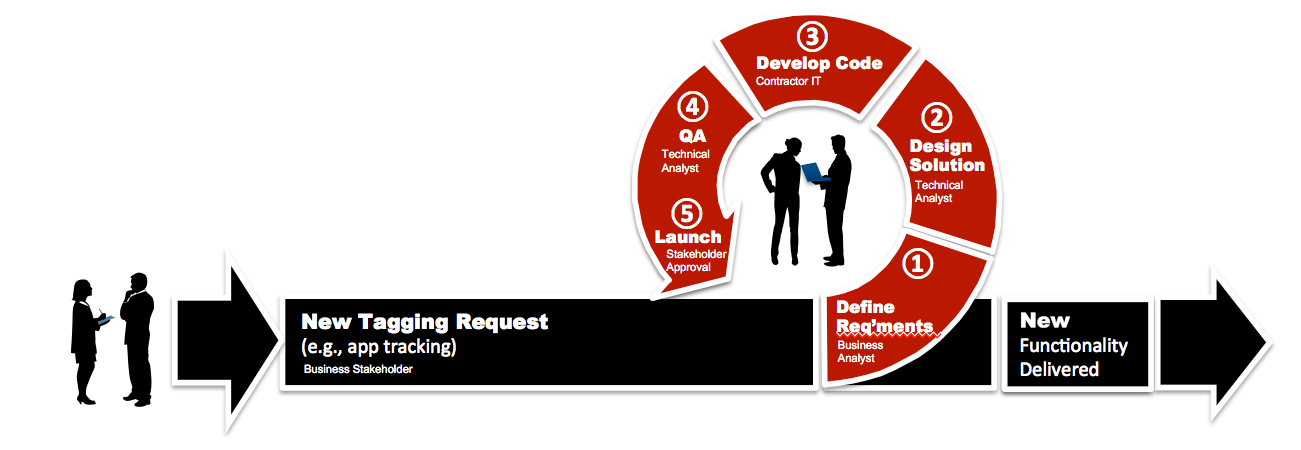
This process is designed using a Scrum methodology, which can easily fit within most companies development cycles. At the conceptual level, the Analytics Tagging & QA Process provides a method for business users to communicate their data needs, which are then used to: 1) Define requirements, 2) Create a Solution Design, 3) Develop Analytics Code, 4) Conduct QA, and 5) Launch new tracking functionality (see diagram below).

Analytics Process

Tagging & QA Process — Starting Point:

The tagging and QA Process is one that is typically used by organizations multiple times throughout website redesigns, feature/function improvements, and general updates. It is intended to be a scalable process so that it can be used for all future feature and development projects that require analytics as well as digital analytics analysis requests.

The starting point for this process includes a “Digital Analytics Brief” that will be used to identify goals, measurement objectives, and specific elements that need to be tracked with analytics. We recommend using a simple Word, Excel or Google Doc document to capture information such as: Requestor, Request Date, Due Date, Priority: (Low, Medium, High), Overview: (brief description of request), Primary Objective: (What are you trying to achieve?), Desired Outcome: (How do we know if we’re successful?), and Additional Comments. Using a brief will force business users to think through what they’re asking for and to clearly define the objectives and desired outcomes. These two components are critical to determining success factors and formulating KPIs.  

A Digital Analytics Brief can be expanded over time or developed as an online questionnaire that feeds a centralized management tool as companies increase their sophistication with the Tagging & QA Process. Yet, either simplistic or automated, using this a Brief format as the first step in the data collection process will enable the digital analytics team to assign resources to projects and prioritize them accordingly. This will also serve to get business users accustomed to thinking about tracking and analytics early in their development projects to ensure tagging will be incorporated into development cycles.

Step 1: Defining Business Requirements

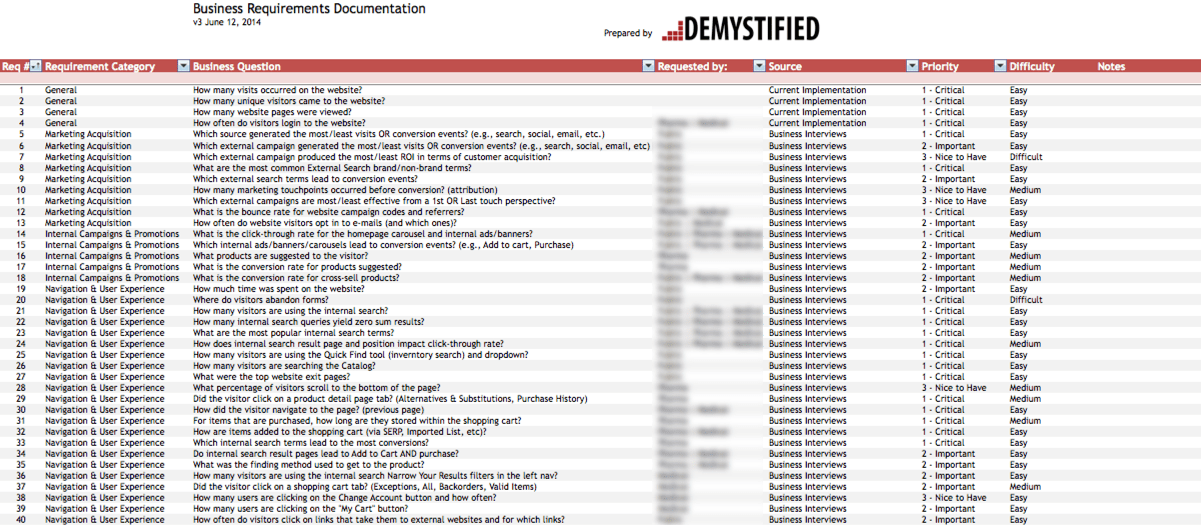
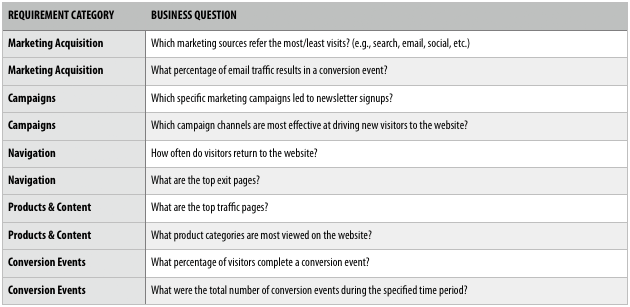
With the Digital Analytics Brief in hand, the business analyst should have pertinent information necessary to begin the process of defining  business requirements. Depending on the scope of the project, this part of the process should take between one and five hours to complete with the Digital Analyst leading the effort and stakeholders collaborating with details. Demystified recommends using a template for collecting business requirements that captures each requirement as a business question. (See Bulletproof Business Requirements for more details).

One of the things that we’ve learned in our years of experience working with digital analytics, is that business-users are rarely able to articulate their analytics requirements in a manner that can be easily translated into measuring website effectiveness. Simply asking these users what data they need leads to insufficient information and gaps in most web analytics deployments. As such, Analytics Demystified developed a process designed to gather information necessary to consistently evaluate the effectiveness of our clients fixed web, mobile sites, mobile apps and other digital assets.

By using a similar process, you too can effectively identify requirements and document them using a format ready for translation into a Solution Design document.

BusinessRequirements_screenshot

Example Business Requirements Documentation

Step 2: Creating A Solution Design

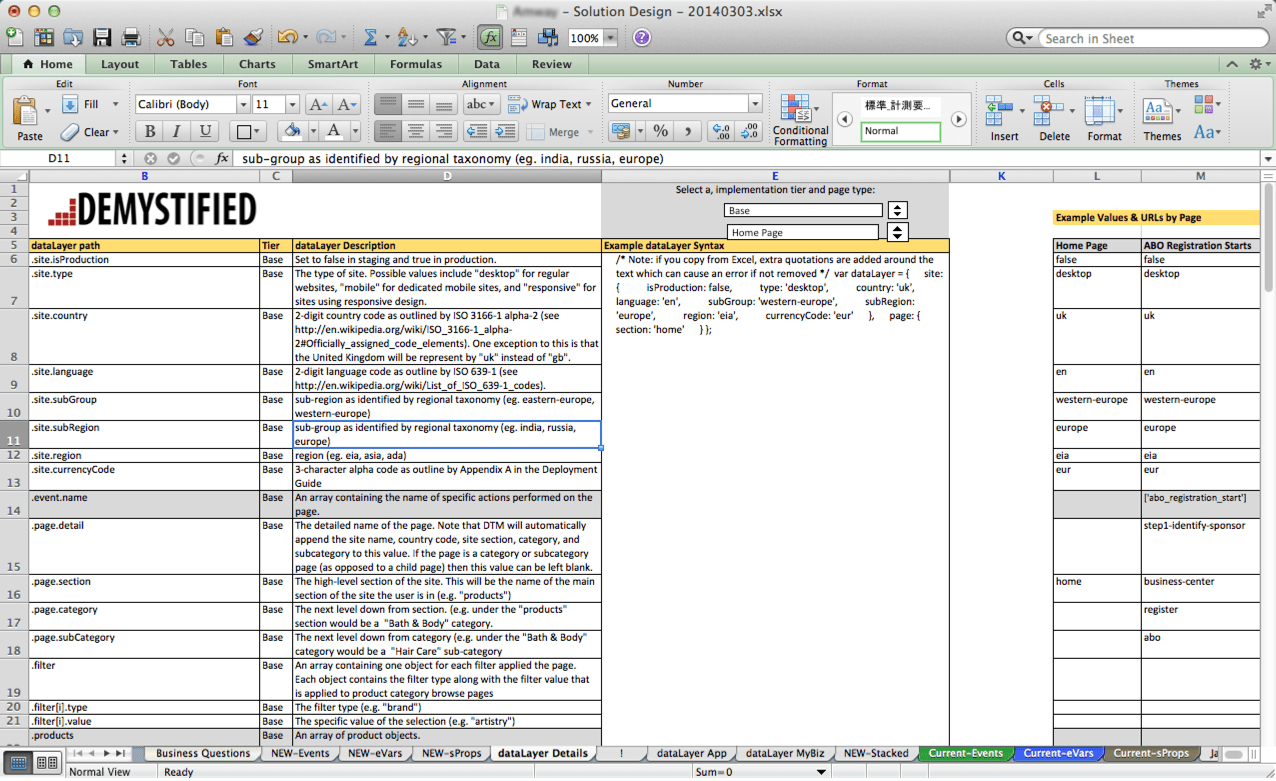
Often one of the most important yet overlooked aspects of digital analytics is documentation. Documentation provides an organization the ability to clearly define and record key components of its digital analytics implementation. At Analytics Demystified, we recommend starting the documentation using Excel as the format and expanding with additional worksheets as the requirements, Solution Design, and other components (e.g., QA processes) evolve.

Companies can rely on internal resources to generate documentation, or if using an agency or consulting partner, ask them to provide documentation  that should serve as the foundation for your analytics implementation. At Analytics Demystified we typically generate a Solution Design as part of our engagements and require that employees on the Digital Analytics team intimately familiar with this document because it will serve to answer all questions about data availability from the analytics platform.

Solution_Design_screenshot

Example Solution Design Documentation

Step 3: Developing Code

Unlike traditional development, digital analytics (especially Adobe Analytics) requires its own specific code base that includes events, eVars, and sProps to work properly. Most often we see clients outsourcing the development of code to external consultants who are experts in these specific technologies as this technical component of the job is often lacking within an organization’s core competency. However, in the long-term employing a Technical Digital Analyst with experience developing code for SiteCatalyst would position the company for self sufficiency.

Also, in the event that Tag Management Solutions are employed, a Data Layer is required to make appropriate information available to the digital analytics solution, which should also be addressed during the coding stage.

Step 4: QA

As with all development projects, digital analytics requires QA testing to ensure that tags are implemented correctly and that data appears within the interface as expected. At Analytics Demystified, we have developed our own processes for administering QA on digital analytics tags. Because QA requires input from technical analysts and IT developers, the process is typically managed via shared documentation (we use Google Docs) that can be accessed and modified by multiple parties.

Beginning with a QA Overview, companies should identify QA environments and Build environments with associated details on the platform (e.g., desktop, mobile, etc) as well as the number of variables to be tested. It is also helpful to develop a QA schedule to ensure that all testing is completed within development cycles and that both Technical Analysts and IT Developers are aware of the timelines for QA testing. Additionally, using a ticketing system will help Technical Analysts to manage what needs to be addressed and where issues are encountered during the QA process. The very nature of QA requires back-and-forth between parties and managing these interactions using a shared spreadsheet enables all parties to remain in synch and for work to get assigned and accomplished as planned.

Step 5: User Acceptance & Launch

Once the code has been QA’ed by the technical analytics team, it moves through the process workflow back to the business user who requested the tagging for final approval. While this part of the process should be managed by the Analytics Technical staff, it’s incumbent upon the business user to sign off on the tagging such that the data they will receive will help them not only measure the digital asset, but also make decisions on how to improve and optimize the asset.

A best practice at this stage would be for the digital analytics team to provide example reports so that the business user knows exactly what data they will receive and in what format. However, due to time constraints with development projects this isn’t always possible. In these cases, simply showcasing the prioritized requirements and the expected output should be sufficient to showcase what the data will look like in the production environment.

In closing, there are many different processes that can (and should) be applied to digital analytics. By building process around mission critical tasks, businesses can create efficiency in the way they work and bring new levels of standards and accountability to staff. By creating a process for new analytics requests, we’ve witnessed that organizations become more skilled at deploying tagging and reports in a timely manner with fewer defects.

Now it’s your turn…do you use a process for analytics? I’d love to hear how yours works.

Analysis, Analytics Strategy, Featured

Two (Only Two!) Reasons for Analysis: Opportunities and Problem Areas

A common — and seemingly innocuous — question that analysts get asked all the time, in one form or another:

“Can you do some analysis tell us where you think we can improve our results?”

Seemingly innocuous…but what does it really mean? All too often, it seems like we have a tendency to just analyze for the sake of analyzing — without really having a clear purpose in mind. We tell ourselves that we should be doing better, without really thinking about the type of “better” that we’re trying too achieve.

I was having this discussion with a client recently who was challenging me to explain how to approach analysis work. I found myself pointing out that there are really only two scenarios where analysis (or optimization) makes sense:

  • When there is a problem
  • When there is a potential opportunity

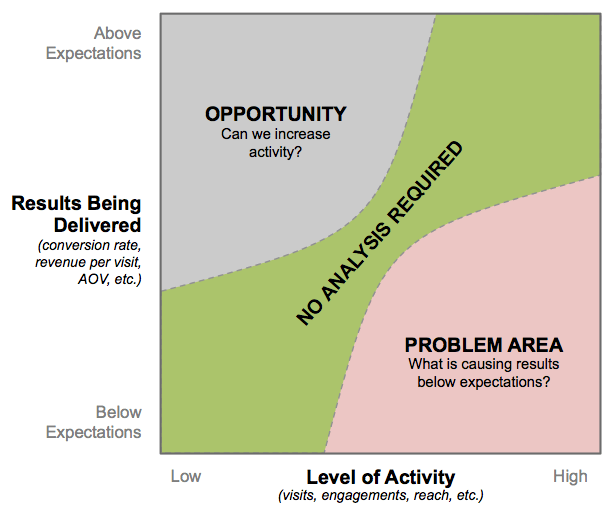
It really breaks down – conceptually – pretty simply:

Problems vs. Opportunities

Some examples:

  • I send an email newsletter once a month, which accounts for a pretty small percentage of traffic to my site (Level of Activity = Low), but that channel delivers the highest conversion rate of any channel (Results Being Delivered = High). On the one hand, that’s expected. On the other hand, is this an OPPORTUNITY? Can I send email more frequently and increase the level of activity without killing the results being delivered? Basically…can I move it into the NO ANALYSIS REQUIRED zone with some analysis and action?
  • Or, flip it around to another classic: I have a high volume of traffic (Level of Activity = High) from Display going to a campaign landing page, and that traffic is converting at a very low rate (Results Being Delivered = Low). That’s a PROBLEM AREA that warrants some analysis. Should media spend be scaled back while I try to figure out what’s going on? Is it the page (should I optimize the landing page experience with A/B testing?) or is it the traffic quality (should the media targeting and/or banner ad creative be adjusted)? Again, the goal is to get that segment of traffic into the NO ANALYSIS REQUIRED zone.
  • Finally, I’ve dug into my mobile traffic from new visitors from organic search. It’s performing dramatically below other segments (Results Being Delivered = Low). But, it also represents a tiny fraction of traffic to my site (Level of Activity = Low). How much effort should I put into trying to figure out why this traffic is performing poorly? “But, maybe, if you figure out why it’s performing poorly with the existing traffic, you’ll also get more traffic from it!!! You can’t ignore it. You need to try to make it better!” you exclaim. To which I respond: “Maybe.” What is the opportunity cost of chasing this particular set of traffic? What traffic is already in the PROBLEM AREA or OPPORTUNITY zone? Isn’t it more likely that I’ll be able to address one of these dimensions rather than hoping my analysis addresses both of them simultaneously?

This diagram is nothing more than a mental construct – a way to assess a request for analysis to try to hone in on why you’re doing it and what you’re trying to achieve.

What do you think?

Adobe Analytics, Analytics Strategy, General, google analytics

How Google and Adobe Identify Your Web Visitors

A few weeks ago I wrote about cookies and how they are used in web analytics. I also wrote about the browser feature called local storage, and why it’s unlikely to replace cookies as the primary way for identifying visitors among analytics tools. Those 2 concepts really set the stage for something that is likely to be far more interesting to the average analyst: how tools like Google Analytics and Adobe Analytics uniquely identify website visitors. So let’s take a look at each, starting with Google.

Google Analytics

Classic GA

The classic Google Analytics tool uses a series of cookies to identify visitors. Each of these cookies is set and maintained by GA’s JavaScript tracking library (ga.js), and has a name that starts with __utm (a remnant from the days before Google acquired Urchin and rebranded its product). GA also allows you to specify the scope of the cookie, but by default it will be for the top-level domain, meaning the same cookie will be used on all subdomains of your site as well.

  • __utma identifies a visitor and a visit. It has a 2-year expiration that will be updated on every request to GA.
  • __utmb determines new sessions and visits. It has 30-minute expiration (same as the standard amount of time before a visit “times out” in GA) that will be updated on every request to GA.
  • __utmz stores all GA traffic source information (i.e. how the visitor found your site). If you look closely at its value, you’ll be able to spot campaign query parameters or search engine referring domains, or at the very least the identifier of a “direct” visit. It has an expiration of 6 months that is updated on every request to GA.
  • __utmv stores GA’s custom variable data (visitor-level only). It has an expiration of 2 years that is updated on every request to GA.

ga

That was a mouthful – you might want to read through it again to make sure you didn’t miss anything! There are even a few cookies I didn’t list because GA sets them but they don’t contribute at all to visitor identification. If that looks like a lot of data sitting in cookies to you, you’re exactly right – and it helps explain why classic GA offers a much smaller set of reports than some of the other tools on the market. While I’m sure GA does a lot of work on the back-end, with all those cookies storing traffic source and custom variable data, there’s definitely a lot more burden being placed on the browser to keep a visitor’s “profile” up-to-date than on other analytics tools I’ve used. Understanding how classic GA used cookies is important to understanding just what an advancement Google’s Universal Analytics product really is.

Universal Analytics

Of all the improvements Google Universal Analytics has introduced, perhaps none is as important as the way it identifies visitors to your website. Now, instead of using a set of 4 cookies to identify visitors, maintain visit state, and store traffic source and custom variable data, GA uses just one, called _ga, with a 2-year expiration, and the same default scope as with Classic GA (top-level domain). That single cookie is set by the Universal Analytics JavaScript library (analytics.js) and used to uniquely identify a visitor. It contains a value that is relatively short compared to everything Classic GA packed into its 4 cookies. Universal Analytics then uses that one ID to maintain both visitor and visit state inside its own system, rather than in the browser. This reduces the amount of cookies being stored on the visitor’s computer, and opens up all kinds of new possibilities in reporting.

ua

One final note about GA’s cookies – and this applies to both Classic and Universal – is that there is code that can be used to pass cookie values from one domain to another. This code passes GA’s cookie values through the query string onto the next page, for cases where your site spans multiple domains, allowing you to preserve your visitor identification across sites. I won’t get into the details of that code here, but it’s useful to know that feature exists.

Many of the new features introduced with Universal Analytics – including additional custom dimensions (formerly variables) and metrics, enhanced e-commerce tracking, attribution, etc. – are either dependent upon or made much easier by that simpler approach to cookies. And the ability to identify your own visitors with your own unique identifier – part of the new “Measurement Protocol” introduced with Universal Analytics – would have fallen somewhere between downright impossible and horribly painful with Classic GA.

This one change to visitor identification put GA on a much more level playing field with its competitors – one of whom we’re about to cover next.

Adobe Analytics

Over the 8 years or so that I’ve been implementing Adobe Analytics (and its Omniture SiteCatalyst predecessor), Adobe’s best-practices approach to visitor identification has changed many times. We’ll look at 4 different iterations – but note that with each one, Adobe has always used a single ID to identify visitors, and then maintained visitor and visit information on its servers (like GA now does with Universal Analytics).

Third-party cookie (s_vi)

Originally, all Adobe customers implemented a third-party cookie. This is because rather than creating its visitor identifier in JavaScript, Adobe has historically created this identifier on its own servers. Setting the cookie server-side allows them to offer additional security and a greater guarantee of uniqueness. Because the cookie is set on Adobe’s server, and not on your server or in the browser, it is scoped to an Adobe subdomain, usually something like companyname.112.2o7.net or companyname.dc1.omtrdc.net, and is third-party to your site.

This cookie, called s_vi, has an expiration of 2 years, and is made up of 2 hexadecimal values, surrounded by [CS] and [CE]. On Adobe’s servers, these 2 values are converted to a more common base-10 value. But using hexadecimal keeps the values in the cookie smaller.

First-party cookie (s_vi)

You may remember from an earlier post that third-party cookies have a less-than-glowing reputation, and almost all the reasons for this are valid. Because third-party cookies are much more likely to be blocked, several years ago, Adobe started offering customers the ability to create a first-party cookie instead. The cookie is still set on Adobe’s servers – but using this approach, you actually allow Adobe to manage a subdomain to your site (usually metrics.companyname.com) for you. All Adobe requests are sent to this subdomain, which looks like part of your site – but it actually still just belongs to Adobe. It’s a little sneaky, but it gets the job done, and allows your Adobe tracking cookie to be first-party.

s_vi

First-party cookie (s_fid)

In most cases, using the standard cookie (either first- or third-party) works just fine. But what if you’re using a third-party cookie and you find that a lot of your visitors have browser settings that reject it? Or what if you’re using a first-party cookie, but you have multiple websites on completely different domains? Do you have to set up subdomains for first-party cookies for every single one of them? What a hassle!

To solve for this problem where companies are worried about third-party cookies – but can’t set up a first-party cookie for all their different websites – a few years ago Adobe began offering yet another alternative. This approach uses the standard cookie, but offers a fallback method when that cookie gets rejected. This cookie is called s_fid, and it is set with JavaScript and has a 2-year expiration. Whenever the traditional s_vi cookie cannot be set (either because it’s the basic Adobe third-party cookie, or you have multiple domains and don’t have first-party cookies set up for all of them), Adobe will use s_fid to identify your visitors. Note that the value (2 hexadecimal values separated by a dash) looks very similar to the value you’d find in s_vi. It’s a nice approach for companies that just can’t set up first-party cookies for every website they own.

Adobe Marketing Cloud ID

The current iteration of Adobe’s visitor identification is a brand-new ID that allows for a single ID across Adobe’s entire suite of products (called the “Marketing Cloud”). That means if you use Adobe Analytics and Adobe Target, they can now both identify your visitors the exact same way. It must sound crazy that Adobe has owned both tools for over 6 years and that functionality is only now built right into the product – but it’s true!

amc

This new Marketing Cloud ID works a little differently than any approach we’ve looked at so far. A request will be made to Adobe’s server, but the cookie won’t be set there. Instead, an ID is created and returned to the page as a snippet of JavaScript code. That code can then be used to write the ID to a first-party cookie by Adobe’s JavaScript library. That cookie will have the name of AMCV_, followed by your company’s unique organization ID at Adobe, and it has an expiration of 2 years. The value is much more complex than with either s_vi or s_fid, but I’ll save more details about the Marketing Cloud ID until next time. It offers a lot of new functionality and has some unique quirks that probably deserve their own post. We’ve covered a lot of ground already – so check back soon and we’ll take a much more in-depth look at Adobe’s Marketing Cloud!

Analytics Strategy

Demystified’s Data Governance Principles

In digital analytics, “Governance” is a term that is used casually to mean many different things. In our experience at Analytics Demystified, every organization inherently recognizes that governance is an important component of their data strategy, yet every company has a different interpretation of what it means to govern their data. In an effort to dispel the misconceptions surrounding what it means to truly steward digital data, Analytics Demystified has developed seven data governance principles that all organizations collecting and using digital data should adhere to. These principles constitute a thorough consideration of stewardship of digital data throughout its lifecycle. Organizations that adopt and apply Analytics Demystified’s Data Governance Principles can operate with the assurance that they have a solid program in place for managing digital data.

The following principles constitute a responsible data governance program:

1. Collection

– All organizations collecting data across digital platforms must be aware of exactly what data they are collecting and how they are attaining that information either directly, through user agents, or via third parties. Data collection methods should be cataloged and documented to identify any data that is extrapolated, passively collected, or explicitly collected on web pages, mobile sites, apps, and other owned digital media assets. Further, this documentation needs to include information specific to the technologies employed such as log file processors, web analytics tools, panel based trackers, tag management systems, and other solutions used to collect all types of digital data.

2. Quality

– Data quality is critically important when governing data for business use. The first component of ensuring data quality is to audit data collection agents to ensure that data collected is in fact what an organization believes that they are collecting. In our experience, we’ve recognized that most web analytics implementations devolve over time. This often leaves organizations with data elements that do not align with business requirements, do not function as designed, or those that have been obfuscated by technology without any clear indication of what the data represent. We advise companies verify data collection implementations and to regularly audit their data to ensure data collection tags (if used) are firing properly and that existing tags are not producing duplicative data. Further, we advocate for routine data quality checks to validate ongoing data collection and to alert organizations to potential data collection errors.

3. Access

– As companies implement data collection methods and provision access to employees and potentially contractors, agencies, and technology partners, access to an organization’s data becomes an increasing concern. The first line of defense for governing data access is to only provision access to email accounts of corporate employees or trusted agency partners (i.e., no personal or gmail accounts). This is an easily administered best practice that reduces the risk of a former employee gaining access to your businesses’ data. A more challenging aspect of data access that you need to govern is when technology partners share data with others. Often this is aggregated, non-identifiable data, yet organizations must be aware of instances of data sharing by third parties, data aggregators, ad servers, targeting technologies and other solutions that potentially compromise restricted access to your digital data.

4. Security

– Data security is often coupled with data access, but we at Analytics Demystified believe that data security goes beyond merely provisioning access to qualified analysts, but that it includes a business’ ability to safeguard its data stores. Most data collection solutions today are amassing large volumes of data and have opted for cloud-based storage solutions. While nearly all of these solutions fortify their security with multiple layers of redundant measures, the onus of understanding where and how any data is transferred from these solutions to other technologies falls upon the business. An area of concern is data “leakage” that could occur when data is inadvertently (or unknowingly) shared with external parties. Companies should minimize this risk by clearly understanding and documenting how their data is stored, shared, and secured across all data collection agents.

5. Privacy

– For any business that is collecting consumer data, privacy is a critical concern. It is the responsibility of the business to inform consumers what data is being collected and how that data will be used. Numerous best practices exist around divulging this information within published privacy policies, but the best guidance that we can offer is to deliver a clear and concise data usage/privacy policy that offers an opt-out for consumers who do not wish to be tracked. Businesses should also be aware of and classify data that is anonymous, segment identifiable, and personally identifiable and treat each independently. This classification element of data governance should be governed at the technology level because it extends beyond web analytics technology into business intelligence, enterprise marketing management, and customer relationship management solutions.

6. Integrity

– Governing data integrity is predicated on the fact that many data collection technologies today leverage processed data in their outputs. In web analytics tools, this might equate to a series of actions that constitute a “user session”, or a “path” the leads to a conversion event. In other technologies like IBM Tealeaf, multiple online activities can be associated with a single session that provides the necessary context for the data output. This data often requires that it is presented in processed form such that it reveals the true nature of what happened in a digital environment. Many businesses have the temptation to disaggregate processed data for inclusion in an enterprise data warehouse as “raw” data that can be analyzed at a later date. However, there are inherent risks in doing this because it could lead to inflated activity counts, incongruous data, or simply incomprehensible data. For these reasons, data integrity is an important principle of governance to ensure that data is utilized and analyzed in its intended form.

7. Presentation

– In digital analytics, there is an old adage that by “torturing” your data you can make it say anything you want. Responsible stewards of digital data are cognizant of this fact and strive to present data in proper context. While some organizations attempt to assign gatekeepers to assure data is presented in proper context, this becomes increasingly difficult as data sets accrue to petabytes in scale and access is granted to numerous individuals. Rather than restrict access to a responsible few, Analytics Demystified recommends companies to train their employees to recognize what data is being collected and what outputs are appropriate for specific data types. This level of education minimizes improper data interpretation and is the foundation for solid presentation and delivery of digital data assets.

It’s important to note that these Data Governance Principles are merely a starting point for developing your own data governance program. In our extensive experience consulting with organizations of all sizes, each presents their own data governance challenges. By adopting these seven principles and institutionalizing a process around each, companies can operate in today’s increasingly digital world with the confidence that they are responsible stewards of digital data and that they have taken precaution to safeguard their data according to industry best practices.

To learn more about any of Analytics Demystified’s Data Governance Principles, please reach out to us at Partners@analyticsdemystified.com, we’d love to help launch your data governance program or to learn how you’re currently governing your digital data.

Analytics Strategy

Three Foundational Tips to Successfully Recruit in Analytics

Hiring in the competitive analytics industry is no easy feat. In most organisations, it can be hard enough to get headcount – let alone actually find the right person! These three foundational tips are drawn from successful hiring processes in a variety of verticals and organisations.

1. Be honest about what you need

This includes being honest in job description, as well as when you talk to candidates. Be clear about what the person will actually do and what your needs are – not what you wish they would get to do!

I have seen highly qualified candidates promised exciting work and the chance to build a team, only to find out “Director” was an in-name-only title, and in reality, they were nothing more than a glorified reporting monkey. Unsurprisingly, these hires last just long enough to line up a better opportunity, and leave with a bad taste in their mouth (and a guarantee that they would never recommend the company to anyone.)

2. Separate ‘nice to have’s from ‘must have’s

A job description is not your wishlist for Santa, and unicorns don’t exist. You are not going to find someone with twenty years Adobe Analytics experience and a PhD in Statistics who is also a Javascript expert (and won a gold medal for basket weaving!) This may sound like a ridiculous example, but so are most of the supposed “requirements” for analytics roles these days.

Start by detailing the bare minimum skills someone would need to have to be effective in the role, and focus the role to address your greatest need. (Yes, I understand you “may not get another req for years!” But by refusing to prioritise, you guarantee that this req will 1) Take forever to fill, and 2) End up being filled by someone who may meet some of your requirements, but perhaps not your most critical!) Do you need someone technical? More business oriented? Devoted to testing? (Resist the urge to throw in the kitchen sink.)

Keep in mind, if candidates have other skills that makes them desirable, they will mention them during the interview process, and you can then factor them into your hiring decision.

Focusing on your most pressing needs will also make sure other interviewers besides yourself clearly understand what is necessary to succeed in the role. There is nothing worse than having another interview provide poor feedback about a candidate you love, because “They didn’t know R” – except that wasn’t something you truly needed!

3. Focus on relationships, not recruiting

Managers who hire well understand they are always recruiting. While you may not have an active req open, you should continue building relationships with others in the industry. This will allow you to move more quickly, with some great candidates in mind, when the time comes.

Managers who do this well are constantly on the lookout for, and evaluating, people they meet for a potential hiring fit. They take the time to catch up with contacts from time to time, whether it’s a quick phone call to check in, or catching up for lunch. They also openly discuss the possibility of one day working together! Be clear that you’re not hiring right now (you don’t want to lead anyone on) but talk through whether there’s even a fit in terms of skills and interests on both sides.

On the flip side, managers who struggle here tend to blow off connections until they need something (for example, they’re actively hiring.)

What do you think?

Please leave your thoughts or questions in the comments!

Analytics Strategy, Featured, General

A Primer on Cookies in Web Analytics, Part 2: What about Web Storage?

Last week I wrote about cookies, and how they are used in web analytics.  That post was really just the first in a series of posts I wanted to write about how cookies are used by web analytics tools to identify visitors to your site, and I’ll get to that shortly. But a few readers reached out to me and asked why I hadn’t mentioned web storage, so I wanted to mention it briefly before moving on.

Web storage is a feature built into modern browsers that allows a developer to store information in the browser about the site and the user, without using a cookie. This storage can be persistent (via the localStorage JavaScript object) or session-based (via the sessionStorage JavaScript object). It was included in the HTML5 spec by the W3C years ago, and any browser versions released in the last 5 years or so include it – even Internet Explorer 8, the current bane of web developers everywhere! Note that there are a few exceptions (like Compatibility Mode in IE8), but suffice to say that web storage has been available to developers for quite awhile. However, while it is an incredibly cool idea in theory, my experience has been that it is less widely used in practice – especially when it comes to web analytics. Why is this?

  1. Cookies are included with every HTTP request, but web storage is only available to the browser. So for tools that need to communicate with the server and give it access to client-side data (like many analytics tools), cookies are still the best solution – even though they clutter up the network as they get passed back and forth, and are limited to about 4KB of data.
  2. Cookies can be shared across subdomains of the same website, but web storage is subdomain-specific. That means that a cookie with scope of analyticsdemystified.com can be read by my blog or any of my partners – but a value stored in web storage is available only to my blog, josh.analyticsdemystified.com. For a company that operates many subdomains and tries to track their users across each one, this is a major limitation of web storage.

When I worked at salesforce.com, that second reason had a major impact on the reason we used a cookie to store all sorts of cool personalization data about our visitors, rather than local storage. In fact, at one point I was challenged by my manager with migrating that cookie to local storage – a really exciting project for me because I got to try out some really new technology. But after all our initial testing passed, I remember frantically having to revert all my code prior to our next code release because my own visitor history disappeared once I started browsing our staging site instead of our development site!

So keep that in mind when thinking about whether to use local storage or cookies. Web storage is much more considerate of your users, and much for forward thinking, since it’s utilizing the latest and greatest technology built into browsers. But there are some things it can’t do, so keep it in your toolbelt but remember that there are many times when cookies are still the best way to solve your analytics challenges.

Analytics Strategy

Five Proven Tips for Managing Analysts Like a Pro

In the analytics industry, it is common to progress through the ‘ranks’ from analyst to managing a team. Unfortunately, many companies do not provide much in the way of support or management training, to help these new managers learn how to effectively work with their team.

Improving your people management skills is no small task. It takes years, and you are never “done.” Here are just a few small tips, picked up over the years from some of my own managers:

1. Be a leader, not a boss. If you didn’t have the official title, would your team still come to your for assistance or guidance? Focus your efforts on being considered a leader, rather than just someone’s “supervisor” on an org chart.

2. Words matter. Using words like “subordinates” or descriptions like “Jane works for me” endears no one. The best managers don’t need to speak of team members as if they are below them. People look up to good leaders because there’s something to see, not because they’ve been pushed down.

3. We, not I. Many analytics managers are still in dual player-coach roles, meaning they still actively work on projects while managing a team. But when you discuss the team’s work and achievements, a little “we” can go a long way. Think about the difference in perception when you say: “We have been working on something really exciting” or “The team has been hard at work” versus I have been working on X.” Even if the work you’re referencing is entirely your own project, give the team credit. A team attitude is contagious, and your example will help team members follow suit.

4. Use your experience to your team’s advantage. Analytics can be a complex field. While it is often resource constraints that keep managers active in day-to-day analytics tasks, most analysts enjoy the work and don’t want to be fully removed, as a pure people-manager. Use this to your team’s advantage! Keeping your hands dirty helps you understand the challenges your team faces, and keeps you realistic about what is reasonable, when negotiating with stakeholders.

5. Share the credit, take the blame. With leadership comes an obligation to share praise to your team, and take the rap when things go wrong. If you’re not willing to do this, don’t take on a leadership role. It’s that simple. Were there mistakes made in an analysis? Data integrity issues, or data loss? Being responsible for a team means having ultimate oversight, and being responsible when that fails.

To overcome a mistake without throwing your team under the bus, explain to affected parties:

  • That an error occurred, and (generally) what it was
  • The consequences for the information shared previously (for example, should they throw out all previous findings?)
  • Where the breakdown in process was
  • How you’ve already addressed the process failure, it to ensure it doesn’t happen again

(None of this requires mentioning specific individuals!)

Treat it as a learning opportunity, and encourage your team to do the same. Work with team members privately to enhance necessary skills and put in place process to ensure it doesn’t happen again.

BONUS! Aim to be rendered obsolete. Good leaders train and guide their team until they’re not even needed anymore. This is great news for your own career: it frees you up to take on a new challenge!

There are a million books and courses on leadership out there, but these are a few of my favourite lessons from some of the best leaders I’ve ever worked for. What are yours? Please share in the comments!

Analytics Strategy, General

A Primer on Cookies in Web Analytics

Some of you may have noticed that I don’t blog as much as some of my colleagues (not to mention any names, but this one, this one, or this one). The main reason is that I’m a total nerd (just ask my wife), but in a way that is different from most analytics professionals. I don’t spend all day in the data – I spend all data writing code. And it’s often hard to translate code into entertaining blog posts, especially for the folks that tend to spend a lot of time reading what my partners have to say.

But I recently came upon a fairly broad topic that I think will lend itself to a nice series of posts, on something that I continually see confuse analysts and developers alike – cookies! Over the next few weeks, I’m hoping to dive into cookies, how they’re used in web analytics, and specifically how the 2 web analytics tools you probably use the most (Adobe Analytics and Google Analytics) use cookies to identify visitors to your website. There are subtle differences in how these tools identify website visitors, and I’ve found that most people really don’t understand those differences very well.

What is a cookie?

From the most reliable and trusted source on the Internet, a cookie is defined as:

a small piece of data sent from a website and stored in a user’s browser while the user is browsing that website

I disagree with a few key points in that definition:

  1. A cookie can be sent from a website (i.e. a web server), but it can also be set or manipulated in the browser once the page has loaded in the browser and communication has more-or-less stopped with the server.
  2. Cookies are stored in a user’s browser – but the duration of this storage can (and usually does) last beyond the time the user browses that website.

So let’s start by redefining what a cookie is – or at least my opinion of what a cookie is: A cookie is a small piece of data about a website, as well as the user browsing that website. It is stored in the user’s browser for an amount of time determined by the code used to set the cookie, and can be set and modified either on the server or in the browser. There are several important attributes to a cookie:

  • A name: This is a friendly name for the cookie, usually reflecting what data it is storing (like a username, or a preferred content language).
  • A value: This is the actual data to be stored, and is always a string – but it could contain a numeric string, or JSON data converted to a string, or any type of data that can easily be converted from a string to some other format.
  • An expiration date/time: This is a readable UTC date string (not a timestamp). If this date is omitted, the cookie expires when the browser closes (i.e. a session cookie). If the date is included, the cookie is persistent.
  • A domain: This is the website in which the cookie has scope (meaning where it can be read and written). For example, on my blog I can set a cookie that has scope of analyticsdemystified.com or josh.analyticsdemystified.com. I cannot set a cookie that has scope of adam.analyticsdemystified.com, or for any other website.
  • A path: Once the domain has been specified, I can also choose to restrict it to a certain path or directory on my website – like maybe only anything in /products. The path is rarely specified.
  • Security and other access controls: These include whether the cookie can be read on both secure and non-secure pages, and (in newer browsers) whether a cookie should be readable by JavaScript. These settings are also rarely used.

 A day in the life of a cookie

You may use a tool like Firebug to inspect your cookies, and be familiar with seeing cookies represented like this:

However, you may be less familiar with what a cookie actually “looks” like. But it’s just a string that is saved as a text file somewhere in your browser’s application data (you can find these text files if you search for where your browser’s cache is located on your computer). For the same example above, the text string looks something like this:

userid=12345; expires=Wed, 31 Dec 2014 23:59:59 UTC; path=/; domain=josh.analyticsdemystified.com

So lets take a deep dive into this particular cookie and how it ends up being available for your analytics tools to use. This cookie gives me a unique user ID on my blog. It is set to expire on the last day of 2014, and has scope anywhere on my blog domain. But what led to this cookie showing up in the list of cookies in my browser?

First, a cookie must be set. This can occur on the web server that responds to your request for a given page – or it can occur with JavaScript code setting a new cookie once the page is rendered in your browser. The code setting the cookie must specify all the details above.

Now, every time I request a new page on my blog, this cookie will be sent back to the server with that request. The server may modify it, and then the cookie will be available to the browser with the rest of the page. Any JavaScript loaded onto the page can then read it, overwrite it, and do whatever it wants to it. But if I leave and go to Eric’s blog, my cookie will not be sent anymore – it will stay stored in my browser, waiting until New Years’ Eve, just hoping that I come back.

cookies

This issue of cookie scope is a particularly tricky topic, so let’s take a closer look. Because I set my cookie with the scope of josh.analyticsdemystified.com, it will be included any time one of my blog posts is served. But if I set it with the scope of webanalyticsdemytified.com, it will be included for any of my partners’ posts as well – because we all share that top-level domain. I cannot set my cookie with any other scope – I can use my subdomain or the top-level domain – but other subdomains or other domains (like google.com) are not allowed. And my code will never be allowed to read cookies on those other domains, either. The same is true of the “path” component of a cookie as well – so you can see how path and domain combine to limit which cookies a a site can read, and which ones it cannot read. They essentially act as a bouncer, controlling which parts of this big party called the web my site has access to.

First-party vs. Third-party

Another major issue of confusion when dealing with cookies in web analytics is the idea of first-party vs. third-party cookies. A first-party cookie simply means that the domain of the cookie matches the domain of the website in the browser. In the example above, a cookie whose domain is josh.analyticsdemystified.com or analyticsdemystified.com is first-party on my blog. It will be included in all requests to the server, and returned to the browser where JavaScript can use it.

However, the average page normally includes many assets – like images or scripts – that are hosted on a different domain than my site. For example, my blog loads the jQuery library from Google’s CDN, ajax.googleapis.com, and our Google Analytics tracking requests are sent back to http://www.google-analytics.com. Any cookies my browser has for either of those domains (note: if you look, you will not see any – this is just an example) will be sent back to each of those servers, because they have scope there – but when the requests come back to my browser, the page waiting to receive the assets has a different domain – so it can neither read  from nor write to any of those cookies. They are what we call third-party.

Third-party cookies have a bad reputation, because some companies use them maliciously, and also because it can be annoying to have cookies you never asked for cluttering up your browser cache and passing data back to places you never knew about. But in most cases, cookies – even third-party cookies – contribute to making the most positive user-experience possible. However, because maintaining privacy is important to everyone, most modern browsers offer users the ability to choose whether third-party cookies should be allowed or not. Most browsers allow third-party cookies by default, and most users never modify those settings. But if third-party cookies are disabled, it means that the server will try to set a cookie, and the browser will immediately reject or delete it. And even when third-party cookies are allowed, they can never be used by the site in the browser – nor can the third-party site read any first-party cookies, either. For example, when this page loaded, a cookie was set by disqus.com, the tool we use for comments and discussions. My blog cannot read or modify that disqus.com cookie – and disqus.com can’t read any analyticsdemystified.com cookies, either. Developers reading this post are now shaking their heads, as there are obviously exceptions to this – but most readers probably aren’t interested in cross-site scripting and other hacking techniques that are the exceptions to this rule.

Some browsers like Safari even allow you to select an option that says “Only accept cookies from sites I visit,” which blocks some, but not all, third-party cookies. For example, when I worked at salesforce.com, http://www.salesforce.com was the entry point to all our websites, but we had other websites (like http://www.force.com) that we linked to on that website. Because http://www.force.com included images from http://www.salesforce.com, those cookies with http://www.salesforce.com scope would not be deleted, even though the domain didn’t match that of the page in the browser – because I had previously been to that site. The browser used my history as an implicit acceptance of those third-party cookies. However, even though the cookies would not be deleted, they couldn’t be used by http://www.force.com, either.

I often have clients ask me how they can take advantage on one site of a cookie they set on another one of their sites. Unfortunately, even though they “own” both sites, and the same developers manage both sites, there is no way of doing this without taking the risk that those cookies will be deleted by your users blocking third-party cookies. There are some “hacks” to accomplish this, but they rarely outweigh the risks you’re taking.

Conclusion

Hopefully, you now understand the basics of cookies a little better – because I’ll be back soon with a closer look about how analytics tools make use of them. The next topic I plan to address is how Adobe and GA use cookies to identify your visitors. Then, the concluding topic in this series will be about Adobe’s new Marketing Cloud visitor ID, and how it differs from the other ways Adobe has historically managed visitor identification.

Analytics Strategy

What I Love: Adobe and Google Analytics*

While in Atlanta last week for ACCELERATE, I got into the age-old discussion of “Adobe Analytics vs. Google Analytics.” I’m up to my elbows in both of them, and they’re both gunning for each other, so this list is a lot shorter than it would have been a couple of years ago. To wit:

  • Cross-session segments are in both!
  • Both enable multi-suite/property/view tracking!
  • Sequential segments are in both!
  • Custom dimensions/variables and custom metrics/events are plentiful (not that users won’t always pine for more)!
  • Classifications/dimension widening is in both!
  • They both have reasonably robust eCommerce tracking, including a native concept of “product” and “cart” (yeah…that’s a new one for one of these guys)!

Are these features identical in both platforms? Of course not! Does one platform handle any of these capabilities in an empirically better way? Perhaps…but the comment trolls and platform homers will take over the comments if we let ourselves stray down such a path. Let’s just say that they both provide these capabilities and accept that personal preference and “the-tool-I-learned-first” quickly enter the picture and make such a debate subjective. Let’s call it close enough to binary parity and move on.

Other historical knocks against one platform or the other are rapidly going away, too:

  • Sampling is becoming less and less frequent an occurrence in Google Analytics
  • Correlations and subrelations are increasingly available between any two props/evars in Adobe
  • Google Analytics has gently eased its terms of service as Universal Analytics continues to get broadened so that user-level tracking is allowed (as long as reasonable privacy lines aren’t crossed)
  • Adobe has drastically simplified their product/pricing model so that users just get many of the most powerful features that used to require additional expense

Right?! Convergence ruuuuullllles!

loveallthetools

Nonetheless, I made a bold claim last week that I could write a brief post that hits my highlights — geared towards analysts, and avoiding topics that are more religio-philosophical than fact-based — as to the capabilities of each tool that, to me, are meaningful differentiators between the platforms. And, this is my attempt to back that claim up, listing these capabilities as positives of what each tool has that stands out, rather than as them’s-fightin’-words-type criticisms of either platform.

(As it turns out, I was wrong when I claimed I could write a brief post. I circulated the initial draft internally among the Demystified partners and Team Demystified…and the end result is a much more complete — not as…er…”brief” — and clear work.)

Things I Love That Google Analytics Does

Here’s my list of some features I use all the time in Google Analytics that might be lacking in another platform:

  • Multiple Segments — applying up to 5 segments to a view in the tool’s web interface (I almost never use 5…but THREE is a magic number!). “In the web interface” is the operative phrase here — more on that in the next section.
  • Retaining Segments — when multiple segments are applied in the tool’s web interface, Google Analytics is really good about retaining those applied segments no matter how you click around among reports; you’re stuck with them until you click to remove them!
  • Segment and Report Template Sharing — sharing segment and custom report templates (“templates” is the operative word) with a simple emailed URL (read it again: sharing templates for segments and reports; not the segments and reports themselves).
  • There Is a “Free” Version — yes, “free” is in quotes, because I’m just talking about the licensing fees. But, for a company on a tight budget that is looking to get off a dying platform or that, somehow, doesn’t have web analytics on the site yet, the availability of a free platform removes one barrier to getting internal backing for the effort. Plus, from a talent pool perspective, the existence of a free option means lots of analysts and marketers can get their hands dirty with the platform on small sites and be able to hit the ground running faster with analytics for larger, more complex sites.
  • Automatic Adwords (and DoubleClick) integration — Google owns these products, of course, and the very existence of Google Analytics is driven by that fact, but that doesn’t change the fact that it reduces the need to implement campaign tracking variables for a, generally, significant traffic source.
  • Google Spreadsheet Integration for Free — there’s a handy Google spreadsheet extension that lets you pull data straight into a Google spreadsheet.
  • Captures the URL and hostname of the Page by Default — URLs still matter, so having the URL (with gratuitous parameters stripped appropriately in the configuration) readily available is super handy. And the hostname is useful to be able to easily get to for multi-domain/subdomain sites and to figure out if another site (and which site) has inadvertently hijacked your tag.

Things I Love That Adobe Analytics Does

Here’s my short list of some features I use all the time in Adobe Analytics that might be lacking in another platform:

  • Ad Hoc Analysis / Discover — this has to be at the top of the list. I go for days without getting into Reports & Analytics, and that’s as it should be. Slicing and drilling, comparing different segments side by side, quickly trending a specific item that I’ve drilled down to, and so on. I’ve said it before, and I’ll say it again, if you are an analyst using Adobe Analytics and you spend more time in Reports & Analytics (SiteCatalyst) than Ad Hoc Analysis (Discover), you really, really should be kicking yourself. If you match this description, and you’re at eMetrics in Boston and are willing to sign a waiver, I’ll happily deliver the appropriate kick in the pants for your poor judgment. (Business users heads still spin when they dive into Discover, so I don’t think Reports & Analytics can go away…even as I hanker for extending its capabilities).
  • Hit Containers —  It took me a while to fully grasp the robustness of the Hit/Visit/Visitor segment paradigm in Adobe Analytics when it was rolled out, but I find myself using all three container types all the time! Hit (page view) containers, in particular, stand out as being a unique plus to Adobe Analytics.
  • Calculated Metrics — These can be created by individuals for their own temporary (even throwaway) use, or they can be deployed to all users. Very handy!
  • Segment / Dashboard / Bookmark Management — Being able to actually share these items (rather than templates of these items) comes in extraordinarily handy. And, giving the user the option to either copy or simply link to dashboards…is genius.
  • Segment Stacking — the ability to apply multiple segments at once (“I want to see only the visits who are First-Time Visitors — one segment — and who did not purchase — another segment — without building a whole new segment.”) This used to be an Ad Hoc Analysis-only thing, but it’s now available in Reports & Analytics and Report Builder. Woot!
  • Pathing on any traffic variable — because Adobe Analytics has a long-standing history of extensive custom variables, the ability to do pathing on those variables pops up as being super handy when you’d least expect it.
  • Excel Integration for Free — Adobe Analytics comes with Report Builder, which enables a high level of control over what data gets pulled into Excel, when, and how (and enables scheduling of well-formatted results).
  • “Page Names” decoupled from “URLs” — a page is a page is a page…and being able to build a meaningful taxonomy for your pages that makes that core unit neither too granular nor too broad is pretty powerful flexibility.

The Thing I Would Love but Am Unable To

I’ve got to put one item on the list that doesn’t exist in any web analytics platform: better data visualization. Choosing from a 2×2 or 2×3 grid (or even from a longer list of limited layouts) and then dropping in widgets where I can control substantially less of the presentation of the data than I could manage with Excel 95 is embarrassing. Especially since there are oodles of third-party visualization platforms that are built to be embedded in products. I don’t get it. I’m forced to pull data into third-party tools (for me, that’s generally Excel, but plenty of people use Tableau for the same reason — and good on ya’, Adobe, for supporting that with the Tableau export format!) if I want to deliver recurring reports to business users that can actually be meaningfully understood. I need better control of:

  • The layout of widgets — not necessarily pixel-level granularity, but give me a grid that is at least 25 columns wide
  • Labels and dividers — grouping and organizing of content
  • Trending of data — chart size and style, axis label display and formatting, line/bar color
  • Sorting control — for lists of numbers…and let me decide if I want to include a gratuitous “% of total”
  • And much, much more…

I’ve bought a copy of Stephen Fews’s Information Dashboard Design for a web analytics product manager before, and I’ll happily do it again. Let me know if that’s your role and you’re interested.

So, Clearly, the Better Tool Is…

…really? Surely, you didn’t think I was going to bite on that, did you? I’ll even stop short of, “It depends on your needs.” I’d hazard that, north of 75% of the time, a company could flip a coin between these two platforms and then invest all the time they were planning to put into an exhaustive RFP process, instead, into finding people who really know the platform inside and out to implement, maintain, and use the tool. And, they’d come out ahead of the company that obsesses about which of these platforms is “right” for them (they’re both right, and they’re both wrong!).

As Adam Greco says in his Top Gun training classes, “It doesn’t matter what tool you’re using if you’re only using 20-30% of its capabilities. Make sure you have the people and the commitment to not only learn and apply the full power of the tool now, but to stay current on new capabilities as competing platforms chase each other.” Competition is stressful for the vendors…but it’s a boon for analysts!

* This post doesn’t attempt to cover all web analytics platforms. There is no mention…except in this footnote… of Webtrends, IBM Coremetrics, Mixpanel, AT Internet, KISSmetrics, Piwik, or any of the other potential dozens of vendors who may comment here about their particular platforms. I’m sticking with what I know and what we see with our current client base. It’s in the post title.

Image Source: Flickr / Klearchos Kapoutsis

Analytics Strategy

Bulletproof Business Requirements

As a digital analytics professional, you’ve probably been tasked with collecting business requirements for measuring a new website/app/feature/etc. This seems like a task that’s easy enough, but all too often people get wrapped around the axle and fail to capture what’s truly important from a business users’ perspective. The result is typically a great deal of wasted time, frustrated business users, and a deep-seated distrust for analytics data. All of these problems can be avoided by following a few simple rules for collecting and validating business requirements.

Rule #1: Set Proper Expectations for What’s Really Worth Measuring

You’ve heard the saying from Albert Einstein…Not everything that can be counted counts, and not everything that counts can be counted. Well, Einstein was ahead of his time when it comes to digital analytics. There is an understandable tendency to measure everything, but this certainly doesn’t help when it comes to sifting through data to determine the effectiveness of your digital efforts. In many cases, less is more. Remember that collecting business requirements creates the foundation for developing KPIs to gauge effectiveness of your digital efforts. And, if you’re reading my colleague Tim Wilson’s blog, you know that the “K” in “KPI” is not for “1,000”!

So, the first rule in gathering effective business requirements is sitting down with your business user counterparts and explaining to them that their new digital asset should be measured on the merits of what it’s designed to accomplish with as few metrics as possible. In plain english, you should ask the question, What is this new thing of yours supposed to do? Once you have the answer to that question, you can start digging into the real meat of what’s needed in terms of measuring its performance. Most business users don’t want to spend hours analyzing and interpreting data, so this rule allows you to set the expectation that you can save them time and headaches by distilling the metrics down into the most salient measures.

In my experience I’ve found that asking your stakeholders to do a little homework prior to meeting will help these conversations go much more smoothly. By prompting them with probing questions about which elements of their digital asset are critical and setting expectations about what digital analytics can do well, you will have a much more productive requirements gathering session.

Rule #2: Break Requirements Down into Manageable Categories

When asked which specific things a business user wants to measure on their shiny new digital asset, the conversation usually goes something like this…

      Analyst:

What data would you like to collect about your new website/app/feature/etc…?

      Business User:

I don’t know, what do you have?

      Analyst:

Well, we can collect anything you want, if you just tell me what it is that you want to know.

      Business User:

Okay, I want to know everything…

      Analyst:

So, everything is important?

      Business User:

Yep.

      Analyst:

Grrrrrr…

      Business User:

WTH?

Asking business users what they want to measure — or what data they need — is truly a difficult question to answer. As an analyst, you have to put yourself in their shoes and lead them into data collection conversation with some guidance. I recommend the approach of breaking your measurement requirements down into categories that can be addressed one at a time. In many cases, there will be different stakeholders who want to know different things about their digital asset and the category approach helps you to generate a comprehensive list of requirements while considering everyone’s feedback. The table below illustrates a handful of requirement categories and corresponding questions that a business user might want to know.

The exact categories and business questions will vary based on the digital asset you’re measuring so be sure to customize the categories to take into consideration when you’re measuring a mobile app, checkout feature, or entire website.

Rule #3: Verify Requirements and Provide Example Reports

My third rule for verifying requirements is often overlooked by analysts because it is both time consuming and labor intensive. But, if you do take the time to do this, you’ll not only ensure that you have the right requirements, but that you may also save yourself a lot of work in the long run.

Once you’ve solicited requirements from all stakeholders, go through the exercise of prioritizing and de-duping your list so that you can identify what’s really important. Once you receive stakeholder approval for your list, you should then take the next step of providing an example of the reports that business users will receive once you’re live with data collection. This helps because while you may have a solid understanding of how the data will be represented, you’re typically working with users who aren’t equipped to visualize the output of your requirements. As such, providing a mock-up of an analytics report that shows the key data points you will collect helps to validate that you’ve got the right information. Use this process to also ask stakeholders if they will be able to make decisions about their digital asset given the reports you’re providing. If the answer is no, then you need to keep working on the requirements.

By taking this extra step, you’re not only ensuring that you understood the business requirements, but also providing the opportunity to refine your metrics to capture critical decision-making data. Not only will you impress your stakeholders with your proactive approach, but you’ll also avoid having to go back and implement tracking on something that they may have overlooked during your discovery process.

In summary, collecting business requirements for digital analytics is no easy task. It takes a process to illicit good information and it takes some analytical foresight to visualize the results. These are skills that take time to master, but once you get them right, you’ll be on your way to providing the most useful and pertinent data to your business colleagues.

If you’d like to learn more about gathering bulletproof business requirements, please send me an email. Or better yet, join me for a half-day workshop on Requirements Gathering the Demystified Way in Atlanta prior to Analytics Demystified’s ACCELERATE conference, where I will go into detail about what it takes to gather requirements and teach you all the tips and tricks of the trade.

Analytics Strategy, General, Social Media

Top 5 Metrics You're Measuring Incorrectly … or Not

Last night as I was casually perusing the days digital analytics news — yes, yes I really do that — I came across a headline and article that got my attention. While the article’s title (“Top 5 Metrics You’re Measuring Incorrectly”) is the sort I am used to seeing in our Buzzfeed-ified world of pithy “made you click” headlines, it was the article’s author that got my attention. Whereas these pieces are usually authored by well-meaning startups trying to “hack growth” … this one was written and published by Jodi McDermot, a Vice President at comScore and the current President of the Digital Analytics Association.

I have known Jodi for many years and we were co-workers at Visual Sciences back in the day. I have tremendous respect for Jodi and the work she has done, both at comScore and in the industry in general. That said, her blog post is the kind of vendor-centric FUD that, at least when published by a credible source like comScore, creates unnecessary consternation within Enterprise leadership that has the potential to trickle down to the very analysts she is the champion for at the DAA.

Gross.

Jodi does not mince words in her post, opening with the following (emphasis mine):

“With the availability of numerous devices offering web access, daily usage trends, and multi-device ownership by individual consumers, traditional analytics are not only misleading, but often flat out wrong.”

While open to interpretation, it is not unreasonable to believe that Jodi is saying that companies who have invested heavily in analytics platforms from Adobe, Google, Webtrends, IBM, etc. are just wasting money and, worse, the analysts they pay good salaries to are somehow allowing this to happen. She goes on to detail a handful of metrics that are negatively impacted by the multi-platform issue, essentially creating fear, uncertainty, and doubt about the data that we all recognize is core to any digital analytics effort in the Enterprise.

Now, at this point it is worth pointing out that I don’t fundamentally disagree with Jodi’s main thesis; multi-device fragmentation is happening, and if not addressed, does have the potential to impact your digital analytics reporting and analysis efforts. But making the jump from “potential” to “traditional analytics are not only misleading, but often flat out wrong” is a mistake for several reasons:

  1. Assuming analysts aren’t already taking device fragmentation into account is likely wrong. It’s not as if multi-device fragmentation is a new problem … we have been talking about issues related to the use of multiple computers/browsers/devices for a very, very long time. Jodi’s post seems to imply that digital analysts (and DAA members) are ignoring the issue and simply puking data into reports.
  2. Assuming consumers are doing the same thing on different devices is likely wrong. This is a more gray area since it does depend on what the site is designed to do, but when Jodi says that “conversion rate metrics must follow the user, not the device” she is making the assumption that consumers are just as likely to make a purchase on a small screen as a large one. I am sure there is more recent data, but a quick Google search finds that less than 10% of the e-commerce market was happening on mobile devices in Q2 2013.
  3. Assuming the technology exists to get a “perfect” picture of cross-device behavior is flat-out wrong. This is my main beef with Jodi’s post; while she never comes out and says “comScore Digital Analytix is the solution to all of these problems” you don’t have to read between the lines very much to get to that conclusion. The problem is that, while many companies are working on this issue from an analytical perspective (e.g., Google, Adobe, Facebook, etc.), the consensus is that a universal solution has yet to emerge and, if you’re an old, jaded guy like me, is unlikely to emerge anytime soon.

I don’t fault Jodi for being a fangirl for comScore — that is her job — but implying that all other technology is broken and (by extension) analysts not using comScore technology are misleading their business partners is either unfair, irresponsible, or both. The reality is, at least within our client base, this is a known issue that is being addressed in multiple ways. Through sampling, segmentation, the use of technologies like Digital Analytix, and good old fashioned data analysis, our clients have largely been able to reconcile the issues Jodi describes such that the available data is treated as gospel within the digital business.

What’s more, while comScore data can be useful for very large sites, in my experience sites that don’t have massive traffic volumes (and thusly representation in the comScore panel) often fail the basic “sniff” test for data quality at the site-level. I do admit, however, that as a firm we don’t see Digital Analytix all that often among our Enterprise-class clients, so perhaps there are updates we are not privy to that address this issue.

What do you think? Are you an analyst who lays awake at night, sweating and stressing over multi-device consumers? Do you dread producing analysis knowing that the data you are about to present is “misleading and flat out wrong?” Or have you taken consumer behavior into account and continue to monitor said behavior for other potential business and analysis opportunities?

Comments are always welcome. Or, if you want to debate this in person, meet me in person at ACCELERATE 2014 in Atlanta, Georgia on September 18th.

Analytics Strategy, Conferences/Community, General

Welcome to Team Demystified: Nancy Koons and Elizabeth Eckels!

I am delighted to announce that our Team Demystified business unit is continuing to expand with the addition of Nancy Koons and Elizabeth “Smalls” Eckels.

  • Nancy has been working in digital analytics for over a decade, most recently at Vail Resorts, and has been a long-time contributor to Analytics Demystified’s Analysis Exchange effort. Nancy is also a three time finalist for the DAA’s prestigious “Practitioner of the Year Award” and a frequent presenter at industry conferences. You can find Nancy in Twitter @nancyskoons.
  • Elizabeth has been working in the industry for half-a-dozen years but has  managed to “punch above her weight class” and has established herself as a rising star in the digital analytics industry through her participation in local Columbus events, national conferences, and on Twitter. Elizabeth was the recipient of the DAA’s “Rising Star” award in 2013 and, like Nancy, is a long-time contributor to the Analysis Exchange. You can find Elizabeth in Twitter @smallsmeasures.

Our Team Demystified efforts are exceeding all expectation and are allowing Analytics Demystified to provide truly world-class services to our Enterprise-class clients at an entirely new scale.

And did we mention that our Team members get to have fun?  Yeah, @iamchrisle is pretty into the work he is doing for an “anonymous” global client …

We believe that being able to focus 100% on a single client while maintaining direct access to Adam, John, Brian, and the rest of the Analytics Demystified Partners and Senior Partners creates a unique value proposition for the analytics practitioner. The addition of industry rock-stars like Nancy and Elizabeth validate that, as does the rate at which we continue to sign up new clients who are leveraging our Team Demystified resources.

Elizabeth, Nancy, Chris, and the entire Team Demystified group will be at ACCELERATE in Atlanta on September 18th. Register using our “Meet the Team” discount code and save 25% off conference registration!

Welcome Nancy and Elizabeth!

Analytics Strategy, General

Team Demystified Update from Wendy Greco

(The following is a guest post from Wendy Greco, General Manager of our Team Demystified business unit. You can meet Wendy and learn more about Team Demystified at our ACCELERATE conference in Atlanta, Georgia on September 18th — learn more about ACCELERATE and register today!)

When Eric Peterson asked me to lead Team Demystified a year ago, I couldn’t say no! Having seen how hard all of the Analytics Demystified partners work and that they are still not able to keep up with the demand of clients for their services, it made sense for Analytics Demystified to find another way to scale their services. Since the Demystified team knows all of the best people in our industry and has tons of great clients, it is not surprising that our new Team Demystified venture has taken off as quickly as it has. As a reminder, the purpose of “Team Demystified is for Analytics Demystified to help its clients add web analysis and technical resources to current Analytics Demystified projects by employing qualified and proven independent contractors known to the Demystified partners.

So far, our clients have loved working with Team Demystified. They get the opportunity to accelerate projects by adding additional qualified resources who they can trust due to the oversight of Analytics Demystified partners.  Team Demystified resources are currently managing global Adobe Analytics rollouts at leading brands, helping interpret Google Analytics and Adobe Analytics data for top retailers and helping implement web analytics and tag management tools across large enterprises.

At the same time that our clients are loving our Team Demystified resources, our team members are also benefiting from being part of the Analytics Demystified family. First and foremost, our Team Demystified resources get to work with the partners at Analytics Demystified. Whether it is learning SiteCatalyst from Adam Greco, testing tools from Brian Hawkins or web analysis strategies from Michele Kiss and Tim Wilson, Team Demystifiers get to learn from the best in the business on a daily basis. In addition, all Team Demystifiers were given an all expense paid trip to Portland, Oregon where they attended a full two day training from many of the Analytics Demystified partners so they could build up and round out their web analysis skills.

In addition to classroom training, Team Demystified members participate in a weekly Google hangout in which they get to learn from each other and share tips and best practices. On a monthly basis, we provide a special “brown-bag” lunch and learn Google hangout in which Analytics Demystified partners or Team Demystifiers can present a topic that relates to their expertise. We also have an internal collaboration tool that allows Team Demystifiers to post any questions they have and get answers from other team members and/or Analytics Demystified partners. Finally, all of our Team Demystifiers are receiving an all-expense paid trip to Atlanta to attend our upcoming ACCELERATE conference and some are even presenting at the conference!

As you can see, we are investing heavily in Team Demystified and believe that it is both great for our clients and for the contractors who join us as well. In fact, we don’t think there is any other opportunity in the web analytics field that compares to Team Demystified for those who want to learn as much as possible about the web analytics industry, while also having the freedom and flexibility that comes with working as an independent contractor.

Our model has been so successful with our clients that our biggest roadblock is finding more qualified contractors to join our team. Therefore, if you would like to learn more, we are actively looking for US-based talent in the following areas:

  • Front-End Developers who are well-familiar with analytics tags, tag management, and popular coding platforms
  • Analysts and Senior Analysts, skilled with either Google Analytics, Adobe Analytics, or both
  • Analytics Managers, with demonstrated experience growing analytics teams of their own

If you fit this role, even if you are not actively looking now, I would love to talk to you. You can contact me directly via email (wendy@analyticsdemystified.com) and I can explain more about how Team Demystified works.  Thanks!


Analysis, Analytics Strategy

How to Deliver Better Recommendations: Forecast the Impact!

One of the most valuable ways to be sure your recommendations are heard is to forecast the impact of your proposal.

Consider what is more likely to be heard:

“I think we should do X…”

vs

“I think we should do X, and with a 2% increase in conversion, that would drive a $1MM increase in revenue”

The benefits of modeling out the impact of your recommendations include:

  1. It forces you to think through your recommendation. Is this really going to drive revenue? If so, how? What are the behaviours that will change that will drive the growth?
  2. A solid revenue estimate will help you “sell” your idea
  3. Comparing the revenue impact estimate of a number of initiatives can help the business to prioritise

There are a few basic steps to putting together an impact estimate:

  • Clarify your idea
  • Detail how it will have an impact
  • Collect any existing data that will help you model that impact
  • Build your model, with the ability to adjust assumptions
  • Using your current data, and assumed impact, calculate your revenue estimate
  • Discuss your proposal with stakeholders and fine-tune the model and its assumptions

Example 1: Adding videos to an ecommerce product page

Sample Revenue Model: Videos on the Product Page

View model

This model forecasts the revenue impact of adding videos to an ecommerce site’s product pages. This model makes a few assumptions about how this project will drive revenue:

  1. It assumes some product page visits will view a video, where those visits would not have previously engaged with photo details
  2. It assumes that conversion from product page to cart page will be improved because of users who were viewing photos being further convinced by video
    • Note: This assumption could be more general, or more specific. In the model we have assumed that conversion will be better for users who view photos or videos. The model could also simplify, and assume a generic lift, without taking in to account whether users view the video or click photos.

It does not assume there will be an impact on:

  1. Migration to the product pages (since users won’t even know there are videos until they get there)
  2. Conversion from cart to purchase
  3. Average Order Value

However, for #2 and #3, placeholders are there to allow the business to adjust those if there is a good reason to.

There are a lot of other levers that could be added, if appropriate:

  • Increase in order size
  • Cross-sell
  • Increase in migration to the product page, if videos were widely advertised elsewhere on the site

So you will see it’s a matter of thinking through the project and how it’s expected to affect behaviour (and subsequently, revenue) in choosing what assumptions to adjust.

Example 2: Adding a new ad unit to the home page

Sample Revenue Model: Ad Unit on Home Page

View model

This is a non-ecommerce example, for a website monetised via advertising. The recommendation is to add a third advertising unit to the home page, a large expanding unit above the nav.

The assumptions made are:

  1. The new ad unit will have high sell through and high CPM. This is because we are proposing a “high visibility” unit that we think can sell well.
  2. The existing Ad Unit 1 will suffer a small decrease in sell through, but retain its CPM
  3. The existing Ad Unit 2, as the cheaper ad unit, will not be affected as those advertisers would not invest in the new, expensive unit

There are of course other levers that could be adjusted:

  • We could factor in the impact to click-through rate for the existing ads, and assume a decrease in CPM for both ads due to lower performance.
  • We could take into account the impact on down-stream ad impressions, as the new ad unit generates clicks off site. For users to click the ad, we would lose revenue from the ads they would have otherwise seen later in their visit.
  • We could, as a business, consider only selling the new ad unit half the time (to avoid such a high-visibility ad being “in user’s faces” all the time), and adjust the sell through rate down accordingly.

Five Tips to Success

  1. Keep the model as simple as possible, while accounting for necessary assumptions and adjustments. The simpler the model, the easier it will be for stakeholders to follow your logic (a critical ingredient for their support!)
  2. Be clear on your assumptions. Why did you assume certain things? And why didn’t you assume others?
  3. Encourage stakeholder collaboration. You want your stakeholders to weigh in on what they think the impact can be. Getting them involved is key to getting them on board. Make it easy for them to adjust assumptions and have the model re-calculate. (A user experience tip: On the example models, you’ll see that I used colour coding: yellow fill with blue text means this is an “adjustable assumption.” Using that same formatting repeatedly will help train stakeholders how to easily adjust assumptions.)
  4. Be cautious. If in doubt, be conservative in your assumptions. If you’re not sure, consider providing a range – a conservative estimate and an aggressive estimate. E.g. With a 1% lift in conversion, we’ll see X, with a 10% lift we’ll see Y.
  5. Track your success. If a project gets implemented, compare the revenue generated to your model, and consider why the model was / was not in line with the final results. This will help fine-tune future models.

Bonus tip: Remember this an estimate. While the model may calculate “$1,927,382.11”, don’t confuse being precise with being accurate. When going back to the business, consider presenting “$1.8-2.0MM” as the final estimate.

What tips would you add?

Share your experiences in the comments!

Analytics Strategy, General

The Recent Forrester Wave on Web Analytics … is Wrong

Having worked as an industry analyst back in the day I still find myself interested in what the analyst community has to say about web analytics, especially when it comes to vendor evaluation. The evaluations are interesting because of the sheer amount of work that goes into them in an attempt to distill entire companies down into simple infographics, tables, and single paragraph summaries. Huge spreadsheets of data, long written answers, and multiple calls and product demos … all munged down into a single visualization designed to tell the large Enterprise which vendors to call and which to avoid.

In the early days of web analytics having access to these evaluations could be a huge time-saver. At the time there were dozens of vendors all embroiled in a battle for market-share, and so the vendor summary provided an “at a glance” view of the landscape that had the potential to save the Enterprise time and money. Plus, during the early growth period in web analytics, no one vendor had hegemony over the market and so any errors or inconsistencies in the results could easily be swept under the rug based on this being “an emerging market …”

Today, however, the web analytics market is functionally mature, and two vendors have emerged as “market leaders” based on their particular strengths and business models. I don’t even have to tell you who these vendors are; if you work in this industry or you are paying any level of attention to the technology landscape, you already know who they are … and who they are not … which brings me to the main topic I wanted to discuss:

The most recently published Forrester Wave on Web Analytics (Q2 2014) authored by James McCormick is wrong.

You can get a free copy of this report from Adobe, and I would encourage you to have a look yourself, but based on hundreds of implementations, vendor evaluations, RFP processes, and thousands of hours of work on our part, the Partners at Analytics Demystified and I can assure you that only one of the vendors dubbed a “leader” in this document is truly leading in the market today. Additionally, another vendor labeled a “strong performer” has consistently demonstrated more leadership and commitment to digital analytics than any of the vendors evaluated.

[At this point you may be asking yourself “why isn’t he naming names?” … which is a fair question. The old me was kind of a dick; the new me is trying to be less of a dick. I suspect that I am doing a poor job at that, but I am trying …]

I would encourage you, if you are interested, to review the scoring for the Wave reported in Figure 3 on page 9 … and ask yourself “do these results and, more importantly, these weightings, make sense?” For example:

  • A zero weighting for “Market Presence” … despite the fact that two vendors have an increasing lock on the market in 2014, especially when you look at wins and losses in the last twelve months.
  • The “Product” and “Corporate” strategy … which to me seem arbitrary at best, reporting that Google’s product and corporate strategy is “average” while that of a company that is on their third CEO and umpteenth head of Marketing is second only to A) a true market leader who is tied with B) a behemoth who is buying great companies but struggling to retain key employes who truly understand the market.
  • “Application usability and administration” … reporting that again Google is behind a vendor who has not updated their core analytics application for an estimated ten years.
  • The inclusion in the report of not one but two vendors whose names have not come up in Enterprise web analytics circles for years …

Take a look when you have a chance and see what you think. Maybe I’m the one who is wrong, and perhaps after 100+ collective years in this industry it is my Partners and I who have completely lost our connection to the web analytics vendor landscape …

At Analytics Demystified we rather enjoy the mature technology market we are working in today. With our clients increasingly standardizing on one, the other, or both of the true market leaders, our ability to move beyond the technology to how the technology is used effectively and efficiently in the business context is made that much easier. When analytics is put to use properly … good things happen.

I welcome your comments and feedback.

Adobe Analytics, Analytics Strategy, Conferences/Community, General

The Reinvention of Your Analytics Skills!

Last week, myself and 7,000+ of my friends attended Adobe’s Summit 2014 in Salt Lake City. The overarching theme of the event was “the reinvention of marketing”, which got me thinking about how digital analytics professionals can continue to reinvent themselves and their skills.

Digital analytics is a rapidly evolving field, progressing swiftly from log files, to basic page tagging, to cross-device tracking. The “web analysts” of just a few years ago have progressed from pulling basic reports to advanced segmentation, optimisation and personalisation and modeling in R.

So as technology continues to develop, how can analysts and marketers stay up to date on their skills?

1. Attend trainings and conferences like Adobe Summit. These events are a great opportunity to learn how other companies are leveraging technologies, and spark creative ideas. If you struggle to justify budget, propose attending low cost events like DAA Symposiums or our ACCELERATE, or consider submitting a speaking submission to share your own insights (as speaking normally earns you a free conference pass.)

2. Read up! There is no shortage of blogs and articles that discuss new trends in digital. Try to carve out a small amount of time each day or week to read a few.

3. Network and discuss. Local events like DAA Symposiums, Web Analytics Wednesdays and Meet Ups are great places to meet people and discuss trends and challenges.

4. Join the social conversation. If you can’t attend local events (or, not as often as you would like) use social media as another source of inspiration and conversation. Twitter, Linked In groups or the new DAA forums are great places to start.

5. Online courses. Lots of vendors offer free webinars that can help you stay up to date with your skills. Or, consider taking a Coursera, Khan Academy or similar online course to learn something new.

6. Experiment. Playing can be learning! If you hear of a new tool, social channel or technology, try getting your hands on it to see how it works.

What other tips do you have for keeping skills fresh? Share them in the comments!

Analytics Strategy, General

The 80/20 Rule for Analytics Teams

I had the pleasure last week of visiting with one of Analytics Demystified’s longest-standing and, at least from a digital analytical perspective, most successful clients. The team has grown tremendously over the years in terms of size and, more importantly, stature within the broader multi-channel business and has become one of the most productive and mature digital analytics groups that I personally am aware of across the industry. Their leader has the attention of senior-most stakeholders, all the way up to the company’s CEO, and her evangelism has led to the widespread acceptance of the inherent value of digitally collected data to the broader business, both online and off.

A true success story … but not one that came easily.

While much has been said about “maturity” in the digital analytics industry, my Partners and I have long been skeptical about this term and it’s application. That isn’t to say we don’t believe that maturation happens … but rather that it isn’t something that can be forced. Yes, companies can make better or worse decisions about where to invest their time and money when it comes to analytics and optimization, and yes, having a written plan governing this decision making process is a tremendous help, but nearly all of our experience over the past fifteen years — including the past five in partnership with the aforementioned client — leads us to believe that certain milestones simply need to happen over time and cannot be avoided, accelerated, or otherwise forced.

Why do we believe this? Experience.

In the past three years we have seen amazing things. We have watched an organization, largely recognized as being “the best of the best” in analytics crumble under it’s own weight; we have worked with one of the best recognized software companies in the world to make fundamental (even simple) analytical decisions; we have helped billion dollar digital organizations add hundreds of millions of incremental dollars through testing … and watched other, similarly sized companies fail to take advantage of even the most rudimentary analysis solutions.

Through all of this work — and trust me, with nearly 100 clients worldwide, the previous list only touches the tip of the iceberg — three things have stood out:

  1. Leadership counts. Perhaps the single most clear differentiator between “the best” and “all the rest” has been the quality, character, and experience of the day-to-day leader of a company’s analytical efforts. This differentiator cuts across dozens of dimensions — hiring and team development, evangelism up and down in the org, critical examination of analytical output, you name it … your organization is going to be massively more successful with digital analytics if you have an experienced resource that leadership trusts to produce insights and recommendations (as opposed to data and information.)
  2. You need to have a plan. While cynics will accuse me of being self-serving in this regard given that I have built a multi-million dollar consultancy based almost exclusively on the creation and adherence to a strategic plan for analytics, the proof is clear. Our clients (and other companies) that approach analytics and optimization armed with a clear and concise plan to drive understanding, adoption, and use of digital insights are far more successful than those who still incorrectly believe that “web analytics is easy” and that analysis will simply happen if the tools are provided.
  3. Your analysts are your greatest asset. Even if you have an amazing plan and a great leader for analytics, if you aren’t able to hire, train, and retain great analysts you will still be dead in the water. Tons has been written about the advantage that bright, articulate, passionate analysts and optimization specialists confer to the Enterprise, and the importance of finding the right talent has become so paramount that Analytics Demystified has started actively helping our clients hire digital analytics and optimization specialists. We have long said that web analytics is about “people, process, and technology” … and there is a reason we mention “people” first.

The last point brings me back around to the title of my post: the 80/20 Rule for Analytics Teams.

Great analysts, unsurprisingly, love to analyze data. I am honored to know some of the best analysts in the industry, and I can say with absolute certainty that few work-related things please them more than having the time to hunker down and leverage the available data to produce impactful recommendations. Yes, they will produce reports; yes, they will explain the Adobe Analytics UI for the umpteenth time; and yes, they will drop what they are doing to get you that “one number” you need for a presentation due to your boss … in an hour. But that is not what they love to do, and that is not their passion.

Their passion is analysis.

The problem with this fairly obvious: within most companies there simply aren’t enough analysts to meet the ever-expanding data and information needs of the business. Even in companies that are well-staffed, while great analysis and recommendations are frequently produced, more often than not the output is constrained by either time, specific business need, technology limitations, or all of the above. So we are closer … but we are not there yet.

In thinking about this I was reminded of a program that Google has or had: their “20% time.” Basically the opportunity for programmers to spend twenty percent of their time — a day a week — working on whatever they thought might be good for the business. I’m not sure how much value this effort delivered back to Google and their share-holders, the idea that staff could be trusted to take initiative and focus on opportunities that they believed could be valuable is brilliant (and the program certainly gathered press and accolades for Google.)

What if you gave your analysts the same trust and freedom that Google gave their engineers, only with a few more parameters … what do you think would happen? What if you told your Senior Analysts and Analytics Managers that they were free to spend 20% of their time producing analysis that they thought could benefit the business? And what if you gave them a venue to present this information so that, if their analysis was robust and their recommendations solid, the analysis would make its way up the ranks?

Think about that for a minute.

While not easy to pull off both from a logistical and resource-allocation perspective, I personally think that giving analysts “20% time” has potential that is three-fold:

  1. It would create very happy, engaged, and loyal analysts. Remember: analysts love to produce analysis. By taking the constraints of time, business need, and technology off the table and simply saying “provide analysis that you believe can practically and reasonably help drive the business forward” you are turning your team loose to do the thing they love (and potentially helping the business at the same time.) Happy analysts, in turn, help with recruiting and retention — both of which are challenging to say the least.
  2. It would further reinforce the value of digital data to the broader business. Readers are well aware of the value that digitally-collected data has to their companies, both online and off, but the same cannot be said for the majority of most companies. Especially in multi-channel and traditional offline organizations, web data is new, confusing, and often suspect. By giving your best analysts additional opportunities to use said data to help improve the overall business you logically increase the visibility and awareness of digital analytics across the Enterprise in it’s “most valuable” form (e.g., insights and recommendations.)
  3. It would provide a unique, data informed view of the business. Analysts usually have a very unique perspective on how the business is run given that A) they don’t typically “belong” to a single business unit and B) they are trained to be objective whenever possible. Over the years I have seen amazing analyses produced by digital analysts who aren’t constrained by programs that have been planned, monies that have been committed, or “the way we have always done things.” By giving your analysts the opportunity to take a step back and leverage their knowledge of the business informed by the available data … you might be surprised by what you learn.

Now yes, the devil is in the details. Carving out one day per week and having your analysts work on “whatever” has the potential to slow down projects and further strain resources, giving analysts carte blanche to suggest changes to infrastructure and long-term business plans has the potential to backfire, and given that the analysis would not originate with the business, serious thought would need to be given to the way the insights were socialized.  Still:

  • By carving out time for analysis … you are further reinforcing the need to create valuable work product (versus the “spreadsheets and data” output that is so common …)
  • By removing barriers … you are increasing the odds of finding insights that have the potential to truly move the needle (versus small, incremental wins and losses …)
  • By creating new venues to present analysis … you are both further demonstrating the value of digital analytics and giving your analysts additional experience presenting to leaders

Honestly this isn’t that radical of an idea; it is likely your best analysts have been producing independent analysis all along … they just haven’t had any formal way to share what they have learned with the rest of the business.

So what do you think?

As always I welcome your thoughts and comments. Have you tried something like this in the past? Are you an analyst who doesn’t get nearly enough time to produce recommendations and insights? Do you think this idea is great or simply awful?

Adobe Analytics, Analytics Strategy

Black Friday Analytics

So it’s that time of year again when commercialism runs rampant, people spend with reckless abandon, and at any moment there could be fisticuffs at your local Wal-Mart. But alas, this is Holiday Season in America, so be joyous about it!

I’ve been watching online spending trends for the past decade and most recently tying to discern what impact mobile and social media plays in all that glitters online. All signs indicate that 2013 is door-busting records with all time highs for online sales, yet depending on which data you believe in, there’s different stories to be told.

Two analytics leaders, IBM and Adobe routinely benchmark holiday shopping. And while their methodologies differ, so too does their data. Here’s a snapshot of some of their published findings thus far:

Show me the Money

IBM’s Digital Analytics Benchmark reports a +18.9% increase from 2012 in Black Friday sales during this year’s holiday season. Average Order Value (AOV) was $135 with on average 3.8 items per order.

Adobe’s Digital Index reported slightly higher profits with a 39% increase from 2012 for a whopping $1.93 Billion in online sales. Adobe reported a similar AOV at $139 and also revealed that the peak shopping time on Black Friday was between 11AM and noon ET, when retailers accrued $150 Million during this single profitable hour.

While both companies reported lift on 2013 online sales during these two days of shopping, each indicates substantial lift in Thanksgiving Day sales, which may have cannibalized some of Friday’s profits. And while Cyber Monday numbers are still being tallied, all signs point to the biggest online shopping day yet, which likely has retailers grinning from ear to ear early on in this short 2013 holiday shopping season.

Mobile Madness

Both indices show mobile as a significant driver in online sales. Adobe reported that on Thanksgiving and Black Friday, nearly one out of every four sales was made via mobile device. IOS devices and in particular, iPads were the device of choice in both company’s findings. Adobe reported that a total of $417 Million was recognized in just two days (Thanksgiving and Black Friday) via iPad sales by businesses within their index.

This should come as no surprise to those of us following the data, but mobile now represents nearly 40% of all Black Friday traffic. That’s a trend that retailers just cannot ignore. And as a consumer, you probably can’t ignore it either. Tactics reported by IBM indicate that retailers sent 37% more push notifications via alerts and popup messages on installed apps during these two heavy online shopping days.

Where in the World?

The biggest discrepancy between the two online shopping benchmarks comes from the geographic perspective. Keep in mind here, that IBM’s Digital Analytics Benchmark is comprised of data from 800 US Retail websites; and the Adobe Digital Index data represents a wholly different set of US retailers that accrued 3 billion online visits during the Thanksgiving to Cyber Monday shopping spree. (Note that exact comparable data isn’t provided in publicly available information.)

Yet, Adobe’s data reflects the majority of online shopping on Black Friday coming from 1) Vermont, 2) Wyoming, 3) South Dakota, 4) North Dakota, and 5) Alaska. They cite weather and rural locations as rationale for these states topping the list. IBM on the other hand, indicates that on Black Friday 2013, the highest spending states from their benchmark include: 1) New York, California, Texas, Florida, and Georgia. It’s not atypical to see variances in data sets, yet keep in mind when interpreting results for yourself, it’s all about the data collection method. Results will vary based on who is in your benchmark and how you’re slicing the data.

Social Influence

While IBM’s early data cited in an article by All Things Digital made the outlook for social appear dreary,
Adobe weighed in with a contradictory and uplifting perspective on social. IBM did not report on social sales for Black Friday in 2013 apparently because the findings weren’t “interesting”, but their report from 2012 showed that directly attributable revenue from social media (last click) was a dismal .34% of Black Friday sales. By my math that equates to a paltry $3.5 Million total online dollars via social media sales for Black Friday. The AllThingsD reporter managed to eek out of Jay Henderson, IBM’s Strategy Director, that social sales were flat again this year. Moreover, the article quotes Henderson as saying “I don’t think the implication is that social isn’t important, but so far it hasn’t proven effective to driving traffic to the site or directly causing people to convert.” Hmm…

However, this year Adobe is telling a slightly different story. According to their Cyber Monday blog post, social media has referred a whopping $150 million in sales in just five days from Thanksgiving to Cyber Monday. While, it’s not clear if they’re tracking using a last- or first-click perspective, this data indicates that social is pulling its share of the holiday sled this 2013 season. Well, at least social is pulling about 2% of the sled based on a total of $7.4 billion in total online sales from Thanksgiving through Cyber Monday.

Whichever metrics you choose to believe, counting dollars in social media ROI is never an easy task and it usually doesn’t lead to riches. I’m about to publish a white paper on this very topic, so if you’d like to learn more about quantifying the impact of social, email me for more info.

The Bottom Line

This holiday season is shaping up to be the biggest yet for retailers of all sizes. Remember when just a few years ago people were afraid to buy ***anything*** online? Well, it certainly appears that those days are gone. So, as the days before Christmas (or whichever holiday you celebrate) wind down, and the free shipping deals get sweeter, and the door-busters swing closed until next year, take a close look at your data to see what the digital data trends leave for you.

Adobe Analytics, Analytics Strategy, General

The problem with "Big Data" …

A lot has been written about “big data” in the past two or three years — some say too much — and it is clear that the idea has taken hold in the corner offices and boardrooms of corporate America. Unfortunately, in far too many cases, “big data” projects are failing to meet expectations due to the sheer complexity of the challenge, lack of over-arching strategy, and a failure to “start small” and expand based on demonstrated results.

At Analytics Demystified we have been counseling our clients to think differently about this opportunity, encouraging the expanding use of integrated data and increasingly complex systems via an incremental approach based initially on digitally collected information.  We refer to the approach, somewhat tongue-in-cheek, as “little big data” and recently had an opportunity to write a full-length white paper on the subject (sponsored by Tealium.)

You can download the white paper freely from Tealium:

Free White Paper: Digital Data Distribution Platforms in Action

The central thesis of the paper is that through careful and considered digital data integration — in this case powered by emerging Digital Data Distribution (D3P) platforms like Tealium’s AudienceStream — the Enterprise is able to develop the skills and processes necessary for true “big data” projects on reasonably sized and integrated data sets (hence, “little” big data.) The same types of complex, integrated analyses are possible using the same systems and data storage platforms, but by simplifying the process of collection and integration via D3P companies can focus on generating results and proving value … rather than spinning their wheels creating massive data sets.

I will be delivering a webcast with Tealium on this white paper and subject on Wednesday, October 16th at 10 AM Pacific / 1 PM Eastern if you’re interested in learning more:

Free Webinar: Digital Data Distribution Platforms in Action

If you are struggling with “big data” or are interested in how D3P might help your business better understand the integrated, multi-channel consumer, please join us.

Analytics Strategy, General

Announcing "Team Demystified" Analytics Staffing Services

Last week at our annual ACCELERATE conference Analytics Demystified announced our new “Team Demystified” web analytics and optimization staffing and contractor services offering. In a nutshell, “Team Demystified” is a response to the profound unmet need for experienced analytical professionals within our client base, a need that we have repeatedly been asked to help fulfill. And while this need is nothing new — staffing is one of the oldest problems in the digital measurement and optimization space — Analytics Demystified has patiently waited to help resolve the challenge until we were confident that we had a value-added way to do it.

When we asked our clients why it was so difficult to hire we consistently heard two things:

  1. Internal HR departments didn’t have the knowledge, time, and depth of network to find truly qualified individuals
  2. External recruiting firms had lists of individuals who look good on paper but often lack real experience in the field

Based on this we realized that we already had the solution in place:

  • We have the world’s largest network of analytics and optimization professionals thanks to our longstanding investment in Web Analytics Wednesday, Analysis Exchange, the Digital Analytics Association, ACCELERATE, and the Web Analytics Forum at Yahoo! Groups
  • We don’t lack for qualification when it comes to carefully vetting talent, thanks to the experience of the Demystified Partners and Senior Partners

Still, just knowing people and being able to carefully vet them didn’t seem like enough … and so we put our thinking caps back on and worked out figure out an approach that would truly differentiate our staffing efforts.

“Team Demystified”

At the end of the day we determined that we didn’t really have an appetite for creating another “find ’em and forget ’em” FTE placement and contractor model — the norm in the industry today where follow-up contact with placed resources is little more than “call me when you’re ready for a new gig so I can make some more money off of you.” Instead we set out to create a program that continually created value for both our clients and “Team Demystified” associates … the result includes:

  • The ability to work side-by-side with Analytics Demystified Partners and Senior Partners at amazing clients
  • Ongoing communication with Analytics Demystified Senior Partners to ensure quality work and analyst development
  • Weekly check-ins with Demystified staff to continually monitor for focus, adherence to detail, and overall excellence
  • Monthly face-to-face’s with Demystified Senior Partners to continue to develop Team resources capabilities and competencies
  • Invitations to our annual ACCELERATE conference and a special annual “Team Demystified” education day
  • Invitations to many more special opportunities Analytics Demystified has access to in the industry

In short, the “Team Demystified” effort allows us to find the best talent in the industry, place them with our already great clients, and have them work side-by-side with Analytics Demystified on forward-thinking analytics and optimization projects. We believe this approach is truly unique and we love that we can deliver value to both sides of the equation simultaneously.

You can learn more about Team Demystified on the new Analytics Demystified web site.

Analytics Strategy, General

Data Privacy: It’s not an all or nothing!

Recently I have been exploring the world of “self quantification”, using tools like Jawbone UP, Runkeeper, Withings and more to measure, well, myself. Living in a tech-y city like Boston, I’ve also had a chance to attend Quantified Self Meet Ups and discuss these topics with others.

In a recent post, I discussed the implications of a movement like self quantification on marketing and privacy. However, it’s easy for such conversations to to stay fairly simply, without necessarily addressing the fact that privacy is not an all or nothing: there are levels of privacy and individual permissions.

Let’s take self quantification as an example. On an on-going basis, the self quantification tools I use track:

  • My every day movement (steps taken, as well as specific exercise activities)
  • Additional details about running (distance, pace, elevation and more)
  • Calorie intake and calorie burn
  • Heart rate, both during exercise (via my Polar heart rate monitor or Tom Tom running watch) and standing resting heart rate (via my Withings scale)
  • Weight, BMI and body fat
  • Sleep (including duration and quality)

That’s a ton of data to create about myself every day!

Now think about the possible recipients of that data:

  • Myself (private data)
  • My social network (for example, my Jawbone UP “team” can see the majority of my data and comment or like activities, or I can share my running stats with my Facebook friends)
  • Medical professionals like my primary care physician
  • Researchers
  • Corporations trying to market to me

It’s so easy to treat “privacy” as an all or nothing: I am either willing to share my data or I am not. However, consumers demand greater control over their privacy precisely because there are different things we’re willing to share with different groups, and even within a group, specific people or companies we’re willing to share with.

For example, I may be willing to share my data with my doctor, but not with corporations. Or I may be willing to share my data with Zappos and Nike, but not with other corporations. I may be willing to share my running routes with close friends but not my entire social network. I may be willing to share my data with researchers, but only if anonymised. I may be willing to share my activity and sleep data with my social network, but not my weight. (C’mon, I won’t even share that with the DMV!)

This isn’t a struggle just for self quantification data, but rather, a challenge the entire digital ecosystem is facing. The difficulty in dealing with privacy in our rapidly changing digital world is that we don’t just need to allow for a share/do not share model, but specific controls that address the nuance of privacy permissions. And the real challenge is managing to do so in a user-friendly way!

What should we do? While a comprehensive system to manage all digital privacy may be a ways off (if ever), companies can get ahead by at least allowing for customisation of privacy settings for their own interactions with consumers. For example, allowing users to opt out of certain kinds of emails, not just “subscribe or unsubscribe”, or providing feedback that which targeted display ads are unwelcome, or irrelevant. (And after you’ve built those customisation options, ask your dad or your grandma to use them to gauge complexity!)

Want to hear more? I have submitted to speak about these issues and more at SXSW next year. Voting closes EOD Sun 9/8, so if you’re interested in learning more, please vote for my session! http://bit.ly/mkiss-sxsw

Analytics Strategy, General

Want to be part of Analytics Demystified?

Likely you have noticed that Analytics Demystified has grown significantly in the past twelve months, adding Kevin, Michele, Josh, and Tim to the team … and we’re ready to grow our resources again. We have a handful of clients who need help — both technical and analytical — and so we are actively looking for talented individuals who would like to work side-by-side with our team at some of the most amazing brands on the planet.

Immediate needs include:

  • Front-End Developers who are well-familiar with analytics tags, tag management, and popular coding platforms
  • Analysts and Senior Analysts, skilled with either Google Analytics, Adobe Analytics, or both
  • Analytics Managers, with demonstrated experience growing analytics teams of their own

Plusses include the obvious: Excel skills, presentation chops, experience with testing and optimization platforms, and at least three years of hands-on work in the analytics industry. Willingness to travel is a big plus … but not a hard-and-fast requirement for several of the opportunities we have.

Compensation is commensurate with experience. Benefits include regular contact with the entire Analytics Demystified team, discounts to ACCELERATE and other conferences, and more!

If you are interested — or you know someone who is — please have them email me directly. All conversations will be treated as highly confidential.

Analytics Strategy, Tag Management

Tag management systems: How do I choose?

Since I joined Analytics Demystified a few months ago, I’ve spent quite a bit of time deep-diving into the various tag management tools. I had worked with most of these tools previously, but I’ve had the chance to meet with their leadership and development teams, and really get a feel for where they’ve come from, where they’re heading, and where the industry is at generally – so I figured I’d share a few thoughts.

In the early days of tag management, the leading tools either offered only professional services and no product (“Hey, just let us write all your analytics code for you in a central place”), or just made a developer manage tags in yet another environment that they weren’t familiar with. These tools are much better now, with the idea of a data layer, “tag templates”, and the ability to easily connect your data to your tags.

Still, there’s a lot of room for improvement, and in my view there isn’t one single tool that addresses all of the challenges that a dynamic, data-driven organization faces in their quest for rapid deployment, data integrity, and marketing agility. Here are my top three questions that a company must answer when choosing a tag management vendor:

  1. Am I trying to remove my development team from the tagging process – or am I trying to free my tagging process from my development team’s deployment cycle?
  2. What role does testing and optimization play in my organization?
  3. How do I prioritize scalability, speed, and tool usability in my selection of a tag management system?

Question #1: Am I trying to remove my development team from the tagging process – or am I trying to free my tagging process from my development team’s deployment cycle?

The historical schism between Marketing and IT becomes the central question when it comes to tag management: how can the enterprise improve their analytical efficiency? On one hand, the development team doesn’t want to “waste” time and effort on tagging anymore; on the other, the marketing team is frustrated by the lengthy release cycles their development team offers them to release new tags.

If you’re trying to solve for the first part of the question, you may be in for an uphill battle and might end up disappointed. Even the most user-friendly tools don’t totally remove the need for a developer. After implementation, a marketer may be able to add the simplest conversion or remarketing tags, but web analytics tags like Adobe Analytics (formerly SiteCatalyst) are complicated, especially with dynamic interactions to be tracked after a page has loaded. You should plan on needing some development help even after implementing a TMS, though it will be less than before.

It’s a much more realistic goal to address the second question and separate your tagging from traditionally lengthy release cycles. Your development team may still need to help you write some code to target a particular page event, or write some custom JavaScript to manipulate a particular value in your data layer for a new tag – but (ideally) they can do it without being tied to a release several months in the future.

Regardless, these questions aren’t as much a TMS selection question as an internal process and governance issue. When you have answered the question your TMS choices will narrow, but if you don’t address this question “head on” no TMS will help you.

Question #2: What role does testing and optimization play in my organization?

Optimization is becoming increasingly critical for data-driven organizations, and unfortunately, it’s the most difficult use case for a tag manager to address. This is because according to best practices, testing tags must load synchronously on a page to function properly. For example, the Adobe Target (formerly Test&Target) “mBox” blocks everything below it from loading, by design, until Adobe returns the new content.

On this specific point I see the current TMS vendors as being differentiated. Ensighten is the current leader in providing easy integration with optimization tools; it is also the only tag management system whose best-practice implementation starts with a synchronous tag. Conversely, Tealium and BrightTag use an asynchronous tag, which has several advantages, the most common being no page blocking. This is ideal for almost any tag except optimization tags. Both these tools offer a synchronous deployment approach and other alternatives to prevent “flicker” when the page loads, but they are not as simple to implement.

On the question of testing, at least for now you will need to decide if you value an asynchronous tag or the ability to stick with a standard tagging strategy for your optimization program.

Question #3: How do I prioritize scalability, speed, and tool usability in my selection of a TMS?

As I mentioned earlier, each of the tag management leaders have strengths and weaknesses. Three important factors to consider when choosing a TMS are scalability, speed, and usability – and there isn’t a single tool currently available that has cornered the market on all three.

  • Scalability: You want to choose a tool that can grow with your organization. Ensighten and BrightTag both utilize a tag that combines client-side and server-side technology. IT departments and security teams often worry about overloading the DOM – and while there is a limit to what you can do with a purely client-side solution, I’ve found it to be more of a “theoretical” limit. If your TMS-deployed tags are still slowing down your site, it’s probably not the tool’s fault! You can succeed with either approach if you plan well and execute on that plan – but it’s up to you to decide what works best for your tagging roadmap.
  • Speed: The flip-side to that additional server-side request is speed. Every bit of code delivered by Tealium can be served from a static CDN (like Akamai), which means it can potentially load much faster than a tool requiring server-side technology – and they, BrightTag, and Ensighten support the bundling of your most commonly-used tags, which speeds things up even more. With careful planning around your tool’s scalability and speed constraints, any of these tools can likely yield a successful implementation – but you need to be aware of the strengths and weaknesses of your tool.
  • Usability: The first releases of the leading TMS tools were clunky from a usability point-of-view. Instead of being able to manage your tagging code within your CMS, in an environment you were comfortable with, you had to cut and paste your tags into a less familiar tool. Now, all the major tools offer “tag templates”, which simplify and standardize the implementation of the leading tags. Right now, Tealium’s template library and collection of helpful extensions is the richest and most user-friendly, and now everyone is heading in that direction. A good tag manager will have the capability to access critical data on the page – BrightTag’s data binding features, for example, are great at this.

Two last points before I wrap up:

  1. I’ve intentionally tried to focus primarily on strengths, not weaknesses, of the products I’ve mentioned – to identify areas where a particular product does something really well. But don’t read too much into not seeing a product mentioned with a particular topic. Plus, I value our partnerships with the various tag management companies – and I obviously have lots of friends and former colleagues scattered throughout the industry.
  2. It’s quite possible your company uses or has researched a tag management tool I didn’t specifically address. For the most part, I tried to stick to the tools our clients use most frequently, because they’re what I’m most familiar with. But there are a few other tools I really need to get my hands on, and as soon as I do, I’ll share my thoughts on them as well.

In summary, when you choose your TMS, it will be critical to identify your top requirements and make sure you pick a solution that covers them best. You’ll likely encounter some trade-offs along the way, because there’s not a perfect tool out there. But any of the solutions can make your life easier and improve the speed with which you can deploy your tags.

At Analytics Demystified, we’re excited about the trends in the industry – and we’d love to talk more with you as you consider which tool works best for you!

Analytics Strategy, General

Self-Quantification: Implications for marketing & privacy

At the intersection of fitness, analytics and social media, a new trend of “self-quantification” is emerging. Devices and Applications like Jawbone UP, Fitbit, Nike Fuel Band, Runkeeper and even Foursquare are making it possible for individuals to collect tremendous detail about their lives: every step, every venue visited, every bite, every snooze. What was niche, or reserved for professional athletes or the medically-monitored, has become mainstream, and is creating a wealth of incredibly personal data.

In my previous post, I discussed what this kind of tracking could teach us about the practice of analytics. Now, I’d like to consider what it means for marketing, targeting and the privacy debate.

Implications for marketing, personalisation & privacy

I have argued for some time that for consumers to become comfortable with this new data-centric world, they need to see the benefits of data use.

There are two sides to this:

1. Where a business is using consumers’ data, they need to provide the consumer a benefit in exchange. A great way is to actually share that data back to the consumer.

Some notable examples:

  • Recommendations: “People who looked at Product X also looked at Product Y”, as seen on sites like Amazon.com.
  • Valuation and forecasts: Websites like True Car, Kelley Blue Book and Zillow crunch data from thousands of transactions and provide back to consumers, to help them understand how the pricing they are looking at compares to the broader market.
  • Credit scores: Companies like Credit Karma offer a wealth of data back to consumers to understand their credit and help them make better financial decisions.
  • Ratings and Reviews: Companies like CNet inform customers via their editorial reviews, and a wealth of sites like Amazon and Newegg provide user ratings to help inform buying decisions.

2. Outside of business data, consumers’ own collection and use of data helps increase the public understanding of data. The more comfortable individuals get with data in general, the easier it is to explain data use by organisations. The coming generations will be as fluent with data as millennials today are fluent with social media and technology.

This type of data is a huge opportunity for marketers. Consider the potential for brands like Nike or Asics to deliver truly right-time marketing: “Congratulations on running 350 miles in the last quarter! Did you know that running shoes should be replaced every 300-400 miles? Use this coupon code for 10% off a new pair.” Or McDonalds to use food intake data to tell them that 1) The consumer hasn’t yet eaten lunch (and it’s 30mins past their usual lunch time), 2) The consumer has been following a healthy diet and 3) The consumer is on the road driving past a McDonalds, and promote new healthy items from their menu. These are amazing examples of truly personalised marketing to deliver the right offer at the right time to the right person.

However, it is also using incredibly personal data and raises even newer privacy concerns than simple online ad targeting. Even if a marketer could do all of that today, the truth is, it would probably be construed as “creepy” or, worse, a disturbing invasion of privacy. After all, we’re not even comfortable sharing our weight with the DMV. Can you imagine if you triggered a Weight Watchers ad in response to your latest Withings weigh-in?!

So how must marketers tread with respect to this “self-quantification” data and privacy?

1. We need to provide value. This might sound obvious – of course marketers need to provide value. However, I would argue that when consumers are trusting us with what amounts to every detail of their lives, we must deliver something that is of more value to the consumer than it is to us. This all comes down to the idea of marketing as a service: it should be so helpful you’d pay for it.

2. There has to be consent. This technology is too new, and there are too many concerns about abuse, for this to be anything but opt-in. (The idea of health insurance companies rejecting consumers based on lifestyle is a typical argument used here.) If marketers provide for (and respect) opt-in and -out, and truly deliver the right messaging, they’ll earn the right to broaden their reach.

3. It requires crystal-clear transparency. Personalisation and targeting today is already considered “creepy.” Use of this incredibly personal data requires absolutely transparency to the end user. For example, when being shown an offer, consumers should know exactly what they did to trigger it, and be able to give feedback on the targeted message.

This already exists in small forms. For example, the UP interface already gives you daily “Did you know?”s with fun facts about your data vs the UP community. Users can like or flag tips, to give feedback on whether they are helpful. There has to be this kind of functionality, or users only option to targeting will be to revoke access via privacy settings.

4. We need to speak English. No legalese privacy policies and no burying what we’re really doing on page 47 of a document we know no one will ever read. Consumers will be outraged that we didn’t tell them the truth about what you were doing, and we’ll never regain that trust.

5. We have to get it right. And by that, I mean, right by the consumer’s perspective. There will be no second chances with this kind of data. That requires careful planning and really mapping out what data we need, how we’ll get consent, how we’ll explain what we’re doing and ensuring the technology works flawlessly. Part of the planning process has to be dotting every i and crossing every t and truly vetting a plan for this data use. If marketers screw this up, we will never get that permission again.

This includes getting actual consumer feedback. A small beta release with significant qualitative feedback can help us discover whether what we’re doing is helpful or creepy.

6. Don’t get greedy. If marketers properly plan this out, we should be 100% clear on exactly what data we need, and not get greedy and over collect. Collecting information we don’t need will hurt opt-in. This may involve, for example, clearly explaining to consumers what data we collect for their use, and what we use for targeting.

7. Give users complete control. This will include control over what, of their data, is shared with the company, what is shared with other users, what is shared anonymously, what is used for targeting. There has to be an exhaustive (but user friendly) level of control to truly show respect for informed and control opt-in. This includes the ability to give feedback on the actual marketing. Without the ability to continually tell a business what’s creepy and not, we end up in a binary system of either “consenting” or “not”, rather than an on-going conversation between consumer and business about what is acceptable.

Think about the user reaction every time Facebook changes their privacy policy or controls. People feel incredible ownership over Facebook (it’s “their” social world!) even though logically we know Facebook is a business and does what suits their goals. The tools of the future are even more personal: we’re talking about tracking every minute of sleep, or tracking or precise location. This data is the quantification of who we are.

With opportunity comes responsibility

This technology is an amazing opportunity for marketers and consumers, if done well. However, marketers historically have a habit of “do first, ask permission later.” To be successful, we need to embark on this with consumers’ interests and concerns put first, or we’ll blow it before we even truly begin.

Analytics Strategy, General

What Self-Quantification Teaches Us About Digital Analytics

At the intersection of fitness, analytics and social media, a new trend of “self-quantification” is emerging. Devices and Applications like Jawbone UP, Fitbit, Nike Fuel Band, Runkeeper and even Foursquare are making it possible for individuals to collect tremendous detail about their lives: every step, every venue visited, every bite, every snooze. What was niche, or reserved for professional athletes or the medically-monitored, has become mainstream, and is creating a wealth of incredibly personal data.

These aren’t the only areas that technology is creeping in to. You can buy smart phone controls for your home alarm system, or your heating/cooling system. “Smart” fridges are no longer a crazy futuristic concept. Technology is creeping in to every aspect of our lives. This can be wonderful for consumers, and a huge opportunity for marketers, but it has to be done right.

In this series of blog posts, I will explore what this proliferation of tools and data looks like, how it relates to analytics, and what it means for marketing, targeting and the privacy debate.

What Self-Quantification Teaches Us About Digital Analytics

Since April, myself and a surprising number of the digital analytics community have been exploring devices like Jawbone UP and Fitbit. Together with apps and tools like Runkeeper, Withings, My Fitness Pal, Foursquare and IFTTT, I have created a data set that tracks all my movements (including, often, the precise location and route), every workout, every bite and sip I’ve consumed, every minute of sleep, my mood and energy levels, and every venue I’ve visited.

Amidst the explosion of “big data”, this is a curious combination of “big data” (due to the sheer volume created from multiple users tracking these granular details) and “small data” (incredibly detailed, personal data tracking every nuance of our lives.)

Why would one go to all this trouble? Well, “self-quantifiers” are looking to do with their own “small data” exactly what we propose should be done with “big data”: be better informed, and use data to make more educated decisions. Over the past few months, I have found that my personal data use reveals surprisingly applicable learnings for analytics.

Learning 1: Like all data and analytics, this effort is only worthwhile and the data is only valuable if you use it to make better decisions.

Example: My original reason for trying Jawbone UP was for insight into my sleep patterns. Despite getting a reasonable amount of sleep, I struggled to wake up in the morning. A few weeks of UP sleep data told me that my current wakeup time was set right in the middle of a typical “deep sleep” phase. Moving my wakeup time one hour earlier, meant waking in a lighter phase of sleep and made getting up significantly easier. This sleep data wasn’t just “fun to know” – I literally used it to make decisions, with positive results.

Learning 2: Numbers without context are useless.

Using UP, I track my daily movements, using a proxy of “steps.” Every UP user sets a daily “step goal” (by default, 10,000 steps.) Without a goal, 8,978 would just be a number. With a goal, it means something (I am under my goal) and gives me an action to take (move more.)

Learning 3: Good decisions don’t always require perfect data

Steps is used as a proxy for all movement. It’s not a perfect system. After all, it struggles to measure activities like cycling, and doesn’t take into account things like heart rate. (Note though that these devices do typically give you a way to manually input activities like cycling, to take into account a broader spectrum of activity.)

However, while imperfect, this data certainly gives you insight: Have I moved more today than yesterday? How am I tracking towards my goal? Am I slowly increasing how active I am? Did I beat last week? Good decisions don’t always involve perfect data. Sometimes, good directional data and trends provide enough insight to allow you to confidently use the data.

Learning 4: Not all tools are created equal, and it’s important to use the right tool for the job

On top of Jawbone UP, I also heavily use Runkeeper, as well as a Polar heart rate monitor. While UP is great for monitoring my daily activity (walking to the store, taking the stairs instead of the escalator), Runkeeper gives me deeper insight into my running progress. (Is my pace increasing? How many miles did I clock this week? What was my strongest mile?) UP and Runkeeper are different but complementary tools, and each has a purpose. Which data set I use depends on the question at hand.

Learning 5: Integration is key

One of things I enjoy the most about UP is the ability to integrate other solutions. For example, Runkeeper pushes information about my runs to UP, including distance, pace, calorie burn and a map of the route. I have Foursquare integrated via IFTTT (If This Then That) to automatically push gym check-ins to UP. Others have their Withings scale or food journals integrated.

Depending on the question at hand, UP or Runkeeper might have the data I need to answer it. However, there’s huge value for me in having everything integrated into the UP interface, so I can view a summary of all my data in one place. One quick glance at my UP dashboard tells me whether I should rest and watch some TV, or go for an evening walk.

Learning 6: Data isn’t useful in a vacuum

The Jawbone UP data feed is not just about spitting numbers at you. They use customisable visualisations to help you discover patterns and trends in your own data.

For example, is there a correlation between how much deep sleep you get and how many steps you take? Does your active time align with time taken to fall asleep?

While your activity data, or sleep data, or food journal alone can give you great insight, taking a step back, and viewing detailed data as a part of a greater whole, is critical to informed analysis.

The bigger picture

In the end, data analysis is data analysis, no matter the subject of the data. However, where this “self-quantification” trend really shakes things up is in the implications for marketing. In my next post, I will examine what the proliferation of personal data means for targeting, personalisation and the privacy debate.

2015-05-06_18-05-45

Analytics Strategy, General, Technical/Implementation

Five Tips to Help Speed Up Adoption of your Analytics Tool

New technologies are easier bought than adopted…

All too often, expensive “simple, click of a button” analytics tools are purchased with the best of intentions, but end up a niche solution used by a select few. If you think about this on a “cost per user” basis, or (better yet) a “cost per decision” basis, suddenly your return on investment doesn’t seem as good as the mass-adopted, enterprise-wide solution you were hoping for.

So what can you do to better disseminate information and encourage use of your analytics investments? Here are five quick tips to help adoption in your organisation.

1. Familiarity breeds content

I am the first to admit that I can be pedantic about data visualization and information presentation. However, where possible (aka, where it will adequately convey the point) I will intentionally use the available visualisations in the analytics “system of record” when sharing information with business users. While I could often generate better custom visuals, seeing charts, tables and visualisations from their analytics tool can help increase users’ comfort level with the system, and ultimately help adoption. When users later log in for themselves, things look “familiar” and they feel more equipped to explore the information in front of them.

2. Coax them in

Just as standard visualisations don’t always float my boat in many analytics tools, I am often underwhelmed by custom reporting and dashboarding capabilities. Yet despite limitations, they do have inherent value: they get users to log in.

So while it can be tempting to exclusively leverage Excel plugins or APIs or connections to Tableau to deliver information outside of the primary reporting tool, don’t overlook the value of building dashboards within your analytics solution. Making it clear that your analytics solution is the home of critical information can help with adoption, by getting users to log in to view results pertinent to them.

3. Measure your measurement

If you want to drive adoption, you need to be measuring adoption! A lot of analytics tools will give administrators visibility into who is using the tool, how recently and how often. Keep an eye on this, and be on the lookout for users who might benefit from a little extra attention and help. For example, users who never log in, yet always ask for basic information from your analytics team.

If your solution doesn’t offer this kind of insight, there are still things you can do to understand usage. Consider sending out a user survey to help you understand what people use and don’t use, and why. Do you have an intranet or other internal network for sharing analytics findings? Even though this won’t reflect tool usage, consider implementing web analytics tracking to understand engagement with analytics content more generally. (If you post all this information via intranet and no one ever views it, it’s likely they don’t log in to your analytics tool either!)

Want to take it a step further? Set an adoption rate goal for your team, and a reward if it’s met. (Perhaps a fun off-site activity, or happy hour or lunch as a team.)

4. Training, training, training

Holding (and repeating!) regular trainings is critical for adoption. Even very basic training can help users feel comfortable logging in to their analytics solution (where perhaps they would have been otherwise tempted to just “ask Analytics.”)

But don’t just make this a one-time thing. Repeat your trainings, and consider recording them for “on-demand” access. After all, new team members join all the time, and existing employees often need a “refresher.”

Don’t be afraid to get creative with your training delivery methods! “Learn in the Loo” signs in bathrooms can be a sneaky way to grab available attention.

5. Pique their interest

While as analysts we absolutely need to be focused on actionable data, sometimes “fun facts” can intrigue business users and get them to engage with your analytics tool. Consider sharing interesting tidbits, including links to more details in your analytics solution. Quick soundbytes (“Guess what, we saw a 15% lift in visits driven by this Tumblr post!”) can be shared via internal social networks, intranet, email, or even signs posted around the office.

What are some of your tips for helping grow adoption?

Analysis, Analytics Strategy

Some (Practical) eCommerce Google Analytics Tips

A short, partially self-promotional post — two links and one, “Hey…look out for…” note about sampling.

Post No. 1: Feras Alhlou’s 3 Key GA Reports

Feras Alhlou of E-Nor recently wrote an article for Practical eCommerce that describes three Google Analytics reports with which he recommends eCommerce site owners become familiar. The third one in his list — Funnel Segments — is particularly intriguing (breaking down your funnels by Medium).

Post No. 2: (Log Rolling) 5 Custom Events for eCommerce Sites

I also recently published a Practical eCommerce article with some handy (I claim) tips for eCommerce site owners running Google Analytics that describes five of my favorite custom events for eCommerce sites.

“Hey…look out for…sampling (with conversion rates)”

Sampling in Google Analytics is one of those weird things that people either totally freak out about (especially people who currently or previously worked for the green-themed-vendor-that-has-been-red-for-a-few-years-now) or totally poo-poo as not a big deal at all. Once Google Analytics Premium came out, Google actually started talking about sampling more…because its impact diminishes with Premium.

I actually fell in the “poo-poo” camp for years. The fact was, every time I dug into a metric in a sampled report — when I jumped through hoops to get unsampled data — the result was similar enough for the difference to be immaterial. I patted myself on the back for being a sharp enough analyst to know that an appropriately chosen sample of data can provide a pretty accurate estimate of the total population.

And that’s true.

But, if you start segmenting your traffic and have segments that represent a relatively small percentage of your site’s overall traffic, and if you combine that with a metric like Ecommerce conversion rate (which is a fraction that relies on two metrics: Visits and Transactions), things can start to get pretty wonky. Ryan at Blast Analytics wrote a post that I found really helpful when I was digging into this on behalf of a client a couple of months back.

Obviously, if you’re running the free Google Analytics and you never see the yellow “your data is sampled” box, then this isn’t an issue. Even if you do see the box, you may be able to slide the sampling slider all the way to the right and get unsampled data. If that doesn’t work, you may want to pull your data using shorter timeframes to remove sampling (which throws Unique Visitors out the window as a metric you can use, of course).

Be aware of sampling! It can take a nice hunk of meat out of your tush if you blithely disregard it.

Analysis, Analytics Strategy

#eMetrics Reflection: Self-Service Analysis in 2 Minutes or Less

I’m chunking up my reflections on last week’s eMetrics conference in San Francisco into several posts. I’ve got a list of eight possible topics, but I seriously doubt I’ll managed to cover all of them.

The closing keynote at eMetrics was Matt Wilson and Andrew Janis talking about how they’ve been evolving the role of digital (including social) analytics at General Mills.

Almost as a throwaway aside, Matt noted that one of the ways he has gone about increasing the use of their web analytics platform by internal users is with video:

  1. He keeps a running list of common use cases (types of data requests)
  2. He periodically makes 2-minute (or less) videos of how to complete these use cases

Specifically:

  • He uses Snagit Pro to do a video capture of his screen while he records a voiceover
  • If a video lasts more than 120 seconds, he scraps it and starts over

Outside of basic screen caps with annotations, the “video with a voiceover” is my favorite use of Snagit. When I need to “show several people what is happening,” it’s a lot more efficient than trying to find a time for everyone to jump into GoToMeeting or a Google Hangout. I just record my screen with my voiceover, push the resulting video to YouTube (in a non-public way — usually “anyone with the link” mode), and shoot off an email.

I’ve never tried this with analytics demos — as a way to efficiently build a catalog of accessible tutorials — but I suspect I’m going to start!

Analysis, Analytics Strategy

#eMetrics Reflection: Visits / Visitors / Cohorts / Lifetime Value

I’m chunking up my reflections on last week’s eMetrics conference in San Francisco into several posts. I’ve got a list of eight possible topics, but I seriously doubt I’ll managed to cover all of them.

One of the first sessions I attended at last week’s eMetrics was Jim Novo’s session titled “The Evolution of an Attribution Resolution.” We’ll (maybe) get to the “attribution” piece in a separate post (because Jim turned on a light bulb for me there), but, for now, we’ll set that aside and focus on a sub-theme of his talk.

Later at the conference, Jennifer Veesenmeyer from Merkle hooked me up with a teaser copy of an upcoming book that she co-authored with others at Merkle called It Only Looks Like Magic: The Power of Big Data and Customer-Centric Digital Analytics. (It wasn’t like I got some sort of super-special hookup. They had a table set up in the exhibit hall and were handing copies out to anyone who was interested. But I still made Jennifer sign my copy!) Due to timing and (lack of) internet availability on one of the legs of my trip, I managed to read the book before landing back in Columbus.

A Long-Coming Shift Is About to Hit

We’ve been talking about being “customer-centric” for years. It seems like eons, really. But, almost always, when I’ve hear marketers bandy about the phrase, they mean, “We need to stop thinking about ‘our campaigns’ and ‘our site’ and ‘our content’ and, instead, start focusing on the customer’s needs, interests, and experiences.” That’s all well and good. Lots of marketers still struggle to actually do this, but it’s a good start.

What I took away from Jim’s points, the book, and a number of experiences with clients over the past couple of years is this:

Customer-centricity can be made much more tangible…and much more tactically applicable when it comes to effective and business-impacting analytics.

This post covers a lot of concepts that, I think, are all different sides of the same coin.

Visitors Trump Visits

Cross-session tracking matters. A visitor who did nothing of apparent importance on their first visit to the site may do nothing of apparent importance across multiple visits over multiple weeks or months. But…that doesn’t mean what they do and when they do it isn’t leading to something of high value to the company.

Caveat (defended) to that:

Visitors Trump Visits

Does this means visits are dead? No. Really, unless you’re prepared to answer every new analytics question with, “I’ll have an answer in 3-6 months once I see how visitors play out,” you still need to look at intra-session results.

When I asked Jim about this, his response totally made sense. Paraphrasing heavily: “Answering a question with a visit-driven response is fine. But, if there’s a chance that things may play out differently from a visitor view, make sure you check back in later and see if your analysis still holds over the longer term.”

Cohort Analysis

Cohort analysis is nothing more than a visitor-based segment. Now, a crap-ton of marketers have been smoking the Lean Startup Hookah Pipe, and, in the feel-good haze that filled the room, have gotten pretty enamored with the concept. Many analysts, myself included, have asked, “Isn’t that just a cross-session segment?” But “cross-session segment” isn’t nearly as fun to say.

Cohort Analysis Tweet

Here’s the deal with cohort analysis:

  • It is nothing more than an analysis based around segments that span multiple sessions
  • It’s a visitor-based concept
  • It’s something that we should be doing more (because it’s more customer-centric!)

The problem? Mainstream web analytics tools capture visitors cross-session, and they report cross-session “unique visitors,” but this is only in aggregate. You can dig into Adobe Discover to get cross-session detail, or, I imagine, into Adobe Insight, but that is unsatisfactory. Google has been hinting that this is a fundamental pivot they’re making — to get more foundationally visitor-based in their interface. But, Jim asked the same question many analysts are:

Visitor Value Prediction

Having started using and recommending visitor-scope custom variables more and more often, I’m starting to salivate at the prospect of “visitor” criteria coming to GA segments!

Surely, You’ve Heard of “Customer Lifetime Value?”

“Customer Lifetime Value” is another topic that gets tossed around with reckless abandon. Successful retailers, actually, have tackled the data challenges behind this for years. Both Jim and the Merkle book brought the concept back to the forefront of my brain.

It’s part and parcel to everything else in this post: getting beyond, “What value did you (the customer) deliver to me today?” to “What value have you (or will you) deliver to me over the entire duration of our relationship” (with an eye to the time value of money so that we’re not just “hoping for a payoff wayyyy down the road” and congratulating ourselves on a win every time we get an eyeball).

Digital data is actually becoming more “lifetime-capable:”

  • Web traffic — web analytics platforms are evolving to be more visitor-based than visit-based, enabling cross-session tracking and analysis
  • Social media — we may not know much about a user (see the next section), but, on Twitter, we can watch a username’s activity over time, and even the most locked down Facebook account still exposes a Facebook ID (and, I think, a name)…which also allows tracking (available/public) behavior over time
  • Mobile — mobile devices have a fixed ID. There are privacy concerns (and regulations) with using this to actually track a user over time, but the data is there. So, with appropriate permissions, the trick is just handling the handoff when a user replaces their device

Intriguing, no?

And…Finally…Customer Data Integration

Another “something old is new again” is customer data integration — the “customer” angle of of the world of Master Data Management. In the Merkle book, the authors pointed out that the illusive “master key” that is the Achilles heel of many customer data integration efforts is getting both easier and more complicated to work around.

One obvious-once-I-read-it concept was that there are fundamentally two different classes of “user IDs:”

  • strong identifier is “specifically identifiable to a customer and is easily available for matching within the marketing database.”
  • weak identifier is “critical in linking online activity to the same user, although they cannot be used to directly identify the user.”

Cookie IDs are a great example of a weak identifier. As is a Twitter username. And a Facebook user ID.

The idea here is that a sophisticated map of IDs — strong identifiers augmented with a slew of weak identifiers — starts to get us to a much richer view of “the customer.” It holds the promise of enabling us to be more customer-centric. As an example:

  • An email or marketing automation system has a strong identifier for each user
  • Those platforms can attach a subscriber ID to every link back to the site in the emails they send
  • That subscriber ID can be picked up by the web analytics platform (as a weak identifier) and linked to the visitor ID (cookie-based — also a weak identifier)
  • Now, you have the ability to link the email database to on-site visitor behavior

This example is not a new concept by any means. But, in  my experience, the way each of the platforms involved in a scenario like this has preferred to work is that they set their own strong and weak identifiers. What I took away from the Merkle book is that we’re getting a lot closer to being able to have those identifiers flow between systems.

Again…privacy concerns cannot be ignored. They have to be faced head on, and permission has to be granted where permission would be expected.

Lotta’ Buzzwords…All the Same Thing?

Nothing in this post is really “new.” They’re not even “new to me.” The dots I hadn’t connected was that they are all largely the same thing.

That, I think, is exciting!


Analytics Strategy, General

Welcome Josh West, Adobe, and Google!

I am delighted to announce three big additions to the Analytics Demystified family today! The first is our newest Partner and lead for tag management, platforms, and technology, Mr. Josh West. Josh is an incredibly experienced developer and has been working in the digital measurement space for years, both at Omniture and more recently Salesforce.com. Josh adds additional depth to our expanding team, complimenting all of our work, and Josh will be working directly with Adam Greco, John Lovett, and I on a variety of custom analytics and integration projects. More importantly, Josh will be be the Demystified lead for tag management system (TMS) vendor selection and integration projects, adding capacity in what is one of the hottest and most active components of Demystified’s business.

We will be adding Josh’s blog and content to the web site in the coming days, and of course you will be able to meet Josh in person at the Analytics Demystified ACCELERATE event in September in Columbus, Ohio.

Secondly, we are excited to announce that we have become certified partners with both Adobe and Google, adding to our existing agreement with Webtrends. Both companies are giving us great access and insight into their analytics and optimization product families, and we are delighted to be formalizing such great, long-standing relationships. Additionally, we are joining Google’s Premium Analytics reseller program, allowing our firm to be even more creative in how we help Enterprise-class clients make the switch to Google’s most powerful analytics solutions.

You can read the press release about Josh West and our expanded partnerships here. If you have any questions about Josh or either partnership, please don’t hesitate to reach out to me directly.

Analytics Strategy, Testing and Optimization

Web Analytics Is Just a Hammer

It’s funny how you never know which conversations or presentations will stick with you for years. One of mine, that I didn’t realize at the time, was when John Lovett keynoted at ForeSee‘s user conference several years ago. He had a simple diagram in his presentation (this was John pre-Prezi!) that talked about different types of data: behavioral, attitudinal, and observational. That really resonated with me, to the point that it’s become one of my favorite soapboxes.

That soapbox (although hopefully presented in a much less preachy way than “soapbox” connotes) is one of the core elements of one of the eMetrics sessions I’ll be leading next month. And, I also got to try to capture those thoughts in a recent Practical eCommerce article. The premise for the article comes from the cliché that, when all you have is a hammer, all the world looks like a nail. Not a week goes by when I don’t have a co-worker or client view their “main” analytics or optimization platform as a universal tool.

Web analytics tell you what visitors did. Site surveys tell you what they wanted to do and, to a certain extent, who they are. Testing platforms let you construct a parallel universe. You get the idea.

Read more in the article itself.

Analytics Strategy, General, Tag Management

New White Paper on Tag Management from Demystified!

Lately it seems like nearly every conversation I have with a client or prospect touches on Tag Management Systems (TMS). If it’s not a client or prospect, it’s a Venture Capitalist asking who they should throw money at, or it’s a new TMS firm pitching us on why they are the “easiest, fastest, most best-est TMS in the Universe …” Were I a less patient man I would probably stop answering the phone; were I more patient, I would probably author Tag Management Demystified …

Turns out I fall somewhere in the middle.

In the midst of spending hours every day talking about TMS with a variety of interested parties, and while helping our clients select and deploy a wide range of tag management solutions, I have somehow managed to find the time to do two really great things. The first was to attend the Ensighten Agility conference a few weeks back in San Francisco, the second, to assist Demystified Partner Brian Hawkins in authoring a great new white paper on Testing and Tag Management.

Ensighten Agility was a treat to attend. I had missed the event the last two years due to a variety of schedule constraints, but it was amazing to see how Ensighten’s presence, team, and customer base has grown in such a short amount of time. Josh Manion and his team are to be applauded for putting together such a wonderful event and for getting great speakers, ranging from my personal favorite Brandon Bunker (Sony) to the always popular Joe Stanhope (formerly of Forrester Research, now at SDL) and a very funny presenter from Microsoft who’s name I will omit since she shared perhaps a little more than her corporate handlers may have liked.

At Agility, Analytics Demystified Partner Brian Hawkins had the opportunity to speak and present a technical perspective on how TMS like Ensighten are being used to dramatically accelerate the testing and optimization process within the Enterprise. Brian is our lead for Testing, Optimization, and Personalization at Demystified, and his tactical chops were on full display during his speech. In a nutshell, if you’re not leveraging TMS for testing … you’re missing a HUGE opportunity.

Interested? You should be!

Fortunately for you, just in case you missed Agility, Brian has teamed up with Ensighten to author what we believe to be the definitive piece on testing and tag management. Even more fortunately, the nice guys at Ensighten are making the white paper freely available for download via their web site!

Download “Empowering Optimization with Tag Management Solutions” now from Ensighten

If you’re interested at all in tag management, especially if you’re interested in tag management and testing, reach out and let us know. We have a ton of experience with the former … and have more experience than anyone with the latter … and we’re always happy to help.

Analytics Strategy, Presentation

#AdobeSummit Takeaways: My Favorite Tips

I’ve written several posts with different reflections on my Adobe Summit 2013 experience. You can see a list of all of them by going to my Adobe Summit tag.

This post isn’t long, but I picked up a few real nuggets of brilliance that were very tactical tips that I’ll be exploring further in my day job in the next week or two.

Finding Questions in Site Search

Nancy Koons might be the nicest person on the planet (feel free to leave a comment if you think you know someone nicer) and also is the source of two of my favorite tips (neither of which is at all Adobe-specific).

I’m a fan of site search data (I even wrote a Practical eCommerce article on the subject last year). Nancy set up the tip by explaining why site search analytics makes sense, but then she gave this tip:

“Filter your site search terms report by the words: who, what, why, where, and how.”

Literally. Filter for those 5 words. What this will give you a list of results that are full questions people typed into your search box. These are all going to be unique — they’ll be wayyyy out on the long tail of the report. But, they’re also context-rich. They tell you exactly what the visitor was trying to do.

Cool, huh?

A Poster of Insights

This next tip is also completely to Nancy’s credit. The entire panel touched on the need to not just do analysis, but to effectively communicate their results. Nancy shared a situation where her team was doing a “year in review” and had a number of useful insights that they had turned up over the course of the year. The challenge they had was, “How to actually communicate them in a way that they wouldn’t be forgotten at the point when they would be most useful to apply in the coming year?”

The solution: a printed poster that captured the insights that would most be able to be applied in the coming year. The poster was heavily designed — almost infographic-level detail. The posters were good-sized — they looked to be 24-30″ wide and maybe 15″ tall — and were distributed to the marketers to put up in their offices. Brilliant! A constant reminder/reference of the most useful learning from the prior year!

Report Builder…

There were several tips that were geared towards “don’t present the data directly from within SiteCatalyst,” which meant Report Builder and Excel got some real love. Report Builder is a great way to get automated data updates into Excel, where the richer visualization options for the platform can be put to full use.

If you want to hone your Report Builder and Excel chops, consider Kevin Willeitner’s class this fall in Columbus (and stick around for #ACCELERATE).

Context Variables in SiteCatalyst

I’m not proud. I’ll admit that I totally missed context variables in the v15 release…until Ben Gaines explained them in his “10 tips” session. Basically, remove developer confusion over the difference between props, eVars, and event.

Did You Pick Up a Favorite Tip?

I got a number of other little nuggets and ideas, but these were the ones I most felt like I’d be putting to use almost immediately. What did you take back from Salt Lake City that you’ll be putting into action soon?


Analytics Strategy, Social Media

#AdobeSummit Takeaways: Adobe Puts on a GREAT Event

I’ve written several posts with different reflections on my Adobe Summit 2013 experience. You can see a list of all of them by going to my Adobe Summit tag.

This was my first Summit. I’ve wanted to attend for years, but the stars never quite managed to align to get me there. And…this experience had me regretting that I didn’t work harder to force some astronomic alignment!

The best way for me to capture the “GREAT” in the subject line is with a bulleted list:

  • Overall event organization — given the magnitude of the event, seemingly every detail was fully thought through with redundancies and contingencies in place. Pre-event communication, “no wait” registration, a great mobile app, people standing everywhere with “Have questions? Ask me.” signs, transportation to and from various venues, and food and drink stations well stocked and appropriately spread out for every meal. Perfection.
  • Speakers — the Adobe presenters, the keynote speakers, and the practitioners in breakout sessions were top notch. I actually found myself questioning how to rate the speakers — “Average” for Summit or “Average” for all presenters I’ve ever seen at conferences? I went with the latter, which meant I had a Lake Wobegone experience — all the speakers were (well!) Above Average.
  • Community Pavilion — the vendor exhibit hall was very well laid out, and the range of vendors on hand was a great mix.
  • Fostering the conversation — I was invited, along with Michele Kiss, to be a Summit Insider. We were given free rein to share our experiences via social media to try to foster the conversation. And, we got to do some video interviews of attendees, which was both nerve-wracking and fun. I honestly thought I was at least trying to take a little bit of the edge off my usual snarkiness…but two different people commented on my Twitter snarkiness on Thursday night. I guess we’ll see if I’m back next year in the same role if they do it again. I’d certainly love to!

What are your thoughts about the quality of the event? Did I miss a seedy underbelly somewhere, or did you think it was well done?

Analytics Strategy

#AdobeSummit Takeaways: Adobe Marketing Cloud

I’ve written several posts with different reflections on my Adobe Summit 2013 experience. You can see a list of all of them by going to my Adobe Summit tag.

Summit was Adobe’s opportunity to tell the Adobe Marketing Cloud story in multiple ways to a large and captive audience. They did a good job, including an ambitious “megademo” that followed a hypothetical scenario all the way across all five components of the full suite. I’m not going to try to explain the platform — Adobe has lots of content that does that well, and I’m not really qualified to comment on several of the major components. Rather, I’m going to cherrypick some specific observations.

Tackling “Collaboration”

The story behind Adobe Marketing Cloud includes a lot of “breaking down the silos” ambitions (between creative  and analytics, between analytics and marketers, between marketers and agencies, between analytics and testing, etc.). Those silos need to be broken down, so it’s great that Adobe is talking about that and evolving their products with that in mind. Having said that:

  • Adobe is a technology company — their bias towards “breaking down silos” is to lead with “tools” for that. That’s great! Rolling out single sign-on for all of their products and employing a common interface and “collaboration space” where users of the various tools can post/pin/share content from the different tools is an attempt to provide supporting technology for collaboration.
  • People and process are still key — it’s not that Adobe doesn’t acknowledge that. They do! But, I don’t think they’re thinking they will get into the business of helping companies with the “people” aspect of what’s needed here. And, my sense is that they somewhat see “the tools” as being “the process,” which it’s not. (One of the big reasons I joined Clearhead was that the vision for the company was heavily focused on the “people and process” aspect of analytics and optimization…so I’m not going to complain that Adobe is not diving full-bore into that space!)
  • How clients are managing collaboration now — in one of the optimization panels I attended, a member of the audience asked the panelists, “What tools do you use to manage the optimization process itself?” Very interestingly, Autodesk and Dell said they use Sharepoint, and Symantec said they use a heavily customized implementation of Jira.  All three panelists indicated these were clunky and imperfect solutions. Which brings me to…
  • Adobe…or someone else? — (at least) two exhibitors at Summit actually play in the collaboration space to some extent: SweetSpot Intelligence and Insight Rocket. Granted, these are focused on the “digital insight management” aspect of collaboration, which has a narrower focus than the full “Marketing Cloud” scope. But, there’s something to be said for focus! (And kudos to Adobe for having both vendors in their Community Pavilion — kudos for the event itself are the topic of a different post).

I absolutely love that this conversation is getting elevated.

How Integrated Marketing Cloud Components Will Be Is Unclear

Adobe has introduced single sign-on across the entire Marketing Cloud, which is an impressive technical feat, and a necessary first step in truly providing an integrated experience across the platform. I actually left unclear as to how deep that integrated experience currently goes. Each of the components of the Marketing Cloud has subcomponents, and each subcomponent, at one time, was a standalone product. So, we’re talking a massive effort to truly unify the user experience across the full platform:

  • Basic palette and visual elements — this would be a basic level of experience unification that would at least show that all products are “Adobe.” I don’t think this will be a trivial effort in and of itself, but it would be great to see it happen.
  • User experience consistency — this is the real whopper, because the different components/subcomponents are doing fundamentally and drastically different things. And, they’re not going to have a ton of users jumping across from, say, Adobe Analytics products to Experience Manager products. But, oh, man, if Adobe tackled that with “consistency of the interfaces to the full extent possible” on their 3-year roadmap…that would be pretty freakin’ admirable and cool!

Adobe Analytics — Simplification of Options

From some backchannel exchanges, Adobe thought they had clearly articulated this simplification in the opening keynote. But, also from the backchannel, non-Adobe employees were scratching their heads. I actually got a really clear explanation from an Adobe consultant I know late in the day on Thursday. And it’s simple (and fantastic):

  • Adobe Analytics Standard — includes SiteCatalyst, Data Warehouse, Discover, and Genesis (the connectors — NOT services to get them working , if needed)
  • Adobe Analytics Premium — same as Standard, but also includes Insight

Simple, right? I suspect that means the “base cost” for Adobe Analytics will go up a bit. But, clients will no longer stretch their budgets to get SiteCatalyst…and then realize 3 months later that they need Data Warehouse and Discover (and agency analysts will no longer be told by their clients: “Yes, we have Discover, but we only have 3 seats, so we don’t let agencies access is to answer the questions we’re asking them to answer.”).

Adobe: thankyouthankyouthankyouthankyou!

Adobe Social — Encouraging Progress

I actually didn’t get to attend any of the Adobe Social breakouts (I couldn’t justify it given the sessions they competed with). I’ll cover this again in my “regrets” post.

What I did see is that they’re continuing to be serious about “getting the data” (I’m sure the breakout sessions covered that they’re now part of the Gnip partner program, but I missed that in the keynotes) and integrating with Adobe Analytics, and they’re working hard to seamlessly incorporate Context Optional. They’re also, it seems, pushing themselves to figure out truly effective visualizations for the data they present. More on that in the next section.

Data Visualization — It Feels Like Adobe is “Half Pregnant”

Okay, so you can’t be “half pregnant.” I sorta’ feel like Adobe might be trying to, though, when it comes to information visualization.

The good news is that Adobe seems to be really be expecting to overhaul the user experience for their products. To be as polite as possible about it, I abhor the current SiteCatalyst interface, and it has pained me to watch very smart, long-time SiteCatalyst users (and Omniture/Adobe employees) defend it. It’s been a blind spot that has generated bulging veins on my forehead more than once. Specifically, the lack of flexibility in how data gets visualized (the SiteCatalyst dashboards allow some customization…but are still wayyyyyyyyy on the “rigid” end of the flexibility spectrum; this is the case for all web analytics platforms).

What is still really unclear is how much of a serious investment Adobe is making in truly giving their products the ability to natively visualize information.

It was super-telling (to me) that both the NFL and Vail Resorts panelists in the “Rock Stars” session had tips specifically about using Report Builder to actually build reporting and analysis deliverables. Doughnut charts kept popping up in various new feature demos, which, to me, say, “We know pie charts are bad, so we’re not using them.” Which, of course, completely misses the point of why pie charts are evil.

I’d love to have Adobe set their sites on Tableau Software as a company they treat as a competitor they need to take seriously — just tasking a few people with doing serious competitive research of Tableau would open some eyes on the product team (as would getting a few people to read Stephen Few’s Information Dashboard Design: The Effective Visual Communication of Data).

What Were Your Product Takeaways?

There is very little in this post that I can claim as an original observation — tweets and conversations with attendees certainly contributed (unfortunately, not directly and discretely enough that I can properly provide attribution). I’d love to pick up some other thoughts and observations from the “product” aspect of the conference in the comments below!

Analysis, Analytics Strategy, Presentation

Effectively Communicating Analysis Results

I was fortunate enough to not only get to attend the Austin DAA Symposium this week, but to get to deliver one of the keynotes. The event itself was fantastic — a half day that seemed to end pretty much as soon as it started, but in which I felt like I had a number of great conversations, learned a few things, and got to catch up with some great people whom I haven’t seen in a while.

The topic of my keynote was “Effectively Communicating Analysis Results,” and, as sometimes tends to happen between the writing of the description and the actual creation of the content, the scope morphed a bit by the time the symposium arrived.

My theme, ultimately, was that, as analysts, we have to play a lot of roles that aren’t “the person who does analysis” if we really want to be effective. I illustrated why that is the case…in a pie chart (I compensated by explaining that pie charts are evil later in the presentation). The pie chart was showing, figuratively, a breakdown of all of the factors that actually contribute to an analysis driving meaningful and positive action by the business:

What Goes Into Effective Analysis


The roles? Well:

  • Translator
  • Cartographer
  • Process Manager
  • Communicator
  • Neuroscientist
  • Knowledge Manager

I recorded one of my dry runs, which is available as a 38 minute video, and the slides themselves are available as well, over on the Clearhead blog.

It was a fun presentation to develop and deliver, and a fantastic event!

Analytics Strategy

Social media is like coffee …

Last week was an awesome week for digital measurement, especially if you were in San Francisco. The week started with a resurgent Webtrends, kicking off their Streams product at their annual Engage user conference, and ended with what is undoubtedly the largest gathering of tag management users and wonks in the industry at Ensighten Agility. Both were great events, exceptionally well run throughout, and my team and I were honored to be invited to present and participate in both.

While both conferences had great speakers, and I certainly learned a ton throughout the week, one of the most interesting presentations I saw was from Charlene Li of the Altimeter Group. I have never met Charlene but knowing a few of her analysts and her reputation I have a profound respect for both her knowledge and her business acumen. Demystified and Altimeter are alike in many ways — we even collaborated on a measurement piece a few years back — and so I find myself watching Mrs. Li and the growth of her firm for clues about what Demystified should do next.

One thing that Charlene said last week really stuck with me for a few days after her talk — the idea that “Social is like air”. I won’t do Charlene justice but you can read her thoughts in the Washington Times and the relevant piece is this (emphasis mine):

“I believe that in the future, social media will be like air – it will be anywhere and everywhere we want and need it to be. We’ve already seen the progression of this over the past five years, with Facebook Platform and APIs enabling social media features and content to be embedded in any application, in any mobile device application.”

Now I certainly don’t disagree that social media has and will continue to explode, becoming near ubiquitous from a platform perspective. Based on the past five years growth in social networks, and especially if you live in or near the Silicon Valley, one gets the sense that if you’re not investing like crazy in social that, well, something is simply wrong with you. So yes, I can definitely see how Mrs. Li would think that “social media will be like air” sometime in the coming future …

But for today, social media is like coffee.

Coffee? But that’s crazy, right? Not everyone likes coffee … some people drink tea, some prefer soda, some folks don’t drink anything but water. What’s more, coffee is an acquired taste, one that more often than not simply does not work for your palette, preference, or state of mind.

Exactly.

Social media is like coffee, which is to say that it’s great if you love it, but that social media is simply not for everyone. Nor every business.

Here I should point out that I do not disagree with Charlene or any other analyst, pundit, or business leader who believes that social media is A) transformational for business and B) tremendously important to our digital futures. At Analytics Demystified I have certainly seen (and more importantly, measured) amazing successes driven in large part by social media marketing and social campaigns; that said, I have also seen (and measured) an amazing amount of churn, thrash, and outright waste associated with “trying to leverage social media.”

For instance:

  • What if you are a marketer leading a Fortune 100 company whose primary focus is B2B … how should you leverage Twitter to drive leads?
  • What if you are a billion dollar hardware manufacturer whose name is virtually unknown to the public … do you need a Facebook page?
  • How about if you are a slow moving governmental organization … do you need a presence on YouTube?

The list goes on and on … and note that it will probably never include “retail, direct to consumer” anything as social has clearly (and measurably) transformed marketing in this sector, likely forever. But at the same time there is an awful lot of money being spent in the B2B and CPG space on “marketing” that is eying social media as if it is the only possible hope for the future …

… but it’s not, because companies can live without social media, just like you and I can live without coffee*.

The good news is this: You don’t have to take my or anyone’s word for it — go ahead and invest as much money as you want into social media. Buy traffic and followers on Twitter, build elaborate Facebook pages, and post “why Acme is great” videos to your YouTube channel to your heart’s content — so long as you have a clear, concise, and pre-agreed plan to A) measure the impact of your investment and B) determine whether said investment is “air” or “coffee” for your firm.

Yeah, you knew I’d bring it back to measurement, didn’t you?

I am confident in saying “social media is like coffee” because I have seen the proof. Social media is not for every business. Social media is not for every business plan. Social media is not the end-all-be-all that will save your company … neither is analytics for that matter. In much the same way that I eschew the silly notion of “data driven decision making” I encourage my clients to balance the things they hear with the things they know on the fulcrum of objective, trustworthy business analysis.

What do you think? Am I crazy? Am I missing something profoundly important or obvious? Am I just some redneck heretic from Oregon who doesn’t understand how Silicon Valley (or the Internet for that matter) works and thusly am doomed to failure? Or, like you, am I a business person and marketer who enjoys coffee profoundly …

… just not as much as air.

* Footnote: I cannot live without coffee, nor would I try … but I know some people who can.

Analytics Strategy, General

Digital Analytics Success Requires Crystal Clear Business Goals

Is your organisation struggling to see the value of digital analytics? Feel like there are a ton of numbers but no tie to business success? Before you throw out your vendors, your existing reports, or your analysts, stop and ask your leaders the following question:

“What makes our digital customer interactions successful?”

For example:

  • What outcomes make a visit to our website “successful”? Or in other words: What do we want visitors to do?
  • What interactions make a download of our app “successful”? How would we like users to engage with it? Do we want them to use it every day? Or do we want long periods of engagement, even if they are less frequently? Is there particular content we want them to use within the app?
  • What objectives are we accomplishing with our Facebook page or Twitter account that make them “successful”? Why are we even engaging with customers on social media, and what do we want to get out of it?

That’s not to say there is only one behaviour that defines a success. In fact, there are many, and businesses that interact with all kinds of customers create the need for different measure of success.

In a B2B environment, a “successful visit” for a new customer might be one in which they submitted a contact request. For an existing customer, a “successful visit” might be one in which they found the answer to an issue in your support section. For a content site, a visit might be successful if they read or share a certain number of articles. A CPG business may want visitors to research and compare their products. A successful visit to a restaurant’s website might be one in which a visitor searches for a location.

So if your business is not yet measuring successful customer interactions, how can you start? First, gather your major stakeholders. In a working session, ask for their input on:

  • Why does your website / mobile experience / social media presence / etc even exist?
  • If we took down the website / our mobile app / stopped engaging in social tomorrow, what would we be losing? What could customers not do, that they can do today?
  • If a visitor came in and performed only one behaviour on the site, what would you want it to be?
  • If visitors suddenly stopped doing one thing on the site that spelled disaster, what would that be?

What you’re ultimately looking for is, “Why are we doing this, and what will make our business stakeholders happy?” Approaching it from this standpoint, rather than “What goals should we configure in Google Analytics?” allows for critical business input, without getting buried in the technical details of creating goals or setting success events. Once you have this, you have clear objectives for digital analytics to measure against.

Analytics Strategy, General

Why I am excited about Webtrends Streams

This morning we are very excited to announce that Analytics Demystified has partnered with Webtrends as a consulting and development partner on their recently announced Webtrends Streams platform. You can read all the details in the official Webtrends press release, and I contributed a lengthy post to the Webtrends blog that details why I am so excited about Streams and what we are able to do with it.

In a nutshell:

  • At Analytics Demystified we are increasingly seeing clients integrating disparate data as a rule, not an exception, in their reporting and analysis;
  • Because of the disparate and rapidly evolving nature of the connected world, this integration at times becomes complex to the point of being absurd;
  • Experience has shown that “traditional” analytics platforms do a reasonably poor job handling new data (e.g., mobile app data, social data, etc.);
  • I personally do not believe that this pace of change will abate — we will only have “more data” coming from “more devices” from this point forward.

Given all of this, for the past few years I have been on the lookout for a truly robust “generic” data collector — a device that would allow us to tag anything and that would deliver that data to us in a reasonably fast and programatic way. Essentially a log file for, well, everything digital … web sites, mobile apps, social interactions, geographic locations, in-game actions … even turning up the heat in your house or shutting off your lights when you’re not home.

I have seen many solutions that were close … some very close … but I think that Webtrends has solved the problem with Streams.

When you first see Webtrends Streams you’ll think “oh, yeah, real-time data … I have seen that before … it’s useless.” It turns out that the most interesting thing about the platform is not the real-time nature of Streams; that is really more of a “nice to have” than the core value proposition. Also, Webtrends Streams is not for everyone. If you’re not using the analytics you already have with any level of proficiency to create tangible business value … well, you’re probably better off focusing on that first.

But if you’re like an increasing number of Analytics Demystified clients, and if you’re ready to start really pushing the envelope with what you’re able to do with the multiple, disparate data your business is inevitably generating, we’d love to discuss Webtrends Streams.

(I will be in San Francisco later this month and if you’d like a live demonstration of the product email me directly and we can set up a time to meet.)

Analytics Strategy, Featured

Re-Examining Attribution

Attributing credit across a multitude of marketing efforts is one of those sticky problems in digital analytics that seems to generate a whole lot of controversy. This is a topic that comes up with nearly all of my clients and is one that both Eric T. Peterson and I have been researching and writing about for some time now. My latest findings on attribution will be published in a whitepaper sponsored by Teradata Aster, titled, Attribution Methods and Models: A Marketer’s Framework, but you can tune in to our webcast on January 16th, to get the high notes.

While some pundits will argue that attribution is not worth the trouble and that all attribution models are flawed, others contend that attribution simply requires a healthy dose of marketing science, which will enable marketer’s to reap benefits tenfold. At the risk of opening up a whole can of Marketing Attribution worms, I’ll offer my Marketer’s Framework for Attribution, which is a pragmatic approach to organizing, analyzing, and optimizing your marketing mix using data. But first, let’s define marketing attribution:

Analytics Demystified defines Marketing Attribution as:

The process of quantifying the impact of multiple marketing exposures and touchpoints preceding a desired outcome.

The first question that you need to ask yourself is whether or not you really even need to include attribution in your analytical mix of tools, tricks, and technologies. I offer this as a starting point because attribution isn’t easy and if you don’t really need it, then you can save yourself a whole lot of headaches by short-cutting the process and offering a data-informed validation of why you don’t want to mess with attribution.

The approach I offer is shamelessly ripped-off from Derek Tangren of Adobe, who blogged; Do we really need an advanced attribution marketing model? Derek encourages his readers to answer this question by looking at their existing data to determine what percentage of orders occur on a user’s first visit to your website vs. those that occur on multiple visits. I bastardized Derek’s idea and applied it to help marketers understand how many visits typically precede a conversion event. While Derek offers a way to do this using Adobe Omniture, I’ve created a custom report within Google Analytics that does virtually the same thing. I call it the Attribution Litmus Test.

My version is a quick sanity check for those of you running Google Analytics to determine the number of conversions that occur on the first visit versus those that occur on subsequent visits. To use this, you must have your conversion events tagged as Goals within Google Analytics (which you should be doing anyway!). If you’d like to run the Attribution Litmus Test on your own data within Google Analytics, you can add the Custom Report to your GA account by following this link: http://bit.ly/Attribution_litmus_test. Remember that you must have goals set up in Google Analytics for this report to generate properly.

So now that you’ve determined that Attribution is a worthwhile endeavor to pursue for your organization, let’s dive into the Framework. According to a study conducted by eConsultancy, only 19% of Marketers have a framework for analyzing the customer journey across online and offline touch points. Yet, the reality of consumer behavior today illustrates that multi-channel marketing exposures and multiple digital touch points are commonplace. As such, Marketers need a method for understanding their cross-channel customers in a systematic and reproducible way.

Step 1: Identify Your Data Sources

The first step in utilizing an Attribution Framework is to identify and input your data sources. Because advanced attribution requires understanding marketing effectiveness across all channels, it means that you must acquire data from each channel that potentially impacts the customer path to purchase. Typical digital channels may include: display advertising, search, email, affiliates, social media, and website activity.

Step 2: Sequence Your Time Frame

All attribution models must consider time to understand which marketing exposures occurred first, and also to discern the latent impact of exposure across channels. This requires that organizations sequence their data. While numerous data formats will likely go into the model, we’ve seen the greatest success when attribution data is stored and aggregated within a relational database.

Step 3: Apply Attribution Models

The actual attribution models will determine how you look at your data and make determinations about which marketing channels, campaigns, and touch points are effective in the context of your entire marketing mix. There are five models that are commonly used in the attribution world: First Click, Last Click, Uniform, Weighted, Exponential. To learn more about these models, tune into the webcast where I explain each in more detail.

Step 4: Conduct Statistical Analysis

After the data has been prepped, sequenced, and cleansed; this is typically where Data Scientists conduct general queries, apply business logic, and run what-if analyses against the model. At agencies that specialize in attribution modeling like Razorfish, they have an advanced analytics team comprised of data scientists that attack the data. They’re looking for correlations to identify if users are exposed to marketing assets A>B>C, are they likely to take action D?

Step 5: Optimize Marketing Mix

Of course, the ultimate goal in utilizing an attribution framework is to make decisions that impact your marketing efforts. These decisions can be strategic such as: deciding to invest in a new social media channel; discontinuing use of a non-performing affiliate partner; or reallocating budget to highly successful channels. But an attribution model can also play a major role in making daily life marketing decisions such as: which keywords to bid on during a specific campaign; who should receive an email promotion; or where to place that out of home billboard to attract the most attention.

In conclusion, Marketing Attribution continues to be an Achilles’ heel to many marketers. But, the good news is that approaching attribution with the right toolset and a framework for solving the attribution riddle is definitely the way to go. Throughout my latest research, I talked with companies like Barnes & Noble, LinkedIn, and the Gilt Groupe to learn how they’re using and applying Marketing Attribution models. I’ve also had the good fortune to demo some of the latest attribution tools from industry leading vendors like Teradata Aster and Visual IQ. Through this research, I learned that there is some truly innovative work going on with regard to attribution, but there is no single best way to do it. I’d love to hear how you’re solving for attribution. Please shoot me a note, tune into our webcast, or comment on how you’re re-examining attribution.

Analytics Strategy, General

Happy New Year from Analytics Demystified

On behalf of the rapidly growing team at Analytics Demystified I wanted to wish all of my clients, readers, and friends a Happy New Year! I say rapidly growing because 2012 saw unprecedented growth for the Demystified team:

  • In February we added Brian Hawkins to the team to build out our Testing, Optimization, and Personalization practice. Testing has long been a fundamental component of our strategic client engagements, and adding Brian to the team has allowed us to take our support for optimization to entirely new levels. With nearly a year with Demystified under his belt, the one thing that strikes me as most impressive about Brian (and client’s clearly agree) is how he never runs out of great ideas for testing! Check out Brian’s blog to see what he is up to …
  • In September we added Kevin Willeitner to the team to build out our Implementation and Systems Integration practice. One of the most common requests we had from clients following our strategic work has been “can you help us implement your recommendations?” While we have worked in the past with a variety of third-parties and partners, at the end of the day what clients were saying was “can YOU help us …” — it turned out more than anything clients were looking for the seniority and stability that Analytics Demystified has long stood for in the analytics industry. When I realized this, I immediately went and hired the best systems integrator I knew, Kevin Willeitner, and not to brag, but Kevin recently helped one of our clients deploy Google Analytics Premium via Ensighten across nearly 50 brand, mobile, and social sites … all in less than 45 days. See what Kevin is thinking about these days …
  • In December, again responding to key strategic clients telling us they were tired of working with junior, unskilled, and inexperienced consultants who ended up creating as many problems as they solved, we added Michele Kiss to the Demystified team to build out our Analysis and Analyst Support practice. Michele is a certified analytics industry rock-star, often referred to as “the voice of analytics,” and has an amazing breadth of experience as an end-user client and consultant. Check out Michele’s blog and learn more about our newest Partner …

Adding Brian, Kevin, and Michele to the team, augmenting the amazing work that John, Adam, and I have long been doing for clients, really amounts to a shift in what Analytics Demystified is able to do for our clients. Whereas in the past we have had to rely on other firms, partners, and vendor resources … now clients are able to form a strategic partnership with Analytics Demystified and work with the most experienced consultants in the industry, exclusively. In the short span of 12 months we have gone from a largely strategic firm, providing oversight over dozens of moving parts, to a single-source provider of the deepest body of analytics expertise available in the industry today.

Pretty cool, at least for our clients.

I sincerely hope that your 2012 was as amazing, productive, and exciting as mine was, and that you are similarly excited about what 2013 will bring. If you have any questions about Brian, Kevin, or Michele, or how the entire Analytics Demystified team might be able to help you expand your use of analytics, don’t hesitate to reach out and we can set up a time to talk.


Analytics Strategy

Breaking in to the Digital Analytics Field

Over the past few years, I’ve been asked many times for advice on how to “get into digital analytics.” Without fail, these requests come from people who have gotten just enough of a taste of the field that they’re pondering a redirection of their career. After having written a long-ish email in response to one request…and then having forwarded that same email along multiple times in response to other requests…I realized I had this blog thing-y that might be more efficient than email forwards! This post is a (greatly) expanded update of that email.

But, Honestly, I’m Not the Best Person to Answer the Question…

Take anything in this post with a huge grain of salt, as it’s inherently a “Do as I say do…which only barely relates to what I did.” If you wanted to follow the Tim Wilson Digital Analytics Career Path Model, you would:

  1. Get a degree in architecture and start out your career drawing details of how drywall should be placed around windows in tilt-wall commercial building
  2. Change careers entirely within 3 years of getting that degree to become a technical writer
  3. Learn HTML while working on an intranet site for a group you supported as a technical writer
  4. Become the business owner of an online community at the same company where you taught yourself HTML (…because you’d taught yourself HTML)
  5. Inherent ownership of the web analytics tool because no one else wanted it
  6. Stumble into a web marcom manager role in the same company because a bunch of other people in the company changed jobs and they needed someone to backfill the marcom role…and take web analytics ownership with you
  7. Stumble (again) into a role in the BI department at that same company when you’d intended to simply transition web analytics ownership to them…

You get the idea. The steps in my career, while unique in detail, are similar to most of the people who have been working with web/digital analytics for a decade a more. We all started out doing something entirely different and only settled into digital analytics through the grace of random and fortuitous circumstance (semi-well-known trivia: Eric Peterson’s undergrad degree was in fungi — mycology!).

In short, I’m a lousy person to ask for a discrete set of steps — my own entry and development in the field has been much more of a drunken stagger than a measured march!

Read the rest of this post with that grain of salt tucked into your cheek, okay?

Most Important: Start Doing Analytics

On the one hand, getting paid to do digital analytics has the same Catch-22 as many professions: companies want even the “junior” people they hire to have at least some experience in the field. How do you get experience if you have to have experience?!

Luckily, with digital analytics, where there’s an interest, there’s a way. If one of the items on the list below isn’t a reasonable possibility for you, then stop reading this post and use your internet connection to contact someone to get you off of the remote desert island or distant planet where you must be stranded:

  • Get a login to your company’s web analytics account and start trying to answer questions about the visitors to your site. These don’t have to be actionable, earth-shattering questions by any means. Just ask questions and see if you can answer them. If there is a person or team who owns web analytics for the company, ask them what questions they get most often and see if you can answer them. Try to see how clearly you can explain where the data you’re seeing in the tool actually comes from.
  • Set up Google Analytics on a site where you can actually make changes to the site. The kicker here is that, ideally, you wouldn’t have to create a site from scratch to do this. It’s easy enough to set up a brand new site…but that site will have nearly zero traffic. That means nearly zero data. But, look around your personal network: which of your friends has a small business with a web site? Does your church have a site? What about your niece’s soccer league that your brother manages? As long as you promise that you won’t break the site (and it’s verrrrrrry low risk that you will), you can find someone who will let you implement Google Analytics and start doing some analysis for them.
  • Sign up as a Student for The Analysis Exchange.  This is an organization that connects non-profits with an analytics mentor (someone who has solid experience in the field) and a “student” (explicitly does not have to be someone who is formally in school — that’s a misperception they have to explain fairly often) to do a real project for a real organization. The projects are generally fairly short, so it’s not an inordinate amount of time. The challenge here is that it may take a while to get assigned to a project (if you find an organization and get the organization to sign up…you can, I think, ensure that the organization selects you as the student, though!).

Read a Book…Maybe

I’ve gotten the, “What’s a good book to read…?” question as part of the requests that spawned this post…and I always feel a little guilty when I recommend books that I haven’t actually read. I actually do quite a bit of industry-oriented reading, including books, but I tend to think what I’m reading isn’t necessarily a great fit for what the person who is asking is looking for.

The first book I read on web analytics was Jim Sterne’s Web Metrics: Proven Methods for Measuring Web Site Success. That book is now a decade old. Eric Peterson’s Analytics Demystified: A Marketer’s Guide to Understanding How Your Web Site Affects Your Business is only a couple of years younger. Both books absolutely nail both fundamental truisms and touch on aspects of “how the internet works (technically) from an analytics/data capture perspective.

But, the internet has evolved dramatically over the past decade. So, are those books still relevant? For chuckles, I grabbed Eric’s book and opened it to a random page (page 88) and read the first paragraph my eyes landed on. I’m not making this up. Here’s what it said:

Another important thing to keep in mind regarding campaign analysis is that there is no reason to limit your measurement to only online campaigns. For many successful businesses of reasonable size, online advertising is only part of the total marketing program. If you also run television spots, radio ads, print ads or create and distribute brochures, you can make a reasonable attempt at quantifying the effect each have at driving visitors to your Web site by creating unique, branded landing pages.

The only thing that is at all dated about this paragraph is that there is no mention of social media (the book was published the same year that Facebook was launched) or mobile devices.

A more recent book (2007) is Avinash Kaushik’s first book: Web Analytics: An Hour a Day. That’s a lengthier tome, but it’s designed to be consumable in bite-sized chunks. And, while I have a copy, I have only lightly skimmed it (see the note at the beginning of this post about taking my recommendations with a grain of salt), but the opinion of the industry is that it is a great resource.

There are some fantastic tool-specific books on Google Analytics (look for books by Brian Clifton, Justin Cutroni, and Caleb Whitmore) and Adobe Sitecatalyst (by Adam Greco), too.

In other words, if you’re a book-reader, there are books out there.

Read Some Blogs…Definitely

Get your blog reader of choice set up (I’m a Google Reader guy on my laptop and use Feedly on my iPad) and start subscribing to blogs. Rather than listing specific blogs — I’d inevitably include an inadvertent stinker or two, and I’d inevitably miss something — here are some places to start:

  • The web analytics topic on Alltop — it’s a “too short” list, but a great starting point
  • The various List.ly that Stéphane Hamel links to — Stéphane has long maintained various iterations of resources for the community, with List.ly being the latest repository for that work (so some of the lists in this link were set up by others)
  • My Measurement and Analytics Google Reader feed (RSS feed) — this has a heavier dose of data visualization and social media stuff with a few eclectic bloggers thrown in, so it is a “distant third” on this list

I also use Zite on my iPad for on-going content discovery by including Google Analytics, Web Analytics, and Analytics categories in the app.

Meet #measure

If you’re not active on Twitter — both consumption-wise and conversation-wise — then this won’t be a useful tip. But, if you are, then set up a stream for #measure. To be clear:

  • There WILL be a lot of extraneous junk in this stream
  • You do NOT need to read everything — dip in and browse regularly
  • You WILL start to identify specific accounts worth following more closely pretty quickly (and, if they have a blog — add them to your blog list)
  • You CAN (and SHOULD) engage with the tweets you find interesting or have questions about

If you’re on the fence about using Twitter to dig in, then you can read more in this post (by me) or this post (by Michele Kiss…who is a more credible Twitter resource on that front!).

Attend Events

Conferences can be expensive, especially if they’re occurring in a place that requires air travel to get to. But, keep an eye on the schedules for #ACCELERATE, eMetrics, and DAA Symposiums (at some point, you will want to join the Digital Analytics Association and become involved as well) and see if you can come up with a way to attend. You’ll get as much (or more) from the people you meet as you will from the content.

Check to see if there are Web Analytics Wednesdays in your area and attend those. Here’s a tip: if there is not a WAW schedule on the calendar, click on the “Global Event Locations” link to bring up a word cloud of locations that includes historical events. If your city is listed, click on it and contact the organizer(s) via email about any plans for upcoming events (offering to help with the planning is a great way to get a response!). WAWs are open to anyone who has an interest in digital analytics. Don’t worry that you shouldn’t attend because you’re not an experienced analyst. Everyone is welcome, and it’s a great way to make local contacts in the field.

And, Finally, Some Words of Wisdom from the Wise

The information and resources above are intended to truly be “how to get started” material. They’re inherently tactical and are geared towards getting a foot in the door and building some basic skills. It’s worth a read of two blog posts from two very highly regarded and successful digital analysts:

This List Is Incomplete

I consciously tried to make this post succinct and tactical. And it still got to be pretty long. AND it’s an incomplete list. If you’re an experienced analyst with ideas as to what is missing, or if you’re a newer analyst who has found great resources that aren’t listed here, please add the suggestions as a comment!

Analytics Strategy, Technical/Implementation

Adobe SiteCatalyst – ClickTale Integration

About a year ago, I wrote a blog post discussing ways that you could integrate Adobe SiteCatalyst and Tealeaf. In that post, I talked about some of the cool integration points between the two products. In this post, I’d like to talk about how the same integration would work with ClickTale and share some cool new things that are possible that go even beyond what is possible with Tealeaf.

What is ClickTale?

For those unfamiliar with ClickTale, it is an in-page analytics tool that allows you to record website sessions, filter them and play them back. It is often used to see heat maps of pages and to “watch” website visitors and includes even their mouse movements. It is pretty cool technology since often times the best way to get internal stakeholders to understand website issues is to have them watch real users encountering issues.

In a similar manner to what I described in my previous Tealeaf post (which I suggest you read before continuing with this post!), it is possible to pass a ClickTale ID to SiteCatalyst via an sProp or eVar:

Having this ClickTale ID in SiteCatalyst allows you to use the standard segmentation capabilities of SiteCatalyst to isolate visits or visitors who exhibit specific behaviors in which you are interested. For example, you might be interested in isolating visits where visitors reached checkout, but didn’t purchase:

Once you do this, it is possible to open the preceding ClickTale Session ID eVar and see a list of all of the ClickTale session ID’s that match this segment.

Adobe Genesis Extend (BETA) Integration

But as I noted in my preceding Tealeaf post, one of the frustrations of this type of integration is that once you isolate the session ID’s that you want to watch, you are stuck. You have to copy each one individually and then switch to the other application (i.e. Tealeaf) and then start the process of watching the session. My wishlist item in my previous post was that this process could be simplified so you can simply click and view the session, right from within SiteCatalyst. Believe it or not, doing this is now possible! Thanks to the creation of Genesis Extend (still in Beta), you can add a Genesis Chrome browser extension to your version of Chrome and get the ability to streamline this process for ClickTale (not Tealeaf unfortunately).

To do this, simply search for the Genesis Chrome browser extension and install it. When that is done, you will see a new icon in your Chrome browser which you can click to see the settings:

You will notice that there is a ClickTale box you can check (and also one for Twitter which allows you to see actual Tweets in referrer reports). From here you can enter your ClickTale authorization credentials and you are ready to go.


Back in SiteCatalyst, there is a free Genesis “labs” area you can visit to launch the wizard that helps you generate the code you need to capture the ClickTale ID in an eVar of your choice:

After you have completed the wizard and are collecting ClickTale recording ID’s in an eVar, you can open that report in SiteCatalyst, you will see a new link in each row…

…which allows you to click to view the actual recording in ClickTale:

It is also possible to use this new SiteCatalyst eVar to copy a list of ClickTale ID’s and paste them right into ClickTale to create a segment and look at heat maps for just those ID’s.

Final Thoughts

As you can see, this is a cool interface integration that is possible since both SiteCatalyst and ClickTale are “cloud” products. I would expect that you will see more of this in the future in more browsers or even natively as part of SiteCatalyst. If you are a ClickTale customer and use SiteCatalyst, you should definitely try this out!

Analytics Strategy

A Google Analytics Advanced Segment for Smartphones

“Mobile” is a tricky topic, if for no other reason than the fact that tablets are mobile devices and smartphones are mobile devices. And, when it comes to web sites, even ones that have brilliantly adaptive/responsive designs, the user experience (and, often, the user’s intent) can vary quite a bit depending on whether they’re visiting the site from their phone or from a tablet. That’s the first question I tackled in my most recent Practical eCommerce article, Analyzing Mobile Traffic in Google Analytics; 5 Questions.

Google Analytics has been a little slow on the uptake when it comes to their default segments on this front. First, they only had “Mobile Traffic,” which included both smartphones and tablets. More recently, they added a “Tablet Traffic” segment, so now, with a default segment, you can split out tablet traffic, too (but “Mobile Traffic” is inclusive of both smartphones and tablets):

Luckily, it’s easy enough to create a custom segment that is Smartphone Traffic only. The segment looks like this:

Create it yourself, or, if you want it pre-created, you can get it at http://bit.ly/ga_phone.

Happy segmenting!

Analytics Strategy

"Tag! You’re It!" One More Analyst’s Tag Management Thoughts

Unless you’re living in a cave (and, you’re clearly not, because you’re spending enough time trolling the interwebtubes to wind up on this blog), you’ve seen, heard, and felt the latest wave of news and excitement about tag management. Google announced Google Tag Manager last month, rumors are swirling that Adobe is going to begin providing their tag manager for free to all Sitecatalyst clients, and, most recently, Eric Peterson wrote a post trying to bring it all together. (Well…that was the most recent post when I started writing this, but Rudi Shumpert actually weighed in with a wish list for tag management systems, and his post is worth a read, too!).

My awareness of tag management dates back just over two years — back to Eric’s initial paper on the subject, which was sponsored by Ensighten; this coincided with Josh Manion’s “Tagolution” marketing stunt at the Washington, D.C. eMetrics in the fall of 2010. Since then:

  • I’ve had multiple discussions and demos from multiple enterprise tag management vendors (and even training from one!).
  • I’ve had one client that used Ensighten.
  • I hosted a recent Web Analytics Wednesday in Columbus that was co-sponsored by BrightTag, who also presented there
  • I’ve chatted with several local peers who either already have or are in the process of implementing tag management.
  • I’ve taken a crack at rolling out Google Tag Manager on this blog (I failed after an hour of fiddling — broke several things and couldn’t get Google Analytics working with it)

Along the way, of course, I’ve read posts, seen conference presentations, and chatted with a number of sharp analysts. I’ve also, apparently, derided the underlying need for tag management to Evan LaPointe of Satellite. This was over a year ago, and I don’t remember the conversation, but I am a cynic by nature, so I don’t doubt that I was somewhat skeptical.

My fear then, as it is now, is this:

Once again, we’re treating an emerging class of technology as a panacea. We’re letting vendors frame the conversation, and we’re putting our heads in the sand about some important realities.

Now, all told, I’ve had a lot of conversations and very little direct hands-on use of these platforms. On the one hand, since I love to tinker, that’s a symptom of some of what I’ll cover in this toast — tag management requires wayyyy more than “just dropping a single line of Javascript” to actually use. On the other hand, I may just be doing that blogging bloviation thing. You decide!

Tag Management Doesn’t Simplify the Underlying Tools

Example No. 1: In the spring of 2011, I got a demo — via Webex — of one of the leading enterprise tag management systems. The sales engineer who was demoing the product repeatedly confused Sitecatalyst and Google Analytics functionality in his demo. It was apparent that he had little familiarity with any web analytics tool, and questions that we asked to try to understand how the product worked got very vague and unsatisfactory answers. If the sales guy couldn’t clearly show and articulate how to accomplish some of our most common tagging challenges, we wondered, how could we believe him that his solution was, well, a solution?

Example No. 2: When it came to our client who used Ensighten, we were set up such that analysts at my agency developed the Sitecatalyst tagging requirements as part of our design and development work for the client, while an analytics consultancy — also under contract with the client — actually implemented what we specified through the TMS. Time and again, new content got pushed to production with incorrect or nonexistent tagging. And, time and again, we were told by the analytics consultancy that we needed to make adjustments to the site in order for them to be able to get the tags to fire as specified. Certainly, this was not all the fault of the tag management platform, as a tool is only as good as the people and processes that use it. But, the experience highlighted that tag management introduces complexity at the same time that it introduces flexibility.

Example No. 3: I had a discussion with a local analyst who works for a large retailer that is using BrightTag. When I asked how she liked it, she said the tool was fine, but, what no one had really thought through was that the “owner of the tool” inherently needed to be fairly well-versed in every tool the TMS was managing. In her case, she was an analyst well-versed in Sitecatalyst. She had BrightTag added to her plate of responsibilities. Overnight, she found herself needing to understand her companies implementations of ForeSee, Google Analytics, Brightcove, and a whole slew of media tracking technologies. In order to deploy a tag or tracking pixel correctly through the TMS, she actually needed to know what tags to deploy and how to deploy them in their own right.

Example No. 4: In my own experience with rolling out Google Tag Manager, I quickly realized how many different tags and tag customizations I’ve got on this blog. My documentation sucks, I admit, and over half of what is deployed is “for tinkering,” so, in that regard, my experience with this site isn’t a great example. On the other hand, sites that have been built up and evolved over years can’t simply “add tag management.” They have to ferret out where all of their tags are and how they’ve been tweaked and customized. Then, for each tagging technology, they need to get them completely un-deployed, and then redeploy them through the tag management system. That’s not a trivial task.

Putting all of these examples together is concerning, because there is a very real risk that, in an industry that is already facing a serious supply shortage, a significant number of very smart, multi-year-experienced analysts will find themselves spending 100% of their time as tool jockeys managing tags rather than analysts focused on solving business problems.

Tag Management Doesn’t Simplify User Experience

Completely separate from the discussions around tag management is the reality of the continuing evolution and fragmentation of the online consumer experience.

I recently completed a tagging spec for a client whose technology will be rolled out onto the sites of a number of their clients. As I navigated through the experience — widget-ized content augmentation our client’s clients’ sites — I was reminded anew how non-linear and non-“page”-based our online experiences have become. Developing tags that would enable the performance management and analysis that we scoped out in our measurement framework, that would be reasonably deployable and maintainable, and that would deliver data that would be interpretable by the casual business user while also having the underlying breadth and depth needed for the analyst, required many hours of thought and work.

And …the platform has pretty minimal designed integration with social media.

And …the platform does not yet have a robust mobile experience.

In other words, in some respects, this was a pretty simple tagging exercise…and it wasn’t simple!

The truth: Most of our customers and potential customers are now multi-device (phones, tablets, laptops, desktops, TV,…) and multi-channel (Facebook, Twitter, Pinterest, apps, web site,…). Tag management only works where “the tag” can be deployed, and it doesn’t inherently provide cross-device and cross-channel tracking. (For the record, neither does branding the next iteration of your platform as “Universal Analytics,” either…but that’s a topic for another day.)

Tag Management IS Another Failure Point

I’ve developed a reverse Pavlovian response to the phrases “single line of code” and “no IT involvement” — it’s a reverse response because, rather than drooling, I snarl. Tag management vendors are by no means the only platforms that laud their ease of deployment. And, there is truth in what they say — a single line of Javascript that includes a file with a bunch of code in it is a pretty clever way to minimize the technical level of effort to deploy a tool.

But, with the power of tag management comes some level of risk. I can deploy and update my Webtrends tags through a TMS. That means there are risks that:

  • I could misdeploy it and not be capturing data at all.
  • I could deploy it in a way that hangs up the loading of the entire site.
  • I could use my tag management system to implement some UI changes rather than waiting for IT’s deployment cycle…and break the UI for certain browsers.
  • I could implement code that will capture user data that violates my company’s privacy policy.

IT departments, as a whole, are risk averse. They are the ones whose cell phones ring in the middle of the night when the site crashes. They’re the ones who wind up in front of the CEO to explain why the site crashed on Black Friday. They are the ones who wind up in the corporate counsel’s office responding to a request to provide details on exactly what systems did what and when in response to lawsuits.

In other words, every time a TMS vendor proudly delivers their, “No IT involvement!” claim…I feel a little ill for two reasons:

  • The friction between IT and Marketing is real, but it needs to be addressed through communication rather than a technology solution.
  • The statement illustrates that the TMS vendor is not recognizing that site-wide updates of Javascript should be vetted through some sort of rigorous (not necessarily lengthy!) process (yes, many TMSs have workflow capabilities, but the fact that, “Oh, we have workflow and you can have it go through IT before being deployed…if you need to do that” is a response to a question rather than an up-front recognition is concerning).

I have a lot of empathy for the IT staff that gets cut out of TMS vendor discussions until after the contract has been signed and are then told to “just push out this one line of code.” That puts them in a difficult, delicate, and unfair spot!

Yet…Tag Management Is the Future

Do my concerns above mean that I think tag management is misguided or a mistake? Absolutely not! Tag management is an important step forward for the industry, but we can’t ignore the underlying realities. Tag management isn’t easy — no more than web analytics is easy or testing and optimization easy. The technology is a critical part of the whole formula, and I’m excited to see as many players as there are in the space — they’ll be innovating like crazy to survive! But, people (with knowledge) and processes (that cut across many systems) seem like they must be just as important to a successful TMS deployment as the TMS itself.
Analytics Strategy, Tag Management

The Evolving Tag Management Marketplace

Today started with a flurry of communication about Adobe’s intent to start giving their Tagmanager product away to all SiteCatalyst customers at no charge. I see this change as having significant impact on the larger tag management and digital analytics marketplace, so I figured it was worth writing about.

Adobe’s news, confirmed but still not official, follows the launch of Google’s free Google Tag Manager by just over a month. This timing may be a coincidence — stranger things have happened — but it is just as easy to imagine that someone in Adobe decided that it was better to shake up the tag management market than to try and compete head-to-head on more robust, less expensive, and more widely adopted solutions. Additionally it is worth noting that IBM/Coremetrics made a similar decision months ago, essentially to provide access to their Digital Data Exchange product at no charge to customers.

For those of you keeping score at home, from the perspective of the traditional web and digital measurement vendors, here is broadly how things look today:

Vendor TMS Strategy TMS Cost TMS Maturity
Adobe In-house Product Free Emerging Platform
IBM In-house Product Free Emerging Platform
Webtrends Third-Party Solutions $ to $$$$$ Varies by Vendor
Google In-house Product Free Emerging Platform
comScore Third-Party Solutions $ to $$$$$ Varies by Vendor

As you can see, three out of five of the market leaders as listed by Forrester Research in their Q4 2011 Web Analytics Wave report are currently providing their own in-house tag management product to customers at no charge. Only Webtrends and comScore at this point are left relying on third-parties, essentially forcing customers to either allocate budget, negotiate contracts, and manage another vendor or leverage Google’s tag management platform, a frightening prospect these days given Google’s continued push into Enterprise-class analytics.

What’s more, the real impact will likely be felt less in the halls at Webtrends, IBM, Google, and comScore and more at stand-alone tag management vendors like Ensighten, BrightTag, Tealium, TagMan, and others. This group, well summarized by Joe Stanhope in his recent report “Understanding Tag Management Tools and Technology”, breaks along two lines of maturity: Emerging and Mature.

By “Emerging” I mean simply platforms that are earlier-stage start-ups, built on open source code bases, or otherwise not a full-bore efforts on the part of leadership teams and investors. In this group I count Search Discovery’s Satellite product, UberTags, Tag Commander, and until recently SiteTagger (who were acquired by BrightTag this past August.) I also count the offerings from Adobe, IBM, and Google in this list — each are a great first-effort from their respective owners, but each have functional gaps relative to the mature platforms listed below.

The “Mature” platforms, at least in my mind, are BrightTag, Ensighten, Tealium, and TagMan. Each of these companies are growing, well funded, stable, and reasonably focused in their efforts to create value for the tag management market and their shareholders alike. And, while I admittedly don’t know the TagMan guys very well, the other three are all known to Analytics Demystified to have happy and satisfied Enterprise-class customers who are increasingly dependent on their platforms for their analytics and optimization strategies.

The challenge all of these companies now face is this: without regard to relative maturity or technical sophistication, the two biggest companies in the digital measurement space (Adobe and Google) are now giving away tag management. What’s more, Adobe’s solution is essentially already deployed as part of most SiteCatalyst customer’s existing deployments, giving Adobe PR the license to declare that “Tagmanager is the world’s most widely deployed tag management solution” if they wanted.

Touche, Adobe. Touche.

While without a doubt the usual platitudes about “rising tides” and “market education” will be brought up, as will the typical FUD about “fox in the henhouse” and “vendor lock-in”, I wanted to drill down a little and provide my personal perspective on who Adobe’s announcement helps and who it hurts. Feel free to disagree with me here in comments … I know not everyone will like what I’m about to say.

Who Adobe Giving Away Tag Management Helps …

In the short-term, Adobe’s announcement helps more or less every SiteCatalyst customer who has been wondering if tag management is right for their company. The pricing barrier is gone, the deployment barrier is gone (assuming you have the right code base deployed), and for the most part the decision barrier is gone. You don’t have to decide whether it’s right to send even more data to Google … you’re already in bed with Adobe so pull those covers up a little more and snuggle in for a long Winter’s, umm, adventure learning how to actually leverage tag management.

Okay, that analogy stunk. Sorry.

Once Adobe flips the switch, every company leveraging SiteCatalyst has the immediate green light to start to explore tag management. Keep in mind, as with everything else, it’s not the tool you use, it’s how you use it … and if you’d like help getting started with the actual process of tag management please let me know. Analytics Demystified is very experienced with the process of bringing TMS up within the Enterprise …

Adobe’s announcement (again, when they officially make it) will also have that “rising tide” effect I alluded to above, without a doubt. Especially considering the money that Adobe is spending on advertising and marketing lately, if Tagmanager is rolled into that it is likely that an even greater number of CEO/CIO/CTO types will be asking their analytics teams about tag management, thusly generating substantially more interest in the topic at vendors across the board.

Longer-term, Adobe and Google’s announcement will help all companies. Trust me here, tag management is the future of digital measurement, analysis, and optimization. Based on work with our clients in the past two years, tag management is Pandora’s box — once it’s opened you can never, ever return to the way things were. And while I certainly don’t want anyone reading this to think that “tag management is easy” — it’s not — with the right people, process, and technology in place, tag management is enabling a whole new type of digital analytics. Again, contact me directly if you’d like to learn more about how tag management might be able to transform your company.

Who Adobe Giving Away Tag Management Hurts …

Much the same as I opined in my Good Guy/Scumbag Google blog post on the same subject, the Adobe announcement is not all good news. While Adobe customers can certainly bask in the altruism of their vendor — regardless of the reason they decided to make Tagmanager free … free is free — not everyone can be happy about this.  Here are a few companies who I think are going to be hurt by Adobe’s decision:

  1. Adobe’s competitors in the digital measurement space. Within the Enterprise market I certainly consider Adobe the market leader. While they are certainly not perfect, post-acquisition I have seen a steady increase in the focus and commitment the company exhibits towards the analytics market and, while I can never be entirely sure if they are actually leading the way or just following very quickly, the result is the same and Adobe continues to log impressive wins in the market. Giving away tag management — even if they have been doing it all along as a practical matter — only makes them a stronger competitor in the RFP process up against the likes of IBM, Google, Webtrends, and comScore. Seemingly overnight, free tag management has become “table stakes” in the digital measurement arena.
  2. The Emerging tag management vendors. Here the pain is equally inflicted by Google and Adobe. To me it is not clear that companies will continue to pay for a solution that has, in the blink of an eye, moved from the hottest technology out there to a commodity market. Yes, Adobe and Google’s solutions are emerging themselves, and  yes, each has as many limitations as they do advantages, but the one thing that Google buying Urchin years ago has taught us is that “free” is very compelling, especially when the final value proposition from the change being considered is not 100% clear.
  3. The Mature tag management vendors. I suspect that today was one of those “ugh, f*ck” days at Ensighten, TagMan, Tealium, and BrightTag … a day that is sadly increasingly common. The competition among these four is fierce, and I suspect the last thing that any of the executives and investors at any of these firms wanted to see on the heels of a free Google entry was a widespread and automatic deployment of a no-cost tag management from the platform (Adobe) that, honestly, benefits the most from tag management in the first place. To be fair, each of these vendors has a technological and methodological advantage over both Adobe and Google — each in their own way — but again, I consider it likely that at a minimum sales cycles will lengthen, prices will be forced down, and future rounds of investment will be somewhat harder to come by.
  4. Tag management investors. Tag management vendors of all types have seen substantial investment from venture capitalists around the globe. Given my writing about tag management I have spent countless hours on the phone with investors considering getting into the sector and, on every call, I was inevitably asked “do you think Google or Adobe or IBM will get into the space?” Now we have our answer, and what’s more, each of these three companies see a greater advantage in having their code deployed than they do trying to use TMS to drive revenue. Unfortunately revenue and adoption is the name of the game for investors, and that game just changed.

I suspect that there is some argument to be made for “this decision by Adobe (and Google) hurts everyone” given that if I am right about points #1 through #4 above it is likely that innovation in the tag management space will slow. Here I am not so convinced — knowing the leaders at most of the Mature TMS vendors moderately well I rather expect them to respond to Adobe and Google by making even better, even more sophisticated, and even more compelling offerings for as long as the market will let them. These guys are a smart bunch, and not a one of them to my knowledge is a quitter, so I expect them all to put up a good fight … driving innovation.

Again, for at least as long as the market will let them.

What do you think? Are you using SiteCatalyst and ready to give Tagmanager a try? Are you more likely to consider SiteCatalyst because they’re giving tag management away? Or does Adobe’s decision not really change your approach towards TMS … and if not, why not?

As always I welcome your comments and thoughts.

Analytics Strategy

Beefing Up the Integration of Optimizely and Google Analytics

I’ve developed a pretty serious crush on Optimizely as an A/B and multivariate testing platform — it’s hard to beat the ease-of-deployment and ease-of-use. Just like any platform — web analytics, tag management, voice of the customer, testing, or otherwise — that is implemented with “just one line of Javascript,” there are some limitations as to what can be achieved without any additional tweaks to the code on your site. But, still, the emergence of “leveraging the DOM” has been a boon to the world of analytics and optimization. And, while, at Clearhead, we are platform-agnostic when it comes to testing technology, this post is about Optimizely, which we’ve found certainly shines in certain situations.

Coming from a web analytics background, I tend to want almost any technology that relates to my site to be hooked in to the site’s web analytics. It doesn’t matter what your testing platform is or what your web analytics platform is, you’ll almost certainly want to link them up (Exhibit 1: Bryan Hawkins just wrote a great post detailing how to push Adobe Test&Target data into Google Analytics.)

What’s the Point of Integrating?

First, let’s define “integration” in the context of this post:

Integration means passing information into your web analytics tool that tells the tool if a visitor was exposed to a certain test, and, if they were, to which variation of the test they were exposed.

By enabling this integration, you enable segmentation of your traffic based on the different test variations, and you can do side-by-side comparisons of visitor behavior and any metric based on which variation of the test the visitor experienced. This is similar, in some ways, why you put campaign tracking parameters on links from banner ads to your sites: you get powerful data to augment the impression, clickthrough, and conversion (if tracking pixels are implemented) metrics provided by the media server.

The depth of out-of-the-box integration is one of the selling points for using testing and web analytics solutions from the same company (Adobe, Google, or Webtrends), but it is always possible — and not all that difficult — to enable a link between any testing technology and any web analytics platform.

This Post Just Covers Optimizely –> Google Analytics

Recently, we had a client that was using Optimizely and Google Analytics…and we quickly ran into some limitations of the out-of-the-box integration, which is well-documented by Optimizely. What the integration does is populate a visit-scope Google Analytics custom variable: the variable key is the name of the experiment, and the variable value is the variation that was served to the visitor. (My favorite explanation of Google Analytics custom variables, including what “visit-scope” means and the implications therein, is the first one Justin Cutroni wrote on the subject).

One shortcoming to Optimizely’s documentation is that, when it comes to using the integration, it only details how to build an advanced segment based on the custom variable. Custom variables also have their own reporting, including many standard metrics, available under Audience » Custom » Custom Variables, and custom variables can be used in custom reports. So, the post stops short of providing sufficiently deep documentation on how to get to custom variable data within Google Analytics.

But…the bigger issue are two limitations of the integration itself.

First, there is the fact that the free version of Google Analytics only has five custom variables available. If you’re not already using custom variables, then that means you can run five Optimizely experiments concurrently…so you’re probably fine. But, if you are using custom variables (to track registered users, logged in users, returning customers, page type, or any of the slew of other valuable uses), well, you should be! (Justin actually has written multiple posts with specific suggestions on that front.) With Optimizely’s standard Google Analytics integration, you can only integrate as many concurrent experiments as you have available custom variables.

The other limitation is related to the “just one line of Javascript!” implementation of Optimizely. Yes, it is one line of Javascript, but, depending on your site and the conversion goal for your experiment, you may have to implement additional Javascript on your site to pass data back to Optimizely (for instance, if you want to track revenue by test variation, you have to implement Javascript on your order confirmation page to tell Optimizely how much revenue was in the order). In many cases, that information is data that is already being captured by Google Analytics!

In the case of this client, we were going to have to implement additional Javascript on the site in order to track orders, and we had only one available custom variable and three concurrent experiments. In short, we were effectively up a creek with a spork for a paddle!* Luckily, we also had a couple of passable analytics (me) and javascript (Ryan Garner) woodworkers and a plank of (digital) wood.

A More Flexible Integration Approach

The approach we took allows an unlimited number of experiments to be run concurrently (of course, the more experiments there are running at the same time, the more risk there is that experiments will overlap, which has implications for test duration and, in some cases, results interpretation for individual tests). We did this using:

  • Optimizely’s Global Javascript feature — the ability to implement a piece of Javascript across all pages in the experiment, including the original page and every variation; Optimizely has the capability documented, and even references in the documentation that its primary use is for integration with “analytics services.”
  • Google Analytics Non-Interaction Events — a way to pass test information into Google Analytics without affecting any web analytics metrics (more on non-interaction events can be found in the Google Analytics documentation for event tracking)

All we needed to do — and we admit we based this largely on the example in Optimizely’s documentation, was go to Options » Global Javascript in each Optimizely experiment and paste in the following code:

[Update: The original code snippet included in this post worked…but could occasionally cause the dreaded “flicker” when the page loaded. The snippet has been updated as of 30-Nov-2012 to both use some Optimizely special markup to force the code to evaluate immediately as soon as it loads, and it now checks for _gaq before using it so as to not cause any Javascript errors.]


/* _optimizely_evaluate=force */
setTimeout(function(){
experimentId = ;
if (typeof(optimizely) != "undefined" &&
optimizely.variationMap.hasOwnProperty(experimentId)) {
window._gaq = window._gaq || [];
_gaq.push(['_setAccount', '']);
_gaq.push(['_trackEvent', 'Optimizely', optimizely.data.experiments[experimentId].name, optimizely.variationNamesMap[experimentId], 1, true]);
}},1000);
/* _optimizely_evaluate=safe */

With this code, a non-interaction event gets sent to Google Analytics each time the experiment is displayed. That event has a Category of “Optimizely,” an Action that is the name of the experiment, and a Label that is the variation of the experiment that was displayed.

With the event values sent to Google Analytics, you can explore visitor behavior for each version of the test to which the visitor was exposed:

  • By building custom segments for each variation (use the Action and Label values to isolate visitors who were exposed to each variation of the experiment)
  • By drilling down on Content » Events » Top Events » Optimizely and analyzing site usage and/or Ecommerce metrics
  • By creating a custom report that breaks out the experiment variations as warranted with specific metrics of interest

Of course, before you go too nuts with your in-Google Analytics analysis, be sure to do a quick cross-reference with the Optimizely Results page for the experiment to make sure Google Analytics and Optimizely are within the same ballpark when it comes to how many times each variation of the test has been served (use the “Unique Events” or “Visits” metric in Google Analytics). They will never match, as they are capturing the test counts in very different ways, but they should be within spitting distance of each other. Be sure you have both Optimizely and Google Analytics set up to use the same timezone!

That’s all there is to it! Happy test analyzing!
*If you’re not familiar with the “up a creek” reference, see this link.


Analytics Strategy

Good Guy Google …

The good guys at Google announced today that they are giving away their own Tag Management System, Google Tag Manager. Since I’m not at Emetrics (where the announcement was made) I have been watching the news and responses over Twitter and I have to say it has been quite interesting. Responses seem to fall into two broad camps — “Good Guy Google” and “Scumbag Google” (with respect to /r …) — and since we have been covering and supporting TMS deployments for the past few years I figured I would offer some thoughts on both.

Good Guy Google

In one camp we have, well, most of the companies around the globe who have been considering an investment in tag management. In one fell swoop, Google has made their lives easier by far, at least when it comes to cost-justifying an additional investment in analytics … by simply eliminating the cost all-together. Whereas Google could have brought Tag Manager to market as a revenue generating service similar to Google Analytics Enterprise, Good Guy Google (“GGG”) opted instead for rapid adoption via their tried and true “trade you for data” model which has served the analytics offering so well.

What’s more, Google made the “trade you for data” very transparent in the sign-up process, giving users an easy to identify checkbox that allows them to deny Google the ability to use their data as part of the exchange. How cool is that?

GGG is truly being good in this regard, and although they do indicate under their Terms of Service that they will be using Tag Manager data to improve the tag management service, they explicitly state they will not share collected data without the user’s consent.

Good Guy Google for thinking about our privacy!

While I am still exploring the service it is clear that A) this is a pretty good first effort and B) that Google Tag Manager is lacking much of the functionality and sophistication of the established market leaders in the space, Ensighten, Tealium, and BrightTag. Des Cahill, Vice President of Marketing at Ensighten, posted a nice welcome to Google and a brief summary of some of the limitations the Google product has relative to Ensighten and others that is worth a read if you have five minutes …

That said, given Google’s demonstrated history of rapid application evolution and their long-standing commitment to Google Analytics, I suspect that Google’s TMS will quickly evolve beyond a good “entry point” into tag management to the same type of business-viable solution that Google Analytics itself has become. If I’m right, and hell, even if I’m not, Good Guy Google has changed the adoption curve for tag management forever by putting TMS into everyone’s hands, not just those companies with enough pain or enough money to make the leap.

Scumbag Google

Inevitably not everyone is happy to see Google come into the Tag Management space. As Cahill points out in his post, the handful of tag management options out there that are targeting the lower-end of the market likely just got the wind taken completely out of their sails (or sales, FTW!) And while these very few companies will point to more mature products, better user interfaces, more well defined SLAs, and whatever other FUD they are able to think up, it is far more likely that these companies are about to undergo a “forced pivot” … which is never that much fun.

And that sucks. Scumbag Google.

What’s more, this potential pain isn’t limited to vendors targeting the lower-end of the market. The “big dogs” have taken in over $50,000,000 in venture funding in the past twelve months, and I suspect that most of that was predicated on an assumption of the continuation of the same type of hockey-stick like growth in adoption and revenue acquisition we have been reading about. Now, even if Google’s service doesn’t meet the requirements of an Enterprise-class offering, it is likely that the TMS buying process for a great number of companies just became as complicated as … well … paying for web analytics when their is a widely adopted, powerful, free solution provided by Good Guy Google.

Scumbag Google, indeed.

Good Guy or Scumbag … it Depends!

Whether you consider Google a Good Guy or a Scumbag really depends on where you work and what your vested interest are, and honestly it’s probably too soon to say for sure exactly what impact Google Tag Manager will have on the TMS space overall. Still, I have long commented that the evolution of the TMS sector is much like the web analytics sector, only much compressed, and Google’s announcement will only accelerate that compression.

Now, instead of having five to seven years to build a great company and work towards the kind of million (or billion) dollar exit appreciated by Omniture, Coremetrics, Unica, and Urchin, executives and investors at the marketing leading tag management firms need to be thinking about twelve to twenty-four month exit plans.  And, instead of having the luxury of time and a natural growth and adoption curve, the smaller, lower-end firms need to quickly evaluate their commitment to a sector that is about to be overwhelmed by Good Guy/Scumbag Google.

What do you think?

Do you think Google is a Good Guy for making TMS free? Or are you skeptical, thinking that this is the ultimate Scumbag move on their part? I welcome your comments, and to make weighing in even easier I have posted to comments below that you can up-vote or down-vote based on your own, anonymous feelings.

Analytics Strategy, Reporting

Web Site Performance Measurement

It’s funny. Sometimes, we get so focused on the design and content aspects of how a web site performs that we forget about one of the more fundamental aspects of the site: how long it takes to load. That’s a fundamental aspect, but there are a lot of different aspects of “site loading” — both what affects it and how to measure and monitor it.

My most recent article on Practical eCommerce provides an overview of some of the main drivers of site performance, as well as the multiple (complementary) approaches for measuring and monitoring.

Adobe Analytics, Analytics Strategy

eMetrics Chicago – Wrapup

Before too much time passes during these dog days of summer, I thought that I’d offer a recap of the eMetrics Marketing Optimization Summit that took place in Chicago recently. First of all, Chicago really digs analytics. Despite a smallish eMetrics crowd of around ~100 or so people, there was lots of energy, young talent and academic interest.

I had the privilege of sharing a few minutes of the opening keynote with Jim Sterne where I made a few announcements about the newly rebranded DAA (Digital Analytics Association). I proudly announced that we transitioned 25% of our Board of Directors by adding new members Eric Feinberg, Peter Fader and Terry Cohen to our diverse assembly of directors. I also took the stage in my new role as President of the DAA and shared my thoughts about the epic journey we’ve collectively embarked on in this industry that we call digital analytics. This is a theme that I reiterated during my closing presentation on The Evolution of Analytics, whereby I concluded, that the future state of evolution is up to each of us to determine.

But speaking of future success, I commend the local DAA Chicago Chapter for the great strides they’ve made in not only organizing our open industry meeting, but also in championing the cause for digital analytics in the windy city. The DAA has much better brand recognition and awareness in Chicago than I thought. But I suppose I shouldn’t be too surprised because after all, according to the DAA Compensation scan, Chicago is the second best place to live if your seeking a job in analytics.

Moving onto more details about the conference, Jim Sterne always encourages attendees to measure the value of eMetrics not just in the content, but also in the hallway conversations and the key tibits that you take back to your desk when all the sessions and lobby bar fun is over. In Chicago, for me the hallway conversations focused on several hot topics in analytics including: tag management, privacy and of course, the perennial analytics issues of people, process and technology.

On the privacy front, the controversial WSJ article about Orbitz’ targeting was a hot topic of conversation for me (and Scot Wheeler) during the conference. Despite the fact that the WSJ got the headline wrong…it reiterated the fact of how very little the average consumer knows about what we all do…

I also learned (privately) that Amazon is doing some crazy brilliant stuff, but it’s so good that they can’t even talk about it. The senior brass at the really good companies are very protective, but web analysts can still be plied (at least a little) with alcohol at a Web Analytics Wednesday.

And finally, people who do know what we do are struggling to pull together the pieces for making an analytics program work…finding staff, selecting tools, building process. These are perennial issues in digital analytics and why we’ve built our consulting practice here at Analytics Demystified to help solve these problems.

But as always at eMetrics, I was invigorated to speak with new entrants to digital analytics and the usual suspects as well. For me, I’ll be taking from this eMetrics something back to my desk and to my clients…and that is a fresh perspective.

Anyone who has been in this game for any length of time should recognize that it’s easy to become steeped in your own myopic view of digital analytics and continue to rehash the same perennial issues with the same examples over and over again. Yet, any good analysis – or method of teaching – needs to evolve to remain relevant. And thus, for me this eMetrics taught me that experience needs to be tempered with the fresh eyes of unbridled passion and enthusiasm. While we may hold the frameworks and fundamentals, it is they who hold the spark. I for one appreciate what the next generation of digital analyst is bringing to this industry and hope to learn as much from them as I can offer.

What do you think?

Analytics Strategy

Site Search and Google Analytics = The Voice of the Customer

Thanks in large part to co-worker and Web PieRat Jill Kocher, I’m now writing a monthly article for Practical eCommerce, a site dedicated to providing small and medium-sized businesses with advice and tips for maximizing the value of their eCommerce presences. I kicked off my relationship there with one of those oft-overlooked opportunities for customer insight: the queries entered in a site’s on-site search.

Years ago, I had a co-worker who often and vigorously pointed out:

“Your site search is a gold mine of information. Rather than looking at where visitors to the site clicked and what they did, you’re hearing from them in their own words what it is they are looking for!”

That statement stuck with me, and it’s made the site search reporting in web analytics one of my go-to sources when getting familiar with a new site (if the site has no site survey deployed, it’s really the only voice of the customer data I have to work with!).

Read more details on the wherefore, the why, and the how of getting value out of your site search reports in the full article on the Practical eCommerce site.

Analytics Strategy

The Anatomy of a URL: Protocol, Hostname, Path, Parameters

Put this post in the “very tactical” bucket, covering some things I’ve found myself explaining off and on over the years. Just last week, I wound up digging into an “oops” on some client work that was partially triggered by someone’s limited understanding of how URLs work., and, as I did a quick Google search to see if I could find a clean explanation of what I was trying to explain…I failed. Thus, a blog post was born.

Why Analysts Should Understand URLs

URLs are fundamental to the internet. And, while web sites are having their digital dominance chipped away by social media and mobile apps, URLs remain a core component of the Language of Digital.

For analysts, there are two key reasons that a solid grasp of URLs matters:

  • Web analytics tools — Google Analytics, Adobe/Omniture Sitecatalyst, Coremetrics, Webtrends, and the like all pack a wheelbarrow’s worth of data into a customized URL every time a user takes a tracked action; you can see a 4-minute video on that subject or read a much more detailed explanation as to the mechanics of that process
  • Pages on the site (and hackery therein) — some web analytics platforms use the URL (or some part of the URL) as the core means for reporting “Pages” data (Google Analytics, for one); some don’t (Sitecatalyst); either way, understanding the different components of a URL and how that affects the data feeding into your analytics tool (and how you can occasionally tweak a URL to get some supplemental data without doing a single lick of development on your site), is important!

Lengthy preamble complete… Let’s dive in!

The Anatomy of a URL

Although each URL is a single string of numbers, letters, and special characters, each URL has four distinct components:

  • Protocol — always present
  • Hostname — always present
  • Path or Stem — always present…but sometimes is, basically, null
  • Parameters — optional (but this is where some of the real fun can happen)
  • Hash (or “hash bang”) — also optional (but a pretty common place for campaign tracking to get jacked)

Below is a fictitious URL with each of these components identified:

When a URL is “executed,” a couple of things happen:

  1. The magic of the internet occurs (browser mechanics, DNS resolution, etc.)  to actually get that request routed all the way through the interwebtubes to a web server somewhere; the mechanics of this are beyond the scope of this post.
  2. That web server interprets the request (the URL plus some other information that invisibly — and equally magically — comes along with it) and figures out what information needs to get sent back to the requestor

In that second step, the URL gets broken up into its four distinct components. And, if you actually start digging into web server logs, you will find that each of these components is stored in a separate “field” in each log entry. If you actually enjoy digging into web server logs, then, well, you’re not alone. You officially have one of the markers used to identify career digital analysts!

Component 1: The Protocol

The protocol is pretty fundamental, but it’s also the least interesting to a digital analyst. It’s simply an indication of what overarching framework is being used to transmit data back and forth:

  • Far and away the most common is http, which stands for (did you know this?) “Hyper Text Transfer Protocol.”
  • When people started buying stuff and accessing sensitive information over the internet years ago, a more “private” version of http came into being, which was https. What’s the “s” for? Well, “secure,” of course! When sites are accessed using https, it’s tougher to get at some data, but that protocol exists for a reason, so don’t start trying to hack your way around that. https was actually at the core of Google’s decision to start encrypting keyword search data for users who were logged into Google when they did searches, if you’ve been following or are affected by that kerfuffle.
  • FTP is another fairly common format, which is used more for “file”-related data; FTP stands for “file transfer protocol.”

That’s really all there is to the protocol. It’s good to know what it is, but it’s not super interesting.

Component 2: The Hostname

The hostname is a bit more interesting than the protocol, and is, basically, the “domain” to which the URL is referring. The main hostname for this site is “analyticsdemystified.com.” But, “www.analyticsdemystified.com” also works, and the fact that both exist for the same content is where things start to get a little interesting.

The hostname can actually be broken down into several parts:

  • .com (or .edu or .net or whatever) — this is actually the “TLD” or “top level domain.”
  • “analyticsdemystified.com” is often referred to as the “domain” for the site, but that is not, strictly speaking, correct. Technically, “analyticsdemystified.com” is a subdomain of “.com.” But, almost no one talks about sites that way, so let’s just say that the domain is “analyticsdemystified.com”
  • “www.analyticsdemystified.com” is actually a subdomain of “analyticsdemystified.com.” I could have multiple subdomains all hosted on different servers — search.analyticsdemystified.com, recipes.analyticsdemystified.com, etc. The “www” is something of a throwback convention and, usually, set up to work exactly the same as the base domain. BUT, every few months, I come across a site where <sitename>.com doesn’t load, but www.<sitename>.com does. This is purely a configuration miss on the part of the site owner that is easily fixed.

That last bullet was getting really long, wasn’t it? Subdomains do matter:

  • If you’re not careful, “www.<yoursite>.com/” will get treated as a different page than “<yoursite>.com/” by search engines and/or your web analytics tool. That’s not good.
  • If you have content hosted on a totally different system than your main site (a jobs board, a store locator, a discussion forum, etc.), a best practice is to create a new subdomain for that site but keep it under the same domain. This is usually very, very easy — do a Google search for “CNAME record” and you’ll be totally set on that front.
  • There are cookie (visit and visitor identification) implications when it comes to the domains and subdomains in use on a site, but this post is going to be long enough without me diving into those. Trust me. Fewer domains is better.

So, even though the hostname is a pretty small part of the overall URL, it’s important, and there is interesting stuff that goes on with that component.

Component 3: The Path

The path (or stem) in the URL is analogous to the file path for a file on your computer. It often has an inherent drilldown/tree structure that uses “/”s in some organizing fashion. The path includes the filename, if there is one: index.htm, products.php, about.html, etc.

The path is somewhat static. That doesn’t mean you can’t have a content management system (CMS) that generates new paths like crazy, but, typically, each unique path represents either a core “page” of content or a core content template (that then uses parameters — which we’ll get to next — to update the actual content).

For news sites and blogs (including this one), you will often see “date” data built into the path structure (that’s what the “/2012/05/22/” in the URL of this post is — it’s showing that the post was originally published on May 22, 2012). For any site that cares at least a half of a whit about search engine optimization, you will see keywords relevant to the content as part of the URL (thus “the-anatomy-of-a-url-protocol-hostname-path-and-parameters” being in the path of this post).

There is a lot of flexibility in the path component of the URL, but the path ends — and this is an always-always-ALWAYS statement — when a question mark appears in the URL. A “?” in the URL is a demarcation that denotes the end of the path and the beginning of…

Component 4: The Parameters

Not all URLs include parameters. And, for web analytics campaign tracking purposes, parameters often get added to URLs for pages that were developed without giving parameters a second thought. That’s what makes them fun!

Parameters are nothing more than a list of variables in the URL. There is no limit (well, there are overall URL length limits, but lets not go there) to the number of parameters that can be included in a URL. But, there are a few hard-and-fast rules about parameters:

  • They must be separated from the URL’s path using a “?”
  • They must be separated from each other (when there are multiple parameters involved) using a “&” (this “must” is a little squishy — you can put subparameters inside of a single parameter using a little developer legerdemain…but that, too, is beyond the scope of this post)
  • They must be structured as a “key-value pair.” The “key” is the name of the variable, while the “value” is the actual, well, value of the variable. The key goes on the left side of an “=” sign, and the value goes on the right side.

Key-value pairs are pretty simple to understand. You see them all the time as you browse the internet. Just look for “=” signs in URLs. All that the Google Analytics URL Builder for campaign tracking does is tack a series of key-value pairs on to the end of a protocol + hostname + path URL that you provide.

The order of parameters almost never matters!

Let’s say I had a URL that looked like this:

http://yoursite.com/index.htm?source=twitter&content=socialwelcome

We have two parameters in this URL: “source” and “content.”

This URL would generally produce the exact same resulting content for the visitor:

http://yoursite.com/index.htm?content=socialwelcome&source=twitter

All I did was change the order of the parameters. And, since they’re just a list of variables, sites typically won’t care about the order one whit.

Also (and I alluded to this earlier), you can generally add parameters to a URL without affecting the functionality of the page or what content gets displayed.

Let me repeat that, because it’s one of the keys to how web analytics tools capture traffic source data:

You can generally add parameters to a URL without affecting the functionality of the page or what content gets displayed.

When you add campaign tracking to a URL, you are doing something that the original developer of the content to which you are linking likely did not give a single thought. Try it on this page if you want to. Make up a key-value pair or two and tack them on the end of the URL for this page and see if the content changes. It won’t. Depending on what you tacked on, you’re probably introducing some squirrely data into my web analytics tools…but that’s okay. I’ll survive.

Parameters get used for lots of things:

  • For web analytics campaign tracking
  • To customize and personalize content that is presented to a visitor
  • To drastically update the content shown on a page by using a parameter value to give the key piece of information as to what content/products/information should be displayed (this used to be much more prevalent, but it tends to have undesired SEO ramifications)

A single URL can include parameters that get used for many different purposes. As I noted, the order doesn’t matter. And, as I implied, most sites simply ignore parameters that they don’t recognize.

One caveat: occasionally, I come across a site where a developer took a shortcut in the implementation of the site such that unrecognized parameters do break the page. To date, I have never tracked down any of the handful of developers who have done this, so my desire to flog them has gone unfulfilled. “Extraneous” parameters should never break a site.

One more note: web analytics packages handle parameters in different ways:

  • Sitecatalyst — since Sitecatalyst relies on pageNames rather than URLs, extra parameters don’t cause any web analytics issues
  • Webtrends — historically (this might have changed), Webtrends stripped ohf all parameters in URLs by default and just used the hostname and path to identify pages; usually, this works fine, but there can be cases where you find you need the parameter to distinguish between different unique pages, and Webtrends has the ability to add those parameters back in through the configuration of the profile
  • Google Analytics — by default, the only parameters that Google Analytics strips off of URLs are the Google Analytics campaign tracking parameters (utm_medium, utm_source, utm_campaign, etc.). But, you can go in and tell the tool to strip other parameters off as well.

Managing parameters effectively in your web analytics platform is one of those things that keeps your reports cleaner. If your site has, say, 300 basic pages, but your web analytics Pages report is maxxing out with 10s of thousands of rows, the chances are that you have a parameter management issue.

— when a question mark appears in the URL. A “?” in the URL is a demarcation that denotes the end of the path and the beginning of…

Bonus Component: #

I don’t know that I would consider the hash sign (or “fragment identifier”) as a core component of the URL, but it’s worth a mention. Hash signs — #s — at the end of URLs refer to locations within the main page. Most commonly, these get used as intra-page “bookmarks” of sorts. Both Wikipedia and FAQ pages tend to use these quite bit. For instance, if you view the source of this page, you will see the following in the HTML right at the beginning of this section:

<a name=”bonus_component”>…</a>

And, if you tack “#bonus_component” onto the end of the URL for this page, the page will load and jump right down to this section.

Key for campaign tracking: if you have both query parameters and a hash, then the hash should come after the query parameters — not before.

Pretty Simple, Right?

I hope you found this helpful. URLs are key to the workings of the internet, and understanding their component parts and how you can both decipher them and manipulate them is one of those things that comes in handy when you least expect it!

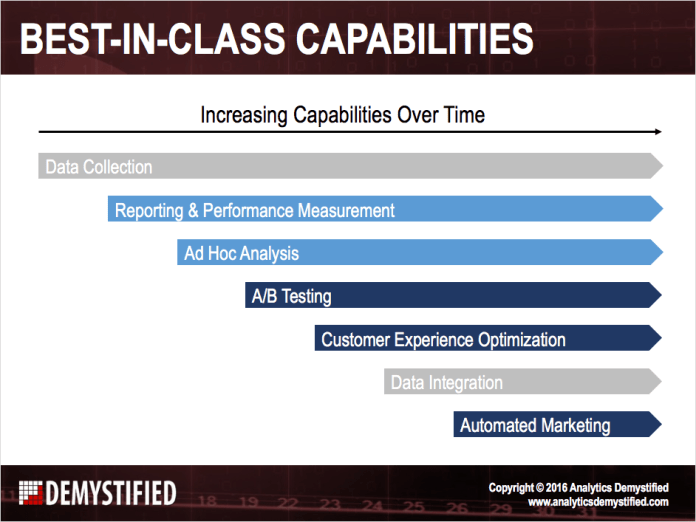
Analytics Strategy, General, Reporting

Site Performance and Digital Analytics

One of the issues we focus on in our consulting practice at Analytics Demystified is the relationship between page performance and key site metrics. Increasingly our business stakeholders are cognizant of this relationship and, given that awareness, interested in having clear visibility into the impact of page performance on engagement, conversion, and revenue. Historically speaking tying the two together has been arduous, and, when the integration has been completed, possible outcomes have been complicated by the fact that site performance is usually someone else’s job.

Fortunately both of these challenges are becoming less and less of an issue. Digital analytics providers are increasingly able to accept page performance data, either directly as in the case of Google Analytics “Site Speed” reports, or indirectly via APIs and other feeds from solutions like Keynote, Gomez, Tealeaf, and others allowing the most widely used digital analytics suites to meaningfully segment against this data on a per-visit and per-visitor basis.

Additionally, thanks to Web Performance Optimization and the recent emergence of solutions that allow for multivariate testing of different performance optimization techniques, business stakeholders and analysts are increasingly able to collaborate with IT/Operations to devise highly targeted performance solutions by geography, device, and audience segment. Recently I had the pleasure of working with the team at SiteSpect to describe these solutions in a free white paper titled “Five Tips for Optimizing Site Performance.”

You can download the white paper directly from SiteSpect (registration required) or get the link from our own white papers page here at Analytics Demystified. If you want a quick preview of what the paper covers I’d encourage you to give a listen to the brief webcast we created in support of the document.

If you’re thinking about how you can better measure and manage your site’s performance we’d love to hear from you. Drop us a line and we’ll walk you through how we’re helping clients around the globe get their arms around the issue.

Analysis, Analytics Strategy, Reporting, Social Media

Four Dimensions of Value from Measurement and Analytics

When I describe to someone how and where analytics delivers value, I break it down into four different areas. They’re each distinct, but they are also interrelated. A Venn diagram isn’t the perfect representation, but it’s as close as I can get: Earlier this year, I wrote about the three-legged stool of effective analytics: Plan, Measure, Analyze. The value areas covered in this post can be linked to that process, but this post is about the why, while that post was about the how.

Alignment

Properly conducted measurement adds value long before a single data point is captured. The process of identifying KPIs and targets is a fantastic tool for identifying when the appearance of alignment among the stakeholders hides an actual misalignment beneath the surface. “We are all in agreement that we should be investing in social media,” may be a true statement, but it lacks the specificity and clarity to ensure that the “all” who are in agreement are truly on the same page as to the goals and objectives for that investment. Collaboratively establishing KPIs and targets may require some uncomfortable and difficult discussions, but it’s a worthwhile exercise, because it forces the stakeholders to articulate and agree on quantifiable measures of success. For any of our client engagements, we spend time up front really nailing down what success looks like from a hard data perspective for this very reason. As a team begins to execute an initiative, being able to hold up a concise set of measures and targets helps everyone, regardless of their role, focus their efforts. And, of course, Alignment is a foundation for Performance Measurement.

Performance Measurement

The value of performance measurement is twofold:

  • During the execution of an initiative, it clearly identifies whether the initiative is delivering the intended results or not. It separates the metrics that matter from the metrics that do not (or the metrics that may be needed for deeper analysis, but which are not direct measures of performance). It signifies both when changes must be made to fix a problem, and it complements Optimization efforts by being the judge as to whether a change is delivering improved results.
  • Performance Measurement also quantifies the results and the degree to which an initiative added value to the business. It is a key tool in driving Internal Learning by answering the questions: “Did this work? Should we do something like this again? How well were we able to project the final results before we started the work?”

Performance Measurement is a foundational component of a solid analytics process, but it’s Optimization and Learning that really start to deliver incremental business value.

Optimization

Optimization is all about continuous improvement (when things are going well) and addressing identified issues (when KPIs are not hitting their targets). Obviously, it is linked to Performance Measurement, as described above, but it’s an analytics value area unto itself. Optimization includes A/B and multivariate testing, certainly, but it also includes straight-up analysis of historical data. In the case of social media, where A/B testing is often not possible and historical data may not be sufficiently available, optimization can be driven by focused experimentation. This is a broad area indeed! But, while reporting squirrels can operate with at least some success when it comes to Performance Measurement, they will fail miserably when it comes to delivering Optimization value, as this is an area that requires curiousity, creativity, and rigor rather than rote report repetition. Optimization is a “during the on-going execution of the initiative” value area, which is quite different (but, again, related) to Internal Learning.

Learning

While Optimization is focused on tuning the current process, Internal Learning is about identifying truths (which may change over time), best practices, and, “For the love of Pete, let’s not make the mistake of doing that again!” tactics. It pulls together the value from all three of the other analytics value areas in a more deliberative, forward-looking fashion. This is why it sits at the nexxus of the other three areas in the diagram at the beginning of this post. While, on the one hand, Learning seems like a, “No, duh!” thing to do, it actually can be challenging to do effectively:

  • Every initiative is different, so it can be tricky to tease out information that can be applied going forward from information that would only be useful if Doc Brown appeared with his Delorean
  • Capturing this sort of information is, ideally, managed through some sort of formal knowledge management process or program, and such programs are quite rare (consultancies excluded)
  • Even with a beautifully executed Performance Management process that demonstrates that an initiative had suboptimal results, it is still very tempting to start a subsequent initiative based on the skeleton of a previous one. Meaning, it can be very difficult to break the, “that’s how we’ve always done it” barrier to change (remember how long it took to get us to stop putting insanely long registration forms on our sites?)

Despite these challenges, it is absolutely worth finding ways to ensure that ongoing learning is part of the analytics program:

  • As part of the Performance Measurement post mortem for a project, formally ask (and document), what aspects, specifically, of the initiative’s results contain broader truths that can be carried forward.
  • As part of the Alignment exercise for any new initiative, consciously ask, “What have we done in the past that is relevant, and what did we learn that should be applied here?” (Ideally, this occurs simply by tapping into an exquisite knowledge management platform, but, in the real world, it requires reviewing the results of past projects and even reaching out and talking to people who were involved with those projects)
  • When Optimization work is successfully performed, do more than simply make the appropriate change for the current initiative — capture what change was made and why in a format that can be easily referenced in the future

This is a tough area that is often assumed to be something that just automatically occurs. To a certain extent, it does, but only at an individual level: I’m going to learn from every project I work on, and I will apply that learning to subsequent projects that I work on. But, the experience of “I” has no value to the guy who sits 10′ away if he is currently working on a project where my past experiences could be of use if he doesn’t: 1) know I’ve had those experiences, or 2) have a centralized mechanism or process for leveraging that knowledge.

What Else?

What do you say when someone asks you, “How does analytics add value?” Do you focus on one or more of the areas above, or do you approach the question from an entirely different perspective? I’d love to hear!

Analytics Strategy, Conferences/Community, General

Digital analytics is like basketball …

If you follow me you know I’m a huge fan of digital measurement, analysis, and optimization. I’ve written books about it, I’ve given talks about it all over the world, and for the last five years I have been building a rapidly growing company around it. The Analytics Demystified brand, at least according to Google, has become more or less synonymous with the subject, and for that my partners and I are grateful.

What you may not know is that I’m also a huge fan of basketball.

This time of the year, when the NBA playoffs are in full swing, is my favorite time of the year. Spring is coming in Oregon, summer vacation is approaching for my kids, and some of the greatest athletes in the world are hammer the boards and performing acts of acrobatic magic, all in an effort to get to the next round.

During last year’s playoffs I started thinking about how similar digital analytics is to basketball and running a championship NBA franchise. Both require great owners, leaders, and coaches. Both depend heavily on star talent. And both have the potential to become transformative for businesses, shareholders, and customers.

A few months back I went with that theme and put together a short presentation. I had the pleasure of giving that presentation at our recent ACCELERATE conference, and I have embedded it below for your viewing pleasure. It’s only about 20 minutes long, so just in case you’re not a fan of the Chicago Bulls and Michael Jordan, well, you only have to listen to me extol their greatness for 20 minutes …

//www.viddler.com/player/48b34f67/

If you agree with me and think that analytics is a lot like basketball, but if you struggle in your company to meet some of the criteria I outlined, go ahead and give me a call. I’m always happy to talk about analytics and basketball, and who knows, maybe my company can help yours!

By the way, we just published all of the ACCELERATE 2012 Chicago videos for your viewing pleasure. If you’re interested in how ACCELERATE is different go ahead and watch a few. If you like what you see, sign up to join us on October 24th in Boston (it’s free!)

Analytics Strategy

10 Tips for Web Analytics Wednesday Awesomeness

I’ve become enamored with the “10 tips” format for organizing information (thank you, ACCELERATE), and I’ve had a couple of recent situations where people I know have asked for my advice on getting rolling with or successfully sustaining Web Analytics Wednesdays. A couple of years ago, someone actually tried to get a group of WAW organizers around the world together to come up with a handy guide for WAW organizers, but, due to scheduling issues, that never came together. After a successful Columbus WAW last week (shown below), it seemed worthwhile to write up what I’ve learned about planning and running WAWs over the last four years.

Columbus Web Analytics Wednesday - April 2012

Some of these tips overlap with the FAQ posted on the WAW site, and I’ve also created a one-page Excel checklist that covers the various details that go into our events to supplement this post.

And now, onto the tips!

Tip No. 1: Start Small

In Columbus, we now have a WAW almost every month, and we have between 40 and 60 attendees at each on . It took us several years to get to that level of consistent turnout, and that, in my mind, was a good thing. The core group that met over the first year or so got to know each other really well, as there were only 8-15 us at each event, and we could actually have group discussions in which everyone participated. Those early participants are still regularly attendees. People came consistently because they enjoyed the people, and they were patient with logistical hiccups and not-so-great venues. They provided feedback and made suggestions that helped us refine the what, the how, and the where of future events.

The other benefit of starting small is that you don’t have to worry about paying for the event – the Web Analytics Wednesday Global Sponsors are insanely easy to tap into to cover the cost (more on that in Tip No. 9).

Tip No. 2: Location, Location, Location

Location matters. In Columbus, this was something that took us over a year to really nail down, and I wasn’t much help, as I had only recently moved to the area. Some things to look for in a venue:

  • Centrally located – most cities have some degree of sprawl, so there is no location that is perfect for everyone; but, what we’ve found is that, the closer we can get the venue to the main business district, the better
  • Separate meeting room – lots of restaurants have rooms that can be reserved for private parties; sometimes, they require a separate fee, but sometimes they just require a minimum total spend. All things are negotiable – you’re bringing business to them on a Wednesday night, so they are generally flexible.
  • Low-to-moderate noise level – if the venue has a separate room, this is less of an issue; if it doesn’t, the noise level is key. WAWs are, first and foremost, about people meeting and talking to other people, and no one wants to be hoarse on Thursday morning. Live music and happenin’ bar scenes are cool…but they don’t make for great WAWs
  • Presentation-friendly – at a minimum, having a room that has a layout that is conducive to a projector and screen is important if there will be any presenting (see Tip No. 7); some venues have screens, and some actually have projectors. But, if the room layout isn’t such that it will support a projector and screen, then make sure you’ve thought through how visual information will be shared in the absence (tip: large companies typically have projectors that employees can check out for meetings – we regularly tap into attendees who work at such companies to actually provide the projectors). Handouts work, too.

Nailing down a single good location is hard enough, but we actually now have 2-3 good locations. This allows us to mix things up so that the event doesn’t start to seem like it has fallen into a rut. And, it gives us options – if one venue is booked for the preferred WAW date, another one is likely to be open.

Tip No. 3: Be Consistent

The cadence of WAWs seems to matter. We aim for an event once per month and know that, occasionally, we won’t manage to have one. Having the events on a regular schedule adds credibility to the event overall (which helps with sponsors and attendees alike), and it really helps convert “networking acquaintances” into “professional friends.”

There is definitely a commitment required in order to follow this tip. From the get-go in Columbus, we had multiple co-organizers, and that group of organizers has grown. We split up the effort — one secured a venue each month, one person handled the emails to past attendees, another person handled finding new ways to promote the event — and have built a pretty solid and repeatable process.

It’s difficult to build momentum without a consistent and recurring schedule, so getting organized and making it a group effort is key (see Tip No. 10).

Tip No. 4: Build a WAW Database

From our first event onward, I started entering the name and email address of each person who registered for a Columbus WAW into a Google Spreadsheet (I now use ExactTarget for this). This requires a little bit of sleuthing, as the WAW registration form only collects an email address. But, 9 times out of 10, it’s pretty easy to figure out the person’s name (the internet being scary that way and all…) and company. This is a bit tedious, but it’s worth it, as it gives us an ever-growing “house list” to whom we can promote upcoming events.

We now have a sign-in sheet at every event to collect the name and email address of each attendee. To reduce the level of data entry and handwriting-deciphering required, I pre-print a list of all registrants for the sign-in sheet and just ask people to check a box next to their name to indicate they’ve arrived. That sheet has blank rows for people who registered late or didn’t register to write in their information.

Tip No. 5: Invite and Remind

Obviously, it’s not enough to just build and maintain a house list if it doesn’t get used. For every WAW, each person on that list gets sent at least two emails (but no more than three):

  • Notification / invitation – a couple of weeks out, we send an email to the entire list letting them know of the upcoming event
  • Second invitation – for anyone who has not registered a week out, we send a second invitation; the content is very similar to the first one, but we generally mix up the subject line and the body copy a bit
  • Reminder – for anyone who has registered, we send a reminder email 2-3 days before the event

We try to consistently hit some key information with each email:

  • The date and location for the event
  • Information as to the topic that will be presented (if we have a presentation)
  • A reminder that the event is free
  • A link to the event registration page on the WAW site

We’ve even done some A/B testing on the subject lines, but, with a list that is only several hundred people, that’s more because it’s a good way to experiment with the process for A/B testing in ExactTarget than because we’ve been able to learn anything of note about effective subject lines for WAW emails.

And, while we haven’t always been 100% CAN-SPAM compliant, we’ve always been clear in all communications as to how the recipient could opt out of future emails, and we honor any opt out requests we receive.

Tip No. 6: Multi-Channel Promotion

In addition to email, we consistently push out notifications through as many channels as possible:

We don’t actively maintain any of these channels for any purpose other than notifications of upcoming events. That may not be a social media best practice, but it works, in that participants can opt in to non-email communication through whatever channel they prefer.

One thing we did learn was that we shouldn’t just sit down on one night and send out the email and simultaneously update every social media channel. This just meant that users who were connected through multiple means got spammed with the same information all at one point in time, which reduced its effectiveness (and was a little annoying). We now spread out the updates over the course of several days.

Tip No. 7: Limited Formal Presentations / Plenty of Time for Networking

We tell our presenters to aim for 15-20 minutes and to avoid presentations that are simply sales pitches for their companies. With brief presentations on relevant topics (sometimes the sponsor presents, sometimes it’s simply one of the organizers or an attendee who has volunteered a topic), we tend to spend another 15-30 minutes in Q&A and discussion. The feedback we’ve consistently gotten is that attendees enjoy both the networking and having some formally presented content. So, we strive to keep a balance between the two. Two keys to that:

  • Very clear (polite, but firm) communication to the presenters ahead of time as to expectations regarding presentation length
  • Having one of the organizers prepared to manage the clock — be it signaling the presenter to wrap up or announcing “let’s do one more question” if things run long and the crowd starts to squirm (some day, I’ll live down cutting off Chris Grant after she traveled all the way down from Michigan for our WAW…)

The schedule we’ve followed for the past few years is:

  • 6:30 – 7:00 — sign-in and networking
  • 7:00 – 7:10-ish — find seats, welcome and announcements
  • 7:10 – 7:45-ish — presentation and Q&A
  • 7:45-ish – 8:30/9:00 — more networking

I’ve got the word “networking” in the title of this tip and a couple of times in the listed schedule above, but, honestly, “hanging out” is probably a better description. Like-minded people with food and beer… it’s fun!

Tip No. 8: Encourage Tweeting

We encourage tweeting at our WAWs for all of the same reasons tweeting is encouraged at conferences:

  • It publicizes the event and content out to the followers of the attendees
  • It fosters networking as people engage with each other during the presentation
  • It provides a nice way to have crowdsourced “notes” from the presentation

To promote tweeting, we have started printing out little cards that we put at all of the tables that include:

  • The Twitter usernames of the presenter(s)
  • The hashtag for the event (we use #cbuswaw)
  • The logos of our sponsors (nothing should get printed or emailed that doesn’t include a thank you to the sponsors)

Even if there are only a small number of attendees, and even if there is no formal presentation, tweets can help spread the word.

Tip No. 9: Free Drinks (and Food, if Possible)

We’re reaching the end of this list, but that doesn’t mean these tips are any less important! Free drinks are a must! While no one attends a WAW simply because they are burdened with an empty bank account and a drinking problem, by offering booze, the overall vibe and purpose gets communicated as a “fun event” more than a “professional obligation.”

Providing free drinks can get expensive…but it’s worth the effort to make sure it happens. Sub-tips on that front:

  • If you’re just getting started, and it’s a small event, tap into the Web Analytics Wednesday Global Sponsors. That’s what their sponsorship is there for!
  • Use drink tickets to manage the total outlay. I have yet to host an event at a bar or restaurant that doesn’t have drink tickets on hand for our use, and, by handing out 1-2 tickets (we usually do 2), you can ensure that your sponsors aren’t inadvertently funding a fraternity party
  • Seek out sponsors — the smaller the event, the smaller the ask; the larger the event, the more worthwhile it is for the sponsor. Use your and other attendees connections to the analytics vendors and services they use. Many of them have marketing funds available, and it’s a great way for them to make connections with prospective customers in their territory.

We almost always provide food at our events as well. To manage costs on that front, we typically go with a “heavy appetizer buffet” rather than a full-on meal. We typically order food to cover 15-20% fewer people than we actually expect to attend. Otherwise, we wind up with crazy amounts of leftovers

Tip No. 10: Ask for Help

As I put together the checklist to accompany this post, and as I wrote the post itself, I realized how many moving parts there are in our process. No single event will ever be perfect, and it doesn’t have to be. But, the more details that get consistently covered, the more likely the WAWs are to flourish and grow. The best way to cover those details is through organization and teamwork: ask for volunteers to help with future events at each of your events; pay attention to who seems to be most engaged and has useful ideas and suggestions for future events. Recruit!

What’s Missing?

The downloadable checklist is intended as a companion to these tips, and it’s organized based on the different aspects of managing a WAW. I hope you find it useful.

What else have you seen — either when organizing or attending a WAW — that works particularly well? I’d love to get some comments that give us some ideas for continuing to improve our events!

Analysis, Analytics Strategy, Reporting

Digital Analytics: From Data to Stories and Communication

This will be a quick little post as I try to pull together what seems to be an emerging theme in the digital analytics space. In a post late last year, I wrote:

I haven’t attended a single conference in the last 18 months where one of the sub-themes of the conference wasn’t, “As analysts, we’ve got to get better at telling stories rather than simply presenting data.

Lately, though, it seems that the emphasis on “stories” has shifted to a more fundamental focus on “communication.” As evidence, I present the following:

A 4-Part Blog Series

Michele Kiss published a 4-part blog series over the course of last week titled “The Most Undervalued Analytics Tool: Communication.” The series covered communication within your analytics teamcommunication across departments, communication with executives and stakeholders, and communication with partners. Whether intentionally or not, the series highlighted how varied and intricate the many facets of “communication” really are (and she makes some excellent tips for addressing those different facets!).

A Data Scientist’s “Day to Day” Advice

Christopher Berry, VP of Marketing Science at Syncapsealso published a post last week that touched on the importance of communication. Paraphrasing (a bit), he advised:

  • Recognize that you’re going to have to repeat yourself — not because the people your communicating with are stupid, but because they’re not as wired to the world of data as you are
  • Communicate to both the visual and auditory senses — different people learn better through different channels (and neuroscience has shown that ideas stick better when they’re received through multiple sensory registers)
  • Use bullet points (be concise)

Christopher is one of those guys who could talk about the intricacies of shoe leather and have an audience spellbound…so his credibility on the communication front comes more from the fact that he’s a great communicator than from his position as a top brain in the world of data scientistry.

Repetition at ACCELERATE

During last Wednesday’s ACCELERATE conference in Chicago, I tweeted the following:

The tweet was mid-afternoon, and it was after a run of sessions — all very good — where the presenters directly spoke to the importance of communication when it come to a range of analytics responsibilities and challenges.

A Chat with Jim Sterne

At the Web Analytics Wednesday that followed the conference, I got my first chance (ever!) to have more than a 2-sentence conversation with Jim Sterne (I’m pretty sure the smile on his face all day was the smile of a man who was attending a conference as a mere attendee than as a host and organizer, and the plethora of attendant stresses of that role!).

During that discussion, Jim asked me the question, “What is it that you are doing now that is moving towards [where you want to be with your career].” We’ll leave the details of the bracketed part of my quote aside and focus on my answer, which I’d never really thought of in such explicit terms. My answer was that, being a digital analyst at an agency that was built over the course of 3 decades on a foundation of great design work and outstanding consumer research (as in: NOT on measurement and analytics), I have to keep honing my communication skills. In many, many ways I have a conversation every day where I am trying to communicate the same basics about digital analytics that I’ve been communicating for the past decade in different environments. But, I’m not just repeating myself. If I look back over my 2.5 years at the agency, I’ve added a new “tool” to my analytics communication toolbox every 2-3 months, be it a new diagram, a new analogy, a new picture, or a new anecdote. I’ve been working really hard (albeit not explicitly or even consciously) to become the most effective communicator I can be on the subject of digital analytics. Not every new tool sticks, and I try to discard them readily when I realize they’re not resonating.

It’s a work in progress. Are you consciously working on how you communicate as an analyst? What’s your best tip?

Analysis, Analytics Strategy, Social Media

The Many Dimensions of Social Media Data

I’ve been thinking a bit of late about the different aspects of social media data. This was triggered by a few different things:

  • Paul Phillips of Causata spoke at eMetrics in San Francisco, and his talk was about leveraging data from customer touchpoints across multiple channels to provide better customer relationship management
  • I’ve been re-reading John Lovett’s Social Media Metrics Secrets book as part of an internal book group at Resource Interactive
  • We’ve had clients approaching us with some new and unique questions related to their social media efforts

What’s become clear is that “social media analytics” is a broad and deep topic, and discussions quickly run amok when there isn’t some clarity as to which aspect of social media analytics is being explored.

As I see it, there are four broad buckets of ways that social media data can be put to use by companies:

No company that is remotely serious about social media in 2012 can afford to ignore the top two boxes. The bottom two are much more complex and, therefore, require a substantial investment, both in people and technology.

Now, I could stop here and actually have a succinct post. But, why break a near-perfect (or consistently imperfect) streak? Let’s take a slightly deeper look at each bucket.

Operational Execution

(I almost labeled this bucket “Community Management,” but the variety of viewpoints in the industry on the scope of that role convinced me to leave that can of worms happily sealed for the purposes of this post.)

Social media requires a much more constant intake and rapid response/action based on data than web sites typically do. Having the appropriate tools, processes, and people in place to respond to conversations with appropriate (minimal) latency is key.

Key challenges to effectively managing this aspect of social media data include: determining a reasonable scope, being realistic about the available on-going people who will manage the process, and, to a lesser extent, selecting the appropriate set of tools. Tool selection is challenging because this is the area where the majority of social media platforms are choosing to play — from online listening platforms like Radian6, Sysomos, Alterian, and Syncapse; to “social relationship management” platforms like Vitrue, Buddy Media, Wildfire, (Adobe) Context Optional, and Shoutlet; and even to the low-cost platforms such as Hootsuite and TweetDeck. These platforms have a range of capabilities, and their pricing models vary dramatically.

Performance Measurement

Ahhh, performance measurement. When it comes to social media, it definitely falls in the “simple, but not easy” bucket. And, it’s an area where marketers are perpetually dissatisfied when they discover that there is no “value of a fan” formula, nor is there “the ROI of a tweet.” But, any marketer who has the patience to step back and consider where social media plays in his/her business can absolutely do effect performance measurement and report on meaningful business results!

Chapters 4 and 5 of John Lovett’s book, Social Media Metrics Secrets, get to the heart of social media performance measurement by laying out possible social media objectives and appropriate KPIs therein. High on my list is to make it through Olivier Blanchard’s Social Media ROI: Managing and Measuring Social Media Efforts in Your Organization, as I’m confident that his book is equally full of usable gems when it comes to quantifying the business value delivered from social media initiatives.

When it comes to technologies for social media performance measurement, we generally find ourselves stuck trying to make use of the Operational Execution platforms. They all tout their “powerful analytics,” but their product roadmaps have typically been driven more by “listenting” and “publishing” features than they have been driven by “metrics” capabilities. With Google’s recent announcement ofGoogle Analytics Social Reports, and with Adobe’s recent announcement of Adobe Social, this may be starting to change.

(Social-Enhanced) CRM

Leveraging social media data to improve customer relationship management is something that there has been lots of talk about…but that very few companies have successfully implemented. At its most intriguing, this means companies identifying — through explicit user permission or through mining the social web — which Twitter users, Facebook fans, Pinterest users, Google+ users, and so on can be linked to their internal systems. Then, by listening to the public conversations of those users and combining that information with internally-captured transactional data (online purchases, in-store purchases, loyalty program membership, email clickthroughs, etc.), getting a much more comprehensive view of their customers and prospects. That “more comprehensive view,” in theory, can be used to build much more robust predictive models that can let the brand know how, when, and with what content to engage individual customers to maximize the value of that relationship for the brand.

The challenges are twofold:

  • Consumer privacy concerns — even if a brand doesn’t do anything illegal, consumers and the press have a tendency to get alarmed when they realize how non-anonymous their relationship with the brand is (as Target learned…and they weren’t even using social media data!)
  • Complexity and cost — there is a grave tendency for marketers to confuse “freely available data” with “data that costs very little to gather and put to good use.” Companies’ customer data is data they have collected through controllable interactions with consumers — through a form they filled out on the web, through a credit card being run as part of a purchase, through a call into the service center, etc. Data that is pulled from social media platforms is at the whim of the platforms and the whim of the consumer who set up the account. No company (except Twitter) can go out to a Twitter account and, in an automated fashion, bring back the user’s email address, real name, gender, or even country of residence. It takes much more sophisticated data crawling, combined with probabilistic matching engines, to get this data.

Despite these challenges, this is an exciting opportunity for brands. And, the technology platforms are starting to emerge, with the three that spring the most quickly to my mind being Causata, iJento, and Quantivo.

Trend / Opportunity Prediction

This is another area that is really tough to pull off, but it’s an area that, admittedly, has great potential. It’s a “Big Data” play if ever there was one — along the lines of how the Department of Homeland Security supposedly harnesses the data in millions of communications streams to identify terrorist hot spots. It’s sifting through a haystack and not knowing whether your’re looking for a needle, a twig, a small piece of wire, or a paperclip, but knowing that, if you find any of them, you’ll be able to put it to good use.

The wistfully optimistic marketing strategist describes this area something like this: “I want to pick up on patterns and trends in the psychographic and attitudinal profile of my target consumers that emerge in a way that I can reasonably shift my activities. I want an ‘alert’ that tells me, ‘There’s something of interest here!'”

It’s a damn vague dream…but that doesn’t mean it’s unrealistic. It’s a multi-faceted challenge, though, because it requires the convergence of some rather sticky wickets:

  • Identifying conversations that are occurring amongst people who meet the profile of a brand’s target consumers (demographic, psychographic, or otherwise) — yet, social media profiles don’t come with a publicly available list of the user’s attitudes, beliefs, purchasing behavior, age, family income, educational level, etc.
  • Identifying topics within those conversations that might be relevant for the brand — we’re talking well beyond “they’re talking about what the brand sells” and are looking for content with a much, much fuzzier topical definition
  • Identifying a change in these topics — generally, what marketers want most is to pick up on an emerging trend rather than simply a long-held truism

To pull this off will require a significant investment in technology and infrastructure, a significant investment in a team of people with specialized skills, and a significant amount of patience. I chuckle every time I hear an anecdote about how a brand managed to pick up on some unexpected opportunity in real time and then quickly respond…without a recognition that the brand was spending an awful lot of time listening in real-time and picking up nothing of note!

This area, I think, is what a lot of the current buzz around Big Data is focused on. I’m hoping there are enough companies investing in trying to pull it off that we get there in the next few years, because it will be pretty damn cool. Maybe IBM can set Watson up with a Digital Marketing Optimization Suite login and see what he can do!

Analytics Strategy, Conferences/Community

2012 WAA Award of Excellence

On Tuesday at the Emetrics Summit the Web Analytics Association membership awarded Analytics Demystified a 2012 Award for Excellence and dubbed us the “Most Influential Agency” in the digital measurement sector. We are incredibly honored by the award but there are a few folks I forgot to thank at the event that Adam, Brian, John, and I wanted to recognize:

  • Our wives and families, without whom we would not be able to do the work we do
  • Our clients, whose continued support keeps us participating in some amazing analytics around the world
  • Our partners, including Keystone Solutions, IQ Workforce, and eClerx, whose own leadership makes our work better
  • Our sponsors for Web Analytics Wednesday, Analysis Exchange, and ACCELERATE allow us to expand our footprint
  • Our friends throughout the digital measurement, analysis, and optimization community around the world, especially April Wilson who wrote a really nice nomination letter for us

While Analytics Demystified can be a facilitator and catalyst for great events, experiences, and engagements, we are only successful because we get such incredible help and support from the community. From each of us to all of you, thank you!

Analytics Strategy, General

Web 3.0 and the Internet User's Bill of Rights

Back in 2007, on the subject of the evolution of the web analytics industry, I proffered that “If Web Analytics 1.0 was all about measuring page views to generate reports and define key performance indicators, and if Web Analytics 2.0 is about measuring events and integrating qualitative and quantitative data, then Web Analytics 3.0 is about measuring real people and optimizing the flow of information to individuals as they interact with the world around them.”

At the time I was thinking about the onset of digital ubiquity — an “always on” Internet that followed us everywhere we went and more or less knew where we were. Given the explosion of mobile devices and our near universal dependence on smartphones, location-based services, and digital personal assistants, the following comment seems almost quaint:

“Just think for a minute about how your browsing experience might change if the web sites you visited remembered you and delivered a tailored experience based on your demographic profile (theoretically available via your phone number), your browsing history (accurate because you’re not deleting your phone number) and your specific geographic location when you make the request?”

Essentially I envisioned a future where anonymous log files gave way to massive data stores that, given much of the data would be flowing from mobile devices that we kept on us at all times, would form a far more complete picture of each of us individually than Web Analytics 1.0 or 2.0 could ever hope to support. What’s more, when subject to enough processing power and computational wizardry, this data would support previously unimaginable levels of micro-targeting and content personalization, possibly knowing more about us than our own loved ones.

At the time I recall having conversations with one particularly smart individual who argued that this would never happen — that phone manufacturers and phone and Internet service providers would never allow this type of information to be used, much less in a commercial context. His argument was that this would be such an egregious violation of consumer privacy that, were this to happen, the government would inevitably step in and, fearing ham-fisted meddling by “luddite politicians” (his words, not mine), industry leaders would come together and attempt to offer at least some level of consumer protection, even if it would negatively impact their business models.

Turns out we were both right.

What I referred to as “Web Analytics 3.0” is clearly the collection, analysis, and use of what is more commonly referred to as “Big Data” — an incredibly powerful source of information about consumers that can be used in an almost endless number of ways to power our new data economy. And, thanks to some spectacular mis-steps on the part of organizations, groups, and companies who should know better, “Big Data” is increasingly subject to regulation.

In the past few days, the California Attorney General has announced that she has the agreement of six of the largest mobile platform providers — Google, Apple, Amazon, HP, RIM, and Microsoft — to begin enforcing a law that calls attention to the use of consumer data in mobile applications. And, even more amazingly, the Obama administration has delivered a “Digital Consumer’s Bill of Rights” that has the major browser manufactures agreeing to quickly begin to support “Do Not Track” functionality designed to limit the flow and use of even anonymous web usage data in some instances.

Clearly, both of these announcements are good for consumers, who will hopefully be better protected from bonehead moves like sending entire address books insecurely up to cloud-based servers. And clearly both of these announcements are good for legislators, who during an election year will have something positive to talk about, at least with the majority of their constituents.

But where does this leave you, the digital measurement, analysis, and optimization worker?

More or less in the same place we were back in December 2010 when this all first came up, on the brink of a sea-change in web analytics, but one that I’m confident that most of us can handle. While I still believe that web analytics is hard — perhaps more so than ever — I’m also confident that individuals who are truly invested in making informed decisions based on the available data will be just fine.

Still there are unknowns and subsequently risk coming down the pipe through the President’s “Bill of Rights.”  Some things that I am particularly interested in knowing include:

  • Who decides which technologies will be subjected to browser-based “Do Not Track” directives?
  • Will “blocked” technologies be universally blocked? Or, like in P3P, is their a continuum of requirements?
  • Will “blocked” technologies be blocked across all participating browsers? Or will browser vendors decide individually?
  • Will “blocked” sessions be identified as such? And if so, will some minimal data still be available?
  • How will the Bill of Rights “guarantee” data security, transparency, respect for context, etc. as outlined by the President?

I suspect the answers to most of these questions are still being discussed.  Still, the ramifications are important and there is an awful lot of conflict of interest inherent in the browser vendor’s participation.  For example, if you’re Google and have made a pretty significant investment into Google Analytics, what is your motivation to block analytics tracking in your Chrome browser? Or perhaps you’re Microsoft and you have multiple initiatives to improve the quality of search and display advertising — all of which depend on some level of data collected via the browser — are you willing to prevent all of that in Internet Explorer?

It will be interesting to watch this play out.

For what it’s worth, at Analytics Demystified we have been thinking about the explosion in digital data collection and consumer privacy for a pretty long time. Going all the way back to that 2007 post on Web 3.0, and rolling forward to our work on the Web Analyst’s Code of Ethics and more recently our GUARDS Audit (with BPA Worldwide), Analytics Demystified strongly believes that consumer data is a valuable asset, one that needs to be treated with the upmost respect.

To that end, if your legal team or senior leadership are asking you about the data you collect and how you might be exposed based on how that data is being secured and used, you might be interested in Analytics Demystified GUARDS. In a nutshell, GUARDS is a comprehensive audit of your digital data collection landscape performed by auditors from BPA Worldwide designed to help leadership understand what data is collected, where, why, and how that data is being secured and ultimately used.

Either way, my partners and I at Analytics Demystified will be keeping a careful eye on this Bill of Rights, changes in the mobile data collection landscape, and the application of Do Not Track across modern browsers. I welcome your comments and feedback.

Analytics Strategy

Working Around Sampled Search Data in Google Analytics

I got into a discussion of sampling in Google Analytics  with SEO expert and Web PieRat Jill Kocher earlier this year, which led to some profile/filter noodling that seemed worth sharing. Specifically, Jill and I were discussing how, in the world of search engine optimization — where the long tail can be a handy thing to analyze — sampling in Google Analytics can be a real nuisance.

That got me thinking that a partial solution would be to have a Google Analytics profile that only includes organic search traffic. This isn’t a profile that you would use for cross-session analytics, but it’s one that would allow simplified segmentation, reduced cases of sampling, and, perhaps, a more complete data set.

As it turns out, it was pretty simple to set up, and it seems to do the trick.

Step 1: Make a New Profile

Create a new profile under the same web property that you’re using for your site and name it Organic Search Traffic Only:

There’s nothing magic about this. The key is that this is a profile that uses the same web property ID as the profile where you’re running into sampling issues with your SEO analysis. We’re just going to take that same feed of data coming in as visitors visit your site and carve out the subset of that data that is traffic from organic search referrals.

Step 2: Apply an Organic Search Filter

The next (and final) step is to create a filter and apply it to the profile such that only organic search traffic is included.

In the new profile you just created, select the Filters tab and then click New Filter:

From there:

  1. Give the filter a name like “Organic Search Referrals”
  2. Select Custom Filter as the Filter Type
  3. Set the filter as an Include filter
  4. Set the Filter Field to Campaign Medium
  5. Set the Filter Pattern to “organic”
  6. Save the filter

The screen below shows the filter settings:

Step 3: Sit Back and Let the Data Roll In

The profile is only going to include data from the point you set it up going forward. But, it will accurately reflect (to the extent that any web analytics package can accurately reflect this) new versus returning visitors for all time (well, since you initially implemented Google Analytics), because it’s getting that data from the cookie that already exists on users’ machines.

Initially, I saw some odd data on the unique visitors front, which I can semi-intuitively understand…but not quite explain.

Suffice it to say that, once you have the profile up and running for a week or so, you can select the Non-paid Search Traffic segment in your main profile and compare it to the All Visits segment in your new profile, and the numbers will be virtually identical. But, you can now do SEO analysis with a base set of data that only includes search traffic.

Is that handy?

Analytics Strategy, Social Media

New Blog Design –> Responsive Design & Web Analytics Musings

If you’re reading this post on the site itself (as opposed to via RSS or email), and if you’ve been to the site much in the past, then you’ll notice the design of the site has been completely overhauled. This was one of my goals for my weeklong holiday break…and it’s a goal I entirely missed! Luckily, though, I wound up with a kid-free/spouse-free weekend a week-and-a-half ago, so I got to tackle the project.

So, Why a New Design?

I updated the design for two reasons:

  • The old design was starting to wear on me. There were a number of little alignment/layout/wrapping issues that I had never quite managed to fix, even as I tinkered with the blog functionality (for instance, my social icons never quite lined up well). I also figured out last fall that the nested table structure pretty much precluded me from getting the mix I wanted of fixed and liquid elements. In short, a redesign just seemed in order.
  • Responsive web design is here. This was more of the direct-tie-to-my-day-job reason for the overhaul. Various sharp people at Resource Interactive have started pushing responsive web design as something that should be actively considered for our clients. As I dug into the topic, I realized that: 1) this blog is a good candidate for a responsive design, and 2) there are some analytics implications to a responsive design, and I needed somewhere to experiment with them.

So, this site is now using a fully responsive WordPress theme.

What Is Responsive Design, Exactly?

As I understand it, responsive design is an “Aha!” that grew out of the increasing need for web sites to function across a wide range of screen sizes and experiences and platforms: laptop monitors, desktop monitors, tablets (iOS and Android), and smartphones (also iOS and Android). The idea is that, rather than having a “desktop site” and a “mobile-optimized site,” you can have “a site” that works effectively on a wide range of devices.

There are two keys to this:

  • The site needs to be viewable in different devices — 3 columns that display on a desktop monitor may need to become a single set of stacked content on a smartphone. Or, a list of links in the sidebar on the desktop may need to become a dropdown box at the top of the page on an iPhone.
  • The site needs to support the most likely use cases in different devices — this is a stickier wicket, because it forces some strategic thought (and possibly research and testing) to think through what a visitor to your site who is using an iPhone (for instance) is likely looking to do and how that differs from a visitor to your site who is using a desktop.

Both of these are questions that have always been asked when it comes to developing a “mobile-optimized version of the site,” but they’re a bit more nuanced given that responsive design isn’t a “separate site.”

Wow, Tim, I’m Impressed with Your Coding Skills!

Don’t be impressed with my coding skills.

I did a little research and then shelled out $35 to buy the Rising theme. That doesn’t mean there wasn’t a fair amount of tinkering (and more tinkering yet to be done — I certainly have not fallen prey to a need to have the perfect site designed before pushing it live!), but the end result is an improved site. And, more importantly, having a site that actually works well across devices (Try it! Just resize your browser window and watch the sidebar at the right. Or, fire up the site on your smartphone and compare it to your desktop.)

Now, of the “two keys” above, I really focused on the first one. This is a blog, after all. Regardless of what device you’re on, presumably, you’re here to consume blog post content.

I’m still working with the palette (too little contrast between the hyperlink color and the plain text color), the font selection (I’m not in love with it), and the header logo (pulling what strings I can to get a professional to contribute on that front), but I’m reasonably content with the change. Let me know if you have any tips for improving the design (I’m not proud!).

Where Does Analytics Come into All of This?

While I have access to tons of different web analytics accounts across a range of platforms through our various clients, I don’t actually have a great sandbox for trying things out (you would think our company’s site would be a good testbed, but the reality is that there are so many competing agendas for competing resources there that it’s seldom worth the effort). Luckily, this site has built up enough content and enough of a presence to get a few hundred visits a day, which is enough to actually do some tinkering and get some real data as a result.

Here’s my list of what I’ll be toying with over the coming weeks:

  • Responsive design analytics — we’ve had “screen resolution” and “device” reporting for years, but responsive design introduces a whole new twist, because it’s truly experience-centric. I’ve done a little digging online and haven’t found much in the way of thinking on this. While I don’t think it’s possible to directly pull CSS media query data into the web analytics platform, it should be possible to use Javascript to detect which responsive layout is being used for any given visitor and then pass that information to the web analytics platform (as a custom variable or a non-interaction event in Google Analytics). And, it should be possible to record when an onresize event occurs. In both cases, using this data to segment traffic to determine if a particular layout is performing poorly or well, as well as how visitors move through the site in these different experiences, seems like a promising thought.
  • Facebook Insights for Websites — I’ve had this running for a while, but, as part of another experiment, I switched over from using my Facebook user ID in the meta data to authenticate my ownership of the site to using a Facebook app ID. That’s a better way to go when it comes to “real” sites, and I’m now actually doing some tinkering on some client sites to fully validate what happens, so look for some thoughts on that front in the future.
  • Detecting the Facebook login status of visitors to the site — this is some experimentation that is actively in work. It’s the implementation of some code that Dennis Paagman came up with to use Facebook Connect and Google Analytics non-interaction events to detect (and then — my thinking — segment) visitors based on whether they’re logged into Facebook or not at the time of their visit to the site. This seems like it has intriguing possibilities when it comes to determining what types of social  interactions should be offered and how prominently. I’ve hit a minor snag on that front and am hoping Dennis will be able to help get to the bottom of it (see the comments on his blog post). But, if I get it figured out, I’ll share in a post down the road.
  • Site performance — anecdotally, it seems like this site is now loading more slowly than it did with the old design. The Google Analytics Site Speed report seems to indicate that is the case, but I don’t feel like I have enough data to be conclusive there just yet. I have signed up for a site24x7.com account, which is a platform we use with some of our clients for a couple of reasons: 1) to see what it reports relative to Google Analytics (it’s a fundamentally different data capture method, so I’m not going to be surprised if the results are wildly divergent), and 2) to get more reliable data if I start playing with changes to reduce the site load time. In hindsight, I wish I’d signed up a month or so ago so I had good pre- and post- data. If I had a nickel for every time I wanted to have had that, I’d be a wealthy man!

In a nutshell (a gargantuan, artificial nutshell, I’ll grant you), I’ve got a backlog of topics, some of which will require some additional experimentation. This blog post, I realize, is almost more of a “to do” list for me than it is a “how to” list for you! Oh, well. They can’t all be winners!

Analytics Strategy, Conferences/Community, General

Announcing the Analysis Exchange Scholarship

Continuing our long-standing efforts to support the broader digital measurement, analysis, and optimization community around the globe, I am incredibly happy to announce the creation of the Analysis Exchange Scholarship Fund. You can read the press release and learn more about the effort at the Analysis Exchange web site, but in an nutshell thanks to the generosity of ObservePoint and IQ Workforce we are now able to financially support Analysis Exchange member’s in their efforts to expand their web analytics horizons.

What’s more, as soon as Jim Sterne heard about our efforts, he and Matthew Finlay immediately donated three passes to the eMetrics Marketing Optimization Summit each year — how amazing is that! Tremendous thanks to Corry Prohens, Rob Seolas, Jim Sterne, and each of their teams for their support of our efforts at the Analysis Exchange.

Analysis Exchange members in good standing are encouraged to apply for scholarship funds. We are open to ideas but in general expect these funds to be used for things like:

  • Pay partial travel or registration fees for conferences like ACCELERATE and eMetrics
  • Pay annual membership fees for the Web Analytics Association or other professional groups
  • Pay partial tuition to the University of British Columbia’s Web Analytics courses
  • Pay partial costs for the Web Analytics Association’s certification
  • Pay for books, software licenses, and so on

Quarterly awards will be up to $500 USD per selected applicant and I imagine we will give two or three away each quarter depending on the quality of applications we get. You need to be a member of Analysis Exchange in good standing and have earned very good scores on projects to be eligible.

I hope you’ll take a minute to learn more about the Analysis Exchange Scholarship. I also hope you’ve been helping in the Analysis Exchange and you’re excited to apply for this funding!

If you have any questions about these funds please don’t hesitate to reach out to our Executive Director Wendy Greco directly. I am also happy to answer questions.

Thanks

Analytics Strategy, Conferences/Community

Big News from Web Analytics Wednesday!

Just a quick note of thanks to OpinionLab, ObservePoint, and Splunk who have joined I.Q. Workforce as official sponsors of our global Web Analytics Wednesday series for 2012. Thanks to these very generous organizations, my partners and I are going to be able to continue to help Web Analytics Wednesday evolve and continue to be the gathering point for digital measurement practitioners and analysts around the globe.

What these added sponsors mean to all of you is bigger budgets for Web Analytics Wednesday which we hope will lead to bigger and better gatherings. Whereas we typically limited reimbursement from the Global Fund in the past to around $100 USD, we are now able to provide larger sums based on need and demonstrated commitment to the event.

More. Free. Money.

If you have any questions about hosting a Web Analytics Wednesday or how these funds can be used please email me directly. Otherwise I hope you will join me in thanking all four of these companies for their generous support of the entire digital measurement community.  You can tweet them at @corryprohens, @observepoint, @opinionlab, and @splunk or let them know you appreciate their efforts in the comments below.

Analytics Strategy, Conferences/Community, General

My New Year's Resolutions, Demystified

Happy New Year everyone! I hope you had a relaxing and joyous Holiday season and are as excited as I am about what the coming year has in store. While I’m not much for making predictions I am a big fan of making resolutions, both personal and professional. Here are five high-level resolutions that Adam, John, and I have made for 2012:

We resolve to continue to provide great value to our clients.

A consulting business like ours is only as good as the value we provide on an ongoing basis. To that end, all of us are committed to working closely with all of our clients to ensure we deliver business insights and recommendations designed to make our key stakeholders look like heroes within their organizations. While we are intensely proud of the work our client Best Buy has done to become more analytically-minded, we want all of our clients to appreciate the same type of high-visibility wins.

We resolve to have Demystified to evolve with our industry.

You don’t need to be an analyst to see that the “web analytics” industry is changing. Increasingly the work our clients do is less about the “web” and more about the entire digital world, and the people, process, and technology required to analyze and optimize the digital world are different than those we have used in the past. We started thinking about this transformation back in 2009, but at Analytics Demystified we are committed to adding resources and knowledge to be the best guides possible as our clients begin to leverage digital business intelligence and data sciences.

We resolve to continue to provide great support to the measurement community.

Analytics Demystified is fortunate to be more than just a consultancy, we are part of the foundation of the entire digital measurement community around the world. Through our Web Analytics Wednesday event series, our Analysis Exchange educational efforts, our support for the Web Analytics Association, and now our ACCELERATE conference series we are able to connect with analysts around the world. In 2012 we resolve to do more for the community — watch our web site for news in the coming weeks about all of these efforts.

We resolve to provide more web analytics education in 2012 than ever before.

Our educational effort, Analysis Exchange, has succeeded beyond expectation since it’s inception in 2010, thanks largely to the efforts of Executive Director Wendy Greco. With nearly 1,700 members and nearly 200 completed projects, the Exchange has become the de facto source for hands-on web analytics education. But we believe we have found a way to do even more with the Exchange in 2012, creating more projects and opportunities for any individual motivated to break into this industry.

We resolve to make ACCELERATE the best small digital measurement conference in the world.

In 2011 we tried something new with the ACCELERATE conference. While mistakes were made, and an awful lot of nice people weren’t able to join us due to demand, we believe we are converging on an innovative conference format that will continue to be 100% free to attend. But we promise to not just stop when we find something that works — we are resolved to push ACCELERATE to be the most engaging, most fun, and most valuable small event in the industry.

How about you? What are you resolved to do in 2012?

Adobe Analytics, Analytics Strategy, Technical/Implementation

Integrating SiteCatalyst & Tealeaf

In the past, I have written about ways to integrate SiteCatalyst with other tools including Voice of Customer, CRM, etc… In this post, I will discuss how SiteCatalyst can be integrated with Tealeaf and how to implement the integration. This post was inspired and co-written by my friend Ryan Ekins who used to work at Omniture and now works at Tealeaf.

About Tealeaf

For those of you unfamiliar with Tealeaf, it is a software product in the Customer Experience Management space. One key feature that I will highlight in this post is that Tealeaf customers can use their set of products to record every minute detail that happens on the website and are then able to “replay” sessions at a later time to see how website visitors interacted with the website. While this “session replay” feature is just a portion of what you can do in Tealeaf, for the purposes of this post, that is the only feature I will focus on. In general, Tealeaf collects all data that is passed between the browser and the web/application servers, so when someone says, “Tealeaf collects everything” that is just about right. While there is some third party data that may need to be passed over in another way, for the most part, out of the box you get all communications between browser and server. Tealeaf clients use their products to improve the user experience, identify fraud or to simply learn how visitors use the website. Whereas tools like SiteCatalyst are primarily meant to look at aggregated trends in website data, Tealeaf is built to analyze data at the lowest possible level – the session. However, one of the challenges with having this much data, is that sometimes finding exactly what you are looking for is like looking for a needle in a haystack if you have an earlier version of Tealeaf (i.e. earlier than 8.x). While the Tealeaf UI has gotten better over the years and is used by business and technical users, it was not built to replace the need for a web analytical package. It is for this reason that an integration with web analytical packages such as SiteCatalyst makes so much sense.

SiteCatalyst Integration

Since SiteCatalyst is a tool that can be used by many folks at an organization, years ago, the folks at Omniture and Tealeaf decided to partner to create a Genesis integration that leverages the strengths of both products. The philosophy of the integration was as follows:

  • SiteCatalyst is an easy tool to use to segment website visits, but that it doesn’t have a lot of granular data
  • Tealeaf has tons of granular data, but isn’t built for many end-users to access it and build segments of visits on the fly
  • Establishing a “key” between the SiteCatalyst visit and the Tealeaf session identifier could bridge the gap between the two tools

Based upon this philosophy, the two companies were able to create a Genesis integration that is easy to implement and provides some very exciting benefits. When you sign up for the Tealeaf/SiteCatalyst Genesis integration, a piece of JavaScript is added to your SiteCatalyst code. This JavaScript merely takes the Tealeaf session identifier and places it into an sProp or eVar. That sProp or eVar then becomes the key across both products. Once the Tealeaf session identifier is passed into SiteCatalyst, it acts like any other value. This means that you can associate SiteCatalyst Success Events to Tealeaf ID’s, segment on them or even export these ID’s. However, if you go back to the original philosophy of the integration, you will recall that the primary objective of the integration is to combine SiteCatalyst’s segmentation capability with Tealeaf’s granular session replay capability. This is where you will find the most value as demonstrated in the following example.

Let’s say that you have an eCommerce website and that you have a high cart abandonment rate. In SiteCatalyst, it is easy to build a segment of website visits where a Cart Checkout Success Event took place, but no Purchase Success Event occurred:

Once you create this segment, you can use SiteCatalyst or Discover to see anything you want including Visit Number, Paths, Items in the Cart, Browser, etc… However, the one thing that is difficult to see in SiteCatalyst is the actual pages the visitor saw, how these pages looked, where the user entered data, the exact messages they saw, etc… As the old saying goes, “a picture is worth a thousand words” and sometimes simply “seeing” visitors use your site can open your eyes to ways you can improve the experience and make more money! However, watching every shopping cart session would be tedious. But by using the SiteCatalyst-Tealeaf integration, once you have built the segment shown above, you could isolate the exact Tealeaf session ID’s that match the criteria of the segment, which in this case are visits where a checkout event took place, but there was no purchase. To do this, simply apply this segment in SiteCatalyst v15, Discover or DataWarehouse and you can get a list of the exact Tealeaf session ID’s that are now stored in an sProp or eVar:

Once you have these Tealeaf ID’s, you can open Tealeaf and view session replays to see if you can find an issue that is common to many visits, such as a data validation error, a type of credit card that is causing issues, etc… Here is a screenshot of what you might see in Tealeaf:

It is easy to see how simply passing a unique Tealeaf session ID to a SiteCatalyst variable can establish a powerful connection between the two tools that can be exploited in many interesting ways. The above example is the primary method of leveraging the integration, but you could also upload meta-data from Tealeaf into SiteCatalyst using SAINT Classifications and many, many more.

One additional point to keep in mind is that for many clients, the number of unique Tealeaf session ID’s stored in SiteCatalyst will exceed the 500,000 monthly limit. As shown in the screenshot above, 96% of the values exceeded the monthly limit. This means that you may have to rely heavily on DataWarehouse, which can sometimes take a day or two to get data back. It also means that you may want to consider using an sProp instead of an eVar if you have a heavily trafficked site.

The Future

In the future, we’d like to see Adobe and Tealeaf build a deeper integration that allows SiteCatalyst users to simply click on a segment and automatically be taken into Tealeaf where they could have the same segment created in Tealeaf and begin replaying sessions. This functionality exists for OpinionLab, Google Analytics and others already. It would also be interesting if one day joint customers could use Tealeaf to assist with SiteCatalyst tagging itself. Since Tealeaf has all of the data anyway, why not use this, combined with SiteCatalyst API’s to populate data in SiteCatalyst instead of using lots of complex JavaScript? Currently, the cost of API tokens make this cost-prohibitive, but technically, there is no reason this cannot be done.

Final Thoughts

So there you have it. If you have both SiteCatalyst and Tealeaf, I recommend that you check-out this integration and think about the use cases that might make sense for you. Also keep in mind that similar integrations exist with other vendors that offer “session replay” features like ClickTale and RobotReplay (now part of Foresee). If you have any detailed questions about the Tealeaf integration, feel free to reach out to @solanalytics.

Analytics Strategy, Social Media

Counting ROI in Pennies with Social Media

“Goddam money. It always ends up making you blue as hell.” ~ Holden Caufield, The Catcher in the Rye

That is…if you let it.

During our webinar yesterday Activating Your Socially Connected Business, Lee Isensee (@OMLee) and I caused a minor flurry on Twitter when I Tweeted about the results Lee showed from the IBM/comScore social sales data from Cyber Monday. The findings revealed that $7 million dollars captured on Cyber Monday 2011 in online sales was directly attributable to social media. This makes up 0.56% of all online sales on Cyber Monday 2011.

The skeptics were quick to pounce on the paltry figure, with #WhoopDeeFrigginDo’s and “rounding error” rhetoric (see the Storify.com synopsis). And I agree, that half a percentage point, by anyone’s count isn’t a whole lot of impact. Even when it equates to $7 million bucks in a $1.25 billion dollar day of digital shopping. However folks, remember that all online sales last year represented just 7.2% of holiday cha-chingle in retailers’ pockets. According to comScore’s numbers that’s $32.6B in digital business over the 2010 holiday shopping season. Yet, how many of the total $453B in last year’s holiday sales…or this year’s forecasted $469B in holiday sales…were/will be ***influenced*** by online channels? The answer is a lot.

According to research firm NPD, 30% of all holiday shoppers plan to buy online this year, with the numbers even larger for high income households. Further, a full 50% of shoppers will turn to the Internet to research products prior to buying this year. And this that doesn’t include another 20% that will rely on consumer reviews and 4% who will turn to social media for their pre-buying intel. As we know, many of these shoppers will hit the stores with smartphones in hand, ready to get info or tap into their social networks as necessary.

My point is that if you’re so narrowly focused on social media that the only reason you’re in it is for the money…then you’re missing the point. Social media is today – and will be tomorrow – an enabler. It’s a method to engage with people on a meaningful level and to allow them to engage with one another. As a brand, if you can’t see this then you’re totally missing the point. It’s not all about the Benjamin’s. Social media ROI is important, but trying to pin everything down to bottom line metrics will have you “blue as hell” when it comes time to tally the numbers.

Instead, work to identify other Outcomes for your social media objectives that ***don’t have*** direct financial implications, but that ***do have*** business value. Demonstrating that your social channels reduce call center costs, elevate customer satisfaction, or simply drive awareness of your in-store promotions will deliver value deep within the business.

I’m all for generating ROI from social media activities and making direct revenue correlations when they exist. Yet, in today’s world, social media isn’t just about the bucks. It’s a means to deliver better experiences for the many people who turn to that channel.

If you’re interested in learning more about Activating Your Socially Connected Business, download Chapter 3 from Social Media Metrics Secrets, courtesy of IBM.

Analytics Strategy, Social Media

Reflections on the Inaugural #ACCELERATE Conference


On Friday, November 19, 2011, the good folk over at Analytics Demystified experimented with a new format for a digital analytics conference, dubbed #ACCELERATE. The key features of the event:

  • It was entirely free to attendees (it was sponsored by TealeafOpinionLab, and Ensighten)
  • It lasted a single day
  • It had two distinct presentation formats — a 20-minute format and a 5-minute format

The 20-minute presentations were  in a “10 Tips in 20 Minutes” format on topics that the organizers selected and then recruited speakers to present. The 5-minute presentations were left entirely up to the presenter when it came to topic selection, but they were encouraged to bring a “Big Idea” and make it “FUN.”

I’ve actually found myself doing more reflection on the conference structure, format, and details than I’ve found myself mulling over the content itself. I’d find that troubling if it weren’t for the fact that I picked up a solid set of intriguing and re-usable nuggets from the content. And, I’ve seen a few blog posts already that do a great job of recapping the event:

  • Michele Hinojosa’s Top 10 Takeaways plays with the “list of 10” format of the event by listing three different sets of 10 takeaways (she left off her own session which provided one of the enduring images for me when she plotted the four different “types” of digital analytics jobs — industry, vendor, agency, consultant — on a 2×2 grid that illustrated how the experiences differ; it’s a handy graphical view of the career development guide she spearheaded for the WAA earlier this year)
  • Corry Prohens’s review of the event recaps the content session by session (but, of course, left out his own excellent session on how to go about recruiting and hiring the right digital analyst for the job).
  • Gabriele Endress recapped the event as well, including a “top 5 learnings” that are spot-on when it comes to the key realities of the dynamic world of digital analytics

I really don’t have much to add to those summaries. The content was great, and I’ve walked away with an array of actions/requests/hopes:

  • I’ve secured a copy of June Dershowitz’s presentation and the blog post that inspired it (top geek humor from the event: “?q=<3”)
  • I’ve prodded Michele to elaborate on her 2×2 grid
  • I’ve been mulling over the vendor-user relationship as described by Ben Gaines (while I have been critical of technology platforms, I also think most vendors with whom I’ve worked closely would put me at least marginally above average on the collaboration/partnership front)
  • I’ve re-cemented Justin Kistner in my brain as my go-to resource for all things Facebook
  • I’m looking forward to Chicago and fervently hoping that Ken Pendergast (or someone) takes another run at making the case for one of the enterprise web analytics vendors to offer a freemium option (I’ve heard that that’s been bandied about over the years at Adobiture, but it’s never been something they’ve been able to effectively justify)

That’s all of the stuff I’m not going to cover in this post. Instead, I’m going to cover more of a meta analysis of the event — a range of factors that made the event stand out and positioned it for on-going evolution and excellence.

Social Media Integration

Social media was heavily incorporated into the event:

  • Twitter-friendliness Part 1 — the event’s name itself — #ACCELERATE — was a ready-made Twitter hashtag. That was clever, as it meant that all Twitter references to the event automatically used Twitter conventions that made the content easy to find, follow, and amplify.
  • Twitter-friendliness Part 2 — throughout the day, Eric Peterson encouraged attendees to use both #ACCELERATE and #measure as they tweeted, and there were incentives for participants to tweet (with quality tweets) both before and during the event (with winners selected using Twitalyzer and TweetReach). This had the effect of #ACCELERATE dominating the #measure world for the day (at one point, TweetReach reported that over 70% of all #measure tweets for the day also included #ACCELERATE in the tweets). That meant that no one who is at least nominally following the #measure hashtag could fail to be aware of the event and aware of the fact that it was a very “socially active” conference.
  • Twitter-maybe-not-so-friendliness Qualifier — the slightly unfortunate side effect of the “10 tips” presentation format, combined with the tweet encouragement, was that it was really easy to simply tweet the title of each “tip,” which often really weren’t all that useful without listening and re-articulating the presenter’s explanation of the tip. A tweet I saw from a non-attendee asked a good question on that front:

“…most of the #measure tweets today were about #ACCELERATE… but was it always relevant?”

  • Post-event buzz bounty — Eric tacked on an incentive for conference attendees to write about (either publicly or privately in an email) their experiences at the event, with the Analytics Demystified team being the judges of the “best” write-up. I suspect that will result in a higher number of blog posts than would otherwise have occurred.

Overall, it was a big win on the Twitter front — I haven’t been to a conference that so actively leveraged the platform both for pre-event buzz generation and during-event content sharing (and further buzz generation). See the last section of Michele Hinojosa’s post for more detail on the Twitter activity.

Presentations Functioning on Two Levels

When it came to the presentation structure, the organizers bent over backwards to set the speakers up for success. In his recap of the event, Corry Prohens credited Craig Burgess with the following observation:

“The conference was also a study on presentation styles and techniques. How often do you get to see 26 presentations in a day? It is a rare opportunity to spot trends and take note of what works. In a field where we all have to present what we know (to clients, stakeholders, etc.) this was a big value-add to the digital measurement insights.”

This was an excellent point. Any conference is going to include sessions that stand out as being fantastic, as well as a few sessions that fall flat. One notable exception (qualifying full disclosure: it’s a conference I’ve never attended): TED.  Whether Eric and company consciously drew inspiration from TED or not, I don’t know, but there are two taglines on the TED home page that could easily be applied to the aspirations for #ACCELERATE:

“Ideas worth spreading”

“Riveting talks by remarkable people, free to the world”

By packing so many sessions into a single day and enforcing brevity (out of necessity), #ACCELERATE had a great pace and kept the attendees engaged for the entire event. Presenters were pushed to bring their “A” game to their sessions, both by repeated reminder-admonitions from Eric, as well as by the inclusion of audience-awarded $500 Best Buy gift cards for the top session of each format.

The presentations were set up to effectively convey useful and engaging content. At the same time, the presentations were set up to give the presenters a set of liberating constraints — establishing distinct guardrails for the content that then empowered the presenters to really focus in on the content and the way they communicated it. This benefited the presenters, certainly, by helping them hone the craft of presenting (that was my experience, at least), but it also benefited the audience by exposing them to a large number of presenters in a concentrated period. I hope everyone took away a few useful nuggets that they can incorporate into their own future presentations (internally or at conferences).

I haven’t attended a single conference in the last 18 months where one of the sub-themes of the conference wasn’t, “As analysts, we’ve got to get better at telling stories rather than simply presenting data.” There is real value in a conference that is designed to help analysts develop their storytelling chops.

Audience Participation

Having the audience directly vote for the winning presentation was another innovation from the event. While it is not at all unheard of to have audience-based voting on presentations, the fact that #ACCELERATE put this at the forefront was something new for digital analytics conferences, as far as I’m aware.

OpinionLab’s DialogCentral platform was leveraged to allow real-time voting and feedback on each session as it occurred. I saw a demo of DialogCentral over a year ago, found it intriguing, and then could never remember what it was called or what ever happened to it, so it was good to see it put into action. Any audience member who had a smartphone could quickly navigate to a mobile-optimized site and vote the presentation on a 5-point scale, leave an open-ended comment, and leave contact info if desired.

There were some glitches on that front, in that there were some participants who did not have smartphones (well, 2 or 3), and at least one attendee reported that the system did not work on her Blackberry. Overall, the voting occurred in smaller numbers than I think the organizers hoped, but it was a great idea and it worked perfectly adequately for a first-time attempt.

And…It Was Free

It’s easy to simply rattle off that “free is better” and leave it at that.  As a first-time event, I’m sure the fact that the event was fully sponsor-supported helped make it fill up quickly. The challenge with having a free event is that the registrants have no real skin in the game — it’s easy to sign up first and then figure out if you can actually attend. If you can’t, well, no worries, because it’s no money out of your pocket! Having co-organized Web Analytics Wednesdays in Columbus — also free events — for several years now, I’ve lived with this challenge firsthand. Trying to accurately predict the no-show rate is an art unto itself, which introduces a range of logistical headaches.

At the other extreme from “free,” the major established digital analytics conferences all have hefty price tags, which makes them cost-prohibitive for many potential attendees who are operating in organizations that have extremely limited training and conference budgets (not to mention the personal budgets for analysts who are in between jobs and could really benefit from the networking opportunities at conferences). That, I suspect, leads to misaligned speaker incentives — members of the industry desperately angling for speaking slots so they can reduce the cost of the overall conference attendance rather than because they have something unique and worthwhile to share.

I could totally see #ACCELERATE evolving to have a nominal registration fee — something like $100 would ensure there was a real commitment required by registrants, but it would also make it totally feasible for someone to attend without corporate backing (make it $25 for students, and, heck, provide bartered alternatives where people can blog about the event or get referral credits).

Overall, free is good, and that made the event right-sized — ~300 people was enough to keep a single track, provide plenty of opportunity for worthwhile networking, while also keeping the setting relatively intimate.

I’m looking forward to Chicago!

Analytics Strategy

Gilligan Meets Super #ACCELERATE — Recreated

I had a ball at the inaugural #ACCELERATE event last Friday, created and hosted by Analytics Demystified and sponsored by OpinionLab, Tealeaf, and Ensighten. I was lucky enough to snag one of the Super #ACCELERATE sessions — 12 presenters, 5 minutes each — that closed out the day.

The instructions we got from Eric Peterson for the Super #ACCELERATE sessions were simple and clear (and reinforced multiple times):

  1. NO MORE than 5 minutes
  2. One BIG IDEA
  3. Have FUN

With that, I noodled on a variety of topics and then decided to use the opportunity to try to bring together a couple of thoughts I’ve had over the past six months to see if I could coherently articulate how they could all play together in an envisioned future.

Several people asked for a reproduction of the presentation, so I’ve recorded it as a video with voiceover (you don’t get the added imagery of me standing behind a podium, but I don’t think that overly detracts from the experience). The video version below is 30 seconds longer than 5 minutes because I’ve added an intro slide and a set of credits that were not part of the actual presentation.

The slides themselves are also posted on SlideShare (no audio included).

I’ll have another post (or maybe two) of reflections on the event. I’ll also be eagerly looking forward to the next #ACCELERATE event slated for April in Chicago.

Analytics Strategy, General

Do You Trust Your Data?

A recurring theme in our strategy practice at Analytics Demystified is one of data quality and the businesses ability and willingness to trust web analytics data. Adam wrote about this back in 2009, I covered it again in 2010, and all three of us continue to support our client’s efforts to validate and improve on the foundation of their digital measurement efforts.

Not that I am surprised — far from it — given that the rate at which senior leadership and traditional business stakeholders have been calling us to help get their analytical house in order. It turns out management doesn’t want to “get over” gaps in data quality; they want reliable numbers they can trust to the best of the company’s ability to inform the broader, business-wide decision making process.

To this end, and thanks to the generosity of our friends at ObservePoint, I am happy to announce the availability of a free white paper Data Quality and  the Digital World. Following up on our 2010 report on page tagging and tag proliferation, this paper drills into the tactical changes that companies can make to work to ensure the best possible data for use across the Enterprise. In addition to providing ten “tips” to help you create trust in your online data, we provide examples from ObservePoint customers including Turner, TrendMicro, and DaveRamsey.com, each of whom have a great story to tell about data auditing and validation.

One surprise when doing the research for this document was that multiple companies cited examples of something we have coined “data leakage.” Data leakage happens when business users, agencies, and other digital stakeholders start deploying technology without approval and, more importantly, without a clear plan to manage access to that technology. Examples are myriad and almost always seem harmless — that is until something goes wrong and the wrong people have access to your web traffic, keyword, or transactional data.

The idea of data leakage is one of the reasons that we have teamed up with BPA Worldwide to create the Analytics Demystified GUARDS audit service, and unsurprisingly GUARDS audits include an ObservePoint analysis to help identify possible risks when it comes to consumer data privacy. You can learn more about the GUARDS consumer data privacy audit on our web site.

If you’re being asked about the accuracy and integrity of your web-collected data, if you know you cannot trust the data but aren’t sure what to do about it, or if you suspect your company may potentially be leaking data through tag-based technologies, I would strongly encourage you to download Data Quality and  the Digital World from the ObservePoint site. What’s more, if you need help reseting expectations about data and it’s usage across your business, don’t hesitate to give one of us a call.

Download Data Quality and the Digital World now!


Analysis, Analytics Strategy, Reporting

The Analyst Skills Gap: It's NOT Lack of Stats and Econometrics

I wrote the draft of this post back in August, but I never published it. With the upcoming #ACCELERATE event in San Francisco, and with what I hope is a Super Accelerate presentation by Michael Healy that will cover this topic (see his most recent blog post), it seemed like a good time to dust off the content and publish this. If it gives Michael fodder for a stronger takedown in his presentation, all the better! I’m looking forward to having my perspective challenged (and changed)!

A recent Wall Street Journal article titled Business Schools Plan Leap Into Data covered the recognition by business schools that they are sending their students out into the world ill-equipped to handle the data side of their roles:

Data analytics was once considered the purview of math, science and information-technology specialists. Now barraged with data from the Web and other sources, companies want employees who can both sift through the information and help solve business problems or strategize.

That article spawned a somewhat cranky line of thought. It’s been a standard part of presentations and training I’ve given for years that there is a gap in our business schools when it comes to teaching students how to actually use data. And, the article includes a quote from an administrator at the Fordham business school: “Historically, students go into marketing because they ‘don’t do numbers.'” That’s an accurate observation. But, what is “doing numbers?” In the world of digital analytics, it’s a broad swath of activities:

  • Consulting on the establishment of clear objectives and success measures (…and then developing appropriate dashboards and reports)
  • Providing regular performance measurement (okay, this should be fully automated through integrated dashboards…but that’s easier said than done)
  • Testing hypotheses that drive decisions and action using a range of analysis techniques
  • Building predictive models to enable testing of different potential courses of action to maximize business results
  • Managing on-going testing and optimization of campaigns and channels to maximize business results
  • Selecting/implementing/maintaining/governing data collection platforms and processes (web analytics, social analytics, customer data, etc.)
  • Assisting with the interpretation/explanation of “the data” — supporting well-intended marketers who have found “something interesting” that needs to be vetted

This list is neither comprehensive nor a set of discrete, non-overlapping activities. But, hopefully, it illustrates the point:

The “practice of data analytics” is an almost impossibly broad topic to be covered in a single college course.

What bothered me about the WSJ article are two things:

  • The total conflation of “statistics” with “understanding the numbers”
  • The lack of any recognition of how important it is to actually be planning the collection of the data — it doesn’t just automatically show up in a data warehouse

On the first issue, there is something of an on-going discussion as to what extent statistics and predictive modeling should be a core capability and a constantly applied tool in the analyst’s toolset. Michael Healy made a pretty compelling case on this front in a blog post earlier this year — making a case for statistics, econometrics, and linear algebra as must-have skills for the web analyst. As he put it:

If the most advanced procedure you are regularly using is the CORREL function in Excel, that isn’t enough.

I’ve…never used the CORREL function in Excel. It’s certainly possible that I’m a total, non-value-add reporting squirrel. Obviously, I’m not going to recognize myself as such if that’s the case. I’ve worked with (and had work for me) various analysts who have heavy statistics and modeling skills. And, I relied on those analysts when conditions warranted. Generally, this was when we were sifting through a slew of customer data — profile and behavioral — and looking for patterns that would inform the business. But this work accounted for a very small percentage of all of the work that analysts did.

I’m a performance measurement guy because, time and again, I come across companies and brands that are falling down on that front. They wait until after a new campaign has launched to start thinking about measurement. They expect someone to deliver an ROI formula after the fact that will demonstrate the value they delivered. They don’t have processes in place to monitor the right measures to trigger alarms if their efforts aren’t delivering the intended results.

Without the basics of performance measurement — clear objectives, KPIs, and regular reporting — there cannot be effective testing and optimization. In my experience, companies that have a well-functioning and on-going testing and optimization program in place are the exception rather than the rule. And, companies that lack the fundamentals of performance management that try to jump directly to testing and optimization find themselves bogged down when they realize they’re not entirely clear what it is they’re optimizing to.

Diving into statistics, econometrics, and predictive modeling in the absence of the fundamentals is a dangerous place to be. I get it — part of performance measurement and basic analysis is understanding that just because a number went “up” doesn’t mean that this wasn’t the result of noise in the system. Understanding that correlation is not causation is important — that’s an easy concept to overlook, but it doesn’t require a deep knowledge of statistics to sound an appropriately cautionary note on that front. 9 times out of 10, it simply requires critical thinking.

None of this is to say that these advanced skills aren’t important. They absolutely have their place. And the demand for people with these skills will continue to grow. But, implying that this is the sort of skill that business schools need to be imparting to their students is misguided. Marketers are failing to add value at a much more basic level, and that’s where business schools need to start.

Analytics Strategy, Social Media

QR Codes — How They Work (at least…What Matters for Analytics)

I’ve had a couple of situations in the past few weeks where I’ve found myself explaining how QR codes work and what can/cannot be tracked under what situations. To whit, this post focuses on tracking considerations — not the what and why of QR codes themselves. This is an “…on data” blog, after all!

Nevertheless, the Most Basic of the Basics

A QR code contains data in a black-and-white pixelated pattern. That’s all there is to it. It can store lots of different types of data (only a finite amount, of course), but the most common data for that pattern to store is a URL. For instance, the QR code below stores the URL for this blog post:

Please, DON’T Do What I Just Did!

Here’s the key point to this whole post: the example above is a perfect example of how NOT to generate a QR code.

Two reasons:

  • It will not be possible to track the number of scans of the QR code
  • The QR code is needlessly complex, which requires a larger, more involved QR code

With the QR code above, the QR code reader on a person’s phone reads the underlying URL and routes the user to the target address:

The problem here is that, if you’re using QR codes in multiple places — printed circulars, product packaging, in-store displays, etc. — and they’re sending the user to the same destination URL, you won’t be able to distinguish which of the different physical placements is generating which traffic to that destination URL.

That’s a problem, because, inevitably, you’ll want to know whether your target users are even scanning the codes and, if so, which codes they’re scanning. It would be one thing if QR codes were inherently attractive and added to the aesthetics of analog collateral. But, like their barcode ancestors, they tend to lack visual appeal. If they’re not adding value and not being used, it’s best that they be removed!

Why, Yes, There IS a Better Way. I’m Glad You Asked.

The QR code below sends the user to the exact same destination (this post):

Notice anything different? For starters, the code itself is much, much smaller than the first example above. That’s nice — it takes up less room wherever it’s printed! Designers will hug you (well, they won’t exactly hug you — they’ll still blanch at your requirement to drop this pixelated box into an otherwise attractively designed piece of printed material…but they’ll gnash their teeth moderately less than if they were required to use the much larger QR code from above).

The trick? Well, this new QR code doesn’t include the full URL for this page. Rather it has a much simpler, much shorter, URL encoded in its pixels:

http://goo.gl/H104m.qr

It makes sense, doesn’t it, that a shorter URL like this one will require fewer black and white pixels to be represented in a QR code format? This URL, you see, was generated using http://goo.gl — a URL shortener. You can also generate QR codes using http://bit.ly. Both are free services and both have a reputation of high availability.

Using some flavor of URL shortener is one of those things consultants and tradesfolk refer to as a “best practice” for QR code generation. What’s going on is that the process relies on an intermediate server-side redirect (of which goo.gl and bit.ly are both examples) to route the user to the final destination URL. This alters the actual user flow slightly so that it looks something like the diagram below:

That adds a little bit of complexity to the process, and, depending on the user’s QR code reader and settings therein, he/she may actually see the intermediate URL before getting routed to the final destination. That’s really not the end of the world, as it’s a fairly innocuous step with a dramatic upside. (Technically, this approach introduces an additional potential failure point into the overall process, but that plays out as more of a theoretical concern than a practical one.)

Why Is This Marginally Convoluted Approach Better?

By introducing the shortened URL, you get two direct benefits:

  • A smaller, cleaner QR code (we covered that already)
  • The ability to count the number of scans of each unique QR code

This second one is the biggie. To be clear, this isn’t going to distinguish between each individual printout of the same underlying QR code, but it will enable you to, for instance, identify scans of a code that is printed on a particular batch of direct mail from scans that are printed in a newspaper circular.

How is it doing that, you ask? Well, exactly the same way that URL shorteners like goo.gl and bit.ly provide data on how many times URLs created using them were scanned: when the “URL Shortener Server” gets a request for the shortened URL, it not only redirects the user to the full destination URL, but it increments a count of how many times the URL was “clicked” (and, in the case of a QR code, “click” = “scanned”) in an internal database. You can then access that data using the URL shortener / QR code generator’s reporting system.

But Wait! There’s MORE!

Take another look at the full URL that the shortened URL (embedded in the QR code) is redirecting to:

http://www.gilliganondata.com/index.php/2011/10/12/qr-codes-how-they-work-at-least-for-analytics?utm_source=gilliganondata&utm_medium=qr_code&utm_campaign=oct_2011_blog

Notice how it has Google Analytics campaign tracking parameters tacked onto the end of it? That’s a second recommended best practice for QR codes that send the user to web sites that have campaign tracking capabilities. This is just like setting up a banner ad or some other form of off-site promotion or advertising: you control the URL, so you should include campaign tracking parameters on it! This will enable you to look at post-scan activity — did users who scanned the QR code from the product packaging convert at a higher rate on-site than users who scanned the in-store display QR code? You get the idea.

A Final Note on This — Where bit.ly and goo.gl Come Up Short

The upsides to goo.gl and bit.ly QR code generation is that they’re free and have decent click/scan analytics. The downside is that, once a short URL is generated, the target URL can’t be edited (they have their reasons).

Paid services such as the service offered by 3GVision i-nigma both offer solid analytics and allow QR codes to be edited after the short URLs (which the QR codes then represent) are created. This makes a lot of sense, because a printed QR code may stay in-market for a sustained period of time, while the digital content that supports the placement of that code may need to be updated. Or, say that someone creates a QR code and uses a target URL that is devoid of campaign tracking parameters — with a service like 3GVision’s, you can add the tracking parameters after the QR code has been generated and even after it has gone to print (any resemblance to actual situations where this has occurred is purely coincidental! …or so the blogger innocently claimed…). You can’t go backwards in time and add campaign tracking for scans that have already occurred, but you can at least “fix” the tracking going forward.

As is my modus operandi, this has been a pretty straightforward concept with a couple of tips and best practices…and I’ve turned it into a rather verbose and hyper-descriptive post. <sigh> I hope you found it informative.

Analytics Strategy, Conferences/Community, General

Finally! Standards come to Web Analytics

Last week I had the pleasure of traveling to Columbus, Ohio to participate in Web Analytics Wednesday, hosted by Resource Interactive’s Tim Wilson and generously sponsored by the fine folks at Foresee. We opted for an “open Q&A” format that turned out pretty well. Turns out the web analysts in Ohio are a pretty sharp bunch so all of the questions I fielded were of the “hardball” type.

One question in particular surprised me, and the answer I gave forced me to elucidate a point I have been pondering for some time but have never voiced in public. The question came from Elizabeth Smalls (@smallsmeasures, go follow her now) who asked, and I paraphrase, “How can we best explain the differences in the numbers we see between systems?” and “Is there any chance the web analytics industry will ever have ‘standards’?”

Long-time readers know I have followed the Web Analytics Associations’s efforts to establish standards closely over the years, helping to create awareness about the work and also pushing the Association to “put teeth” behind their definitions and encourage vendors to either move towards the “standard” definitions or, at worst, elucidate where they are compliant and where they differ from the WAA’s work.

Sadly the WAA’s “standards” never really caught on as a set of baseline definitions against which all systems could be compared to help explain some of the differences in the data. As a result practitioners around the globe still struggle when it comes time to explain these differences, especially when moving from one paid vendor to another.  But none of this matters anymore for one simple reason …

Google Analytics has become the de facto standard for web analytics.

Google has become the standard for web analytics by sheer force of might, persistence, and dedication. By every measure, Google Analytics is the world’s most popular and widely deployed web analytics solution. Hell, in our Analysis Exchange efforts we focus exclusively on the use of Google Analytics because A) we know that 99 times out of 100 we will find it already deployed and B) nearly all of our mentors have had enough exposure to Google Analytics to effectively teach it to our students.

What’s more, as Forrester’s Joe Stanhope opined the recently published Forrester Wave for Web Analytics, web analytics as we knew it doesn’t really exist anymore:

“Few web analytics vendors restrict their remit to pure on-site analytics. Most vendor road maps incorporate emerging media such as social and mobile channels, data agnostic integration and analysis features, usability for a broad array of analytics stakeholders, and scalability to handle the rising influx of data and activity.”

Joe says “few” vendors remained focused on on-site analytics, but it would be more precise to say “one” vendor — Google — has maintained interest in how site operators measure their efforts with any level of exclusivity and sincerity. In fact, I don’t think we need to call the industry “web analytics” anymore … it is probably more accurate to say we have “Google Analytics” and “Everything Else.”

Everything else is enterprise marketing platforms. Everything else is integrated online marketing suites. Everything else … is all of the stuff that has been layered on top of solutions we have historically considered “web analytics” as a response to an event that can only be accurately described as the single most important acquisition in our sector, period.

Google Analytics is the de facto standard for web analytics, and this is great news.

Assuming you take care with your Google Analytics implementation, whenever there is a question about the data you will have a fairly consistent[1] view for comparison. Switching from one vendor to another? Use Google Analytics to help explain the differences between the two systems! Worried that your paid vendor implementation is missing data? Compare it to Google Analytics to ensure that you have complete page coverage! Not sure if a vendor’s recent change in their use of cookies impacted their data accuracy? Yes, you guessed it, compare it to Google Analytics!

With Google Analytics you have a totally free standard against which all other data can be reconciled.

Now keep in mind, I am absolutely not saying that all you need is Google Analytics — nothing could be further from the truth. Despite a nice series of updates and the emergence of a paid solution that may be appropriate for some companies, I agree with Stanhope when he says that “Google Analytics Premium still lags enterprise competitors in several areas such as data integration, administration, and data processing …”

But that’s a debate for the lobby bar, not this blog post.

If you’re looking for a set of rules that can be universally applied when it comes to the most basic and fundamental definitions for the measures, metrics, and dimensions that our industry is built upon, you don’t have to look anymore. Google has solved that problem for the rest of us, and we should thank them. Now, thanks to Google, we can focus on some of the real problems facing our industry … which again, is a debate best left to the lobby bar.

What do you think? Are you running Google Analytics on your site? Do you use it when you see anomalies in data collected through other systems? Have you used it to validate a move from one paid vendor to another? Or do you believe that the WAA standards already provide the solution I am ascribing to Google?

As always I welcome your opinions and feedback.


[1] Yes, when Google changed the definition of a “session” that impacted their consistency, but once they corrected the bug they introduced it seems the number of complaints has gone down significantly. What’s more, the change made sense and in general we should be in favor of “improving on standards whenever possible” don’t you think?

Analytics Strategy

Monish Datta Gives #cbuswaw w/ Eric Peterson & ForeSee Thumbs-Up

We blew past our previous attendance record at the latest Columbus Web Analytics Wednesday, and the speaker did not disappoint! We were fortunate to have Eric Peterson in town and extremely lucky to have Foresee as our sponsor — covering the food and drink for a larger-than-initially-predicted turnout, as well as providing a copy of Larry Freed’s new book to each person who asked a question. All in all, the event got a figurative thumbs-up from many of the attendees, and I caught a literal thumbs up from Monish Datta as well:

WAW Columbus - October 2011

Eric played to a packed house, which he handled with ease:

WAW Columbus - October 2011

The evening’s format was simply a “Q&A with Eric Peterson.” Knowing our audience, I was confident that the questions would be good ones, and they were!

I’ve used Twitter as a crowdsourced note-taking tool in the past at events like 2011 eMetrics San Francisco, and it has worked out well. So, for this event, I made sure that our standard event hashtag — #cbuswaw — was included on notecards scattered around the room (along with the username for our speaker — @erictpeterson — and our sponsor — @foresee). I set up a TweetReach tracker ahead of the event based on the hashtag and then just sat back and let the “note taking” begin!

In the end, we had 179 tweets from 49 different people:

For a small networking event in central Ohio, that seemed like plenty of taking of notes! Several attendees were following the stream of tweets and retweeting as various thoughts caught their eyes (counting myself amongst that group), so it’s a reasonable leap, I think, that looking at the “most retweeted” tweets is a quick-and-dirty way to get a  read on what content was most resonant with the in-person audience.

The most retweeted tweets:

Social media was definitely one hot topic, for which Eric had some thoughts about overall maturity and challenges, but he also referred attendees to his partner, John Lovett’s, book on the subject.

There was also a discussion about “standards” for web analytics. Eric had some new and interesting thoughts on that front…but I found out later that he’d been tossing those around in his head for a while and has a draft blog post written on that subject. So, keep an eye on his blog to see if that gets fleshed out.

I honestly don’t remember if it was the social media question or the standards question that led to a discussion of “measuring engagement,” but John Hondroulis managed to dig up Eric’s post from 2007 on the subject and get that shared out to the crowd.

And, the inevitable privacy topic came up, which garnered a few tweets about the WAA’s Code of Ethics.

All in all, it was a fantastic event!

Analytics Strategy

How Google Analytics In-Page Analytics / Overlay Works

I’m starting to think that page overlays are the new page-level clickstream — they’re what well-meaning-but-inexperienced business users see in their minds’ eyes as a quick and clear path to deep insights when, generally, they are not. I’ve had a couple of clients over the last year ask for overlays (in one case, “provided weekly for all major pages of the microsite”), and the overlays were never an effective mechanism for helping them drive their businesses forward. (One request was for overlays from Sitecatalyst; the other was for overlays from Google Analytics.)

I seldom use overlays for reporting or analysis. The reason isn’t that they don’t have very real usefulness in certain situations, but, rather, because those certain situations are extremely rare in my day-to-day work. As the “page” paradigm — in its basic-HTML simplistic glory — goes the way of daytime soap operas, and as brands’ digital presences increasingly are intertwined combinations of their sites and social media platforms, the number of scenarios where an overlay provides a view of the page that is both reasonably complete and actually useful are few and far between.

That’s a bit broader of a topic than I was aiming to cover with this post, though.

I recently needed to explain to a client why it wasn’t simply a matter of “fixing” the Google Analytics implementation on his site to get the overlays to work properly. I did some digging for documentation that explained the underlying mechanics of GA’s in-page overlays (similar to what Ben Gaines wrote about Sitecatalyst ClickMap a couple of years ago when he was still at Omniture), and…I couldn’t find what I was looking for. This post is trying to be that documentation for the next person who is in the same situation. If you have deeper knowledge of the underlying mechanics of Google Analytics than I have, and I’ve misrepresented something here, please leave a comment to let me know!

Google Analytics <> Sitecatalyst <> ClickTale

There are different ways to capture/present clickmap and heatmap overlays. In order of increasing robustness/usefulness (I’m leaving out a number of vendors because I simply don’t have current knowledge of their specifics):

  • Google Analytics, at its core, uses some basic reverse-engineering of page view data to generate its in-page analytics (overlays). It looks nice in their video…but the video uses a very basic site, which doesn’t reflect the reality of most sites for medium-sized and large companies
  • Adobe Sitecatalyst gets a bit more sophisticated with its approach, which automatically closes some of the gaps in the GA approach while also allowing for working around a chunk of the challenges that are inherent with overlays; see Ben’s post that I referenced earlier if you want to really get into the details there!
  • ClickTale is a solution that was developed from the ground up to provide workable overlays and heatmaps. As such, it takes an even more robust approach — capturing both mouse movements and clicks. The “downside” (in quotes because this is a limitation in theory — not in practice) is that ClickTale does not track all sessions. It samples sessions — still collecting plenty of data to provide you with highly usable data, but business users inevitably get heartburn when they find out that they’re not capturing everything.

Make sense? The point is that there are different ways to skin the overlays cat. This post just covers Google Analytics.

How Google Analytics Figures Out Overlays

For each user session, Google Analytics gets a “hit” for each page viewed during the session, and it records a timestamp for each page view, so it knows the sequence in which pages were viewed in the session. Consider a simple, 3-page site, where the main page (page_A) has links to the other two pages.

 Now, let’s have three visitors come to the site (Visitor 1111, Visitor 2222, and Visitor 3333). All three enter the site on Page_A, but then:

  • Visitor 1111 clicks on the link to Page_B and then exits the site
  • Visitor 2222 clicks on the link to Page_C and then exits the site
  • Visitor 3333 clicks on the link to Page_B and then exits the site

Google Analytics would have captured a series of page views that looked something like this:

Visitor ID Timestamp Page Viewed
Visitor 1111 09:03:16 Page_A
Visitor 1111 09:03:24 Page_B
Visitor 2222 09:04:12 Page_A
Visitor 2222 09:04:53 Page_C
Visitor 3333 09:10:22 Page_A
Visitor 3333 09:10:54 Page_B

With a little sorting and counting and cross-referencing, Google Analytics can figure out that:

  • There were 3 visits to Page_A
  • The “next page” that two of those visitors went to from Page_A was Page_B
  • The “next page” that one of those visitors went to from Page_A was Page_C

That’s how Google Analytics generates the Next Page Path  area of the Navigation Summary report for a page (and, with the same basic technique, this is how the Previous Page Path is generated):

Make sense? Good. So, how does this become in-page analytics? In-page analytics, really, is just a visualization of the Next Page Path data. To do that:

  1. Google Analytics pulls up the current version of the page at the URL being analyzed with in-page analytics
  2. It compiles a list of all of the “next pages” that were visited (with the number of “next page” page views for each one)
  3. It scans the page for the URLs of those “next pages” and then labels each link that references one of those pages with the number of pageviews (and the % of total “next page” page views that the value represents)

Pretty simple, and pretty solid…except when various common situations occur, which we’ll get to next.

Oh, the Many Ways that In-Page Analytics Breaks Down

In-page analytics is problematic when any of the following situations occur on a page:

  • A link has a target URL that is not part of the current site (e.g., a link to the brand’s Facebook page or YouTube channel): Google Analytics doesn’t capture the “next page” viewed, so it can’t deduce how many times the link was clicked (Note: a best practice, obviously, is to have event tracking or social tracking implemented in these situations, so Google Analytics can report on how many times the link was clicked…but this doesn’t work it’s way back into in-page analytics overlays)
  • A link points to a PDF or file download: this is similar to the previous scenario, in that the “next page” doesn’t execute the Google Analytics page tag; again, even if a virtual page view is captured on the click, that is, technically, different from the actual target URL in the <a href=”…e> that points to the file, so Google Analytics doesn’t make the connection needed to render this on the overlay. In other words, the virtual page view will show up on the Navigation Summary in the Next Page Path list, but it won’t show up on the overlay.
  • Multiple links on the page point to the identical next page: because GA uses the URL of the “next pages,” it doesn’t inherently capture which link pointing to the specific next page is the one that was clicked. The standard workaround for this is to force the URLs to be unique by tacking on a junk parameter to the end of the second URL (e.g., have one link point to “Page_B.htm” and the second link point to “Page_B?link=2”). This will make the target URLs unique in GA’s view…but will also make base reporting for Page_B a bit trickier, as there will be two different rows in the Pages report for the same page (if your <title> tags are well-formed, you can work around this by using the Page Titles dimension in the Pages report)
  • Links are embedded in “hidden” content, such as Javascript menu dropdowns: this is simply a limitation of the overlay paradigm, in that it is often impossible to make all of the links on a page visible at once. With in-page analytics, as you mouse over areas that make the links appear, the in-page analytics data will appear as well, but it still requires moving all around the page to reveal all of the links to view all of the “next page” data
  • Links are embedded in Flash: in-page analytics simply can’t effectively add clicks to links that are embedded in Flash objects
  • Links appear to reference the same page: some implementation of DHTML that trigger overlays or other interactive in-page content wind up including something like “<a href=”#”…”, which looks to Google like a link back to the current page. This confuses GA mightily!
  • The link is removed from the page: say you run a promo for a week and then take the hyperlinked image off of the page. When you pull up in-page analytics for that week, GA will know that there were a lot of “next page” views to the target for that promo…but it only has the current page for use in generating an overlay, so it won’t know where to overlay the page views for that promo
  • The links on the page aren’t spaced far enough apart: this is a practical reality, in that I have never seen an overlay where there aren’t some overlay details that obscure the details for other links that are located in close proximity. Obviously, you’re not going to design your site to be overlay-friendly…so you just have to accept this limitation.

The kicker is that these are not obscure, corner-case scenarios. They’re common occurrences, and they lead to most overlays presenting an incomplete picture of activity that occurs on the page.

A Handful of Additional Thoughts

In-Page Analytics are seldom useful. To the best of my knowledge, this is neither an area in which Google is investing to make improvements, nor is it an area that seasoned web analysts are really clamoring for updates.

However, overlays have their place, I think. But, they need to be done right, which is something on which ClickTale is focused (Michele Hinojosa wrote a good overview of the platform last year if you want to read another analyst’s perspective).

Related to overlays, although not strictly overlay-ish, is a feature of Satellite by Search Discovery, whereby you can very easily enable tracking of all clicks on unlinked content (how many times have you been on a site where you think clicking on a product image will take you to the product’s page…and it doesn’t take you anywhere at all!). I think this is some ClickTale-ish like functionality, but that may be something of a stretch. It was a nifty concept, though.

So, that’s it on GA’s In-Page Analytics. Understand what it does and how it does it, and you will be able to identify the (extremely rare) situations when it will be useful.

Analytics Strategy

Moneyball Will Put Web Analytics on the Map

So, my prediction is that the movie Moneyball, set to release this Friday September 23rd, will add a level of awareness to Analytics that skyrockets our little cottage industry straight to household status.

For many of us in the analytics and optimization business, Michael Lewis’ book Moneyball is something of a bible. I know that when I first read it back in 2003, it made me want to become a web analyst. The book chronicles the unorthodox methods of one maverick baseball manager who was forced to break the traditional paradigm of scouting and recruiting big market baseball players to build a winning team that didn’t match his shoestring budget. The manager was Billy Beane, responsible for the 2002 Oakland A’s baseball club, who irrevocably changed the business of baseball using analytics.

Back in 2009, when Steven Soderberg was directing the film, the critics were calling this a niche movie with a purported $60M budget. But since then, with Bennett Miller taking the Director’s chair, this film is set to leap off movie screens across the country. This isn’t merely because they wrangled A-listers like Brad Pitt and Jonah Hill to star in the film, but because this movie has universal appeal. Baseball, business, and Brad Pitt. What brand doesn’t want to imagine themselves as the underdog who bucked the system and came out ahead of the game? Even the biggest brands will see the potential for doing more with less as depicted in the movie. And my guess is that many c-level executives will walk into their offices on Monday and ask who’s running their analytics. Brad Pitt is about to put the sexy into analytics. While, this parallels are somewhat different, I think that just like Pitt’s 1992 movie A River Runs Through It catapulted flyfishing to mainstream status, Moneyball will do the same thing for web analytics. While there may not be a flashmob at the next eMetrics event with newbies clamoring to become Certified Web Analysts, there will certainly be a widespread awakening to what we do.

The thing about Moneyball is that despite the fact that analytics enabled the team to recognize talent and even predict what/who was likely to be successful, it also reveals that running a business purely by the numbers doesn’t guarantee your win. This is akin to the debate ignited by my partner Eric T. Peterson about whether or not your business should be data-driven. While I agree with Eric’s argument on many levels, commentary from the other side of the argument penned by Brent Dykes makes a lot of sense too. I’ll go on record as saying that I do believe that both of these guys are trying to slice it too thin by getting into the semantics of analysis because they’re both right. What we do as analytics professionals requires a balance of data and experience. So the way I see it, both these guys are arguing for similar results. The Oakland A’s got the jump on most major league teams back in their day by using data for competitive advantage. But just like many of the stalwart directors and scouting veterans likely thought, it didn’t get them all the way to the world championship. In analytics too, we need to balance data with business acumen. Tipping the scales all the way toward managing by business experience and intuition won’t net big wins any more than managing purely by the numbers.

What we can take away from analytics and now thanks to the movie Moneyball is that data can gets us a whole lot closer to the answers. While Billy Beane’s character depicts a relentless pursuit of his goal using data, his visibly abrasive personality and callous nature of treating players reveals that balance is required. The fact is that analytics are everywhere in business today. In baseball, Billy Beane still works for the Oakland A’s and my beloved Redsox hired Bill James (another Sabermetrics guru), but many statistical sports pros” have built successful businesses using data and real-time analytics – not just in baseball, but other sports too. A quick look at NBA basketball teams reveals that numerous big leaguers are employing interns, analysts and consultants to study the numbers. And of course, businesses too. For every digital proprietor, business-to-business operation, or consumer facing brand selling today; using data to understand customers and to improve digital marketing has undeniable allure. So, have we finally made it to the mainstream? Well, I think we’re close and that this movie will certainly help.

So the next time you’re explaining to your neighbor – or grandmother – what it is that you do for work … Don’t be surprised when they say “Oh, it’s like that movie Moneyball!” Just smile and say, “Yep, it’s something like that.”

Analytics Strategy

Reflections from the Google Analytics Partner Summit

Having recently become a Google Analytics Certified Partner, we got to participate in our first Partner Summit out in Mountainview, California, last week. It was unfortunate that the conference conflicted with Semphonic’s XChange conference (There really aren’t that many digital analytics conferences, are there? Maybe I should publish a proposed schedule for 2013 for a non-conflicting master schedule?), but I’m looking forward to reading through the reflections from huddlers who were down in San Diego on the blogosphere in the coming weeks!

Onto my shareable takeaways from the Google Analytics summit…

CRAZY Coolness Is on the Way

<sigh> This is the stuff where I can’t provide any real detail. But, essentially, the first two hours of the summit were one live demo after another of very nifty enhancements to the platform, some of which are coming in the next few weeks, and some of which won’t be out until 2012. Some of the enhancements fall in the “well…the Sitecatalyst sales folk won’t be able to use that as a Google Analytics shortcoming when they’re a-bashing it” category, and some fall in the “where on earth did they come up with that — no one else is even talking about doing that” category.

Very cool stuff, and with a continuing emphasis on ease of implementation, ease of management, and a clean and usable UI. Clearly, when v5 rolled out and Google emphasized that the release was more about positioning the under-the-hood mechanics for more, better, and faster improvements in the future, they meant it. Agility and a constant stream of worthwhile enhancements are the order of the day.

I Don’t Know My Googlers

Two presenters — both spoke a couple of times, either formally or when called upon from the stage — really stood out. Maybe I’ve just been living in an oblivious world, but I wasn’t familiar with either one:

  • Phil Mui, Group Product Manager — Phil is apparently a regular favorite at the summit, and he got to run through a lot of the upcoming features; he’s a very engaging speaker, and he’s both excited about the platform while also in tune (for the most part) with how and where the upcoming enhancements will be able to be put to good use by users
  • Sagnik Nandy, Engineering Lead, Google Analytics Backend and Infrastructure — it was a pleasure to listen to Sagnik walk through all manners of how the platform works and what’s coming in the future; the backend is in good hands!

Both of these guys (all of the Googlers, actually) are genuine and excited about the platform. Avinash Kaushik’s passion and thoughtfulness (and healthy impatience with the industry) is alive and well…and entertaining as all get out!

Google Analytics Competitive Advantage

I owe Justin Cutroni for this one, but it was one of the more memorable epiphanies for me. As we chatted about GA relative to the other major web analytics players, he pointed out a fundamental difference (which I’m expanding/elaborating on here):

  • Adobe/Omniture, Webtrends, and IBM (Coremetrics and Unica) are all largely fighting on the same playing field — striving to develop products that have a better feature set at a better price than their competition. This is pretty basic stuff, but it requires pretty careful P&L management — R&D investment that, ultimately, pays a sufficient return through product revenue
  • Google is playing a different game — their products are geared towards driving revenue from their other products (Google Adwords, the Google Display Network, etc.). That actually makes for a very different model for them — much less of a need to manage their R&D investment against direct Google Analytics income (obviously), as well as a totally different marketing and selling model.

There is a certain inherent degree of commoditization of the web analytics space. With a relatively small number of players, R&D teams are focused as much on closing feature gaps that their competitors offer as they are on developing new and differentiating features. In a sense, Google is more focused on “making the web better” — raising the water level in the ocean — while the paid players are geared solely towards making their boats bigger and faster.

I fervently hope that Adobe, Webtrends, and IBM are able to remain relevant over the long term. Competition is good. But, it may very well be a very steep uphill battle for structural reasons.

Silly Me — I thought Tag Management Was a 2-Player Field

Several of the exhibitors at the conference offer some flavor of tag management. The conference was geared towards Google Analytics, so their focus was on GA, but all of them clearly had the “any tag, any Javascript” capability that Ensighten touts (TagMan is the other player I was aware of, but, due to crossed signals, I haven’t yet seen a demo of their product).

The most impressive of these tools that I saw was Satellite from Search Discovery, which Evan LaPointe presented during Wednesday night’s blitz “app integration” session, and which he showed me in more depth on Thursday morning. In his Wednesday night presentation, Evan made a pretty forceful point that, if we’re talking about “tag management,” we’re already admitting defeat. Rather, we should be thinking about data management — the data we need to support analyses — rather than about “the tag.”

Subtle semantic framing? Perhaps. But, it falls along the same lines of the “web analytics tools are fundamentally broken” post I wrote last month that set off a vigorous discussion, and which wound up being timed such that Evan’s post about web analytics douchiness had a nice tie-in.

In short, Analytics Engine is impressive for its rich feature set and polished UI. Equally, if not more, exciting is the mindset behind what the platform is trying to do — get analysts and marketers thinking about the data and information they need rather than the tags that will get it for them.

In Short, Not a Bad Couple of Days!

The nature of any conference is that there will be sessions and conversations that are either not informative or not relevant to the attendee. That’s just the way things go. If I walk away with a small handful of new ideas, a couple of newly established or deepened personal relationships with peers, and validation of some of my own recent thinking, I count the conference a success. The Partner Summit delivered against those criteria — there were a few sessions I could have lived without, at least one session that wildly under-delivered on its potential, and some looseness with the Day 2 schedule that made it difficult to bounce between tracks effectively. But, overall, it was a #winning event.


Adobe Analytics, Analytics Strategy, Conferences/Community

More seats opening for ACCELERATE 2011!

As I have mentioned a few times before, the initial response to our ACCELERATE event announcement caught us off guard — we honestly didn’t plan to be full after a single day of registrations. Because we hate to disappoint folks we set about figuring out how to increase our room capacity, and thanks to the generosity of our sponsors Tealeaf, Ensighten, and OpinionLab, I’m happy to announce we have succeeded!

Between today and October 1st we will be accepting more registrations for the event on Friday, November 18th in San Francisco. These registrations will still be provisional (e.g., on the “wait list”) but we are committed to having a final list by the first week in October so that folks can make travel plans, etc. If you are interested in joining us, I strongly recommend you go to the ACCELERATE site and register today.

Speaking of the ACCELERATE site, we have added information about many of the fine folks who will be presenting “Ten Tips in Twenty Minutes.” We are extremely honored to have great speakers including Bill Macaitis, VP of Online Marketing at Salesforce.com, Michael Gulmann, VP of Global Site Conversion at Expedia, and a half-dozen other brilliant analysts, practitioners, and vendors representing great companies like Sony Entertainment, AutoDesk, Symantec, and many more.

What’s more, we are honored to have ESPN’s Ben Gaines, formerly of Omniture/Adobe fame and the creator of the @OmnitureCare twitter account. Ben will be sharing tips on managing expectations in vendor relationships and I have to say we’re pretty excited to be hosting Ben’s first “non-vendor” appearance in the web analytics world.

We have also put up a registration for the big Web Analytics Wednesday event we will be holding on Thursday, November 17th, generously sponsored by Causata, Coremetrics/IBM, iJento, and ObservePoint. The location is still TBD but is looking like Roe in downtown San Francisco.

So, if you’re interested in joining us at ACCELERATE, your action items today are:

  1. Register on the expanded wait list at the ACCELERATE web site
  2. Register for the Web Analytics Wednesday event
  3. Tweet something like “I want to attend #ACCELERATE 2011! http://j.mp/accelerate2011 #measure”

(Okay, the last action item is more of a wish-list thing for us … 😉

Analytics Strategy, Social Media

The Social Technology Spectrum

Social media technologies are massively confusing today. Not because they aren’t powerful or capable of substantially benefitting your organization, but because there are so many to choose from…

During my research while writing my book, Social Media Metrics Secrets (Wiley, 2011) and through countless interviews with social media practitioners and leading vendors in the industry, I developed a categorization schema for understanding social media technologies. I call this the Social Media Technology Spectrum. Across this spectrum, there are five primary functions that businesses can accomplish with social media technologies:

Discover > Analyze > Engage > Facilitate > Manage

While, I go into great detail about each category in the book, I’ll offer an overview here:

The Discovery Tools (Social Search) Discovery tools are social media solutions that effectively act as search engines for social media channels and platforms. Typically, Social Search technologies are freely available, but they don’t allow you to save search queries, download data or export results. Example Discover vendors include: SocialMentionIceRocketBacktweets, Topsy, and hundreds more.

The Analysis Technologies (Social Analytics) These tools are most commonly associated with listening platforms, but in my view, Social Analytics vendor requirements include: filters, segments, visualizations and ultimately analysis. Example Analyze vendors include: Alterian SM2, Omniture SocialAnalytics, Radian6, Sysomos, and many more.

The Engagement Platforms (Engagement/Workflow) Vendors in this category extend their Social Analytics capabilities to include workflow delegation and engagement capabilities from directly within the interface, it places more controls at the fingertips of your internal business users. Example Engage vendors include: Crimson Hexagon, Hootsuite, Objective Marketer, Collective Intellect, and many more.

The Hosting and Facilitation Tools (Social Platforms) If you need to offer your community a social media destination like a user group, a forum, or a designated social media website. That’s where the Social Facilitation technologies provide a platform that can facilitate the conversation, the dialogue and the learning experience. Example Facilitate vendors include: Mzinga, Pluck, Ning, Lithium, Jive, Telligent and many more.

The Management Solutions (Social Management) This group of technology offerings includes social customer relationship management tools, internal collaboration solutions, and social media aggregation services that enable businesses to manage their social media efforts in an orchestrated way. Example Manage vendors include: BatchBook, Flowtown, Salesforce Chatter, Yammer and many more.

As you can see, each category has associated vendors. While there is certainly some cross-over here, there is also a lot more depth to each of the categories. For each category, you can delve deeper by specific social media channel (i.e., there’s a whole cast of Social Analytics tools specifically for Twitter). Yet, in a technology environment that is so cluttered with options and new entrants, I feel that some categorization is merited.

But what do you think? … Am I on the right track here? Do you use technologies from multiple categories? …What did I miss?

Analytics Strategy, General

The Myth of the "Data-Driven" Business

You may have noticed I have been pretty quiet in my blog lately aside from sharing news about our ACCELERATE event in San Francisco in November. It’s partially because honestly I’ve been swamped with new clients, existing work, and the never-ending effort to be a good husband, dad, and friend in the midst of Demystifying web analytics …

But being busy is no excuse to stop sharing ideas and encouraging conversation so let’s dive into something that has increasingly become a pet-peeve of mine: the notion leveraging web analytics to create a “data-driven” business.

I’m sure I have used this phrase in the past in an effort to describe the transformation that companies need to go through in the digital world, relying less on “gut feel” and more on cold, hard data to guide business decision making. Hell, a lot of smart of people have, including Omniture’s Brent Dykes and Google Analytics Evangelist Avinash Kaushik who has gone so far as to describe creating a data-driven culture as the “holiest of holy grails.”

Becoming “data driven” is the way to silence the HIPPO and to more firmly establish the value of our collective investments in digital measurement, analysis, and optimization technology. It sounds great, except for one thing:

A “data-driven business” would be doomed to fail.

I think that perhaps what people mean when they talk about being “data-driven” is the need for a heightened awareness of the numerous source of data and information we have available in the digital world, enough so that we are able to take advantage of these sources to create insights and make recommendations. On this point I agree — better use of available data in the decision making process is an awesome thing indeed.

My concern arises from the idea that any business of even moderate size and complexity can be truly “driven” by data. I think the right word is “informed” and what we are collectively trying to create is “increasingly data-informed and data-aware businesses and business people” who integrate the wide array of knowledge we can generate about digital consumers into the traditional decisioning process. The end-goal of this integration is more agile, responsive, and intelligent businesses that are better able to compete in a rapidly changing business environment.

Perhaps this is mere semantics — you say “potato” I say “tuberous rhizome”  — but given the sheer number of consultants, vendors, and practitioners talking about creating, powering, and working in the mythical “data-driven business” I have started to worry that we’re about to shoot ourselves in the collective foot. We (meaning the web analytics industry as a whole) have done this before, first by claiming that web analytics was easy, then by insisting that cookies were harmless … and personally I’d prefer we avoid yet another self-imposed crisis of credibility if possible.

And while this may be semantics, I do disagree with Brent Dykes assertion that in the absence of carrot-and-stick accountability that web analytics breaks down and fails to create any benefit within the business, although I do understand fully where Mr. Dykes is coming from. I simply have not seen nearly enough evidence that eschewing the type of business acumen, experience, and awareness that is the very heart-and-soul of every successful business in favor of a “by the numbers” approach creates the type of result that the “data-driven” school seems to be evangelizing for.

What I do see in our best clients and those rare, transcendent organizations that truly understand the relationship between people, process, and technology — and are able to leverage that knowledge to inform their overarching business strategy — is a very healthy blend of data and business knowledge, each applied judiciously based on the challenge at hand. Smart business leaders leveraging insights and recommendations made by a trusted analytics organization — not automatons pulling levers based on a hit count, p-value, or conversion rate.

Kishore Swaminathan, Accenture’s chief scientist, in his discussion on “What the C-suite should know about analytics” outlines how an over-dependence on data can lead to “analysis-paralysis”, stating:

“Data is a double-edged sword. When properly used, it can lead to sound and well-informed decisions. When improperly used, the same data can lead not only to poor decisions but to poor decisions made with high confidence that, in turn, could lead to actions that could be erroneous and expensive.”

Success with web analytics and optimization requires a balance, and business leaders who will be successful analytical competitors in the future will need to develop a top-down strategy to govern how their businesses will leverage both digitally-generated insights and the collective know-how of their organizations. Conversely, being “driven” implies imbalance and over-correction — going out of your way to devalue experience, ignore process, and eschew established governance in favor of a new, entirely metrics-powered approach towards decision making.

You can do this, but to Swaminathan’s point, what if the numbers you’re using are wrong?

I think that creating a “data informed” business is a huge victory and for most companies a major step in the right direction. What’s more, working to create a “data informed” business shows respect for the hard work, commitment, and passion your employees have for their jobs and your company and products.

Rather than walk in and “embarrass the boss” with your profound and amazing knowledge of customer interactions, you can actively work with your management team by providing insights and recommendations that reflect your knowledge of how the entire business works, not just your amazing talent as web analytics implementer (or analyst, whatever …)

But I digress.

I’m interested in your collective thoughts here people. Am I over-reaching after a blogging hiatus and unnecessarily sniping in hopes of an early Fall dust-up in Google+? Or have you had the same thoughts and/or concerns, that by insisting that everyone needs to do exactly what the data tells them that we risk alienating (again) the very consumers of our efforts? Do you work at a truly “data driven” business and do what the numbers tell you each and every time? Or are you working to create a practice where otherwise smart, hard-working, and passionate marketers, merchandisers, and business leaders can benefit from the type of information and insights you are uniquely able to provide as a digital measurement, analysis, and optimization specialist?

While you consider your response I’ll leave you with a story that has shaped some of my thinking about web analytics over my career. Years ago my good friend Shari Cleary brought me into CBS News in New York to train her editorial team on Hitbox (yeah, Hitbox, I told you it was years ago!) Most of my clients at the time were “new school” but not these guys — they were hardcore news editors from the TV side of the business who had been tasked with making digital news work.

I talked and talked and talked about how powerful Hitbox was and how real-time analytics was going to power the content they put out there in the world. The editors were polite and showed real interest in the training until at one point the oldest and most grizzled of the group stopped me.

“Son, we’re not going to let the data make the decisions for us regarding editorial content,” he said with all sincerity. I was, of course, shocked to hear this — I mean, hell, that is what Hitbox was for! Figuring out which stories generated page views and which needed to be rolled off the page into obscurity.

“Umm, why is that?” I asked, figuring he’d lay into me about the inaccuracy of the system or how painful it was to use Hitbox …

“Because if we let the data drive editorial, all you will read about at CBS News is Paris Hilton’s breasts and Lindsay Lohan’s drinking problem.”

Needless to say, I stopped talking about real-time, data-driven changes to editorial content.

As always I welcome your comments, criticism, and feedback.

Analytics Strategy

Privacy Whitewashing, History Sniffing, and Zombie Cookies, Oh My…

This content originally posted on the ClickZ Marketing News & Expert Advice website with thoughtful comments and numerous reactions on August 11, 2011.

There’s a great deal of fear, uncertainty, and doubt (FUD) in the hearts and minds of consumers regarding their privacy online. While not totally unmerited, this FUD is fueled by mainstream media sources like The Wall Street Journal and USA Today, that typically paint the issues with a stark black and white perspective. Unfortunately, this perspective corrals all advertisers, website operators, and would-be digital trackers into a single category of shameful voyeurs.

While some tracking practices may indeed be dubious, other allegations are accused of slander. Both scenarios are reason enough to give conscientious consumers pause, thereby placing your online business and the way you track customers in jeopardy. The root of the problem is a fundamental communication breakdown.

What’s Really Going on Behind the Privacy Curtain?
The majority of first-party digital measurement (“first-party” data is obtained by the entity that owns and controls the domain) is designed to improve the user experience online by making processes easier, enabling faster access to relevant goods and services, as well as offering time-saving conveniences for everyday users. These practices have been going on since the dawn of consumerism, and for the most part are tolerated and even appreciated by consumers as long as they adhere to some semblance of consumers’ rights. However, consumers must retain the right to shop, browse, and otherwise interact online in an anonymous manner if they choose to do so. Thus, the opt-out policy. But technologies today have inadvertently enabled ways to circumvent the opt-out by regenerating cookies (dubbed “zombie cookies”) or embedding locally stored objects into users’ machines. These practices are wrong and deftly explained and criticized in Eric T. Peterson’s whitepaper, “Flash LSO’s: Is Your Privacy at Risk?” (registration required).

The flip-side to first-party tracking is third-party tracking, (“third-party” data is obtained from the first party and typically not reasonably known to the end user). This data is often employed by ad-serving technologies as a method for targeting consumers. The primary objection to third-party data is that it can be used to track visitors across multiple domains (“history sniffing” or “daisy-chaining”), thereby creating a history of multi-site browsing behavior that reveals aggregate details on consumer actions unbeknownst to the user.

Most third-party data sources still don’t know names, nor do they profit from selling any personally identifiable information. Instead, anonymous user data is brokered to a slew of third-party advertisers, ad exchanges, ad networks, ad platforms, data aggregators/exchanges, and market research companies who work to serve up relevant content based on the websites users visited. I hate to break it to folks, but that’s how most content websites work. Visitors get free content, hosts deliver ads. It’s a trade-off that most of us are willing to accept. It’s also this trade-off that’s sucking any remnants of serendipity out of the Internet, because things just don’t happen by coincidence today; they happen by marketing.

If They Want Out, Show Them the Door!
The fact is that if consumers don’t want to be tracked, then you must offer them a simple and permanent way out for the wary. Of course, browsers can do this today and consumers can take proactive steps to delete cookies, but it’s still the responsibility of the business to offer choice. Your primary responsibility as a vendor or business is to educate your users through effective communication. This is where most of the confusion festers because vendors don’t provide easy-to-understand guidelines about how their technologies are designed to be used; and businesses often don’t educate their customers about how they treat personal data. As a result, technologies are used inappropriately and consumers feel violated by targeted content and there’s typically a whole lot of fingerpointing going on to pass the blame.

If you’re a business, it’s your responsibility to understand how the technologies you use for digital tracking work, but also to give consumers a choice regarding their ability to remain anonymous and to opt out of all types of tracking. For first-party data collectors, this should be a relatively straightforward exercise; don’t retain customer information if they don’t want you to. If you need more guidance on the right thing to do as a practitioner or data collector, visit the Web Analytics Association’s (WAA) Code of Ethics that outlines the core tenets of ethical first-party, data-handing practices.

For third-party data collection, organizations like the Network Advertising Initiative (NAI) or the Digital Advertising Alliance (DAA) offer third-party opt-out choices for consumers. Consider joining one of these coalitions to join the ranks of the self-regulated. Alternatively, you can brush up on third-party data collection guidelines issued by organizations like TRUSTe, who act in the best interests of consumers by offering guidance on what to do and what not to do regarding digital data collection.

Create an Action Plan for Maintaining White-Hat Digital Tracking Practices
Finally, the best thing that you can do as a vendor, a marketer, or a business is to operate above the fray of privacy pundits by following a few key principles. Take these steps to use digital tracking in the way in which it was designed and to deliver value for your customers and your business:

1. Understand the technologies. While this sounds relatively basic, you must know what the technologies you build or deploy are capable of doing. While getting inside the minds of the devious shouldn’t consume all your time, vendors should issue guidance for utilization as well as educate constituents about how technologies function.

2. Keep PII safe, secure, and private. It should go without saying that keeping customer data safe and private is a top priority, but go beyond offering lip service and spell it out for consumers. Demonstrate how you protect and secure data by communicating to your audience about the measures you take to do so and instill confidence by provisioning multiple safeguards.

3. Divulge data usage practices. If your business is collecting and utilizing first- or third-party data, make it known by divulging your practices in clear and readable language. This requires keeping the legalese to a minimum and offering consumer-friendly policies and explanations for what you’re trying to accomplish. Transparency is the best practice here, so explain what you’re doing and how visitors benefit.

4. Empower consumers to opt out. This one bears repeating…give consumers a way out. And for crying out loud, don’t opt them back in if they don’t request it. This is potentially the biggest threat to online privacy today and as more and more organizations abide by consumer preferences, the ones who don’t will be outed and ultimately tarnish their reputations.

5. Spread the word. The Internet offers many incredible opportunities for networking, commerce, education, and entertainment, but collectively we must act as stewards of consumer data. Perhaps I’m naïve, but I believe that most data collectors are ethical and simply need to do a better job of describing what they’re up to and where the value exchange exists for consumers.

I personally applaud researchers like Ashkan Solanti and Jonathan Mayer for the work they do and for keeping vendors honest about the realities of their digital tracking applications. We need more education and we desperately need to voice the digital measurement side of the argument to crystallize the validity of what we do as analytics professionals.

The online privacy discussion won’t dissipate anytime soon, so the best we can do is communicate effectively, demonstrate value, and offer choice. Do you agree?

Adobe Analytics, Analytics Strategy, Conferences/Community

ACCELERATE 2011 is SOLD OUT

Yesterday we announced that Analytics Demystified was bringing an entirely new type of event to San Francisco in November: ACCELERATE!

Today I am chagrined to announce that ACCELERATE 2011 in San Francisco is SOLD OUT!

Suffice to say, we didn’t expect to sell out overnight, nor did we expect to have so many people traveling to the event from around the globe. We have registrations from as far away as London, Spain, Shangahi, and India; we have registrations from New York, Boston, Seattle, Portland, Phoenix, Boulder, and more!

We are still accepting provisional (“wait listed”) registrations but will likely stop doing that by the end of the week. If you want to join us I strongly recommend registering for the ACCELERATE 2011 wait list IMMEDIATELY.

Also, if you’re already on the list, you will help ensure your seat at the table by joining our “Super Accelerator” session at the end of the day. More details are available at the ACCELERATE mini-site under the “LEARN MORE” link.

As our clients, prospects, and friends complete their registrations we will develop a better sense of exactly how many we can accommodate. At that point we will email registrants directly and provide confirmation.

On behalf of John, Adam, our sponsors at Tealeaf, OpinionLab, and Ensighten, and especially myself we are grateful for the community’s response to ACCELERATE and will do everything possible to get as many folks to the table as we can.


Analysis, Analytics Strategy, Social Media

What I Learned About #measure & Google+ from a Single Blog Post

Quite unintentionally, I stirred up a lengthy discussion last week with a blog post where I claimed that web analytics platforms were fundamentally broken. In hindsight, the title of the post was a bit flame-y (not by design — I dashed off a new title at the last minute after splitting up what was one really long post into two posts; I’m stashing the second post away for a rainy day at this point).

To give credit where credit is due, the discussion really took off when Eric Peterson posted an excerpt and a link in Google+ and solicited thoughts from the Google+/#measure community. That turned into the longest thread I’ve participated in to date on Google+, and subsequently led to a Google+ hangout that Eric set up and then moderated yesterday.

This post is an attempt to summarize the highlights of what I saw/heard/learned over the past week.

What I Learned about the #measure Community

Overall, the discussion brought back memories of some of the threads that would occasionally get started on the webanalytics Yahoo! group back in the day. That’s something we’ve lost a bit with Twitter…but more on that later.

What I took away about the group of people who make up the community was pretty gratifying:

  • A pretty united “we” — everyone who participated in the discussions was contributing with the goal of trying to move the discussion forward; as a community, everyone agrees that we’re at some sort of juncture where “web analytics” is an overly limiting label, where the evolution of consumer behavior (read: social media and mobile) and consumer attitudes (read: privacy) are impacting the way we will do our job in the future, and where the world of business is desperately trying to be more data-driven…and floundering more often than succeeding. There are a lot of sharp minds who are perfectly happy to share every smart thought they’ve got on the subject if it helps our industry out — the ol’ “a rising tide lifts all boats” scenario. That’s a fun community with whom to engage.
  • Strong opinions but small egos — throughout the discussion that occurred both on Google+ and on Twitter (as well as in several blog posts that the discussion spawned, like this one by Evan LaPointe and Nancy Koon’s inaugural one and Eric’s post), there were certainly differing points of view, but things never got ugly; I actually had a few people reach out to me directly to make sure that their thoughts hadn’t been taken the wrong way (they hadn’t been)
  • 100s of years of experience — we have a lot of experience from a range of backgrounds when it comes to trying to figure out the stickiest of the wickets that we’re facing. That is going to serve us well.
  • (Maybe) Agencies and vendors leading the way? — I don’t know that I learned this for sure, but an informal tally of the participants in the discussion showed a heavy skewing towards vendor and agency (both analytics agencies and marketing/creative/advertising agencies) representation with pretty limited “industry” participation. On the one hand, that is a bit concerning. On the other hand, having been in “industry” for more of my analytics career than I’ve been on the agency side, it makes sense that vendors and agencies are exposed to a broader set of companies facing the same challenges, are more equipped to see the patterns in the challenges the analytics industry is facing, and are being challenged from more directions to come up with answers to these challenges sooner rather than later.

These were all good things to learn — the people in the community are one of the reasons I love my job, and this thread demonstrated some of the reasons why that is.

Highlights of the Discussion

Boiling down the discussion is bound to leave some gaps, and, if I started crediting individuals with any of the thoughts, I’d run the serious risk of misrepresenting them, so feel free to read the Google+ thread yourself in its entirety (and the follow-up thread that Eric started a few days later). I’ve called out any highlights that came specifically from the hangout as being from there (participants there were Adam GrecoJohn LovettJoseph StanhopeTim WilsonMichael HelblingJohn RobbinsEmer KirraneLee IsenseeKeith Burtis, and me), since there isn’t a reviewable transcript for that.

Here goes:

  • Everyone recognizes that a “just plug it in and let the technology spit out insights” solution will likely never exist — the question is how much of the technical knowledge (data collection minutia, tool implementation nuances, reporting/analysis interface navigation) can be automated/hidden. A couple of people (severalpublicly, one privately) observed that we want (digital) analytics platforms to be a like a high-performance car — all the complexity as needed under the hood, but high reliability and straightforward to operate. Pushing that analogy — how far and fast it runs will still be highly dependent on the person behind the wheel (the analyst).
  • Adobe/Omniture and Google Analytics had near-simultaneous releases of their latest versions; both companies touted the new features being rolled out…but both companies have stressed that there was a lot more about the releases that were under-the-hood changes that were positioning the products for greater advances in subsequent releases; time will tell, no? And, several people who have actually been working  with SC15 (I’ve only seen a couple of demos, watched some videos, and read some blog posts — the main Omniture clients I support are over a year out from seeing SC15 in production), have pointed out that some of the new features (Processing Rules and Context Data, specifically) will really make our lives better
  • There was general consensus that Omniture has gotten much, much better over the years about listening to customer feedback and incorporating changes based on that feedback; there is still a Big Question as to whether customer-driven incremental improvements (even improvements that require significant updates on the back end) will get to true innovation — the “last big innovations” in web analytics were pointed out as being a decade ago (I would claim that the shift from server logs and image beacons to Javascript-based page tags was innovative and wasn’t much older) — or whether “something else” will have to happen was a question that did not get resolved
  • Getting beyond “the web site” is one major direction the industry is heading — integrating cross-channel data and then getting value from it — introduces a whole other level of complexity…but the train is barrelling along on a track that has clearly been laid in that direction
  • We all get sucked into “solving the technical problem” over “focusing on the business results” — the tools have enough complexity that we count it a “win” when we solve the technical issues…but we’re not really serving anyone well when we stop there; this is one of those things, I suspect, that we all know and we constantly try to remind ourselves…and yet still get sucked into the weeds of the technology and forget to periodically lift our heads up and make sure we’re actually adding value; John Lovett has been preaching about this conundrum for years (and he hits on it again in his new book)
  • Marketing/business are getting increasingly complex, which means the underlying data is getting more complex (and much more plentiful — another topic John touches on in his book), which means getting the data into a format that supports meaningful analysis is getting tougher; trying to keep up with that trend is hard enough without trying to get ahead!
  • Tag management — is it an innovation, or is it simply a very robust band-aid? Or is it both? No real consensus there.
  • Possible areas where innovation may occur: cross-channel integration, optimization, improved conversion tracking (which could encompass both of the prior two areas), integration of behaviora/attitudinal/demographic data
  • [From the hangout] “Innovation” is a pretty loaded term. Are we even clear on what outcome we’re hoping to drive from innovation?
  • [From the hangout] Privacy, privacy, privacy! Is it possible to educate the consumer and/or shift the consumer’s mindset such that they are informed about why that “tracking” them isn’t evil? Can we kill the words “tracking” and “targeting,” which both freak people out? Why are consumers fine with allowing the mobile or Facebook application access to their private data…but freak out about no-PII behavioral tracking (we know why, but it still sucks)?
  • [From the hangout] How did a conversation about where and how innovation will occur devolve into the nuts and bolts of privacy? Why does that happen so often with us? Is that a problem, or is it a symptom of something else?

Yikes! That’s my attempt to summarize the discussion! And it’s still pretty lengthy!

What I Learned about Google+

I certainly didn’t expect to learn anything about Google+ when I wrote the post — it was focusing on plain ol’ web (site) analytics, for Pete’s sake! But, I learned a few things nonetheless:

The good:

  • Longer-form (than 140 characters) discussions, triggered by circles, with the ability to quickly tag people, are pretty cool; Twitter sort of forced us over to blog posts (and then comments on the posts) to have discussions…and Google+ has the potential to bring back richer, more linear dialogue
  • Google+ hangouts…are pretty cool and fairly robust; we had a few hiccups here and there, but I was able to participate reasonably well from inside a minivan traveling down the highway that had the other four members of my family in it (Verizon 4G aircard, in case you’re wondering); and, as the system detects who is speaking, that person’s video jumps to the “main screen” pretty smoothly. It’s not perfect (see below), but we had a pretty meaty conversation in a one-hour slot (and credit, again, to Eric Peterson for his mad moderation skills — that helped!)

The not-so-good:

  • Discussions aren’t threaded, and the “+1” doesn’t really drive the organization of the discussion — multiple logical threads were spawned as the discussion continued, but the platform didn’t really reflect that, which many discussion forums have supported for years
  • Linking the blog post to the discussion was a bit clunky. Who knows what long tail search down the road would benefit from seeing the original post and the ensuing conversation? I added a link to the Google+ discussion to the post after the fact…but it’s not the same as having a string of comments immediately following a post (and if Google+ fizzles…that discussion will be lost; I’ve made a PDF of the thread, but that feels awfully 2007)
  • Google+ hangouts could use some sort of “hand-raising” or “me next” feature; everyone who participated in the hangout worked hard to not speak over anyone else, but we still had a number of awkward transitions

So, that’s what I took away. It was a busy week, especially considering I was knocking out the first half of John Lovett’s new book book (great stuff there) at the same time!

Adobe Analytics, Analytics Strategy, Conferences/Community

Announcing ACCELERATE 2011!

We are incredibly excited to announce that registrations are open for our newest community initiative designed for digital measurement, analysis, and optimization professionals, ACCELERATE!

The first event will be held this year in San Francisco on Friday, November 18th at the Mission Bay Conference Center at UCSF, and thanks to generous support from Tealeaf, OpinionLab, and Ensighten, ACCELERATE 2011 is completely free.

Our agenda is still being finalized, but we will have thought- and practice-leaders from amazing companies including Nike, Symantec, AutoDesk, Salesforce.com and, of course, Analytics Demystified. Also, since we recognize that some of the brightest talent in our field works for solution providers, we’ve invited a few practice leaders from the vendor community to present as well, thusly ensuring great content across the board.

The format at ACCELERATE is completely new, and we believe our “Ten Tips in Twenty Minutes” style will create the maximum number of insights possible for attendees of all backgrounds. What’s more, we have a dozen ten open slots for new speakers in our “Super Accelerator” session to showcase up-and-coming talent — and we’re having those folks compete for a $500 gift card from Best Buy based on audience votes.

Did I mention that ACCELERATE 2011 is completely free?

If you’re interested in joining us we encourage you to visit the ACCELERATE 2011 mini-site sign-up register today. Space is limited to the first hundred or so folks who sign up and we’ve already had registrations from New York, Boston, Seattle, Portland, Columbus, and San Francisco.

Go to the ACCELERATE 2011 site and register to attend right now!

EVENT DETAILS:

Location: Mission Bay Conference Center, San Francisco
Date: Friday, November 18, 2011 from 9:00 AM to 4:30 PM
Registration: Open now, limited to the first hundred or so folks who sign up

If you have any questions about ACCELERATE 2011 please leave comments below or email us directly.

Analytics Strategy, General, Social Media

Massive Web Analytics Throw-down in Google+

Much to my chagrin, having been outed by the local newspaper for my original dismissal of Google+, it appears that the web analytics community is prepared to go “all in” in the social network. What’s more, because we’re no longer bound by 100-odd characters (after we @respond and #measure tag), suddenly some incredibly bright minds are able to rapidly contribute to an emerging meme.

Interested? I knew you would be.

Head on over to my stream at Google+ and catch up on the conversation stemming from Tim Wilson’s recent critique of Adobe SiteCatalyst 15. Certainly the thread has diverged somewhat but if you’re in web analytics and on Google+ we would all welcome your contribution.

>>> Web Analytics Platforms are Fundamentally Broken

If you’re not on Google+ click on this link as I have bunches of invites I can share.

Analytics Strategy

Web Analytics Platforms Are Fundamentally Broken

Farris Khan, Analytics Lead at ProQuest and Chevy Volt ponderer extraordinaire, tweeted the question that we bandy about over cocktails in hotel bars the world over during any analytics gathering:

His tweet came on the heels of the latest Beyond Web Analytics podcast (Episode 48), in which hosts Rudi Shumpert and Adam Greco chatted with Jenn Kunz about “implementation tips.” Although not intended as such, the podcast was skewed heavily (95%) towards Adobe/Omniture Sitecatalyst implementations. As the dominant enterprise web analytics package these days, that meant it was chock full of useful information, but I found myself getting irritated with Omniture just from listening to the discussion.

My immediate reply to Farris’s tweet, having recently listened to the podcast, reflected that irritation:

Sitecatalyst throws its “making it much harder than it should be” talent on the implementation side of things, and I say that as someone who genuinely likes the platform (I’m not  a homer for any web analytics platform — I’ve been equally tickled pink and wildly frustrated with Google Analytics, Sitecatalyst, and Webtrends in different situations). I’m also not criticizing Sitecatalyst because I “just don’t understand the tool. ” I no longer get confused by the distinction between eVars, sProps, and events. I’ve (appropriately) used the Products variable for something totally separate from product information. I’ve used scView for an event that has nothing to do with a shopping cart. I’ve set up SAINT classifications. I’ve developed specs for dynamically triggering effectively named custom links. I’ve never done a stint as an Adobiture employee as an implementation engineer, but I get around the tool pretty well.

Given that I’ve got some experience there, I’ve also worked with a range of clients who have Sitecatalyst employed on their sites. As such, I’ve rolled my eyes and gnashed my teeth at the utter botched-ness of multiple clients’ implementations, and, yes, I’ve caught myself making the same type of critical statements that were rattled off during the podcast about companies’ implementations:

  • Failure to put adequate up front planning into their Sitecatalyst implementation
  • Failure to sufficiently document the implementation
  • Failure to maintain the implementation going forward on an on-going basis
  • Failure to invest in the people to actually maintain the implementation and use the data (Avinash has been fretting about this issue publicly for over 5 years)

In the case of the podcast, though, I wasn’t participating in the conversations — I was simply listening to others’ talk. The problem, though, was that I heard myself chiming in. I jumped right  on the “it’s the client’s fault” train, nodding my head as the panel described eroded and underutilized implementations. But, then a funny thing happened. As  I stepped back and listened to what “I” would have been saying, I got a bit unsettled. I realized I’d been seduced by the vendor. Through my own geeky pride at having cracked the nut of their inner machinations, I’d crossed over to vendor-land and started unfairly blaming the customer for technology shortcomings:

If the overwhelming majority of companies that use a given platform use it poorly…shouldn’t we shine a critical light on the platform rather than blaming the users?

I love digital analytics. I enjoy figuring out new platforms, and it’s fun to develop implement something elegantly and then let the usable data come pouring in that I can feed into reports and use for analysis. But:

  • I’ve been doing this for a decade — hands-on experience with a half-dozen different tools
  • It’s what I’m most interested in doing with my career — it beats out strategy development, creative concepting, campaign ideation, and any and every other possible marketing role
  • I’m a sharp and motivated guy

In short…I’m uniquely suited to the space. I’m neither the only person who is really wired to do this stuff nor even in the 90th percentile of people who fit that bill. But the number of people who are truly equipped to drive a stellar Sitecatalyst implementation are, best case, in the low thousands, and, worst case, in the low hundreds. At the same time, demand for these skills is exploding. Training and evangelization is not going to close the gap! The Analysis Exchange is a fantastic concept, but that’s not going to close the gap, either.

There is simply too much breadth of knowledge and thought required to effectively work in the world of digital analytics for a tool to have a steep learning curve with undue complexity for implementation and maintenance. The Physics of the Internet means there are a relatively finite number of types of user actions that can be captured. Sitecatalyst has set up a paradigm that requires so much client-side configuration/planning/customization/maintenance/incantations/prayer that the majority of implementations are doomed to take longer than expected (much longer than promised by the sales team) and then further doomed to be inadequately maintained.

The signals that Adobe is slowly taking steps to merge the distinction between eVars and sProps is an indication that they realize that there are cases where the backend architecture needlessly drives implementation complexity. But, just as the iPhone shattered the expectations we had for smartphones, and the iPad ushered in an era of tablet computing that will garner mass adoption, Adobe has a very real risk of Sitecatalyst becoming the Blackberry of web analytics. Sitecatalyst 15, for all of the excitement Adobe has tried to gin up, is a laundry list of incremental fixes to functional shortcomings that the industry has simply complained about for years (or, in the case of the the introduction of segmentation, a diluted attempt to provide “me, too” functionality based on what a competitor provides).

The vendors have to take some responsibility for simplifying things. The fact that I can pull Visits for an eVar and Visits for an sProp and get two completely different numbers (or do the same thing for instances and page views) is a shortcoming of the tool. We’ve got to get out of the mode of simply accepting that this will happen, that a deep and nuanced understanding of the platform is required to understand the difference, and then gnashing our teeth when more marketers don’t have the interest and/or time to develop that deep understanding of the minutia of the tool.

<pause>

Although I’ve focused on Sitecatalyst here, that doesn’t mean other platforms are beyond reproach:

  • Webtrends — Why do I have to employ black magic to get my analysis and report limits set such that I don’t miss data? Why do I have to employ Gestapo-like processes to prevent profile explosion (and confusion)? Why do I have to fall back on weeks-long reprocessing of the logs when someone comes up with a clever hypothesis that needs to be tested?
  • Google Analytics — Why can’t I do any sort of real pathing? Why do I start bumping up against sampled data that makes me leery…just when I’m about to get to something really cool I want to hang my hat on? Why is cross-domain and cross-subdomain tracking such a nightmare to really get to perform as I want it to?

My point here is that the first platform that gets a Jobs-like visionary in place who is prepared to totally destroy the current paradigm is going to have a real shot at dominating over the long haul. There are scads of upstarts in the space, but most of them are focused on excelling at one functional niche or another. Is there the possibility of a tool (or one of the current big players) really dramatically lowering the implementation/maintenance complexity bar (while also, of course, handling the proliferation of digital channels well beyond the traditional web site) so that the skills we need to develop can be the ones required to use the data rather than capture it?

Such a paradigm shift is sorely needed.

Update: Eric Peterson started a thread on Google+ spawned by this post, and the lengthy discussion that ensued is worth checking out.

Analytics Strategy, Social Media

Monish Datta: "Justin Kistner KNOWS Facebook Measurement!"

We had a fantastic Web Analytics Wednesday last night, sponsored by Webtrends with social media measurement guru Justin Kistner providing a wealth of information about Facebook measurement (and Facebook marketing in general).

With almost 50 attendees, we were, as best as I can tell, tied with the largest turnout we’ve ever had. Is “number of attendees” an appropriate success measure? Well, yeah, it is. Even better that the group was super-engaged, and I’ve never had so many people track me down to laud the content (including multiple follow-up requests as to whether I had the deck yet!

Justin was gracious enough to share his presentation, and it’s posted below (click through to Slideshare to download the source PowerPoint):

A handful of pictures from the event:

Mingling/Eating/Drinking

Food, Drink, and Chatting

Justin Launches His  Presentation

Justin Gets Things Rolling

The Late Night Lingerers
(that’s Monish Datta in the middle — a wholly gratuitous reference in pursuit of SEO silliness)

The Late Lingerers

Analytics Strategy

An Explanation of Sitecatalyst Events for the Google Analytics Power User

This post is one half of a 2-post series of which, most likely, you are looking for only one of the two posts!

Here’s the guide:

  • If you are well-versed in Google Analytics and are trying to wrap your head around Adobe Omniture (Adobiture) Sitecatalyst “events,” read on! This is the post for you!
  • “If you are well-versed in Sitecatalyst and are trying to wrap your head around Google Analytics “events,” then this sister post is probably a better read.

If you’re looking for information about Coremetrics or Webtrends…well, you’re SOL. If you’re looking for a great flour tortilla recipe, then my limited SEO work on this blog has run so far amok that I’ll just thank my lucky stars that I’m an analytics guy rather than a search guy (but, hey, here’s a great recipe, anyway).

Why “Events” Seem Similar in Google Analytics and Sitecatalyst

At a basic/surface/misleading level, events in Google Analytics and Sitecatalyst are similar. In both cases, they’re something that are triggered by a user action on the site that then sends a special type of call to the web analytics tool:

Alas! The similarity ends there! But, since no one learns multiple tools simultaneously, this surface similarity causes confusion when crossing between tools. Hopefully, these posts will help a person or two overcome that messiness.

Google Analytics Events — Conceptually

Let’s just start by making sure we’re on the same page when it comes to Google Analytics events. In a nutshell, they’re just a handy way to record user actions that don’t get picked up by the base page tag and that don’t get recorded as page views, right? They’re useful for recording outbound link clicks, activities within Flash or DHTML content that don’t warrant the full “page view” treatment (and, hopefully, you have a standard and consistent approach for determining when to use an “event” and when to use a “virtual page view”). Those are Google Analytics events at their most basic level, right? Okay. Cool. Let’s continue.

Sitecatalyst Events — Different in Concept from Google Analytics Events

In Sitecatalyst, events are much more conceptually similar to Google Analytics goals than they are to Google Analytics events (except, of course, when it comes to their name!). In olden times (web analytics olden times, that is), so I hear, Sitecatalyst events were actually called “KPIs” — a nod to the fact that many of the best KPIs are about what visitors do on a site, rather than simply being related to the fact that they arrived on the site in the first place.

So, a key point:

Sitecatalyst “events” really are more like Google Analytics “goals” than they are like Google Analytics “events.”

Sitecatalyst Events — Different in Implementation from Google Analytics Events

If we can agree that Sitecatalyst events are really more like Google Analytics goals than they are like Google Analytics events, then it’s worth pointing out that Sitecatalyst events are primarily set/captured/identified client-side (on a page), while Google Analytics goals are primarily configured/set on the back end by a Google Analytics admin user.

Google Analytics goals are typically established by specifying a specific visitor activity or behavior (or set of behaviors) using already-being-captured data (page title, page URL, time on site, number of pages viewed, or, as of v5, triggering of a specific event category/action/label/value) as a “goal” within a profile. Once the goal is defined, you can track the number of visitors who complete that goal, the conversion rate, and a conversion funnel. And, you can do this (funnels excepted…unless you’re prepared to get fancy pants about it) by visitor segment. In short:

Google Analytics goals are primarily configured on the back end.

Now, you may occasionally do some tweaking on the client (page) side of things in order to enable you to set up the goals, but I’m not going to digress on that point (leave a comment if you’d like me to elaborate and I will).

With Sitecatalyst events, the main work occurs on the client side of things. You establish what activities/occurrences warrant “event” status, and then you make sure your site is configured so that the appropriate event(s) gets recorded any time that activity occurs. Typically,the event occurs at the same time — and in the same Sitecatalyst page tag call — that a view of a page (the pageName) and various other data gets passed to Sitecatalyst. For instance, when a visitor completes a site registration, the Sitecatalyst page tag will likely need to record the traffic to the confirmation page (via pageName and additional sProps) as well as the “event” of a registration being completed. This event (or “completion of a goal”) will be recorded as “event=eventx” in the page tag call. To make use of “eventx” (event1, event2, etc.) requires some backend configuration (including whether the event is serialized or not…but that’s another digression I will avoid). But, for the most part:

Unlike Google Analytics goals, Sitecatalyst events are primarily set up client-side — via values in the “event” variable recorded by the Sitecatalyst page tag.

eVars (aka “conversion variables”) and Sitecatalyst events –> Google Analytics Segments

With Google Analytics goals, it is handy to use segments — standard or advanced — to explore how different subsets of visitors behave. For instance, how do visitors who viewed product details tend to convert to an order as opposed to visitors that do not? Do visitors that entered the site via organic search reach product details pages at a higher rate than visitors who arrived as direct traffic? You get the idea.

Excepting the segmentation capabilities of the lugubriously rolling out v15, as well as the capabilities of Discover, Sitecatalyst relies largely on eVars to do this sort of exploration. With scads of available eVars to work with, and with the appropriate use of subrelations (allowing the cross-tabulation of eVars), it’s largely a matter of solid up-front thinking and planning, combined with a willingness (and ability) to make site-side adjustments over time, to get at “segmented conversions” using Sitecatalyst.

eVars are both a blessing and a curse when viewed through a Google Analytics lens. They’re a blessing because they allow much more detailed and sophisticated capture and analysis of conversion data. They’re a curse because they require much more site-side planning and implementation work!

Does This Help?

Describing  this distinction in a clarifying manner is tricky — it’s quite confusing and frustrating…until it makes sense, at which point it’s hard to identify exactly what made it so confusing in the first place!

If you’ve gone through (or are going through) the process of adding Sitecatalyst to your toolset after being deeply immersed in Google Analytics, please leave a comment as to how you overcame the “events” hurdle. With luck, others will benefit!

Analytics Strategy

An Explanation of Google Analytics Events for the Sitecatalyst Power User

This post is one half of a 2-post series of which, most likely, you are looking for only one of the two posts!

Here’s the guide:

  • If you are well-versed in Adobe Omniture (Adobiture) Sitecatalyst and are trying to wrap your head around Google Analytics “events,” read on! This is the post for you!
  • If you are well-versed in Google Analytics and are trying to wrap your head around Sitecatalyst “events,” then this sister post is probably a better read.

If you’re looking for information about Coremetrics or Webtrends…well, you’re SOL. If you’re looking for a great refried beans recipe, then my limited SEO work on this blog has run so far amok that I’ll just thank my lucky stars that I’m an analytics guy rather than a search guy (but, hey, here’s a great recipe, anyway).

Why “Events” Seem Similar in Google Analytics and Sitecatalyst

At a basic/surface/misleading level, events in Google Analytics and Sitecatalyst are similar. In both cases, they’re something that are triggered by a user action on the site that then sends a special type of call to the web analytics tool:

Alas! The similarity ends there! But, since no one learns multiple tools simultaneously, this surface similarity causes confusion when crossing between tools. Hopefully, these posts will help a person or two overcome that messiness.

Sitecatalyst Events…Conceptually (Just to Make Sure We’re on the Same Page)

With Sitecatalyst, an event is a success event — a conversion to an on-site activity you care about. I was told by a reliable source that, in early versions of Sitecatalyst, events were actually  called KPIs — a nod to the fact that many of the best KPIs are about what visitors do on a site, rather than simply being related to the fact that they arrived on the site in the first place. So, are we cool with that high-level definition of a Sitecatalyst event? Good. Let’s continue…

Google Analytics Events — Conceptually, a Completely Different Animal

A Google Analytics event is very different in both concept and in application from a Sitecatalyst event. It’s much more akin to Sitecatalyst link tracking or a “non-standard” Sitecatalyst call triggered for the sake of counting some activity other than viewing of a basic HTML page (viewing of content in Flash or DHTML…although these also use virtual page views — more on that in a bit) either via pageName or an sProp.

Events are, simply put, a way to record a user action that warrants being recorded, but that does not warrant being counted as a page view.

While events in Sitecatalyst, almost by definition, are “significant” actions — a product added to a car, an order completed, a product details page viewed, a site registration — Google Analytics events are often of much less on-going importance. For instance, they may include:

  • The use of minor navigational buttons or elements (in Flash, in DHTML, or elsewhere)
  • The reaching of a certain point (half viewed, 3/4 viewed, 95% viewed) in a streaming video
  • The exit from the site on an outbound link (virtually identical to Sitecatalyst “exit links,” but requiring explicit coding/customization to track using Google Analytics events)

Up until the most recent release of Google Analytics, and much to the chagrin of analysts the world over, Google Analytics events could not be set as “goals,” and goals in Google Analytics — configured by a Google Analytics admin user rather than anywhere in the page tag — are the closest that Google Analytics comes to the concept of a Sitecatalyst “event.”

Did you catch that? If you’re looking to implement something akin to a “Sitecatalyst event” in Google Analytics, read up on Google Analytics goals.

“eventx” (Sitecatalyst) vs. Category/Action/Label/Value (Google Analytics)

Another, albeit lesser and secondary, difference is that Google Analytics events are named and categorized at the point when the event is fired by a user action. As such, you won’t see a Google Analytics event called event1, event2, etc. that subsequently needs to be described and named on the back end. Google Analytics events have the requisite meta data built into the page-side recording of the action through the inclusion of a “category,” an “action,” and an (optional) “label” and “value” that will then appear in Google Analytics event reporting just as the values were called from the page. Plentiferous detail on the mechanics and syntax are available in the Google Analytics documentation on event tracking.

This is similar to how Google Analytics handles campaign tracking — all of the meta data about a campaign is included in multiple parameters in the target URL for the campaign, whereas, with Sitecatalyst, you have the opportunity to simply use SAINT classifications to map an alphanumeric campaign tracking ID to a range of different classifications.

Google Analytics Events vs. Virtual Page Views

One final area of confusion is the popular “when to use an event versus when to use a virtual page view in Google Analytics” conundrum. Sitecatalyst power users transitioning to Google Analytics can get all sorts of twisted in the head on this, as the basic question just doesn’t make sense…if they’re thinking about “events” in Sitecatalyst terms. If the question doesn’t make sense to you, er…re-read the first half of this post (or leave a scathing comment as to how non-elucidating the first part of the post is!).

When to use one or the other is both situational and a judgment call. The general rule our analysts apply is to consider whether the activity meets either of the following conditions:

  • Activity that is already being recorded as a standard page view elsewhere (e.g., clicks on home page promo areas where the target URL is on the same site and will soon be recorded as a page view…but where you want to be able to easily report or analyze individual promo or promo location clickthroughs)
  • Activity that the visitor would not consider as “viewing a new ‘page’ of content” (e.g., reaching the halfway point in a streaming video)

If either of these criteria is met, our bias is to record the activity as an event rather than as a virtual page view.

(Until recently, the exception to this criteria was if the user action was a “goal” for the site. Since events could not be set as goals, we would be required to a virtual page view. But, Google has, happily, added the ability to use events as goals in v5!)

Does This Help?

Describing  this distinction in a clarifying manner is tricky — it’s quite confusing and frustrating…until it makes sense, at which point it’s hard to identify exactly what made it so confusing in the first place!

If you’ve gone through (or are going through) the process of adding Google Analytics to your toolset after being deeply immersed in Sitecatalyst, please leave a comment as to how you overcame the “events” hurdle. With luck, others will benefit!

Analytics Strategy

Quick Tip: Track Your Omniture JS File Version [SiteCatalyst]

Have you ever had someone run a report in SiteCatalyst and come running to you saying something like this?

This report doesn’t make sense…There is obviously a tagging issue and you need to fix it ASAP!

If I had a dollar for every time this happened to me, I’d be a rich man! The truth is, that after many wild goose chases, the problem is not usually tagging related (note you can use tools like ObservePoint and DigitalPulse to verify). But if it ever was tagging that caused the issue, it was usually related to the release of a new JavaScript file. That has been the culprit many times for me over the years. Therefore, in this post, I will share a trick you can use to easily find out if data issues you might be experiencing might be related to a new JavaScript file release.

Tracking Your JavaScript File

So how can you use SiteCatalyst to determine if a new JavaScript file you released is wreaking havoc on your data? For example, let’s imagine a scenario where the morning of May 18th, you started seeing some strange data irregularities (possibly by checking Data Quality as described here!). Here is what you need to do:

  1. Each time you create a new version of your JS file, assign it a version number (i.e. 0.5, 0.8, 1.2)
  2. Pass this version number into a tool that can store it and let you know when it sees the version number change
  3. Look at a report that shows you when the version number value has changed (what date it changed and at what time)

Sounds easy right? If only we knew of a tool into which we could pass data, have it be time-stamped and report upon changes in version number values…Hmmm….Where would we find such a tool??

Obviously, we already have that tool and it is SiteCatalyst! We can use the tool we know and love to track each version of the JavaScript file by simply passing in the version number of the file into an sProp on every page (and yes, I get the irony that we are using a JavaScript file which sets a beacon to enable tracking to track itself!). By doing this, we will have a historical record of when each JavaScript file was released. After you pass in the JavaScript File version you will see a report like this:

Here we can see the distribution of page views related to each JavaScript file version. In this case, we have been busy and have had four JavaScript file changes in one month! However, this report isn’t super-useful in answering our initial question: Were the issues we saw on the morning of May 18th related to a new JavaScript file release?

To answer this question, all we have to do is to switch to the “trended” view of this report and we will see a report like this:

Now we can start to see the flow of JavaScript file updates. Looking at this report, we can see that we moved from version 0.5 to version 0.7 (poor version 0.6!) on May 18th… This might support our hypothesis, but to be sure, we can look at this report by hour on May 17th & 18th and see this:


Now we can narrow things down to an hour and it looks like the JavaScript file did, in fact, change around 9:00 am on May 18th. As you can see, the simple action of taking the administrative step of keeping your JavaScript file in an sProp can provide an easy way for you to do some sleuthing when you are in a pinch!

Additionally, if you want to further test your hypothesis, you can isolate data that is related to a specific JavaScript file to see if it represents the issue you are seeing. To do this, simply use DataWarehouse to create a segment that only pulls pages that had data collected using a specific JavaScript file version as shown here:


Analytics Strategy

U.S. Privacy and Data Security Legislation Summary/Recap

Andy Kennemer, VP of Social Marketing & Media at Resource Interactive, recently attended the NRF Washington Leadership Conference, which included a meeting of the Shop.org Policy Advisory Group (PAG) meeting, of which he is a member. A major focus of the PAG meeting was the increased legislative focus on privacy and data security. Andy agreed to summarize some of the highlights for me to share here.

Legislation is cyclical, and we’re in a hot period right now.

The focus of our meeting was discussing in detail the various legislative actions in Congress regarding both online privacy and data security. These two issues are separate, but related, and the more they are mixed together in legislation, the more complicated and ambiguous it will make things for retailers and brands.

Last year we saw 3 main efforts:

  1. The FTC’s attempt to establish rule-making authority through a new US Privacy Framework proposal;
  2. Rep Boucher’s attempt to introduce an online privacy bill, which primarily would support the notion of consumer opt-IN to 3rd party tracking; and
  3. Sen. Pryor introduced a bill addressing Commerce Data Security.

The FTC is likely to release a final “staff report” on this matter sometime this year. The Boucher and Pryor bills never made it to the floor for debate.

This year, mainly in the last 3 months, we have seen a flurry of activity like never before.

Key privacy bills introduced this year:

  • Sens. Kerry & McCain introduce broad privacy bill (4/12/11)
  • Reps. Stearns & Matheson introduce broad privacy bill (4/13/11)
  • Sen. Rockefeller introduces “Do Not Track Online” bill (5/9/11)
  • Reps. Markey & Barton introduce “Do Not Track Kids” bill (5/13/11)
  • Sens. Franken & Blumenthal introduce Location Privacy bill (6/15/11)
  • Sen. Wyden & Rep. Chaffetz introduce “GPS” Privacy bill (6/15/11)

Key data security proposals:

  • White House releases Cyber Security proposal (5/25/11)
  • Sen. Leahy re-introduces Judiciary bill from 111th Congress (6/8/11)
  • Dept of Commerce “Green Paper” on Cyber Security framework (6/8/11)
  • Rep Bono Mack revises House-passed data security bill from 111th Congress (6/10/11)
  • Sen. Pryor re-introduces Commerce Bill from 111th Congress (6/15/11)

With so much activity, it’s challenging to even keep track of everything, and which bills and proposals matter the most. There are a few of these that are gaining momentum that, as an industry, we need to watch. The Kerry-McCain bill, White House Cyber Security proposal, and potential final report from the FTC on the privacy framework will have the broadest impact to brands and retailers.

For now, the feedback from a congressional staffer who attended the meeting was:

  • There is a fear of modernity within the government. What needs to be better articulated is how data collection is used to actually help consumers, to have a more relevant and enjoyable online experience.
  • We need the voice of actual consumers. Right now consumer advocacy groups have influence, but it isn’t clear if they really represent the concerns of average consumers.
  • Retailers have not adequately addressed the consequences of legislation, in terms of actual economic harm, or hindering innovation. Some sort of cost / benefit / risks analysis could be helpful (e.g., What does our online experience look like if advertising is not as effective? Are consumers ready to pay for services that are currently free and ad-supported?

This continues to be a complex and rapidly evolving area, and brands cannot afford to simply put their heads in the sand and hope it goes away. Legislation will get passed, but the extent and impact of that legislation is far from clear.

Analytics Strategy, General

Three Great Jobs at Best Buy

Now that summer is upon us I suspect that some of my personal blogging activity will slow down but I wanted to call my reader’s attention to three great jobs that our good friends at Best Buy just posted:

  • Senior Analyst, Digital Analytics
  • Associate Manager, Digital Analytics
  • Manager, Digital Analytics

Those of you who were at Emetrics in San Francisco this Spring heard some of the story about the work we’ve been fortunate to help with at Best Buy. Those of you coming to Internet Retailer in San Diego on June 16th will get to hear a shortened version of the same story. If you can’t/didn’t make either event I am happy to put interested parties directly in touch with the hiring manager at Best Buy, email me directly for details.

If you are coming to Internet Retailer, come and hear Lynn Lanphier (Best Buy) and I tell their amazing story.

Analytics Strategy

Web Analytics (How It Works) Explained in 4 Minutes

I was tinkering around a few weeks ago trying to figure out the best way to communicate an idea out to a group of people and hit on using Snagit to record me talking my way through a few PowerPoint slides that had some basic diagrams on them and then uploading the resulting video to YouTube (in that case, as a private video). It worked great — perfectly okay audio quality (I used a USB headset) and perfectly okay graphics. Lo-fi, but using the tools I already had at hand.

Below is an audio slideshow that uses the same approach to provide a very basic overview of how page tag-based web analytics tools work. If you’re a web analyst, I sincerely hope there is nothing new to you here. But, if you’re a web analyst who has repeatedly beaten your head against a brick wall when trying to explain to some marketers you work with that they need to put campaign tracking parameters on the links they use…maybe it’s a video you can send their way! It’s right at 4 minutes long, with a subtle-but-shameless suck-up to my favorite Irish web analyst at the 1:30 mark (it really never hurts to suck up to an Irish(wo)man, now, does it?).

The video is a much simplified overview of what I went into in greater detail in an earlier blog post.

If you’d like to download the slides (.pptx) for your own use (attribution appreciated but not required, and edit at will), you can do so here.

I’d love to hear what you think (of the format and/or of the content)!

Analytics Strategy

Webtrends Table Limits — Simply Explained

A co-worker ran into a classic Webtrends speed bump a couple of weeks ago. A new area of a client’s web site had rolled out a few days earlier…and Webtrends wasn’t showing any data for it on the Pages report. More perplexingly, there was traffic to the new content group that had been created along with the launch showing up in the Content Groups report. What was going on? I happened to walk by, and, although I haven’t done heavy Webtrends work in a few years, the miracle of cranial synapses meant that the issue jumped out pretty quickly (I can’t figure out how to say that without sounding egotistical; oh, well — it is what it is).

Heavy Webtrends users will recognize this as a classic symptom of “table limits reached.” There’s quite a bit written on the subject online…if you know where to look. The best post I found was You need to read this post about Table Limits by Rocky of the Webtrends Outsiders. The last sentence (well, sentence fragment, really) in the post is, “End of rant.” In other words, the post starts AND finishes strong, and the content in between is damn good, too.

What I found, though, was that it took a couple of conversations and a couple of whiteboard rounds to really explain to my colleague what was going on under the hood that was causing the issue in a way that he could really understand. That’s not a knock against him. Rather, it’s one of those things that makes perfect sense…once it makes sense. It’s like reading an analog clock or riding a bicycle (or, presumably, riding a RipStik…I wouldn’t know!).  So, I decided I’d take a crack at laying out a simplistic example in semi-graphical form as a supplement to the post above.

The Webtrends Report-Table Paradigm

First, it’s important to understand that every report in Webtrends has two tables associated with it:

  • Report Table — this is the table of data that gets displayed when you view a report
  • Analysis Table — the analysis table is identical in structure to the report table, but it has more rows, and it’s where the data really gets stored as it comes into the system

Webtrends aggregates data, meaning that it doesn’t store raw visitor-level, click-by-click data and then try to mine through a massive data volume any time someone runs a simple report. Rather, it simply increments counters in the analysis tables. That makes sense from a performance perspective, but can easily lead to a “hit the limits” issue.

Key: neither of these tables simply expands (adds rows) as needed. Both have their maximum row count configured in the admin console. Those limits can be adjusted…but that comes at a storage and a processing load price.

(Now, actually, there are multiple analysis tables for any single report — copies of the underlying table structure populated with data for a specific day, week, or month…but it’s beyond the scope of this post to go into detail there. Just tuck it away as another wrinkle to learn.)

In the rest of this post, I’m going to walk through an overly simplistic scenario of a series of visits to a fictitious site with unrealistically low table limits to illustrate what happens.

The Scenario

Let’s say we have a web site with a series of pages that we’ll call Page A, Page B, Page C,…Page Z. And, let’s say we have our Report Table limit for the Pages report set to “4” (in practice, it’s probably more like 5,000) and our Analysis Table limit set to “8” (in practice, it would be more like 20,000). That gives us a couple of empty tables that look something like this:

Now, we’re going to walk through a series of visits to the site and look at what gets put into the tables.

Visit 1

The first visitor to our site visits three pages in the following order: Page A –> Page B –> Page C  –> <Exit>.

The analysis table gets its first three rows loaded up in the order that the pages were visited, and each page gets a Visits value of 1. If we looked at the Pages report at that point, the Report Table would pull those top 3 values, and everything would look fine:

Visit 2

The next visitor comes to the site and visits 5 pages in the following order: Page B –> Page C –> Page D –> Page E –> Page F –> <Exit>

We’ve now had more unique pages visited than can be displayed in the report (because the report table limit is set to 4). But, that’s okay. After two visits to the site, our Analysis Table would still have a row or two to spare, and the Report Table could pull the top 4 pages from the Analysis Table and do a quick sort to display correctly, using the All Others row to lump in everything that didn’t make the top 4:

If you searched or queried for “Page F” at this point, you wouldn’t see it. It’s there in the Analysis Table, but you’re searching/querying off of the Report Table. That doesn’t mean Page F is lost, though. It just means it has less traffic (or is tied for last) with the last item that fit in the Report Table.

Visit 3

Sequence of pages: Page F –> Page G –> Page H –> Page B –> <Exit>

Following the same steps above and incrementing the values in our Analysis Table, and again looking at a report for the entire period, we see (bolded numbers in the Analysis Table are the ones that got created or incremented with this visit):

Look! Page F is now showing up in the Report Table! Can you see why? Because the Analysis Table has greater row limits, the Report Table can adjust and pick the top-visited pages.

Visit 4

Sequence of pages: Page F –> Page I –> Page J –> Page B –> <Exit>

Here’s where we really start to lose page-level granularity. Our Analysis Table is full, so there are no rows to store Page I and Page J. So, that will add 2 visits to the All Others row in the Analysis Table (while this is a single visit, this is the pages report, and each of those pages received a visit). Our tables now look like this:

Until the Analysis Table gets reset, no pages after Page H will ever appear in a report.

Even if Page I Becomes the Most Popular Page on My Site?

It’s time for a direct quote from the Webtrends Outsider post referenced at the beginning of this post:

Ugly example #1: Your end users contact you wanting to know about traffic to their expensive new microsite.  You know you’ve been collecting the data correctly because you triple-checked the tagging before and after launch.  So you open the Pages report and WebTrends tells you those pages don’t exist.  Those  expensive pages got no traffic at all, apparently.  Knowing how the CEO’s been obsessed with the new microsite, you call in sick indefinitely.

It doesn’t matter if Page I becomes the only page on your site. Until the tables reset, you won’t see the page in your Pages report — it will continue to be lumped into All Others.

And That Is Why…

If you started out on Google Analytics and then switched over to Webtrends you might have noticed something odd about the URLs being captured (I learned it going in the opposite direction): in Google Analytics, the full URLs for each page, including any query string parameters (campaign tracking parameters excluded) are reported by default. In Webtrends, query string parameters are dropped by default. In the case of Google Analytics, you can configure a profile to drop specific parameters, while, in Webtrends, you can configure the tool to include specific parameters.

Why does Webtrends exclude all parameters by default? The table limits is one of the reasons. If, for instance, your site search functionality passes the terms searched for and other details to the search engine using query parameters, the Analysis Table for the Pages report would fill up very quickly…with long tail searches that only received 1 or a small handful of requests.

What to Do?

The most important thing to do is to keep an eye on your table sizes and see which ones are getting close to hitting their limits. If they’re getting close, then consider adjusting your configuration to reduce “fluff” values going in. If that’s not an issue, then you need to bump up your table limits. That may slow down the time it takes for Webtrends to process your profiles, but it will keep you from unpleasant conversations with the business users you support!