Adobe Analytics, Testing and Optimization

Adobe Target and Adobe Analytics Webinar with Adobe

I had the amazing good fortune to be in the testing and optimization space since 2006 when I joined a small company called Offermatica.  In 2008, Offermatica (now Adobe Target) was acquired by Omniture (now Adobe Analytics).  In the twelve years since that acquisition, the two solutions have evolved into a single profile by way of Analytics for Target (A4T).

On Tuesday, October 27th, I will be joining Adobe on a webinar to talk about A4T and dive into:

  • How A4T can provide the mechanisms to align organizationally, scale your optimization program, monitor the program in aggregate, and leverage metric-driven AI
  • Automation with Target and putting  the metrics and audiences from Analytics to work for you
  • Incorporating Automation to advance the journeys of your digital consumers

If you are interested, please join us:

https://www.adobeeventsonline.com/Webinar/2020/PersonalizationScale/invite.html

Featured, Testing and Optimization

How Adobe Target can help in the craziest of times…

It has been a crazy week but I don’t have to tell any of you that.  Many of you might be new to working from home, adjusting to homeschooling (the biggest challenge in my house), changes to businesses, health issues, family concerns, etc…  We have never seen anything like this before.  Truly historical times.

Since last Saturday, I have been swamped helping some of my clients that leverage Adobe Target to make things easier and better for their digital consumers.  Now that I am getting my head above the water, I thought I would share some of the many use cases that have come up in the hopes that some of you might find them helpful as well.  

So, in no particular order:

A.  Geo-Targeting –   a few of the retailer companies that I work with wanted certain messaging sent to certain DMA’s and cities related to store closings, adjusted hours, etc..  I even had a few financial institutions that needed certain content displayed to their customers outside the United States.  Geo-Targeting is simply an Activity that is targeted to an audience that uses the built-in geo-attributes:

Another helpful utility built into the geo-attributes for the telco’s out there.  You can target your own network or a competitor’s network.  😉


B.  Impression Capping – This has been a popular request this week.  Present COVID-19 related content show but only for 3 or 4 impressions and then suppress it.  This is done by leveraging Adobe Target profile attributes.  We simply set up a profile script to increment with each Adobe Target server call (or mbox call for us old-timers) like the one below.


Then create an Audience like this and use it in the Activity.  This Audience here essentially represents 1, 2, or 3 page impressions assuming a global mbox (every page) deployment.  The fourth impression would kick the visitor out of the test and stop any content associated with it to stop showing.


C.  Recommendations – quite a bit of work here this week helping customers adjust the Criteria used in Recommendations being made across the site.  The first thing we focused on is the recency of data.  Baseball and soccer cleats were hot items up until this week so adjusting the “most viewed” or “top sellers” to a smaller window made a lot of sense. 

To modify this, within the Criteria, simply drag it all the way to the left and data window for product suggested will only come from data within the last 24 hours.  

The next thing we did was raise the inventory considerations given the high volume of some items being sold.  Again, within the Criteria, you can tell Adobe not to include a particular SKU or product in the Recommendations if the inventory of that product falls below a threshold.

D.  Auto-Allocate – this feature is available to all Adobe Target licenses and not limited to those that have Target Premium.  This feature is huge during short-term marketing initiatives (think cyber Monday, black Friday, etc…) but was really helpful this week.  By simply changing the default radio button to what I show below within the Targeting step of the Activity setup, Adobe Target will automatically shift traffic to the better performing experience.

If you have different messaging that you need to convey to your visitors and are unsure of what one would be the best, you can let your consumers tell you.  Be warned though, I have seen this thing kick some serious butt and shift traffic pretty quickly when confidence is detected.


E.  Emergency Backups – This one came as a bit of a surprise to me this week and something you all should think about.  I’ve been helping companies use technologies like Adobe Target since 2006 at Offermatica and I’ve been the pseudo backup for people hundreds of times I am sure but this week things got a bit more formal. 

This week I was incorporated into a very formal process with one of the large Financial firms that I help a lot with test execution and system integrations.  When the situation arose this week, this firm put together very formal processes in place in the event someone is unavailable to work or even get on a phone.  Quite impressive and a testament to the value of optimization and personalization. 

The tactical component of this exercise involved making some adjustments to Adobe Target workspaces (NOT to be confused with Analytics workspaces:) and Adobe Target Product Profiles (NOT the Profile attribute:).  

F:  Test Results – these are not normal times and visitor behavior, traffic volume, conversions are likely very atypical.  In most of the scenarios I dove into this week, the test results were not helpful even though this noise is distributed across all test experiences.  I’d spend more time on qualitative data and use that data, coupled with your testing solution, to help the digital consumer.  Deciding a test winner based off of this traffic, could potentially not be a winner when things normalize.  That said, it depends on what the test is – I had a Recommendation test related to the design that could be valid despite odd traffic.  We are just going to test it again later.    

I wish all of you and yours well and let us all continue to flatten the curve.


Featured, Testing and Optimization

Profile Playbook for Adobe Target

Adobe Target Profile Playbook

This blog post provides a very thorough overview of what Adobe Target’s profile is and how it works.  Additionally, we’ve included 10 profile scripts that you can start using immediately in your Adobe Target account. 

We also want to share a helpful tool that will allow you to see the Adobe Target Profile in action.  This Chrome Extension allows Adobe Target users to visualize, edit, and add profile attributes to your Adobe Target ID or your 1st Party Organization’s ID.  Here is a video that shows it in action and if you want to read about all the free Adobe Target features in the extension, please check out this blog post.  

THE PROFILE

The Adobe Target profile is the most valuable component of the Adobe Target platform. Without this profile, Adobe Target would be a relatively simple A/B testing solution.  This profile allows organizations to take their optimization program to levels not normally achievable with typical testing tools.  The profile and the profiling capabilities allow organizations to define attributes for visitors for targeting and segmenting purposes.  These attributes are independent of any tests and essentially are creating audiences that can be managed automatically.

As a general example, let’s say an organization decided to build an audience of purchasers.  

Within the Adobe Target user interface, users can create profile attributes based off of any data that Target gets passed to it.  When someone makes a purchase the URL could contain something like “thank-you.html” or something along those lines.

URLs, among other things, are automatically passed to Adobe Target.  So within Target, under the Audiences and then Profiles Scripts, a Target user can say “IF URL CONTAINS ‘thank-you’, set the purchaser attribute to TRUE.  

Once saved, anytime a visitor sees a URL that contains ‘thank-you’, they will automatically attain the profile attribute of ‘purchaser’ and that value will be ‘true’.  This audience will continue to grow automatically on its own as well and if you had a test targeted to purchasers, visitors who purchased would automatically be included in that test.

Audiences like purchasers can be made based off of any event, offline or online when data is communicated to Adobe Target.  The Adobe Target profile is immediate in that Adobe’s infrastructure updates and evaluates the profile before returning test content.  This allows audiences created to be used IMMEDIATELY on that first impression.

The image below outlines what happens when calls are made from your digital properties to the global edge network of Adobe Target.  Here you can see just how important the profile is as it is the first thing that gets called when Adobe receives a network request.  

The profile is much more than this simple example of creating an audience.  The Adobe Target Profile is:

  • The backbone of Adobe Target:  all test or activity participation are visitor profile attributes in Adobe Target.  In this image below, you can see our Analytics Demystified home page and on the right, the MiaProva Chrome Extension that is highlighting four tests that I am in on this page and a test that my Visitor ID is associated with in another location.  Test and test experiences are just attributes of the unique visitor ID.

  • Independent of any single activity or test:  This profile and all attributes associated with it are not limited to any single or group of tests and can be used interchangeably across any test type in Adobe Target.  
  • Is an OPEN ID for custom audience creation:  The profile and its attributes map directly to the Adobe Target visitor ID and this ID can be shared, coupled, and joined with other systems and IDs.  Before there was A4T for example, you could push your Adobe Target Visitor ID to an eVar, create audiences in Analytics and then target a test to the Target ID’s that mapped to the data in Analytics.  This ID is automatically set and can easily be shared with other systems internally or externally.
  • Empowerment of 1st, 2nd, and 3rd party data: the profile allows audiences to be created and managed in Adobe Target.  The audiences are constructed from 1st party data (an organization’s data), a 2nd party (Adobe Analytics/Target, Google Analytics, etc…), or 3rd party data (audience manager, DemandBase, etc..).  The profile allows to consolidate data sources and use them interchangeably giving you the ability to test out any strategies without any limitations that data sources typically have.

  • Cross-Device test coordination: Adobe Target has a special reserved parameter name called ‘mbox3rdPartyId’ (more on that below) but essentially this is YOUR organization’s visitor ID.  If you pass this ID to Adobe Target, any and all profile attributes are then mapped to that ID. This means that is this ID
  • Exportable client side dynamically:  Profile attributes can be used in offers used in tests or activities and they can be used as Response Tokens (more on Response Tokens later).  To the right here is our Chrome Extension and the boxed area “Adobe Target Geo Metadata” are actually profile attributes or profile tokens injected into the Chrome Extension via Target.  


Here is what the offer looks like in Target:


<div class=“id_target”>

  <h2>Adobe Target Geo Metadata</h2>

  <h3>City: ${user.city}<br>

  State: ${user.state}<br>

  Country: ${user.country}<br>

  Zip: ${user.zip}<br>

  DMA: ${user.dma}<br>

  Latitude: ${profile.geolocation.latitude}<br>

  Longitude: ${profile.geolocation.longitude}<br>

  ISP Name: ${user.ispName}<br>

  Connection Speed: ${user.connectionSpeed}<br>

  IP Address: ${user.ipaddress}</h3>

</div><br>

<div class=“id_map”>

  <iframe allowfullscreen frameborder=“0” height=“250” src=https://www.google.com/maps/embed/v1/search?key=AIzaSyAxhzWd0cY7k-l4EYkzzzEjwRIdtsNKaIk&q=${user.city},${user.state},${user.country}‘” style=“border:0” width=“425”></iframe>

</div>

The BOLD text are actually profile attributes that I have in my Adobe Target account.  

When you use them in Adobe Target offers they are called tokens and these tokens are dynamically replaced by Target to the values of the profile attributes.   You can even see that I am also passing Adobe Target Profile attributes to Google Mapping Service to return the map based on what Adobe considers to be my geolocation.


  • How Automated Personalization does its magic:  Automated Personalization is one of Adobe’s Activity types that uses propensity scoring and models to decide what content to present to individuals.  Without passing any data to Adobe Target, Automated Personalization uses what data is does see, by way of the mbox or Adobe Target tags, to see what content works well with what visitors.  To get more value out of Automated Personalization an organization typically passes additional data to Adobe Target for the models to use for content decisions. Any and all data supplied to Sensei or Automated Personalization outside of the data that Adobe Target collects automatically, are profile attributes.  Similarly, the data that you see in the Insights and Segments reports of Automated Personalization is profile attributes (image below of example report).

  • The mechanism by which organizations can make use of their internal models:  Because the Adobe Target profile and its attributes are all mapped to the Adobe Target ID or your organizational ID, that means you can import any offline scoring that your organization may be doing.  Several organizations are doing this and seeing the considerable value. The profile makes it easy to have the data just sitting there waiting for the digital consumer to be seen again so as to respond automatically with the desired content related to the model or strategy.  

HOW TO CREATE PROFILES

The beautiful part of the Adobe Target Profile is that it is created automatically as soon as digital consumers come in contact with Adobe Target.  This is the case no matter how you use Adobe Target (client-side, server-side, SDK, etc…). When we want to leverage the profile’s ability to define audiences, we are not creating profiles as much as we are creating profile attributes that are mapped or associated with a Profile which is directly mapped to Adobe Target’s ID or your organization’s ID.  

There are three main ways to create profile attributes.  No matter the method of creating the profile attributes, they all function exactly the same way within Adobe Target.  The three ways that Adobe Target users can create mboxes is by way of the mbox (passing the parameter value data as profile parameters), within the Adobe Target user interface, and programmatically via an API.

Client-Side

This is going to be the most popular and easiest way to get profile attributes into your Adobe Target account.  For those of you that have sound data layers or have rich data in your tag management system, you are going to love this approach. When Adobe Target is implemented, you can configure data to be passed to the call that is made to Adobe when a visitor consumes your content.  This data can be from your data layer, cookies, your tag management, or third-party services that are called.

The image below is from the MiaProva Chrome Extension and highlights the data being passed to Adobe when Adobe Target is called.  The call that is made by Adobe Target to Adobe is often referred to as a mbox call (mbox being short for marketing box). The data being passed along are called mbox parameters.  

If you look at #3 below in the image, that is a mbox parameter but because it starts with a “profile.” syntax, that makes it a profile attribute that is then immediately associated with the ID’s at #1 (your organizational ID) and #2, Adobe Target’s visitor ID.  

The important thing to note is that you are limited to 50 profile attribute per mbox or call to Adobe Target.  

Server-side – within your Adobe Target account

The client-side approach will likely be your go-to method especially if you have investments in data layers and tag management.  That said, there is another great way to create these profile attributes right within your Adobe Target account.

This method is quite popular because it requires no change to your Adobe Target implementation and anyone with Approver rights in your Target account can create them.  I especially appreciate that it allows for processing, similar to Adobe I/O Runtime, to be done server side.

This method can be intimidating though because it requires some scripting experience to really take advantage of all the benefits of this approach.  Essentially, you are creating logic based off of what data Adobe Target is getting coupled with the values of any other profile attributes.

Here is a good example, let’s say we want to an audience of current customers and we know that only customers see a URL that contains “myaccount.html”.  When Adobe Target makes its call to Adobe, it passes along the URL to Adobe. Here in this server-side approach, we want to say “if URL contains myaccount.html” create an audience or profile attribute of customer equal to true.  

Here is what that would look like in Target:

And the script used:

if (page.url.indexOf(‘myaccount.html’)  > -1) { return ‘true’; }

Developers and people comfortable with scripting love this approach but for those not familiar with scripting, you can see how it can be intimidating.  

After scripts like this are saved, they live in the “Visitor Profile Repository” and are a key component of the “Profile Processing” as seen in the image below.  Your Adobe Target account will process any and all of these scripts and update their values if warranted. This all happens before test content is returned so that you can use that profile and its values immediately on the first impression.  

To access this server-side configuration of Adobe Target profile attributes, simply click on Audiences in the top-navigation and then on Profile Scripts in the left navigation.  

10 Profile Templates:  The table below outlines 10 great profile scripts that you can use immediately in your Adobe Target account.  Once these scripts are saved, the audiences they create will immediately start to grow. These scripts are a great starting point and help you realize all the potential with this approach.


DETAILS PROFILE ATTRIBUTE NAME SCRIPT
This profile attribute retains the current visit number of the visitor. visitnumber if(user.sessionId!=user.getLocal(‘lastSessionId’)) {  user.setLocal(‘lastSessionId’, user.sessionId);

 return (user.get(‘visitnumber’) | 0) + 1;

}

This profile attribute will associate the IP address with the visitor thus enabling you to target activities to certain IP addresses ip_address user.header(‘x-cluster-client-ip’);
This attribute increases with each purchase as defined by impressions of the ‘orderConfirmPage’ mbox which typically exists on thank you pages. purchasefrequency if (mbox.name == ‘orderConfirmPage’) {

return (user.get(‘purchasefrequency’) | 0) + 1;

}

One of my favorites as it allows you to QA tests without having to repeat entry conditions of the tests.  Simply use the letters “qa” as part of your query string and this profile is set to true! Very popular attribute.   qa if (page.param(“qa”)) {

  return “true”;

}

Day of the week.  Helpful such that it highlights the incorporation of standard javascript functions.   day_of_visit if (mbox.name == “target-global-mbox”) {

var today = new Date().getDay();

var days = [‘sunday’, ‘monday’, ‘tuesday’, ‘wednesday’, ‘thursday’, ‘friday’, ‘saturday’];

return(days[today]);

}

This attribute sums up the total revenue per visitor as they make multiple purchases over time. amountSpent if (mbox.name == ‘orderConfirmPage’) {

  return (user.get(‘amountSpent’) || 0) + parseInt(mbox.param(‘orderTotal’));

}

This attribute sums up the number of items purchased by a visitor over time.   purchaseunits if (mbox.name == (‘orderConfirmPage’)) {

var unitsPurchased;

if(mbox.param(‘productPurchasedId’).length === 0){

   unitsPurchased = 0;} else {

   unitsPurchased = mbox.param(‘productPurchasedId’).split(‘,’).length;

}

return unitsPurchased;

} else {

return ‘0’;

}

This attribute simply sets a value of true based off of the URL of the page. You can easily modify this script for any page that is important to you.   myaccount if (page.url.indexOf(‘myaccount’)  > -1)

{

return ‘true’;

}

This attribute is a good example of using an mbox name and an mbox parameter to set an attribute.  I used this one for Marketo when a user submits a form. This creates a ‘known’ audience segment. form_complete if ((!user.get(‘marketo_mbox’)) && (mbox.param(‘form’) == (‘completed’))) {

return ‘true’;

}

This script enables mutual exclusivity in your Adobe Target account.  This attribute creates 20 mutually exclusive swim lanes. Visitors are randomly assigned a group number 1 through 20.   random_20_group if (!user.get(‘random_20_group’)) {

var ran_number = Math.floor(Math.random() * 99),

query = (page.query || ”).toLowerCase();query = query.indexOf(‘testgroup=’) > -1 ? query.substring(query.indexOf(‘testgroup=’) + 10) : ”;

if (ran_number <= 4) {

return ‘group1’;

} else if (ran_number <= 9) {

return ‘group2’;

} else if (ran_number <= 14) {

return ‘group3’;

} else if (ran_number <= 19) {

return ‘group4’;

} else if (ran_number <= 24) {

return ‘group5’;

} else if (ran_number <= 29) {

return ‘group6’;

} else if (ran_number <= 34) {

return ‘group7’;

} else if (ran_number <= 39) {

return ‘group8’;

} else if (ran_number <= 44) {

return ‘group9’;

} else if (ran_number <= 49) {

return ‘group10’;

} else if (ran_number <= 54) {

return ‘group11’;

} else if (ran_number <= 59) {

return ‘group12’;

} else if (ran_number <= 64) {

return ‘group13’;

} else if (ran_number <= 69) {

return ‘group14’;

} else if (ran_number <= 74) {

return ‘group15’;

} else if (ran_number <= 79) {

return ‘group16’;

} else if (ran_number <= 84) {

return ‘group17’;

} else if (ran_number <= 89) {

return ‘group18’;

} else if (ran_number <= 94) {

return ‘group19’;

} else {

return ‘group20’;

}

}

API

The third approach that we highlight is by way of API.  Many organizations leverage this approach because the data that they want to be profile attributes is not available online and so passing it client side is not an option.  Similarly, we can’t use server-side scripting either because of data communications. Many financial institutions and organizations that have conversion events offline typically use this approach.  

Essentially, how this works is you leverage Adobe’s API to push data (profile attributes) to Adobe based on your visitor ID (mbox3rdPartyId) or by Adobe Target’s ID.  The documentation on this approach can be found here: http://developers.adobetarget.com/api/#updating-profiles

mbox3rdPartyId or thirdPartyId

This is one of the easiest things you can do with your Adobe Target account and yet it is one of the most impactful things you can do to your optimization program.  

The mbox3rdPartyId is a special parameter name that is used when you pass YOUR visitor ID to Adobe Target.  

The image to the right is the MiaProva Chrome Extension which is showing the data that is communicated to Adobe Target.  The highlighted value is this mbox3rdPartyId in action.

Here I am mirroring my ID, with the Adobe ID.  This will allow me to coordinate tests across devices such that if a visitor is getting Experience B on one device, they will continue to get Experience B on any other device that has this ID.

Any and all data that is available offline by this ID can be imported to Adobe Target via API!  This further enables offline modeling and having targeting in place even before the digital consumer arrives on your digital properties.  

If your digital property has a visitor ID that they manage, you most definitely want to integrate this into Adobe Target.

Response Tokens

To allow organizations to easily made profile attributes and their values available to other systems, Adobe Target has Response Tokens.  Within your Adobe Target account under “Setup” and then “Response Tokens” as seen in the image below, we can toggle on or off Response Tokens, which are Profile Attributes.  

When you turn the toggle to on, Adobe Target will push these profile attribute values back to the page or location where the Adobe Target call came from.  

This feature is how Adobe Target can integrate with third-party Analytics tools such as Google Analytics.  It is also how the MiaProva Chrome Extension works because as part of that setup, we instruct turning the above-toggled attributes to on.

The immediate image below is what the Adobe Target response looks like where I have a test running.  The first component (in green) is the offer that is changing the visitor’s experience as part of the test.  The second component (in blue) are response tokens that have been turned on. Pretty cool way to easily get your profile attributes part of your data layer or for the consumption of other tools such as ClickTale, internal data lakes, Heap, MiaProva, etc…    

Expiration

A very important thing to note.  By default, the Adobe Target Profile lasts for 14 days of inactivity.  You can submit a ticket to client care to extend this lifetime. They can extend it for 12 to 18 weeks.  This period of time is a rolling period based off of inactivity. So if a visitor arrives on day 1 and then on day 85, the visitor ID and its attributes will be gone if your profile expiration was at 12 weeks (84 days).  

If the visitor was seen at any point before the profile expiration, Adobe Target will push its expiration back by the profile expiration period.  


Adobe Analytics, Reporting, Testing and Optimization

Guest Post: Test Confidence – a Calculated Metric for Analysis Workspace

Today I am happy to share a guest post from one of our “Team Demystified” superstars, Melody Walk! Melody has been with us for years and is part of Adam Greco’s Adobe Analytics Experts Council where she will be sharing this metric with other experts. We asked her to share more detail here and if you have questions you can write me directly and I will connect you with Melody.


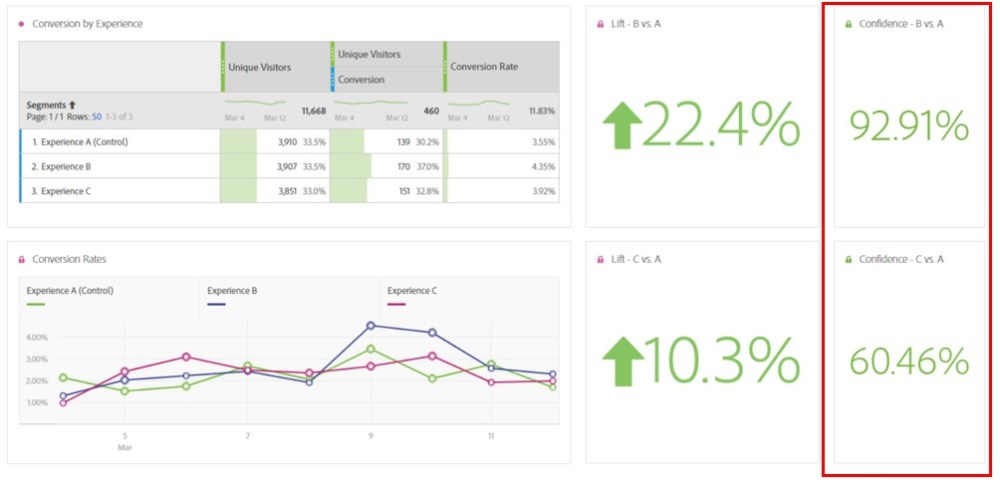
It’s often helpful to use Adobe Analysis Workspace to analyze A/B test results, whether it’s because you’re using a hard-coded method of online testing or you want to supplement your testing tool results with more complex segmentation. In any case, Analysis Workspace can be a great tool for digging deeper into your test results. While Workspace makes calculating lift in conversion rate easy with the summary change visualization, it can be frustrating to repeatedly plug your data into a confidence calculator to determine if your test has reached statistical significance. The calculated metric I’m sharing in this post should help alleviate some of that frustration, as it will allow you to display statistical confidence within Analysis Workspace just as you would lift. This is extremely helpful if you have business stakeholders relying on your Workspace to regularly check in on the test results throughout the life of the test.

This calculated metric is based on the percent confidence formula for a two-tailed T-Test. Below is the formula, formatted for the Adobe Calculated Metric Builder, and a screen shot of the builder summary.

The metric summary can be difficult to digest, so I’ve also included a screen shot of the metric builder definition at the end of this post. To create your confidence calculated metric you’ll need unique visitor counts and conversion rates for both the control experience (experience A) and the test experience (experience B). Once you’ve built the metric, you can edit it for all future tests by replacing your experience-specific segments and conversion rates, rather than starting from scratch each time. I recommend validating the metric the first several times you use it to confirm it’s working as expected. You can do so by checking your percent confidence against another calculator, such as the Target Complete Confidence Calculator.

Here are some things to keep in mind as you build and use this metric:

  1. Format your confidence calculated metric as a percent (number of decimals is up to you).
  2. You’ll need to create a separate confidence calculated metric for each experience compared to the control and for each success event you wish to measure. For example, if your test has a control and two challenger experiences and you’re measuring success for three different events, you’ll need to create six confidence metrics.
  3. Add your confidence metric(s) to a separate free-form table with a universal dimension, a dimension that is not specific to an individual experience and applies to your entire test period. Then, create summary number visualizations from your confidence metrics per the example below.

  1. This formula only works for calculating confidence with binary metrics. It will not work for calculating confidence with revenue or AOV.

After creating your confidence metrics you’ll be able to cleanly and easily display the results of your A/B test in Analysis Workspace, helping you save time from entering your data in an external calculator and helping your stakeholders quickly view the status of the test. I hope this is as helpful for you as it has been to me!


Calculated Metric Builder Definition

Featured, Testing and Optimization

Adobe Target Chrome Extension

Adobe Target Chrome Extension

I use many different testing solutions each day as part of my strategic and tactical support of testing programs here at Analytics Demystified.  I am very familiar with how each of these different solutions functions and how to get the most value out of them.  To that end, I had a Chrome Extension built that will allow Adobe Target users to get much more value with visibility into test interaction, their Adobe Target Profile, and the bidirectional communication taking place.  23 (and counting:) powerful features, all for free.  Check out the video below to see it in action.


Video URL: https://youtu.be/XibDjGXPY4E

To learn more details about this Extension and download it from the Chrome Store, click below:
MiaProva Chrome Extension

Featured, Testing and Optimization

Adobe Target and Marketo

The Marketo acquisition by Adobe went from rumor to fact earlier today.  This is a really good thing for the Adobe Target community.

I’ve integrated Adobe Target and Marketo together many times over the years and the two solutions complement each other incredibly well.  Independent of this acquisition and of marketing automation in general, I’ve also been saying for years that organizations need to shift their testing programs such that the key focus is on the Knowns and Unknowns if they are to succeed.  Marketo can maybe help those organizations with this vision if it is part of their Adobe stack since Marketo is marketing automation for leads (Unknowns) and customers (Knowns).

The assimilation of Marketo into the Adobe Experience Cloud will definitely deepen the integration between the multiple technologies but let me layout here how Target and Marketo work together today so as to relay the value the two together bring.

Marketo

For those of you in the testing community that is unfamiliar with Marketo or Marketing Automation in general, let me layout at a very high level some of the things these tools do.

Initially and maybe most commonly the Marketing Automation starts out with Lead Management space which means, when you fill out those forms on websites, the management of that “lead” is then handled by these systems.  At that point, you get emails, deal with salespeople, consume more content, etc…  The management of that process is handled here and if done well, prospects turn into customers.  Unknowns become Knowns.

Once you are Known, a whole new set of Marketing and Customer Marketing kicks in and that is also typically managed by Marketing Automation technologies like Marketo.

Below is an image that was taken directly from Marketo’s Solution’s website that highlights their offering.

Image from: https://www.marketo.com/solutions/

Adobe Target

Just like Marketo, testing solutions like Adobe Target also focus on different audiences as well.  The most successful testing programs out there have testing roadmaps and personalization strategies dedicated to getting Unknowns (prospects) to becoming Knowns (customers).  And when that transition takes place, these newly gotten Knowns then fall into tests and personalization initiatives focused on different KPIs vs becoming a Known.

Combining the power of testing and the quantification/reporting of consumer experiences (Adobe Target) with the power of marketing automation (Marketo) provide a value significantly higher than the value these solutions provide independently.

Target into Marketo

Envision a scenario where you bring testing to unknowns and use the benefits of testing to find ideal experiences that lead to more forms completions.  This is a no-brainer for Marketo customers and works quite well.  At this point, when tests are doing their thing, it is crucial to communicate or share this test data to Marketo when end users make the transition from Unknowns to Knowns.  This data will help with the management of leads because we will know what test and test experience influenced their transition to becoming a Known.

Just like Target, Marketo loves data and this code below is what Target would deliver with tests targeted to Unknowns.  This code delivers to Marketo the test name but also the Adobe Target ID in the event users of Marketo wanted to retargeted certain Adobe Target visitors.

var customData = {value: ‘${campaign.name}:${user.recipe.name}’};
rtp(‘send’, ‘AdobeTarget’, customData);
var customData = {value: ‘${profile.mboxPCId}’};
rtp(‘send’, ‘AdobeTarget_ID’, customData);

Marketo into Target

Adobe Target manages a rich profile that can be made up of online behaviors, 3rd Party Data, and offline data.  Many Target customers use this profile for strategic initiatives that change and quantify consumer experiences based off of the values of the profile attributes associated with this profile or Adobe Target ID.

In the Marketo world, there are many actions or events that take place as the leads are nurtured and the customers are marketed to.  Organizations differ on how the specific actions or stages of lead or customer management/marketing are defined but no matter what definition, those stages/actions/events can be mirrored or shared with Adobe Target.  This effort allows Marketo users to run tests online that are coordinated with their efforts managed offline – hence making those offline efforts more successful.

Push Adobe Target ID into Marketo

Marketo can get this data into Target in one of two ways.  The first method uses the code that I shared above where the Adobe Target ID is shared with Marketo.  Marketo can then generate a report or gather all Adobe Target IDs at a specific stage/event/action and then set up a test targeted to them.  It is literally that easy.

Push Marketo ID into Adobe Target

The second method is a more programmatic approach.  We have the Marketo visitor ID passed to Adobe Target as a special mbox parameter called mbox3rdPartyId.  When Adobe Target sees this value it immediately marries its ID to that ID so that any data shared to Adobe with that ID will be available for any testing efforts.  This process is one that many organizations use with their own internal ID.  At this point, any and all (non-PII) data can be sent to Adobe Target by way of APIs using nothing more than the Marketo ID – all possible because it passed the ID to Adobe Target when the consumer was on the website.

And then the cycle repeats itself with Adobe Target communicating test and experience names again to Marketo but this time for the Knowns – thus making that continued management more effective.


Testing and Optimization

Steps to Automation [Adobe Webinar]

On August 9th, this upcoming Thursday, I will be joining Adobe on the Adobe Target Basics webinar to geek out over how to dip your toes in Automation, using Automated Personalization in Adobe Target.

I am going to dive deep into the strategy, the setup, best practices, and how to interpret the results.  To make things even more fun, I am going to walk attendees through a LIVE Automated Personalization test that is currently running on our home page.

This test has only been up and running for 12 days and the image below represents a sneak preview of the results.  During the webinar, I will explain what is going on with this test.

To register for the webinar, simply register via the CTA at the bottom.


Hope to see you there!

Adobe Analytics, Tag Management, Technical/Implementation, Testing and Optimization

Adobe Target + Analytics = Better Together

Last week I wrote about an Adobe Launch extension I built to familiarize myself with the extension development process. This extension can be used to integrate Adobe Analytics and Target in the same way that used to be possible prior to the A4T integration. For the first several years after Omniture acquired Offermatica (and Adobe acquired Omniture), the integration between the 2 products was rather simple but quite powerful. By using a built-in list variable called s.tnt (that did not count against the 3 per report suite available to all Adobe customers), Target would pass a list of all activities and experiences in which a visitor was a participant. This enabled reporting in Analytics that would show the performance of each activity, and allow for deep-dive analysis using all the reports available in Analytics (Target offers a powerful but limited number of reports). When Target Standard was released, this integration became more difficult to utilize, because if you choose to use Analytics for Target (A4T) reporting, the plugins required to make it work are invalidated. Luckily, there is a way around it, and I’d like to describe it today.

Changes in Analytics

In order to continue to re-create the old s.tnt integration, you’ll need to use one of your three list variables. Choose the one you want, as well as the delimiter and the expiration (the s.tnt expiration was 2 weeks).

Changes in Target

The changes you need to make in Target are nearly as simple. Log into Target, go to “Setup” in the top menu and then click “Response Tokens” in the left menu. You’ll see a list of tokens, or data elements that exist within Target, that can be exposed on the page. Make sure that activity.id, experience.id, activity.name, and experience.name are all toggled on in the “Status” column. That’s it!

Changes in Your TMS

What we did in Analytics and Target made an integration possible – we now have a list variable ready to store Target experience data, and Target will now expose that data on every mbox call. Now, we need to connect the two tools and get data from Target to Analytics.

Because Target is synchronous, the first block of code we need to execute must also run synchronously – this might cause problems for you if you’re using Signal or GTM, as there aren’t any great options for synchronous loading with those tools. But you could do this in any of the following ways:

  • Use the “All Pages – Blocking (Synchronous)” condition in Ensighten
  • Put the code into the utag.sync.js template in Tealium
  • Use a “Top of Page” (DTM) or “Library Loaded” rule (Launch)

The code we need to add synchronously attaches an event listener that will respond any time Target returns an mbox response. The response tokens are inside this response, so we listen for the mbox response and then write that code somewhere it can be accessed by other tags. Here’s the code:

	if (window.adobe && adobe.target) {
		document.addEventListener(adobe.target.event.REQUEST_SUCCEEDED, function(e) {
			if (e.detail.responseTokens) {
				var tokens = e.detail.responseTokens;
				window.targetExperiences = [];
				for (var i=0; i<tokens.length; i++) {
					var inList = false;
					for (var j=0; j<targetExperiences.length; j++) {
						if (targetExperiences[j].activityId == tokens[i]['activity.id']) {
							inList = true;
							break;
						}
					}
					
					if (!inList) {
						targetExperiences.push({
							activityId: tokens[i]['activity.id'],
							activityName: tokens[i]['activity.name'],
							experienceId: tokens[i]['experience.id'],
							experienceName: tokens[i]['experience.name']
						});
					}
				}
			}
			
			if (window.targetLoaded) {
				// TODO: respond with an event tracking call
			} else {
				// TODO: respond with a page tracking call
			} 
		});
	}
	
	// set failsafe in case Target doesn't load
	setTimeout(function() {
		if (!window.targetLoaded) {
			// TODO: respond with a page tracking call
		}
	}, 5000);

So what does this code do? It starts by adding an event listener that waits for Target to send out an mbox request and get a response back. Because of what we did earlier, that response will now carry at least a few tokens. If any of those tokens indicate the visitor has been placed within an activity, it checks to make sure we haven’t already tracked that activity on the current page (to avoid inflating instances). It then adds activity and experience IDs and names to a global object called “targetExperiences,” though you could push it to your data layer or anywhere else you want. We also set a flag called “targetLoaded” to true that allows us to use logic to fire either a page tracking call or an event tracking call, and avoid inflating page view counts on the page. We also have a failsafe in place, so that if for some reason Target does not load, we can initiate some error handling and avoid delaying tracking.

You’ll notice the word “TODO” in that code snippet a few times, because what you do with this event is really up to you. This is the point where things get a little tricky. Target is synchronous, but the events it registers are not. So there is no guarantee that this event will be triggered before the DOM ready event, when your TMS likely starts firing most tags.. So you have to decide how you want to handle the event. Here are some options:

  • My code above is written in a way that allows you to track a pageview on the very first mbox load, and a custom link/event tracking call on all subsequent mbox updates. You could do this with a utag.view and utag.link call (Tealium), or trigger a Bootstrapper event with Ensighten, or a direct call rule with DTM. If you do this, you’ll need to make sure you configure the TMS to not fire the Adobe server call on DOM ready (if you’re using DTM, this is a huge pain; luckily, it’s much easier with Launch), or you’ll double-count every page.
  • You could just configure the TMS to call a custom link call every time, which will probably increase your server calls dramatically. It may also make it difficult to analyze experiences that begin on page load.

What my Launch extension does is fire one direct call rule on the first mbox call, and a different call for all subsequent mbox calls. You can then configure the Adobe Analytics tag to fire an s.t() call (pageview) for that initial direct call rule, and an s.tl() call for all others. If you’re doing this with Tealium, make sure to configure your implementation to wait for your utag.view() call rather than allowing the automatic one to track on DOM ready. This is the closest behavior to how the original Target-Analytics integration worked.

I’d also recommend not limiting yourself to using response tokens in just this one way. You’ll notice that there are tokens available for geographic data (based on an IP lookup) and many other things. One interesting use case is that geographic data could be extremely useful in achieving GDPR compliance. While the old integration was simple and straightforward, and this new approach is a little more cumbersome, it’s far more powerful and gives you many more options. I’d love to hear what new ways you find to take advantage of response tokens in Adobe Target!

Photo Credit: M Liao (Flickr)

Featured, Testing and Optimization

Adobe Insider Awesomeness and Geo Test deep dive

Adobe Insider and EXBE

The first Adobe Insider with Adobe Target took place on June 1st in Atlanta, Georgia.  I wrote a blog post a couple of weeks back about the multi-city event but after attending the first one, I thought I would share some takeaways.  

The event was very worthwhile and everyone that I talked to was glad to have attended.  The location was an old theatre and Hamilton was even set to run in that building later that evening.  Had I known that my flight back to Chicago that evening would be delayed by four hours, I would have tried to score a ticket.  The Insider Tour is broken down into two tracks.  An Analytics one and an Adobe Target or Personalization one.  My guess is that there were about 150 to 180 attendees which made for a more social and intimate gathering.

The Personalization track got to hang directly with the Target Product Team and hear some presentations on what they are working on, what is set to be released, and they even got to give some feedback as to product direction and focus.

The roundtable discussions went really well with lots of interaction and feedback.  I especially found it interesting to see the company to company conversations taking place.  The roundtable that I was at had really advanced users of Adobe Target as well as brand new users which allowed newbies to get advice and tips directly from other organizations vs. vendors or consultants.

As for the what the attendees liked the most, they seem to really enjoy meeting and working directly with the Product Team members but the biggest and most popular thing for the day was EXBE.   EXBE represents “Experiences Business Experience Excellence”.  You are not alone if that doesn’t roll off the tongue nicely.  Essentially, this all translates to someone (not Adobe and not a Consultant) sharing a case study of a test that they ran.  The test could be simple or the test could be very complex, it doesn’t matter.  The presenter would simply share any background, test design, setup, and any results that they could share.

Home Depot shared a case study at this year’s event and it was a big hit.  Priyanka, from Home Depot, walked attendees through a test that made a very substantial impact into Home Depot’s business.  Attendees asked a ton of questions about the test and the conversation even turned into a geek out.  Priyanka made really cool use of using multiple locations within a single experience.   This capability mapped back to using multiple mboxes in the same experience.  Some advanced users didn’t know it was possible.

So, if you are in LOS ANGELES, CHICAGO, NEW YORK, or DALLAS and plan on attending the Insider Tour, I strongly encourage to submit a test and present it.  Even if the test may seem very straightforward or not that exciting, there will be attendees that will benefit substantially.  The presentation could be 5 minutes or 30 minutes, and there is no need to worry if you can’t share actual results.  It is also a great opportunity to present to your peers and in front of a very friendly audience.  You can register here or via the very nerdy non-mboxy CTA below (see if you can figure out what I am doing here) if you are interested.

Sample Test and feedback…

At the event that day, an attendee was telling me that they don’t do anything fancy with their tests otherwise they would have submitted something and gotten the experience presenting to fellow testers.  I explained that I don’t think that matters as long as the test is valuable to your or to your business.  I then explained a very simple test that I am running on the Demystified site that some might think is simple but would a good example of a test to present.  

Also, at the event, a few people asked that I write more about test setup and some of the ways I approach test setup within Target.  So, I thought I would walk through the above mention Geo Targeted test that I have running on the Demystified website.


Test Design and Execution

Hypothesis

Adam and I are joining Adobe on the Adobe Insider Tour in Atlanta, Los Angeles, Chicago, New York and in Dallas.  We hypothesize that geo-targeting a banner to those five cities encouraging attendance will increase clicks on the hero compared to the rotating carousel that is hard-coded into the site.  We also hope that in the event that some of our customers or previous customers didn’t know about the Insider event, that maybe the test might make them aware of it and they attend.  

Built into Adobe Target is geo-targeting based on reverse IP lookup.  Target user the same provider that is in Analytics and users can target based on zip code, city, state, DMA, and country.  I chose to use DMA so as to get the biggest reach.

This data in this box represents the geo attributes for YOU, based on your IP address.  I am pumping this in via a test on this page.

Default Content – if you are seeing this, you are not getting the test content from Target

Test Design

So as to make sure we have a control group and to make sure we get our message out to as many people as possible, we went with a 90/10 split.  Of course, this is not ideal for sample sizes calculations, etc… but that is a whole other subject.  This is more about the tactical steps or a geo-targeted test.

Experience A:  10% holdout group to serve as my baseline (all five cities will be represented here)

Experience B:  Atlanta 

Experience C:  Los Angeles

Experience D:  Chicago

Experience E:  New York

Experience F:  Dallas

I also used an Experience Targeted test in the event that someone got into the test and happen to travel to another city that was part of our test.  The Experience Targeted test enables their offer to change to the corresponding test-Experience.

The banner would look like this (I live in Chicago DMA so I am getting this banner:).  When I go to Los Angeles next week, I will get the one for Los Angeles.  If I used an A/B test, I would continue to get Chicago since that is where I was first assigned.

Profile to make this happen

To have my 10% group, I have to use Target profiles.  There is no way to use % allocation coupled with visitor attributes like DMA so profiles are the way to go.  I’ve long argued that the most powerful part of the Adobe Target platform is the ability to profile visitors client side or server side.  For this use case, we are going to use the server side scripts to get our 10% control group.  Below is my script and you are welcome to copy it into your account.  Just be sure to name it “random_10_group”.

This script randomly generates a number and based off of that number, puts visitors into 1 of 10 groups.  Each group or set of groups can be used for targeting.  You can also force yourself into a group by appending the URL parameter ‘testgroup’ = the number of the group that you want.  For example, http://analyticsdemystified.com/?testgroup=4 would put me in the group4 for this profile.  Helpful when debugging or QA’ing tests that make use of this.

These groups are mutually exclusive as well so if your company wants to incorporate test swimlanes, this script will be helpful.

if (!user.get('random_10_group')) {
var ran_number = Math.floor(Math.random() * 99),
query = (page.query || '').toLowerCase();
query = query.indexOf('testgroup=') > -1 ? query.substring(query.indexOf('testgroup=') + 10) : '';
if (query.charAt(0) == '1') {
return 'group1';
} else if (query.charAt(0) == '2') {
return 'group2';
} else if (query.charAt(0) == '3') {
return 'group3';
} else if (query.charAt(0) == '4') {
return 'group4';
} else if (query.charAt(0) == '5') {
return 'group5';
} else if (query.charAt(0) == '6') {
return 'group6';
} else if (query.charAt(0) == '7') {
return 'group7';
} else if (query.charAt(0) == '8') {
return 'group5';
} else if (query.charAt(0) == '9') {
return 'group6';
} else if (query.charAt(0) == '10') {
return 'group10';
} else if (ran_number <= 9) {
return 'group1';
} else if (ran_number <= 19) {
return 'group2';
} else if (ran_number <= 29) {
return 'group3';
} else if (ran_number <= 39) {
return 'group4';
} else if (ran_number <= 49) {
return 'group5';
} else if (ran_number <= 59) {
return 'group6';
} else if (ran_number <= 69) {
return 'group7';
} else if (ran_number <= 79) {
return 'group8';
} else if (ran_number <= 89) {
return 'group9';
} else if (ran_number <= 99) {
return 'group10';
} else {
return 'sorry';
}
}

Audiences

Before I go into setting up the test, I am going to create my Audiences.  If you are going to be using more than a couple of Audiences in your test, I recommend you adopt this process.  Creating Audiences during the test setup can interrupt the flow of things and if you have them already created, it takes no time at all to add them as needed.

Here is my first Audience – it is my 10% control group that was made possible by the above profile parameter and it has all five cities that I am using for this test.  This will be my first Experience in my Experience Targeted Test which is a very important component.  For Experience Targeted Tests, visitors are evaluated for Experiences from top to bottom so had I put my New York Experience first, I would get visitors that should be in my Control group in that Experience.

And here is my New York Audience.  Chicago, Dallas, Atlanta, and Los Angeles are setup the same way.


Offer Code

Here is an example of the code I used for my test. This is the code for the offer that will display for users in Los Angeles.  I could have used VEC to do this test but our carousel is finicky and would have taken too much time to figure out in VEC so I went with FORM based.  I am old school and prefer to use Form vs. VEC.  I do love the easy click tracking as conversions events in VEC and wish they would put that in Form-based testing.  Users should only use VEC if they are using the Visual Composer.  Too often I see users select VEC only to place in custom code.  That adds overhead and is unnecessary.


<!– I use CSS here to suppress the hero from showing –>
<style id=”flickersuppression”>
#slider {visibility:hidden !important}
</style>
<script>
(function($){var c=function(s,f){if($(s)[0]){try{f.apply($(s)[0])}catch(e){setTimeout(function(){c(s,f)},1)}}else{setTimeout(function(){c(s,f)},1)}};if($.isReady){setTimeout(“c=function(){}”,100)}$.fn.elementOnLoad=function(f){c(this.selector,f)}})(jQuery);
// this next like wants for my test content to show up in the DOM then changes the experience
jQuery(‘.rsArrowRight > .rsArrowIcn’).elementOnLoad(function(){
$(“.rsContainer”).replaceWith(“<div class=\”rsContent\”>\n <a href=\”https://webanalyticsdemystif.tt.omtrdc.net/m2/webanalyticsdemystif/ubox/page?mbox=insider&mboxDefault=http%3A%2F%2Fwww.adobeeventsonline.com%2FInsiderTour%2F2018%2F/\”><img class=\”rsImg rsMainSlideImage\” src=\”http://analyticsdemystified.com/wp-content/uploads/2015/02/header-image-services-training-700×400.jpg\” alt=\”feature-image-1\” style=\”width:100%; height: 620px; margin-left: 0px; margin-top: -192px;\”></a>\n \n \n <div class=\”rsSBlock ui-draggable-handle\” style=\”width: auto; height: 600px; left: 40px; top: 317px;\”><h1><strong>Los Angeles! Analytics Demystified is joining Adobe on the Adobe Insider Tour</strong></h1>\n<p style=\”text-align:left;\”><br><br>Thursday, June 21st – iPic Westwood in Los Angeles, CA. </p>\n</div>\n</div>”);
$(“.rsContainer > div:eq(0) > div:eq(0) > div:eq(0) > p:eq(0)”).css({“color”:”#000000″});
$(“.rsContainer > div:eq(0) > div:eq(0) > div:eq(0) > h1:eq(0)”).css({“color”:”#000000″});
$(“.rsNav”).css({“display”:”none”, “visibility”:””});
$(“.rsArrowLeft > .rsArrowIcn”).css({“display”:”none”, “visibility”:””});
$(“.rsArrowRight > .rsArrowIcn”).css({“display”:”none”, “visibility”:””});
$(“#login-trigger > img”).removeAttr(“src”).removeAttr(“srcdoc”);
$(“#login-trigger > img”).css({“display”:”none”, “visibility”:””});
$(“.rsSBlock > h1”).append(“<div id=\”hawk_cta\”>…</div>”);
// this next line removes my flicker suppression that I put in place at the top of this code
jQuery(‘#flickersuppression’).remove();
})
// one of the coolest parts of at.js making click tracking a lot easier!!!
$(‘#slider’).click(function(event){
adobe.target.trackEvent({‘mbox’:’hero_click’})
});
</script>

Success Events

The success event for this test is clicking on the hero CTA which brings you to the Adobe page to register to join the insider event.  This CTA click was tracked via a very cool function that you all will grow to love as you adobe at.js.

$(‘#slider‘).click(function(event){
adobe.target.trackEvent({‘mbox’:’hero_click‘})
});

To use this, one needs to be using at.js and then update the two bold sections above.  The first bold section is the CSS selector which you can get with any browswer by right clicking and then click inspect.  In the HTML below we then right click again and copy the selector.  The second bold section is the name of the mbox that will be called when the area gets clicked on.  In the test setup, that looks like this:

Segments

Segment adoption within Target varies quite a bit it seems.  I personally find it a crucial component and recommend that organizations standardize a set of key segments to your business and include them with every test.  With Analytics, much time and effort are put in place to classify sources (utm parameters), behaviors, key devices, etc… so the same effort should be applied here.  If you use A4T or integrate with Analytics in other ways, this will help with these efforts for many of your tests.  For this test, I can’t use Analytics because the success event is a temporary CTA that was put in place for this test and I have no Analytics tracking in place to report on it so the success event lives in Target.

The main segments that are important here are for my Control group.  If you recall, I am consolidating all five cities into the Experience A.  To see how any of these cities do in this Experience, I have to define them as a segment when they qualify for the activity.  Target makes this a bit easier now vs. the Classic days as we can repurpose the Audiences that we used in the Experience Targeting.

Also cool now is the ability to add more than one segment at a time!  Classic had this many years back but the feature was taken away.  Having it now leaves organizations with no excuses for not using key segments in your tests!

An important note, you can apply segments on any and all Adobe Target success events used in the test.  For example, if I wanted to segment out visitors that spent over $200 on a revenue success event (or any event other than test entry), I can do that in the “Applied At” dropdown.  Lot of very cool use cases here but for what I need here, I am going to select “Campaign Entry” (although Adobe should change this to Activity entry:) and I will see how all the visitors from each of these cities did for my Control.

Geo-Targeting

To wrap things up here, I am going to share this last little nugget of gold.  Adobe Target allows users to pass an IP address to a special URL parameter and Adobe Target will return the Geo Attribues (City, State, DMA, Country, and Zip) for that IP address.  Very helpful when debugging.  You can see what it would look like below but clicking on this link will do you no good.  Sadly there is a bug with some versions of WordPress that changes the “.” in the URL to an underscore.  That breaks it sadly but this only applies to our site and some other installs of Word Press.

https://analyticsdemystified.com/?mboxOverride.browserIp=161.185.160.93

Happy Testing and hopefully see you at one of the Insider events coming up!


Featured, Testing and Optimization

Adobe Personalization Insider

To my fellow optimizers in or near Atlanta, Los Angeles, Chicago, New York, and Dallas:

I am very excited to share that I am heading your way and hope to see you.  I have the privilege of joining Adobe this year for the Adobe Insider Tour which is now much bigger than ever and has a lot of great stuff for optimizers like you and me.   

If you haven’t heard of it, the Adobe Insider Tour is a free half-day event that Adobe puts together so attendees can network and collaborate with their industry peers.  And it’s an opportunity for all participating experts to keep it real through interactive breakout sessions, some even workshop-style.  Adobe will share some recent product innovations and even some sneaks to what’s coming next.

The Insider Tour has three tracks, the Analytics Insider, and Personalization Insider and for New York, there will also be an Audience Manager Insider.  If you leverage Adobe to support your testing and personalization efforts, your analysis, or for managing of audiences, the interactive breakouts will be perfect for you.  My colleague Adam Greco will be there was well for the Analytics Insider.

Personalization Insider

I am going to be part of the Personalization Insider as I am all things testing and if you part of a testing team or want to learn more about testing, the breakout sessions and workshop will be perfect for you.  

In true optimization form, get ready to discuss, ideate, hypothesize and share best practices around the following:

*Automation and machine learning

*Optimization/Personalization beyond the browser (apps, connected cars, kiosks, etc)

*Program ramp and maturity

*Experience optimization in practice

Experience Business Excellence Awards

There is also something really cool and new this year that is part of the Insider Tour.  Adobe is bringing the Experience Business Excellence (EXBE) to each city.  The EXBE Awards Program was a huge hit at the Adobe Summit as it allows organizations to submit their experiences of using Adobe Target that kicked some serious butt and compete for awards and a free pass to Summit.  I was part of this last year at Summit where two of my clients won with some awesome examples of using testing to add value to their business and digital consumers.  If you have any interesting use cases or inspirational tests, you should submit them for consideration.   

Learn More and Register

If you come early to the event, there will be a “GENIUS BAR” where you can geek out with experts with any questions you might have.  Please come at me with any challenges you might have with test scaling, execution or anything for that matter.  I will be giving a free copy of my book on Adobe Target to the most interesting use case brought to me during “GENIUS BAR” hours.

I really hope to see you there and the venues are also being held at some cool places.    

Here are the dates for each city:  

  • Atlanta, GA – June 1st
  • Los Angeles, CA – June 21st
  • Chicago, IL – September 11th
  • New York, NY – September 13th
  • Dallas, TX – September 27

Click the button below to formally register (required)

(I did something nerdy and fun with this CTA – if anyone figures out exactly what I did here or what it is called, add a comment and let me know:)

Conferences/Community, Featured, Testing and Optimization

2018 Adobe Summit – the testing guys perspective

The 2018 Adobe Summit season has officially closed.  This year marked my 11th Summit with my first Summit dating back to 2008 when Omniture acquired Offermatica where I was an employee at the time.  I continue to attend Summit for a variety of reasons but I especially enjoy spending time with some of my clients and catching up with many old friends.  I also enjoy geeking out hardcore with the product and product marketing teams.

While I still very much miss the intimacy and the Friday ski day that Salt Lake City offered, I am warming much more than had I anticipated to Las Vegas.  I also got the sense that others were as well.  I also just learned that after Summit this year that quite a few folks have created their own Friday Funday if you will (totally down for Friday Motorcycle day next year!). The conference is bigger than ever with reported attendee numbers around 13,000.  Topics, or Adobe Products, covered have grown quite a bit too.  I am not sure if I got all the whole list but here are the products or topics, I saw covered at Summit:

  • Advertising Cloud
  • Analytics
  • Audience Manager
  • Campaign
  • Cloud Platform
  • Experience Manager
  • Primetime
  • Sensei
  • Target

My world of testing mainly lives in the Adobe Target, Adobe Analytics and to varying degrees, Adobe Audience Manager, Adobe Experience Manager, and Adobe Launch worlds.  It was cool to see and learn more about these other solutions but there was plenty in my testing and personalization world to keep me busy.  I think I counted 31 full sessions and about 7 hands-on labs for testing.  Here is a great write up of the personalization sessions this year broken down by category that was very helpful.

The conference hotel and venue are quite nice and make hosting 13,000 people feel like it is no big deal given its size.  As nice as the hotel is, I still stay around the corner at the Westin.  I like getting away and enjoy the walk to and from the event.  And boy did I walk this year.  According to my Apple Watch, in the four days (Monday – Thursday), I logged 63,665 steps and a mind-blowing 33.38 miles.

The sessions that I focused on where the AI ones given my considerable work with Automated Personalization, Auto-Allocate, and Recommendations.  I also participated in a couple of sessions around optimization programs given my work with MiaProva.

Below was my week and lessons learned for next year.


Summit week

Monday

I made a mistake this year and should have come in earlier on Monday or even Sunday for that matter.  Monday is the Adobe Partner day and they have quite a few fun things to learn about in regards to the partnership and Adobe in general.  It is also a nice time to hang out with the product teams at Adobe – before the storm of Summit begins.  In fact, I was able to make it one great event that evening at Lavo in the Venetian.  Over the last couple years at least, organizations that use Adobe solutions and agencies that help those organizations use Adobe solutions can be nominated for awards based on the impact of using Adobe solutions.  That night, attendees got to hear about some great use cases including one from Rosetta Stone where they used testing to minimize any detriment going from boxed software to digital experiences (a very familiar story to Adobe:).  If you find yourself part of a team that does something really cool or impactful with Adobe Experience Cloud solutions, consider nominating it for next year!

Also on that Monday is something called UnSummit.  I have gone to UnSummit a few times and always enjoyed it.  UnSummit is a great gathering of smart and fun people that share interesting presentations.  Topics vary but they are mainly about Analytics and Testing which is reminiscent of the old days at the Grand America in Salt Lake City.  I am not 100% sure why it is called UnSummit as that could leave the impression that it is a protest or rejection of Summit.  I can assure you that it isn’t or at least I’ve never heard of any bashing or protest.  In fact, all attendees are in town because of Summit.  Again, great event and if you have the time next year, I recommend checking it out.

Tuesday

Opening day if you will.  The general session followed up by many sessions and labs.  This sounds silly but I always come early to have breakfast at the conference.  I have had many a great conversation and met so many interesting people by simply joining them at the table.  I do this for all the lunches each day as well.  We are all pretty much there for similar reasons and have similar interests so it is nice to geek out a bit and network as well.

I also enjoy checking out the vendor booths as well and did so this year.  Lots of great conversations and it was cool to run into many former colleagues and friends.  Southwest Airlines even had a booth there but not sure why!  Maybe to market to thousands of business folks?

On Tuesday nights, Adobe Target usually hosts an event for Adobe Target users to get together at.  This year it was at the Brooklyn Bowl which is on the Linq Promenade, only a few blocks from the hotel.  A very cool area if you haven’t been that way.  They also have an In-n-out there too!

This event was great as I got to spend some time with some of my clients and enjoy some good food and music.  There was a live band there that night so it was a bit loud but still a great venue and event.  Lots of folks got to bowl which was awesome too.  Of the nightly events, I usually enjoy this one the most.

Wednesday

Big day today!  Breakfast networking, a session, the general session and then game time!  I had the honor of presenting a session with Kaela Cusack of Adobe.  We presented on how to power true personalization with Adobe Target and Adobe Analytics.  The session was great as we got to share how organizations are using A4T and the bi-directional flow of data between the two solutions to empower organizations to make use of the data that they had in Adobe Analytics.  Lots of really good feedback and I will be following up here with step by step instructions on how exactly organizations can do this for themselves.  You can watch the presentation here.

After my session Q&A, it was Community Pavilion time which is basically snacks and alcohol in the vendor booth area.  I also met with a couple of customers during this time.

Then it was time for Sneaks.  I never heard of Leslie Jones before but she was absolutely hysterical.  She had the crowd laughing like crazy.  Lots of interesting sneaks but the one around Launch visually interpreting something and then inserting a tag, I found to be the most interesting.  If Launch can receive inputs like that, then there should be no reason why Target can’t communicate or send triggers to Launch as well.  I see some pretty cool use cases with Auto-Allocate, Automated Personalization and Launch here!

After Sneaks it was concert time!  Awesome food, copious amounts of Miller Lite and lots of time to hang with clients and friends.  Here is a short clip of Beck who headlined that night:


Thursday

Last year I made the big mistake of booking a 3 pm flight out of Vegas on Thursday.  It was a total pain to deal with the luggage and I missed out on two really great sessions that Thursday afternoon.  I wasn’t going to make that mistake this year so I flew home first thing on Friday morning which I will do again next year too.

Thursday is a chill day.  I had quite a few meetings for Demystified and MiaProva prospects and attended a few great sessions.  Several people told me that the session called “The Future of Experience Optimization” was their favorite session of all of Summit and that took place on Thursday afternoon.  I was disappointed that I couldn’t attend due to a client meeting but will definitely be watching the video of this session.

Thursday late afternoon and night were all about catching up on email and getting an early nights rest.  Again, much more relaxing not rushing home.  So that was my week which somehow now feels like it was many weeks ago.

Takeaways

There were many great sessions, far too many to catch live.  Adobe though made every session available here for viewing.

There is quite a bit going on with Adobe Target and not just from a product and roadmap perspective.  There is a lot of community work taking place as well.  If you work with Target in any way, I recommend subscribing to both Target TV and the Adobe Target Forum.  I was able to meet Amelia Waliany at Adobe Summit this year and she totally cool and fun.  She runs these two initiatives for Adobe.

There are many changes and updates being made to Adobe Target and these two channels are great for staying up to date and for seeing what others are doing with the Product.  I also highly recommend joining Adobe’s Personalization Thursdays as they go deep with the product and bring in some pretty cool guests from time to time.

Hope to see you next year!


Featured, Testing and Optimization

Personalization Thursdays

Personalization Thursdays and MiaProva

Personalization Thursdays

Each month, the team at Adobe hosts a webinar series called Personalization Thursdays.  The topics vary but the webinars typically focus on features and capabilities of Adobe Target.  The webinars are well attended and they often go deep technically which leads to many great questions and discussions.  Late last year, I joined one of the webinars where I presented “10 Execution tips to get more out of Adobe Target” and it was very well received!  You can watch that webinar here if you are interested.

Program Management

On Wednesday, March 15th, I have the privilege of joining the team again where I am presenting on “Program Management for Personalization at Scale”.  Here is the outline of this webinar:

Program management has become a top priority for our Target clients as we begin to scale optimization and personalization across a highly matrixed, and often global organization. It’s also extremely valuable in keeping workspaces discrete and efficiency of rolling out new activities. We’ll share the latest developments in program management that will assist with ideation and roadmap development, as well as make it easier to schedule and manage all your activities on-the-go, with valuable alerts and out of the box stakeholder reports.

I plan on diving into Adobe I/O and how organizations and software can use to scale their optimization programs.  I will also show how users of MiaProva leverage it to manage their tests from ideation through execution.

You have to register to attend but this webinar is open to everyone.  You can quickly register via this link:  http://bhawk.me/march-15-webinar

Hope to see you there!

Featured, Testing and Optimization

Simple and oh so very sweet

Informatica is a very large B2B company and one of the most successful players in the data management market.  Informatica also has an impressive testing and optimization program and they make heavy use of data and visitor behavior to provide the ideal experience for their digital consumers.

Like most spaces, in the B2B space, there are countless opportunities for testing and learning.  The more data that you have, the more opportunities exist for quantifying personalization efforts through targeted tests and for machine learning through solutions like Adobe’s Automated Personalization tools.  In fact, many B2B optimization programs are focused on the knowns and the unknowns with integrations between the testing solution(s) and with demand generation platforms as I wrote about a few years ago.

In a world with relatively complex testing options available with first-party data, third-party data such as Demandbase (great data source for B2B), and with limitless behavior data, it is important to not lose sight on simpler tests.  Just because rich data is available and complex testing capabilities exist, doesn’t mean the more basic tests and user experience tests should be deprioritized.  It is ideal for organizations to have a nice balance of targeted advanced tests along with an array of more general tests as it gives the organization a wider basket to catch opportunities to learn more about what is important to their digital consumers.   Informatica knows this and here is a very successful user experience test that they recently ran.

Informatica was recently named a leader in Gartner’s Magic Quadrant report and the testing team wanted to optimize how to get this report to their digital consumers of their product pages on their website.  Many different ideas were discussed and the user experience team decided to use a sticky banner that would appear on the bottom of the page.  Two key concepts were introduced into this test with the first being the height of the banner and the second being the inclusion of an image.  Both sticky banners allow for the user to X or close the banner as well.

The Test Design

Here is what Experience A or the Control test variant looked like (small sticky footer and no image) on one of their product pages:

and the Experience B test variant on the same product page (increased height and inclusion of image):


And up close:

vs.


The primary metric for this test was Form Completes which translates to visitors clicking on the banner and then filling out the subsequent form on the landing page.  We also set up the test to report on these additional metrics:

  • Clicks on the “Get the Reports” CTA in banner
  • Clicking on the Image (which lead to the same landing page)
  • Clicking on the “X” which made the banner go away

The Results

And here is what was learned.  For the “Get the Reports” call to action in both footers:

While our primary test metric is “Form Completes”, this was a great finding and learning.  There was a 32.42% increase in the same call to action either because of the increased height or the image.

For the “Image Click”:

This was not surprising since visitors could technically only click on the image for Experience B since the image didn’t exist for Experience A.  Some might wonder why this metric was even included in the test setup but by doing so, we were able to learn something pretty interesting.   The primary metric is “Form Completes” and in order to get a form complete we need to get visitors to that landing page.  The way that visitors get to that landing page is by either clicking on the “Get the Report” call to action or by clicking on the image.  We wanted to see what percentage of “clickers” for Experience B came from the Image vs. the “Get the Report” call to action.  Turns out 52.6% of clicks in Experience B came from the Image vs. the call to action which had 47.5% of the clicks.  Keep in mind though, while the image did marginally better in clicks, the same call to action in Experience B got a 32.42% increase vs. Experience A.  The image clickers represented an additional net gain of possible form completers!

For the “X” or close clickers:

This was another interesting finding.  There was a significant increase of over 127% of visitors clicking on the X for Experience B.  This metric was included so as to see engagement rates with the “X” and to compare those rates with the other metrics.  We found that engagement with the “X” was significantly higher, almost tenfold, compared to the calls to action or the image.  The increase of “X” clicks of Experience B compared to Experience A was surmised to be because of the increased height of Experience B.

And now, for the primary “Form Complete” metric:

A huge win!  They got close to a 94% lift in form completes with the taller sticky footer and image.  The Experience B “Get the Report” call to action led to a 32.42% increase in visitors arriving on the form page.  The image in this same Experience B brought a significant number of additional visitors to this same form page.  Couple this and we have a massive increase in form completions!

For a test like this, it often also helps to visualize the distribution of clicks across the test content.  In the image below, X represents the number of clicks on the Experience A “Get the Reports” call to action.  Using “X” as the multiplier, you can see the distribution of clicks across the test experiences.

Was it the image or the height or the combination of the two that led to this change in behavior?  Subsequent testing will shed more light but at the end of the day, this relatively simple test led to significant increases in a substantial organizational key performance indicator and provided the user experience teams and designers with fascinating learnings.


Testing and Optimization

With Adobe Target, it is all about the Profile

Before there was Adobe’s Audience Manager or the Marketing Cloud Visitor ID service with A4T, there was the Adobe Target Profile.  In fact, this Profile goes all the way back to the roots of Adobe Target, to Offermatica.  This Profile, as old as it is, doesn’t really get the attention it deserves given the massive punch that it packs.  In my humble opinion, this Profile is arguably one of, if not the most valuable components of the Adobe Target platform to this day.  In fact, I have a whole chapter dedicated to it in my book as this Profile not only enables strategic personalization testing efforts but also allows for highly custom configurations of tests.


Adobe Target Profile


Given all that the Profile can do, I still find myself surprised to see just how many organizations are not really using it to its full potential.  In fact, I sadly still find organizations that are unaware of the capabilities that exist with the Profile or even how to use it.  Just late last week, I had a call with an organization that uses Adobe Target regularly and they shared that they had never heard of it which is one of the reasons why I am writing about it here today.

What is the Profile?

So what is this Profile exactly?  In geek speak, it is a collection of server-side visitor attributes stored on Adobe Target’s servers.  These visitor attributes are directly mapped and associated with the first party visitor identifier (PCID) that Adobe Target uses for visitor management.

In plain speak, the Profile is what Adobe uses to manage visitors but it also enables Adobe Target users to create audiences.  These audiences can be used to target tests to or to segment test results by, among other things.  These audiences are completely independent of any test so you can use them across tests as well.  The Profile enables audiences to be created based off of site behavior, environmental data, temporal data, first-party data via data layer or cookies, third-party data or offline behavior.  These Profile attributes can also be shared internally or externally.

Example Profile

Consider this example to solidify the concept.  You are an Adobe Target user and you want to create an audience within Adobe Target of visitors that have made a purchase.  You can do this because you know that the thank you page or the purchase complete page has a URL that contains “thanks.html”.  Without having to bother IT, you can create this audience within the Adobe Target user interface using profile scripts.  Profile scripts are simply snippets of code that execute on Adobe’s servers to define the profile attribute and in this example, our profile script will be read sort of like this:

“if the URL contains ‘thanks.html’, return true”

If we name this profile script “previous_purchaser” that creates a profile attribute called “previous_purchaser”.  Profile scripts execute to create “profile attributes”.

Whenever Adobe Target technology is seen by a visitor (by way of mbox calls), it creates a Profile.  Let us assume that in this example here that the visitor had never been to this site before and entered the site initially on the home page.  If Adobe Target is in place on the home page, that is where and when the Adobe Target Profile was born for this visitor.  As this visitor traversed the site and made its way to making a purchase, Adobe Target was called several times by way of mbox calls.  Every time the mbox makes a call, these server-side profile scripts execute or are evaluated to create profile attributes.

When the mbox call took place on the ‘purchase complete’ page where the URL contained ‘thanks.html’, this profile script we created above will then set a value of true!  This happens because each mbox call passes along the URL of the page it fired from.

In this case, the Profile was born on the home page and we are simply adding to that Profile that already exists with additional metadata.  In this case, we are adding an attribute with the name of “previous_purchaser” with a value of “true” to visitors that have made a purchase.

Now, Adobe Target users can target content to previous purchasers by creating an activity or test where the test audience is made up of the profile attribute “previous_purchaser” equal to or containing ‘true’.  Adobe Target profile attributes are ready for immediate use which makes them quite powerful.  You can use this “previous_purchaser” profile attribute on the very next page impression if you would like.

To summarize, our Audience is “Previous Purchasers” and we used “profile scripts” to create “profile attributes” that augment the Adobe Target Visitor Profile.  Only those visitors that saw the ‘purchase complete page’ will have this additional profile attribute for this example.

This example of previous purchasers is commonly used and one of the simpler use cases of using Adobe Target’s Profile to create audiences with profile attributes.  The sky is truly the limit when it comes to creating these audiences and we are not limited to a single event such as seeing a ‘thank you’ page.

Client side

The above example highlighted the most common way users of Adobe Target create profile attributes, through the user interface of Adobe Target.  Because these profile scripts execute on Adobe’s servers vs. the web page where visitors are seeing content, we consider these profiles to be server side.  When profile attributes are created within the user interface, they have the syntax of user.profile_attribute in the profile section of Adobe Target.  This is to differentiative this method of creating profile attributes vs. the alternative method which is client side by way of passing data to the mbox call.

Here is a generic example of mbox call and the text in red represents a profile attribute.  When Adobe Target sees a parameter value pair that has “profile.” at the start of it, it will augment that visitor ID with this new profile attribute.

If your organization leverages Tag Management or you have rich server-side data, you will find significant benefits to this client-side approach.  It can serve as a nice way to get data layer or managed data into Adobe Target quickly without having to write scripts in the Adobe Target interface.  Adobe limits profile attribute passing to 50 per mbox call and please consider the size of your mbox call when you add many profile attributes.

Profile facts

There is so much to profiles and many fascinating use cases for them.  In the months ahead, I plan on sharing more about what profiles can do and some fascinating use cases.  I just wanted to get the general concept of Profile attributes out there here.  In fact, there is a cool project in the works at MiaProva to help organizations make better and more strategic use of this capability.  More on that soon but here are some facts and factoids on profile attributes that you might find helpful.

  • The Adobe Target Profile that each one of your digital consumers has (assuming you have a global mbox) expires, by default, after 14 days of inactivity.  This means your audiences do too since it is mapped to the Profile that Adobe Target manages.
  • Mutual exclusivity within Adobe Target is doable because of profile scripts.
  • Adobe has a rich set built-in profile attributes that can be very helpful.  Things such as what ‘active tests’ users are into or the value of the unique visitor ID.  More information on that here.
  • Profile Attributes can not only be used for Adobe Target but for Adobe Recommendations and for Automated Personalization efforts.
  • Profiles can be static or dynamic – for example, you can have a profile attribute ‘have purchased’ and another profile attribute ‘number of purchase events’ that would increment every time the event happened
  • Profiles attributes can be created using the values of other profile attributes.
  • Profile attribute values can be passed onto other platforms.  If you’ve ever used the s_tnt integration with Adobe Target that passes test data to Adobe Analytics, you are using profile attributes (test name and experience name) and are sharing that to Adobe Analytics for consumption.
  • Automated Personalization LOVES profile attributes for their content decisioning.  If you want the models to consider an important data attribute of yours, create a profile attribute!
  • If you want to manage experiences across test activities, you would use profiles attributes.  For example, if you want everyone that got Experience B of one test to get Experience B of another test, you target both Experiences to the same profile attribute.
  • Adobe Target’s category affinity algorithm is an array of dynamic profile attributes.

If you weren’t already familiar with the Adobe Target Profile, I hope this post helped serve as a nice introduction to the Profile and how users can use attributes to append to the Profile to create audiences.  Profile attributes allow testers to up their game big time!  In an upcoming post, I will dive into mbox3rdPartyId which brings the Profile and its attributes to a whole new level!

Adobe Analytics, Conferences/Community, Featured, Presentation, Testing and Optimization

Get Your Analytics Training On – Down Under!

Analytics Demystified is looking at potentially holding Analytics training in Sydney, in November of this year. We’re looking to gauge interest (given it’s a pretty long trip!)

Proposed sessions:

Adobe Analytics Top Gun with Adam Greco

Adobe Analytics, while being an extremely powerful web analytics tool, can be challenging to master. It is not uncommon for organisations using Adobe Analytics to only take advantage of 30%-40% of its functionality. If you would like your organisation to get the most out its investment in Adobe Analytics, this “Top Gun” training class is for you. Unlike other training classes that cover the basics about how to configure Adobe Analytics, this one-day advanced class digs deeper into features you already know, and also covers many features that you may not have used. (Read more about Top Gun here.)

Cost: $1,200AUD
Date: Mon 6/11/17 (8 hours)

Data Visualisation and Expert Presentation with Michele Kiss

The best digital analysis in the world is ineffective without successful communication of the results. In this half-day workshop, Analytics Demystified Senior Partner Michele Kiss will share her advice for successfully presenting data to all audiences, including communication of numbers, data visualisation, dashboard best practices and effective storytelling and presentation. Want feedback on something you’re working on? Bring it along!

Cost: $600 AUD
Date: Fri 3/11/17 (4 hours)

Adobe Target and Optimization Best Practices with Brian Hawkins

Adobe Target has been going through considerable changes over the last year. A4T, at.js, Auto-Target, Auto-Allocate, and significant changes to Automated Personalisation. This half day session will dive into these concepts, as well as some heavy focus on the power of the Adobe Target profile and how it can be used as a key tool to advance personalisation efforts. Time will also be set aside to dive into proven organisational best practices that have helped organisations democratise test intake, work flow, dissemination of learnings and automating test learnings.

Cost: $600 AUD
Date: Fri 3/11/17 (4 hours)

[MeasureCamp Sydney is being proposed to be held on the Saturday, giving you a great reason to stay and hang out in Sydney over the weekend]

If you plan to attend, we need you to sign up here bit.ly/demystified-downunder so we can understand if there’s sufficient interest.

These trainings have not been (and likely never will come again!) to Australia, so it’s an awesome opportunity to get a great training experience at a way lower cost than that of flying to the US!

This is not confirmed yet so please do not book any travel (or any other non-refundable stuff) until you hear from us. Hope to see you all soon!! (edited)

* I’m allowed to say that, because I was born and raised in Australia (though I may no longer sound like it.) From the booming metropolis of Geelong! 

Analytics Strategy, Testing and Optimization

Focusing on Outcomes

Measuring outcomes is a hot-box issue that stands between Marketers and Measurers that track marketing effectiveness. Today’s article in the Wall Street Journal, Some Marketers Want More Ad Testing, Less Debating About Metrics explores this issue and the brands that are taking action.

What are you measuring?

On one side, many Marketers (and particularly Brand Marketers) are fighting for attention online. They attempt to prove value by racking up viewable impressions and time spent with digital media. But, the other camp is fighting for A little less conversation, a little more action. This latter group is focused on using digital media to drive specific outcomes. These outcomes include: an online purchase, a download, or signing up online. Even sites without specific conversion events contain outcomes. For these sites, objectives are often to engage visitors and to have them return for more information or content. Yet, Marketer’s spend too much time second-guessing the value of time on page or how many ad units equal currency. Not enough energy focuses on desired outcomes. My colleagues and I have written and preached about the fallacy of time spent in the past and simply put, there’s a better way.

Let’s skip the nuance

I won’t slip down the partisan path to debate brand marketing versus direct. However, I will argue that the multitude of dollars spent on digital media is still largely questionable. Now is the time to look between the fuzzy marketing tactics to focus on outcomes. I advocate for using Measurement Plans to identify outcomes with digital analytics and counsel my clients to take this approach. Now, don’t mistake this focus on outcomes as a recommendation to place a magnifying glass on just the conversion event itself. It’s extremely important to understand the customer journeys and pathways that lead up to the event. This enables you to replicate journeys and to produce more desired outcomes. It’s the same with attempting to measure every nuanced action on your website. Taking this approach results in lots of data and a lack of clear information on what to do about it. Instead, focus on outcomes that matter most to your business.

Experimentation drives innovation

But getting back to the WSJ article, the disruptive companies mentioned like Dollar Shave Club, Netflix, and Wayfair are migrating away from the swirling conversations about viewable impressions and placing bets on marketing tactics that drive actions. These companies are experimenting with their digital initiatives to see what works in our ever-evolving world of online consumers. By testing ideas and non-traditional advertising, innovative brands can pivot quickly to tactics that produce their desired outcomes and leave those that don’t in the dust.

Connect outcomes to experiences

This starts with examining your customer experience and creating beginning and end points for distinct phases throughout the customer journey. If it’s the advertising piece of the puzzle you’re spending money on, this exercise should focus on your acquisition efforts and the desired outcomes at the end of that part of the journey. But remember, acquisition isn’t the end of the experience. Pulling those customers through the desired outcomes for each lifecycle stage: from acquisition, to consideration, to purchase (or your digital equivalent), and then keeping them as valued customers must be the perspective you take. Today’s digital world isn’t about the bite-sized ad your prospective customer viewed and consumed; it’s about the entire diet of the prospect, and their peers, and how they eat as a whole. By clearly defining your desired outcomes and tracking how digital customers arrive at those points, you can ultimately create better digital experiences.

To learn more about how Analytics Demystified helps organizations build Measurement Plans to capture outcomes across the entire customer lifecycle, or how we can help your company focus less on the noisy metrics and more on the outcomes that matter, reach out to john@analyticsdemystified.com or leave a comment.

Analytics Strategy, Testing and Optimization

Web Analytics Is Just a Hammer

It’s funny how you never know which conversations or presentations will stick with you for years. One of mine, that I didn’t realize at the time, was when John Lovett keynoted at ForeSee‘s user conference several years ago. He had a simple diagram in his presentation (this was John pre-Prezi!) that talked about different types of data: behavioral, attitudinal, and observational. That really resonated with me, to the point that it’s become one of my favorite soapboxes.

That soapbox (although hopefully presented in a much less preachy way than “soapbox” connotes) is one of the core elements of one of the eMetrics sessions I’ll be leading next month. And, I also got to try to capture those thoughts in a recent Practical eCommerce article. The premise for the article comes from the cliché that, when all you have is a hammer, all the world looks like a nail. Not a week goes by when I don’t have a co-worker or client view their “main” analytics or optimization platform as a universal tool.

Web analytics tell you what visitors did. Site surveys tell you what they wanted to do and, to a certain extent, who they are. Testing platforms let you construct a parallel universe. You get the idea.

Read more in the article itself.

Analysis, Testing and Optimization

Big Data without Digital Insight Management Is a Big Hot Mess

One of the many exciting aspects of joining a new company is the opportunity for reflection. The lead-up to the job change forced some introspection — what was it I really most enjoyed about my profession and what would a dream job look like that allowed me to spend as much of each day doing that as possible? And, as a new company, everyone has had to put their heads together to build out the processes needed to bring the vision for the company to life, which has required a different flavor of reflection: reflecting on what has and has not worked in our collective experience when it comes to enabling brands to be as data-informed as possible in their daily processes.

Shortly after joining Clearhead, I attended eMetrics in Boston. The conference, as always, was a great time. And, as often is the case, one of the conversations that stuck with me the most occurred where I didn’t expect it — in the exhibit hall during the sessions with a vendor I’d never heard of before the conference: Sweetspot Intelligence. Sergio Maldonado (@sergiomaldo) explained the vision for Sweetspot, gave me a brief product tour, and handed me a copy of the paper they sponsored Eric Peterson to write: Digital Insight Management: Ten Tips to Better Leverage Your Existing Investment in Digital Analytics and Optimization. The concept of “Digital Insight Management” is intriguing. And, luckily, it’s much more than an abstract idea — it’s real and, I believe, something that all analysts should be striving to implement.

Let’s Start with the Basics — Demystified’s Hierarchy of Analytical Needs

Early in the paper, Eric included Analytics Demystified‘s Hierarchy of Analytical Needs:

Experienced analysts look at this diagram and think, “Well…yeah. That’s a good depiction of the battle we fight every day.” Any sort of ho-hum response to the diagram is because we’ve been fighting the battle to move “up the pyramid” for a while, and we often feel undermined by the business environment in which we work. This is one of the more succinct and elegant depictions (not just the labels on the left — the assessment in the boxes on the right) that I’ve seen.

One Step Back Adds Another Element

When viewed through the lens of “what an analyst can do,” the hierarchy is complete. In some respects, the analyst can only lead the proverbial horse to water (clearly communicate a data-informed recommendation). The analyst can’t necessarily make the horse drink (take action). But, still, it’s worth recognizing that, if we take just one step back from this pyramid, we want to see one more level on the hierarchy:

Again, this is somewhat obvious. Yet, it’s where “we” (businesses) seem to so often stumble. There is so much “Data” now that marketers are now conditioned to prepend any mention of the word “data” with the word “big!” Few reports rely on data from a single source as analysts, and marketers work hard to place the data into meaningful context.  But, of course, the further up the pyramid we go, the easier and easier it is to get derailed. Ultimately…limited action.

Pivoting the Process

While the hierarchies above are unequivocally true, the actual process for meaningful analytics — analysis that drives relevant action — actually looks quite different:

Let’s break this down a bit:

  • Everything hinges on having clear objectives and measures of success — it’s scary how often marketers stumble on this, and, as analysts, it behooves us to be skilled in helping marketers get these nailed down (these are soft skills!)
  • Performance measurement is key…but it’s not the source of insights — performance measurement is the alerting system; it tracks the KPIs against targets, as well as some supporting and contextual metrics. But, the reports and dashboards themselves don’t yield insights — they surface problems that then need to be further explored.
  • All analysis starts with a business problem, business question, or business idea — the lefthand column is where th magic happens (or, all too often, doesn’t!).

It is impossible to attend any analytics-oriented conference these days without being hit over the head with how critical it is to develop and foster strong relationships with your business partners: regularly communicate, listen for the problems they’re having that your analytical skills can help with, learn how to communicate effectively, etc. That is a recurring theme because actually teasing out the right business questions and problems can be tricky!

Conversely, the back end of the process can be tricky, too. We’ve all had cases where we completed the right analysis and got actionable results…but action never occurred. As I understand it, that is where Sweetspot comes in: technology that supports communication and workflow related to getting actionable information to the people who can take action:

So…Will Tag Management Solve This?

(Blog authors get to crack themselves up with their headings…)

What Eric’s paper, and Sweetspot’s product, got me thinking about are a couple of gaps that, hopefully, I’ve covered in this post:

  • As analysts, we need to develop, implement, and own workable processes within our companies to make analytics truly gain and sustain traction
  • There is an opportunity for better technology to support these processes…and that is analytics technology that has nothing to do with the mechanics of capturing customer data

Is “Digital Insight Management” the next big thing? I think it is. Big Data is just a big hot mess without it.

Testing and Optimization

Optimization Test Techniques – Part II of II

In my previous post, I highlighted how it is important to understand what optimization techniques are available in the market today because by knowing the techniques, you are much better armed to apply additional strategy to your optimization efforts.

This post is a continuation of my previous blog post in that I walk through the remaining five optimization test techniques available in Test&Target. So far, I have covered 1:1 Campaign, 1:1 Display Campaign, A/B Campaign, and Flash Campaign. Here I will cover Landing Page Test, Landing Page Campaign, Monitoring Campaign, Multivariate Test, and finally the Optimizing Campaign.

Landing Page Test/Landing Page Campaign

I’ve combined both the Landing Page Test and the Landing Page Campaign types here because they provide the same core test functionality. These types of test techniques are very different compared to an A/B test in that visitors can switch branches or experiences of a test. This technique is highly effective when your test strategy requires that visitors be able to change branches of a test versus the A/B approach where visitors are forced to maintain membership in a particular test branch.

A great example of such a test is around SEM reinforcement. Lets say you have two different ad campaigns taking place on Google where one ad campaign is promoting a particular product and the other campaign is promoting discount messaging. If you have a test running that is basically quantifying the value of message reinforcement associated with source, then you would have an A, B, C Campaign. Experience A would be the default content or what is currently running on the landing page. Experience B would be targeted to the first Google SEM messaging on product messaging and Experience C would be targeted to the second Google SEM ad around discount messaging.

To effectively run this type of scenario you would want to leverage the Landing Page Campaign in the event visitors happen to click through on both of the SEM ads. Using an A/B campaign with this type of test would reinforce the messaging of the first ad clicked on the landing page even if the visitor clicked the second ad because with the A/B campaign, you are stuck with the first Experience assigned for the life of the campaign. The Landing Page campaign would recognize the ad clicked on and switch you to the corresponding campaign experience even if that means switching branches.

The SEM reinforcement example is just one way the Landing Page technique can help add additional strategy. I often find this technique to also be helpful when targeting campaigns to particular behaviors on the site or when offline data is incorporated into your online optimization efforts.

The key difference between the Landing Page Test and The Landing Page Campaign is that a Landing Page Test is used for Multivariate testing where the strategy involves having the visitors change experiences within a Multivariate test design.

Monitoring Campaign

The monitoring campaign is an incredibly helpful asset for any organization that leverages Test&Target.

The monitoring campaign is typically used to collect data or to run concurrently with other campaigns to track results. The monitoring campaign is not typically used to display content, although it can if needed.

A great use case for using a monitoring campaign would be to set a baseline for conversion rates or revenue metrics like total sales, revenue per visitor, or average order value. I often recommend to customers that if they have the mboxes on the site but the alternative content isn’t ready, to start a monitoring campaign to not only see some metrics but also to familiarize yourself with the Test&Target platform.

The Monitoring Campaign was not designed to replace an organization’s analytics but many organizations soon find themselves using the Monitoring Campaign to provide data on certain behaviors defined in T&T or to even augment analytics with pathing reports. Another interesting use of Monitoring campaigns that I have seen helpful to organizations is using it to deploy tags to the site independent of T&T. Before tag management solutions became so popular, the mbox was a nice and easy way to get code to the page without having to bother IT if an mbox was already in place. Nowadays, T&T has a plugin functionality that can handle that without having to setup a Monitoring Campaign.

Multivariate or MVT Campaigns

Multivariate testing is a somewhat political topic in the testing world. There are many schools of thought when it comes to multivariate testing and there is also much debate about whether it is as beneficial as A/B testing. I will leave those topics for future blog posts but simply outline how the T&T platform approaches MVT testing here.

The default or productized MVT approach in the Test&Target platform is the Taguchi approach. This approach is a partial factorial approach in that not all possible combinations of elements and alternatives will be incorporated into the test design – only a portion of all possible will be. The key benefit T&T advocates here is that less time is needed to get results because less experiences require less traffic to the test.

Here is an example of the Taguchi approach: lets say you have 3 elements and 2 alternatives for each element. The elements are the Call to Action, the Color, and the Text. If you had two different iterations of each of these elements that would represent a 3X2 MVT design. If you mixed and matched each element and each alternative, all possible combinations would come to 3ˆ2 = 8. By applying the Taguchi approach, only 4 out of the 8 possible combinations will be tested. The 4 experiences that are tested are not a random four but rather the 4 according to the Taguchi model. T&T helps you with this as you go about creating your test within the platform. Here is an example of a test design created by T&T with a 3X2 MVT:

The Taguchi approach becomes especially handy when you have more then 3 elements. In the above example, testing 8 experiences versus the 4 wouldn’t present as much of a challenge as testing 7 elements with 2 alternatives. A 7X2 MVT with all possible combinations would require testing 128 experiences (2ˆ7) versus the Taguchi approach where only 8 experiences would be needed.

The reporting that comes along with a T&T Multivariate test is very similar to what you can expect from any other type of test technique with one exception. For MVT tests, T&T provides what is called an Element Contribution Report. This report is helpful for a number of things.

First, when you test only a subset of all possible test combinations you are only getting data on those tested experiences. This report presents to you what the “Predicted Best Experience” is based on data collected thus far. With a 7X2 MVT Taguchi test design, you are only testing 8 out of 128 possible experiences – this report tells you which experience would have been the best given the odds of you having it in your test design would be only 8/128.

Secondly, this report is helpful to understand how each element impacts the given success event, hence the name of the report being Element Contribution Report. This data is incredibly helpful because you can use it for other tests designs. For example, I have seen many Taguchi MVT Element Contribution reports infer that a certain Message Approach as a test alternative was incredibly impactful with high statistical confidence. Those organizations can now take that Message concept and incorporate it into A/B tests or even in offline Marketing efforts. This report essentially helps identify themes that can be incorporated into other Marketing efforts.

Here is an example of an Element Contribution Reprot where you can see each element and which alternative of that element was more successful, making up what would be the best test experience even if it wasn’t part of the test design. Additionally, you can see that the most influential element was the Submit Button :

element-contribution-report

Just because T&T’s default approach to MVT is the Taguchi approach, that doesn’t mean that you are limited to running partial factorial multivariate tests with this platform. I have worked with many clients over the years including one right now that is using T&T for full factorial MVT tests. To do this, you simply have to create your test design offline and set it up as an A/B test within T&T. The post test data is then analyzed offline as well to quantify interaction effects.

Optimizing Campaign

This type of campaign technique is surprisingly unique to the Test&Target platform given that it can be very helpful to any Optimization team within an Organization.

[Correction: SiteSpect also offers this automated optimizing test functionality.]

The Optimizing Campaign is not your typical test type. It isn’t designed for the type of learnings that you might be used to with running other types of tests where you are comparing different experiences across different visitor sets. It is designed to allow the testing platform automatically deliver the right experience at the right time.

Imagine if you will, five different pieces of content for testing. This content can be home page hero content, navigational elements, calls to action, email content….anything really that you wish to have tested as part of a test design. Typically you would approach this with either an A/B test technique or a Multivariate test so as to see which version versus the other led to increases in given success events. The Optimizing campaign test technique is designed to not maintain an equal distribution of test content to give you this data but rather it will automatically shift traffic to the better performing experience of all the possible experiences. If Experience C was consistently outperforming the other Experiences, the Optimizing Campaign will automatically shift more and more of that that visitor traffic to that test experience.

T&T takes the Optimizing Campaign to another level with how it leverages segments in this automation. If you include segments in this campaign setup, the Optimizing Campaign will provide its automation to those segments by automatically providing the most effective experience for that segment. Additionally, the reporting associated with this campaign type provides a report called “Insights” that shows what segments impacted what test offers and whether that impact was positive or negative. This is incredibly powerful because the tool is doing the discovery for you and you are then enabled to create a new campaign right from this report targeted to that discovered segment.

Here is a screen shot of an Insights report from T&T:

test&target optimizing campaign

I find that the Optimizing Campaign test technique is most effective for tests that are being run in email campaigns. Lets say you have an email blast that is going out to 200,000 email subscribers and you were running an A/B/C test of content within that email. The Optimizing Campaign has the potential to learn what experience within that test design was the most successful from the first sets of visitors that opened that email. If, for example, the first 2,000 visitors reacted much more favorably to Experience B, the Optimizing Campaign would shift more and more visitors to get Experience B if they haven’t opened the email yet. This approach allows organizations to immediately capitalize on test learnings for short marketing cycles like those in email campaigns.

Testing and Optimization

Optimization Test Techniques – Part I of II

As I talk to more and more companies that are using testing solutions, I find many of them are unaware of the test techniques that are available in their testing platform.  Testing solutions available today offer more then just A/B and multivariate testing capabilities.  There are different techniques around multivariate tests but there are also other test techniques available that offer additional strategy for your tests.  Familiarizing yourself with the different techniques available will allow you to get much more value out of your testing solution and your optimization program.

Here I will share what test techniques or types that are currently available in Adobe’s Test&Target (T&T) platform.

In T&T, tests types are referred to as campaigns and campaign types.  All the campaign types use the same core components such as the mbox and the offer.  The mbox, which is short for marketing box, does many things but for this topic, it is best to think of it as the area of real estate on the website that you wish to assign content as part of a test.  That content that you assign as part of the test is your offer. Campaigns are where you assign business rules to your mboxes and offers.


1:1 Campaign

The 1:1 campaign is a campaign type that is only available to those customers that have a Test&Target1:1 license.  Test&Target1:1 is the former Touch Clarity product acquired by Omniture and has since been incorporated into the Test&Target platform as a test type allowing users to leverage a shared profile and a single platform for their optimization efforts.

The 1:1 campaign is designed to leverage models to determine the right content to present to the individual vs. a segment of visitors.  These models are focussing on a single success event that you specify in the campaign setup.  These events can be anything that can happen in a session such as:  click through, form complete, purchase, revenue per visitor, etc…

There will be two branches of this type of test, similar to an A/B test.  The first branch serves as a control and is presented to 10% of traffic.  These visitors will randomly see any one of the offers you are using in the test.  The engine learns from this 10% of traffic by understanding how visitors react to the content and then correlating that reaction to the profile attributes of those visitors.

The other 90% of traffic benefits from this by receiving targeted content based off of the real time scoring the 1:1 engine provides.

I have seen this campaign type offer a ton of value to customers in highly trafficked pages such as the home page or main landing pages.  The big benefit here is the automation.  You set it up and let it do its thing with minor tweaking here and there.

This is what the summary report looks like in the 1:1 campaign type where you can see the two branches of the test:

test&target1:1

The other key value that this test type provides is what is called an “Insights” report.  Yep, Adobe has an Insight product for analytics and also a report in 1:1 called Insights.  This Insights report in 1:1 provides data on what profile attributes of visitors are offer a positive and negative propensity against a given offer.  In other words, this report discovers segments or profile attributes that are impactful.    Here you can learn things like people on their 3rd session and are from California respond positively to a particular offer – hence discovering this segment for you and providing a marketing insight that can be used in other tests or in offline marketing!

1:1 Campaign Display

This campaign type is the exact same at the 1:1 except that it is used in display ads versus a website.

A/B..N Campaign

This is by far the most popular of the campaign types and, as you can imagine, it is the test type that allows you to compare two different experiences.  You can have just two experiences competing against each other but you can also incorporate as many different experiences as your traffic and creative permits.  Here is what the architecture of a standard A/B test looks like with two different offers being assigned to two different mboxes:

campaign setupAn important thing to note regarding the A/B test is that whatever experience or branch of the test the visitor falls into, they are stuck with the experience for the life of the campaign.  That is, if they continue to visit the area that is being tested, they will continue to see that test content until they convert which is defined as the primary success event in T&T.

Flash Campaign

This campaign type is used when you wish to test content within flash files.  This is a great technique to use if you wish to apply optimization to your display ads.  Onsite profiles collected by T&T can be used for quick and easy targeting with this type of campaign.

Adobe’s CS5 of Flash has productized the integration with T&T in that within CS5 of Flash, you can leverage a Flash Extension to quickly “mbox” components of the flash asset to be used as part of a test in T&T.  In T&T then you select the Flash campaign and during the campaign setup, you either upload the “mboxed” flash file or point to where it lives in the network.  T&T then identified the “mboxed” components where you can assign alternative content to it as part of the test.

The flash campaign follows the same technique as an A/B test in that visitors are stuck with whatever experience they were originally provided.

In the follow up post, I will highlight the Monitoring Campaign, Multivariate Campaigns and the Optimizing Campaign.