Adobe Analytics, Testing and Optimization

Adobe Target and Adobe Analytics Webinar with Adobe

I had the amazing good fortune to be in the testing and optimization space since 2006 when I joined a small company called Offermatica.  In 2008, Offermatica (now Adobe Target) was acquired by Omniture (now Adobe Analytics).  In the twelve years since that acquisition, the two solutions have evolved into a single profile by way of Analytics for Target (A4T).

On Tuesday, October 27th, I will be joining Adobe on a webinar to talk about A4T and dive into:

  • How A4T can provide the mechanisms to align organizationally, scale your optimization program, monitor the program in aggregate, and leverage metric-driven AI
  • Automation with Target and putting  the metrics and audiences from Analytics to work for you
  • Incorporating Automation to advance the journeys of your digital consumers

If you are interested, please join us:

https://www.adobeeventsonline.com/Webinar/2020/PersonalizationScale/invite.html

General

Our campaign to raise money for Black Girls CODE

A little more than a week ago I could not sleep. I was about to ask the analytics community for money at what has proven to be a tough time for many, and I was about to make a statement about the values that our company holds. It’s a little nerve-wracking I admit.

I shouldn’t have worried in retrospect.

Jason Thompson of 33 Sticks and I set out to raise $40,000 for Black Girls CODE by agreeing to match up to $20,000 in donations. We gave ourselves two weeks to raise the money and meet our goal.

It took three days.

I just want to say I am personally HUGELY GRATEFUL for the support we have received from the digital measurement community in this campaign.  Nearly 100 individual donations large and small have pushed us past our goal and now we are well on our way to raising over $50,000.

We still welcome your donations, instructions to do that are pasted below, but again, from the bottom of my heart … thank you all. Thank you for thinking beyond your own lives and considering the lives of others. Thank you for recognizing that racism is present even if we personally do not see it. Thank you for sharing our desire to have a more diverse, more equitable, and more balanced technology landscape over time.

You are all awesome.


If you’d like to make a donation as part of the Demystified/33 Sticks campaign for Black Girls CODE:

  1. Decide how much you can contribute, knowing that Jason and I are matching you dollar for dollar
  2. Go to donorbox.org/support-black-girls-code and make your donation
  3. When you get your email confirmation of the donation, which is also your tax donation receipt, forward that to either blm@analyticsdemystified.com or blm@33sticks.com. If you want to redact the email and remove your personal info that is totally fine, we just need to know how much you donated!
  4. Track our collective progress online at https://tinyurl.com/demystified-33sticks
General

Analytics Demystified Supports Black Lives Matter

I have white privilege.

I was born into it, and throughout my life I have been given opportunities simply because I am white. I don’t want to say I have taken advantage of that, but I honestly don’t know that I haven’t … because I don’t know what it’s like to not be white and live in a system that treats otherwise qualified, talented, hard working individuals differently because of the color of their skin.

I didn’t ask for it, but it’s there, and so watching the scenes unfold across the media in the wake of George Floyd’s killing makes me feel ashamed of the system that has given me so much. And I am frustrated that in a day and age that has seen so many amazing technological advancements, we have not as a society managed to further the causes of equality, humanity, and compassion.

I’d like to start to help fix that.

If you have followed my career — from my founding of the Web Analytics Forum, to my publishing Web Analytics Demystified and The Big Book of Key Performance Indicators, to my co-founding of Web Analytics Wednesdays, or the creation and fostering of the Analysis Exchange — you will see that I have tried to be there for the digital analytics community. My efforts have not always been wholly altruistic, I admit that, but in the end I like to believe that I have had some positive impact on our industry as a whole.

Today I want to ask the analytics community to help me give back.

On behalf of Analytics Demystified, I am donating to Black Girls CODE, a 501(c)(3) non-profit that is working to increase the number of women of color in the digital space by empowering girls of color ages 7 to 17 to become innovators in STEM fields, leaders in their communities, and builders of their own futures through exposure to computer science and technology. I chose Black Girls CODE as a recipient because their efforts speak directly to me as a technologist, a business leader, and as a father.

But I am not alone in my efforts.

Jason Thompson, the CEO and co-founder of 33 Sticks, has generously agreed to match my donation to Black Girls CODE.  While technically Jason and I compete, I reached out to him because I respect his work ethic and his continual efforts to remind us all that it’s not what we do but how we do it that matters. He is one of the “good guys” in digital measurement, and I knew before I even asked him that he would help if he could.

And Jason and I … would like your help.

We are asking each of you reading this who work in the analytics industry and who have comparatively good lives to join us in donating to Black Girls CODE. And to encourage your donations, Jason and I will match up to a total of $20,000 USD in donations over the next 14 days.

Our goal is to work with you, the global digital measurement community, to raise $40,000 USD for Black Girls CODE to help them bring more diverse voices into technology. By expanding the range of experiences shaping our industry, Jason and I have little doubt that digital analytics, and by extension, the technology community, will be better for it.

To help us, and to take advantage of our matching efforts is super simple:

  1. Decide how much you can contribute, knowing that Jason and I are matching you dollar for dollar
  2. Go to donorbox.org/support-black-girls-code and make your donation
  3. When you get your email confirmation of the donation, which is also your tax donation receipt, forward that to either blm@analyticsdemystified.com or blm@33sticks.com. If you want to redact the email and remove your personal info that is totally fine, we just need to know how much you donated!
  4. Track our collective progress online at https://tinyurl.com/demystified-33sticks

No donation is too small!  If you can give $5 it’s like giving $10! If you can give $50 it’s like giving $100!! Jason and I are confident that if we are able to rally the digital analytics community to raise $40,000 for Black Girls CODE, that together we can have a positive and meaningful impact on their efforts to make our little corner of the world a more diverse, a more inclusive, and an overall better place.

I welcome any questions you might have about this effort, and on behalf of everyone at Analytics Demystified I sincerely hope that all is well for you and yours during these uncertain times.

P.S. Please feel free to share this post with anyone and everyone you think may want to contribute. 

Featured, Testing and Optimization

How Adobe Target can help in the craziest of times…

It has been a crazy week but I don’t have to tell any of you that.  Many of you might be new to working from home, adjusting to homeschooling (the biggest challenge in my house), changes to businesses, health issues, family concerns, etc…  We have never seen anything like this before.  Truly historical times.

Since last Saturday, I have been swamped helping some of my clients that leverage Adobe Target to make things easier and better for their digital consumers.  Now that I am getting my head above the water, I thought I would share some of the many use cases that have come up in the hopes that some of you might find them helpful as well.  

So, in no particular order:

A.  Geo-Targeting –   a few of the retailer companies that I work with wanted certain messaging sent to certain DMA’s and cities related to store closings, adjusted hours, etc..  I even had a few financial institutions that needed certain content displayed to their customers outside the United States.  Geo-Targeting is simply an Activity that is targeted to an audience that uses the built-in geo-attributes:

Another helpful utility built into the geo-attributes for the telco’s out there.  You can target your own network or a competitor’s network.  😉


B.  Impression Capping – This has been a popular request this week.  Present COVID-19 related content show but only for 3 or 4 impressions and then suppress it.  This is done by leveraging Adobe Target profile attributes.  We simply set up a profile script to increment with each Adobe Target server call (or mbox call for us old-timers) like the one below.


Then create an Audience like this and use it in the Activity.  This Audience here essentially represents 1, 2, or 3 page impressions assuming a global mbox (every page) deployment.  The fourth impression would kick the visitor out of the test and stop any content associated with it to stop showing.


C.  Recommendations – quite a bit of work here this week helping customers adjust the Criteria used in Recommendations being made across the site.  The first thing we focused on is the recency of data.  Baseball and soccer cleats were hot items up until this week so adjusting the “most viewed” or “top sellers” to a smaller window made a lot of sense. 

To modify this, within the Criteria, simply drag it all the way to the left and data window for product suggested will only come from data within the last 24 hours.  

The next thing we did was raise the inventory considerations given the high volume of some items being sold.  Again, within the Criteria, you can tell Adobe not to include a particular SKU or product in the Recommendations if the inventory of that product falls below a threshold.

D.  Auto-Allocate – this feature is available to all Adobe Target licenses and not limited to those that have Target Premium.  This feature is huge during short-term marketing initiatives (think cyber Monday, black Friday, etc…) but was really helpful this week.  By simply changing the default radio button to what I show below within the Targeting step of the Activity setup, Adobe Target will automatically shift traffic to the better performing experience.

If you have different messaging that you need to convey to your visitors and are unsure of what one would be the best, you can let your consumers tell you.  Be warned though, I have seen this thing kick some serious butt and shift traffic pretty quickly when confidence is detected.


E.  Emergency Backups – This one came as a bit of a surprise to me this week and something you all should think about.  I’ve been helping companies use technologies like Adobe Target since 2006 at Offermatica and I’ve been the pseudo backup for people hundreds of times I am sure but this week things got a bit more formal. 

This week I was incorporated into a very formal process with one of the large Financial firms that I help a lot with test execution and system integrations.  When the situation arose this week, this firm put together very formal processes in place in the event someone is unavailable to work or even get on a phone.  Quite impressive and a testament to the value of optimization and personalization. 

The tactical component of this exercise involved making some adjustments to Adobe Target workspaces (NOT to be confused with Analytics workspaces:) and Adobe Target Product Profiles (NOT the Profile attribute:).  

F:  Test Results – these are not normal times and visitor behavior, traffic volume, conversions are likely very atypical.  In most of the scenarios I dove into this week, the test results were not helpful even though this noise is distributed across all test experiences.  I’d spend more time on qualitative data and use that data, coupled with your testing solution, to help the digital consumer.  Deciding a test winner based off of this traffic, could potentially not be a winner when things normalize.  That said, it depends on what the test is – I had a Recommendation test related to the design that could be valid despite odd traffic.  We are just going to test it again later.    

I wish all of you and yours well and let us all continue to flatten the curve.


Featured, google analytics

Data Studio (Random) Mini-Tip: Fixing “No Data” in Blends

I encountered a (maybe?) very random issue recently, with a nifty solution that I didn’t know about, so I wanted to share a quick tip.

The issue: I have two metrics, in two separate data sources, and I’d like to blend them so I can sum them. Easy… pretty basic use case, right?

The problem is that one of the metrics is currently zero in the original data source (but I expect it to have a value in the future.) So here’s what I’m working with:

So I take these two metrics, and I blend them. (I ensure that Metric 1, the one with a value, is in fact on the left, since Data Studio blends are a left join.)

And now I pull those same two metrics, but from the blend:

Metric 1 (the one with a value) is fine. Metric 2, on the other hand, is zero in my original data source, but “No data” in the blend.

When I try to create a calculation in the blend, the result is “No data”

GAH! I just want to add 121 + 0! This shouldn’t be complicated… 

(Note that I tried two methods, both Metric1+Metric2, as well as SUM(Metric1)+SUM(Metric2) and neither worked. Basically… the “No data” caused the entire formula to render “No data”)

Voila… Rick Elliott to the rescue, who pointed me to a helpful community post, in which Nimantha provided this nifty solution.

Did you know about this formula? Because I didn’t:

NARY_MAX(Metric 1, 0) + NARY_MAX(Metric 2, 0)

Basically, it returns the max of two arguments. So in my case, it returns the max of either Metric1 or 0 (or Metric2 or 0.) So in the case where Metric2 is “No data”, it’ll return the zero. Now, when I sum those two, it works!

MAGIC!

This is a pretty random tip, but perhaps it will help someone who is desperately googling “Data Studio blend shows No Data instead of zero”  🙂

google analytics, Reporting

Using Multiple Date Selectors in Data Studio

Recently a question came up on Measure Chat asking about using multiple date selectors (or date range controls) in Data Studio. I’ve had a couple of instances in which I found this helpful, so I thought I’d take a few minutes to explain how I use multiple date selectors. 

Date Range Controls in Data Studio can be used to control the timeframe on:

  1. The entire report; 
  2. A single page; or
  3. Specific charts on a page that they are grouped with. 

Sometimes though, it can be surprisingly useful to add more than one date selector, when you want to show multiple charts, showing different time periods. 

For example, this report which includes Last Month, Last Quarter (or you could do Quarter to Date) plus a Yearly trend:

You could manually set the timeframe for each widget (for example, for each scorecard and each chart, you could set the timeframe to Last Month/Quarter/Year, as appropriate.)

However, what if your report users want to engage with your report, or perhaps use it to look at a previous month?

For example, let’s say you send out an email summarizing and sharing December 2019’s report, but your end user realizes they’d like to see November’s report. If you have (essentially) “hard-coded” the date selector in to the charts, to pick another month, your end users would need to:

  1. Be report editors (eek!) to change the timeframe, and
  2. Very manually change the timeframe of individual charts.

This is clunky, cumbersome, and very prone to error (if a user forgets to change the timeframe of one of the charts.)

The solution? Using multiple date selectors, for the different time periods you want to show.

By grouping specific charts with different date selectors, you can set the timeframe for each group of widgets, but in a way that still allows the end user to make changes when they view the report.

In the example report, each chart is set to “Automatic” timeframe, and I actually have three date selectors: One set to Previous Month, that controls the top three scorecard metrics:

A second timeframe, set to “Last Quarter” controls the Quarterly numbers in the second row:

Wait, what about the final date selector? Well, that’s actually hiding off the page!

Why hide it off the page? A couple reasons… 

  1. It’s very clear, from the axis, what time period the line charts are reporting on – so you don’t need the dates to be visible for clarity purposes. 
  2. People are probably going to want to change the active month or quarter you are reporting on, but less likely to go back a full year…
  3. Adding yet another date to the report may end up causing confusion (without adding much value, since we don’t expect people are likely to use it.) 
  4. Your report editors can still change the timeframe back to a prior year, if it’s needed, since they can access the information hidden off the margin of the report. (I do a lot of “hiding stuff off the side of the report” so it’s only viewable to editors! But that’s a topic for another post.) 

The other benefit of using the date selectors in this way? It is very clearly displayed on your report exactly which month you are reporting on: 

This makes your date selector both useful, and informative.

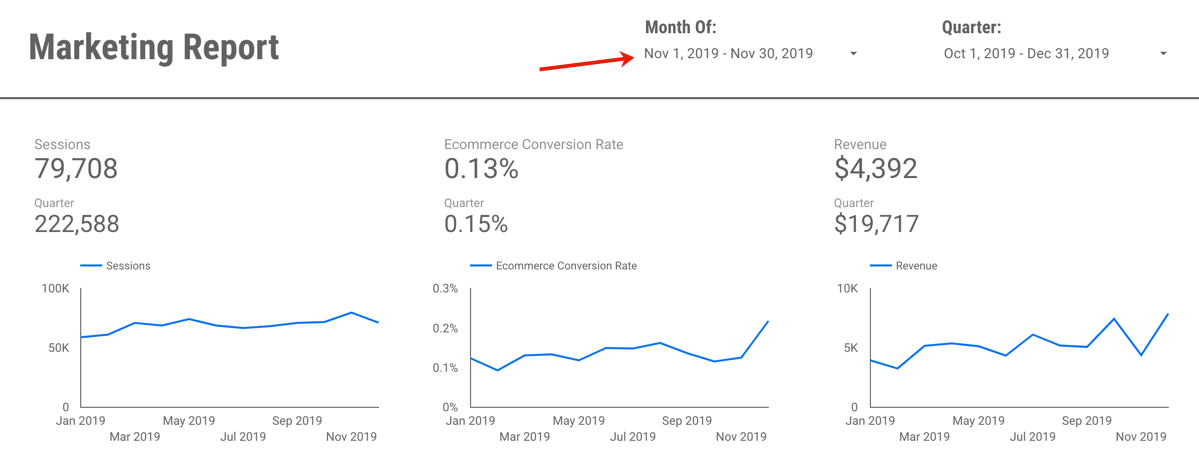
So when I now want to change my report to November 2019, it’s a quick and easy change:

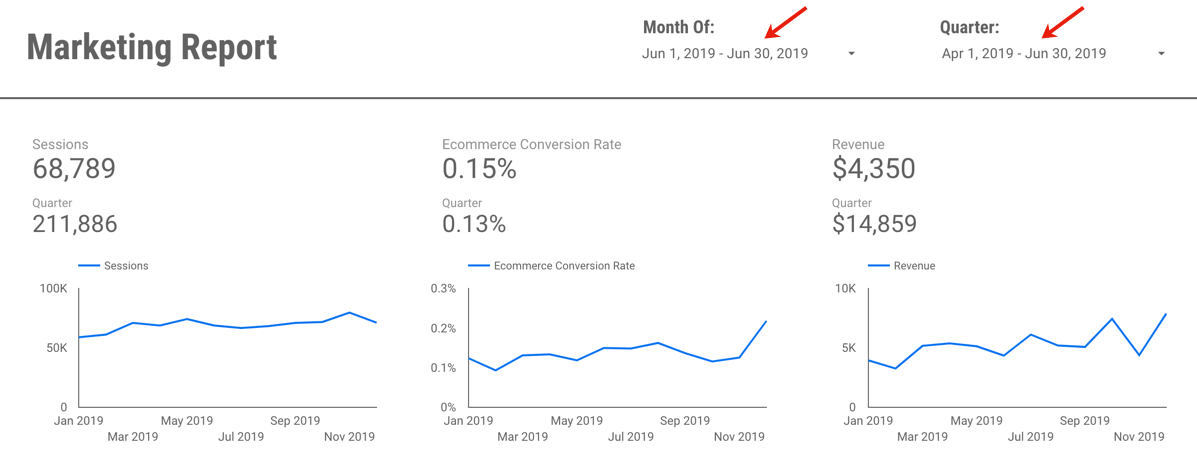
Or perhaps I want to change and view June and Q2:

If you’d like to save a little time,  you can view (and create a copy of) the example report here. It’s using data from the Google Merchandise Store, a publicly available demo GA data set, so nothing secret there!

Questions? Comments? Other useful tips you’ve found?

If you want to be a part of this, and other Data Studio (and other analytics!) discussions, please join the conversion on Measure Chat.