Excel Tips, Social Media

Exploring Optimal Post Timing…Redux

Back in 2012, I developed an Excel worksheet that would take post-level data exported from Facebook Insights and do a little pivot tabling on it to generate some simple heat maps that would provide a visual way to explore when, for a given page, the optimal times of day and days of the week are for posting.

Facebook being Facebook, both the metrics used for that and the structure of the exports evolved to the point that that spreadsheet no longer works. I’ve updated it, and, with the assistance of Annette Penney, even done a little testing to confirm that it works. The workbook is linked to at the end of this post.

The spreadsheet is intended as a high-level exploration of three things:

  • When (weekday and time of day) a page posts
  • Which of those time slots appear to generate the highest organic reach for posts
  • Which of those time slots appear to generate the highest engagement (engaged users / post reach) for posts

I initially added in some slicers to filter the heatmaps by post type, but then ran into the harsh reminder that Excel for Macs doesn’t support slicers (Booooo!). Maybe I’ll get around to posting that version at some point — leave a comment if you want it.

What It Looks Like

The spreadsheet takes a simple export of post-level data from Facebook Insights (the .xls format) and generates three basic charts.

The first chart simply shows the number of posts in each time slot and each day of week — this answers the question, “When have I not even really tried posting?”

fbposts_frequency

In this example, the page does most of their posting between 9:00 and noon, and then again from 3:00 to 6:00 PM (the spreadsheet lets you set the timezone you want to use, as well as what you want to use for time blocks). In my experience — for operational/process reasons as much as for data-driven reasons — brands tend to get into something of a rut as to when they post. The example above actually shows a healthy sprinkling of posts outside of the “dominant” windows, and shows that Thursday didn’t follow the normal pattern (they had a unique promotion during the analysis period that drove them to post earlier than normal on Thursdays).

The next two charts are crude heatmaps of a couple of metrics, but they both use the same grid as above, and they use a pretty simple white-to-green spectrum to show which slots performed best/worst relative to the other slots:

fbposts_legend

The first of these charts looks at the average organic reach (the number of unique users of Facebook who were exposed to the post not through Facebook advertising) of the updates that were posted in each time slot:

Organic Reach

In the example above, while the brand posts most often from 9:00 AM to noon, it appears that earlier posts are actually reaching more users organically. Digging in, the earlier morning posts on Thursdays, at least, were for a unique campaign, so it’s not possible to know if it was the nature of the campaign/content, the timing of the posting, or some combination. But, the results certainly indicate that some experimentation with posting earlier in the day — with “normal” posts — garner the same results.

The next chart shows the average engagement rate of the posts, defined as the number of engaged users divided by the total reach of the post. This is a pretty straightforward measure of the content quality: did the post drive the users who saw it to take some action to engage with the content? Arguably, the propensity for a user to engage is less impacted by the time of day and day of week, but, who knows?

fbposts_engagementrate

In this example, those earlier-in-the-day Thursday posts again stand out as being more engaging. And, the 9:00 to noon slot, as well as Fridays, appear to be some of the less engaging times for the page to post.

How to Use This for Your Own Page

If you want to try this out for your page(s), simply download the Excel file and follow the instructions embedded in the worksheet. You will need to export post-level Facebook Insights data for your page, which means you will have to have, at a minimum, Analyst-level admin access to the page. Use the settings shown in the screen cap below for that export:

fbposts_insightsexport

Then, just follow the instructions in the spreadsheet and drop me a note if you run into any issues!

Some Notes on the Shortcomings

This approach isn’t perfect, and, if you have ideas for improving it, please leave a comment and I’ll be happy to iterate on the tool. Specifically:

  • This approach measures all updates against the other posts for the same page — there is no external benchmarking. This doesn’t bother me, as I’m a proponent of focusing on driving continuous improvement in your performance by starting where you are. Certainly, this analysis should be complemented by performance measurement that tracks the actual values of these metrics over time.
  • The overall visualization could be better. It’s not ideal that you need to jump back and forth between three different visualizations to draw conclusions about what days/times are really “good” or “bad”…including factoring in the sample size. I’ve toyed with making more of a weighted score and then doing the same  grid, but, then, you’d be looking at a true abstraction of the performance, so I didn’t go that route. Suggestions?
  • Facebook Advertising introduces a wrinkle into this whole process. While the “reach” metric looks at organic reach only — attempting to remove the impact of paid media — the engagement rate grid uses total engaged users and total reach. In my experience, posts that have heavy Facebook promotion tend to get less engagement as a percent of total reach. So, it’s important to dig into the numbers a bit.

And One Final Note

This spreadsheet isn’t “the answer,” and is not intended to be. If anything, it’s Step 1 in an analysis of optimizing the timing of your posts. The goal is almost certainly not to post only once a week in one time slot, but, if you’re going to post 10 times a week, it makes sense to make those 10 times the best 10 times possible. To really figure out when those sweet spots are requires more than just an analysis of historical data. It requires experimentation — posting in slots you haven’t tried or that the historical analysis indicates might be good slots to try. It requires a close collaboration between the analyst and the community manager to apply the requisite structure to that testing. And, sadly, “the answer,” even when you get one, will likely change as Facebook continuously evolves their algorithms for which users see what and when.

Please do weigh in with how you would change this. I’m happy to rev it based on input!

Analytics Strategy, General, Social Media

Top 5 Metrics You're Measuring Incorrectly … or Not

Last night as I was casually perusing the days digital analytics news — yes, yes I really do that — I came across a headline and article that got my attention. While the article’s title (“Top 5 Metrics You’re Measuring Incorrectly”) is the sort I am used to seeing in our Buzzfeed-ified world of pithy “made you click” headlines, it was the article’s author that got my attention. Whereas these pieces are usually authored by well-meaning startups trying to “hack growth” … this one was written and published by Jodi McDermot, a Vice President at comScore and the current President of the Digital Analytics Association.

I have known Jodi for many years and we were co-workers at Visual Sciences back in the day. I have tremendous respect for Jodi and the work she has done, both at comScore and in the industry in general. That said, her blog post is the kind of vendor-centric FUD that, at least when published by a credible source like comScore, creates unnecessary consternation within Enterprise leadership that has the potential to trickle down to the very analysts she is the champion for at the DAA.

Gross.

Jodi does not mince words in her post, opening with the following (emphasis mine):

“With the availability of numerous devices offering web access, daily usage trends, and multi-device ownership by individual consumers, traditional analytics are not only misleading, but often flat out wrong.”

While open to interpretation, it is not unreasonable to believe that Jodi is saying that companies who have invested heavily in analytics platforms from Adobe, Google, Webtrends, IBM, etc. are just wasting money and, worse, the analysts they pay good salaries to are somehow allowing this to happen. She goes on to detail a handful of metrics that are negatively impacted by the multi-platform issue, essentially creating fear, uncertainty, and doubt about the data that we all recognize is core to any digital analytics effort in the Enterprise.

Now, at this point it is worth pointing out that I don’t fundamentally disagree with Jodi’s main thesis; multi-device fragmentation is happening, and if not addressed, does have the potential to impact your digital analytics reporting and analysis efforts. But making the jump from “potential” to “traditional analytics are not only misleading, but often flat out wrong” is a mistake for several reasons:

  1. Assuming analysts aren’t already taking device fragmentation into account is likely wrong. It’s not as if multi-device fragmentation is a new problem … we have been talking about issues related to the use of multiple computers/browsers/devices for a very, very long time. Jodi’s post seems to imply that digital analysts (and DAA members) are ignoring the issue and simply puking data into reports.
  2. Assuming consumers are doing the same thing on different devices is likely wrong. This is a more gray area since it does depend on what the site is designed to do, but when Jodi says that “conversion rate metrics must follow the user, not the device” she is making the assumption that consumers are just as likely to make a purchase on a small screen as a large one. I am sure there is more recent data, but a quick Google search finds that less than 10% of the e-commerce market was happening on mobile devices in Q2 2013.
  3. Assuming the technology exists to get a “perfect” picture of cross-device behavior is flat-out wrong. This is my main beef with Jodi’s post; while she never comes out and says “comScore Digital Analytix is the solution to all of these problems” you don’t have to read between the lines very much to get to that conclusion. The problem is that, while many companies are working on this issue from an analytical perspective (e.g., Google, Adobe, Facebook, etc.), the consensus is that a universal solution has yet to emerge and, if you’re an old, jaded guy like me, is unlikely to emerge anytime soon.

I don’t fault Jodi for being a fangirl for comScore — that is her job — but implying that all other technology is broken and (by extension) analysts not using comScore technology are misleading their business partners is either unfair, irresponsible, or both. The reality is, at least within our client base, this is a known issue that is being addressed in multiple ways. Through sampling, segmentation, the use of technologies like Digital Analytix, and good old fashioned data analysis, our clients have largely been able to reconcile the issues Jodi describes such that the available data is treated as gospel within the digital business.

What’s more, while comScore data can be useful for very large sites, in my experience sites that don’t have massive traffic volumes (and thusly representation in the comScore panel) often fail the basic “sniff” test for data quality at the site-level. I do admit, however, that as a firm we don’t see Digital Analytix all that often among our Enterprise-class clients, so perhaps there are updates we are not privy to that address this issue.

What do you think? Are you an analyst who lays awake at night, sweating and stressing over multi-device consumers? Do you dread producing analysis knowing that the data you are about to present is “misleading and flat out wrong?” Or have you taken consumer behavior into account and continue to monitor said behavior for other potential business and analysis opportunities?

Comments are always welcome. Or, if you want to debate this in person, meet me in person at ACCELERATE 2014 in Atlanta, Georgia on September 18th.

Excel Tips, Social Media

Automating the Cleanup of Facebook Insights Exports

This post (the download, really — it’s not much of a post) is about dealing with exports from Facebook Insights. If that’s not something you do, skip it. Go back to Facebook and watch some cat videos.

If you are in a situation where you get data about your Facebook page by exporting .csv or .xls files from the Facebook Insights web interface, then you probably sometimes think you need a 52” monitor to manage the horizontal scrolling. Facebook includes a lot of data in those exports, and a lot of it is useful. Unfortunately, depending on the size of your audience, a page-level export can easily have 1,500 to 2,000 columns of data. It’s unlikely that you are using more than a fraction of them. But, the Facebook Insights interface doesn’t let you specify which ones to include in your export, so you’re stuck with the full data dump.

To add a level of messiness to this, the order and placement of the columns in the export can and will vary based on the timeframe that is exported, and based on what new data Facebook has added to the Facebook Insights export. Over the past few years, I’ve built — twice — simple macros so that “getting just the data I want” from one of these exports is relatively painless. All it takes is a one-time setup to specify the columns you want to keep, what order you want them in, and what you want to label them (because the .csv export — which is nice because it’s a simple flat file and has a single row with the metric names/descriptions — has sometimes long, and yet occasionally still unclear, headings). After that, you just run a quick macro each time you do an export, and you get a worksheet with just the data you want!

You can download the Excel file here — detailed instructions are on the first tab.

Social Media

A Useful Framework for Social Media "Engagements"

Whether you have a single toe dipped in the waters of social media analytics or are fully submerged and drowning, you’ve almost certainly grappled with “engagement.” This post isn’t going to answer the question “Is engagement ROI?” Nor is it going to answer the question, “How do I make the link from engagement to ROI?” (although it’s doable, in my mind, through some causal modeling that gets validated over time…but that’s fancy talk, and I’m not going to get into it now).

Interact!

This post is just going to share something that I picked up in a discussion with Anna O’Brien of Sprinklr earlier this week. 48 hours after the chat, my mind keeps coming back to it, so it seemed worth publicly noting!

One thing I often struggle with is capturing the full spectrum of “engagements.” A Facebook like takes no more than a click of a button — it’s low effort and, consequently, a lighter engagement than, say, a comment on a post. Viewing a photo is an “engagement,” too, although it’s not a “story-generating” one (for that matter, liking a post is a SINO engagement — Story-generating In Name Only). Start listing the different types of engagements across the many different social platforms, and things get overwhelming in a hurry: likes (Facebook, Instagram, Pinterest), shares (Facebook or YouTube), comments (Facebook, Instagram, or Tumblr), replies (Twitter), mentions (Facebook or Twitter), retweets, reblogs (Tumblr), Favorites (YouTube or Tumblr), user posts (Facebook), link clicks (Facebook, Twitter, Pinterest), photo views (Facebook), video plays (Facebook or YouTube), etc.

Yowza!

Here’s the framework Anna laid out for me. It’s platform agnostic, and I’m sure there’s a corner case or two where some sort of engagement doesn’t cleanly and obviously fit into one of these four buckets, but it’s damn solid:

  • Proactive engagements — interactions where a consumer, unprompted, interacts with a brand. Think Twitter mentions, Facebook user posts, and (I think) general brand mentions/conversation (listening platform territory)
  • Reactive engagements — interactions where a consumer is responding to a brand’s content. Think Twitter replies, retweets, and favorites; Facebook and YouTube likes, comments, and shares; Instagram likes and comments; etc.
  • Private engagements — interactions directly between a consumer and the brand. Think Twitter direct messages and Facebook messages (which I don’t think can occur between a Facebook page and a consumer)
  • Consumptions — tubercular connotations aside, these are engagements where the consumer, well, consumes brand content. Think Twitter link clicks and Facebook photo views, video plays, and link clicks (and “other post clicks”…whatever the hell THOSE actually are!).

All of these are legitimate engagements. They’re all behavioral proof of at least a momentary “top of mind” status for the brand. But, they’re not all created equally. And, yes, when it comes to reactive engagements, a “like” is not equal to a “comment.” That’s true, but, from an overall framing, they are both reactions to a piece of content, and it’s useful to group them separately from the other types of engagements.

As an analyst, my job is to provide meaningful information that can be effectively consumed and acted upon. A clear, high-level organization for engagements helps with that.

What do you think? Is this a useful way to think about the myriad types of actions and interactions that can occur in social media?

Photo courtesy of David Shankbone

Conferences/Community, Social Media

eMetrics San Francisco 2013 Wrap-Up

This month the Analytics Demystified team travelled to San Francisco for the eMetrics Marketing & Optimisation Summit. Here are a few of the things that emerged for me from the event.

Communication is critical

When hiring: Communication is a truly critical skill for analysts. Balaji Bram from Walmart recommends looking for digital analytics talent that can recommend and influence others.

When communicating analytics results: Raise it up a level. Ask yourself – how would I tell my boss’s boss what we’re trying to achieve and what our results were? –Tim Wilson. As Ned Kumar put it, “Executives don’t care what you did [aka, your methodology.] They care about what they should do [what actions they should take.]” And perhaps putting it best: Ian Lurie – “Data no one understands is just ink. Ink gets FIRED.” And remember: “Being right without being understood is meaningless.”

With great power comes great responsibility: While analysts may feel they don’t have much power (after all, they may not be the ones who make or execute on decisions), Ian Lurie cautioned: “As the people who present data, we have a lot of power over the decisions other people make. Don’t cheat!”

The nature of social

For the last few years, social has been the “shiny object” marketers have gone after, without necessarily having concrete goals or even reasons. Finally it seems like we are starting to get it: “Don’t build a strategy around a social channel. Build a strategy, and see what channel fits with it.” –John Lovett

After all, social isn’t a channel, a platform, or even a toolset. It is a capability. It’s what allows us to act, but in and of itself, is not goal. Perhaps one of the most apt analogies: “Social is like a telephone. It’s not the end goal, it’s merely an enabler.” –John Lovett

On the client side, Vail Resorts has taken great strides in the past few years with their Epic Mix app, which incorporates in-mountain data with social media sharing. However, Vail hasn’t reinvited the wheel or forced a social experience. Rather, their customers have been telling stories of their trips for years. Social is what they have always done, and it’s just the channels and the integrations that have changed. –Nancy Koons

Working with stakeholders

One anecdote I loved was Nancy Koons‘, who shared Vail’s internal “tweet your face off” competition. Apart from a friendly competition to see who could refer the most traffic and reservations, a big benefit was that their marketers got really good at campaign tracking! After all, if you are incentivised based on a metric, there’s suddenly much more interest in measuring it properly!

In setting expectations, Tim Wilson recommends that rather than asking a client or stakeholder what their KPIs are, analysts need to ask the “magic questions” that lead to the KPIs. “What are we trying to do?” and “How will we know if we’ve done it?” When people are requesting data, don’t ask about dimensions and metrics, and don’t let them put requests in those terms. Ask them to put it in the following form: “I believe that … and if I’m right, I will …” This ensures they have 1) a hypothesis and 2) a plan for action based on the results.

There’s always more

It’s impossible to truly wrap up three days of great presentations in a short blog post, but these were certainly a few of the highlights for me.

The Twitter scene

In true geeky fashion, I took a look at the #eMetrics twitter feed to see what was going on there. Here is a little overview:


eMetricsTwitterInfo


Analytics Strategy, Social Media

#AdobeSummit Takeaways: Adobe Puts on a GREAT Event

I’ve written several posts with different reflections on my Adobe Summit 2013 experience. You can see a list of all of them by going to my Adobe Summit tag.

This was my first Summit. I’ve wanted to attend for years, but the stars never quite managed to align to get me there. And…this experience had me regretting that I didn’t work harder to force some astronomic alignment!

The best way for me to capture the “GREAT” in the subject line is with a bulleted list:

  • Overall event organization — given the magnitude of the event, seemingly every detail was fully thought through with redundancies and contingencies in place. Pre-event communication, “no wait” registration, a great mobile app, people standing everywhere with “Have questions? Ask me.” signs, transportation to and from various venues, and food and drink stations well stocked and appropriately spread out for every meal. Perfection.
  • Speakers — the Adobe presenters, the keynote speakers, and the practitioners in breakout sessions were top notch. I actually found myself questioning how to rate the speakers — “Average” for Summit or “Average” for all presenters I’ve ever seen at conferences? I went with the latter, which meant I had a Lake Wobegone experience — all the speakers were (well!) Above Average.
  • Community Pavilion — the vendor exhibit hall was very well laid out, and the range of vendors on hand was a great mix.
  • Fostering the conversation — I was invited, along with Michele Kiss, to be a Summit Insider. We were given free rein to share our experiences via social media to try to foster the conversation. And, we got to do some video interviews of attendees, which was both nerve-wracking and fun. I honestly thought I was at least trying to take a little bit of the edge off my usual snarkiness…but two different people commented on my Twitter snarkiness on Thursday night. I guess we’ll see if I’m back next year in the same role if they do it again. I’d certainly love to!

What are your thoughts about the quality of the event? Did I miss a seedy underbelly somewhere, or did you think it was well done?

General, Social Media

#AdobeSummit Is Next Week

Every year, it seems, I hit a point where every analyst I know is dropping the question, “Are you going to Summit?” (“Summit” of course, is industry shorthand for Adobe Digital Marketing Summit.) For years, my shoulders have sagged each time the question is asked as I’ve responded, “Not this year.”

But…this year…I’m actually responding in the affirmative. And, through a stroke of fantastic good fortune (and, I’m convinced, some anonymous string-pulling on my behalf, but I have only suspicions and no hard data), I’m actually going to be a Summit Insider.

Michele Kiss (@michelejkiss) and I will be roaming the conference as digital correspondents for the event — tweeting (of course), interviewing attendees and various Adobe muckity-mucks, and reflecting on our experiences. In other words…doing what we like to do at analytics conferences even when we haven’t been tasked with the responsibility!

My Pre-Summit Predictions

I’ve never been to Summit, but I’ve certainly read posts, listened to podcasts, and had discussions about it to the point that I’m comfortable making some predictions:

  • There will be some fantastic content (as I worked on my schedule, I was disappointed to find out that the Autoscheduler for the event was not able to open up rifts in the space-time continuum — I had three time slots where I desperately wanted to be in three sessions at once)
  • There will be nuggets of wisdom (real wisdom here, people — not just pap cliches) from keynoters that I will not see coming at all
  • Michele will out-tweet me by a ratio of at least 10:1 (It’s not a competition! But that’s what the loser always says, right?)
  • I will get to catch up with a lot of friends (and will get to meet some of them in person for the first time!)
  • I will be irked at least once by something someone at Adobe says (I’m generally a cranky person, so my irkedness is to be expected)
  • I will be exhausted — mentally and physically — by the time I make my way to the airport on Friday morning (to head to SXSW…oh…lord…score me a restful flight, because “stamina” is not something that has increased with age!)

If You’re Going to Be at Summit

Please, please, please track me down. I’m easy to find. Whether or not I wear my Gilligan hat will be determined by the level of peer pressure exerted, but I’ll be keeping a close eye on my Twitter account, and I’m going to be disappointed (pissed, really) if I don’t come away with a few good “connected via Twitter” stories from the event.

If there’s something you would like to see Michele or me do that would make your Summit experience more interesting, entertaining, or noteworthy, please let us know! We have the loosest of reins (think Zoe Barnes after she left The Washington Herald for Slugline), the power of the digital pen, and a penchant for stepping a bit off the reservation if it seems like it would be fun to do so. And we have Michele’s legions of followers.

If You’re Not Going to Be at Summit

Hey! Part of the reason Adobe asked us to do this is that they’d love to have the Summit experience extend in a small way to those analysts who are unable to attend. If you’re on the Twitter, there are lots of ways to follow along:

And, of course, you can get fancy and combine the above into various Twitter searches (my favorite reference on that front is this TweetReach blog post).

But, if there’s something you think I could do that would give you a better remote experience, let me know!

Stay Tuned!

I’m excited about the event (as is evident from the schoolgirl-quantity volume of exclamation points in this post) and look forward to trying to wrap my brain around the experience and capture my thoughts in the moment and afterwards.

Analysis, Reporting, Social Media

Analysts as Community Managers' Best Friends

I had a great time in Boston last week at eMetrics. The unintentional theme, according to my own general perception and the group messaging backchannel that I was on, was that tag management SOLVES ALL!!!.

My session…had nothing to do with tag management, but it seemed worth sharing nonetheless: “The Community Manager’s Best Friend: You.” The premise of the presentation was twofold:

  • Community managers plates are overly full as it is without them needing to spend extensive time digging into data and tools
  • Analysts have a slew of talents that are complementary to community managers’, and they can apply those talents to make for a fantastic partnership

Due to an unfortunate mishap with the power plug on my mixing board while I was out of town a few month ago, my audio recording options are a bit limited, so the audio quality in the 50-minute video (slides with voiceover) below isn’t great. But, it’s passable (put on some music in the background, and the “from the bottom of a deep well” audio effect in the recording won’t bug you too much):

I’ve also posted the slides on Slideshare, so you can quickly flip through them that way as well, if you’d rather:

As always, I’d love any any and all feedback! With luck, I’ll reprise the session at future conferences, and a reprise without refinement would be a damn shame!

Social Media

Fortune 500 CEOs Aren’t Social — Ummm…Thank You!

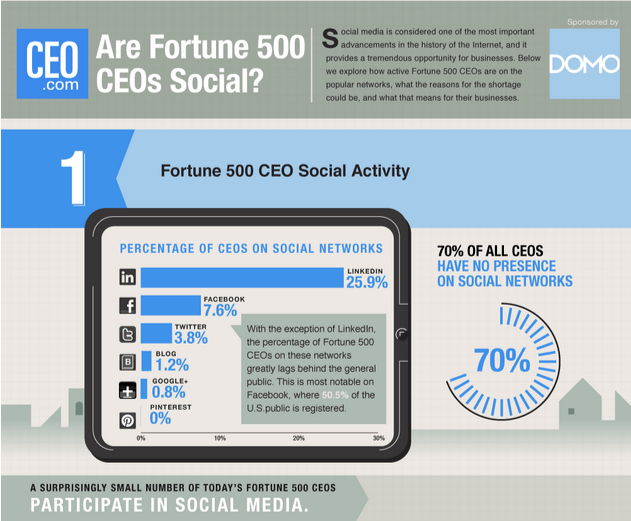
A new report debuted last week on CEO.com from the creators of DOMO, which citied findings about the social participation of Fortune 500 CEO’s. The report showcased the fact that only 7.6% of big company CEO’s are on Facebook; only 1.8% actually use Twitter; and that 70% of global CEO’s have no social media presence at all. To these numbers, I say…FANTASTIC!

Now, don’t get me wrong…I’m a huge proponent of social media and of measuring it methodically…I even wrote a book on this topic. Further, I corroborate the statements that social media has become a transformative force that’s changed the way individuals and businesses communicate. Of course, without a doubt! Yet, when CEO’s are called to task for not individually participating in social channels…well I for one think that they should be spending their time focusing on fiscal responsibility, shareholder value, and customer satisfaction with their products and services. These CEO’s should be lauded for focusing on what matters and for delegating a social presence to others within their organizations who are hired to interact with consumers and to keep touch with the pulse of their marketplace.

The downloadable report is accompanied by a slick video and jazzy infographic…that basically tell us that most CEO’s aren’t Twittering all day (Ummm…that’s good, right?).

While this report certainly doesn’t shed light on what CEO’s actually do spend their days doing, it proves that they aren’t looking to social media as an output channel. And thank goodness for that. While social media is undeniably valuable for communicating to consumers, marketing to them, and interacting in meaningful ways…last time I checked, that’s not the job of an officer in chief. Do they need to be aware of it…? ABSOLUTELY! Do they need to be open to consumer and employee interactions? Why Yes! But do they need to be a first-line responder? I think not. There are lots of ways for executives to stay informed and to communicate. Yet, bolstering a social media presence only to abandon it shortly thereafter, or allow it to die a slow unused death doesn’t help anyone’s credibility.

Maybe I’m alone, but in my opinion the underlying premise of this research missed the mark by a long-shot. Fortune 100 CEO’s shouldn’t be pandering to consumers on social media. Let’s allow the executives in chief the opportunity to focus on business and save the Twittering and Facebooking for the marketers.

Analysis, Social Media

Smart Analytics (Sometimes) = Upset Consumers

The recent media coverage of Orbitz’s OS-based content targeting was intriguing, if not surprising. The Wall Street Journal broke the story about how Mac users were presented with higher priced hotel options than PC users on Orbitz’s site. This was NOT, mind you, a case of any actual difference in prices, but, rather, simply pricier hotels presented in search results. Within a few days, there was a minor social media backlash, with the facts of the situation being misrepresented and Orbitz being accused of nefarious behavior.

Orbitz did something that was smart, was right, and benefited consumers. Yet, because they did it by sniffing out easily detectable information — the operating system of visitors to their site — they were (unfairly) accused of bad behavior.

This is a case where, sadly, perception is reality, and sound bites are the full story. To read my complete thoughts on the subject, check out my post on the Resource Interactive blog.

Analysis, Reporting, Social Media

Imperfect Options: Social Media Impact for eCommerce Sites

I’m now writing a monthly piece for Practical eCommerce, and the experience has been refreshing. At ACCELERATE in Chicago earlier this year, April Wilson‘s winning Super ACCELERATE session focused on digital analytics for smaller companies. Her point was that a lot of the online conversation about “#measure” (or “#msure”) focuses on multi-billion dollar companies and the challenges they have with their Hadoop clusters, while there are millions of small- to medium-sized businesses who have very little time and very limited budgets who need some love from the digital analytics community. To that end, she proposed an #occupyanalytics movement — the “99%” of business owners who can get real value from digital analytics, but who can’t push work to a team of analysts they employ.

Practical eCommerce aims to provide useful information to small- to medium-sized businesses that have an eCommerce site. It’s refreshing to focus on that analytics for that target group!

My latest piece was an exploration of the different ways that managers of eCommerce sites running Google Analytics can start to get a sense of how much of their business can be linked to social media. It touches on some of the very basics — campaign tracking, referral traffic, and the like — but also dips into some of the new social media-oriented reporting in Google Analytics, as well as some of the basics of multi-channel funnels as they related to social media.And, of course, a nod to the value of voice of the customer data. Interested in more? You can read the full article on the Practical eCommerce site.

Social Media

Klout Is a Tool — not an Imperfect Holy Grail

Last week, I found my dander elevated as I read Harnessing the Power of Social Media with Mark Schaefer. Schaefer knows his stuff when it comes to “influence,” and he recognizes that it is a messy, nuanced, multi-faceted topic — so much to the point that he wrote a book on the subject. Unfortunately, Schaefer didn’t write this article that referenced him. Rather, it’s a summary by someone who, as best I can tell, simply attended an Awareness webinar where Schaefer was the presenter …and then clumsily tried to recap it. The article uses circular examples — offering proof that social media superstars are influencers simply based on the fact that brands have targeted them. That’s like saying that Rebecca Black has mad vocal chops because millions of people have viewed her music video.

Nate Riggs interviewed Schaefer directly a few months ago, and, during that discussion, Schaefer made the point that Klout is not truly a “measure of influence.” Rather, it is nothing more and nothing less than:

“How content moves through a system and how people react to it.”

That’s a brilliant and succinct statement. The hard work comes when trying to figure out what to do with that information. Marketers (as a broad generalization) hunger for simple answers where simple answers don’t exist: 1-to-1 marketing, “viral videos,” SEO shortcuts, and now “influencer identification and activation.” Marketing is squishy, imperfect, inexact, and messy — it always has been, and it always will be. Services like Klout and PeerIndex are useful, but they’re not The Marketing Holy Grail.

For more on my thoughts on Klout, PeerIndex, and the like, hop over to the post I wrote on the Resource Interactive blog last month: In Search of Influence, Authority, and Clout (or…Klout?).

Analysis, Analytics Strategy, Reporting, Social Media

Four Dimensions of Value from Measurement and Analytics

When I describe to someone how and where analytics delivers value, I break it down into four different areas. They’re each distinct, but they are also interrelated. A Venn diagram isn’t the perfect representation, but it’s as close as I can get: Earlier this year, I wrote about the three-legged stool of effective analytics: Plan, Measure, Analyze. The value areas covered in this post can be linked to that process, but this post is about the why, while that post was about the how.

Alignment

Properly conducted measurement adds value long before a single data point is captured. The process of identifying KPIs and targets is a fantastic tool for identifying when the appearance of alignment among the stakeholders hides an actual misalignment beneath the surface. “We are all in agreement that we should be investing in social media,” may be a true statement, but it lacks the specificity and clarity to ensure that the “all” who are in agreement are truly on the same page as to the goals and objectives for that investment. Collaboratively establishing KPIs and targets may require some uncomfortable and difficult discussions, but it’s a worthwhile exercise, because it forces the stakeholders to articulate and agree on quantifiable measures of success. For any of our client engagements, we spend time up front really nailing down what success looks like from a hard data perspective for this very reason. As a team begins to execute an initiative, being able to hold up a concise set of measures and targets helps everyone, regardless of their role, focus their efforts. And, of course, Alignment is a foundation for Performance Measurement.

Performance Measurement

The value of performance measurement is twofold:

  • During the execution of an initiative, it clearly identifies whether the initiative is delivering the intended results or not. It separates the metrics that matter from the metrics that do not (or the metrics that may be needed for deeper analysis, but which are not direct measures of performance). It signifies both when changes must be made to fix a problem, and it complements Optimization efforts by being the judge as to whether a change is delivering improved results.
  • Performance Measurement also quantifies the results and the degree to which an initiative added value to the business. It is a key tool in driving Internal Learning by answering the questions: “Did this work? Should we do something like this again? How well were we able to project the final results before we started the work?”

Performance Measurement is a foundational component of a solid analytics process, but it’s Optimization and Learning that really start to deliver incremental business value.

Optimization

Optimization is all about continuous improvement (when things are going well) and addressing identified issues (when KPIs are not hitting their targets). Obviously, it is linked to Performance Measurement, as described above, but it’s an analytics value area unto itself. Optimization includes A/B and multivariate testing, certainly, but it also includes straight-up analysis of historical data. In the case of social media, where A/B testing is often not possible and historical data may not be sufficiently available, optimization can be driven by focused experimentation. This is a broad area indeed! But, while reporting squirrels can operate with at least some success when it comes to Performance Measurement, they will fail miserably when it comes to delivering Optimization value, as this is an area that requires curiousity, creativity, and rigor rather than rote report repetition. Optimization is a “during the on-going execution of the initiative” value area, which is quite different (but, again, related) to Internal Learning.

Learning

While Optimization is focused on tuning the current process, Internal Learning is about identifying truths (which may change over time), best practices, and, “For the love of Pete, let’s not make the mistake of doing that again!” tactics. It pulls together the value from all three of the other analytics value areas in a more deliberative, forward-looking fashion. This is why it sits at the nexxus of the other three areas in the diagram at the beginning of this post. While, on the one hand, Learning seems like a, “No, duh!” thing to do, it actually can be challenging to do effectively:

  • Every initiative is different, so it can be tricky to tease out information that can be applied going forward from information that would only be useful if Doc Brown appeared with his Delorean
  • Capturing this sort of information is, ideally, managed through some sort of formal knowledge management process or program, and such programs are quite rare (consultancies excluded)
  • Even with a beautifully executed Performance Management process that demonstrates that an initiative had suboptimal results, it is still very tempting to start a subsequent initiative based on the skeleton of a previous one. Meaning, it can be very difficult to break the, “that’s how we’ve always done it” barrier to change (remember how long it took to get us to stop putting insanely long registration forms on our sites?)

Despite these challenges, it is absolutely worth finding ways to ensure that ongoing learning is part of the analytics program:

  • As part of the Performance Measurement post mortem for a project, formally ask (and document), what aspects, specifically, of the initiative’s results contain broader truths that can be carried forward.
  • As part of the Alignment exercise for any new initiative, consciously ask, “What have we done in the past that is relevant, and what did we learn that should be applied here?” (Ideally, this occurs simply by tapping into an exquisite knowledge management platform, but, in the real world, it requires reviewing the results of past projects and even reaching out and talking to people who were involved with those projects)
  • When Optimization work is successfully performed, do more than simply make the appropriate change for the current initiative — capture what change was made and why in a format that can be easily referenced in the future

This is a tough area that is often assumed to be something that just automatically occurs. To a certain extent, it does, but only at an individual level: I’m going to learn from every project I work on, and I will apply that learning to subsequent projects that I work on. But, the experience of “I” has no value to the guy who sits 10′ away if he is currently working on a project where my past experiences could be of use if he doesn’t: 1) know I’ve had those experiences, or 2) have a centralized mechanism or process for leveraging that knowledge.

What Else?

What do you say when someone asks you, “How does analytics add value?” Do you focus on one or more of the areas above, or do you approach the question from an entirely different perspective? I’d love to hear!

Analysis, Analytics Strategy, Social Media

The Many Dimensions of Social Media Data

I’ve been thinking a bit of late about the different aspects of social media data. This was triggered by a few different things:

  • Paul Phillips of Causata spoke at eMetrics in San Francisco, and his talk was about leveraging data from customer touchpoints across multiple channels to provide better customer relationship management
  • I’ve been re-reading John Lovett’s Social Media Metrics Secrets book as part of an internal book group at Resource Interactive
  • We’ve had clients approaching us with some new and unique questions related to their social media efforts

What’s become clear is that “social media analytics” is a broad and deep topic, and discussions quickly run amok when there isn’t some clarity as to which aspect of social media analytics is being explored.

As I see it, there are four broad buckets of ways that social media data can be put to use by companies:

No company that is remotely serious about social media in 2012 can afford to ignore the top two boxes. The bottom two are much more complex and, therefore, require a substantial investment, both in people and technology.

Now, I could stop here and actually have a succinct post. But, why break a near-perfect (or consistently imperfect) streak? Let’s take a slightly deeper look at each bucket.

Operational Execution

(I almost labeled this bucket “Community Management,” but the variety of viewpoints in the industry on the scope of that role convinced me to leave that can of worms happily sealed for the purposes of this post.)

Social media requires a much more constant intake and rapid response/action based on data than web sites typically do. Having the appropriate tools, processes, and people in place to respond to conversations with appropriate (minimal) latency is key.

Key challenges to effectively managing this aspect of social media data include: determining a reasonable scope, being realistic about the available on-going people who will manage the process, and, to a lesser extent, selecting the appropriate set of tools. Tool selection is challenging because this is the area where the majority of social media platforms are choosing to play — from online listening platforms like Radian6, Sysomos, Alterian, and Syncapse; to “social relationship management” platforms like Vitrue, Buddy Media, Wildfire, (Adobe) Context Optional, and Shoutlet; and even to the low-cost platforms such as Hootsuite and TweetDeck. These platforms have a range of capabilities, and their pricing models vary dramatically.

Performance Measurement

Ahhh, performance measurement. When it comes to social media, it definitely falls in the “simple, but not easy” bucket. And, it’s an area where marketers are perpetually dissatisfied when they discover that there is no “value of a fan” formula, nor is there “the ROI of a tweet.” But, any marketer who has the patience to step back and consider where social media plays in his/her business can absolutely do effect performance measurement and report on meaningful business results!

Chapters 4 and 5 of John Lovett’s book, Social Media Metrics Secrets, get to the heart of social media performance measurement by laying out possible social media objectives and appropriate KPIs therein. High on my list is to make it through Olivier Blanchard’s Social Media ROI: Managing and Measuring Social Media Efforts in Your Organization, as I’m confident that his book is equally full of usable gems when it comes to quantifying the business value delivered from social media initiatives.

When it comes to technologies for social media performance measurement, we generally find ourselves stuck trying to make use of the Operational Execution platforms. They all tout their “powerful analytics,” but their product roadmaps have typically been driven more by “listenting” and “publishing” features than they have been driven by “metrics” capabilities. With Google’s recent announcement ofGoogle Analytics Social Reports, and with Adobe’s recent announcement of Adobe Social, this may be starting to change.

(Social-Enhanced) CRM

Leveraging social media data to improve customer relationship management is something that there has been lots of talk about…but that very few companies have successfully implemented. At its most intriguing, this means companies identifying — through explicit user permission or through mining the social web — which Twitter users, Facebook fans, Pinterest users, Google+ users, and so on can be linked to their internal systems. Then, by listening to the public conversations of those users and combining that information with internally-captured transactional data (online purchases, in-store purchases, loyalty program membership, email clickthroughs, etc.), getting a much more comprehensive view of their customers and prospects. That “more comprehensive view,” in theory, can be used to build much more robust predictive models that can let the brand know how, when, and with what content to engage individual customers to maximize the value of that relationship for the brand.

The challenges are twofold:

  • Consumer privacy concerns — even if a brand doesn’t do anything illegal, consumers and the press have a tendency to get alarmed when they realize how non-anonymous their relationship with the brand is (as Target learned…and they weren’t even using social media data!)
  • Complexity and cost — there is a grave tendency for marketers to confuse “freely available data” with “data that costs very little to gather and put to good use.” Companies’ customer data is data they have collected through controllable interactions with consumers — through a form they filled out on the web, through a credit card being run as part of a purchase, through a call into the service center, etc. Data that is pulled from social media platforms is at the whim of the platforms and the whim of the consumer who set up the account. No company (except Twitter) can go out to a Twitter account and, in an automated fashion, bring back the user’s email address, real name, gender, or even country of residence. It takes much more sophisticated data crawling, combined with probabilistic matching engines, to get this data.

Despite these challenges, this is an exciting opportunity for brands. And, the technology platforms are starting to emerge, with the three that spring the most quickly to my mind being Causata, iJento, and Quantivo.

Trend / Opportunity Prediction

This is another area that is really tough to pull off, but it’s an area that, admittedly, has great potential. It’s a “Big Data” play if ever there was one — along the lines of how the Department of Homeland Security supposedly harnesses the data in millions of communications streams to identify terrorist hot spots. It’s sifting through a haystack and not knowing whether your’re looking for a needle, a twig, a small piece of wire, or a paperclip, but knowing that, if you find any of them, you’ll be able to put it to good use.

The wistfully optimistic marketing strategist describes this area something like this: “I want to pick up on patterns and trends in the psychographic and attitudinal profile of my target consumers that emerge in a way that I can reasonably shift my activities. I want an ‘alert’ that tells me, ‘There’s something of interest here!'”

It’s a damn vague dream…but that doesn’t mean it’s unrealistic. It’s a multi-faceted challenge, though, because it requires the convergence of some rather sticky wickets:

  • Identifying conversations that are occurring amongst people who meet the profile of a brand’s target consumers (demographic, psychographic, or otherwise) — yet, social media profiles don’t come with a publicly available list of the user’s attitudes, beliefs, purchasing behavior, age, family income, educational level, etc.
  • Identifying topics within those conversations that might be relevant for the brand — we’re talking well beyond “they’re talking about what the brand sells” and are looking for content with a much, much fuzzier topical definition
  • Identifying a change in these topics — generally, what marketers want most is to pick up on an emerging trend rather than simply a long-held truism

To pull this off will require a significant investment in technology and infrastructure, a significant investment in a team of people with specialized skills, and a significant amount of patience. I chuckle every time I hear an anecdote about how a brand managed to pick up on some unexpected opportunity in real time and then quickly respond…without a recognition that the brand was spending an awful lot of time listening in real-time and picking up nothing of note!

This area, I think, is what a lot of the current buzz around Big Data is focused on. I’m hoping there are enough companies investing in trying to pull it off that we get there in the next few years, because it will be pretty damn cool. Maybe IBM can set Watson up with a Digital Marketing Optimization Suite login and see what he can do!

Excel Tips, Social Media

Facebook Status Updates: Exploring Optimal Timing

NOTE: This post is no longer current. An updated version of the post, including an updated spreadsheet, is posted here.

Although Facebook has unofficially admitted that there seems to be little rhyme or reason these days when it comes to the time of day or day of week when a brand posts content on their page, it’s still worth doing a quick analysis to see if this is, indeed, the case for your page.

The challenge, it turns out, is that there are multiple aspects of what sounds like a pretty straightforward assessment:

  • What metric(s) actually make for a “successful” post?
  • How do you effectively consider time of day and day of week?
  • Have you actually posted on a sufficient variety of dates and times to have the data to do a meaningful analysis?

After scraping together some hasty cuts at this, I thought it would be worthwhile to try to knock out something that was easily shareable and reusable. The result is the downloadable spreadsheet at the end of this post.

What It Looks Like

The spreadsheet takes a simple export of post-level data from Facebook Insights (the .csv format) and generates three basic charts.

The first chart simply shows the number of posts in each time slot and each day of week — this answers the question of, “What spots have I not even really tried posting in?”

In this example, there have not been any posts from 9:00 PM to 6:00 AM, only one post between 6:00 AM and 9:00 AM, and only four posts on a Friday. Don’t worry if you don’t like the time windows — we’ll get to that in a bit.

The next two charts are crude heatmaps of a couple of metrics, but they both use the same grid as above, and they use a pretty simple green-to-red spectrum to show which spots performed best/worst relative to the other slots:

(I know, I know: red/green is not a colorblind-friendly palette selection. I’ll keep working on the visualization technique!)

The first of these charts looks at the average total reach of the updates that were posted in each time slot — the number of unique users of Facebook who were exposed to the post:

In the example above, Wednesdays looked to perform pretty well reach-wise, as did Saturday afternoon. If you have Facebook paid media running, these results may get skewed. It’s easy enough to update this chart to use Organic Reach rather than Total Reach, or, you can simply factor an awareness of what was running and when into your assessment of the results. Also, keep in mind that Facebook continues to fiddle with the EdgeRank/GraphRank algorithm, so there are aspects of a post’s reach that are beyond your control.

The next chart shows the average engagement rate of the posts, defined as the number of users who engaged with the post in some way (clicked on a link, posted a comment, liked the post, viewed a photo, etc.) divided by the total reach of the post. This is a pretty solid measure of the content quality — did the post drive the users who saw it to take some action to engage with the content? Now, arguably, the propensity for a user to engage is less impacted by the time of day and day of week, but, who knows?

In this example, Sundays and Thursdays were the days when posts appeared to get more engagement (although be leery of that Sunday, 6:00 PM to 9:00 PM, block — there was only a single post in the data set).

Timeframe Flexibility

Picking a set of timeframes is the most subjective aspect of this whole analysis, and it may be worth iterating through a few times to get to timeframes that are likely to be meaningful for the page given the target consumer. So, I’ve set up the worksheet to make it easy to customize these timeframes. For, instance, below is the same data set used above, but with only four windows of time:

The change look less than 60 seconds to implement (it’s all about VLOOKUPS, pivot tables, and conditional formatting!).

How to Use This for Your Own Page

If you want to try this out for your page(s), simply download the Excel file (this was created using Excel 2007, so it should work fine in both 2007 and 2010) and follow the instructions embedded in the worksheet. You will need to export post-level Facebook Insights data for your page, which may require several iterations (we’ve found that Facebook Insights is prone to hanging up if you try to export more than a couple of months of data at once):

Then, just follow the instructions in the spreadsheet and drop me a note if you run into any issues!

Some Notes on the Shortcomings

This approach isn’t perfect, and, if you have ideas for improving it, please leave a comment and I’ll be happy to iterate on the tool. Specifically:

  • This approach measures all updates against the other posts for the same page — there is no external benchmarking. This doesn’t bother me, as I’m a proponent of focusing on driving continuous improvement in your performance by starting where you are. Certainly, this analysis should be complemented by performance measurement that tracks the actual values of these metrics over time.
  • The overall visualization could be better. It’s not ideal that you need to jump back and forth between three different visualizations to draw conclusions about what days/times are really “good” or “bad”…including factoring in the sample size. I’ve toyed with making more of a weighted score and then doing the same color grid, but, then, you’d be looking at a true abstraction of the performance, so I didn’t go that route. Suggestions?
  • A red–>yellow–>green scale just isn’t good when it comes to supporting: 1) black-and-white printouts, and 2) certain forms of color blindness. A more iconographic approach might make more sense.

Please do weigh in with how you would change this. I’m happy to rev it based on input!

Social Media

Facebook Engagement (aka, Facebook Rhetoric Facebook Reality)

Oh, Facebook.

Facebook, Facebook, Facebook.

Ours is a tumultuous relationship of unrequited frustration, is it not? I am an analyst, therefore (apparently), you scorn me. And, by “scorn,” I mean “ignore.”

You never responded to my letter last year. You don’t return my calls. (Well, that’s not entirely true: you put salespeople on my calls whose general response to any question is, “Buy Facebook media.” I get it. That’s their job, but they act like they’ve parachuted straight out of Mad Men and are pushing traditional mass-blast advertising. Ironic, no?)

Facebook, I’ve dug into the data. Your own documentation states:

Posting regularly with engaging content gets more people to talk about your business with their friends. As a result, you end up reaching more people overall.

Yet, the data you provide us tells a very different story. We debunked this particular claim — that getting people to talk about your content leads to greater reach — a month ago.

So, What Can We Debunk This Month?

Lately, I’ve been digging into a more basic mystery: you claim that, the more someone engages with a page’s content, the more likely that person is to get presented with more of that page’s content in the future. That seems pretty reasonable. Of course, you hedge at the same time:

No matter how engaging your Page posts are, not all of your fans will see them in their News Feed. In order to make sure that more of your fans see your posts, you should create a Page Post Ad

Can we quantify that “not all of your fans…” statement? AllFacebook.com did just that when they published a pretty alarming article last week based on Edgerank Checker data. Their study showed that, on average, across 4,000 pages, only 17% of total fans were being reached per individual post by the brand. “Zoiks!” were the cries that echoed through the halls of community managers the world over!

To be fair, not everyone is on Facebook all the time, and, while that number matches data we’re seeing overall, it also leaves out the fact that these don’t appear to be the same 17% day in and day out. When it comes to looking at the 28-Day Total Reach from Page Posts measure you provide, we see numbers that are more in the neighborhood of half of a page’s Lifetime Total Likes (when there is no Facebook media running — it’s much higher than that if that exposure is being purchased from Facebook).

Is 17% really all brands can expect, or is it all they can expect if they’re doing a lousy job posting content?

Are Brands Simply Not Publishing Engaging Content?

We’ve been working pretty hard to learn what kind of content our clients’ fans like, as well as how often and when to post. That put us in a good position to dig into the data to see how we were doing, especially in light of the drop we felt we were seeing in the Reach of posts across a range of our clients’ pages.

We looked at data from a half-dozen pages. These pages were all devoted to major consumer brands, had Lifetime Total Likes ranging from the low 100,000s to multiple millions, and cut across a range of different verticals. Is “6 pages” on the order of the “4,000 pages” from the Allfacebook.com study? Well, no, but we were working with over 600 status updates, and it quickly became apparent that we’d dug in enough to draw some pretty sound conclusions..

For the chart below, we removed the handful of posts that were clearly data anomalies (skewing both wildly high and wildly low) and then, for each post, took the Lifetime Engaged Users for the post (the number of unique people who clicked anywhere in the post within 28 days of it being posted, regardless of whether the click generated a story or not) and divided it by the Total Reach for the post.

It’s not the cleanest of graphs, but it seems pretty clear that, if anything, these pages are, overall, making some headway when it comes to producing more engaging content.

The idea here is that the only people a post has a chance of engaging are people that it reaches. So, we have Total Reach as the denominator. This is similar to the Post Virality calculation that you, Facebook, generate for me…but we’re looking at a lower level of engagement than “generated a story” — just looking to see if fans are interacting with the post in any way. Because, in theory, if they are, then you will be more likely to present them with subsequent posts from the same page.

So, Engagement Isn’t Dropping. Presumably, Reach Isn’t, Either?

In the post engagement chart, there’s nothing all that shocking. What does get alarming, though, is when we look at the average Organic Reach (unique users who saw the post directly as a result of the page posting it — not because a friend talked about it, and not because the brand ran paid media to extend the reach of the post). We divided that organic reach by the Lifetime Total Likes for the page to see what % of the total fans were reached by the post organically.

Again, outliers (high and low) were removed (this included locally-targeted posts, where the reach, obviously, was very low relative to the total likes for the page). Each point on the chart represents all of the status updates on that day from our sample:

Wow. I’m not a data scientist, so the above doesn’t have any true statistical rigor applied to it. Rather, it is an exercise in what a stats professor once preached to me: “Start off by plotting the data! That’s going to tell you a lot!”

It’s pretty conclusive, I think, that a Facebook algorithm change (and related UI changes — but the algorithms drove what content appears anywhere for a user, regardless of the UI) in late September gave brands a temporary ability to reach a higher proportion of their fans. That, undoubtedly, led to any number of community managers thinking they had been listening and learning and publishing more engaging content.

Then, (alas!) November arrived. And, suddenly, Reach plummeted.

WTF?

It’s not that I’m opposed to paying you for reach, Facebook. I’m totally okay with paid media being part of my social media mix. But, if I have to pay you each time I want to reach someone, the numbers start to get hard to justify. If someone likes my page, and then they engage with my content, why don’t they keep getting my content for some period of time?

Here’s what I think happened (and, frankly, I’d respect you a bit more in the morning if you just came out and admitted it):

  1. You put some sharp people in a room and told them to come up with a good EdgeRank/GraphRank algorithm
  2. While you have “a lot of data,” that algorithm still was largely driven by that team’s instincts around what weighting should be given to different factors
  3. There was a fair amount of teeth-gnashing, and the team even tried to do some testing of the algorithm before rolling it out. But, that’s a taller order than it sounds.
  4. The algorithm got rolled out.
  5. You had no idea what was going to happen. What looked good on paper looked, well, different in practice.
  6. For various reasons — none of which have been openly stated — the algorithm has been quietly tweaked a couple of times. In one case, it was related to the Timeline rollout, but, by this time, the algorithm had become the red-headed stepchild of Palo Alto. No one really wants to own it, because no one can really figure out what will make it “work.” After all…the algorithm-heads are all just down the street in Mountain View! (zing!)

How close am I with the above speculation? I don’t have inside knowledge (as noted earlier, you don’t call, you don’t write), but I’m not sure what other explanation makes sense.

Know that you’re killing us — the analysts who are trying to drive learning and optimization! At least set up some sort of open dialogue. We don’t need to see the full formula. But, we need to have useful information about how to do things better. And we need to know when you’re tinkering with the algorithm and what the likely result of that tinkering will be. Otherwise, we can’t trust the data, which means we can’t learn from it. Without data we can use, it’s hard to justify investment and action.

Analytics Strategy, Social Media

New Blog Design –> Responsive Design & Web Analytics Musings

If you’re reading this post on the site itself (as opposed to via RSS or email), and if you’ve been to the site much in the past, then you’ll notice the design of the site has been completely overhauled. This was one of my goals for my weeklong holiday break…and it’s a goal I entirely missed! Luckily, though, I wound up with a kid-free/spouse-free weekend a week-and-a-half ago, so I got to tackle the project.

So, Why a New Design?

I updated the design for two reasons:

  • The old design was starting to wear on me. There were a number of little alignment/layout/wrapping issues that I had never quite managed to fix, even as I tinkered with the blog functionality (for instance, my social icons never quite lined up well). I also figured out last fall that the nested table structure pretty much precluded me from getting the mix I wanted of fixed and liquid elements. In short, a redesign just seemed in order.
  • Responsive web design is here. This was more of the direct-tie-to-my-day-job reason for the overhaul. Various sharp people at Resource Interactive have started pushing responsive web design as something that should be actively considered for our clients. As I dug into the topic, I realized that: 1) this blog is a good candidate for a responsive design, and 2) there are some analytics implications to a responsive design, and I needed somewhere to experiment with them.

So, this site is now using a fully responsive WordPress theme.

What Is Responsive Design, Exactly?

As I understand it, responsive design is an “Aha!” that grew out of the increasing need for web sites to function across a wide range of screen sizes and experiences and platforms: laptop monitors, desktop monitors, tablets (iOS and Android), and smartphones (also iOS and Android). The idea is that, rather than having a “desktop site” and a “mobile-optimized site,” you can have “a site” that works effectively on a wide range of devices.

There are two keys to this:

  • The site needs to be viewable in different devices — 3 columns that display on a desktop monitor may need to become a single set of stacked content on a smartphone. Or, a list of links in the sidebar on the desktop may need to become a dropdown box at the top of the page on an iPhone.
  • The site needs to support the most likely use cases in different devices — this is a stickier wicket, because it forces some strategic thought (and possibly research and testing) to think through what a visitor to your site who is using an iPhone (for instance) is likely looking to do and how that differs from a visitor to your site who is using a desktop.

Both of these are questions that have always been asked when it comes to developing a “mobile-optimized version of the site,” but they’re a bit more nuanced given that responsive design isn’t a “separate site.”

Wow, Tim, I’m Impressed with Your Coding Skills!

Don’t be impressed with my coding skills.

I did a little research and then shelled out $35 to buy the Rising theme. That doesn’t mean there wasn’t a fair amount of tinkering (and more tinkering yet to be done — I certainly have not fallen prey to a need to have the perfect site designed before pushing it live!), but the end result is an improved site. And, more importantly, having a site that actually works well across devices (Try it! Just resize your browser window and watch the sidebar at the right. Or, fire up the site on your smartphone and compare it to your desktop.)

Now, of the “two keys” above, I really focused on the first one. This is a blog, after all. Regardless of what device you’re on, presumably, you’re here to consume blog post content.

I’m still working with the palette (too little contrast between the hyperlink color and the plain text color), the font selection (I’m not in love with it), and the header logo (pulling what strings I can to get a professional to contribute on that front), but I’m reasonably content with the change. Let me know if you have any tips for improving the design (I’m not proud!).

Where Does Analytics Come into All of This?

While I have access to tons of different web analytics accounts across a range of platforms through our various clients, I don’t actually have a great sandbox for trying things out (you would think our company’s site would be a good testbed, but the reality is that there are so many competing agendas for competing resources there that it’s seldom worth the effort). Luckily, this site has built up enough content and enough of a presence to get a few hundred visits a day, which is enough to actually do some tinkering and get some real data as a result.

Here’s my list of what I’ll be toying with over the coming weeks:

  • Responsive design analytics — we’ve had “screen resolution” and “device” reporting for years, but responsive design introduces a whole new twist, because it’s truly experience-centric. I’ve done a little digging online and haven’t found much in the way of thinking on this. While I don’t think it’s possible to directly pull CSS media query data into the web analytics platform, it should be possible to use Javascript to detect which responsive layout is being used for any given visitor and then pass that information to the web analytics platform (as a custom variable or a non-interaction event in Google Analytics). And, it should be possible to record when an onresize event occurs. In both cases, using this data to segment traffic to determine if a particular layout is performing poorly or well, as well as how visitors move through the site in these different experiences, seems like a promising thought.
  • Facebook Insights for Websites — I’ve had this running for a while, but, as part of another experiment, I switched over from using my Facebook user ID in the meta data to authenticate my ownership of the site to using a Facebook app ID. That’s a better way to go when it comes to “real” sites, and I’m now actually doing some tinkering on some client sites to fully validate what happens, so look for some thoughts on that front in the future.
  • Detecting the Facebook login status of visitors to the site — this is some experimentation that is actively in work. It’s the implementation of some code that Dennis Paagman came up with to use Facebook Connect and Google Analytics non-interaction events to detect (and then — my thinking — segment) visitors based on whether they’re logged into Facebook or not at the time of their visit to the site. This seems like it has intriguing possibilities when it comes to determining what types of social  interactions should be offered and how prominently. I’ve hit a minor snag on that front and am hoping Dennis will be able to help get to the bottom of it (see the comments on his blog post). But, if I get it figured out, I’ll share in a post down the road.
  • Site performance — anecdotally, it seems like this site is now loading more slowly than it did with the old design. The Google Analytics Site Speed report seems to indicate that is the case, but I don’t feel like I have enough data to be conclusive there just yet. I have signed up for a site24x7.com account, which is a platform we use with some of our clients for a couple of reasons: 1) to see what it reports relative to Google Analytics (it’s a fundamentally different data capture method, so I’m not going to be surprised if the results are wildly divergent), and 2) to get more reliable data if I start playing with changes to reduce the site load time. In hindsight, I wish I’d signed up a month or so ago so I had good pre- and post- data. If I had a nickel for every time I wanted to have had that, I’d be a wealthy man!

In a nutshell (a gargantuan, artificial nutshell, I’ll grant you), I’ve got a backlog of topics, some of which will require some additional experimentation. This blog post, I realize, is almost more of a “to do” list for me than it is a “how to” list for you! Oh, well. They can’t all be winners!

Social Media

Facebook Insights — My Favorite KPIs (as of Dec-2011)

This is the last post in an informal 3-part series covering what Mike Amer, a fellow analyst at Resource Interactive, and I have arrived at when it comes to understanding and using the latest release of Facebook Insights. In this post, I’ll cover what metrics we’re generally gravitating towards as effective ways to measure the performance of a Facebook page.

As many, many, many people pointed out before the latest update to Facebook Insights, Page Likes (or “fan count”), while easy to measure, is not a particularly meaningful metric. As John Lovett would say, it is simply a “counting metric.”

Below are the metrics I’m gravitating to these days as KPIs for a page:

  • Reach and Impressions – pick one or the other, but, if one of your goals for Facebook is to gain exposure for your brand, these are much better measures of exposure than Page Likes. If you’re running Facebook media, you may want to use Organic Reach (or Impressions) to measure the exposure you’re generating through non-paid means while the ads or Sponsored Stories are running (this will undercount the overall exposure slightly, as some of your viral reach is from non-paid activity, but there simply is no way to really tease that out)
  • Engaged Users – if one of your goals for Facebook is to foster dialogue with users, then engaged users is a good measure, because it is a measure of how many people took any actual action related to your page (regardless of whether it “generated a story”); again, if you’re running paid media, you may want to adjust this metric by subtracting out New Page Likes from Ads.
  • Average Post Engagement Rate – this is a second potential KPI for the goal of fostering dialogue with users; you have to get this from the post-level data, but it is simply a matter of dividing the number of engaged users by the total reach of the post and then averaging this for all posts in the reporting period.  This metric does not need to be “adjusted” when paid media is running. It is also a metric for which a page owner really can take direct action to affect by analyzing the virality of the individual posts in the reporting period and developing hypotheses as to what made the posts with the highest/lowest engagement rates different from each other (type of post, time of day, day of week, content, etc.). Those  hypotheses can then be tested with subsequent posts to see if they are validated.
  • People Talking About or Stories Generated – if you are aiming for your users to spread the word about your page through their social graph, then these are KPIs to consider. Keep in mind that a person who generates a story by liking your page is producing a much broader reaching “story” than a person who simply comments on a page post. And, as with Engaged Users, subtracting out New Page Likes from Ads when you’re running paid media will give you a better picture of the non-paid results from the page in the same time period (although there will still be some spillover impact that is not currently possible to eliminate).
  • Average Post Virality – Facebook reports the “virality” of any single post as the number of people talking about the post divided by the reach of the post. It’s a good metric, if something of a misnomer, because “Virality” is really “potential virality but minimal real virality due to Facebook’s EdgeRank algorithms…unless the post is a Facebook Question.”

It’s pretty easy to engineer much more involved metrics by diving into the organic, viral, and paid breakouts…but then you wind up with metrics that are hard for the typical business user to understand.

That’s our take. What metrics are you finding most useful with the new Facebook Insights? What measures are you least able to get that you wish Facebook would add (for me, it’s the ability to break out “viral” metrics into “triggered by paid media” and “not triggered by paid media”)?

Social Media

Facebook Insights — “Viral” Measures and EdgeRank

In my last post, I provided an update as to how to interpret the primary measures and dimensions (organic/paid/viral) that are available in the latest iteration of Facebook Insights. While digging into those dimensions, my fellow Resource Interactive analyst, Mike Amer, stumbled across some mild unpleasantries that don’t quite square with how Facebook talks about brand pages in their formal documentation.

On the one hand, Facebook would have us thinking that it’s all about virality. That’s one of the reasons they’ve made “Friends of Fans” such a prominent (if laughable) metric!

To recap, the viral reach of a page or a post is the number of unique people who were exposed to content as a result of another user generating a story (“talking about” the page or post – liking, sharing, commenting, etc.). This differs from organic reach, which is the number of unique people who visited the page or saw an item in their news feed or ticker as a direct result of the page posting the content.

Here are a couple of dirty little clarifications and secrets about virality, though:

  • The most common type of viral reach is from someone liking your page despite Facebook’s insinuations that getting people to like and comment on your page posts will tap into that ginormous “friends of fans” number…those user actions tend to go nowhere. When someone likes your page, though, that generates a story that has a meaningful viral reach (unfortunately, that is a one-time viral exposure — that same user may comment on 10 page posts over the next week and the viral reach generated from those actions will be virtually nil).
  • A page’s virality is dramatically impacted by paid media – If a Facebook Ad for the page is run and a user is exposed to the ad, then that exposure counts as 1 person towards the page’s Paid Reach. If the person clicks the Like button, Facebook will record that as a Like Source of “ads” (why they don’t have that data field name capitalized bothers my OCD, FWIW). But, a good chunk of their friends are going to get an item in their ticker that the person liked the page. All of those friends being exposed get counted as viral reach and impressions.
  • Oh…yeah…and Facebook Questions – Facebook Questions are the single type of Facebook page post that appear to drive meaningful viral reach (presumably, because the Ask friends action is more valued by Facebook than other actions such as standard likes, comments, and shares). Questions are good for that! Unfortunately, we’ve seen several cases over the last month across different pages where the Organic Reach of Facebook Questions was reported as dramatically lower than the typical reach for a status update on the page. It’s unclear whether those lower numbers reflect reality or whether they are simply a Facebook Insights glitch

All this is to say that viral reach is messy (…and don’t take what Facebook espouses at face value).

In my last post in this unofficial series, I’ll provide a list of the KPIs we’ve been gravitating towards with our clients and why.

Analytics Strategy, Social Media

Counting ROI in Pennies with Social Media

“Goddam money. It always ends up making you blue as hell.” ~ Holden Caufield, The Catcher in the Rye

That is…if you let it.

During our webinar yesterday Activating Your Socially Connected Business, Lee Isensee (@OMLee) and I caused a minor flurry on Twitter when I Tweeted about the results Lee showed from the IBM/comScore social sales data from Cyber Monday. The findings revealed that $7 million dollars captured on Cyber Monday 2011 in online sales was directly attributable to social media. This makes up 0.56% of all online sales on Cyber Monday 2011.

The skeptics were quick to pounce on the paltry figure, with #WhoopDeeFrigginDo’s and “rounding error” rhetoric (see the Storify.com synopsis). And I agree, that half a percentage point, by anyone’s count isn’t a whole lot of impact. Even when it equates to $7 million bucks in a $1.25 billion dollar day of digital shopping. However folks, remember that all online sales last year represented just 7.2% of holiday cha-chingle in retailers’ pockets. According to comScore’s numbers that’s $32.6B in digital business over the 2010 holiday shopping season. Yet, how many of the total $453B in last year’s holiday sales…or this year’s forecasted $469B in holiday sales…were/will be ***influenced*** by online channels? The answer is a lot.

According to research firm NPD, 30% of all holiday shoppers plan to buy online this year, with the numbers even larger for high income households. Further, a full 50% of shoppers will turn to the Internet to research products prior to buying this year. And this that doesn’t include another 20% that will rely on consumer reviews and 4% who will turn to social media for their pre-buying intel. As we know, many of these shoppers will hit the stores with smartphones in hand, ready to get info or tap into their social networks as necessary.

My point is that if you’re so narrowly focused on social media that the only reason you’re in it is for the money…then you’re missing the point. Social media is today – and will be tomorrow – an enabler. It’s a method to engage with people on a meaningful level and to allow them to engage with one another. As a brand, if you can’t see this then you’re totally missing the point. It’s not all about the Benjamin’s. Social media ROI is important, but trying to pin everything down to bottom line metrics will have you “blue as hell” when it comes time to tally the numbers.

Instead, work to identify other Outcomes for your social media objectives that ***don’t have*** direct financial implications, but that ***do have*** business value. Demonstrating that your social channels reduce call center costs, elevate customer satisfaction, or simply drive awareness of your in-store promotions will deliver value deep within the business.

I’m all for generating ROI from social media activities and making direct revenue correlations when they exist. Yet, in today’s world, social media isn’t just about the bucks. It’s a means to deliver better experiences for the many people who turn to that channel.

If you’re interested in learning more about Activating Your Socially Connected Business, download Chapter 3 from Social Media Metrics Secrets, courtesy of IBM.

Social Media

Understanding Facebook Insights Terminology Redux

When the latest Facebook Insights was released, I quickly put up a post that both tried to explain the new metrics that became available and proposed some probable KPIs.

Well, a few months have passed, Facebook has quietly rolled out some changes to Facebook Insights, and we’ve gotten a chance to actually dive into some of these metrics. This post and the next two are the result of some digging that Mike Amer and I have done on behalf of Resource Interactive and our clients.

Note: This is minimally a post about the web-based Facebook Insights interface. Rather, it is focused on the slightly deeper data that is available behind that interface, which is available by exporting page-level and post-level data or through the Facebook API.

Understanding the Basics – Reach, Talking About, Engaged Users, Consumers

I get a little depressed when I think about the number of times I have read and re-read the same one-line Facebook Insights definitions for various metrics, which have the illusion of being crystal clear on an initial reading, and then get increasingly confusing with each subsequent cycle of trying to actually interpret the data.

I continue to think that the best way to understand the main new metrics is via a Venn diagram. But, the page-level Venn diagram has evolved a bit since my initial post, as Facebook quietly added a page-level Engaged Users metric, which is the union of People Talking About and Consumers. I also think that Facebook changed the definition of Consumers to include clicks that generated a story, but I haven’t tracked down old printouts to fully confirm.

Below is an updated Venn diagram for page-level Facebook metrics.

And, below is an (unchanged) Venn diagram for post-level metrics:

What About Paid/Organic/Viral (especially Viral!)?

At both the page level and the post level, Facebook breaks down a number of metrics by “paid,” “organic,” and “viral” Here’s how I’ve been describing these when it comes to page-level reach:

  • Organic – unique people who visited the page or saw an item published by the page in their news feed or ticker
  • Viral – unique people who were exposed to content as a result of another user generating a story (“talking about” the page – liking the page, sharing a post, etc.)
  • Paid – unique people who saw a Sponsored Story or Ad pointing to the page

A single user can be reached by multiple ways in a given time period (e.g., they saw a post from the page that they’re a fan of in their news feed – organic – and then saw that a friend of theirs responded to a question on the page in their ticker – viral – and then was exposed to a Facebook Ad – paid), so, when it comes to reach, the sum of organic reach plus viral reach plus paid reach is greater than the total reach. Reach measures are always de-duped to be a count of unique users.

When it comes to impressions, though, there is no de-duping, so the sum of the different types of impressions equals the total impressions.

In my next post, I’ll dig into “virality” a little deeper (it turns out to be a bit of a bugaboo metric, but it’s also one that turns out to reveal some sneaky little unpleasantries about Facebook’s EdgeRank algorithm).

Adobe Analytics, Social Media

Google’s New Social Data Hub

Google’s Eric Schmidt appeared today at LeWeb 2011 and dropped some notable quotes during his interview with conference organizer Loic Le Meur (@loic), including this prescient perspective: “It’s reasonable to say that in the future, the majority of cars will be driverless or driving-assisted.” Foreshadowing perhaps? Could be…but closer to reality:

Google’s Executive Chairman also quipped, “It’s easier to start a revolution and more difficult to finish it.” Google should know. They’ve been revolutionizing the way in which consumers interact on the Web since their inception and news posted today following the LeWeb chat follows suit.

The news reveals a new initiative launching today called the Social Data Hub. What’s even more exciting is the Google Analytics Social Analytics reporting to appear sometime next year. While the details were somewhat vague, I got the inside scoop and what was published should be enough to incite a minor frenzy in the Social Analytics circles.

The “Social Data Hub” is a data platform that is based on open standards allowing Google to aggregate public social media posts, comments, tags, and a plethora of other activities using ActivityStream protocol and Pubsubhubbub hooks. (Yea, that’s a real thing…I had to look it up too.) Early partners in the initiative include social platforms such as Digg, Delicious, Reddit, Slashdot, TypePad, Vkontakte, and Gigya among others. Of course Google’s own social platforms, Google+, Blogger, and Google Groups are included as well. Noticeably absent from the list are social media moguls like Facebook, Twitter, and LinkedIn who have yet to buy into the new Googley idea of a Social Data Hub.

So What…?

If you’re scratching your head wondering how this is different than Google just trying to get more of the world’s data, you’re not alone. At first glance this may seem like yet another big enterprise ploy to get more data (and oh yeah, Don’t be evil). Well, I see this as a huge win for marketers, bloggers, publishers and anyone else trying to discern the impact of social media marketing across the multitude of channels and platforms available today. Currently, most marketers are forced to evaluate their social media activities through the lens that the platform (or their social monitoring tool) offers. Typically this yields low-hanging counting metrics which can be of some value, but more often than not end up as isolated bits of information that don’t provide business value.

Getting at this all important business value in many cases requires wrangling the metrics into another system, processing data and just generally working hard to gain some incremental insight. This is laborious work for the average marketer, so it’s no wonder that eConsultancy just reported that 41% of marketers surveyed had no idea what their return on investment was for social media spending in 2011. Yikes!

Google’s new Social Data Hub – coupled with Google’s Social Analytics reporting – has the potential to knock the socks off these unknowing marketers. By aggregating data from multiple social platforms into the Social Data Hub, they have the ability to make comparisons across platforms to show which channels are driving referrals, which are generating the most interactions, and which are potentially not worth investing in. It’s not that big of a stretch to imagine Google linking this information to data within their Google Analytics product such as Adwords, Goal completion rates and cool new flow visualizations. If/when Google applies the lens of their analytics tool to this new aggregated data set, look out marketers — you just hit the jackpot! Of course, I’m speculating here, but the possibilities are intriguing for a Social Analytics geek like me. That is of course, if platforms open their APIs to the Social Data Hub. A big if…

So Why Would a Platform buy into the Social Data Hub?

Well, it’s questionable if Facebook ever will opt in for this system so I wouldn’t hold your breath on that one. However for other social platforms, being part of the hub has some distinct advantages. They get to prove their value by partnering up with one of the only solutions on the Web that is capable of providing real comparative data on the performance of social channels.

This is a no-brainer for fledgling platforms that want to increase their visibility and even for established players, opting into Google Social Hub could mean the difference in gaining advertising dollars from skeptical marketers. While the big dogs in social media may take a while to come around, I see this new Hub as a potentially great equalizer for understanding the impact of social media as it relates to referrals for on-site activities which can ultimately lead to conversions and bottom line impact.

While today’s announcement may be just a small ripple in the social media pond, I see big waves building for Marketers. But that’s just my take on the disruptive and revolutionary force that is Google…

If you want in on the action, here’s a link to request access to the private beta for Google’s Social Analytics Reporting: https://services.google.com/fb/forms/socialpilot/

And here’s one to for platforms to join the Social Data Hub: http://code.google.com/apis/analytics/docs/socialData/socialOverview.html

Analytics Strategy, Social Media

Reflections on the Inaugural #ACCELERATE Conference


On Friday, November 19, 2011, the good folk over at Analytics Demystified experimented with a new format for a digital analytics conference, dubbed #ACCELERATE. The key features of the event:

  • It was entirely free to attendees (it was sponsored by TealeafOpinionLab, and Ensighten)
  • It lasted a single day
  • It had two distinct presentation formats — a 20-minute format and a 5-minute format

The 20-minute presentations were  in a “10 Tips in 20 Minutes” format on topics that the organizers selected and then recruited speakers to present. The 5-minute presentations were left entirely up to the presenter when it came to topic selection, but they were encouraged to bring a “Big Idea” and make it “FUN.”

I’ve actually found myself doing more reflection on the conference structure, format, and details than I’ve found myself mulling over the content itself. I’d find that troubling if it weren’t for the fact that I picked up a solid set of intriguing and re-usable nuggets from the content. And, I’ve seen a few blog posts already that do a great job of recapping the event:

  • Michele Hinojosa’s Top 10 Takeaways plays with the “list of 10” format of the event by listing three different sets of 10 takeaways (she left off her own session which provided one of the enduring images for me when she plotted the four different “types” of digital analytics jobs — industry, vendor, agency, consultant — on a 2×2 grid that illustrated how the experiences differ; it’s a handy graphical view of the career development guide she spearheaded for the WAA earlier this year)
  • Corry Prohens’s review of the event recaps the content session by session (but, of course, left out his own excellent session on how to go about recruiting and hiring the right digital analyst for the job).
  • Gabriele Endress recapped the event as well, including a “top 5 learnings” that are spot-on when it comes to the key realities of the dynamic world of digital analytics

I really don’t have much to add to those summaries. The content was great, and I’ve walked away with an array of actions/requests/hopes:

  • I’ve secured a copy of June Dershowitz’s presentation and the blog post that inspired it (top geek humor from the event: “?q=<3”)
  • I’ve prodded Michele to elaborate on her 2×2 grid
  • I’ve been mulling over the vendor-user relationship as described by Ben Gaines (while I have been critical of technology platforms, I also think most vendors with whom I’ve worked closely would put me at least marginally above average on the collaboration/partnership front)
  • I’ve re-cemented Justin Kistner in my brain as my go-to resource for all things Facebook
  • I’m looking forward to Chicago and fervently hoping that Ken Pendergast (or someone) takes another run at making the case for one of the enterprise web analytics vendors to offer a freemium option (I’ve heard that that’s been bandied about over the years at Adobiture, but it’s never been something they’ve been able to effectively justify)

That’s all of the stuff I’m not going to cover in this post. Instead, I’m going to cover more of a meta analysis of the event — a range of factors that made the event stand out and positioned it for on-going evolution and excellence.

Social Media Integration

Social media was heavily incorporated into the event:

  • Twitter-friendliness Part 1 — the event’s name itself — #ACCELERATE — was a ready-made Twitter hashtag. That was clever, as it meant that all Twitter references to the event automatically used Twitter conventions that made the content easy to find, follow, and amplify.
  • Twitter-friendliness Part 2 — throughout the day, Eric Peterson encouraged attendees to use both #ACCELERATE and #measure as they tweeted, and there were incentives for participants to tweet (with quality tweets) both before and during the event (with winners selected using Twitalyzer and TweetReach). This had the effect of #ACCELERATE dominating the #measure world for the day (at one point, TweetReach reported that over 70% of all #measure tweets for the day also included #ACCELERATE in the tweets). That meant that no one who is at least nominally following the #measure hashtag could fail to be aware of the event and aware of the fact that it was a very “socially active” conference.
  • Twitter-maybe-not-so-friendliness Qualifier — the slightly unfortunate side effect of the “10 tips” presentation format, combined with the tweet encouragement, was that it was really easy to simply tweet the title of each “tip,” which often really weren’t all that useful without listening and re-articulating the presenter’s explanation of the tip. A tweet I saw from a non-attendee asked a good question on that front:

“…most of the #measure tweets today were about #ACCELERATE… but was it always relevant?”

  • Post-event buzz bounty — Eric tacked on an incentive for conference attendees to write about (either publicly or privately in an email) their experiences at the event, with the Analytics Demystified team being the judges of the “best” write-up. I suspect that will result in a higher number of blog posts than would otherwise have occurred.

Overall, it was a big win on the Twitter front — I haven’t been to a conference that so actively leveraged the platform both for pre-event buzz generation and during-event content sharing (and further buzz generation). See the last section of Michele Hinojosa’s post for more detail on the Twitter activity.

Presentations Functioning on Two Levels

When it came to the presentation structure, the organizers bent over backwards to set the speakers up for success. In his recap of the event, Corry Prohens credited Craig Burgess with the following observation:

“The conference was also a study on presentation styles and techniques. How often do you get to see 26 presentations in a day? It is a rare opportunity to spot trends and take note of what works. In a field where we all have to present what we know (to clients, stakeholders, etc.) this was a big value-add to the digital measurement insights.”

This was an excellent point. Any conference is going to include sessions that stand out as being fantastic, as well as a few sessions that fall flat. One notable exception (qualifying full disclosure: it’s a conference I’ve never attended): TED.  Whether Eric and company consciously drew inspiration from TED or not, I don’t know, but there are two taglines on the TED home page that could easily be applied to the aspirations for #ACCELERATE:

“Ideas worth spreading”

“Riveting talks by remarkable people, free to the world”

By packing so many sessions into a single day and enforcing brevity (out of necessity), #ACCELERATE had a great pace and kept the attendees engaged for the entire event. Presenters were pushed to bring their “A” game to their sessions, both by repeated reminder-admonitions from Eric, as well as by the inclusion of audience-awarded $500 Best Buy gift cards for the top session of each format.

The presentations were set up to effectively convey useful and engaging content. At the same time, the presentations were set up to give the presenters a set of liberating constraints — establishing distinct guardrails for the content that then empowered the presenters to really focus in on the content and the way they communicated it. This benefited the presenters, certainly, by helping them hone the craft of presenting (that was my experience, at least), but it also benefited the audience by exposing them to a large number of presenters in a concentrated period. I hope everyone took away a few useful nuggets that they can incorporate into their own future presentations (internally or at conferences).

I haven’t attended a single conference in the last 18 months where one of the sub-themes of the conference wasn’t, “As analysts, we’ve got to get better at telling stories rather than simply presenting data.” There is real value in a conference that is designed to help analysts develop their storytelling chops.

Audience Participation

Having the audience directly vote for the winning presentation was another innovation from the event. While it is not at all unheard of to have audience-based voting on presentations, the fact that #ACCELERATE put this at the forefront was something new for digital analytics conferences, as far as I’m aware.

OpinionLab’s DialogCentral platform was leveraged to allow real-time voting and feedback on each session as it occurred. I saw a demo of DialogCentral over a year ago, found it intriguing, and then could never remember what it was called or what ever happened to it, so it was good to see it put into action. Any audience member who had a smartphone could quickly navigate to a mobile-optimized site and vote the presentation on a 5-point scale, leave an open-ended comment, and leave contact info if desired.

There were some glitches on that front, in that there were some participants who did not have smartphones (well, 2 or 3), and at least one attendee reported that the system did not work on her Blackberry. Overall, the voting occurred in smaller numbers than I think the organizers hoped, but it was a great idea and it worked perfectly adequately for a first-time attempt.

And…It Was Free

It’s easy to simply rattle off that “free is better” and leave it at that.  As a first-time event, I’m sure the fact that the event was fully sponsor-supported helped make it fill up quickly. The challenge with having a free event is that the registrants have no real skin in the game — it’s easy to sign up first and then figure out if you can actually attend. If you can’t, well, no worries, because it’s no money out of your pocket! Having co-organized Web Analytics Wednesdays in Columbus — also free events — for several years now, I’ve lived with this challenge firsthand. Trying to accurately predict the no-show rate is an art unto itself, which introduces a range of logistical headaches.

At the other extreme from “free,” the major established digital analytics conferences all have hefty price tags, which makes them cost-prohibitive for many potential attendees who are operating in organizations that have extremely limited training and conference budgets (not to mention the personal budgets for analysts who are in between jobs and could really benefit from the networking opportunities at conferences). That, I suspect, leads to misaligned speaker incentives — members of the industry desperately angling for speaking slots so they can reduce the cost of the overall conference attendance rather than because they have something unique and worthwhile to share.

I could totally see #ACCELERATE evolving to have a nominal registration fee — something like $100 would ensure there was a real commitment required by registrants, but it would also make it totally feasible for someone to attend without corporate backing (make it $25 for students, and, heck, provide bartered alternatives where people can blog about the event or get referral credits).

Overall, free is good, and that made the event right-sized — ~300 people was enough to keep a single track, provide plenty of opportunity for worthwhile networking, while also keeping the setting relatively intimate.

I’m looking forward to Chicago!

Analysis, Reporting, Social Media

Digital and Social Measurement Based on Causal Models

Working for an agency that does exclusively digital marketing work, with a heavy emphasis on emerging channels such as mobile and social media, I’m constantly trying to figure out the best way to measure the effectiveness of the work we do in a way that is sufficiently meaningful that we can analyze and optimize our efforts.

Fairly regularly, I’m drawn into work where the team has unrealistic expectations of the degree to which I can accurately quantify the impact of their initiatives on their top (or bottom) line. I’ve come at these discussions from a variety of angles:

This post is largely an evolution of the last link above. It’s something I’ve been exploring over the past six months, and which was strongly reinforced when I read John Lovett’s recent book. As I’ve been doing measurement planning (measurement strategy? marketing optimization planning?) with clients, it’s turned out to be quite useful when I have the opportunity to apply it.

Initially, I referred to this approach as developing a “logical model” (that’s even what I called it towards the end of my second post that referenced John’s book), but that was a bit bothersome, since “logical model” has a very specific meaning in the world of database design. Then, a couple of months ago, I stumbled on an old Harvard Business Review paper about using non-financial measures for performance measurement, and that paper introduced the same concept, but referred to it as a “causal model.” I like it!

How It Works

The concept is straightforward, it’s not particularly time-consuming, it’s a great exercise for ensuring everyone involved is aligned on why a particular initiative is being kicked off, it sets up meaningful optimization work as individual tactics and campaigns are implemented, and it positions you to be able to demonstrate a link (correlation) between marketing activities and business results.

This approach acknowledges that there is no existing master model that shows exactly how a brand’s target consumers interact and respond to brand activity. The process starts with more “art” than “science” — knowledge of the brand’s target consumers and their behaviors, knowledge of emerging channels and where they’re most suited (e.g., a QR code on a billboard on a busy highway…not typically a good match), and a hefty dose of strategic thought.

The exact structure of this sort of model varies widely from situation from situation, but I like to have my measurable objectives — what we think we’re going achieve through the initiative or program that we believe has underlying business value — listed on the left side of the page, and then build linkages from that to a more definitive business outcome on the right:

It should fit on a single page, and it requires input from multiple stakeholders. Ultimately, it can be a simple illustration of “why we’re doing this” for anyone to review and critique. If there are some pretty big leaps required, or if there are numerous steps along the way to get to tangible business value, then it begs the question: “Is this really worth doing?” It’s an easy litmus test as to whether an initiative makes sense.

What I’ve found is that this exercise can actually alter the original objectives in the planning stage, which is a much better time and place to alter them than once execution is well under way!

Once the model is agreed to, then you can focus on measuring and optimizing to the outputs from the base objectives — using KPIs that are appropriate for both the objective and the “next step” in the causal model.

And, over time, the performance of those KPIs can be correlated with the downstream components of the causal model to validate (and adjust) the model itself.

This all gets back to the key that measurement and analytics is a combination of art and science. Initially, it’s more art than science — the science is used to refine, validate, and inform the art.

Reporting, Social Media

The New Facebook Insights — One More Analyst's Take

Facebook released its latest version of Facebook Insights last week, and that’s kicked off a slew of chatter and posts about the newly available metrics. Count this as another one of those. It’s partly an effort to visually represent the new metrics (which highlights some of the subtleties that are a little unpleasant, although, in the end, not a big deal), and it’s partly an effort to push back against the holy-shit-Facebook-has-new-metrics-so-I’m-going-to-combine-the-new-ones-and-say-we’ve-now-achieved-measurement-nirvana-without-putting-some-rigorous-thought-into-it posts (not linked to here, because I don’t really want to pick a fight).

Basically…We’re Moving in a Good Direction!

At the core of the release is a shift away from “Likes” and “Impressions” and more to “exposed and engaged people.” There are now a slew of metrics available at both the page level and the individual post level that are “unique people” counts. That…is very fine indeed! It’s progress!

Visually Explaining the New Metrics

As I sifted through the new Facebook Page Insights product guide (kudos to Facebook for upping the quality of their documentation over the past year!) with some co-workers, it occurred to me that a visual representation of some of the new terms might be useful. I settled on a Venn diagram format, with one diagram for the main page-level metrics and one for the main post-level metrics.

Starting with page-level metrics:

Defining the different metrics — heavily cribbed from the Facebook documentation:

  • Page Likes — The number of unique people who have liked the page; this metric is publicly available (and always has been) on any brand’s Facebook page.
  • Total Reach — The number of unique people who have seen any content associated with a brand’s page. They don’t have to like the page for this, as they can see content from the page show up in their ticker or feed because one of their friends “talked about it” (see below).
  • People Talking About This — The number of unique people who have created a story about a page. Creating a story includes any action that generates a News Feed or Ticker post (i.e. shares, comments, Likes, answered questions, tagged the page in a post/photo/video). This number is publicly available (it’s the “unique people who have talked about this page in the last 7 days”) on any brand’s Facebook page.
  • Consumers — The number of unique people who clicked on any of your content without generating a story.

A couple of things to note here that are a little odd (and likely to be largely inconsequential), but which are based on a strict reading of the Facebook documentation:

  • A person can be counted in the Total Reach metric without being counted in the Page Likes metric (this one isn’t actually odd — it’s just important to recognize)
  • A person can be counted as Talking About This without being included in the Reach metric. As I understand it, if I tag a page in a status update or photo, I will be counted as “talking about” the page, and I can do that without being a fan of the page and without having been reached by any of the page’s content. In practice, this is probably pretty rare (or rare enough that it’s noise).
  • Consumers can also be counted as People Talking About This (the documentation is a little murky on this, but I’ve read it a dozen times: “The number of people who clicked on any of your content without generating a story.” Someone could certainly click on content — view a photo, say — and then move on about their business, which would absolutely make them a Consumer who did not Talk About the page. But, a person could also click on a photo and view it…and then like it (or share it, or comment on the page, etc.), in which case it appears they would be both a Consumer and a Person Talking About This.
  • A person cannot be Consumer without also being Reached…but they can be a Consumer without being a Page Like.

Okay, so that’s page-level metrics. Let’s look at a similar diagram for post-level metrics:

It’s a little simpler, because there isn’t the “overall Likes” concept (well…there is…but that’s just a subset of Talking About, so it’s conceptually a very, very different animal than the Page Likes metric).

Let’s run through the definitions:

  • Reach — The number of unique people who have seen the post
  • Talking About — The number of unique people who have created a story about the post by sharing, commenting, or liking it; this is publicly available for any post, as Facebook now shows total comments, total likes, and total shares for each post, and Talking About is simply the sum of those three numbers
  • Engaged Users — The number of unique people who clicked on anything in the post, regardless of whether it was a story-generating click

And, there is a separate metric called Virality which is a simple combination of two of the metrics above:

That’s not a bad metric at all, as it’s a measure of, for all the people who were exposed to the post, what percent of them actively engaged with it to the point that their interaction “generated a story.”

The Reach and Talking About metrics are direct parallels of each other between the page-level metrics and the post-level metrics. However (again, based on a close reading of the limited documentation), Consumers (page-level) and Engaged Users (post-level) are not analogous. At the post-level, Talking About is a subset of Engaged Users. It would have made sense, in my mind, if, at the page-level Talking About was a pure subset of Consumers…but that does not appear to be the case.

KPIs That I Think Will Likely “Matter” for a Brand

There have been several posts that have jumped on the new metrics and proposed that we can now measure “engagement” by dividing People Talking About by Page Likes. The nice thing about that is you can go to all of your competitors’ pages and get a snapshot of that metric, so it’s handy to benchmark against. I don’t think that’s a sufficiently good reason to recommend as an approach (but I’ll get back to it — stick with me to the end of this post!).

Below are what I think are some metrics that should be seriously considered (this is coming out of some internal discussion at my day job, but it isn’t by any means a full, company-approved recommendation at this point).

We’ll start with the easy one:

This is a metric that is directly available from Facebook Insights. It’s a drastic improvement over the old Active Users metric, but, essentially, that’s what it’s replacing. If you want to know how many unique people are receiving any sort of message spawned from your Facebook page, Total Reach is a pretty good crack at it. Oh, and, if you look on page 176 of John Lovett’s Social Media Metrics Secrets book…you’ll see Reach is one of his recommended KPIs for an objective of “gaining exposure” (I don’t quite follow his pseudo-formula for Reach, but maybe he’ll explain it to me one of these days and tell me if I’m putting erroneous words in his mouth by seeing the new Facebook measure as being a good match for his recommended Reach KPI).

Another possible social media objective that John proposes is “fostering dialogue,” and one of his recommended KPIs for that is “Audience Engagement.” Adhering pretty closely to his formula there, we can now get at that measure for a Facebook page:

Now, I’m calling it Page Virality because, if you look up earlier in this post, you’ll see that Facebook has already defined a post-level metric called Virality that is this exact formula using the post-level metrics. The two are tightly, tightly related. If you increase your post Virality starting tomorrow by publishing more “engage-able” posts (posts that people who see it are more like to like, comment, or share), then your Page Virality will increase.

There’s a subtle (but important this time) reason for using Total Reach in the denominator rather than Page Likes. If you have a huge fan base, but you’ve done a poor job of engaging with those fans in the past, your EdgeRank is likely going to be pretty low on new posts in the near term, which means your Reach-to-Likes ratio is going to be low (keep reading…we’ll get to that). To measure the engage-ability of a post, you should only count against the number of people who saw the post (which is why Facebook got the Virality measure right), and the same holds true for the page.

Key Point: Page Virality can be impacted in the short-term; it’s a “speedboat measure” in that it is highly responsive to actions a brand takes with the content they publish

This is all a setup for another measure that I think is likely important (but which doesn’t have a reference in John’s book — it’s a pretty Facebook-centric measure, though, so I’m going to tell myself that’s okay):

I’m not in love with the name for this (feel free to recommend alternatives!). This metric is a measure (or a very, very close approximation — see the messy Venn diagram at the start of this post) of what percent of your “Facebook house list” (the people who like your page) are actually receiving messages from you when you post a status update. If this number is low, you’ve probably been doing a lousy job of providing engaging content in the past, and your EdgeRank is low for new posts.

Key Point: Reach Penetration will change more sluggishly than Page Virality; it’s an “aircraft carrier measure” in that it requires a series of more engaging posts to meaningfully impact it

(I should probably admit here that this is all in theory. It’s going to take some time to really see if things play out this way).

Those are the core metrics I like when it comes to gaining exposure and fostering dialogue. But, there’s one other slick little nuance…

Talking About / Page Likes

Remember Talking About / Page Likes? That’s the metric that is, effectively, publicly available (as a point in time) for any Facebook page. That makes it appealing. Well, two of the metrics I proposed above are, really, just deconstructing that metric:

This is tangentially reminiscent of doing a DuPont Analysis when breaking down a company’s ROE. In theory, two pages could have identical “Talking About / Page Likes” values…with two very fundamentally different drivers going on behind the scenes. One page could be reaching only a small percentage of its total fans (due to poor historical engagement), but has recently started publishing much more engaging content. The other page could have historically engaged pretty well (leading to higher reach penetration), but, of late, has slacked off (low page virality). Cool, huh?

What do you think? Off my rocker, or well-reasoned (if verbose)?

Analytics Strategy, Social Media

QR Codes — How They Work (at least…What Matters for Analytics)

I’ve had a couple of situations in the past few weeks where I’ve found myself explaining how QR codes work and what can/cannot be tracked under what situations. To whit, this post focuses on tracking considerations — not the what and why of QR codes themselves. This is an “…on data” blog, after all!

Nevertheless, the Most Basic of the Basics

A QR code contains data in a black-and-white pixelated pattern. That’s all there is to it. It can store lots of different types of data (only a finite amount, of course), but the most common data for that pattern to store is a URL. For instance, the QR code below stores the URL for this blog post:

Please, DON’T Do What I Just Did!

Here’s the key point to this whole post: the example above is a perfect example of how NOT to generate a QR code.

Two reasons:

  • It will not be possible to track the number of scans of the QR code
  • The QR code is needlessly complex, which requires a larger, more involved QR code

With the QR code above, the QR code reader on a person’s phone reads the underlying URL and routes the user to the target address:

The problem here is that, if you’re using QR codes in multiple places — printed circulars, product packaging, in-store displays, etc. — and they’re sending the user to the same destination URL, you won’t be able to distinguish which of the different physical placements is generating which traffic to that destination URL.

That’s a problem, because, inevitably, you’ll want to know whether your target users are even scanning the codes and, if so, which codes they’re scanning. It would be one thing if QR codes were inherently attractive and added to the aesthetics of analog collateral. But, like their barcode ancestors, they tend to lack visual appeal. If they’re not adding value and not being used, it’s best that they be removed!

Why, Yes, There IS a Better Way. I’m Glad You Asked.

The QR code below sends the user to the exact same destination (this post):

Notice anything different? For starters, the code itself is much, much smaller than the first example above. That’s nice — it takes up less room wherever it’s printed! Designers will hug you (well, they won’t exactly hug you — they’ll still blanch at your requirement to drop this pixelated box into an otherwise attractively designed piece of printed material…but they’ll gnash their teeth moderately less than if they were required to use the much larger QR code from above).

The trick? Well, this new QR code doesn’t include the full URL for this page. Rather it has a much simpler, much shorter, URL encoded in its pixels:

http://goo.gl/H104m.qr

It makes sense, doesn’t it, that a shorter URL like this one will require fewer black and white pixels to be represented in a QR code format? This URL, you see, was generated using http://goo.gl — a URL shortener. You can also generate QR codes using http://bit.ly. Both are free services and both have a reputation of high availability.

Using some flavor of URL shortener is one of those things consultants and tradesfolk refer to as a “best practice” for QR code generation. What’s going on is that the process relies on an intermediate server-side redirect (of which goo.gl and bit.ly are both examples) to route the user to the final destination URL. This alters the actual user flow slightly so that it looks something like the diagram below:

That adds a little bit of complexity to the process, and, depending on the user’s QR code reader and settings therein, he/she may actually see the intermediate URL before getting routed to the final destination. That’s really not the end of the world, as it’s a fairly innocuous step with a dramatic upside. (Technically, this approach introduces an additional potential failure point into the overall process, but that plays out as more of a theoretical concern than a practical one.)

Why Is This Marginally Convoluted Approach Better?

By introducing the shortened URL, you get two direct benefits:

  • A smaller, cleaner QR code (we covered that already)
  • The ability to count the number of scans of each unique QR code

This second one is the biggie. To be clear, this isn’t going to distinguish between each individual printout of the same underlying QR code, but it will enable you to, for instance, identify scans of a code that is printed on a particular batch of direct mail from scans that are printed in a newspaper circular.

How is it doing that, you ask? Well, exactly the same way that URL shorteners like goo.gl and bit.ly provide data on how many times URLs created using them were scanned: when the “URL Shortener Server” gets a request for the shortened URL, it not only redirects the user to the full destination URL, but it increments a count of how many times the URL was “clicked” (and, in the case of a QR code, “click” = “scanned”) in an internal database. You can then access that data using the URL shortener / QR code generator’s reporting system.

But Wait! There’s MORE!

Take another look at the full URL that the shortened URL (embedded in the QR code) is redirecting to:

http://www.gilliganondata.com/index.php/2011/10/12/qr-codes-how-they-work-at-least-for-analytics?utm_source=gilliganondata&utm_medium=qr_code&utm_campaign=oct_2011_blog

Notice how it has Google Analytics campaign tracking parameters tacked onto the end of it? That’s a second recommended best practice for QR codes that send the user to web sites that have campaign tracking capabilities. This is just like setting up a banner ad or some other form of off-site promotion or advertising: you control the URL, so you should include campaign tracking parameters on it! This will enable you to look at post-scan activity — did users who scanned the QR code from the product packaging convert at a higher rate on-site than users who scanned the in-store display QR code? You get the idea.

A Final Note on This — Where bit.ly and goo.gl Come Up Short

The upsides to goo.gl and bit.ly QR code generation is that they’re free and have decent click/scan analytics. The downside is that, once a short URL is generated, the target URL can’t be edited (they have their reasons).

Paid services such as the service offered by 3GVision i-nigma both offer solid analytics and allow QR codes to be edited after the short URLs (which the QR codes then represent) are created. This makes a lot of sense, because a printed QR code may stay in-market for a sustained period of time, while the digital content that supports the placement of that code may need to be updated. Or, say that someone creates a QR code and uses a target URL that is devoid of campaign tracking parameters — with a service like 3GVision’s, you can add the tracking parameters after the QR code has been generated and even after it has gone to print (any resemblance to actual situations where this has occurred is purely coincidental! …or so the blogger innocently claimed…). You can’t go backwards in time and add campaign tracking for scans that have already occurred, but you can at least “fix” the tracking going forward.

As is my modus operandi, this has been a pretty straightforward concept with a couple of tips and best practices…and I’ve turned it into a rather verbose and hyper-descriptive post. <sigh> I hope you found it informative.

Analytics Strategy, Social Media

The Social Technology Spectrum

Social media technologies are massively confusing today. Not because they aren’t powerful or capable of substantially benefitting your organization, but because there are so many to choose from…

During my research while writing my book, Social Media Metrics Secrets (Wiley, 2011) and through countless interviews with social media practitioners and leading vendors in the industry, I developed a categorization schema for understanding social media technologies. I call this the Social Media Technology Spectrum. Across this spectrum, there are five primary functions that businesses can accomplish with social media technologies:

Discover > Analyze > Engage > Facilitate > Manage

While, I go into great detail about each category in the book, I’ll offer an overview here:

The Discovery Tools (Social Search) Discovery tools are social media solutions that effectively act as search engines for social media channels and platforms. Typically, Social Search technologies are freely available, but they don’t allow you to save search queries, download data or export results. Example Discover vendors include: SocialMentionIceRocketBacktweets, Topsy, and hundreds more.

The Analysis Technologies (Social Analytics) These tools are most commonly associated with listening platforms, but in my view, Social Analytics vendor requirements include: filters, segments, visualizations and ultimately analysis. Example Analyze vendors include: Alterian SM2, Omniture SocialAnalytics, Radian6, Sysomos, and many more.

The Engagement Platforms (Engagement/Workflow) Vendors in this category extend their Social Analytics capabilities to include workflow delegation and engagement capabilities from directly within the interface, it places more controls at the fingertips of your internal business users. Example Engage vendors include: Crimson Hexagon, Hootsuite, Objective Marketer, Collective Intellect, and many more.

The Hosting and Facilitation Tools (Social Platforms) If you need to offer your community a social media destination like a user group, a forum, or a designated social media website. That’s where the Social Facilitation technologies provide a platform that can facilitate the conversation, the dialogue and the learning experience. Example Facilitate vendors include: Mzinga, Pluck, Ning, Lithium, Jive, Telligent and many more.

The Management Solutions (Social Management) This group of technology offerings includes social customer relationship management tools, internal collaboration solutions, and social media aggregation services that enable businesses to manage their social media efforts in an orchestrated way. Example Manage vendors include: BatchBook, Flowtown, Salesforce Chatter, Yammer and many more.

As you can see, each category has associated vendors. While there is certainly some cross-over here, there is also a lot more depth to each of the categories. For each category, you can delve deeper by specific social media channel (i.e., there’s a whole cast of Social Analytics tools specifically for Twitter). Yet, in a technology environment that is so cluttered with options and new entrants, I feel that some categorization is merited.

But what do you think? … Am I on the right track here? Do you use technologies from multiple categories? …What did I miss?

Analysis, Reporting, Social Media

"Demystifying" the Formula for Social Media ROI (there isn't one)

I raved about John Lovett’s new book, Social Media Metrics Secrets in an earlier post, and, while I make my way through Marshall Sponder’s Social Media Analytics book that arrived on bookshelves at almost exactly the same time, I’ve also been working on putting some of Lovett’s ideas into action.

One of the more directly usable sections of the book is in Chapter 5, where Lovett lays out pseudo formulas for KPIs for various possible (probable) social media business objectives. This post started out to be about my experiences drilling down into some of those formulas…but then the content took a turn, and one of Lovett’s partners at Analytics Demystified wrote a provocative blog post…so I’ll save the formula exploration for a subsequent post.

Instead…Social Media ROI

Lovett explicitly notes in his book that there is no secret formula for social media ROI. In my mind, there never will be — just as there will never be unicorns, world peace, or delicious chocolate ice cream that is as healthy as a sprig of raw broccoli, no matter how much little girls and boys, rationale adults, or my waistline wish for them.

Yes, the breadth of social media data available is getting better by the day, but, at best, it’s barely keeping pace with the constant changes in consumer behavior and social media platforms. It’s not really gaining ground.

What Lovett proposes, instead of a universally standard social media ROI calculation, is that marketers be very clear as to what their business objectives are – a level down from “increase revenue,” “lower costs,”and “increase customer satisfaction” – and then work to measure against those business objectives.

The way I’ve described this basic approach over the past few years is using the phrase “logical model,” – as in, “You need to build a logical link from the activity you’re doing all the way to ultimate business benefit, even if you’re not able to track those links all the way along that chain. Then…measure progress on the activity.”

Unfortunately, “logical model” is a tricky term, as it already has a very specific meaning in the world of database design. But, if you squint and tilt you’re head just a bit, that’s okay. Just as a database logical model is a representation of how the data is linked and interrelated from a business perspective (as opposed to the “physical model,” which is how the data actually gets structured under the hood), building a logical model of how you expect your brand’s digital/social activities to ladder up to meaningful business outcomes is a perfectly valid  way to set up effective performance measurement in a messy, messy digital marketing world.

No Wonder These Guys Work Together

Right along the lines of Lovett’s approach comes one of the other partners at Analytics Demystified with, in my mind, highly complementary thinking. Eric Peterson’s post about The Myth of the “Data-Driven Business” postulates that there are pitfalls a-looming if the digital analytics industry continues to espouse “being totally data-driven” as the penultimate goal. He notes:

…I simply have not seen nearly enough evidence that eschewing the type of business acumen, experience, and awareness that is the very heart-and-soul of every successful business in favor of a “by the numbers” approach creates the type of result that the “data-driven” school seems to be evangelizing for.

What I do see in our best clients and those rare, transcendent organizations that truly understand the relationship between people, process, and technology — and are able to leverage that knowledge to inform their overarching business strategy — is a very healthy blend of data and business knowledge, each applied judiciously based on the challenge at hand. Smart business leaders leveraging insights and recommendations made by a trusted analytics organization — not automatons pulling levers based on a hit count, p-value, or conversion rate.

I agree 100% with his post, and he effectively counters the dissenting commenters (partial dissent, generally – no one has chimed in yet fully disagreeing with him). Peterson himself questions whether he is simply making a mountain out of a semantic molehill. He’s not. We’ve painted ourselves into corners semantically before (“web analyst” is too confining a label, anyone…?). The sooner we try to get out of this one, the better — it’s over-promising / over-selling / over-simplifying the realities of what data can do and what it can’t.

Which Gets Back to “Is It Easy?”

Both Lovett’s and Peterson’s ideas ultimately go back to the need for effective analysts to have a healthy blend of data-crunching skills and business acumen. And…storytelling! Let’s not forget that! It means we will have to be communicators and educators — figuring out the sound bites that get at the larger truths about the most effective ways to approach digital and social media measurement and analysis. Here’s my quick list of regularly (in the past…or going forward!) phrases:

  • There is no silver bullet for calculating social media ROI — the increasing fragmentation of the consumer experience and the increasing proliferation of communication channels makes it so
  • We’re talking about measuring people and their behavior and attitudes — not a manufacturing process; people are much, much messier than widgets on a production line in a controlled environment
  • While it’s certainly advisable to use data in business, it’s more about using that data to be “data-informed” rather than aiming to be “data-driven” — experience and smart thinking count!
  • Rather than looking to link each marketing activity all the way to the bottom line, focus on working through a logical model that fits each activity into the larger business context, and then find the measurement and analysis points that balance “nearness to the activity” with “nearness to the ultimate business outcome.”
  • Measurement and analytics really is a mix of art and science, and whether more “art” is required or more “science” is required varies based on the specific analytics problem you’re trying to solve

There’s my list — cobbled from my own experience and from the words of others!

Reporting, Social Media

Have You Picked Up a Copy of "Social Media Metrics Secrets" Yet?

John Lovett’s Social Media Metrics Secrets hit the bookshelves (Kindle-shelves) earlier this month, and it’s a must-read for anyone who is grappling with the world of social media measurement. It’s a hefty tome as business books go, in that Lovett comes at each of the different topics he covers from multiple angles, including excerpting blog posts written by others and recapping conversations and interviews he conducted with a range of experts.

As such, it’s simply not practical to provide an effective recap of the entire book. Rather, I’ll give my take on the general topics the book tackles, and then likely have some subsequent posts diving in deeper as I try to put specific sections into action.

Part I

The first three chapters of the book are foundational material, in that they lay out a lot of the “why you should care about social media,” as well as set expectations for what isn’t possible with social media data (calculating a hard ROI for every activity) as well as what is possible (moving beyond “counting metrics” to “outcome metrics” to enable meaningful and actionable data usage). Early on, Lovett notes:

Analytics solutions and social media monitoring tools are often sold with the promise that “actionable information is just a click away,” a promise that an increasing number of companies have now realized is not usually the case.

That encapsulates, by extension, much of the theme of the first part of the book — that it requires that a range of emerging tools, skills, processes, and organizational structures to come together to make social media investments truly data-driven activities. In addition to the social analytics platforms that Lovett discusses in greater detail later in the book, he makes a case for data visualization as a key way to make reams of social media data comprehensible, and he paints a picture of a “social media virtual network operations center” — a social media command center that harnesses the right streams of near real-time social media data, presents that data in a way that is meaningful, and has the right people in place with effective processes for putting that information to use.

Part II

In Part II of the book, Lovett starts with some basics that will be very familiar to anyone who operates in the world of performance measurement — aligning key metrics to business objectives, using the SMART (Specific, Measurable, Attainable, Relevant, Times) methodology (although Lovett extends this to be “SMARTER” by adding “Evaluate” and “Reevaluate) for establishing meaningful goals and objectives, understanding the difference between accuracy and precision, and so on. This material is presented with a very specific eye towards social media, and then extended to provide a list common/likely business objectives for social media, which each objective drilled into to identify meaningful measures.

These objectives build directly on the work that Lovett did with Jeremiah Owyang of Altimeter Group in the spring of 2010 when they published their Social Marketing Analytics: A New Framework for Measuring Results in Social Media paper. In the book, Lovett substantially extends his thinking on that framework — broadening from four common social media objectives to six, laying out the “outcome measures” that apply for each objective, and then providing pseudo-formulas for getting to those measures (pseudo-formulas only because Lovett emphasizes the need for social media strategies to not be premised on a single channel such as Facebook or Twitter, and he also didn’t want the book to be wholly outdated by the time it was published — the formulas are explicitly not channel-specific, but anyone who is familiar with a given channel will be well-armed with the tools to develop specific formulas that ladder up to appropriate outcome measures). In short, Chapter 5 is one area that warrants a highlighter, a notepad, and multiple reads.

Part III

Part III of the book really covers three very different topics:

  • Actually demonstrating meaningful results — looking at how to get from the ask of “what’s the hard ROI?” to an answer that is satisfactory and useful, if not a “simple formula” that the requestor wishes for; Lovett devotes some time to explaining the now-generally-accepted realization that the classic marketing funnel no longer applies, and then extends that thinking to demonstrate what will/will not work when it comes to calculating social media ROI
  • Social analytics tools — while Lovett makes the point repeatedly that there are hundreds of tools out there, which can be overwhelming, he nonetheless managed to narrow down a list of seven leading platforms (Alterian SM2, Converseon, Cymfony, Lithium, Radian6, Sysomos, and Trendrr) and conducted an extensive evaluation of them. He includes how that evaluation was organized and the results of the analysis in Chapter 8. While the information is sufficiently detailed that a company could simply take his list and choose a platform, the evaluation is set up as an illustration of what should go into a selection process, so it’s a boon to anyone who has been handed the task of “picking the best tool (for our unique situation).”
  • Consumer privacy — this is a very hot topic, and it’s a messy area, so Lovett tries to lay out the different aspects of the situation and what needs to happen to get to some reasonably workable resolution over the next few years. It’s a portion of the book that I’ve already referenced and quoted internally, as it is very easy for marketers and vendors to get caught up in the cool ways they can make content more relevant…without thinking through whether consumers would be okay with those uses of the data

After reading the book once, I’ve already found myself flipping back to certain sections to the point that I’ve got Post Its coming out of it to mark specific pages. Overall, the book is sufficiently modular that individual chapters (and even portions of chapters) stand alone.

Buy it. Buy it now!


Adobe Analytics, Conferences/Community, Social Media

Are you a Super Accelerator?

When John, Adam, and I announced the ACCELERATE conference last week we really didn’t expect the response we got, much less that the seats we had planned for would fill in just over a day. Once we got over the initial shock we set about trying to figure out how to accommodate more of the over 300 people who have already registered for the event … and we’re getting closer every day to solving that problem.

We are continuing to take provisional registrations and being on this list is the most sure way to be able to join us in November. If you’re interested, please sign up for the ACCELERATE 2011 wait list.

In the interim we wanted to call your collective attention to our “Super Accelerator” session at the end of the day. Unlike our main speaking slots where brilliant practitioners from companies including Sony, Nike, Expedia, Autodesk, Symantec, Salesforce.com and more will be sharing “Ten Tips in Twenty Minutes”, the Super Accelerator is designed to allow up-and-comers in our community to share a single idea in five minutes or less.

Five minutes! How easy is that?

Just think about the amazing things you could share with ACCELERATE attendees in five minutes? Off the top of my head:

  • The Number One Reason You Should Join the Web Analytics Association
  • The Best Way to Get Your Manager to Think About Web Analytics Data
  • How to Make I.T. Your Friend (and How That Will Help You as an Analyst)
  • How to Take Advantage of Web Analytics Wednesday for Social Networking
  • The Most Important Hashtags Analysts Should Follow in Twitter
  • Why Strategy is Important to your Company’s Investment in Web Analytics

That list goes on and on and on, and I’m sure the best ideas are those that I’m not even thinking of!

We already have five people signed up for the dozen slots we have but we are looking for seven more folks who meet the following criteria:

  • Really want to attend ACCELERATE 2011 (since if you’re presenting, you have to be there)
  • Are willing to commit to creating and presenting a three-slide, five minute talk
  • Have a true passion for digital measurement, analysis, and optimization
  • Love to present, or want to learn to love presenting
  • Love awesome technology …

If the last criteria seems out-of-place, you need to know that the audience will be providing real-time feedback on each Super Accelerator session (thanks to our friends at OpinionLab) and the presenter who earns the best overall score will get a $500 gift card from Best Buy!

How cool is that? I know!

If you’re interested in joining us at ACCELERATE 2011 and being part of the Super Accelerator session I would encourage you to do the following RIGHT AWAY since we expect this session to fill up fast:

  1. Go to the ACCELERATE 2011 web site and REGISTER (you’ll be put on the wait list)
  2. Go to Twitter and tweet “I want to present at #ACCELERATE 2011 as a Super Accelerator! http://j.mp/accelerate2011 #measure”

We are watching the #ACCELERATE tag and will get back to you ASAP. These slots are filled on a first-come basis so DON’T DELAY and sign up today!


Analysis, Analytics Strategy, Social Media

What I Learned About #measure & Google+ from a Single Blog Post

Quite unintentionally, I stirred up a lengthy discussion last week with a blog post where I claimed that web analytics platforms were fundamentally broken. In hindsight, the title of the post was a bit flame-y (not by design — I dashed off a new title at the last minute after splitting up what was one really long post into two posts; I’m stashing the second post away for a rainy day at this point).

To give credit where credit is due, the discussion really took off when Eric Peterson posted an excerpt and a link in Google+ and solicited thoughts from the Google+/#measure community. That turned into the longest thread I’ve participated in to date on Google+, and subsequently led to a Google+ hangout that Eric set up and then moderated yesterday.

This post is an attempt to summarize the highlights of what I saw/heard/learned over the past week.

What I Learned about the #measure Community

Overall, the discussion brought back memories of some of the threads that would occasionally get started on the webanalytics Yahoo! group back in the day. That’s something we’ve lost a bit with Twitter…but more on that later.

What I took away about the group of people who make up the community was pretty gratifying:

  • A pretty united “we” — everyone who participated in the discussions was contributing with the goal of trying to move the discussion forward; as a community, everyone agrees that we’re at some sort of juncture where “web analytics” is an overly limiting label, where the evolution of consumer behavior (read: social media and mobile) and consumer attitudes (read: privacy) are impacting the way we will do our job in the future, and where the world of business is desperately trying to be more data-driven…and floundering more often than succeeding. There are a lot of sharp minds who are perfectly happy to share every smart thought they’ve got on the subject if it helps our industry out — the ol’ “a rising tide lifts all boats” scenario. That’s a fun community with whom to engage.
  • Strong opinions but small egos — throughout the discussion that occurred both on Google+ and on Twitter (as well as in several blog posts that the discussion spawned, like this one by Evan LaPointe and Nancy Koon’s inaugural one and Eric’s post), there were certainly differing points of view, but things never got ugly; I actually had a few people reach out to me directly to make sure that their thoughts hadn’t been taken the wrong way (they hadn’t been)
  • 100s of years of experience — we have a lot of experience from a range of backgrounds when it comes to trying to figure out the stickiest of the wickets that we’re facing. That is going to serve us well.
  • (Maybe) Agencies and vendors leading the way? — I don’t know that I learned this for sure, but an informal tally of the participants in the discussion showed a heavy skewing towards vendor and agency (both analytics agencies and marketing/creative/advertising agencies) representation with pretty limited “industry” participation. On the one hand, that is a bit concerning. On the other hand, having been in “industry” for more of my analytics career than I’ve been on the agency side, it makes sense that vendors and agencies are exposed to a broader set of companies facing the same challenges, are more equipped to see the patterns in the challenges the analytics industry is facing, and are being challenged from more directions to come up with answers to these challenges sooner rather than later.

These were all good things to learn — the people in the community are one of the reasons I love my job, and this thread demonstrated some of the reasons why that is.

Highlights of the Discussion

Boiling down the discussion is bound to leave some gaps, and, if I started crediting individuals with any of the thoughts, I’d run the serious risk of misrepresenting them, so feel free to read the Google+ thread yourself in its entirety (and the follow-up thread that Eric started a few days later). I’ve called out any highlights that came specifically from the hangout as being from there (participants there were Adam GrecoJohn LovettJoseph StanhopeTim WilsonMichael HelblingJohn RobbinsEmer KirraneLee IsenseeKeith Burtis, and me), since there isn’t a reviewable transcript for that.

Here goes:

  • Everyone recognizes that a “just plug it in and let the technology spit out insights” solution will likely never exist — the question is how much of the technical knowledge (data collection minutia, tool implementation nuances, reporting/analysis interface navigation) can be automated/hidden. A couple of people (severalpublicly, one privately) observed that we want (digital) analytics platforms to be a like a high-performance car — all the complexity as needed under the hood, but high reliability and straightforward to operate. Pushing that analogy — how far and fast it runs will still be highly dependent on the person behind the wheel (the analyst).
  • Adobe/Omniture and Google Analytics had near-simultaneous releases of their latest versions; both companies touted the new features being rolled out…but both companies have stressed that there was a lot more about the releases that were under-the-hood changes that were positioning the products for greater advances in subsequent releases; time will tell, no? And, several people who have actually been working  with SC15 (I’ve only seen a couple of demos, watched some videos, and read some blog posts — the main Omniture clients I support are over a year out from seeing SC15 in production), have pointed out that some of the new features (Processing Rules and Context Data, specifically) will really make our lives better
  • There was general consensus that Omniture has gotten much, much better over the years about listening to customer feedback and incorporating changes based on that feedback; there is still a Big Question as to whether customer-driven incremental improvements (even improvements that require significant updates on the back end) will get to true innovation — the “last big innovations” in web analytics were pointed out as being a decade ago (I would claim that the shift from server logs and image beacons to Javascript-based page tags was innovative and wasn’t much older) — or whether “something else” will have to happen was a question that did not get resolved
  • Getting beyond “the web site” is one major direction the industry is heading — integrating cross-channel data and then getting value from it — introduces a whole other level of complexity…but the train is barrelling along on a track that has clearly been laid in that direction
  • We all get sucked into “solving the technical problem” over “focusing on the business results” — the tools have enough complexity that we count it a “win” when we solve the technical issues…but we’re not really serving anyone well when we stop there; this is one of those things, I suspect, that we all know and we constantly try to remind ourselves…and yet still get sucked into the weeds of the technology and forget to periodically lift our heads up and make sure we’re actually adding value; John Lovett has been preaching about this conundrum for years (and he hits on it again in his new book)
  • Marketing/business are getting increasingly complex, which means the underlying data is getting more complex (and much more plentiful — another topic John touches on in his book), which means getting the data into a format that supports meaningful analysis is getting tougher; trying to keep up with that trend is hard enough without trying to get ahead!
  • Tag management — is it an innovation, or is it simply a very robust band-aid? Or is it both? No real consensus there.
  • Possible areas where innovation may occur: cross-channel integration, optimization, improved conversion tracking (which could encompass both of the prior two areas), integration of behaviora/attitudinal/demographic data
  • [From the hangout] “Innovation” is a pretty loaded term. Are we even clear on what outcome we’re hoping to drive from innovation?
  • [From the hangout] Privacy, privacy, privacy! Is it possible to educate the consumer and/or shift the consumer’s mindset such that they are informed about why that “tracking” them isn’t evil? Can we kill the words “tracking” and “targeting,” which both freak people out? Why are consumers fine with allowing the mobile or Facebook application access to their private data…but freak out about no-PII behavioral tracking (we know why, but it still sucks)?
  • [From the hangout] How did a conversation about where and how innovation will occur devolve into the nuts and bolts of privacy? Why does that happen so often with us? Is that a problem, or is it a symptom of something else?

Yikes! That’s my attempt to summarize the discussion! And it’s still pretty lengthy!

What I Learned about Google+

I certainly didn’t expect to learn anything about Google+ when I wrote the post — it was focusing on plain ol’ web (site) analytics, for Pete’s sake! But, I learned a few things nonetheless:

The good:

  • Longer-form (than 140 characters) discussions, triggered by circles, with the ability to quickly tag people, are pretty cool; Twitter sort of forced us over to blog posts (and then comments on the posts) to have discussions…and Google+ has the potential to bring back richer, more linear dialogue
  • Google+ hangouts…are pretty cool and fairly robust; we had a few hiccups here and there, but I was able to participate reasonably well from inside a minivan traveling down the highway that had the other four members of my family in it (Verizon 4G aircard, in case you’re wondering); and, as the system detects who is speaking, that person’s video jumps to the “main screen” pretty smoothly. It’s not perfect (see below), but we had a pretty meaty conversation in a one-hour slot (and credit, again, to Eric Peterson for his mad moderation skills — that helped!)

The not-so-good:

  • Discussions aren’t threaded, and the “+1” doesn’t really drive the organization of the discussion — multiple logical threads were spawned as the discussion continued, but the platform didn’t really reflect that, which many discussion forums have supported for years
  • Linking the blog post to the discussion was a bit clunky. Who knows what long tail search down the road would benefit from seeing the original post and the ensuing conversation? I added a link to the Google+ discussion to the post after the fact…but it’s not the same as having a string of comments immediately following a post (and if Google+ fizzles…that discussion will be lost; I’ve made a PDF of the thread, but that feels awfully 2007)
  • Google+ hangouts could use some sort of “hand-raising” or “me next” feature; everyone who participated in the hangout worked hard to not speak over anyone else, but we still had a number of awkward transitions

So, that’s what I took away. It was a busy week, especially considering I was knocking out the first half of John Lovett’s new book book (great stuff there) at the same time!

Analytics Strategy, General, Social Media

Massive Web Analytics Throw-down in Google+

Much to my chagrin, having been outed by the local newspaper for my original dismissal of Google+, it appears that the web analytics community is prepared to go “all in” in the social network. What’s more, because we’re no longer bound by 100-odd characters (after we @respond and #measure tag), suddenly some incredibly bright minds are able to rapidly contribute to an emerging meme.

Interested? I knew you would be.

Head on over to my stream at Google+ and catch up on the conversation stemming from Tim Wilson’s recent critique of Adobe SiteCatalyst 15. Certainly the thread has diverged somewhat but if you’re in web analytics and on Google+ we would all welcome your contribution.

>>> Web Analytics Platforms are Fundamentally Broken

If you’re not on Google+ click on this link as I have bunches of invites I can share.

Reporting, Social Media

Gamification — One Angle to Consider w/ Social Media Campaigns

At least once a month, something comes up that reminds me of the power of applying the lens of gamification to campaign planning. While slightly off topic for this blog (I’ll touch on measurement towards the end), it’s something that continues to rattle around in my skull, so I might as well work those thoughts out in a post.

The Basics

A fairly succinct explanation of what game mechanics is can be found in a paper published last October by Bunchball, a gamification platform provider:

At its root, gamification applies the mechanics of gaming to nongame activities to change people’s behavior. When used in a business context, gamification is the process of integrating game dynamics (and game mechanics) into a website, business service, online community, content portal, or marketing campaign in order to drive participation and engagement.
:
The overall goal of gamification is to engage with consumers and get them to participate, share and interact in some activity or community. A particularly compelling, dynamic, and sustained gamification experience can be used to accomplish a variety of business goals.

The key here — and this is actually the biggest detriment of the term itself — is that “gamification” is not simply “playing games.” All too often, I have conversations with people who immediately think XBox, Playstation, Kinect, Farmville, or any number of other “traditional games” when the topic of gamification comes up. That’s an entirely appropriate starting point, but it’s by no means the whole story.

Gamification is about using human nature’s inherent interest in being engaged with others, being rewarded, achieving goals, and, yes, having some fun in the process.

A Recent (and Simple) Example

During a #measureX trip to New Orleans, one of the other people on the trip mentioned that she had been doing a lot of travelling lately, and she tries to fly American Airlines, because they have good flights to most of the places she goes, and she is close to reaching the Gold Level of their Frequent Flier Program. Frequent flier programs are an example of gamification applied for the direct benefit of the brand, allowing travelers to earn points towards different levels, at which they are awarded with different perks. These programs don’t directly drive engagement with other consumers, but that’s another key to gamification — it’s not a one-size-fits-all deal.

And an Even More Recent #measure Example

Even the elusive @AnalyticsFTW has indulged in some gamification of late, with an infographic-creating contest to win a pass toeMetrics in NYC, <shamelessplug>where I will be speaking on Twitter analytics </shamelessplug>. It’s simply a matter of offering a prize (a valuable one, in this case), and then letting the #measure community spread the word, with entrants being challenged to come up with something original and amusing. On the one hand, it’s a “simple contest,” but it’s a simple contest that:

  • Forces all potential entrants to actually stop and think about the value of eMetrics
  • Requires an investment of time and energy to illustrate that value in a clever way (which causes them to thinkmore about the value of eMetrics)
  • Generates marketing collateral for the event that others will come and look at (user-generate content, baby! Not a single designer finger on the paid eMetrics team was lifted to generate the material)

It’s brilliant, really.

An Entirely Different (and More Involved) Example

I was tapped/volunteered to teach a “Microsoft Excel Tips & Tricks” brown bag lunch at work a couple of months ago. It was content that I knew attendees would get value out of…but with a title that didn’t exactly have a “Cowboys & Aliens”-type mystique that would be a natural attendance draw (and, while personable enough, I’m not exactly the office equivalent of Daniel Craig or Harrison Ford).

I applied some game mechanics to promote the event by distributing a series of cards around our various offices (physical cards as well as digital versions to our remote locations):

The cards led to a video (PowerPoint with low-fi voiceover) with details as to the “game,” which required participants to do a little searching and a little collaboration with another office before posting “the answer” on the wall of a Facebook group.

Here’s what I hoped to achieve:

  • Engage as many employees as possible just enough with the type of content that I would be presenting that they would have an opportunity to pause and think, “Hmmm… I might actually get something useful out of this”
  • Extend that engagement beyond our main office in Columbus to our satellite offices and remote workers
  • Find out if I could apply game mechanics without consulting a gamification expert and achieve good results

My KPI for the effort was pretty simple: a “healthy turnout” at the brown bag. I had a handful of additional measures in place:

  • Whether or not anyone actually managed to complete the challenge and, if so, how long it took for that to happen
  • The number of clicks on the goo.gl link/QR code link driving to the YouTube video
  • The number of views of the video
  • The number of people who walked by my desk and either chuckled or shook their head

In the end, we had a full room for the brown bag. KPI achieved!

We’re over 300 employees now, and my other measures played out as follows: 159 clicks on the link, 131 video views, and a half-dozen people who chuckled and shook their heads as they walked by my desk. Not bad.

Most surprisingly, though, was how quickly and to what extent people got into the activity. I launched on a Wednesday evening after almost everyone was gone for the day. At 8:29 AM on Thursday morning…9 seconds apart…two people (from two different offices, and they’d both colluded with the same person in a third office) posted the winning answer on the Facebook group’s wall. Considering that I was a little concerned that the whole thing would be a total dud, I certainly didn’t expect to have winners before 8:30 AM on the first day!

Different from “Games”

So, gamification is not simply “playing games.” It’s using the aspects of human nature that make playing games fun and engaging…and then leveraging those to drive interest and engagement around a brand, a product, an event, or something else. It’s an utterly intriguing concept, and it’s not hard to spot examples of marketers putting these ideas to good use.

Another paper/presentation on the subject published late last year by Resource Interactive has some additional good nuggets on the topic:

Game On: Gaming Mechanics

View more presentations from Resource Interactive


Measuring the Results

Any marketing initiative should be measured. Campaigns that rely heavily on game mechanics are easier to measure than a lot of always-on social media activities (a Twitter feed, a Facebook page, etc.). That is, they’re easier to measure if there is a clear objective for the effort, and if that objective is something that gamification is good at supporting: driving engagement and/or driving awareness (and education) through word-of-mouth. Meaningful KPIs may include:

  • The number of people exposed to the campaign
  • The number of people who participated in the game mechanics aspects of the game
  • The number of people who reached a certain level of engagement with the campaign

Now, this sets me up for the criticism, “Well, yeah, but did it drive business results.” In some cases, CTAs can be embedded in the game that can lead to conversions that can be measured as results. But, there is, admittedly, some requirement that the entire campaign has been designed with a logical link to business value. For instance, for a low-awareness brand targeted at a niche audience, then a campaign that grows awareness across a community that represents that niche, and that does so at a relatively low cost will often be a no-brainer when compared with low-engagement paid media.

Benchmarks will seldom be available for these types of campaigns. Get over it! If you’re developing a compelling campaign, it’s going to need some degree of originality, which means there won’t be a sea of comparable campaigns at your fingertips for benchmarking. That makes establishing targets a bit scary. Set a target anyway. Think through what would be acceptable and what would be clearly awesome based on other, more traditional ways you could have chosen to invest those same dollars. More often than not, if it’s a well-designed game-mechanics-applied campaign, you will know whether you are on to a good idea early in the planning, and you will be very pleasantly surprised by the results.

Social Media

You’re Using the Wrong Social Media Metrics!

This content originally posted on the ClickZ Marketing News & Expert Advice website on July 14, 2011.

In my experience, I’ve found that the vast majority of practitioners measuring social media currently rely on the wrong metrics. Metrics such as fans, followers, +1’s, shares, likes, and dislikes are easily captured and readily delivered by social networks, but they represent merely the low-hanging fruit of social analytics. These are the “counting metrics” of social media because using them typically equates to counting up digital trivia. Effective measurers of social media go beyond counting metrics to create outcome-based metrics and ultimately report on business value metrics to senior stakeholders across the enterprise. In this column, I’ll elaborate on the minutia of counting metrics and where they can add value to your social media operations, as well as how to take the next step of creating outcome and business value metrics to ratchet up your social analytics game to the next level.

Testing the Social Media Waters

The temptation for businesses to experiment with social media is practically irresistible. And in fact, you’d be foolish not to venture into new and emerging channels if your target audience leads you there. But experimentation and ongoing participation in social media must continually prove out the potential for business value. Often times, this potential is demonstrated in metrics that are indicative of volume and activity. Counting metrics do just that because they are measures that tell you how deep the social media pool really is. These counting metrics are typically the freebies offered by social media networks that quantify the basic observational statistics of participation. The stats include: number of users, number of fans, number of followers, number of posts, number of comments per post, number of check-ins, number of ratings, number of reviews…and so on. You quickly see that there’s numbers on top of numbers.

Yet, stopping at this point and using only counting metrics to measure and manage social media is not only just plain lazy, but also detrimental to your business. These metrics are important for gauging the health and activity of your social media operations, but they fail to tell you if you’re achieving your business goals. Counting metrics can offer insights into how many people are swimming and if the water is too cold, or just right. They can also tell you how many people you are reaching with your social media messages and if your content is worthy of passing on to their friends and followers. But, what counting metrics cannot tell you is who the lifeguards should be watching, and where management needs to focus their efforts. Thus, it’s imperative that you go beyond the counting metrics offered by social media platforms to formulate outcome metrics that constitute real measures of success.

Identifying Outcome Metrics for Social Media Measurement

Stepping away from the pool for a moment, I ask you to consider why you’re participating in social media in the first place. Are you working to build awareness for your new products or services? Do you want to initiate a dialogue with your customers to solicit their input on what you could be doing more effectively? Are you building goodwill with consumers by giving back through social media and encouraging philanthropy? Or, can you increase your profits by selling directly through social media platforms? The answers to these questions reveal the business outcomes that you should be working towards when participating in social media. It’s only when you have a clear understanding of what you’re trying to accomplish with your social media efforts that you can develop truly effective measures of success. If you can’t pinpoint why you’re participating in social media today, or if your answers are flimsy and won’t stand up to the scrutiny of executive leadership, I strongly advise that you stop everything and rethink your efforts.

However, if you have a strategic vision of what you’re trying to accomplish with social media, then developing your outcome metrics will become a much easier task. For example, if gaining exposure is the outcome that you are after, then metrics like reach, velocity, and share of voice will be extremely helpful in determining your progress toward this outcome. Similarly, if you’re working to foster a dialogue with customers, focus on metrics like audience engagement, key influencers, and trending topics. Or if cold hard cash is what you’re after, then metrics like social referral source, cost per acquisition, conversion rates, and average order value will illuminate progress toward your stated social media outcomes. Each of these metrics tells you how well you’re doing according to plan and reveals valuable business information.

Demonstrating Social Media Business Value

Now that you’re straight on using counting metrics for sizing up opportunities and outcome metrics for quantifying purpose, the next step is tying all this together to communicate your fabulous progress. To do this, you need to detach yourself from the metrics that you use everyday to manage your social operations and translate these granular metrics into more generalized business language. Think carefully about the things that matter to your organization and the stakeholders that oversee the business and communicate in ways that resonate with them. In most cases, this means aligning your business objectives with corporate goals. Demonstrate which social media channels are contributing to new customer acquisition, which are adding dollars to the corporate coffers, or which are elevating customer satisfaction. This takes some skill and corporate savvy to indoctrinate non-believers into the world of social media metrics, but it’s an entirely worthwhile endeavor that will pay dividends for your organization in the long run.

I’ve found that the most effective way to present a strategic plan and communicate your successes using metrics is to leverage a framework for social media measurement. The one I use includes an inside-out strategy that begins with corporate goals, then aligns business objectives, maps these to measures of success, and then extends out to operational tactics. Using this framework allows me to solicit feedback from stakeholders by actually including them in the planning process of developing social media programs. This encourages participation and gives everyone involved a vested interest in the success of social media endeavors. Ultimately, your social media metrics should build from the basic counting metrics to outcome-based objectives that wholly support your corporate goals. Once you have a solid plan and a strategic roadmap for how you’ll stitch this all together, then you’re ready to dive into the deep end of the social media pool.

Analytics Strategy, Social Media

Monish Datta: "Justin Kistner KNOWS Facebook Measurement!"

We had a fantastic Web Analytics Wednesday last night, sponsored by Webtrends with social media measurement guru Justin Kistner providing a wealth of information about Facebook measurement (and Facebook marketing in general).

With almost 50 attendees, we were, as best as I can tell, tied with the largest turnout we’ve ever had. Is “number of attendees” an appropriate success measure? Well, yeah, it is. Even better that the group was super-engaged, and I’ve never had so many people track me down to laud the content (including multiple follow-up requests as to whether I had the deck yet!

Justin was gracious enough to share his presentation, and it’s posted below (click through to Slideshare to download the source PowerPoint):

A handful of pictures from the event:

Mingling/Eating/Drinking

Food, Drink, and Chatting

Justin Launches His  Presentation

Justin Gets Things Rolling

The Late Night Lingerers
(that’s Monish Datta in the middle — a wholly gratuitous reference in pursuit of SEO silliness)

The Late Lingerers

Social Media

TakeFive with TweetReach

TweetReach has started up a new interview series on their blog called TakeFive with TweetReach. The goal of the series is to “provide insight and commentary from notable members of the social media analytics and measurement community, with the goal of facilitating an ongoing conversation around all things measurement.” I’m not going to quibble with their loose interpretation of the term “notable.” I was happy to participate!

Some of my favorite quotes (from me…how egocentric is that) from the interview:

We use our measurement planning process to ensure we have alignment across the stakeholders involved in the campaign. For each tactic or channel, we try to make sure we’re all in agreement on the answers to two questions (we actually call these “the two magic questions”): 1) what is the tactic supposed to do? (these are the objectives for the tactic) and 2) how will we know if it did that? (these are the key performance indicators).

And:

Marketers tend to operate with a hefty level of cognitive dissonance: on the one hand, touting the importance of multi-channel marketing that has congruent and complementary messaging…and then asking, “What’s the value of a fan of my Facebook page?”

And, finally:

When I’m presented with a, “You must prove the ROI of our social media investment!” decree, I tend to redirect slightly and ask the requestor if what they really want to know is, “Did I efficiently and effectively invest in this effort and garner meaningful, quantifiable results from that investment?” If I can get agreement on that…

Brilliant stuff, I say! Check out the full interview on the TweetReach blog!

General, Social Media

The Crowd Has Spoken: Gilligan It Is

(I’ll return to serious posts shortly!)

A couple of weeks ago, I asked for input as to my new profile picture on this blog and elsewhere across the socialmediaverse. The crowd has spoken, a $74 donation has been made to the Appalachian Trail Conservancy, and it looks like I’m now due to have photographic alignment with the blog name:

Part of the inspiration for this exercise was that I’ve had the experience before of knowing what someone looks like as I’ve gotten to know them digitally solely based on a single picture…and then been surprised in some way by their appearance when I actually meet them in person. This came up a couple of times at eMetrics in San Francisco. So, in addition to changing my standard profile picture, I’ve also added a collage of photos to my About page. The challenge there is that I’m an amateur photographer, so am more often behind the camera than in front of it. That made for slim pickin’s on the photo front, but there’s enough there that you can get a better sense o’ me, should you care to have that!

Social Media

Tweeting on Schedule

I’ve been playing around a bit with scheduling my Tweets and thought that I’d share some of my findings with you. But first, I’ll riff a bit on the fragility of this nascent channel and Twitter’s amazing rise to prominence as the 3rd largest social network in this universe. The figure I’m using for scale is 145 million registered users, which came straight from the Twitter CEO, Evan Williams back in November, 2010. But, it wouldn’t surprise me one bit if another 55 million users joined in the past 5 months. That’s the number that’s being bandied about today.

With ad revenues estimated at $45 million and projections escalating at a 3x clip this year, Twitter is rocketing unequivocally skyward. The only problem with attaining massive growth with user populations rivaling the number of people residing in Brazil, is that Tweets are extremely perishable. If you aren’t watching, listening or searching for a Tweet, it’s highly likely that it will slip right past an entire country of users without ever being noticed. That’s a problem. It’s bad because it seriously erodes any value proposition of time or dollars invested in the channel. Thus, the argument for scheduling Tweets.

Researching Tweets

The best research I’m reading about Twitter is coming from Sysmos, where they continue to crank out valuable insights. Back in September, 2010, they found that the average lifespan of a Tweet is about an hour. Sysomos discovered that 92.4% of Retweets happen within one hour after publication and 96.9% of @replies occur within the first hour. This means if your Tweet isn’t circulated after 60 minutes, it’s likely a goner. Of course there are numerous tools that allow you to automate this process. And that’s what I’ve been exploring. Even the most pedestrian Twitter clients now allow you to schedule your 140 character missives for posting at a later time.

What are the drawbacks of scheduling Tweets?

Scheduling Tweets is a tenuous business. For the most part, you should be Tweeting to deliver good content, but also to initiate a dialogue with your followers. If you’re out on the golf course and your Tweets are generating a firestorm of activity, who’s going to respond? Be cognizant of this fact when scheduling Tweets, because if your Tweet gains velocity and lots of people hear it, you better be at the ready to engage. If not, you’ll quickly lose credence as a friendly human and instead come off looking like a bit of a bot yourself. For this reason alone, if you’re planning to schedule Tweets, do so with considered caution and release news or informative Tweets purely to gain exposure. You don’t want to provoke a dialogue when you’re not ready to interact.

Who offers Tweet scheduling?

This isn’t meant to be a full and comprehensive review of Tweet scheduling tools. These are just a few that I’ve used personally, and my observations of each. I look forward to hearing what you think about Tweet scheduling and which tools if any you use. I’ll commit to updating my list as you offer more…

Tweetdeck – Ahh…my first real Twitter client and a darn good one at that. It’s iconic black interface offers de facto functionality and does so with a fine polish. (I’ve tried to use the “light” interface but just can’t make the switch). Tweetdeck is lightning fast with Tweets posted in real-time. But more to the point, they allow users to schedule Tweets in the future by simply selecting the date and time of your desired launch.

Hootsuite – This little freemium gem is quickly becoming my go-to Twitter client. Despite their recent service outage (which wasn’t really their fault), It’s winning me over with the multi-tabbed interface, multi-user efficiency and slick stream views. Hootsuite allows users to pre-schedule Tweets as well, with the option to select the date and time and receive an email when your 140 character missive flies.

Crowdbooster – I gained access to this product only recently and have been intrigued since my first login. This beauty not only allows you to schedule Tweets, but also recommends the best times to give a shout out. I really like that they deliver an explanation of why specific times are best for Tweeting based on when my followers are active and when I’ve gained the greatest reach. Crowdbooster also has the best charting I’ve seen yet from a Tweet scheduling interface that reveals which Tweets attained reach…and RT’s and @replies as well. I’m having fun with this freemium tool and may even upgrade.

Timely.is – Here’s an interesting new app, that I learned about recently. It uses an algorithm to Tweet when your message is likely to reach the largest audience. Currently, they don’t provide any visibility into how they make this determination, but you can override it by forcing the Tweet to send within the next 30minutes. While they do offer a few cheesy “suggested” tweets, this tool is a product of Flowtown and I’ve been waiting to see what these guys bring out of their private beta. This is definitely one to watch.

Buffer – Buffer offers a slick user interface allowing users to schedule Tweets across a number of recommended times. It has links to the Bit.ly API, but requires premium access to utilize this function. Yet, the free version delivers solid capabilities and collaboration functions for adding additional team members. Perhaps the easiest function is the Chome browser extension that enables you to schedule a Tweet directly from a webpage. This makes scheduling convenient and will be helpful in getting to word out on those juicy bits you discover during non-peak times.

LaterBro – Yo, bro…I haven’t actually tried this one yet, but its interface is simple and clean. I trust it works just fine for planning ahead.

Since drafting this blog post has taken beyond my optimal Tweeting window, I’m signing off now. But before I do, here’s a few more Tweet schedulers that I haven’t tried yet. I’m sure there’s a whole lot more too.

What do you use for scheduling Tweets and what do you like about it? Curious minds want to know.

Analytics Strategy, Social Media

Privacy: It's a 2.5-Dimensional Issue

I’m keeping the voting open for another week or so on my “choose a new profile picture” poll, so if you haven’t voted yet, please click over and do so. There’s a charitable donation (by me!) involved!

“Privacy” is a hot topic in the world of marketing analytics, driven primarily by shifting consumer (and, in turn, regulatory) sentiment on the subject. That shifting sentiment, I think, is largely being driven by the increasing integration of social media into our lives and our online behavior.

The WAA stepped up and put together a Code of Ethics a few months ago, and privacy is going to be a recurring topic at eMetrics and other conferences for the foreseeable future. Following the San Francisco eMetrics conference, Stéphane Hamel put together three scenarios and asked the #measure community to vote as to the ethics and allowability of each situation. He then revealed the results and added his own thoughts. Towards the end of that second post, Stéphane noted that he was disappointed by the lack of interest in the exercise, given the generally accepted importance of the topic.

Emer Kirrane responded in the comments:

It’s interesting that there seems to be a correlation between legality and ethics in the minds of your respondents. To me, the Code of Ethics is there as a flag against practices that are deemed unethical by the community, rather than deemed unethical by law.

Stéphane’s concern and Emer’s response have been bouncing around in my brain for several weeks. My conclusion: “ethics vs. legality” is going to continue to give us fits.

I realize this isn’t the first time that “ethics” and “the law” haven’t perfectly aligned (they almost never do, actually, even though that, from a purist point of view, is the goal), but bear with me — it’s worth using that lens to explore the issue and outline the challenges we’re going to have to deal with. These are two very different dimensions of the privacy debate, and one of them is in flux on several fronts.

Why 2.5 Dimensions?

Obviously, there is a legal/regulatory dimension, and there is an ethical dimension. But, really, the legal/regulatory dimension is heavily driven and influenced by consumer perceptions and fears. I actually wrote some thoughts on that a couple of years ago. With high-profile Facebook snafus and high-profile media outlets reporting on cookies and cross-site tracking, politicians have found an issue that their constituents care about (or can be prodded to care about). So, in a sense, the legal/regulatory dimension has some added “oomph” of consumer concerns behind it; I’m calling that “consumer perspective” another half a dimension.

It’s possible that “consumer perception” should be a third dimension in and of itself. But, oh boy, that would make for some hairy sketching in the remainder of this post. I’m pretty sure I’m not just punting, though — the will of the consumer when it comes to something like privacy does generally get manifested through some form of government regulation.

Start with the Basics

Two dimensions: legal and ethical. We can look at them like this:

Various practices raise privacy questions. In theory, we can plot each of them on this (conceptual) grid — there are more than shown here, but I’m just laying out the basic idea of the framework:

In Theory, We’d Have Harmonious Dimensions

If life was simple, we would have perfect clarity for each dimension, and perfect alignment between dimensions:

Notice the shaded quadrants at top left and bottom right — there would be no practices that were ethical but not legal, nor would there be any practices that were legal but unethical.

Alas! Privacy is Rife with Gray Areas!

Reality is more like this — gray areas rather than hard lines along both dimensions:

Ugh. Things get messy. There are more activities that are questionable — they may or may not be legal and/or they may or may not be ethical! Argh!

But Wait! There’s More!

Ever since the web went mainstream, it’s been a more global medium than anything that came before. And, we’ve all run into cases and concerns that our standard web analytics implementation runs afoul of the law in some country somewhere. This grid illustrates that wrinkle, too — the legal/regulatory gray areas live in different places depending on the country (only the U.S. and the E.U. are shown here — it’s an illustrative diagram, people! Not a comprehensive one!):

And the big blue arrow shows where pressure is being applied (back to that half-dimension of consumer fears mentioned at the beginning of this post). It’s a little counterintuitive that the arrow is pointing upward, isn’t it? How could it be that things are trending towards “allowed?” They’re not. Rather, the “interpretation zone” is moving upward — practices that used to be “clearly allowed” aren’t inherently changing what they are, but those practices are moving from “in the clear” towards the gray area.

Helpful?

This was definitely one of those situations where, when I initially had a rough picture in my mind that would represent these two dimensions, it was simple and clear. It was only as I put pen to paper to sketch it out that it turned out to be tricky. Shortly after I finished writing this post (but, obviously, before I published it…as I’m adding this comment at the end), Jason Thompson made a really good case as to what is (misguidedly) driving the legal dimension out of alignment with the ethical perspective. That reminded me that I keep meaning to go back and re-read the last chapter (chapter 9?) of Jim Sterne’s Social Media Metrics book, as I recall that it was an intriguing non-sequitur that considered turning the entire “tracking” model on its head. Food for thought for another post, that.

What do you think? Is this an effective representation of the shifting privacy landscape we’re dealing with? What does it miss?

Social Media

U-Slurping Influence

I’ve noticed something recently that appears to be a burgeoning trend, and I don’t like it. Startups dangling the promise of exclusivity and early admission to their private beta parties in exchange for wielding your influence to “Spread the Word”. Pssst…”The more friends you invite, the sooner you’ll get access!” C’mon! If your product is good, people are going to use it and talk about it. Don’t patronize me with your bad Charlie Sheen references and generic html. This is lazy social media marketing in my opinion. And its a tactic that I won’t pander to.

However, it’s not nearly as bad as hitting submit on a digital form only to realize that the teeny-tiny checkbox in the bottom left hand corner, yeah…the one you didn’t UN-check?? Well, they opted you right into Tweeting to your entire following that you just signed up for the latest whatever on Twitter. These sneaky little broadcast methods are cheap trix and I say you marketers should be ashamed of yourselves.

I’ll keep this rant short, but influence is and will be a contributing factor in the success of many social marketing activities. Yet, as with all things social, leveraging influence must be genuine. Blatant solicitation of influence is only adding to the derision of influencer metrics and the narcissists who work to game the system. The real value of your influencers will pay dividends when they choose to talk about your products and services unprovoked. Doing it otherwise is a surefire way to usurp the power of the influencers you’re trying to enlist.

Social Media

It's Time for a Change, and I Need Your Help

If you have any regular interaction with me on this blog, Facebook, Twitter, LinkedIn, or scads of other social media sites, then you’re used to seeing my visage as such:

It’s time for a change, and I’d like a little wisdom of the crowds to drive it. Two quick background notes.

Why the Jester Hat in the First Place?

I started using social media heavily when I started working at Bulldog Solutions. I didn’t have much in the way of digital/digitized pictures of myself. The one above was handy (my wife and our three kids made these hats for all of us for a Bulldog social event), and, before I knew it, I’d signed up for a half-dozen services and dropped the image in as my profile picture. Since then, I’ve met numerous people for the first time who have asked, “Where’s the jester hat?” (including being asked by Rudi Shumpert on the Live at eMetrics edition of the Beyond Web Analytics podcast). Who knew? I had apparently done a moderately successful job of personal branding!

Where’d ‘Gilligan’ Come From, Anyway?

In 1993, I hiked the Appalachian Trail from Georgia to Maine. It’s a tradition on the trail to adopt a “trail name” for the duration of the hike. Partly due to my lanky frame, partly due to the fact that I had a tendency to bang my head on the low beams in many of the shelters along the trail, and largely because I wore a Tilley hat, I was dubbed “Gilligan” one evening by several other hikers who were staying at the same shelter that night.

I started this blog on something of a lark, and I knew that “Tim Wilson” was entirely too common of a name to base the blog on, as I’ve written about before.

Cast Your Vote to Contribute to a Worthy Cause

I’ve come up with four options for my new standard profile picture, and I want you to help me choose the one I go with. As a moderate incentive, for every vote cast, my wife and I will contribute $1 to the Appalachian Trail Conservancy (up to $250). And, I’ll wear the chosen hat in public at the next major geek conference I attend (so spread the #measure word, people!).

A – The Hat That Started It All
It’s the same hat I wore for a 2,100-mile hike — and it still sees occasional use.
 
B – A New Jester Hat
Sticking with the jester theme, but with a new hat and a new picture
 
C – As Gilligan As I Can Be
 
D – If You’re Simply Opposed to Change

The voting is wrapped up! You can find the results in this post.

Thanks!

Social Media

One Digital Analyst’s Guide to Using Twitter

Did you come to this post via a #measure link on Twitter? If so, then fair warning: your arrival probably has more opportunity to benefit me than it does to benefit you – I’d love to get some tips in the comments section that help me evolve my own process!

Guy Kawasaki spoke at the San Francisco eMetrics this year, and one of his early statements that most people in the room seemed to agree with was, “If the first time you saw or used Twitter, you didn’t think, ‘This is the dumbest thing I’ve ever seen,’ you probably aren’t that bright.”

Anyone who actively uses Twitter has struggled to articulate how and why it brings value to their lives when discussing it with a non-user. Consistently, those of us who are active users wind up falling back on, “You really have to get in and try it out and stick with it for a couple of weeks before it will start making sense.”

This post is my attempt to provide a guide/process specifically for analysts who fall into that “skeptical non-user” camp to try to make that “try it out for a couple of weeks” as smooth and worthwhile as possible.

A second Guy Kawasaki reference: he wrote a post once where he articulated another absolute truism:

There is no right and wrong with Twitter. There’s only what works for you and what doesn’t, so telling people how to use Twitter is as laughable as telling people what kind of websites were acceptable in 1980.

I’m walking a fine line with this post then, am I not? What I’m laying out here has two critical caveats:

  • It’s how I use Twitter – what I use it for and the tools I employ to use it effectively
  • It’s how I use Twitter as of April 2011 – as the medium continues to evolve and shift, and as I pick up tips and tools from others (I’m hoping to get some such tips from comments to this post), my process evolves

I (like many others) disagree with a lot that Kawasaki has to say about Twitter, but I agree that there is no single “right” way to use it, and this post shouldn’t be taken as such. It’s how I use it — if you find a thought or two that you think would be useful, use it. If you find a thought or two that you think is inane, then don’t (but I’d like a comment on this post so I can evolve my own approach).

Let’s dive in, shall we?

What I Get Out of Twitter

As an analyst, I get a range of benefits from my use of Twitter. Trying to organize them into a list makes it seem like they fall into discrete buckets, when, in reality, they’re a bunch of fuzzy overlapping circles, but here goes, anyway:

  • Breaking news in the industry – product launches, acquisitions, hot topics
  • Useful thinking from members of the industry – blog posts with tips/tools/explanations/philosophies
  • Relationship building – tweets can lead to emails, phone calls, and in-person meetings with both recognized industry leaders as well as analysts grappling with similar issues to me, and two minds are better than one almost all the time! I’ve also had relationships with vendors seeded through Twitter – several that have led to very real and very valuable partnerships
  • Technical support…from the community – I regularly tap into the Twitterverse to confirm oddities (the disappearance of Google Analytics Benchmarking, the fact that GA shows Safari as the top mobile browser for Android devices, etc.), which is often a quick way to confirm that I’m not missing something obvious
  • Technical support…from vendors – many vendors have a formal customer service presence (username) on Twitter or monitor references to their products and will respond promptly. I’ve gotten quick and helpful responses with very targeted queries to @OmnitureCare, @OmnitureFC, @Twitalyzer, and others

Even without all of these benefits, I would still value Twitter as a useful tool in my analyst workbelt. So, let’s get onto the actual process I use with Twitter.

But First! A Critical Understanding

If you’re new to Twitter, there is one key, key thing you absolutely must understand:

98%* of the content on Twitter that you could see and that might be of interest to you…you will miss…and that’s okay.

It’s easy to get sucked into your Twitter streams and find one useful link or reference after another. You then jump into some other work for a few hours (or days), and a little voice in the back of your head starts saying, “You’re missing valuable content!”

You are…and you aren’t. There is simply too much information out there to consume it all. Don’t try. Think about the information you get out of Twitter in terms of incremental bonus information on top of your existing resources rather than an entire body of information that you should be consuming as much of as possible, and you will be much more able to go to bed at night and rest peacefully. As it happens, my own Twitter usage has been pretty light for the past couple of weeks due to travel. It’s not keeping me up at night!

NOW…to the Brass Tacks of Using Twitter

There are three aspects (plus an optional bonus) to using Twitter:

  • Twitter tools (clients)
  • Filtering and categorizing content
  • Contributing and engaging
  • (Optional) Measurement and analysis

Twitter Tools

I use Hootsuite. It’s web-based, has all the functionality I need (the key one being the ability to show multiple “streams” of content at once), and has a mobile app that works fairly well. And, it’s got a nice bookmarklet (“hootlet”) that is a persistent button in my preferred browser, Google Chrome, so I can quickly tweet any link I find.

My setup at work and at home is to use an external monitor with my laptop. I use the monitor as my primary workspace, and my laptop off to the side with a browser maximized with Hootsuite running in it at all times. That way, I engage with the various streams I set up (discussed below), simply by glancing off to the side – where my laptop sits.

There are other clients, for sure. You can look at the tweets of people you follow (or ones you don’t follow) to see what clients they use.

‘nuf said. I’d be surprised if I was still using Hootsuite a year from now, but maybe not terribly surprised.

Filtering and Categorizing Content

One of the great things about the evolution of Twitter is that there is little harm in having a high count of people you are following. You may occasionally scan the timeline that intermingles all of their tweets, but, in practice, that’s going to be an unmanageable sea of information. I have the following “streams” that I set up to drastically filter and organize the content:

  • Replies – I have a stream for people who reference me in a tweet; this is one of the more important ones, because anyone who says something to me or about me can reasonably expect a timely response or acknowledgement
  • #measure hashtag – this is a search of “#measure,” basically, and it’s the widely adopted convention that web analysts (or, really, digital marketing analysts) use for tweets relevant to the field
  • Other searches – during eMetrics, I also followed the #emetrics hashtag; if I were working exclusively with a single web analytics platform, I might follow a search for that tool’s name or the hashtag…but I don’t do that currently (and there are a finite number of streams that I can reasonably follow at once)
  • Lists – I have several lists of people I follow; most notably, a “web analytics” list that I add people to when I see them tweet something of interest in #measure, a “Resource Interactive” list that contains current (and former) co-workers of the agency where I work, and even a private “client” list where I add employees of clients with whom I’ve had some interaction

I have a stream for Twitter direct messages…but I seldom look at it. I have DMs set up to send me a text message so that I’ll be more likely to get them even if I am away from my computer.

Contributing and Engaging

Some people use Twitter solely as a one-way communication vehicle – so-called “lurkers.” They use a combination of the techniques above, but they seldom actually tweet anything themselves. This really cuts down on the overall value that can be gained from the medium.

My personal strategy for contributing/engaging goes something like this:

  • Using the various streams described above, I retweet information that I genuinely find valuable and try to include a few words as to what struck me about the tweet or link it referenced
  • I get emails with interesting content – often people send me a note because they found content that they thought might be of interest to me, and, when I check it out, I feel like it’s actually content that might be of interest to the larger #measure community, so I tweet it (and credit the person who emailed it to me, if they’re on Twitter and I know their username).
  • I reply to people when I’ve got something to contribute – either a humorous response that might make them chuckle, a helpful link that I remember/can track down, or actual information that answers a question they’re asking or furthers a conversation
  • I have a list of “Measurement and Analytics” bloggers that I’ve built a feed for in Google Reader. This is my own version of something Stéphane Hamel (@immeria) set up years ago, and I used to use Yahoo! Pipes for, but which I recently cut over to Google Reader. I regularly add additional blogs to this feed, and I go beyond the pure “measurement” blogs that I find – pulling in both some data visualization and presentation tips blogs as well. This is an information resource for me in its own right, but, I start my day by scanning the new entries in that feed, and, if I see anything that might be of interest to the #measure community or to a specific person…I tweet it.

None of these are time-consuming activities for me. They’re either 5-10 seconds tacked on to whatever I’m already doing (to share the content), or they’re micro-interruptions throughout the day when I need to glance away from whatever work is currently at hand for a quick mental break.

(Optional) Measurement and Analysis

I wonder if it might be a bit controversial to say that measurement is optional. But, I don’t measure my e-mail use or my phone use, and, in many respects, all Twitter is is another channel along those lines.

Having said that, Twitter is also a key tool I use to build and evolve my personal brand. I use it to promote new blog posts I’ve written (this one, for instance, was auto-tweeted when it was published), as well as, I hope, to elevate awareness of who I am and what types of expertise I haven, and even some degree of my personality.

So, for me, it is important for me to measure whether my contributions and use of the platform are having a positive impact on @tgwilson as a Twitter presence. I use Twitalyzer for this…and you can read about how (in near-excruciating detail) in a post from a few months back.

Some Closing Thoughts

In the end, I try to hook into a few different dimensions of my social graph and engage with each of those dimensions. At times – fairly often, actually – I find content from one dimension of my social graph (say, my non-analyst co-workers) and port it over to share with the #measure community.

Both Twitter and various Twitter tools will continue to evolve. In a medium that is inherently micro and choppy, relatively small nuisances (being limited to 4 streams showing concurrently on my laptop screen, for instance) can really start to grate on my nerves over time. But, time and again, both Twitter and Twitter tool vendors continue to innovate and improve the user experience.

Looking back over the past 3 years, I realize that I’m now consuming and engaging much more, garnering more value, and spending the same or less actual time in the medium than I did when I started out. That’s partly from improvements in the tools, partly from the organic evolution of my personal process, and partly from…practice.

What Do You Think?

Chime in! What else do you do to efficiently leverage Twitter as an analyst? What frustrates you or is holding you back?


*Completely unsubstantiated, mostly defensible estimate.

Conferences/Community, General, Social Media

Announcing "Demystified Days"

UPDATE MAY 6, 2011: Under threat of litigation we have decided to postpone Demystified Days for the time being. You can read more about this decision here.

I am incredibly excited to let all of you know about something that Adam, John, and our friends at Keystone Solutions will be doing this coming September that builds on our long-standing commitment to local web analytics communities and our more recent efforts to support nonprofits around the world … something we are calling “Demystified Days!”

Check out the mini-site for Demystified Days right now!

For years we have been helping local web analytics communities around the globe connect with each other as part of Web Analytics Wednesday, and by every measure, Web Analytics Wednesday works. Thanks to current and past sponsors — great companies like I.Q. Workforce, Coremetrics (an IBM Company), SiteSpect, and hundreds of other companies who have hosted regional events — Analytics Demystified has brokered more personal introductions (and served more beers) than any other organization or group in our industry.

This past year we have been trying to leverage our connections in the industry to do something truly good and solve bigger problems. The result was, of course, the Analysis Exchange — the world’s only effort to provide free analytics support to nonprofits and nongovernmental organizations — which thanks to the efforts of great people like Wendy Greco, Emer Kirrane, Jason Thompson and our mentors and students has changed how people learn how to tells stories with data.

Now we are taking it to the next level, one city at a time.

Starting September 12th in San Francisco we will be bringing a day long educational and networking event to cities across the globe.  The format will be one you are all familiar with — great presentations in the morning and great conversations in the afternoon, of course followed by drinks and networking at Web Analytics Wednesdays in the evening.

We could easily do these events for free … but we aren’t going to. Instead we are going to find awesome sponsors to help us offset costs and ask everyone who participates to buy a $99 ticket to the event. Then, at the end of the day, we are going to add up all of the revenues, subtract out all of the costs, and donate every penny that is left to two local charities decided on by the event participants.

Our hope is to be able to donate a total of $50,000 to six charities in the United States. You can help us achieve that goal by doing three very easy things:

  1. Helping us spread the word about Demystified Days within your social network. We have created a short URL http://bit.ly/demystifieddays and you can tag tweets about these events with #demystifieddays.
  2. Joining us in San Francisco, Atlanta, and Boston. We are finalizing venues right now and will post ticket purchasing information in the next few weeks so watch for that!
  3. Email us and let us know you are interested in Demystified Days. The mini-site has a form at the bottom that will let you indicate your interest. Fill out the form and we will keep you in the loop!

On behalf of the teams at Analytics Demystified and Keystone Solutions we sincerely hope you are excited about what Demystified Days can become. We welcome your questions in comments or directly via email.

Help spread the word!


Analytics Strategy, Social Media

eMetrics San Francisco 2011 — Recap by the Tweets

Note: There’s a lot of gushing I could do about how great it was to meet a lot of people in person whom I’d only known via Twitter prior, to see people I’ve met before, and to meet new people…but I’ll save some of that for a later post. This is the “content recap” post.

The last 3-4 conferences I’ve gone to, I’ve used Twitter in lieu of a notepad for my note-taking. What I realized after the first time I tried this was that it forced me to be succinct and to be selective as to what I noted. Now, for better or worse, my thumbs have gotten a bit more nimble at the same time that the input mechanisms on my mobile devices have improved. So, some might say I’m not as selective as I should be!

But, after eMetrics in D.C. last fall, I realized that there’s another benefit of tweet-based note-taking at conferences — it enables crowdsourcing the key takeaways. In theory, at least! Given that, I decided to organize this recap based on one thing: the top most retweeted tweets during the conference, as reported by a TweetReach tracker I set up. Scroll to the end of this post to download a CSV with the raw data, if you’re interested in crunching it yourself.

With that, here are my six summary takeaways:

The Data Isn’t Actionable without Storytelling

Hands, down, the most retweeted tweet (14 times) from the conference was this from Wendy Ertter:

Several presenters touched on the fact that one of the key challenges in our industry is communicating what the data means. As analysts, it can be easy to get absorbed in the data to the point that we intuitively can interpret our analyses. All too often, though, we forget that the business users we’re supporting are neither “wired for data” nor have they been as immersed in it as we have. So, rather than getting stamp-your-foot irritated that your brilliant insights have not led to action, take a look at how those insights are being communicated.

Now, not discussed was the fact that “tell a story with the data” can easily come across as “torture the data until it tells the story you want it to.” It’s a fine line, really, that means transparency has to come along with the storytelling. Storytelling must be merely a means of “effectively communicating the truth” — conveying what the data really is saying, but in a digestible manner.

Social Media, Social Media, Social Media

Ken Burbary’s tweet during Guy Kawasaki’s closing keynote (which garnered quite a bit of ire from the attendees, but that’s potential fodder for a future post) was retweeted 11 times:

Social media was a hot topic at the conference, with the sessions devoted to it concluding: “It’s tough to analyze.” In general, there was consensus that Performance Measurement 101 still applies — if you want to have any hope of measuring social media, you darn tootin’ better have clear objectives for your investment in the channel. Now, because social media isn’t the same as longer standing channels, there are different measures to work with.

One of the more intriguing sessions I attended was a panel, moderated by Michele Hinojosa, that featured Gary Angel of Semphonic and Michael Healy. The subject was sentiment analysis. Specifically, sentiment analysis of short-form text messages — Twitter and the like. Both by illustrating examples and talking through some of the advanced machine learning algorithms that have been applied to the challenge, they made a pretty strong case that trying to discretely quantify sentiment in a Twitter world is a fool’s errand.

Gary also made a distinction between “monitoring” and “measurement” and, later in the discussion, postulated that social media may be one case where you actually need to do analysis first and then set up your measurement. This makes sense, even in light of my “Performance Measurement 101” comment above. It does make sense to sift around in the conversation that is going on around a topic or a brand a bit to get a human and qualitative sense of the lay of the land before determining exactly what to measure and how.

[Update: I just realized that Gary wrote up a pretty detailed post about his key points in the session over on his blog last week — it’s worth a read.]

Attitude Is As Important As Behavior

This tweet from @SocialMedia2Day during Larry Freed’s opening day keynote was retweeted 10 times:

Foresee Results was the Diamond Sponsor for eMetrics, and the company continues to push the web analytics industry to recognize attitudinal data as being every bit as important as behavioral data. Interestingly, VOC vendors overall had a much more prominent presence than web analytics vendors (only Google Analytics and Yahoo! Web Analytics were exhibitors at the event — Webtrends, Adobe/Omniture, and Coremetrics were nowhere to be seen in the exhibit hall).

I have to credit Chris Dooley from Foresee Results for initially introducing me to (read: pestering me about) the rightful place of attitudinal data as a companion to behavioral data. He was right when he started preaching it, and he’s still right today. Another VOC vendor noted during his presentation that, when his company surveyed the top 500 retail sites and the top 500 overall trafficked sites, they found that only 15% were running on-site surveys. That is both surprising and alarming! OpinionLab also impressed a number of people with their presentations in the exhibit hall theater, and iPerceptions provided a bit more detail about their coming 4Q Premium product (which, seeing as how they announced it was coming back in October, is somewhat underwhelming given the price tag).

In short, lots of reinforcement that the voice of the customer matters and shouldn’t be ignored!

comScore’s Silver Bullet (A Bit Tarnished, IMHO)

Since I said I’d go with the most retweets, I have to include this one from John Lovett, which was retweeted 10 times:

The key here is that comScore announced all the problems they were solving. The main differentiator, as best as I can tell, is that comScore is combining web analytics capabilities with its rich demographic/audience-based data. That might be slick, although it seems that they’re overpromising a bit when it comes to the flexibility of the tool and the completeness of the demographic data. I trust John…a lot…so maybe I’m being unduly and prematurely cynical. We’ll see.

Consumers Are Cross-Channel — So Should Be Your Analysis

At the risk of inflating John’s ego (which I’m not all that worried about, but if, ages hence, he’s turned into a pompous ass, I’ll dig up this post and claim credit for starting a perfectly pleasant guy down that path!), the next tweet and the last one are all Lovett-related. Lovett. Love it! 🙂 This next one was Eric Peterson quoting John and was retweeted 10 times:

Data integration and cross-channel analytics were covered by a number of presenters. With the exception of one vendor (who shall remain nameless…but who announced a name change to his company at the conference), the overwhelming agreement was that cross-channel integration is hard, tedious, expensive…and necessary. That one vendor had a video that showed it as being simply a technology issue (and they had the technology!). I’ve dabbled in the customer data integration (CDI) world enough to know that doing this integration at the individual person level is a bear.

But, because customers are living in multiple channels — offline, digital, mobile, social — and are switching freely between them, it’s dangerous to narrow in on a single channel and draw too many conclusions. This challenge isn’t going to go away any time soon.

Several times, both in sessions and in hallway discussions, it came up that both “WAA” and “eMetrics” have quickly become misnomers. Most of the attendees at the conference have responsibilities well beyond simply “web site analytics,” and simply “digital metrics.” I put a plug in that we could start considering “eMetrics” to be “everywhereMetrics,” which is a shameless ripoff of Resource Interactive‘s stance that “eCommerce” has become “everywhereCommerce.”

Fun times to come!

Consumer Privacy — the Regulations, the Law, the Ethics of It

Covered briefly in several sessions, touched on in the WAA Member Meeting, and then covered in depth in a panel was the challenges our industry is facing with regards to consumer concerns about privacy:

John has been the face of a multi-person effort to craft a code of ethics that individuals can sign that lays out how we will treat customer data. What became evident at eMetrics is that there simply is no easy answer to “consumer privacy.” And, the fact that the FTC covers the U.S. and has taken differing stances from the EU, and the EU will get to “one policy…implemented and enforced by country,” just makes my head hurt.

The good news, it seems, is that there seems to be an emerging philosophical consensus as to what is “good/okay” and what is “bad” when it comes to user tracking. The kicker is that it’s really, really hard to write that down in an unambiguous, loophole-free way.

If anything, I took away a sense of empowerment when it comes to really living the Code of Ethics and speaking up if/when I see an initiative starting to get into a gray area — it’s not just a “do the right thing because it’s ethical” case at this point. It’s a “do the right thing…or it might come out that you didn’t, and your brand can get burned severely.”

The Tweets Themselves…

As promised at the beginning of this post, if you want to download the data file with all of the tweets from 14-Mar-2011 to 16-Mar-2011 (Eastern time) that came out of my Tweetreach tracker, you can do so here. If you do anything interesting with them, please leave a comment here as to what that was.

Social Media

eMetrics Day 1 — Let's Look at the Tweets!

Update: I misstated @johnlovett’s follower count in the initial post. This was a fatigue-driven user error on my end — not bad data coming from either tool employed in this analysis and has been corrected!

Picking up on Michele Hinojosa’s quick analysis of tweets from the first day of the Omniture Summit, I thought I’d take a quick crack at Day 1 of eMetrics. I used TweetReach and a “tracker” (query) I set up a couple of weeks ago for that.

Now, I was a bit short-sighted, in that I set up the tracker on Eastern time. But, we still cover the main bulk of the tweets by selecting March 14th for the analysis range, so I’m not going to lose any sleep over it. The high-level summary:

Let’s take a look at some of the more interesting tweets, as identified using a few different criteria.

Just looking at raw exposure of the tweets, @SocialMedia2Day really dominated with their tweets. Now, @SocialMedia2Day has over 59,000 followers, which means every tweet gets recorded as that many impressions — even before anyone retweets (and there are more followers who might retweet). According to Twitalyzer, @SocialMedia2Day has an effective reach of 175,226, which puts the account in the 98.2nd percentile. The top 3 tweets, just based on raw exposure:

Notice that the top tweet had 10 retweets — 10 people in @socialmedia2day’s network thought it worth repeating. And, it’s a pretty good point content-wise.

@comScore also has a high follower count — more than 24,000, and an effective reach from Twitalyzer of 46,474 (94.3rd percentile). So, after all of the @socialmedia2day tweets comes a list of all of the @comScore tweets. Jumping beyond those as anomalies, of sorts, we get the top tweets by “individual” contributors:

John’s Code of Ethics tweet was retweeted 9 times and garnered almost 30,000 impressions. Nice! We care about acting responsibly! John’s tweet generated its exposure through retweets, as he has around 2,500 people following him…which is a lot of people, but only 1/4 of Ken, who has 10,000 people following him (and he’s following 10,000 people), so his tweets generate ~10,000 impressions just from him tweeting them.

So, looking at raw retweet volume is an indication of how naturally interesting and repeatable a user’s followers (and any followers who retweeted) found the tweet to be. The top retweeted tweet was retweeted 11 times:

Again…a pretty sharp observation.

Shifting around to the top contributors, TweetReach again provides a list based on the exposure generated by each user. The top 35:

We covered that @SocialMedia2Day, @comScore, and @kenburbary have a very high follower count, so let’s take a look at the next two. First, @michelehinojosa, who has just under 1,000 followers, an effective reach in Twitalyzer of 18,852 (89.7th percentila), and tweeted about eMetrics 127 tweets over the course of the day (tweet detail sorted by highest to lowest exposure):

Note the top two tweets were retweeted multiple times…and they’re worth sharing!

And, finally, yours truly — a bit under 1,200 followers, and a Twitalyzer effective reach of ~3,000  (although it jumped up to north of 89,900 starting on March 9th, which is twice what @comScore’s effective reach is, and they have 20X the followers; I need to ping the Twitalyzer folk to help me understand how that happened). My top 5 highest exposure eMetrics tweets for the day:

The second tweet — which was just a humorous observation — was interpreted as a “reply” to @jimsterne…but it showed up as the second-highest exposure tweet. That’s not exactly high-value content — more of a chuckle for those in the room who were watching the #emetrics stream. And, interestingly, I got a direct message from a follower midway through the day that they were unfollowing me as I was clogging their stream. I’m somewhat sensitive to that, but, with tweets being, essentially, public note-taking for me at conferences (and the enticing opportunity to then analyze and summarize those tweets after the conference, so it’s actually shared public note-taking), I suppose I’m okay with that.

Overall, this (very quick) analysis seems to reveal that the most engaging (egad! scary word!) tweets were one that stated, succinctly and eloquently, truths about our profession. I also  I would’ve liked to generate a word cloud of all of the tweets (appropriately cleansed)…but that’s simply not as quick and easy as I wish it was!

What do you think?


Social Media

Omniture Announces SocialAnalytics

Omniture’s SocialAnalytics offering won’t be publicly available until summer of this year, but the early glimpses show big promise for the burgeoning field of SocialAnalytics. What makes this tool different from the many capable tools already out on the market is the tight integration of web analytics data with social brand or keyword mentions. This means that you can collect and analyze data from major social media channels like Facebook, Twitter, YouTube (45 data social media sources in total) and perform web analytics style slicing and dicing on the results.

Yet, the beauty of this solution is that users can trend and analyze social metrics against any metric within the SiteCatalyst interface. Further, the SocialAnalytics offering allows users to correlate data from social media with SiteCatalyst metrics and even offers a percentage of statistical confidence. This exceeds what I’ve seen in any other social analytics offering currently on the market. To illustrate with a hypothetical example, the Omniture SocialAnalytics capabilities will allow you to imbed traditional SiteCatalyst campaign ID codes into a your social media marketing on Twitter, YouTube and Facebook, which could all be monitored for activity within the SiteCatalyst interface. You could then trend the social data from campaigns and mentions against any metrics that you currently use within SiteCatalyst such as visitors or conversions. Thus, you could monitor the impact of your social marketing as a driver for website traffic and determine what percentage of that traffic actually purchased online as a result of the social campaign. The tool does this by making a correlation (versus actually pinning causation), but the statistical confidence will deliver assurance as to the validity of the correlation. This is magical. It actually enables users to quantify ROI from social marketing activities with a degree of statistical confidence. No one else has this that I’m aware of today.

Further, one of my pet peeves with today’s social analytics tools is the inability to create custom metrics. In most cases, you have to deal with the formulas and calculations that vendors deliver. The exception here is firms like Radian6 that allow users to weight factors for calculated metrics like Influence, whereby users do have some controls over their metrics. Yet, Omniture’s SocialAnalytics allows users carte blanche ability to create custom metrics and report on them within SiteCatalyst and even leverage in report builder and other Omniture functions. This is a revolutionary step in controlling the way that social is currently measured because it introduces a level of customization that was formerly absent.

While, it’s still early days and this was only my first glimpse at the product, you can probably tell that I’m bullish already. It’s currently in private beta for a few lucky Omniture customers who will undoubtedly bang away at it and help to shape the future of this product. However, there’s still a long way to go before this new tool is street legal, so most Omniture users will have to wait until the general release this summer. I’ll also say that this tool currently does not offer a wholesale replacement for Radian6 or other enterprise social analytics vendors on the market. The primary reason for this is that there is no engagement capability from the interface (i.e., can’t send Tweets or respond to Facebook comments directly). Additionally, there is no workflow built into the SocialAnalytics solution either. Thus, while social is about the interaction between a brand and its customers, Omniture is still leaving its clients to work that out using other means. They do however deliver some of the most robust analysis and reporting capabilities of anyone out there. If you’re looking to make sense of social media and measure the impact it has on your business operations; I suggest you give Omniture’s new SocialAnalytics tool a good look.

Analytics Strategy, Reporting, Social Media

A Framework for Social Media Measurement Tools

Fundamental marketing measurement best practices apply to social media as much as they apply to email marketing and web site analytics. It all begins with clear objectives and well-formed key performance indicators (KPIs). The metrics that are actually available are irrelevant when it comes to establishing clear objectives, but they do come into play when establishing KPIs and other measures.

In a discussion last week, I grabbed a dry erase marker and sketched out a quick diagram on an 8″x8″ square of nearby whiteboard to try to illustrate the landscape of social media measurement tools. A commute’s worth o’ pondering heading home that evening, followed by a similar commute back in the next morning, and I realized I might have actually gotten a reasonable-to-comprehend picture that showed how and wear the myriad social media measurement tools fit.

Here it is (yep — click on the image to view a larger version):

‘Splain Yourself, Lucy

The first key to this diagram is that it makes a distinction between “individual channel performance” and “overall brand results.” Think about the green box as being similar to a publicly traded company’s quarterly filing. It includes an income statement that shows total revenue, total expenses, and net income. Those are important measures, but they’re not directly actionable. If a company’s profitability tanks in any given quarter, the CEO can’t simply say, “We’re going to take action to increase profitability!”  Rather, she will have to articulate actions to be taken in each line of business, within specific product lines, regarding specific types of expenses, etc. to drive an increase profitability. At the same time, by publicly announcing that profitability is important (a key objective) and that it is suffering, line of business managers can assess their own domains (the blue boxes above) and look for ways to increase profitability. In practice, both approaches are needed, but the actions actually occur in the “blue box” area.

When it comes to marketing, and especially when it comes to the fragmented consumer world of social media, things are quite a bit murkier. This means performance measurement should occur at two levels — at the overall ecosystem (the green box above), which is akin to the quarterly financial reporting of a public company, and at the individual channel level, which is akin to the line of business manager evaluating his area’s finances. I use a Mississippi River analogy to try to explain that approach to marketers.

Okay. Got It. Now, What about These “Measurement Instruments?”

Long, long, LONG gone are the days when a “web analyst” simply lived an breathed a web analytics tool and looked within that tool for all answers to all questions. First, we realized that behavioral data needed to be considered along with attitudinal data and backend system data. Then, social media came along introduced a whole other set of wrinkles. Initially, social media was simply “people talking about your brand.” Online listening platforms came onto the scene to help us “listen” (but not necessarily “measure”). Soon, though, social media channels became a platform where brands could have a formally managed presence: a Facebook fan page, a Twitter account, a YouTube channel, etc. Once that happened, performance measurement of specific channels became as important as performance measurement of the brand’s web site.

When it comes to “managing social media,” brand actions occur within a specific channel, and each channel should be managed and measured to ensure it is as effective as possible. Unfortunately, each of the channels is unique when it comes to what can be measured and what should be measured. Facebook, for instance, is an inherently closed environment. No tool can simply “listen” to everything being said in Facebook, because much of users’ content is only available to members of their social graph within the environment, or interactions they have with a public fan page. Twitter, on the other hand, is largely public (with the exception of direct messages and users who have their profile set to “private”). The differing nature of these environments mean that they should be managed differently, that they should be measured differently, and that different measurement instruments are needed to effectively perform that measurement.

Online listening platforms are not a panacea, no matter how much they present themselves as such. Despite what may be implied in their demos and on their sites, both the Physics of Facebook and the Physics of Twitter apply — data access limited by privacy settings in the former and limited by API throttling in the latter. That doesn’t mean these tools don’t have their place, but they are generalist tools and should be seen primarily as generalist measurement platforms.

Your Diagram Is Missing…

I sketched the above diagram in under a minute and then drew it in a formal diagram in under 30 minutes the next morning. It’s not comprehensive by any means — neither with the three “social media channels” (the three channels listed are skewed heavily towards North America and towards consumer brands…because that’s where I spend the bulk of my measurement effort these days) nor with the specific measurement instruments. I’m aware of that. I wasn’t trying to make a totally comprehensive eye chart. Rather, I was trying to illustrate that there are multiple measurement instruments that need to be implemented depending on what and where measurement is occurring.

As one final point, you can actually wipe out the “measurement instrument” boxes and replace those with KPIs at each level. You can swap out the blue boxes with mobile channels (apps, mobile site, SMS/MMS, mobile advertising). I’m (clearly) somewhat tickled with the construct as a communication and planning tool. I’d love to field some critiques so I can evolve it!

Social Media

Twitter Influence — Still Searching for the Perfect Answer

[Updated on 2/17/2011 — added the last section with additional information about Twitalyzer’s Community measurement and a little additional nod to TweetReach.]

A pretty intriguing post from Michael Healy came across the Twitterverse yesterday: #Measuring in 2010 — Analyzing the #measure Data of the Twitterati. What Michael did was take all of the Tweets that used the #measure hashtag in 2010 and run them through an “influence” formula he developed. The tweets data was courtesy of Kevin Hillstrom, who had set up a Twapper Keeper archive of #measure tweets. I’ve set up a couple of Twapper Keeper archives (hopefully, the #emetrics one will continue to function through the upcoming eMetrics conference, as I smell another juicy data set for us to play around with)  in my day and have been a bit frustrated with the quality of the exports — they required quite a bit of cleanup, especially of the timestamps — and, I’ve been a little skeptical of the completeness of the data. But, maybe that’s just because I’ve been working with TweetReach of late, and it’s just so darn clean and robust that the free services really do start to pale in comparison.

I digress.</statementoftheobvious>

Michael’s stated goal was pretty simple:

I wanted to know who were the most influential members of the #measure Twitterverse.

This was an exercise he did as prep work for the Web Analytics Association Spring Awards Gala, which, if you’re going to be in the area, you should plan to attend, as it should be a really good time.

I read the post and had three immediate thoughts:

  • “Influence” is one of the Mid-Major Holy Grails of social media management
  • “#measure” could be replaced by any brand or topic in, and the ability to achieve Michael’s stated goal would come in damn handy in all sorts of situations
  • Michael is one of those Brains with a capital “B,” so it’s worth taking a close look at what he produces when he claims he’s “just having fun.”

The final result was a big ol’ diagram (click on the image to jump over to Michael’s original post and a link to the full-sized image):

Michael’s formula focussed on both the volume of tweets and the “original content” in the tweets (using an Entropy calculation and a slight dampening of the score based on the volume of retweets).

Like Michael, I was surprised to see Szymon Szymanski (@ulyssez) as the dominant circle in the diagram. I’d certainly seen his tweets in the #measure stream, but I would have been more likely to guess @aknecht or @KISSMetrics (which is the good-sized circle off to the right of the diagram, as it so happens) would have had the dominant slot based on volume/variety.

So…Influence, You Say?

Seeing as I’ve been spending a lot of time with Twitalyzer of late, the next thought that popped into my mind was, “I wonder how Michael’s analysis of the top influencers would line up with Twitalyzer’s?”

It doesn’t take much to push that thought further and immediately hit a wrinkle:

  • Michael’s definition of influence was oriented towards tweet volume and tweet content
  • Twitalyzer’s definition of influence is based on an assessment of how likely a user is to be referenced or retweeted

Now, logically, if you have a high tweet volume, and your tweets contain a lot of original content (and, presumably, it’s not navel-gazing content, as that would rarely warrant the inclusion of the #measure hashtag), you’re more likely to be referenced or retweeted. Okay, there’s a logical link there, so maybe that’s not a huge wrinkle.

“Oh, bother,” said Pooh almost immediately, “I think we have a second wrinkle.” That being:

  • Michael’s analysis was based solely on tweets that included the #measure hashtag and the users who tweeted those tweets
  • Twitalyzer’s definition is more “user-based,” and takes into account the user’s direct and indirect network

And, a third wrinkle, just to round out a nice list:

  • Michael’s analysis was based on all #measure tweets from 2010
  • Twitalyzer operates more on a last day, last 7 days, last 30 days mode (with historical data going back much further…but it’s all based on when the user got plugged in as a daily-updated account)

For this third wrinkle, it seems reasonable to assume that the most influential #measure tweeters in 2010 are likely still fairly influential as of the last month.

In the end…does it matter? There’s only one way to know! Let’s take a look!

A Semi-Random Comparison

I’m not going to go through every bubble in Michael’s diagram. But, I am going to hit the “big” bubbles, look up their Twitalyzer Influence scores for the last 30 days, and then do the same for a smattering of small bubbles. For the “small bubble” users I”ve only included users where it looks like Twitalyzer has been doing daily tracking for the last 30 days. And, these bubbles were also a random selection of users that I readily recognized (which, I realize, very likely introduced some sample bias).

Let’s see what we see:

Username Bubble Size Twitalyzer Influence
@ulyssez Ginormous 1.0%
@immeria Huge 1.0%
@analyticscanvas Huge Not available*
@kissmetrics Damn Big 24.0%
@mongoosemetrics Big 5.0%
@thebrandbuilder Big Not available*
@cjpberry Pretty Big Not available*
@usujason Pretty Big 2.0%
@corryprohens Pretty Big 0.0%
@jdersh Pretty Big 1.0%
@minethatdata Pretty Big 3.0%
@hkwebanalytics Pretty Big 1.0%
@johnlovett Pretty Big 2.0%
@jimsterne Small 2.0%
@analyticspierce Small 1.0%
@ericjhansen Small 1.0%
@aknecht Small 4.0%
@tgwilson Small 2.0%
@jojoba Small 1.0%

* These accounts had not yet been Twitalyzed. As such, while I Twitalyzed them, a reliable 30-day average was not available, so I have not included their reported scores here.

So, what does this tell us? Well…seems like we don’t have a perfect correlation (we never do, do we?). From my own use of Twitter, the Twitalyzer scores square pretty well with what I would expect, although, yowza!, I wouldn’t have expected @kissmetrics to be running away from the pack like that!

I don’t think either one of these is “right” in any absolute way. Both approaches were developed with different purposes. Michael’s exercise was, I think, a couple of idle thoughts taken to a logical conclusion. Twitalyzer’s score is one metric inside a measurement platform that offers a whole suite of metrics and that has been evolving and maturing a couple of years.

Does Any of This Really Matter?

I’m drawn to these sorts of exercises because I think they do matter. As web analysts, we got to a pretty consistent definition of a “page view” and a “visit” (“different tools calculate differently” be damned — the basic definition is the same), left things a little loose on “unique visitors,” and never really reached closure on “engagement” (philosophical debates as to whether it even matters notwithstanding).

As social media continues to gain traction with consumers and as social media platforms continue to evolve and mature, we absolutely need to be thinking about measurement within those platforms and we need to keep scrambling to keep up. And, hopefully, maybe we’ll be able to influence the evolution of those platforms so that they’re at least somewhat measurement-friendly. As long as we’ve got analysts pushing the tools and experimenting with new approaches (another example: @jojoba’s oxygenating alter ego posted her Social Media Masters Twitter Analytics presentation over the weekend — lot’s o’ tools out there!), we’ll get there!

So, yeah, it matters. The fact that it’s pretty interesting to watch (and maybe even help) some really, really sharp minds in our space try to crack some pretty hard nuts is just added gravy.

Update: Twitalyzer Community Scores

One of the few benefits of being based in the Eastern timezone with a lot of the heavy analytics work occurring on the west coast is that I got to get up this morning with an inbox and comments on a post that went up shortly before I retired for the evening!

Eric Peterson sent me some of his thoughts and pointed me to the Community area under Tweets and Tags in Twitalyzer:

So…now I need to go do some more Twitalyzer exploration and thinking — from the list above, I need to think through the relationship between Participation, Influence, and Attention, methinks. One of the real draws, for me, of Twitalyzer, is that it enables picking a set of appropriate metrics that, together, measure the effectiveness of any particular Twitter engagement approach. The kicker is nailing down which of those metrics are the right fit in any given situation.

Jenn Deering Davis of TweetReach also sent me some TweetReach data on #measure that covers 2011 to date. TweetReach focusses on reach and exposure of tweets (the difference being that reach is “unique people exposed” and exposure is more “raw impressions”). From that perspective:

TweetReach’s approach has a more direct tie to traditional advertising measurement when it comes to tracking “impressions.” But, it also has a lot of other features that can help sniff out influential people on a particular topic — a major differentiator is that its trackers can use boolean logic, which they showcased in the work they did around the Super Bowl ads. It doesn’t really show this off when we’re looking at a community that is defined as tightly as the #measure hashtag.

Again, I say… so many tool…!


Social Media

Is Social Media Encouraging Narcissism?

I’m a little worried about us. At first I was really psyched to see a tweet about my friend and business partner Eric appearing the the WSJ for his not-so-small side project, Twitalyzer. I eagerly clicked through from Tweetdeck to read all about the great strides that Twitalyzer was making in the marketplace only to be massively disappointed by the article, Wannabe Cool Kids Aim to Game the Web’s New Social Scorekeepers. This article is all about gaming the social system to increase influence scores from services like Klout and Twitalyzer and to personally benefit from doing so. Is this what we’re training kids to aspire towards today?

Have you Googled yourself lately…?

Okay, just admit it. At one point of another you’ve typed your own name into to Google just to see what shows up. Or perhaps, if you’re like me you’ve even created a proactive alert that informs you every time you or your business is mentioned in media outlets? It’s not that I’m vain, but I want to know when something or someone publishes about me or about our brand. Isn’t this the cost of putting yourself out there today? Social media has accelerated this exponentially.

I don’t fault people like the ones described in the WSJ article for working to improve their social influence scores as long as they’re genuine. It’s smart to understand how rankings are formulated and how you can improve your scores. That makes the difference between individuals who are building their personal brands with an entrepreneurial drive and those who simply aren’t tuned in enough to know how. Done right, that’s commendable. But understanding the system and rigging it to your favor is potentially where we’re headed in this age of social media. It’s an environment where your potential employer will check your Facebook page prior to extending that job offer; and they definitely will follow your Tweets after that offer is extended; and you can bet on the fact that they’ll be watching your social escapades after you’re hired to ensure that you don’t misconstrue ideas that are yours alone with those of your employer. Or heaven forbid you’re passed over for a consulting job because of a low Twitalyzer score, like the story Shel Israel foretells. But, this is business today, I just wonder if we’re encouraging an unhealthy level of narcissism?

What’s your Social Media Credit Score…?

One of the topics I’ve been researching lately is Social Media Profile Management. This started with the whitepaper that I authored for Unica called, True Profiles: A Contemporary Method for Managing Customer Data (download the paper next week) where I explored what it takes to integrate data streams from disparate sources. Yet, while that’s happening on the business side, consumers are in desperate need of managing their own social profiles. Services like Rapleaf, PeerIndex, Klout and Twitalyzer all reinforce the need to know how you’re portrayed as an individual in social circles and how much personal information about you is floating around out there.

Brian Solis talks about this as well in his compelling Lift presentation where he describes the sociology and psychology behind what we do in social media. He mentions that debt collectors are now visiting individual’s Facebook pages to track them down and sometimes publicly humiliate them into paying their debts. That’s absolutely frightening! But it’s a reality of the world we live in.

Managing your social credit score is important and undoubtedly we’ll see a burgeoning slew of services like Identity Mixer and others that allow you to manage what appears in the databases of companies like Spokeo.com and whitepages.com for all to see. You’re already being indexed, ranked and reported on whether you like it or not. I just can’t help from wondering if the way we (or at least some people) operate with the aid social profile management technologies is disingenuous?

What Should You Recommend To Your Business…?

Those of you who know anything about Analytics Demystified recognize that we’re not ones to take data and simply gaze at it in wonderment. We use data to make recommendations. More importantly, we encourage you to do this as well. So for all the measurers of social media out there, take into deep consideration the value you place on influence. I do believe that it’s a meaningful metric and I am optimistic about < foreshadowing > new developments on the horizon from Social Analytics vendors in this area < /foreshadowing >, yet you have to understand what your metrics are made of and how they’re calculated.

That’s the thing that irked me most about the WSJ article was that it implied in the subtitle that all the vendors out there keep their influence rankings secret. Twitalyzer doesn’t do this, in fact they expose all of the factors that go into their calculated metrics for all to see. While some metrics within the Twitalyzer dashboard do rely on scores from other technologies like PeerIndex and Klout, they’re labeled as such with nothing secret about them. I’m not bringing this up to tout the greatness of Twitalyzer, but more so to call out the fact that transparency in the metrics you use and rely on is critically important.

Hopefully, most of you are migrating away from counting measures like fans and followers that offer little more than a measure from an uncalibrated yardstick and adopting business value metrics that actually mean something to your organization. If you are working toward this end — and if influence is a measure that will factor into your marketing efforts — then take the time to see through inflated scores and popularity hounds that are gaming the system. It’s likely that you don’t want these people doing your bidding anyhow. Instead, use measures of success like Impact to correlate influence to action. When you begin to look at your social marketing efforts in this way, you may just find that those with the most “popular” profiles aren’t actually good for your business.

General, Social Media

Measuring the Super Bowl Ads through a Social Media Lens

Resource Interactive evaluated the Super Bowl ads this year from a digital and social media perspective — how well did the ads integrate with digital channels (web sites, social media, mobile, and overall user experience) before and during the game. I got tapped to pull some hard data. It was an interesting experience!

A Different Kind of Measurement

This was a different kind of measurement from what I normally do. I definitely figured out a few things that we’ll be able to apply to client work in the future, but, while, on the surface, this exercise seemed like just a slight one-off from the performance measurement we already do day in and day out, it actually has some pretty hefty differences:

  • Presumption of Common Objectives — we used a uniform set of criteria to measure the ads, which, by definition, means that we had to assume the ads were all, basically, trying to reach the same consumers and deliver the same results. Or, to be more accurate, we used a uniform set of criteria and then made some assumptions about the brand to inform how an ad and it’s digital integration was judged. That’s a little backwards from how a marketer would normally measure a campaign’s performance.
  • Over 30 Brands — the sheer volume of brands that advertise at the Super Bowl introduces a wrinkle. From Teleflora to PepsiMax to Kia to Groupon, the full list was longer than any single brand would normally watch as its “major competitors.”
  • Real-Time Assessment — we determined that we wanted to have our evaluation completed no later than first thing Monday morning. The reality of Marketing, though, is that, even as there is a high degree of immediacy and real-time-ness…successful campaigns actually play out over time.  In this case, though, we had to make a judgment within a few hours of the end of the game itself.
  • No Iterations — I certainly could (and did) do some test data pulls, but I really had no idea what the data was going to look like when The Game actually hit. So, we chose a host of metrics, and I laid out my scorecard with no idea as to how it would turn out once data was plugged in. Normally, I would want to have some time to iterate and adjust exactly what data was included and how it was presented (certainly starting with a well-thought-out plan of what was being included and why, but knowing that I would likely find some not-useful pieces and some additions that were warranted).

It was a challenge, for sure!

The Approach

While the data I provided — the most objective and quantitative of the whole exercise — was not core to the overall scoring…the approach we took was pretty robust (I had little to do with developing the approach — this is me applauding the work of some of my co-workers).

Simply put, we broke the “digital” aspects of the experience into several different buckets, assigned a point person to each of those buckets, and then had that person and his/her team develop a set of heuristics against which they would evaluate each brand that was advertising. That made the process reasonably objective, and it acknowledged that we are far, far, far from having a way to directly and immediately quantify the impact of any campaign. Rather, we recognized that digital is what we do.  Ad Age putting us at No. 4 on their Agency A-List was just further validation of what I already knew — we have some damn talented folk at RI, and their experience-based judgments hold sway.

For my part, I worked with Hayes Davis at TweetReach, Eric Peterson at Twitalyzer, and my mouse and keyboard at Microsoft Excel to set up seven basic measures of a brand’s results on Twitter and in Facebook. For each measure, there were either two or three breakdowns of the measure, so I had a total of 17 specific measures. For each measure, I grouped each brand into one of three buckets: Top performer (green), bottom performers (red), all others (no color). My hope was that I would have a tight scorecard that would support the core teams’ scoring — perhaps causing a second look at a brand or two, but largely lining up with the experts’ assessment. And, this is how things wound up playing out.

The Metrics

The metrics I included on my scorecard came from three different angles with three different intents:

  • Brand mentions on Twitter — these were measures related to the overall reach of the “buzz” generated for each brand during the game; we worked with TweetReach to build out a series of trackers that reported — overall and in 5-minute increments — the number of tweets, overall exposure, and unique contributors
  • Brand Twitter handle — these were measures of whether the brand’s Twitter account saw a change in its effective reach and overall impact, as measured by Twitalyzer; Eric showed me how to set up a page that showed the scores for all of the brands we were tracking, which was nifty for sharing.
  • Facebook page growth — this was a simple measure of the growth of the fans of the brand’s Facebook page

The first set of measures were during-the-game measures, and we normalized them using the total number of seconds of advertising that the brands ran. The latter two sets of measures we assessed based on a pre-game baseline. We used Monday, 1/31/2011, as our baseline date. Immediately following the game, there was a lot of manual data refreshing — of Facebook pages and of Twitalyzer — followed by a lot of data entry.

As it turned out, many of the brands came up short when it came to integrating with their social media presence, which made for a pretty mixed bag of unimpressive results for the latter two categories above. Sure, BMW drove a big growth in fans of their page, but they did so by forcing fans to like the page to get to the content, which seems almost like having a registration form on the home page of a web site in order to access any content.

The Results

In the end, I had a “Christmas Tree” one-pager: for each metric, the top 25% of the brands were highlighted in green and the bottom 25% were highlighted in red. I’m not generally a fan of these sorts of scorecards as an operational tool, but, to get a visual cue as to which brands generally performed well as opposed to those that generally performed poorly, it worked. It also “worked” in that there were no hands-down, across-the-board winners.

What Else?

In addition to an overall scoring, we captured the raw TweetReach data and have started to look at it broken down into 5-minute increments to see which specific spots drove more/less social media conversations:

THAT analysis, though, is for another time!

Social Media

Dear Facebook: As an Analyst, It’s Hard to Be Your Friend

Update: More Facebook Insights updates rolling out, and, so far, they are buggy: Facebook Quietly Updates Insights to Show Real-Time Data on Page Posts, Bugs Appear.

Dear Facebook,

I really want to stay your friend, you see, but I’m an analyst. I’m someone who daily gets asked by marketers: “How do I know if my Facebook investment is paying off?” They want to be your friend, too, but you sure don’t make it easy.

For starters, I couldn’t figure out where to send this note. And, honestly, I’ve never been able to figure out how to actually contact you. It seems kinda’ silly — you do a fantastic job of helping people interact with each other, and you do a lot to enable brands to engage with consumers. Yet, you don’t make it very easy for us data types to engage with you. It would be one thing if there were a handful of uber-analysts who had an “in” with you, and if those folk were out there chiming in to the myriad aborted threads of frustrated analysts trying to extract meaningful data from your systems, that would be one thing. But there aren’t.

Alas! This note is destined to be a bit of a pissy rant. You can accuse me of using social media in all the wrong ways, of launching a Festivus-style airing of grievances. All I can say is that I’ve been around long enough to know that I should not post in anger, but, rather, should pen this note and then let my heels cool overnight. I did. Over a couple of nights, actually. And it still seemed like the right thing to do.

You see, I’ve been doing this web analytics thing for a while now. I lived through the maturing of the industry from “counting hits” all the way to “measuring conversion, segmenting traffic, and testing and optimization experiences.” As an industry, we’ve learned a lot on that front, but, Facebook, you seem hell-bent on reinventing the wheel, and, so far, your wheel looks like a square drawn by a drunken monkey. I want to be able to cleanly measure who’s interacting with my brand within Facebook and how they are engaging with my content. I don’t want to know names and e-mail addresses, but I sure would like to know how first-timers with my brand engage with me as compared to long-time fans. I want to be able to segment my fans and analyze their behavior by segment. Each successive Facebook Insights rollout gets a lot of buzz, but that buzz tends to turn out to be a swarm of horseflies…circling a fresh cow pie. And that stinks.

I don’t know if you know this about me, Facebook, but I was a technical writer early in my career. That’s made me a few things: 1) a pretty fast typist, 2) a guy who occasionally does RTFM, and 3) someone who expects formal documentation to be pretty pristine and comprehensive. With that in mind, let me show you what happens when I go to Facebook Insights and click the Export button. This is the box that pops up:

Seperated? SepErated?!! Maybe you don’t have copy editors on your dev team, but that’s just embarrassing, and, it turns out, an indication of deeper issues. I killed several hours trying to get Excel 2010 + PowerPivot + OData working to “sync data with Excel,” and I overcame several hurdles before running into a brick wall a hundred feet from the finish line. One of these days, maybe I’ll fully crack the code and can write a nice guide on how to make that work — it would be a handy capability — but your single page of documentation simply blithely points to dead ends! Never mind that Excel 2010 is far from a mass-adopted tool (and let me point out that all major web analytics vendors, including, Google Analytics, which is every bit as free as Facebook, have Excel integrations that are well-documented and work with multiple versions of Excel). I’m an analyst — not a programmer. That means I’m reasonably technically savvy, I can generate, hack up, and even do a little debugging of VBA and Javascript here and there. But, I’m not really equipped to jump into a poorly documented API to start extracting data. I need a little help, and you simply do not provide it.

Let’s say I just export an Excel file manually, though. At least, finally, you provide daily data for a few more metrics so that I can do some roll-ups and trending. Now, mind you, I still can’t get trended data for individual custom tab traffic without jumping through a painful number of scroll-and-click hoops, and that’s a pretty run-of-the-mill need. But I digress. I’ve exported my Excel file and I’m checking out the Key Metrics tab. I’m not going to even bother to quibble with how on earth you could know what my key metrics are, or the fact that you provide 18 “key” metrics. Let’s put that aside and, instead, just take a close look at the first three columns of data and the metric names and descriptions provided:

  • Daily Active Users — Daily 1 day, 7 day, and 30 day counts of users who have engaged with your Page, viewed your Page, or consumed content generated by your Page (Unique Users)
  • Weekly Active Users — Weekly 1 day, 7 day, and 30 day counts of users who have engaged with your Page, viewed your Page, or consumed content generated by your Page (Unique Users)
  • Monthly Active Users — Monthly 1 day, 7 day, and 30 day counts of users who have engaged with your Page, viewed your Page, or consumed content generated by your Page (Unique Users)

Wha…?!!! Keeping in mind that each of these metrics has a single column of data that has a value for the metric for each date…what the HECK is a “Monthly 1 day count of users?” I guess I can make an assumption that this was just some of the sloppiest bit of documentation ever written (maybe it was those drunken monkeys again?), and that Daily Active Users are, for each day, the number of unique users who “engaged with the Page” (more on that in a minute) on that one day; that Weekly Active Users are, for each day, the number of unique users who engaged with the page over the prior 7 days (so it’s a rolling 7-day count); and that Monthly Active Users, for each day, are the number of unique users who engaged with the Page over the prior 30 days (so it’s a rolling 30-day count).

Unfortunately, that’s not what the definitions say. What the definitions say is…gibberish.

But wait! There’s more! Let’s look at “…or consumed content generated by your Page.” That’s, like, three multi-syllable words put back to back, which, seemingly, indicates a coherent command of the language. Alas! It’s actually a pretty vague statement. Again, I have to make an assumption that this means, “any user who generated an impression by having a status update by the page render in their news feed.” If that’s what it means, then why not say so? And, if that’s what it means, should that really count as an “active” user? Sure, “engaging with your Page” (my assumption being that that is a Like of or a Comment on content from my page) is a sign of “Active,” as is visiting the page itself (“viewed your Page”), but an impression? Hardly. Unfortunately, I can’t carve that out and use a metric definition that makes sense for me.

The vagueness of the documentation points to a larger issue of transparency as to the mechanics of how you capture and report data. With Google Analytics, Sitecatalyst, Coremetrics, Webtrends, Twitalyzer, Localytics, Flurry, and other analytic tools, I can roll up my sleeves, dive into the documentation and the interwebtubes, do a little experimentation, and wind up with a fundamental understanding of how bits and bytes are flying around to capture the data. While these sorts of underlying mechanics aren’t something that the  business users I support need to understand, it’s critical for my ability to translate the business questions they ask into the interpretation of the reporting and analysis I do. If I had a nickel for every time I had to say, “Well, it’s pure guesswork as to how Facebook is actually capturing and counting that (video views is a biggie there),” I’d have a nice chunk o’ change that I could transfer to an offshore account and then buy a little piece of Facebook. I don’t have those nickels, though, so I’ll settle for just having you pull back the covers a bit and share your data capture mechanisms and data model.

That actually leads to a real head-scratcher on some data you don’t provide. Call me crazy if you must, but I actually care if people are spreading my content to their social graph. You know how they do that? Of course you do! You were instrumental in bringing the concept of “Share” into the mainstream! Yet, you provide no native reporting on share volume (much less segmentation of who shares, or any indication of the lifecycle of a share)! I can get basic content Share counts for content that I manage through Vitrue, but I’m not running Vitrue on all of the pages I work with.

Don’t even get me started on the random nonsensical holes in your data — “my page plummeted from hundreds of thousands of fans to zero fans for two days and then mysteriously returned to its pre-plunge levels!” — or the firm commitment you’ve made to have data available within 48 hours <choke!> of the activity occurring. 48 hours? It’s a real-time world, baby, and, even if “real-time” doesn’t truly need to mean absolute zero latency, 48 hours is ridiculous.

Now, a workaround that occurred to me back in late 2009 was to simply give up on Facebook when it came to getting the data I wanted and, instead, to just deploy web analytics code on my pages. But, you made it clear from the get-go that you had no interest in me bringing anyone else into this relationship, even if they could totally offer something that you’re not interested in providing. Javascript only runs in the narrowest of circumstances, your image caching stymies many workarounds to that limitation, and, even when I am successful, you manage to make me feel vaguely dirty about my success, like I’m doing something wrong. I’m not. I just want to understand how people are engaging with my pages!

I could go on and on. Unfortunately, I don’t have time to make this note shorter, and I do apologize for that. I’m going to go hang out with some Twitter data for a bit to calm down. Maybe, while I’m out, you could take a good hard look at the way you’ve been treating me? A few months ago, Brian Clifton predicted that, in order to survive, Webtrends needs to get acquired, and he suggested that Facebook would be be a good suitor. When I initially read that, I thought it was a pretty “out there” idea. I don’t think that any more. You need to get help. You need a friend, and having some seasoned web analysts and web analytics developers sharing their thoughts and ideas with you would really help your and my relationship with each other.

Facebook, as a user, I am your friend. And I’m loyal. You give me a lot. It’s as an analyst that I’m being forced to remain your friend, even though I soooo Unlike how you reciprocate.

Best regards,

Gilligan on Data

Reporting, Social Media

The Future of Advertising Is Clear — Measurement, not So Much

Fast Company published a lengthy article last November titled The Future of Advertising, and it’s a good read. It traces the evolution of the advertising industry over the past 50 years, and it does a great job of assessing the business model(s) that have worked over time and why. That all serves as a backdrop for how the author posits digital and social media, and the crowdsourced-fragmented-wiki world we now live in is blowing those models up. And, it highlights a number of examples of agencies that are successfully shaking up the ways they operate. It’s a great read.

As I read through the article, I was eager to see what, if anything, came up regarding measurement and analytics. The sole mention turned up on the fourth page of the article (bold/underline added by me):

Every CEO in the [advertising agency] business…wants to be financially rewarded for performance, and thanks to all those new data-analytics tools, for the first time ever, their effectiveness can be measured. Says IPG chairman [Michael] Roth: “We should get higher [compensation] if it works and lower if it doesn’t. That’s how this industry can return to the profitability level.” It’s a nice thought, but those tools aren’t infallible: While Wieden’s innovative Web campaign for P&G’s Old Spice garnered tons of publicity, Ad Age speculated that the boost in sales may well have been due to a coupon.

So much for the silver bullet.

First off, the “every CEO in the business wants” statement is a little odd. Unquestionably, every CFO would love to be able to pay for performance, both the leaders in the company’s own marketing organization, as well as every agency with whom the company works. And, sure, every agency executive would agree that it is fair and reasonable to be paid based on performance. But, I don’t exactly think the advertising industry is flush with agencies wishing they could have performance-based compensation. Sure, agencies want to be able to measure the business impact of their work, but that’s so they can demonstrate their value to their clients, so, in turn, they can retain and grow those clients.

Just as my dander was good and raised, I hit the second sentence that I bolded and underlined above: “It’s a nice thought, but those tools aren’t infallible.” <whew> The voice of reason. But, the “new data-analytics tools” wording implies that there is some whole new class of business impact measurement platforms, and there simply is not. There are scads of emerging tools for measuring new channels like blogs and Facebook and Twitter, and there are lots of really smart people trying to build models that can supplement or supplant the broken reality of marketing mix modeling. But, we’re far, far, far from simply having “tools that aren’t infallible.”

Finally, the snippet above brings up the Old Spice campaign that featured Isaiah Mustafa in an eye-popping number of clever and consumer-engaging videos. No rational marketer would look at that campaign and try to judge it solely based on near-term sales. Word-of-mouth impact, consumers talking positively about the brand, existing customers quietly puffing out their chests because “their” brand is making a splash. How can that not lead to increased awareness of the brand, a positive shift in brand perception, and, I would think, 12-24 months of lingering positive effects? Is all of that worth $100 million or $1 million? I don’t know. But, from a “results based on what the conceivers of the campaign hoped to achieve,” it’s hard to argue that it delivered. But, I’m really not going to continue that debate — just want to point out that “immediate sales impact” is, well, the same sort of old school thinking that the rest of the article takes to task.

I still liked the article, but the brief measurement nod was a bit bizarre.

Analytics Strategy, General, Social Media

It's not about you, it's about the community …

Happy New Years my readers! I hope the recent holidays treated you well regardless of your faith, persuasion, or geographic location. I wanted to take a quick break from all the heavy privacy chatter these past few months and tell a little story about the generosity of our community and one individual in particular.

If you follow me on Twitter you may have noticed me cryptically tweeting “it’s not about you, it’s about the community” from time to time. I started sending this update as a subtle hint to a few folks who harp on and on about their accomplishments, products, and “research” in the Twitter #measure community … but sadly those folks never got the hint (so much for being subtle, huh?)

Over time the tweet became something larger — it became a reminder about what we all are capable of when we think about more than our own little world.  “It’s not about you, it’s about the community” is about some of the greatest contributors in the history of web analytics, people like:

  • Jim Sterne, who years ago realized that we needed a place to gather, and who wisely picked the Four Seasons Biltmore in Santa Barbara, California.  While Emetrics may have become a profit-generating machine, those of you who know Jim and know history understand that the conference is as much about and for the community as it is anything else;
  • Jim Sterne, Bryan Eisenberg, Rand Schulman, Greg Drew, Seth Romanow, and others who founded the Web Analytics Association years ago when it was clear that we needed some type of organizing body, committing themselves to hundreds of hours of work without thinking about how they would make money off of the effort;
  • Jim Sterne (again!!!!) who has been making sure that we all know who is doing what where and when via his “Sterne Measures” email newsletter for as long as I can remember;
  • Avinash Kaushik, Google’s famed Analytics Evangelist, who has long committed the profits from his books on web analytics to two amazing charities;
  • Super-contributors to the Web Analytics Forum at Yahoo Groups, folks like Kevin Rogers, Yu Hui, Jay Tkachuk, and dozen more who still take the time to answer questions from newer members of this rapidly expanding community;
  • Past and current Web Analytics Association Board members and super-volunteers, folks like Alex Yoder, Jim Novo, Raquel Collins, Jim Humphries, and so many more who give their time and energy every month to make sure the Association continues to evolve and grow;
  • Activists and evangelists like my partner John Lovett, who in the midst of writing his first book on social media analytics has taken the time to shepherd our Web Analysts Code of Ethics effort through the Web Analytics Association Board of Directors;
  • Everyone who has ever hosted a Web Analytics Wednesday event, including luminaries like Judah Phillips, June Dershewitz, Tim Wilson, Bob Mitchell, Emer Kirrane, Perti Mertanen, Alex Langshur, Anil Batra, Ruy Carneiro, Dash Lavine, Jenny Du, David Rogers, and way too many more folks to list who contribute their valuable time to help grow organic web analytics communities locally;
  • All of the over 1,000 members of the Analysis Exchange, many of whom have contributed to multiple projects to make sure that nonprofit organizations around the world have access to web analytics insights;
  • Dozens of others I am forgetting, and probably hundreds more I have never even met …

When I think about this list of people and their individual contributions to the web analytics community it is almost overwhelming — how lucky we are to have such considerate and giving friends!  Still, people have been giving back for years and so it is rare that I see something or someone in the community that really blows me away …

Until recently.

Not everyone knows Jason Thompson, and I suspect he would be the first to admit that not everyone who knows him actually likes him, but if I had to pick one “web analytics super-hero” for 2010 Jason would be my hand’s-down, number one choice.  See, Jason was smart enough to not just get the web analytics community to give back to our community, he managed to get our community to help provide clean water to an entire community in a developing nation.

Having worked repeatedly as a volunteer with Analysis Exchange Jason was introduced to charity:water, a nonprofit organization who’s vision is very simple: to provide clean, safe drinking water for everyone on the planet.

Water.

Not a great blog or free books, not data or solution profilers, but water that mothers can bring to their children. Clean, pure water that I would venture each and every one of the members of the web analytics community takes for granted and rarely even considers the source and its availability.

But Jason thought about it, and what’s more, Jason did something about it. Thanks to some cool new technology Jason was able to donate his 36th birthday to help raise $500. By leveraging Twitter and his web analytics community he was able to raise that $500 by December 18th.  Having met his goal before his birthday Jason didn’t stop and settle, he set the bar higher, working first to raise $1,000, then $3,000, and finally $5,000, enough to provide water for an entire village – 80 people for 20 years.

Jason’s effort brought out the best in our community again, collecting donations from luminaries and lay-users alike … hell, he even got money from his mom! Some of the biggest names in web analytics helped Jason along, and donations large and small rolled in right up until Ensighten’s Josh Manion put in the last $300 on Jason’s birthday, putting him over the top and completing his final goal.

Honestly I don’t know Jason very well, but I do know passion and greatness when I see it. Jason once again served as a reminder that “it’s not about you, it’s about the community” and he did more than just tweet obnoxiously … he put his time and money where his mouth is and did something real.

Bravo, Mr. Thompson.  Bravo.

If you don’t know Jason I highly recommend following him in Twitter (@usujason, if you’re into Twitter) and, if you see him at a conference or event do like I will and buy the man a drink. I for one am going to let Jason be an example of how I can work even harder to make a difference both inside and outside of the web analytics community in 2011 and beyond.

Hopefully some of you will do the same.

Analysis, Social Media

If the Data Looks too Amazing to Be True…

I’ve hauled out this same anecdote off and on for the past decade:

Back in the early aughts [I’m not Canadian, but I know a few of ’em], I was the business owner of the web analytics tool for a high tech B2B company. We were running Netgenesis (remember Netgenesis? I still have nightmares), which was a log file analysis tool that generated 100 or so reports each month and published them as static HTML pages. It took a week for all of the reports to process and publish, but, once published, they were available to anyone in the company via a web interface. One of the product marcoms walked past my cubicle one day early in the month, then stopped, backed up, and stuck his head in: “Did you see what happened to traffic to <the most visited page on our site other than the home page> last month?” I indicated I had not. We pulled up the appropriate report, and he pointed to a step function in the traffic that had occurred mid-month — traffic had jumped 3X and stayed there for the remainder of the month.

“I made a couple of changes to the meta data on the page earlier in the month. This really shows how critical SEO is! I shared it with the weekly product marketing meeting [which the VP of Marketing attended most weeks].”

I got a sinking feeling in my stomach, told him I wanted to look into it a little bit, and sent him on his way. I then pulled up the ad hoc analysis tool and started doing some digging and quickly discovered that a pretty suspicious-looking user-agent seemed to be driving an enormous amount of traffic. It turned out that Gomez was trying to sell into the company and had just set up their agent to ping that page so they could get some ‘real’ data for an upcoming sales demo. Since it was a logfile-based tool, and since the Gomez user agent wasn’t one that we were filtering out, that traffic looked like normal, human-based traffic. When the traffic from that user-agent was filtered out, the actual overall visits to the page had not shown any perceptible change. I explained this to the product marcom, and he then had to do some backtracking on his claims of a wild SEO success (which he had continued to make in the course of the few hours since we’d first chatted and I’d cautioned him that I was skeptical of the data). The moral of the story: If the data looks too dramatic to be true, it probably is!

This anecdote is an example of The Myth of the Step Function (planned to be covered in more detail in Chapter 10 of the book I’ll likely never get around to writing) — the unrealistic expectation that analytics can regularly deliver deep and powerful insights that lead to immediate and drastic business impact. And, the corollary to that myth is the irrational acceptance of data that shows such a step function.

Any time I do training or a presentation on measurement and analytics, I touch on this topic. In an agency environment, I want our client managers and strategists to be comfortable with web analytics and social media analytics data. I even want them to be comfortable exploring the data on their own, when it makes sense. But, (or, really, it’s more like “BUT“), I implore them that, if they see anything that really surprises them, to seek out an analyst to review the data before sharing it with the client. More often than not, the “surprise” will be a case of one of two things:

  • A misunderstanding of the data
  • A data integrity issue

All of this is to say, I know this stuff. I have had multiple experiences where someone has jumped to a wholly erroneous conclusion when looking at data that they did not understand or that was simply bad data. I’d even go so far as to say it’s one of my Top Five Pieces of Personal Data Wisdom!

And yet…

When I did a quick and simple data pull from an online listening tool last week, I had only the slightest of pauses before jumping to a conclusion that was patently erroneous.

Maybe it’s good to get burned every so often. And, I’m much happier to be burned by a frivolous data analysis shared with the web analytics community than to be burned by a data analysis for a paying client. It’s tedious to do data checks — it’s right up there with proof-reading blog posts! — and it’s human nature to want to race to the top of the roof and start hollering when a truly unexpected result (or a more-dramatically-than-expected affirming result) comes out of an analysis.

For me, though, this was a good reminder that taking a breath, slowing down, and validating the data is an unskippable step.

Analytics Strategy, Social Media

Is It Just Me, or Are There a Lot of #measure Tweets These Days?

<Standard “good golly I haven’t been blogging with my planned weekly frequency / been busy / try to get back on track in 2011” disclaimer omitted>

Update: This update almost warrants deleting this entire post…but I’m going to leave it up, anyway. See Michele Hinojosa’s link in the comment for a link to an Archivist archive of #measure tweets that goes back to May 2010 and doesn’t show anything like the spike the data below shows, and also shows an average monthly tweet volume of roughly 3X what the November spike below shows. Kevin Hillstrom also created a Twapper Keeper archive back in early November 2010, and the count of tweets in that archive to date looks to be in line with what the Archivist archive is showing. So…wholly invalid data and conclusion below!!!

Corry Prohens’s holiday e-greeting email included a list of hist “best of” for web analytics for 2010, and he really nailed it. That just further validates what all web analysts know: Corry is, indeed “Recruiter Man” for our profession. He’s planning to turn the email into a blog post, so, I’ll sit back and wait for that. But, I did suggest that the #measure hashtag probably deserved some sort of shout out (I actually dubbed #measure my “web analytics superhero-sans-cape” in my interview as part of Emer Kirrane‘s “silly series”).

That got me to thinking: how much, really, has the #measure community grown since it’s formal rollout in late July 2009 via an Eric Peterson blog post?

10 minutes in my handy-dandy online listening platform, and I had a nice plot of messages by month:

Yowza! My immediate speculation is that the jump that started in October was directly related to the Washington, D.C. eMetrics conference in the first week of October — the in-person discussions of social media, combined with the continuing adoption of smartphones, combined with the live tweeting that occurred at the conference itself (non-Twitter users at the conference picking up on how Twitter was being effectively used by their peers). That’s certainly a testable hypothesis…but it’s not one I’m going to test right now (add a comment if you’ve got a competing hypothesis or two — maybe I will dive a little deeper if we get some nice competing theories to try out; this will definitely — the horror! — fall in the “interesting but not actionable” category, so, shhhh!!!, don’t point your business users to this post!).

It’s also possible that the data is not totally valid — gotta love the messiness of social media! I’d love to have someone else do a quick “conversation volume” analysis of #measure tweets to see if similar results crop up. Unfortunately, Twitter doesn’t make that sort of historical data available, I shut off my #measure RSS feed archive a few months ago, and, apparently, no one (myself included) ever set up a TwapperKeeper archive for it. So, I can’t immediately think of an alternative source to use to check the data.

Thoughts? Observations? Harsh criticisms? Comment spammers (I know I can always count on you to chime in, you automated, Akismet-busting robots, you!)?


Analysis, Social Media

Twitter Analytics — Turmoil Abounds, and I'm a Skeptic

Last week was a little crazy on the Twitter front, with two related — but very different —  analytics-oriented announcements hitting the ‘net within 24 hours of each other. Let’s take a look.

Selling Tweet Access

On Wednesday, Twitter announced they would be selling access to varying volumes of tweets, with 50% of all tweets being available for the low, low price </sarcasm> of $360,000/year. It appears there will be a variety of options, with “50%” being the maximum tweet volume, but with other options in the offing to get 5% of all tweets, 10% of all tweets, or all tweets/references/retweets that are tied to a specific user. All of these sound like they’re going to come with some pretty tight usage constraints, including that they can’t be resold and that the actual tweet content can’t be published.

Twitter has made an API available almost from the moment the service was created. That’s one of the reasons the service grew so explosively — developers were able to quickly build a range of interfaces to the tool that were better than what Twitter’s development team was able to create. But, the API came with limitations — a very tight limit on how often an application could get updates, and a tight limit on just how many updates could be pushed/pulled at once.

As various Twitter analytics-type services began to crop up, Twitter opened up a “garden hose” option — developers could contact Twitter, show that they had a legitimate service with a legitimate need, and they could get access to more tweets more often through the API. Services like Twitalyzer, TweetReach, and Klout jumped all over that option and have built out robust and useful solutions over the course of the last 6-12 months. Now it looks like Twitter is looking to coil up the garden hose, which could spell a permanent end to the growing season for these services. This will be a shame if it comes to pass.

For a steep price, these paid options from Twitter will have limited use: limited to some basic monitoring/listening and some basic performance measurement. Even with the $360K/year option, providing half of the tweets seems problematic when you consider Twitter from a social graph perspective — in theory, half of the network ripple from any given tweet will be lost, or, more confusingly, will crop up as a 2nd or 3rd degree effect with no ability to trace it back to its source because the path-to-the-source passes through the “unavailable 50%!”

This data also won’t be of much use as a listen-and-respond tool. Imagine a brand that has a fantastic ability to monitor Twitter and appropriately engage and respond…but appears schizophrenic because they’re operating with one eye closed (and paying a pretty penny to do even that!). To be clear, for any given brand or user, only a tiny fraction of all tweets are actually of interest, but that tiny fraction is going to be spread across 100% of the Twitterverse, so only having access to a 5%, 10%, or even 50% sample means that relevant tweets will be missed.

Online listening platforms — Radian6, SM2, Buzzmetrics, Crimson Hexagon, Sysomos, etc. — may actually have deep enough pockets to pay for these tweets to improve their own underlying data…but they will have to significantly alter the services they provide in order to comply with the usage guidelines for the data.

Ugh.

Twitter Analytics

On Thursday, Mashable reported that Twitter Analytics was being tested by selected users. Unfortunately, I’m not one of those users (<sniff><sob>), so I’m limited to descriptions in the Mashable article. Between that article and Pete Cashmore’s (Mashable CEO) editorial on cnn.com, I’ve got pretty low expectations for Twitter Analytics.

Both pieces seem somewhat naive in that they overplay the value to brands that Facebook has delivered with Facebook Insights, and they confuse “pretty graphs” with “valuable data.” All I can think to do is rattle off a series of reactions from the limited information I’ve been able to dig up:

  • Replies/references over time: um…thanks, but that’s always been something that’s pretty easy to get at, so no real value there.
  • Follows/unfollows: this seems to be taking a page directly from Facebook Insights with it’s new fans/removed fans reporting (which, by the way, never agrees with the “Total Fans” data available in the same report, but I digress…); this has marginal value — in practice, unless a user is really pissing off followers or baiting them to follow with a very specific promotional giveaway (“Follow us and retweet this and you’ll be entered to win a BRAND NEW CAR!!!”), there’s probably not going to be a big spike in unfollows, and it isn’t that hard to trend “total followers” over time, so I can’t get too excited about this, either
  • Unfollows (cont’d.): “tweets that cause people to unfollow” is another apparent feature of Twitter analytics. Really? Was that something that someone living on planet Earth came up with? This sounds nifty initially, but, in practice, isn’t going to be of much use. If a user posts offensive, highly political (for a non-political figure user), or obnoxiously self-promoting tweets…he’s going to lose followers. I don’t think “analytics” will really be needed to figure out the root cause (if it was a single tweet) driving a precipitous follower drop. Common sense should suffice for that.
  • Retweets: this is like references, in that it’s not really that hard to track, and I wouldn’t be surprised at all if Twitter Analytics only counts retweets that use the official Twitter retweet functionality, rather than using a looser definition that includes “RT @<username>” occurrences (which are retweets that are often more valuable, because they can include additional commentary/endorsement by the retweeters)
  • Impressions: I’m expecting a simplistic definition of impressions that is based just on the number of followers, which is misleading, because most users of Twitter see only a fraction of the tweets that cross their stream. Twitalyzer calculates an “effective reach” and Klout calculates a “true reach” — both make an attempt to factor in how receptive followers are to messages from the user. None of these measures is going to be perfect, but I’m happier relying on companies whose sole focus is analytics trying to tinker with a formula than I am with the “owner” of the data coming up with a formula that they think makes sense.

With the screen caps I’ve seen, there is no apparent “export data” button, and that’s a back-breaker. Just as Facebook Insights is woefully devoid of data export capabilities (the “old interface” enables data export…but not of some of the most useful data, and API access to the Facebook Insights data doesn’t exist, as best as I’ve been able to determine), Twitter looks like they may be yet another technology vendor who doesn’t understand that “their” dashboard is destined to be inadequate. I’m always going to want to combine Twitter data with data that Twitter doesn’t have when it comes to evaluating Twitter performance. For instance, I’m going to want to include referrals from Twitter to my web site, as well as short URL click data in my reporting and analysis.

Ikong Fu speculated during an exchange (on Twitter) that Twitter may also, at some point, include their internal calculations of a user’s influence in Twitter Analytics:

I didn’t realize that Twitter was calculating an internal reputation score. It makes sense, though, that that would be included when they make recommendations of who else a user might want to follow. I found a post from Twitter’s blog back in July that announced the rollout of  “follow suggestions,” and that post indicated these were based on “algorithms…built by our user relevance team.” The only detail the post provided was that these suggestions were “based on several factors, including people you follow and the people they follow.” That sounds more like a social graph analysis (“If you’re following 10 people who are all following the same person who you are not following, then we’re going to recommend that you follow that person”) than an analysis of each user’s overall influence/quality. Again…I’m more comfortable with third party companies who are fully focussed on this measurement and who make their algorithms transparent providing me with that information than I am with Twitter in that role.

So, Where Does This Leave Us?

Maybe, for once, I’m just seeing a partially filled glass of data as being half empty rather than half full (okay, so that’s the way I view most things — I’m pessimistic by nature). In the absence of more information, though, I’m forced to think that, just as I was headed towards analytics amour when it came to Twitter data, Twitter is making some unfortunate moves and rapidly smudging the luster right off of that budding relationship.

Or, maybe, I’m unfairly pre-judging. Time will tell.

Social Media

WAW Recap: Marketing to Hispanics Using Social Media

We jumped a little afield of web analytics at this month’s Columbus Web Analytics Wednesday: Why Marketing to Hispanics Using Social Media works. The event was hosted and sponsored by Social Media Spanish, and it was chock full of good information. Natasha Pongonis and Eric Diaz presented a host of statistics about both the growth of the Hispanic population in the U.S., the many ways that Hispanics are heavier users of social media than the population as a whole, and how smart brands are targeting Hispanics using social media. They posted the full presentation on the Social Media Spanish blog, and it’s definitely worth checking out.

It’s a complex topic, which Natasha Pongonis highlighted early on with this chart (yes, sadly, it’s a pie chart) showing a breakdown of Hispanics in the U.S. (click to view a larger version):

One of the takeaways here was that there are a significant number of American Hispanics who prefer to communicate in English…and a significant number who prefer to communicate in Spanish! Some of the discussion later in the presentation centered on this challenge — simply “targeting Hispanics” is too broad of a classification, as even something as basic as which language to use in that targeting varies!

It’s a challenge: with social media platforms evolving rapidly in conjunction with evolving consumer expectations, marketers are faced with pros and cons of just about any strategy using these tools.

Not only was the content great, but Social Media Spanish secured a great venue, great food, and even a real photographer! I brought my camera, but Alison Horn really took some great shots, which she has posted as a set on Flickr. Check ’em out!

Reporting, Social Media

Twitter Performance Measurement with (a Heavy Reliance on) Twitalyzer

My Analyzing Twitter — Practical Analysis post a few weeks ago wound up sparking a handful of fantastic and informative conversations (“conversations” in the new media use of the term: blog comments, e-mails, and Twitter exchanges in addition to one actual telephone discussion). That’s sort of the point of social media, right? The fact that I can now use these discussions as an example of why social media has real value isn’t going to convince people who view it just as a way to tell the world the minutia of your life, because they would point out that gazing at one’s navel to better understand navel-gazing…is still just navel-gazing. So, yeah, if a brand knows that 145 million consumers have signed up for Twitter and knows that they are welcome to leverage it as a marketing channel, but just don’t fundamentally believe that it’s a channel to at least consider using, then neither anecdotes nor good-but-not-perfect data is going to convince them.

Many brands, though, are convinced that Twitter is a channel they should use and are willing to put some level of resources towards it. But, the question still remains: “How do we most effectively measure the results of our investment?” Everything in Twitter occurs at a micro level — 140 characters at a time. A single promotion with a direct response purchase CTA can be measured, certainly, but that’s an overly myopic perspective. So, what is a brand to do? For starters, it’s important to recognize there are (at least) three fundamentally different types of “measurement” of Twitter:

  • Performance measurement — measuring progress towards specific objectives of the Twitter investment
  • Analysis and optimization — identifying opportunities to improve performance in the channel
  • Listening (and responding) — this is an area where social media has really started blurring the line between traditional outbound marketing, PR, consumer research, and even a brand’s web site; with Twitter, there is the opportunity to gather data (tweets) in near real-time and then respond and engage to selected tweets…and whose job is that?

The kicker is that all three of these types of “measurement” can use the same underlying data set and, in many cases, the same basic tools (with traditional web analytics, both performance measurement and analysis often use the same web analytics platform, and plenty of marketers don’t understand the difference between the two…but I’m going to maintain some  self-discipline and avoid pursuing that tangent here!).

This post is devoted to Twitter performance measurement, with a heavy, heavy dose of  Twitalyzer as a recommended key component of that approach. Have I done an exhaustive assessment of all of the self-proclaimed Twitter analytics tools on the market? No. I’ll leave that to Forrester analysts. I’ve gone deep with one online listening platform and have done a cursory survey of a mid-sized list of tools and found them generally lacking in either the flexibility or the specificity I needed (I will touch on at least one other tool in a future post that I think complements Twitalyzer well, but I need to do some more digging there first). Twitalyzer was (and continues to be) designed and developed by a couple of guys with serious web analytics chops — Eric Peterson and Jeff Katz. They’ve built the tool with that mindset — the need for it to have flexibility, to trend data, to track measures against pre-established targets, and to calculate metrics that are reasonably intuitive to understand. They’ve also established a business model where there is “unlimited use” at whichever plan level you sign up for — there is no fixed number of reports that can be run each month, because, generally, you want to see a report’s results and iterate on the setup a few times before you get it tuned to what you really need. So, there’s all of that going for it before you actually dive into the capabilities.

One more time: this is not a comprehensive post of everything you can do with Twitalyzer. That would be like trying to write a post about all the things you can do with Google Analytics, which is more of a book than a post. For a comprehensive Twitalyzer guide, you can read the 55-page Twitalyzer handbook.

Metrics vs Measures

The Twitalyzer documentation makes a clear distinction between “metrics” and “measures,” and the distinction has nothing to do with whether the type of data is useful or not. Measures are simply straight-up data points that you could largely get by simply looking at your account at any point in time — following count, follower count, number of lists the user is included on, number of tweets, number of replies, number of retweets, etc. Metrics, on the other hand, are calculated based on several measures and include things like influence, clout, velocity, and impact. Obviously, metrics have some level of subjectivity in the definition, but there are a number of them available, and everywhere a metric is used, you are one click away from an explanation of what goes into calculating it. The first trick is choosing which measures and metrics tie the most closely to your objectives for being on Twitter (“increase brand awareness” is a a very different objective from “increase customer loyalty by deepening consumer engagement”). The second trick is ensuring that the necessary stakeholders in the Twitter effort buy into them as valid indicators of performance.

For both metrics and measures, Twitalyzer provides trended data…as best they can. Twitalyzer is like most web analytics packages in that historical data is not magically available when you first start using the tool. Now, the reason for that being the case is very different for Twitalyzer than it is for web analytics tools. Basically, Twitter does not allow unlimited queries of unlimited size into unlimited date ranges. So, Twitalyzer doesn’t pull all of its measures and calculate all of the metrics for a user unless someone asks the tool to. The tool can be “asked” in two ways:

  • Someone twitalyzes a username (you get more data if it’s an account that you can log into, but Twitalyzer pulls a decent level of data even for “unauthenticated” accounts)
  • All of the tracked users in a paid account get analyzed at least once a day

When Twitalyzer assesses an account, the tool looks at the last 7 days of data. So, as I understand it, if you’re a paid user, then any “trend” data you look at is, essentially, showing a rolling 7-day average for the account (if you’re not a paid user, you could still go to the site each day and twitalyze your username and get the same result…but if you really want to do that, then suck it up and pay $10/month — it’ll be considerably cheaper if you have even the most basic understanding of the concept of opportunity costs). This makes sense, in that it reasonably smooths out the data.

Useful Measures

There isn’t any real magic to the measures, but the consistent capture of them with a paid account is handy. And, what’s nice about measures is that anyone who is using Twitter sees most of the measures any time they go to their page, so they are clearly understood. Some measures that you should consider (picking and choosing — selectivity is key!) include:

  • Followers — this is an easy one, but it’s the simplest indication as to whether consumers are interested in interacting with your brand through Twitter; and if your follower count ever starts declining, you’ve got a very, very sick canary in your Twitter coal mine — consumers who, at one time, did want to interact with you are actively deciding they no longer want to do so; that’s bad
  • Lists — the number of lists the user is a member of is another measure I like, because each list membership is an occasion where a reasonably sophisticated Twitter user has decided that he/she has stopped to think about his relationship with your brand, has categorized that relationship, AND has the ability to then share that category with other users.
  • Replies/References — if other Twitter users are aware of your presence and are actually referencing it (“@<username>”), that’s generally a good thing (although, clearly, if that upticks dramatically and those references are very negative, then that’s not a good thing)
  • Retweets — people are paying attention to what you’re saying through Twitter, and they’re interested in it enough to pass the information along

Twitalyzer actually measures unique references and unique retweets (e.g., if another user references the tracked account 3 times, that is 3 references but only 1 unique reference — think visits vs. page views in web analytics), but, as best as I can tell, doesn’t make those measures directly available for reporting. Instead, they get used in some of the calculated metrics.

A few other measures to consider that you won’t necessarily get from Twitalyzer include:

  • Referrals to your site — there are two flavors of this, and you should consider both: referrals from twitter.com to your site (are Twitter users sharing links to your site overall?), and clickthroughs on specific links you posted (which you can track through campaign tracking, manually through a URL shortener service like bit.ly or goo.gl, or through Twitalyzer)
  • Conversions from referrals — this is the next step beyond simply referrals to your site and is more the “meaningful conversion” (not necessarily a purchase, but it could be) of those referrals once they arrive on your site
  • Volume and sentiment of discussions about your brand/products — Twitalyzer does this to a certain extent, but it does it best when the brand and the username are the same, and I’m inclined to look to online listening platforms as a more robust way to measure this for now

Calculated Metrics

Now, the calculated metrics are where things really get interesting. Each calculated metric is pretty clearly defined (and, thankfully, there is ‘nary a Greek character in any of the definitions, which makes them, I believe, easier for most marketers to swallow and digest). This isn’t an exhaustive list of the available metrics, but the ones I’m most drawn to as potential performance measurement metrics are:

  • Impact — this combines the number of followers the user has, how often the user tweets, the number of unique references to the user, and the frequency with which the user is uniquely retweeted and uniquely retweets others’ tweets; this metric gets calculated for other Twitter users as well and can really help focus a brand’s listening and responding…but that’s a subject for another post
  • Influence — a measure of the likelihood that a tweet by the user will be referenced or retweeted
  • Engagement — a lot of brands still simply “shout their message” out to the Twitterverse and never (or seldom) reference or reply to other users; Twitalyzer calculates engagement as a ratio of how often the brand references other user compared to how often other users reference the brand; so, this is a performance measure that is highly influenced by the basic approach to Twitter a brand takes, and many brands have an engagement metric value of 0%. It’s an easy metric to change…as long as a brand wants to do so
  • Effective Reach — this combines the user’s influence score and follower count with the influence score and follower count of each user who retweeted the user’s tweet to “determine a likely and realistic representation of any user’s reach in Twitter at any given time.” Very slick.

There are are a number of other calculated metrics, but these are the ones I’m most jazzed about from a performance measurement standpoint. (I’m totally on the fence both with Twitalyzer’s Clout metric and Klout‘s Klout score, which Twitalyzer pulls into their interface — there’s a nice bit of musing on the Klout score in an AdAge article from 30-Sep-2010, but the jury is still out for me.)

Setting Goals

Okay, so the next nifty aspect of Twitalyzer when it comes to performance measurement is that you can set goals for specific metrics:

Once a goal is set, it then gets included on trend charts when viewing a specific metric. “But…what goal should I set for myself? What’s ‘normal?’ What’s ‘good?'” I know those questions will come, and the answer isn’t really any better than it is for people who want to know what the “industry benchmark for an email clickthrough rate” is. It’s a big fat “it depends!” But, assessing what your purpose for using Twitter is, and then translating that into clear objectives, and then determining which metrics make the most sense, it’s pretty easy to identify where you want to “get better.” Set a goal higher than where you are now, and then track progress (Twitalyzer also includes a “recommendations” area that makes specific notes about ways you can alter your Twitter behavior to improve the scores — the metrics are specifically designed so that the way to “game” the metrics…is by being a better Twitter citizen, which means you’re not really gaming the system).

I’d love to have the ability to set goals for any measure in the tool, but, in practice, I don’t expect to do any regular performance reporting directly from Twitalyzer’s interface for several reasons:

  • There are measures that I’ll want to include from other sources
  • The current version of the tool doesn’t have the flexibility I need to put together a single page dashboard with just the measures and metrics I care about for any given account — the interface is one of the cleanest and easiest to use that I’ve seen on any tool, but, as I’ve written about before, I have a high bar for what I’d need the interface to do in order for the tool itself to actually be my ultimate dashboard

Overall, though, goal-setting = good, and I appreciate Eric’s self-admitted attempt to continue to steer the world of marketing performance measurement to a place where marketers not only establish the right metrics, but they set targets for them as well, even if they have to set the targets based on some level of gut instinct. You are never more objective about what it is you can accomplish than you are before you try to accomplish it!

But, Remember, That’s not All!

So, this post has turned into something of a Twitalyzer lovefest. Here’s the kicker: the features covered in this post are the least interesting/exciting aspects of the tool. Hopefully, I’ll manage to knock out another post or two on actually doing analysis with the tool and how I can easily see it being integrated into a daily process for driving a brand’s Twitter investment. Twitalyzer is focussed on Twitter and getting the most relevant information for the channel directly out of the API, unlike online listening platforms that cover all digital/social channels and, in many cases, are based on text mining of massive volumes of data (which, as I understand it, is generally purchased from one of a small handful of web content aggregators). It’s been designed by marketing analysts — not by social media, PR, or market research people.  It’s pretty cool and does a lot considering how young it is (and the 4.0 beta is apparently just around the corner). Like any digital analytics tool, it’s going to have a hard time keeping up with the rapid evolution of the channel itself, but it’s one helluva start!

Analysis, Social Media

Four Ways that Media Mix Modeling (MMM) Is Broken

Many companies rely on some form of media mix modeling (or “marketing mix modeling”) to determine the optimal mix of their advertising spend. With the growth of “digital” media and the explosion of social media, these models are starting to break down. That puts many marketing executives in a tough bind:

  1. Marketing, like all business functions, must be data-driven — more so now than ever
  2. Digital is the “most measurable medium ever” (although their are wild misperceptions as to what this really means)
  3. Ergo, digital media investments must be precisely measured to quantify impact on the bottom line

For companies that have built up a heavy reliance on media mix modeling (MMM), the solution seems easy: simply incorporate digital media into the model! What those of us who live and breathe this world recognize (and lament over drinks at various conferences for data geeks), is that this “simple” solution simply doesn’t work. Publicly, we say, “Well…er…it’s problematic, but we’re working on it, and the modeling techniques are going to catch up soon.”

My take: don’t hold your breath that MMM is going to catch up — even if it catches up to today’s reality, it will already be behind, because digital/social/mobile will have continued its explosive evolution (and complexity to model).

Believe it or not, I’m not saying that MMM should be completely abandoned. It still has it’s place, I think, but there are a lot of things it’s going to really, really struggle to address. I’d actually like to see companies who provide MMM services weigh in on what that is. At eMetrics earlier this month, I attended a session where the speaker did just that. Skip ahead to the last section to find out who!

Geographic Test/Control Data

Both traditional and digital marketing have a mix of geo-specific capabilities. The cost of TV, radio, print, and out-of-home (OOH) marketing provides an imperative to geo-target when appropriate (or simply to minimize the peanut butter effect of spreading a limited investment so thinly that it doesn’t have an impact anywhere). Many digital channels, though, such as web sites and Facebook pages, are geared towards being “available to everyone.” Other channels – SEM, banner ads, and email, for instance – can be geo-targeted, but there often isn’t a cost/benefit reason to do so. Without different geographic placements of marketing, the impact on sales in “exposed areas” vs. “unexposed areas” cannot be teased out:

Cross-Channel Interaction

While marketers have long known that multi-channel campaigns produce a whole that is greater than the sum of the parts, the sheer complexity that digital has introduced into the equation forces MMM to guess at attribution. For example, we know (or, at least, we strongly suspect) that a large TV advertising campaign will not only provide a lift in sales, but it will also produce a lift in searches for a brand. Those increased searches will increase SEM results, which will drive traffic to the brand’s web site. Consumers who visit the site can then be added to a retargeting campaign. Those are four different marketing channels that all require investment…but which one gets the credit when the consumer buys?

This is both data capture and a business rules question. Entire companies (Clearsaleing being the one that I hear the most about) have been built just to address the data capture and application of business rules. While they provide the tools, they’re a long way from really being able to capture data across the entire continuum of a consumer’s experience. The business rules question is just as significant — most marketers’ heads will explode if they’re asked to figure out what the “right” attribution is (and simply trying different attribution models won’t answer the question — different models will show different channels being the “best”). Is this a new career option for Philosophy majors, perhaps?

Fragmentation of Consumer Experiences

This one is related to the cross-channel interaction issue described above, but it’s another lens applied to the same underlying challenge. Consumer behavior is evolving — there are exponentially more channels through which consumers can receive brand exposure (I picked up the phrase “cross-channel consumer” at eMetrics, which is in the running for my favorite three-letter phrase of 2010!). Some of these channels operate both as push and pull, whereas traditional media is almost exclusively “push” (marketers push their messages out to consumers through advertising):

We’re now working with an equation that has wayyyyyyyy more variables, each of which has a lesser effect than the formulas we were trying to solve when MMM first came onto the scene. HAL? Can you help? This is actually beyond a question of simply “more processing power.” It’s more like predicting what the weather will be next week — even with meteoric advancements in processing power and a near limitless ability to collect data, the models are still imprecise.

Self-Fulfilling Mix

Finally, there is a chicken-and-egg problem. While there are reams of secondary research documenting the shifting of consumer behavior from offline to online consumption…many brands still disproportionately invest in offline marketing. It’s understandable — they’re waiting for the data to be able to “prove” that digital marketing works (and prove it with an unrealistic degree of accuracy — digital his held to a higher standard than offline media, and the “confusion of precision with accuracy” syndrome is alive and well). But, when digital marketing investments are overly tentative (and those investments are spread across a multitude of digital channels), the true impact of digital can’t be detected because it’s dwarfed by the impact of the massive — if less efficient — investments in offline marketing:

If I shoot a pumpkin simultaneously with a $1,500 shotgun and a $30 BB gun and ask an observer to tell me how much of an impact the BB gun had…

So, Should We Just Start Operating on Faith and Instinct?

I wrote early in this post that I think MMM has its place. I don’t fully understand what that place is, but the credibility of anyone whose bread is buttered by their MMM book of business who stands up and says, “Folks, MMM has some issues,” immediately skyrockets. That’s exactly what Steve Tobias from Marketing Management Analytics (MMA) did at eMetrics. In his session, “Marketing Mix Modeling: How to Make Digital Work for a True ROI,” he talked at length about many of the same challenges I’ve described in this post (albeit in greater detail and without the use of cartoon-y diagrams). But, he went on to lay out how MMA is using traditional MMM in conjunction with panel-based data (in his examples, he used comScore for the analysis) to get “true ROI” measurement. All I’ve seen is that presentation, so I don’t have direct experience with MMA’s work in action, but I liked what I heard!

Analysis, Analytics Strategy, Reporting, Social Media

Analyzing Twitter — Practical Analysis

In my last post, I grabbed tweets with the “#emetrics” hashtag and did some analysis on them. One of the comments on that post asked what social tools I use for analysis — paid and free. Getting a bit more focussed than that, I thought it might be interesting to write up what free tools I use for Twitter analysis. There are lots of posts on “Twitter tools,” and I’ve spent more time than I like to admit sifting through them and trying to find ones that give me information I can really use. This, in some ways, is another one of those posts, except I’m going to provide a short list of tools I actually do use on a regular basis and how and why I use them.

What Kind of Analysis Are We Talking About?

I’m primarily focussed on the measurement and analysis of consumer brands on Twitter rather than on the measurement of one’s personal brand (e.g., @tgwilson). While there is some overlap, there are some things that make these fundamentally different. With that in mind, there are really three different lenses through which Twitter can be viewed, and they’re all important:

  • The brand’s Twitter account(s) — this is analysis of followers, lists, replies, retweets, and overall tweet reach
  • References of the brand or a campaign on Twitter — not necessarily mentions of @<brand>, but references to the brand in tweet content
  • References to specific topics that are relevant to the brand as a way to connect with consumers — at Resource Interactive, we call this a “shared passion,” and the nature of Twitter makes this particularly messy, but, to whatever level it’s feasible, it’s worth doing

While all three of these areas can also be applied in a competitor analysis, this is the only mention (almost) I’m going to make of that  — some of the techniques described here make sense and some don’t when it comes to analyzing the competition.

And, one final note to qualify the rest of this post: this is not about “online listening” in the sense that it’s not really about identifying specific tweets that need a timely response (or a timely retweet). It’s much more about ways to gain visibility into what is going on in Twitter that is relevant to the brand, as well as whether the time spent investing in Twitter is providing meaningful results. Online listening tools can play a part in that…but we’ll cover that later in this post.

Capturing Tweets?

When it comes to Twitter analysis, it’s hard to get too far without having a nice little repository of tweets themselves.  Unfortunately, Twitter has never made an endless history of tweets available for mining (or available for anything, for that matter). And, while the Library of Congress is archiving tweets, as far as I know, they haven’t opened up an API to allow analysts to mine them. On top of that, there are various limits to how often and how much data can be pulled in at one time through the Twitter API. As a consumer, I suppose I have to like that there are these limitations. As a data guy, it gets a little frustrating.

Two options that I’ve at least looked at or heard about on this front…but haven’t really cracked:

  • Twapper Keeper — this is a free service for setting up a tweet archive based on a hashtag, a search, or a specific user. In theory, it’s great. But, when I used it for my eMetrics tweet analysis, I stumbled into some kinks — the file download format is .tar (which just means you have to have a utility that can uncompress that format), and the date format changed throughout the data, so getting all of the tweets’ dates readable took some heavy string manipulation
  • R — this is an open source statistics package, and I talked to a fellow several months ago who had used it to hook into Twitter data and do some pretty intriguing stuff. I downloaded it and poked around in the documentation a bit…but didn’t make it much farther than that

I also looked into just pulling Tweets directly into Excel or Access through a web query. It looks like I was a little late for that — Chandoo documented how to use Excel as a Twitter client, but then reportd that Twitter made a change that means that approach no longer works as of September 2010.

So, for now, the best way I’ve found to reliably capture tweets for analysis is with RSS and Microsoft Outlook:

  1. Perform a search for the twitter username, a keyword, or a hashtag from http://search.twitter.com (or, if you just want to archive tweets for a specific user, just go to the user’s Twitter page)
  2. Copy the URL for the RSS for the search (or the user)
  3. Add a new RSS feed in MS Outlook and paste in the URL

From that point forward, assuming Outlook is updating periodically, the RSS feeds will all be captured.

There’s one more little trick: customize the view to make it more Excel/export-friendly. In Outlook 2007, go to View » Current View » Customize Current View » Fields. I typically remove everything except From, Subject, and Received. Then go to View » Current View » Format Columns and change the Received column format from Best Fit to the dd-Mmm-yy format. Finally, remove the grouping. This gives you a nice, flat view of the data. You can then simply select all the tweets you’re interested in, press <Ctrl>-<C>, and then paste them straight into Excel.

I haven’t tried this with hundreds of thousands of tweets, but it’s worked great for targeted searches where there are several thousand tweets.

Total Tweets, Replies, Retweets

While replies and retweets certainly aren’t enough to give you the ultimate ROI of your Twitter presence, they’re completely valid measures of whether you are engaging your followers (and, potentially, their followers). Setting up an RSS feed as described above based on a search for the Twitter username (without the “@”) will pick up both all tweets by that account as well as all tweets that reference that account.

It’s then a pretty straightforward exercise to add columns to a spreadsheet to classify tweets any number of ways by some use of the IF, ISERROR, and FIND functions. These can be used to quickly flag each tweet  as a reply, a retweet, a tweet by the brand, or any mix of things:

  • Tweet by the brand — the “From” value is the brand’s Twitter username
  • Retweet — tweet contains the string “RT @<username>
  • Reply — tweet is not a retweet and contains the string “@<username>

Depending on how you’re looking at the data, you can add a column to roll up the date — changing the tweet date to be the tweet week (e.g., all tweets from 10/17/2010 to 10/23/2010 get given a date of 10/17/2010) or the tweet month. To convert a date into the appropriate week (assuming you want the week to start on Sunday):

=C1-WEEKDAY(C1)+1

To convert the date to the appropriate month (the first day of the month):

=DATE(YEAR(C1),MONTH(C1),1)

C1, of course, is the cell with the tweet date.

Then, a pivot table or two later, and you have trendable counts for each of these classifications.

This same basic technique can be used with other RSS feeds and altered formulas to track competitor mentions, mentions of the brand (which may not match the brand’s Twitter username exactly), mention of specific products, etc.

Followers and Lists

Like replies and retweets, simply counting the number of followers you have isn’t a direct measure of business impact, but it is a measure of whether consumers are sufficiently engaged with your brand. Unfortunately, there are not exactly great options for tracking net follower growth over time. The “best” two options I’ve used:

  • Twitter Counter — this site provides historical counts of followers…but the changes in that historical data tend to be suspiciously evenly distributed. It’s better than nothing if you don’t have a time machine handy. (See the Twitalyzer note at the end of this post — I may be changing tools for this soon!)
  • Check the account manually — getting into a rhythm of just checking an account’s total followers is the best way I’ve found to accurately track total followers over time; in theory a script could be written and scheduled that would automatically check this on a recurring basis, but that’s not something I’ve tackled

I also like to check lists and keep track of how many lists the Twitter account is included on. This is a measure, in my mind, of whether followers of the account are sufficiently interested in the brand or the content that they want to carve it off into a subset of their total followers so they are less likely to miss those tweets and/or because they see the Twitter stream as being part of a particular “set of experts.” Twitalyzer looks like it trends list membership over time, but, since I just discovered that it now does that, I can’t stand up and say, “I use that!” I may very well start!

Referrals to the Brand’s Site

This doesn’t always apply, but, if the account represents a brand, and the brand has a web site where the consumer can meaningfully engage with the brand in some way, then measuring referrals from Twitter to the site are a measure of whether Twitter is a meaningful traffic driver. There are fundamentally two types of referrals here:

  • Referrals from tweeted links by the brand’s Twitter account that refer back to the site — these can be tracked by a short URL (such as bit.ly), by adding campaign tracking parameters to the URL so the site’s web analytics tool can identify the traffic as a brand-triggered Twitter referral, or both. The campaign tracking is what is key, because it enables measuring more than simply “clicks:” whether the visitors are first-time visitors to the site or returning visitors, how deeply they engaged with the site, and whether they took any meaningful action (conversions) on the site
  • “Organic” referrals — overall referrals to the site from twitter.com. Depending on which web analytics tool you are using on your site, this may or may not include the clickthroughs from links tweeted by the brand.

By looking at referral traffic, you can measure both the volume of traffic to the site and the relative quality of the traffic when compared to other referral sources for the site.

(If the volume of that traffic is sufficiently high to warrant the effort, you may even consider targeting content on the landing page(s) for Twitter referral traffic to try to engage visitors more effectively– you know the visitor is engaged with social media, so why not test some secondary content on the page to see if you can use that knowledge to deliver more relevant content and CTAs?)

Word Clouds with Wordle

While this isn’t a technique for performance management, it’s hard to resist the opportunity to do a qualitative assessment of the tweets to look for any emerging or hot topics that warrant further investigation. Because all of the tweets have been captured, a word cloud can be interesting (see my eMetrics post for an example). Hands-down, Wordle makes the nicest word clouds out there. I just wish it was easier to save and re-use configuration settings.

One note here: you don’t want to just take all of the tweet content and drop it straight into Wordle, as the search criteria you used for the tweets will dwarf all of the other words. If you first drop the tweets into Word, you can then do a series of search and replaces (which you can record as a macro if you’re going to repeat the analysis over time) — replace the search terms, “RT,” and any other terms that you know will be dominant-but-not-interesting with blanks.

Not Exactly the Holy Grail…

Do all of these techniques, when appropriately combined, provide near-perfect measurement of Twitter? Absolutely not. Not even close. But, they’re cheap, they do have meaning, and they beat the tar out of not measuring at all. If I had to pick one tool that I was going to bet on that I’d be using inside of six months for more comprehensive performance measurement of Twitter, it would be Twitalyzer. It sure looks like it’s come a long way in the 6-9 months since I last gave it a look. What it does now that it didn’t do initially:

  • Offers a much larger set of measures — you can pick and choose which measures make sense for your Twitter strategy
  • Provides clear definitions of how each metric is calculated (less obfuscated than the definitions used by Klout)
  • Allows trending of the metrics (including Lists and Followers).

Twitalyzer, like Klout, and Twitter Counter and countless other tools, is centered on the Twitter account itself. As I’ve described here, there is more going on in Twitter that matters to your brand than just direct engagement with your Twitter account and the social graph of your followers. Online listening tools such as Nielsen Buzzmetrics can provide keyword-based monitoring of Twitter for brand mentions and sentiment — this is not online listening per se, really, but it is using online listening tools for measurement.

For the foreseeable future, “measuring Twitter” is going to require a mix of tools. As long as the mix and metrics are grounded in clear objectives and meaningful measures, that’s okay. Isn’t it?

Analytics Strategy, Social Media

eMetrics Washington, D.C. 2010 — Fun with Twitter

I took a run at the #emetrics tweets to see if anything interesting turned up. Rather than jump into Nielsen Buzzmetrics, which was an option, I just took the raw tweets from the event and did some basic slicing and dicing of them.

[Update: I’ve uploaded the raw data — cleaned up a bit and with some date/time parsing work included — in case you’d like to take another run at analyzing the data set. It’s linked to here as an Excel 2007 file]

The Basics of the Analysis

I constrained the analysis to tweets that occurred between October 4, 2010, and October 6, 2010, which were the core days of the conference. While tweets occurred both before and after this date range, these were the days that most attendees were on-site and attending sessions.

To capture the tweets, I set up a Twapper Keeper archive for all tweets that included the #emetrics hashtag. I also, certainly, could have simply set up an RSS feed and used Outlook to capture the tweets, which is what I do for some of our clients, but I thought this was a good way to give Twapper Keeper a try.

The basic stats: 1,041 tweets from 218 different users (not all of these users were in attendance, as this analysis included all retweets, as well as messages to attendees from people who were not there but were attending in spirit).

Twapper Keeper

Twapper Keeper is free, and it’s useful. The timestamps were inconsistently formatted and/or missing in the case of some of the tweets. I don’t know if that’s a Twapper Keeper issue, a Twitter API issue, or some combination. The tool does have a nice export function that got the data into a comma-delimited format, which is really the main thing I was looking for!

Twitter Tools Used

Personally, I’ve pretty much settled on HootSuite — both the web site and the Droid app — for both following Twitter streams and for tweeting. I was curious as to what the folks tweeting about eMetrics used as a tool. Here’s how it shook out:

So, HootSuite and TweetDeck really dominated.

Most Active Users

On average, each user who tweeted about eMetrics tweeted 4.8 times on the topic. But, this is a little misleading — there were a handful of very prolific users and a pretty long tail when you look at the distribution.

June Li and Michele Hinojosa were the most active users tweeting at the conference by far, accounting for 23% of all tweets between the two of them directly (and another 11% through replies and retweets to their tweets, which isn’t reflected in the chart below — tweet often, tweet with relevancy, and your reach expands!):

Tweet Volume by Hour

So, what sessions were hot (…among people tweeting)? The following is a breakdown of tweets by hour for each day of the conference:

Interestingly, the biggest spike (11:00 AM on Monday) was not during a keynote. Rather, it was during a set of breakout sessions. From looking at the tweets themselves, these were primarily from the Social Media Metrics Framework Faceoff session that featured John Lovett of Web Analytics Demystifed and Seth Duncan of Context Analytics. Of course, given the nature of the session, it makes sense that the most prolific users of Twitter attending the conference would be attending that session and sharing the information with others on Twitter!

The 2:00 peak on Monday occurred during the Vendor Line-Up session, which was a rapid-fire and entertaining overview of many of the exhibiting vendors (an Elvis impersonator and a CEO donning a colonial-era wig are going to generate some buzz).

There was quite a fall-off after the first day in overall tweets. Tweeting fatigue? Less compelling content? I don’t know.

Tweet Content

A real challenge for listening to social media is trying to pick up hot topics from unstructured 140-character data. I continue to believe that word clouds hold promise there…although I can’t really justify why a word frequency bar chart wouldn’t do the job just as well.

Below is a word cloud created using Wordle from all 1,041 tweets used in this analysis. The process I went through was that I took all of the tweets and dropped them in MS Word and then did a handful of search-and-replaces to remove the following words/characters:

  • #emetrics
  • data
  • measure
  • RT

These were words that would come through with a very strong signal and dominate potentially more interesting information. Note: I did not include the username for the person who tweeted. So, occurrences of @usernames were replies and retweets only.

Here’s the word cloud:

What jumped out at me was the high occurrence of usernames in this cloud. This appears to be a combination of the volume of tweets from that user (opening up opportunities for replies and retweets) and the “web analytics celebrity” of the user. The Expedia keynote clearly drove some interest, but no vendors generated sufficient buzz to really drive a discussion volume sufficient to bubble up here.

As I promised in my initial write-up from eMetrics, I wasn’t necessarily expecting this analysis to yield great insight. But, it did drive me to some action — I’ve added a few people to the list of people I follow!

Reporting, Social Media

Social Media ROI: Forrester Delivers the Voice of Reason and Reality

All sorts of agencies, social media technology companies, and analyst firms have hit on a lead generation gold mine: write a paper, conduct a webinar, or host an event that includes “ROI” and “social media” in any combination with any set of connecting articles and prepositions, and the masses will come! The beauty of B2B marketing is that the title and description of any such content is all that really needs to be compelling to get someone to fill out a registration form — the content itself can totally under-deliver…and it’s too late for the consumers of it to remove themselves as leads when they realize that’s the case!

Of the dozens of webinars I’ve attended, blog posts I’ve read, and white papers I’ve perused that fall into this “social media ROI” bucket, not a single one has actually delivered content about calculating a true return on investment in a valid and realistic way based on social media investments. That’s not to say they don’t have good content, but they all wind up with the same basic position: have clear objectives for your social media efforts, establish a set of relevant KPIs/metrics based on those objectives, and then measure them!

When a paper titled The ROI of Social Media Marketing (available behind a registration form from Crowd Factory — see the first paragraph above!) written by Forrester analyst Augie Ray (and others) came across my inbox by way of eMarketer last week, I had low expectations. I scanned it quickly and honed in on the following tip late in the paper:

Don’t use the term “ROI” unless you are referencing financial returns. ROI has an established and understood meaning — it is a financial measure, not a synonym for the word “results.” Marketers who promise ROI may be setting expectations that cannot be delivered by social measures.

Bingo! But, then, what is up with the title of the paper? Was there intense internal pressure at Forrester to write something about calculating social media ROI? Did Ray protest, but then finally cave and write a spot-on paper with an overpromising title…and then slip in an ironic paragraph to poke a little fun? I don’t know, but I loudly read out the above when I saw it (to the mild chagrin of everyone within 50 feet of my desk; I’m known in the office for periodic rants about the over-hyping of ROI, so I mostly just generated bemused eyerolls).

The idea the paper posits is to take inspiration from the balanced scorecard framework — not taken to any sort of extreme, but pointing out that social media impacts multiple differing facets of a brand’s performance. Ray neither presses to have a full-blown, down-to-the-individual-performer application of balanced scorecard concepts, nor does he stick to the specific four dimensions of a pure balanced scorecard approach. What he does put forth is highly practical, though!

The four dimensions Ray suggests are:

  • Financial perspective (the only dimension that does map directly to a classic balanced scorecard approach) — revenue and cost savings directly attributable to social media
  • Brand perspective — classic brand measures such as awareness, preference, purchase intent, etc.
  • Risk management perspective — “not about creating positive ROI but reducing unforeseen negative ROI in the future” — a social media presence and engaged customers improve a brand’s ability to respond in a crisis; in theory, this has real value that can be estimated
  • Digital perspective — measuring the impact of social media on digital outcomes such as web site traffic, fan page growth, and so on; Ray points out, “In isolation, digital metrics provide a weak assessment of actual business results, but when used in concert with the other perspectives within a balanced marketing scorecard, they become more powerful and relevant.” Right on!!!

The paper is chock full of some fantastic little gems.

Which isn’t to say I agree with everything it says. One specific quibble is that, when discussing the financial perspective, the paper notes that media mix modeling (MMM) is one option for quantifying the financial impact of individual social media channels; while Ray notes that this is an expensive measurement technique, that’s actually an understatement — MMM is breaking down with the explosion of digital and social media…but that’s a subject for a whole other post! [Update: I finally got around to writing that post.]

At the end of the day, social media is complicated. It’s not measurable through a simple formula. It can strengthen a brand and drive long-term results that can’t be measured in a simplistic direct response model. Taking a nuanced look at measuring your social media marketing results through several different perspectives makes sense!

Analytics Strategy, Reporting, Social Media

Marketing Measurement and the Mississippi River

At least once a week in my role at Resource Interactive, I get asked some flavor of this basic question: “How do I measure the impact of my digital/social media investment?” It’s a fair question, but the answer (or, in some cases, the impetus for the question) is complicated and, often, is related to the frustration gap — the logical leap that, since digital marketing is the most measurable marketing medium of all time, it enables a near-perfect linkage between marketing investments and financial results.

It’s no fun to be the bearer of Reality Tidings when asked the question, especially when it’s easy to sound like the reason we can’t make a clean linkage is because it’s really hard or we just aren’t smart enough to do so. There are countless sharp, well-funded people in the marketing industry trying to answer this exact question, and, to date, there is a pretty strong consensus when you get a group of these people together:

  1. We all wish we had “the answer”
  2. The evolution of consumers and the growth of social media adoption has made “the answer” more elusive rather than less
  3. “The answer” is not something that is just around the corner — we’re chipping away at the challenge, but the increasing fragmentation of consumer experiences, and the explosion of channels available for marketers to engage with those consumers, is constantly increasing the complexity of “the question”

That’s not an easy message to convey.

So, How’s That Explanation Working Out for Ya’?

It’s a tough row to hoe — not just being a data guy who expends a disproportionate amount of energy, time, and brainpower trying to find a clean way to come at this measurement, but trying to concisely explain the complexity. Of late, I’ve landed on an analogy that seems to hold up pretty well: measuring marketing is like measuring the Mississippi River.

If you are tasked with measuring the Mississippi, you can head to New Orleans, don hip waders, load up a rucksack with instruments, and measure all sorts of things at the river’s mouth: flow volume, fish count, contaminants, etc. That’s analogous to measuring a brand’s overall marketing results: brand awareness, share of voice in the industry, customer satisfaction, revenue, profitability, etc. The explosion of digital and social media actually makes some of this measurement easier and cheaper than ever before through the emergency of various online listening and social media analytics platforms.

While these “mouth of the river” measures are useful information — they are measures of the final outcome that really matters (both in the case of the Mississippi and brand marketing) — how actionable are they, really? As soon as results are reported, the obvious questions come: “But, what’s causing those results?”

What causes the Mississippi River to flow at a certain rate, with a certain number of a fish, with a certain level of a certain contaminant where it empties into the Gulf of Mexico? It’s the combination of all that is happening upstream…and the Mississippi’s headwaters reach from Montana (and even western Canada) all the way to Pennsylvania! The myriad headwaters come together many times over — they interact with each other just as different marketing channels interact with and amplify each other — in thousands of ways over time.

If we’re looking to make the Mississippi cleaner, we could travel to western Kansas and check the cleanliness of the Smoky Hill River. If it’s dirtier than we think it should be, we can work to clean it up. But, will that actually make the Mississippi noticeably cleaner? Logic tells us that it certainly can’t hurt! But, rational thought also tells us that that is just one small piece in an almost incomprehensibly puzzle.

With marketing, we have a comparably complex ecosystem at work. We can measure the growth of our Facebook page’s fans, but how is that interacting with our Twitter feed and our web site and our TV advertising and blog posts that reference us and reviews of our products on retailer sites and our banner ads and our SEO efforts and our affiliate programs and our competitors’ presence in all of these areas and… ugh! At a high level, a marketer’s Mississippi River looks like this:

Not only does each of the “managed tactics” represent dozens or even hundreds of individual activities, but environmental factors can be a Mack truck that dwarfs all of the careful planning and investment:

  • Cultural trends — do you really think that the Silly Bandz explosion was carefully orchestrated and planned by Silly Bandz marketers (the CEO of Silly Bandz certainly thinks so — I’m skeptical that there wasn’t a healthy dose of luck involved)
  • Economic factors — during a global recession, most businesses suffer, and successful marketing is often marketing that manages to simply help keep the company afloat
  • Competition — if you are a major oil producer, and one of the top players in your market inadvertently starts dumping an unfathomable amount of crude into the Gulf of Mexico, your brand begins to look better by comparison (although your industry as a whole suffers on the public perception front)

“It’s complicated” is something of an understatement when trying to accurately measure either the Mississippi River or marketing!

So, We Just Throw Up Our Hands and Give Up?

Just because we cannot practically achieve the Holy Grail of measurement doesn’t mean that we can’t be data driven or that we can’t quantify the impact of our investments — it just means that we have to take a structured, disciplined approach to the effort and accept (and embrace) that marketing measurement is both art and science. In the Mississippi River example, there are really three fundamentally different measurement approaches:

  • Measure the river where it flows into the Gulf of Mexico
  • Measure all (or many) of the tributaries that feed into each other and, ultimately, into the main river
  • Model the whole river system by gathering and crunching a lot of data

The first two approaches are reasonably straightforward. The third gets complex, expensive, and time-consuming.

For marketers — and I’m just going to focus on digital marketing here, as that’s complex enough! — we’ve got an analogous set of options (as it should be…or I wouldn’t be calling this an analogy!):

Measuring the direct and cross-channel effect of each tactic on the overall brand outcomes is nirvana — that’s what we’d like to be able to do in some reasonably reliable and straightforward way. And, we’d like that to be able to factor in offline tactics and even environmental factors. For now, the most promising approach is to use panel-based measurement for this — take a sufficiently large panel of volunteers (we’re talking 10s or 100s of thousands of people here) who voluntarily have their exposure to different media tracked, and then map that exposure to brand results: unaided recall of the brand, purchase intent, and even actual purchases. But, even to do this in an incomplete and crude fashion is currently an expensive proposition. That doesn’t mean it’s not an investment worth making — it just means it’s not practical in many, many situations.

However, we can combine the other two approaches — measurement of tactics (tactics include both always-on channels such as a Facebook page or a web site, as well as campaigns that may or may not cut across multiple channels) and measurement of brand results. The key here is to have clearly defined objectives at the brand level and to align your tactic-level measurement with those same objectives. I’m not going to spend time here expanding on clear definition of objectives, but if you’re looking for some interesting thinking there, take a look at John Lovett and Jeremiah Owyang’s white paper on social marketing analytics. They list four basic objectives that social media can support. At the overall brand level, I think there are basically eight possible objectives that a consumer brand might be tackling (with room for any brand to have one or two niche objectives that aren’t included in that list) — and, realistically, focusing in on about half that many is smart business. But I said I wasn’t going to expand on objectives…

What is important is to apply the same objectives at the brand and the tactic level — each tactic isn’t necessarily intended to drive all of the brand’s objectives, so being clear as to which objectives are not expected to  be supported by a given tactic can help set appropriate expectations.

Just because the objectives should align between the tactic and the brand-level measurement does NOT mean that the measures used to track progress against each objective should be the same. For instance, if one of your objectives is to increase engagement with consumers, at the brand level, this may be measured by the volume and sentiment of conversations occurring online about the brand (online listening platforms enable this measurement in near real-time). For the brand’s Facebook page (a tactic), which shares the objective, the measure may, instead, be the number of comments and likes for content posted on the page.

But…How Does That Really Help?

By using objectives to align the measurement of tactics and the measurement of the brand, you wind up with a powerful performance measurement tool:

As simplistic and extreme examples, consider the situation where all of your tactics are performing swimmingly, but the brand overall is suffering. This might be the result of a Mack truck environmental factor — which, hopefully, you are well aware of because you are a savvy marketer and are paying attention to the environment in which you are operating. If not, then you should consider revisiting your overall strategy — do you have the wrong tactics in place to support the brand outcomes you hope to achieve?

On the other hand, consider a situation where the brand overall is suffering and the tactics as a whole are suffering. In that case, you might have a perfectly fine strategy, but your tactical execution is weak. The first order of business is to get the tactics clicking along as designed and see if the brand results improve (in a sense, this is a preferable situation, as it is generally easier to adjust and improve tactics than it is to overhaul a strategy).

In practice, we’re seldom working in a world where things are as black and white (or as green and red) as this conceptual scenario. But, it can certainly be the case that macro-level measurement of an objective — say, increasing brand awareness — is suffering while the individual tactics are performing fine. Let’s say you heavily invested in your Facebook page as the primary tactic to drive brand awareness. The page has been growing total fans and unique page views at a rapid clip, but your overall brand awareness is not changing. You may realize that you’re starting from a very small number of fans on Facebook, and your expectation that that tactic will heavily drive overall brand awareness is not realistic — you need to introduce additional tactics to really move the brand-level awareness needle.

In the End, It’s Art AND Science

Among marketing measurement practitioners, the phrase “it’s art and science” is oft-invoked. It sounds downright cliché…yet it is true and it’s something that many marketers struggle to come to terms with. Look at marketing strategy development and execution this way:

“The data” is never going to generate a strategy — knowing your customers, your company, your competition, and a bevy of other qualitative factors should all be included in the development or refinement of your strategy. Certainly, data can inform and influence the strategy, but it cannot generate a strategy on its own. Performance measurement, though, is all about science — at its best, it is the quantitative and objective measurement of progress towards a set of objectives through the tracking of pre-defined direct and proxy measures. Dashboards can identify trouble spots and can trigger alerts, but their root causes and remediation may or may not be determined from the data — qualitative knowledge and hypothesizing (“arts”) are often just as valuable as drilling deeper into the data.

It’s a fun world we live in — lots of data that can be very valuable and can drive both the efficiency and effectiveness of marketing investments. It just can’t quite deliver nirvana in an inexpensive, easy-to-use, web-based, real-time dashboard! 🙂

Analytics Strategy, General, Social Media

Guest Post: Kevin Hillstrom

Kevin Hillstrom is one smart dude. President of MineThatData, author of Online Marketing Simulations, and prolific contributor to the Twitter #measure channel. Kevin spends a huge amount of time in Twitter challenging web analysts to think and work harder on behalf of their “clients,” 140 characters at a time.

A few weeks ago I asked Kevin “what five practices learned in the offline data analytics world would you like to see web analytics professionals adopt?” The following contributed blog post has Kevin’s answers which are, unsurprisingly, awesome. Near the end Kevin says “The Web Analyst has the keys to the future of the business, so it is a manner of getting the Web Analyst to figure out how to use keys to unlock the future potential of a business.”

Brilliant. We are the future of business … so what future will we be helping to create?

Kevin Hillstrom, President, MineThatData

In 1998, I became the Circulation Director at Eddie Bauer. Back in those days, Eddie Bauer printed money, generating more than a hundred million dollars of pre-tax profit on an annual basis.

One of the ways that Eddie Bauer generated profit was through the use of discounts and promotions. If a customer failed to purchase over a six month period of time, Eddie Bauer applied a “20% off your order” offer. The customer had to use a special promotion code, in order to receive discounted merchandise.

We analyzed each promotion code, using “A/B” test panels. Customers were randomly selected from the population, and then assigned to one of two test panels. The first test panel received the promotion, the second test panel did not receive the promotion. We subtracted the difference between the promotion segment and the control segment, and ran a profit and loss statement against the difference.

In almost all cases, the segment receiving the promotion generated more profit than the control segment. In other words, it became a “best practice” to offer customers promotions and incentives at Eddie Bauer. Over the course of a five year period of time, the marketing calendar became saturated with promotions. In fact, it became hard to find an open window where we could add promotions!

Being a huge fan of “A/B” testing, I decided to try something different. I asked my circulation team to choose two customer groups at random from our housefile. One group would receive promotions for the next six months, if the customer was eligible to receive the promotion. The other group would not receive a single promotion for the next six months. At the end of the six month test period, we would determine which strategy yielded the most profit.

At the end of six months, we observed a surprising outcome. The test group that received no promotions spent the exact same amount of money that the group receiving all promotions spent. After calculating the profitability of each test group, it was obvious that Eddie Bauer was making a significant mistake. It appeared that we would lose, at most, five percent of total annual sales, if we backed off of our promotional strategy. Eddie Bauer would be significantly more profitable by minimizing the existing promotional strategy.

In 1999, we backed off of almost all of our housefile promotions. At the end of 1999, the website/catalog division enjoyed the most profitable year in the history of the business.

This experience shaped all of my subsequent analytical work.

Just because we have the tools to measure our activities in real-time doesn’t mean we are truly optimizing business results. In the Eddie Bauer example, we had the analytical tools to measure every single promotion we offered the customer, and we used existing best practices and “A/B” testing strategies. All of it, however, was wrong, costing us $26,000,000 of profit on an annual basis. Simply put, we were measuring “conversion rate”. What actually happened was that we “shifted conversions” out of non-promotional windows, into promotional windows! Had we measured non-promotional windows, we would have noticed that demand decreased.

So, by measuring customer behavior across a six month period of time, we made a significant change to business strategy, one that dramatically increased annual profit.

What does this have to do with Web Analytics?

The overwhelming majority of Web Analytics activity is focused on improving “conversion rate”. Our software tools are calibrated for easy analysis of events. Did a visitor do what we wanted the visitor to do? Did a promotion work? Did a search visitor from a long-tail keyword buy merchandise when they visited the website? All of these questions are easily answered by the Web Analytics expert, the expert simply analyzes an event to determine if the event yielded a favorable outcome.

Offline analytics experts (often called “Business Intelligence” professionals or “SAS Programmers” if they use SAS software to analyze data) frequently analyze business problems from a different perspective. They use whatever data is available, incomplete or comprehensive, to determine if the individual actions taken by a business over time cause a customer to become more loyal.

With that in mind, here are five offline practices I wish online analytics experts would adopt.

Practice #1 = Extend the Conversion Window: Instead of analyzing whether a customer converted within a single visit or session, it makes sense to extend the conversion window and learn whether the customer converted across a period of time. For instance, when I ran Database Marketing at Nordstrom, we learned that our best customers had a 5% conversion rate, when measured on the basis of individual visits, but our best customers nearly achieved a 100% conversion rate when combining website visits and store visits during a month. By extending the conversion window, we realized that we didn’t have website problems, instead, we had loyal customers who used our website as a tool in a multi-channel process.

Practice #2 = Measure Long-Term Value: Offline analytics practitioners want to know if a series of actions results in long-term profit. In other words, individual conversions are relatively meaningless if, over the course of a year, individual conversions do not yield incremental profit. This is essentially the “Eddie Bauer” example I mentioned at the start of this paper, we learned that individual conversions (customers purchasing via a promo code) yielded increased profit during the promotional period, but generated a loss when measured across a six month timeframe. A generation of Web Analytics experts were trained, largely because of software limitations, to analyze short-term business results, and have not developed the discipline to do what is right for a business across a six month or one year timeframe. Fortunately, Web Analytics practitioners are exceptionally bright, and are easily able to adapt to longer conversion windows.

Practice #3 = Comfort with Incomplete Data: I recently analyzed data for a retailer that was able to tie 70% of store transactions to a name/address. During my presentation, an Executive mentioned that my results must be inaccurate, because I was leaving 30% of the transactions out of my analysis. When I asked the Executive if it would be better to make decisions on incomplete data, or to simply not make any decisions at all until all data is complete and accurate, the Executive acknowledged that inferences from incomplete data are better than inaction caused by data uncertainty. Offline analysts have been dealing with incomplete multi-channel data for decades, and have become good at communicating the benefits and limitations of incomplete data to business leaders. The same opportunity exists for Web Analytics practitioners. Don’t hide from incomplete data! Instead, make confident decisions based on the data that is available, simply communicating what one can and cannot infer from incomplete data.

Practice #4 = Demonstrate What Happens to a Business Five Years From Now Based on Today’s Actions: Believe it or not, this is how I make a living. I use conditional probabilities to show what happens if customers evolve a certain way. Pretend a business had 100 customers in 2009, and 44 of the 100 customers purchase again during 2010. This business must find 56 new customers in 2010 to replace the customers lost during 2010. I can demonstrate what the business will look like in 2015, based on how well the business can retain existing customers or acquire new customers. This type of analysis is the exact opposite of “conversion rate analysis”, because we are looking at the long-term retention/acquisition dynamics that impact every single business. I find that CEOs and CFOs love this type of analysis, because for the first time, they have a window into the future, they actually get to see where the business is heading if things remain as they are today. Better yet, the CEO/CFO can go through “scenario planning” to identify ways to mitigate problems or to capitalize on favorable business trends. The Web Analytics practitioner has the data to do this type of analysis, it is simply a matter of tagging customers or shaping queries in a way that allows the analyst to make inferences that impact long-term customer value.

Practice #5 = Communicate Better: This probably applies to all analysts, not just Web Analytics experts. Executives are frequently called “HiPPOs” by the Web Analytics community, a term that refers to “Highest Paid Person’s Opinion”. The term can be used in a negative manner, suggesting that the Executive is choosing to not make decisions based on data but rather on opinion or gut feel or instinct or internal politics. I was a member of the Executive team at Nordstrom for more than six years, and I can honestly say that I made far more decisions based on opinion than I made based on sound data and analytics … and I am an analyst by trade!! Too often, the analytics community tells an incomplete story. Once, I witnessed an analytically minded individual who made a compelling argument, demonstrating that e-mail marketing had a better return on investment than catalog marketing. This analyst used the argument to suggest that the company shut down the catalog marketing division. On the surface, the argument made sense. Upon digging into the data a bit more, we learned that 75% of all e-mail addresses were acquired when a catalog shopper was placing an online order, so if we discontinued catalog marketing, we would cut off the source of future e-mail addresses. This is a case where the analyst failed to communicate in an appropriate manner, causing the Executive to not heed the advice of the analyst. Too often, analysts fail to put data and customer findings into a larger context. Total company profit, long-term customer profitability, total company staffing strategies and politics, multi-channel customer dynamics, and Executive goals and objectives all need to be taken into account by the analyst when communicating a data-driven story. When this is done well, the analyst becomes a surrogate member of the Executive team. When this is not done well, the analyst sometimes perceives the Executive to be a “HiPPO”.

These are the five areas I’d like to see Web Analytics experts evolve into. The Web Analyst has the keys to the future of the business, so it is a manner of getting the Web Analyst to figure out how to use keys to unlock the future potential of a business. Based on what I have witnessed during the past forty months of multi-channel consulting, I am very confident that Web Analytics practitioners can combine offline techniques with online analytics. The combination of offline techniques and online analytics yields a highly-valued analyst that Executives depend upon to make good business decisions!

Social Media

Hubspot: 2010 Facebook Page Marketing Guide

Hubspot released a new ebook a couple of weeks ago, compiled and edited by the Who’s Blogging What folk, with yours truly contributing the Facebook measurement chapter.

It’s behind a registration page, but it’s a good 30-page read. Topics covered include:

  • Creating a Facebook Page
  • Examples of Effective Pages
  • Six Ways to Get Found on Facebook
  • Getting People to “Like” Your Facebook Page
  • Developing Content/Inbound Marketing for Facebook
  • Leveraging Facebook for Ecommerce
  • Facebook’s Potential to Make Sales Become Viral
  • Analyzing Facebook Traffic

It was a fun little project to contribute to! Check it out!

Analysis, Analytics Strategy, Social Media

Integrated View of Visitors = Multiple Data Sources

I attended the Foresee Results user summit last month, and John Lovett of Analytics Demystified was the keynote speaker. It’s a credit to my general lack of organization that I wasn’t aware he was going to be speaking, much less keynoting!

John showed this diagram when discussing the importance of recognizing your capabilities:

The diagram starts to get at the never-ending quest to obtain a “360 degree customer view.” A persistent misperception among marketers when it comes to web analytics is that behavioral data alone can provide a comprehensive view of the customer. It really can’t — force your customers to behave in convoluted ways and then only focus on behavioral data, and you can draw some crazily erroneous conclusions (“Our customers appear to visit our web site and then call us multiple times to resolve a single issue. They must like to have a lot of interactions with us!”).

Combining multiple data sources — behavioral and attitudinal — is important. As it happened, Larry Freed, the Foresee Results CEO, had a diagram that came at the same idea:

This diagram was titled “Analytics Maturity.” It’s true — slapping Google Analytics on your web site (behavioral data) is cheap and easy. It takes more effort to actually capture voice-of-the-customer (attitudinal) data; even if it’s with a “free” tool like iPerceptions 4Q, there is still more effort required to ensure that the data being captured is valid and to analyze any of the powerful open-ended feedback that such surveys provide. Integrating behavioral and attitudinal data from two sources is tricky enough, not to mention integrating that data with your e-mail, CRM, marketing automation, and ERP systems and third-party data sources that provide demographic data!

It’s a fun and challenging world we live in as analysts, isn’t it?

(On the completely off-topic front: I did snag 45 minutes one afternoon to walk around the University of Michigan campus a bit, as the conference was hosted at the Ross School of Business; a handful of pictures from that moseying is posted over on Flickr.)

Analytics Strategy, Reporting, Social Media

Monish Datta Learns All about Facebook Measurement

Columbus Web Analytics Wednesday was last week — sponsored by Omniture, an Adobe company, and the topic wound up being “Facebook Measurement” (deck at the end of this post).

For some reason, Monish Datta cropped up — prominently — in half of the pictures I took while floating around the room. In my never-ending quest to dominate SEO for searches for Monish, this was well-timed, as I’m falling in the rankings on that front. You’d think I’d be able to get some sort of cross-link from http://www.monishdatta.com/, but maybe that’s not to be.

Columbus Web Analytics Wednesday -- May 2010

We had another great turnout at the event, AND we had a first for a Columbus WAW: a door prize. Omniture provided a Flip video camera and a copy of Adobe Premier Elements 8 to one lucky winner. WAW co-organizer Dave Culbertson presented the prize to the lucky winner, Matt King of Quest Software:

Columbus Web Analytics Wednesday -- May 2010

Due to an unavoidable last minute schedule change, I wound up pinch-hitting as the speaker and talked about Facebook measurement. It’s been something I’ve spent a good chunk of time exploring and thinking about over the past six months, and it was a topic I was slated to speak on the following night in Toronto at an Omniture user group, so it wound up being a nice dry run in front of a live, but friendly crowd.

I made some subsequent updates to the deck (improvements!), but below is substantially the material I presented:

In June, Columbus Web Analytics Wednesday is actually going to happen in Cincinnati — we’re planning a road trip down and back for the event. We’re hoping for a good showing!

Social Media

New Research on Social Marketing Analytics

I’ve been awaiting this day with eager anticipation for some time now because we are finally releasing our paper on Social Marketing Analytics. Several months ago Eric Peterson and I started talking with Jeremiah and Altimeter Group about the issues facing social marketers. Despite the red hot flames trailing anything with the word social in it, the outlook for effectively measuring the effects of social marketing initiatives in a meaningful way was somewhat grim.

A lack of standardization, reckless experimentation, and unanswered calls for accountability were plaguing businesses who were working in earnest to embark on their social marketing activities. After some intense discussions and some creative thinking, we decided to collaborate on a research project that would leverage social media strategy from Altimeter Group and digital measurement rigor from Analytics Demystified. The result is a framework for measuring social media that we’re happy to share with you today. If you’re into this stuff, please drop us a note or give a call to get involved in the conversation.

Introducing the Social Media Measurement Framework

There’s no denying that social media is the hottest sensation sweeping the globe today. Yet, marketers must see past the shiny object that is social media and start applying a pragmatic approach to measuring their efforts in the social space. We developed a framework that starts with a strategy that requires solid business objectives. From there, specific measures of success – that we call Key Performance Indicators – provide a standardized method for quantifying performance.


Mapping Business Objectives to KPIs

Our report identifies four social business objectives that include: Foster Dialog, Promote Advocacy, Facilitate Support and Spur Innovation. While, there may be others that apply to your business, we view these as a solid foundation for beginning the measurement process. In the report we align KPIs to these social business objectives and offer real formulas for calculating success.

    The Social Business Objectives and Associated KPIs are:

  • Foster Dialog: Share of Voice, Audience Engagement, Conversation Reach
  • Promote Advocacy: Active Advocates, Advocate influence, Advocate Impact
  • Facilitate Support: Resolution Rate, Resolution Time, Satisfaction Score
  • Spur Innovation: Topic Trends, Sentiment Ratio, Idea Impact

We encourage you to download the full report here to get the complete context and actual formulas for these KPIs.

Note: This report was a collaborative effort by Analytics Demystified and Altimeter Group and as such there are two versions of this report. The content is identical, yet we each published under our own letterhead.

This is Open Research…

We made a conscious decision not to accept sponsors for this research and to produce it entirely at our own expense so that we could offer a genuine launching pad for social media measurement to the industry. However, this research would not have been possible without numerous contributions from social media and measurement visionaries. We thank them in the report, but it’s worth mentioning that these contributors helped illuminate the big picture of the challenges and opportunities associated with measuring social. We’re publishing this work under a Creative Commons License Attribution-Noncommercial-Share Alike 3.0 United States and encourage practitioners, vendors and consultants to adopt our framework and use it in measuring social media.

We also want to be realistic about this body of work and acknowledge that it does not answer all questions regarding the measurement of social activities. Our hope is that it offers a solid jumping off point for getting started and that each of you in the community will modify and make contributions to improve this method of measurement. We can assure you that we’ll be listening to to your feedback and will continue to update our knowledge based your feedback on this work.

Want to Contribute or Learn More?

Jeremiah and I will be conducting a webcast on June 3rd to reveal the gritty details behind the strategy and framework. Join us by registering here: Attend the no-cost webinar on Social Media Measurement.

We encourage you to embed the Slideshare link into your own sites and I’ll link to others that extend the conversation here as well.

For more white papers from Analytics Demystified, click here. Or to instantly download a PDF of this Social Marketing Analytics report click this GET IT NOW link.

Related Links:

Jeremiah Owyang, my co-author, on the Web-Strategist blog

The Altimeter Group blog posting

Social market analytics: the dark side? Posted by Dennis Howlett

Shel Holtz also recognizes “The haphazard means by which we are monitoring and measuring social media…”

cjlambert’s posterous gives us a “like” but remains skeptical on the concept that media can be measured comprehensively

Geoffroi Garon takes the report to his French speaking audience.

Marshall Sponder includes us in his Social Analytics Web Journal write-up. Marshall is also working to implement our KPIs with one of his clients. Here’s Part 1 of his multi-part series.

Kenneth Yeung delivers a fantastic synopsis of our 25 page report with once concise post on his blog, The Digital Letter, with a follow-up post here.

Research Live offered a brief write-up of the research.

@Scobleizer tweeted us! Woot!

Chelsea Nakano references our research in her ambitious post titled Everything You Need to Know About Social Media Marketing.

Lisa Barone of Outspoken Media gives us a shout out. Lisa was also an influencer that we interviewed for the research.

Christopher Berry delivers great questions and thoughts on the research in his Eyes on Analytics blog.

Analytics Strategy, Reporting, Social Media

Digital Measurement and the Frustration Gap

Earlier this week, I attended the Digital Media Measurement and Pricing Summit put on by The Strategy Institute and walked away with some real clarity about some realities of online marketing measurement. The conference, which was relatively small (less than 100 attendees) had a top-notch line-up, with presenters and panelists representing senior leadership at first-rate agencies such as Crispin Porter + Bogusky, and Razorfish, major digital-based consumer services such as Facebook and TiVo, major audience measurement services such as comScore and Nielsen, and major brands such as Alberto Culver and Unilever. Of course, having a couple of vocal and engaged attendees from Resource Interactive really helped make the conference a success as well!

I’ll be writing a series of posts with my key takeaways from the conference, as there were a number of distinct themes and some very specific “ahas” that are interrelated but would make for an unduly long post for me to write up all at once, much less for you to read!

The Frustration Gap

One recurring theme both during the panel sessions and my discussions with other attendees is what I’m going to call The Digital Measurement Frustration Gap. Being at an agency, and especially being at an agency with a lot of consumer packaged goods (CPG) clients, I’m constantly being asked to demonstrate the “ROI of digital” or to “quantify the impact of social media.” We do a lot of measurement, and we do it well, and it drives both the efficient and effective use of our clients’ resources…but it’s seldom what is in the mind’s eye of our clients or our internal client services team when they ask us to “show the ROI.” It falls short.

This post is about what I think is going on (with some gross oversimplification) which was an observation that was actively confirmed by both panelists and attendees.

Online Marketing Is Highly Measurable

When the internet arrived, one of the highly touted benefits to marketers was that it was a medium that is so much more measurable than traditional media such as TV, print, and radio. That’s true. Even the earliest web analytics tools provided much more accurate information about visitors to web sites – how many people came, where they came from, what pages they visited, and so on – than television, print, or radio could offer. On a “measurability” spectrum ranging from “not measurable at all” to “perfectly measurable” (and lumping all offline channels together while also lumping all online channels together for the sake of simplicity), offline versus online marketing looks something like this:

Online marketing is wildly more measurable than offline marketing. With marketers viewing the world through their lens of experience – all grounded in the history of offline marketing – the promise of improved measurability is exciting. They know and understand the limitations of measuring the impact of offline marketing. There have been decades of research and methodology development to make measurement of offline marketing as good as it possibly can be, which has led to marketing mix modeling (MMM), the acceptance of GRPs and circulation as a good way to measure reach, and so on. These are still relatively blunt instruments, and they require accepting assumptions of scale: using massive investments in certain campaigns and media and then assessing the revenue lift allows the development of models that work on a much smaller scale.

The High Bar of Expectation

Online (correctly) promised more. Much more. The problem is that “much more” actually wound up setting an expectation of “close to perfect:”

This isn’t a realistic expectation. While online marketing is much more measurable, it’s still marketing – it’s the art and science of influencing the behavior of human beings, who are messy, messy machines. While the adage that it requires, on average, seven exposures to a brand or product before a consumer actually makes a purchase decision may or may not be accurate, it is certainly true that it is rare for a single exposure to a single message in a single marketing tactic to move a significant number of consumers from complete unawareness to purchase.

So, while online marketing is much more measurable than offline marketing, it really shines at measurement of the individual tactic (including tracking of a single consumer across multiple interactions with that tactic, such as a web site). Tracking all of the interactions a consumer has with a brand – both online and offline – that influence their decision to purchase remains very, very difficult. Technically, it’s not really all that complex to do this…if we just go to an Orwellian world where every person’s action is closely tracked and monitored across channels and where that data is provided directly to marketers.

We, as consumers, are not comfortable with that idea (with good reason!). We’re willing to let you remember our login information and even to drop cookies on our computers (in some cases) because we can see that that makes for a better experience the next time we come to your site. But, we shy away from being tracked – and tracked across channels – just so marketers are better equipped to know which of our buttons to push to most effectively influence our behavior. The internet is more measurable…but it’s also a medium where consumers expect a decent level of anonymity and control.

The Frustration Gap

So, compare the expectation of online measurement to the reality, and it’s clear why marketers are frustrated:

Marketers are used to offline measurement capabilities, and they understand the technical mechanics of how consumers take in offline content, so they expect what they get, for the most part.

Online, though, there is a lot more complexity as to what bits and bytes get pushed where and when, and how they can be linked together, as well as how they can be linked to offline activity, to truly measure the impact of digital marketing tactics. And, the emergence and evolution of social media has added a slew of new “interactions with or about the brand” that consumers can have in places that are significantly less measurable than traffic to their web sites.

Consumer packaged goods struggle mightily with this gap. Brad Smallwood, from Facebook, , showed two charts that every digital creative agency and digital media agency gnashes their teeth over on a daily basis:

  • A chart that shows the dramatic growth in the amount of time that consumers are spending online rather than offline
  • A chart that shows how digital marketing remains a relatively small part of marketing’s budget

Why, oh why, are brands willing to spend millions of dollars on TV advertising (in a world where a substantial and increasing number of consumers are watching TV through a time-shifting medium such as DVR or TiVo) without batting an eye, but they struggle to justify spending a couple hundred thousand dollars on an online campaign. “Prove to us that we’re going to get a higher return if we spend dollars online than if we spend them on this TV ad,” they say. There’s a comfort level with the status quo – TV advertising “works” both because it’s been in use for half a century and because it’s been “proven” to work through MMM and anecdotes.

So, the frustration gap cuts two ways: traditional marketers are frustrated that online marketing has not delivered the nirvana of perfect ROI calculation, while digital marketers are frustrated that traditional marketers are willing to pour millions of dollars into a medium that everyone agrees is less measureable, while holding online marketing to an impossible standard before loosening the purse strings.

My prediction: the measurement of online will get better at the same time that traditional marketers lower their expectations, which will slowly close the frustration gap. The gap won’t be closed in 2010, and it won’t even close much in 2011 – it’s going to be a multi-year evolution, and, during those years, the capabilities of online and the ways consumers interact with brands and each other will continue to evolve. That evolution will introduce whole new channels that are “more measurable” than what we have today, but that still are not perfectly measurable. We’ll have a whole new frustration gap!

Analytics Strategy, Social Media

Facebook Analytics: Part II – Vendor Solutions

Earlier this week we described the Facebook Analytics Ecosystem and some of the ways in which businesses can go about measuring components of the social networking empire. Today, we reveal two key pieces of additional information that will help organizations: a. Understand the benefits of measuring Facebook (a necessary element in forming social marketing business objectives) and b. Identify vendors that offer measurement solutions for Facebook.

DISCLOSURE: Analytics Demystified works with many web analytics vendors including some of those discussed in this post. We rarely disclose our clients publicly but for the sake of transparency wanted the reader to know that we do have a financially beneficial relationship with three of these vendors and a mutually beneficial relationship with all four.

Three Business Benefits of Measuring Facebook

To demystify the ways in which businesses can measure, understand and capitalize on the growing Facebook phenomenon, we identified three pillars of Facebook measurement. These three pillars identify the “what”, the “who” and the “cha-ching” of marketing within Facebook.

1. Observe Interactions: What are people on Facebook doing?

      This essential component of Facebook measurement includes the ability to track anonymous user information such as visits, friends, comments, likes and exposure across pages, custom tabs and applications. It’s not as easy as it sounds.

2. Understand Demographics: Who are all these people on Facebook? In addition to knowing what they do, it’s important to know who Facebook users are to segment the massive population on attributes such as user ID, gender, age, education level, work experience, marital status or geographic information. Facebook is very protective of user privacy and many limitations apply here as well.

3. Impact Conversions: How can businesses cash in on Facebook marketing? This includes the ability to associate impressions and exposure within Facebook back to conversion events on external sites. And the ability to target advertising within Facebook based on observations and demographic data, while maintaining the ability to track viewthroughs and conversions offsite. This too requires extensive development and fancy footwork to make it happen so we’ll explain shortly.

Vendor Capabilities For Measuring Facebook

As mentioned in Part I of our series on Facebook Analytics, several of the major web analytics vendors are vying for position to deliver Facebook measurement capabilities. While we have not yet reached Facebook directly for comment, we concluded that no single vendor is likely to gain a long-term competitive advantage over the rest of the market for measuring Facebook. The partnership established between Omniture and Facebook does provide some short-term gains because Omniture is able to leverage a direct relationship with Facebook developers to fully utilize data provided by existing APIs; still, all of the vendors interviewed for this research informed us that they were actively engaged in talks with Facebook. Further, Analytics Demystified strongly believes that it is not in Facebooks’ best interest to lock into exclusive vendor agreements or partnerships because of the risk of alienating significant portions of their business population using disparate tools.

Here’s what we know:

Facebook Insights

Facebook Insights offers aggregate views of behavioral and demographic data across a number of areas within the ecosystem. The Wall Insights show behavioral and demographic info on unique Fan interactions and all Fan visits. While the offering is great for the price, one thing we heard repeatedly is that the data is sampled and slow in coming, sometimes delayed up to three days.

To Facebook’s credit they appear to be constantly working to improve the quality of insights they provide. Mashable broke unofficial news again this morning by reporting that Facebook is offering more analytics detail to page admins through weekly email alerts. These reports reveal new fan counts, page views comments and likes over the week.

Most useful for: Companies unwilling to invest in “pro tools” for Facebook measurement. Facebook Insights does offer value so if you’ve got no other measurement prospects then what they’re offering is better than no data at all.

Coremetrics

Coremetrics’ Facebook announcement described their ability to determine Facebook’s influence on site visits and conversions, which melds nicely with their impression attribution tool. This slick capability allows Coremetrics to reveal vendor, category, placement and item data collected from within Facebook back to the Coremetrics Analytics interface. They do this using image tags and claim that caching happens infrequently, yet they circumvent these occurrences with cache busters.

Server-side rendering of image tags allows Facebook to segment and report on attributed data. This allows Coremetrics’ users to see how interaction with specific tabs led to web site engagement and conversions. While technically possible for them, Coremetrics hasn’t dedicated focus on reporting user interactions within Facebook in their interface. Instead, they’ve honed in on the ability to understand how the social networking site acts as a feeder channel to their customers’ primary web properties.

Most useful for: Companies heavily focused on Facebook as an advertising channel. Coremetrics is a good choice for clients that are not heavily invested in Facebook, but more interested in understanding how it compliments their other online acquisition marketing efforts.

Omniture

Omniture’s view on measuring Facebook is simple: Understand your audience > Target them with advertising > Optimize the message. They enable this by focusing on the custom tabs, apps and ads within Facebook. Their most recent announcements touted their partnership with Facebook to enable ad creation and demographic targeting directly within their Search Center Plus solution. This works through an Omniture Genesis integration that also enables even more granular behavioral and demographic data collection. We previewed each of these solutions in working demos, and both are scheduled for general release later this year (with the Genesis offering likely tied to the rumored announcements at Facebook f8.) Clients today are targeting with limited profile information specific to gender with product ads.

Omniture has also developed a “Facebook JavaScript” (FBJS) measurement library that allows them to track behavior data natively within Facebook, and despite competitor’s claims Omniture pointed out that they’ve been doing this since May of 2009. They also deploy output and image tags, which occurs less frequently, and for permissioned applications Omniture is collecting a bevy of demographic data that will appear within Discover for slice and dice ability. They’ve also created default segments within Discover showing pathing reports for: visitors acquired from Facebook (conversion); visitors from Facebook (impressions); and known Facebook users (user association).

Most useful for: Companies that have not yet fully determined what their approach towards Facebook will be. Given the breadth of their capabilities Omniture is a good choice for companies looking to better understand how user’s interact with the platform and the demographic make-up of their audience in Facebook, and with the SearchCenter Plus release, Omniture has the potential to dramatically improve customer’s ability to purchase laser-targeted advertising on the platform.

Unica

Unica has been noticeably quiet during the Facebook Analytics Wars but we’re not shy so we called ‘em out and asked them to weigh in on their capabilities. It turns out that they too have been measuring Facebook for some time using both dynamic and static image tags. They’re collecting strictly according to Facebook’s published rules but include unique user IDs and other attributes such as friend counts from visitors to their custom tabs. They also get app data for average viewing time, views, visits and visitors – all passed to Unica’s NetInsight interface.

Unica is taking a very conservative approach to the demographic data and like some others, waiting for a ruling from Facebook before developing capabilities in that area. While that capability is waiting in the wings, Unica’s longer term vision may include integration with their new search technology and conversion pathing visualizations.

Most useful for: Companies using other of Unica’s Affinium products and companies needing in-house analytical capabilities. Unica customers looking to develop or advertise within Facebook should explore the vast customization possibilities with Unica directly.

Webtrends

Webtrends is aggressively working to deliver social analytics solutions to their customers and also walking the Facebook talk. Their own corporate Facebook fan pages are the most developed of all vendors interviewed and they use these pages to test concepts and showcase capabilities. Webtrends also takes a conservative approach to data collection and privacy by adhering strictly to the letter of Facebook law, thus collecting and displaying fewer demographic attributes.

In their own words Webtrends has been “throwing the book” at the Facebook API to obtain as much data as their published documentation allows, which includes: views, visits, bounce rates and time on site for Facebook shares, ads, apps and custom tabs. Webtrends refutes the long-term feasibility and accuracy of image tags and cache busting techniques within Facebook. And they’ve responded by developing a proprietary solution that uses a data call to pass parameters from the data collection API. This method captures all the typical data as well as flash, pop-ups and other custom fields with the potential to do a whole lot more if the data collection restrictions ease. But before you go snooping for details, Webtrends informed us they have filed a patent for this new method of data collection.

Most useful for: Companies that want to gain deep visibility into interactions within the Facebook ecosystem. Webtrends has the potential to be very useful for social media marketers who are actively developing and tracking social media behavior in Facebook.

Questions to ask your vendor…

While some aspects of these Facebook measurement solutions have been around for a while, they are still very much nascent. Nearly all of the capabilities described above – as best we can tell – are deployed via customized consulting engagements with each vendor and likely will be for the foreseeable future. Keep this in mind as you think about pricing, development resources and timing.

Also, because Facebook is changing its rules and these solutions are largely custom consulting jobs, please don’t even think about buying anything before you see it in action. Have the vendor demonstrate the functionality you’re looking for using live customer data. While mock data and in-house examples are fine for some purposes, ask to see real-world data or decide whether you want to be the test subject.

Additionally here are a few questions that we recommend you pose to vendors when seeking out a Facebook Analytics solution:

  1. How long have you had an active measurement solution in place for Facebook?
  2. How many active customers do you have using your Facebook measurement capabilities?
  3. Can we speak with two or three of your customers actively using your Facebook measurement capabilities?
  4. Do you adhere to Facebook’s published data collection, storage and privacy regulations?
  5. Are you using your solution to measure your own Facebook efforts? Can we see your data?
  6. Do you have documented PHP and FBJS libraries that we are able to deploy on our own?
  7. How long, on average, do your Facebook measurement deployments take start to finish?
  8. Do I need to be a customer to purchase your Facebook measurement solution?
  9. Which Facebook profile data can you import into your application? Can we see it in your application?
  10. Which of your solutions are required to leverage your Facebook measurement solution?

As always I welcome your comments, thoughts, and opinions about this exciting aspect of digital measurement. And if you think we got something wrong, please do let us know!

Social Media

Facebook Analytics: Part I – The Measurable Ecosystem

2010 is shaping up to be the year of social media measurement and March is the month for measuring Facebook. While most of the major analytics vendors have been working on their Facebook measurement capabilities for some time; Webtrends, Coremetrics and Omniture all released significant advancements in their respective abilities to measure and analyze activity within the social networking juggernaut recently. These announcements created a frenzy of curiosity and confusion around what’s possible and what each vendor can deliver, so we were compelled to investigate. However, our inquiries exposed a world of complexity in terms of what’s measurable according to the emerging Facebook rules and exactly how organizations would benefit from measuring behavior within the walled social networking ecosystem.

In this first part of our two part series on Facebook Analytics, we will dissect the Facebook ecosystem of pages, tabs, applications, advertisements, and Facebook Connect functionality to reveal the do’s and don’ts of tracking visitor activity. While it may seem straightforward, some areas of the ecosystem are off limits to traditional tracking, while other areas can be measured with a high degree of detail. But in all cases, 3rd party measurement solutions must play by the Facebook rules, which we’ll begin to describe here. In Part II of this series, we’ll lay out a framework for how businesses can derive value from measuring their efforts within Facebook and we’ll take a deep dive into the specific capabilities of vendors that offer solutions for measuring Facebook today.

The Facebook Ecosystem

The Facebook ecosystem is comprised of many parts, some of which can be customized while others may not. This section will offer a brief description of each component within the ecosystem.

Facebook Page & Tabs

Facebook “Pages” form the skeleton of each company’s presence on Facebook. Within the pages are a series of “tabs” with default (i.e., mandatory) tabs as well as customization opportunities. Default tabs include: the Wall and Info tabs, but additional standard tabs may include Photos, Discussion, Videos, Events, Boxes, etc. In addition to the standard tabs, Custom tabs within Facebook are plentiful. Yet, none of the tabs within Facebook can be measured using traditional JavaScript web analytics tags. This presents huge measurement challenges despite the fact that tabs offer massive opportunity for businesses to create compelling user experiences within Facebook. Mashable did a nice write-up last summer of Killer Facebook Fan Pages, which will give you a good idea of some of the customization possibilities.

Facebook Applications

Applications on Facebook can be developed using a variety of coding languages including PHP, JavaScript, Ruby or Python and Facebook even provides Client Libraries for their API. Applications must be hosted outside of Facebook and they can be stand-alone apps or embedded within custom tabs. Because apps can be developed using standard code, tracking with traditional web analytics methods is possible. It’s important to note that all applications require permission to track data about users (more on this in the next section). More than 500,000 applications are available on Facebook today so clearly they’re popular. Developers can learn more about The Anatomy of an App.

Facebook Advertisements

Facebook ads appear in the right hand column of your Facebook pages and can link to external web pages – or – within Facebook on tabs, applications, events or groups. Ads can be tracked using Facebook Insights or with traditional web analytics tags when the ad links out to external sites by using campaign ID codes. Ads follow a template format and offer some restrictions around size, text and images. Ads can be targeted according to nine filters including age, gender and keywords just to name a few. Ads can be purchased according to impressions or clicks providing options for businesses.

Facebook Share

Facebook share options are surfacing across the web at an astounding rate. Much in the same way that you can share content trough social bookmarking sites or microblog formats, Facebook Share will populate a link within a users Wall page. Adding the Share link requires only one line of code and can drive traffic back to your site. Facebook even makes it simple by offering multiple Share icons to choose from.


Facebook Connect

Facebook Connect enables businesses and individuals to extend capabilities of Facebook including their identity and connections to the web at large (e,g., outside the Facebook ecosystem). In other words, Facebook Connect makes sharing content, conversations, images and social comments possible, both inside and outside the walls of Facebook. Some aspects of Facebook Connect are measurable when delivered outside the Facebook ecosystem, yet internal connections likely require custom solutions. Facebook Connect works through a set of APIs that quite frankly have the potential to make Facebook the epicenter of the digital universe. Below is an example of Facebook Connect in action and more examples are available here. I recommend checking out JCPenney’s “Beware the Doghouse” campaign that leverages Facebook Connect for a good laugh and a taste of how Connect can pull content, images and video from Facebook to create a rich multimedia experience.


Why is measuring the Facebook ecosystem so difficult?

Regardless of whether you agree with Facebook’s ideology or not, the company has made a conscious decision to build it’s empire using standard web development practices within its own ecosystem. Unlike standard web pages that are rendered using HTML, Facebook requires that organizations use their markup language called FBML (Facebook Markup Language) to build custom tabs and enable personalized experiences. Further, Facebook does not allow JavaScript to run on any page or tab on load, but instead uses their own solution FBJS (Facebook JavaScript). There’s a developer wiki maintained by Facebook that provides great detail on the Facebook platform located here and the bloggers at PHP, Web and IT Stuff in the UK did a great write-up on the topic of custom tabs as well.

This ain’t your ordinary JavaScript

Because Facebook utilizes its own Markup Language to “empower developers with functionality” and “protect users privacy”, you need to use FBJS if you want to include JavaScript in your custom tabs or applications. This makes tracking using traditional web analytics JavaScript tags impossible. However, some web analytics vendors have developed methods to track visitor information within standard tabs, which we will reveal in Part II of this series. Facebook does offer its own analytics tool called Insights for tracking the default Wall page. It provides reports on exposure, fans, actions and behavior and offers demographic information about visitors to Wall pages and ads. Note that while Insights provides both click-through rates (CTRs) and engagement rate (ETRs), this is sampled data that offers estimates on actual behavior. Data can be exported from Insights to Excel (.xls) or CSV files. Facebook’s development roadmap indicates that more data will be made available through Insights in early 2010. The developer notes also indicate that an API will be available to gain access to data collected within the Insights tool.

The clock is ticking and tracking permission is opt in

To complicate matters, at this time Facebook does not permit the storage of user data acquired from Facebook for more than 24 hours. Although rumors are brewing that this may change. Exceptions to the 24 hour storage rule are documented in the Facebook developer site, but they are far from being crystal clear. Data stored in perpetuity may include User ID, Photo Album ID, email address, primary network ID and several other attributes noted here. This means that despite all the ways that you can get data out of Facebook Insights or through third party methods, their platform policies may prohibit long-term storage of that data. [If you choose to follow those rules]. However, Facebook has opened the floodgates to external measurement solutions for applications and advertisements…if… And this is a big IF… users grant permission to track and store data about them. This authorization is requested using a standard message shown in the screenshot below.


For users who are comfortable with tracking and aware that this happens on nearly every web site out there, it’s really no big deal. But I’m willing to guess that the abandon rate on most permission requests is astronomical. If you’ve got data on Facebook app abandon rates, I’d love to know.

Next steps…

Now that we’ve painted the big picture of the Facebook ecosystem and hinted at what’s possible in terms of measurement, it’s time to explore vendors that can actually measure all these moving parts. We’ll save the juicy details for Part II of this post, but leave you with some food for thought…

Measuring Facebook is no easy task. Despite the fact that over 400 million users access the site regularly, the visibility into the actions, behavior, and demographics is carefully guarded. Each of the vendors we interviewed interrogated was highly sensitive to Facebook rules and the privacy of its citizens.

I’d love to hear your thoughts on the ecosystem and if you think I missed anything, which is entirely possible given the complexity of Facebook. I welcome your comments and I hope you’ll visit again soon to learn how a small handful of major web analytics vendors are cracking the Facebook measurement ecosystem.

Social Media

Social CRM = Business Transformation

Hot off the presses! Ray Wang and Jeremiah Owyang of the Altimeter Group just released their newest report: Social CRM: The New Rules of Relationship Management. The opening tenor of the report adeptly characterizes the shift in control from brands to consumers and the frenetic scramble to understand this new paradigm. Yet, the experts at the Altimeter Group see a new shade of CRM technologies aiding in the quest to maintain customer relationships. They write in the report that Social CRM is not a displacement of traditional CRM solutions, but rather a value add function to deepen customer relationships through interaction.

As always the Altimeter Group takes a pragmatic approach by encouraging organizations to start slowly and choose Social CRM entry points based on business value. They list seven categories that tie to real business use cases such as: Social Customer Insights, Social Sales, Social Innovation and Customer Experience to illustrate their points. Yet the real meat of this report exists in the 18 case studies that exemplify tested use cases for Social CRM.

Each use case includes two key measures that enable readers to determine the importance of the activity to their business and the feasibility of putting the use case into action. The first measure is the Market Demand Index, which provides context for the urgency associated with each activity. High Market Demand means that adoption is likely within a short (i.e., 6 month) timeframe. The second measure is Tech Maturity Index that signifies either currently available technologies that are widely used or conceptual products that are still evolving.

This report is chock full of information that you can use to begin understanding your customers and their use of social media in an entirely new way. As one of the influencers listed on this report, I can attest to the fact that it is recommended reading for anyone who’s working in social media today.

Finally, this isn’t the last word on Social CRM. The Altimeter Group encourages readers to add to the conversation and engage in the dialog. To take part: Join your peers in the Google Group for Social CRM Pioneers at:
http://groups.google.com/group/social-crm-pioneers – or – Add the hashtag #scrmusecase to your tweets to join the conversation on Twitter.

Analytics Strategy, Social Media

Web Analytics Tracking on a Facebook Page

I’ve been on a quest now for several months to crack the code of how to get web analytics tracking on a Facebook fan page. My (and our clients’) desire to do so shines an interesting light on the way that social media has blurred the concept of a “web site.” Back in the day, it was pretty simple to identify what pages you wanted to track: if the user perceived the page as being part of your site, you wanted to track that page with your web analytics software (even if it was an area of your site that was hosted by some other third party that had specialized capabilities like managing job opening, events, or discussion forums).

Social media, and Facebook in particular, is starting to blur those lines. If your company manages a branded fan page on Facebook, and that page is a place through which your customers and target customers actively engage with the brand, isn’t it acting a bit like your web site? Clearly, a Facebook page is not part of your site, but it’s a place on the web where consumers actively engage with brands, both to give and receive brand-related content. It acts a lot like a traditional web site in that regard.

As companies begin to invest more heavily in Facebook pages — both through creative development and staff to engage with consumers who interact with their brand through a fan page — there is an increasing need to have better visibility into activity on those pages. I wrote an entire post on the subject of Facebook measurement back in January, and I’ve had to update it several times since then as Facebook has rolled out changes and as I’ve gotten a bit deeper into the web analytics aspects of that tracking.

Just last week, Webtrends announced some damn slick enhancements to Analytics 9 that allow not only tracking well beyond what Facebook Insights offers, but that also brings in some specific (anonymous) user information so that the traffic can be segmented in useful ways (the post on mashable.com shows some screen captures of the resulting data). I fully expect that Omniture will come out with something comparable as soon as they can, but I don’t think they have that level of tracking yet (if you know differently, please leave a comment to let me know). [Update: Coremetrics announced some new Facebook tracking capabilities shortly after this post was published.]. My one concern with the Webtrends solution is that, as best as I can tell, it requires the tracked pages to use a Facebook application that will pop up an “Allow Access?” question to the user — the user has to indicate this is okay before getting to the content on the page. Lots of applications have this, but, at Resource Interactive, we’ve also had lots of clients for whom we have built very rich and interactive experiences on their fan pages…without requiring anything of the sort. If the access is needed to enable the application to deliver value to the user, then this is fine, and the improved trackability is just scrumptious gravy that comes along for the ride. If the access is needed just for tracking, then I would have to think long and hard about it — data capture should always be between somewhere between excruciatingly minimally visible to the user and not visible at all.

The question, then, is, “What can be tracked unobtrusively, and how can it be done?” This post will attempt to answer that question.

Why Is It So Tricky in the First Place?

Facebook, largely for privacy reasons, locks down what can happen on its pages. It may make your head hurt (it certainly makes mine) to understand all of the cans vs. cannots for different scenarios, but I’ll take a crack at a short list. There are two basic scenarios that a customer might experience as a “tab on a brand’s page:”

  • The brand can add a tab to the page and drop some form of Facebook application into it; in this scenario, iFrames are not allowed, and Javascript cannot be executed
  • The brand can make a separate application, and, on the “application canvas,” they can drop an iFrame, and Javascript can be executed within that iFrame; but, since the application canvas cannot exist “in a tab,” the design for the page has to include tabs to mimic the fan page, which is a bit clunky and raises some other user experience challenges

Okay, so that was easy enough…assuming you’re following the custom tab / application / application canvas terminology. Both of these scenarios allow the embedding of Flash objects on the page.

Facebook doesn’t allow Javascript, but it does allow it’s own similar scripting language, called FBJS (these tabs also use “FBML” rather than HTML for developing the page — it’s similar to HTML but not identical).

What all of this means is that it’s not as simple as “just drop your web analytics page tag on the page” and you’ll get tracking. But that doesn’t mean you’re entirely SOL. This post is almost entirely geared towards custom Facebook tabs — and, really, it assumes that the content on those pages are based on an FBML application.

Tracking Basic Visits and Page Views for a Custom Tab?

We’ve cracked this to varying degrees for two different web analytics tools: Google Analytics and Webtrends. We haven’t had a pressing need to tackle it for anything else, but I’m pretty sure the same principles will apply and we’ll be able to make it happen. In both cases, the approach is pretty much the same — you need to have the FBML and FBJS on the page make an image call to the web analytics program. To pull it off, you do need to have a good understanding of how web analytics tools collect data, which I wrote an extensive post about a few days ago.

In the case of Webtrends, the simplest thing to do is treat the page like a page where every visitor who comes has Javascript disabled in their browser. I’ll cover that later in this post.

For Google Analytics, things are a little dicier because Google Analytics doesn’t have out-of-the-box “noscript” capabilities. You have to figure out all of the appropriate parameter values and then just make a full image call (again, reference the link above for a detailed explanation of what that means). You’re not going to get all of the data that you would get from running the standard page tag (which I’ll touch on a bit more later in this post), but you can certainly get page views and unique page views with a little FBJS work.

Start out by creating a new Google Analytics UA number for your Facebook tracking. This will give you a profile with a new ID of the form: UA-XXXXX-YY. You will have to provide a domain name, but what that domain name is is immaterial — “<brand>.facebook.com” makes sense, but it can really anything you want.

Then, it’s just a matter of figuring out the list of values that you are going to tack on as parameters to the Google Analytics image call (http://www.google-analytics.com/__utm.gif). Below are some tips on that front (refer to the Google Analytics documentation for a deeper explanation of what each parameter is), with the bolded ones being the ones that I’ll discuss in greater detail:

  • utmwv: 4.6.5 (or a newer version — I don’t think it’s critical)
  • utmn: needs to be a random number between 100000000 and 999999999 (more on this in a bit)
  • utmhn:  <brand>.facebook.com (or something else — again, not critical)
  • utmcs: leave blank
  • utmsr: leave blank
  • utmsc: leave blank
  • utmul: leave blank
  • utmje: leave blank
  • utmfl: leave blank
  • utmdt:  the title of the page (whatever you want to call it)
  • utmhid: leave blank
  • utmr: leave blank
  • utmp: a “URL” for the page
  • utmac: the Google Analytics ID you set up (UA-XXXXX-YY)
  • utmcc: __utma%3D1.<session-persistent ID>.1252000967.1252000968.1252000969.1%3B

This is as simple as it gets. Obviously, all of the “leave blanks,” as well as the limited number of “cookie values” being passed, mean that you’re not going to get nearly as rich information for the visitors to this tab (you should be able to just eliminate the “leave blank” parameters entirely from the image call. You will get page views and unique page views, and you can set up goals and funnels across tabs if you want. You can also start getting a little fancier and inserting campaign tracking parameters and other information, but start here and get the basics working first — you can always augment later (and please come back and comment here with what you figure out!).

For the four bolded parameters in the list above, two are ones that you will predefine for the tab itself — they’re essentially static — and two are ones that will require a little FBJS magic to make happen.

Let’s start with the two static ones:

  • utmdt: this is normally the <title> tag for the page that is being visited; you can make it any plain English set of text you want, but you need to replace spaces and other special characters with the appropriate URL encoding
  • utmp: this is the URL for the page; you certainly can navigate to the custom tab in Facebook and use that, but I suggest just making it a faux URL, similar to how you would name a virtual pageview when doing onclick tracking; again, you will need to make this an appropriately URL encoded value (that mainly means replacing each “/” in the URL you come up with with “%2F”)

The two other values require a little more doing, although it’s apparently pretty straightforward with FBJS (if you’re not a Javascript / FBJS jockey, as I’m not, you may need to track down a willing collaborator who is):

  • utmn: the sole purpose of this value is to make the overall GIF request a “new” URL; it’s a random (or, at least, quasi-random) number between 100000000 and 999999999 that should change every time there is a new load of the page
  • utmcc: the main thing you want to do here is generate a value between 1000000000000000000 and 9999999999999999999 that will stay with the visitor throughout his visit to Facebook. The other values in the __utma subparameter of utmcc are various date-stamps; if you want to get fancy, you can try to populate some of those as well; overall, utmcc is supposed to be a set of cookie values that persists on the user’s machine — we’re not actually dropping a cookie here, which means we’re not going to be able to track any of the sorts of “lifetime unique visitors”-dependent measures within Google Analytics (that includes “new vs. returning” visitors — everyone’s going to look like a new visitor in your reporting)

Make sense? I built a spreadsheet that would concatenate values I’d populated for these variables which just isn’t pretty enough to share. But, you just need to tack all of these values together as I described in my my last post and drop that as an image call on your custom tab.

This won’t work for every tab — you can’t do it on your wall or your Info tab or other pre-defined, unformattable tabs, but if you create a new tab and drop an FBML application in it, you can go nuts with this.

[Update: At almost the exact same time that this post went live, an e-mail hit my inbox with a link to a Google Analytics on Facebook post that I failed to turn up during my research (the post is only a week old, and most of my research happened prior to that). This post includes a handy link generator which looks really promising and helpful.]

Tracking Actions within a Tab

Now, suppose you’ve got your custom tab, and you’ve got tracking to the tab working well. But, you’ve dropped some Flash objects on the tab, and you want to track interactions within Flash. You’ve got two options here:

  • Just use the Actionscript API for Google Analytics — as I understand it, this works fine; I’ve also heard, though, that this adds undue weight to the app (35 KB), and that it’s not super-reliable; but, if you or your Flash developer is already familiar with and using this approach, then knock yourself out
  • Manually generate image calls for each action you want to track — this really just means follow the exact same steps as listed in the prior section, but use Actionscript rather than FBJS for the dynamically generated pieces

Because I work with motivated developers, we went the latter route and built a portable Actionscript class to do the heavy lifting.

Presumably, you can also use FBJS to track non-Flash actions as well, depending on what makes sense.

What About Webtrends?

The same principles described above apply for Webtrends. But, Webtrends has an out-of-the-box “<noscript>” solution, so, rather than reverse-engineering the dcs.gif, you can use a call to njs.gif:

http://statse.webtrendslive.com/<your DCS ID>/njs.gif?dcsuri=/<virtual URL for the page>&WT.ti=<name for the page>

(I did confirm that you can leave off the WT.js parameter that is listed in the Webtrends documentation for using njs.gif).

It also seems like it would make sense to tack on a random number in a parameter at the end (such as “&amp;nocache=<random number>”) just to reduce the risk of caching of the image request (similar to what’s described for the utmn parameter for Google Analytics above). I haven’t even asked for confirmation that that would be useful, but it seems like it would make sense, and it’s just a parameter that Webtrends will ignore in the processing.

Chances are, you’ll want to set up a new profile in Webtrends that only includes this Facebook traffic (see my opening ramble about Facebook pages being quasi-web sites), and you’ll probably want to filter this traffic out of your various existing profiles. That may mean you need to think about how you are naming your pages to make for some easy Include and Exclude filter creation.

(Oh, yeah, and the “statse.webtrendslive.com” assumes you’re using Webtrends Ondemand — if you’re running Webtrends software, you’ll need to replace this with the appropriate domain.)

As you’ve probably deduced by now, we haven’t really vetted our “njs.gif” usage…yet, but we’ve gotten a lot of head nods from within Webtrends that this should work. I’ll update this post once I’ve got confirmation, but I wanted to go ahead and get the information published so that someone else can run with it and maybe figure it out in more detail and let me know!

Webtrends also, apparently, allows Actionscript to interact with the Webtrends REST API directly, which, allegedly, is an option for action tracking within Flash on Facebook pages. We haven’t confirmed that, and, in what little looking I did on http://developer.webtrends.com, I didn’t turn up any particularly useful documentation, so either that’s not widely in use, or I’m a lousy user of their search function.

It’s Not as Tough as It Looks…but It’s Not Perfect

This may seem a little overwhelming, but the mechanics are really pretty straightforward once you dive in and start playing with it.

To test your work, you don’t need to actually code up anything — just set up your new profiles (Google Analytics or Webtrends) build up some image request strings, and start hitting them. You can manually swap out the “dynamic” values — even have some friends or co-workers hit the URLs as well. To introduce a bit of rigor, it’s worth tracking the specific image requests you’re using, how many times you hit them and from what browser. That way you can compare the results in your web analytics tool to see if you’re getting what you’d expect. Then you can move on to actually getting the calls dropped into a Facebook page.

Realize, too, that this whole process is a dumbing down of what normally happens when Javascript or Actionscript is used to tell your web analytics tool that someone has visited the page. Your new vs. returning traffic is going to be inaccurately skewed heavily towards “new.” You’re not going to get browser or OS details (much less whether Javascript is enabled or not). But, you will get basic page views and visits/unique pageviews, and that’s something! You’re stepping back into the Bronze Age of web analytics, basically, but that’s better than the Stone Age, and you’re doing it within social media!

I suspect that you can get a little fancier with FBJS and start to get more robust measurement. As a taste of that, we actually got some tracking working on users’ walls in Facebook, which was both wicked and rad (as the cool kids in the 80s would have said):

  • We posted a status update that was, basically, an invitation to click into a Flash object; if the user clicked into it, then a Flash-based box expanded on their wall, and Google Analytics would be passed an image call to record a page view for the activity
  • We also passed in a “utmv” value, which we then used to set up segments within Google Analytics — the idea being that, each time we do one of these status updates will be a separate “campaign,” but our campaign tracking will be through custom segments within Google Analytics — that will enable all of our reporting, including the conversion funnels we set up, to be set up once and then re-used through Google Analytics segmentation

Neat, huh? Or, as we’d say in the rural Texas town where I grew up, it’s slicker than greased baby poop. This is giving us highly actionable data — enabling us to see how people are interacting with these experiences through Facebook and enabling us to try different approaches to improve conversion over time! (To be clear, we’re not capturing personally identifiable Facebook information — exactly who is interacting is still invisible to us, which is as it should be).

Fun stuff. If you’ve given anything along these lines a try (or if you’ve successfully taken a totally different tack), please leave a comment — I’d love to get other options added!

Social Media

Defining Social Marketing Analytics

Social Marketing Analytics is the process of measuring, analyzing and interpreting the results of interactions between brands and consumers and/or businesses across digital channels in the context of specific goals and objectives.

…At least that’s our working definition. Analytics Demystified and the Altimeter Group are collaborating on a white paper on the topic of Social Media Measurement and we need your help. Our goals for this endeavor are to offer a framework for quantifying the efforts of your social marketing activities and to provide some best practices in measuring social media. Our approach is to bring together social media strategy from the Altimeter Group and analytics discipline from Analytics Demystified to illustrate how organizations can truly justify social media marketing. This paper will be available in March 2010 to all at no cost as we believe that practitioners and organizations shouldn’t have to pay for quality research.

So, now that you know the backstory… While conducting research for this paper, we quickly realized that social media means so many different things to different people that a clear definition was necessary. Under the concept of open research, we’re looking to you to help us crowd source a definition for what we call Social Marketing Analytics. We offer a starting point for the definition here and challenge all you vendors, social media mavens, gurus, users, abusers and everyday practitioners to help us refine the definition.

As you help us shape this definition, please keep in mind the following:

    • Social Marketing Analytics is a method for businesses to understand the results of their social marketing efforts – it’s not meant for consumers.

    • The definition must include all social channels – those in existence today and ones that will exist in the future.

    • We’re taking a big-picture approach by starting with a strategy for social marketing that isn’t dependent on specific channels or technologies.

So here’s our working definition. Please post your comments below or reach out to us via email or Twitter to help define a common starting point for measuring this incredibly important piece of our connected universe.

“Social Marketing Analytics is the process of measuring, analyzing and interpreting the results of interactions between brands and consumers and/or businesses across digital channels in the context of specific goals and objectives.”

Now make it yours… Please comment!

Reporting, Social Media

Facebook Measurement: Impressions from Status Updates

[Update October 2011: Facebook recently released a new version of insights that renders some aspects of this post as moot. My take and explanation regarding this release is available in this post.]

[Update: It looks like a lot of people are arriving on this page simply looking for the definition of a Facebook impression, so it seemed worth explaining that right up here at the top. It is a damn shame that Facebook doesn’t provide clear and accessible documentation for analysts.]

As best as I can tell, Facebook defines an impression of a status update as any time the status update was loaded into a browser’s memory, regardless of whether it was displayed on the screen. So:

  • User visits a brand’s Facebook page and the status update is displayed on the Wall (above or below the fold) –> counts as an impression
  • User views his/her News Feed in Facebook and the status update is displayed in the feed (above or below the fold) –> counts as an impression
  • User shares the status update (from the brand’s page or from his/her News Feed) and it is viewed by a friend of the user (either in their News Feed or when viewing the initial user’s Wall) –> counts as an impression
  • In any of the scenarios above, the user refreshes the browser or returns to the same page while the update is still “active” on the Wall/News Feed –> counts as an additional impression
  • User has hidden updates from the brand and then views his/her Wall –> does NOT count as an impression

I hope that’s clear enough, if that’s what you were looking for when you came to this page. The remainder of this post discusses Interactions and %Feedback.

[End of Update]

In my last post, one of the challenges I described was that it was impossible to get a good read on the number of impressions a brand was garnering from their fan page status updates — a status update on a fan page appears in the live feeds of the page’s fan…assuming the fan hasn’t hidden updates from that page and the fan logs in to Facebook and views his/her live feed before there are so many new updates from his/her other friends that the status update has slid down into oblivion.

A lot has changed since that post! A few days after that post, Nick O’Neill reported that a Facebook staffer had let the cat out of the bag during a presentation in Poland and announced that impression measurement was on the way. And, last Thursday, it became official. IF you have an authenticated Facebook page (at least 10,000 fans and you’ve authenticated the page when prompted), you now get (with some delay), something like this underneath each of your status updates:

Pretty slick, huh?

First, Impressions

I’ll be the first to say that “impressions” is a pretty loose measure — it’s a standard in online advertising, and it became the go-to measure there because print and TV have historically been so eyeball-oriented. It’s not a great measure, but it does have some merit. I’ll even go so far as to claim that a Facebook impression is “heavier” than a typical online display ad (be it on Facebook or some other site), because many online display ads are positioned somewhere on the periphery of the page where we’ve trained ourselves to tune them out. A Facebook impression is in the fan’s feed.

Of course, the other way to look at it is that it’s only showing up for people who are already fans of your page, which, presumably, are people who already have an affinity for your brand (although, considering that “fan” is short for “fanatic”…methinks the meaning of the term has evolved to be a much lesser state of enthusiasm than it was 20 or 30 years ago). So, it’s not much of a “brand awareness”-driving impression.

Facebook’s note on the subject gives a pretty clear definition of how impressions are counted:

…the number of impressions measures the number of times the post has been rendered on user’s [sic] browsers. These impressions can come from a user’s news feed, live feed, directly from the Page, or through the Fan Box widget. This includes instances of the post showing up below the fold.

Clear enough. This will be really useful information for sifting through past status updates and seeing which ones garner the highest impressions per fan to determine what day (and time of day) is optimal for getting the broadest reach for the update (remember that impressions have nothing to do with the quality of the content — it’s just a measure of how many people had that post rendered in their browser). Juicy stuff. The impression count will (or should…Facebook metrics have a record of being a little shifty) only go up over time. So, to get a good handle on total impressions, you’ll have to let the update be out there for a few days or a week before it really closes in on its top end.

% Feedback

So, what about that “% Feedback” measure? This is a good one, too — it’s actually a tighter measure of “post quality” than the Post Quality measure provided through Facebook Insight (Post Quality is vaguely defined by Facebook as being “calculated with an algorithm that takes into account your number of posts, total fan interactions received, number of fans, as well as other factors.” Yeesh!). It’s simple math:

(Likes + Comments) / Impressions

What percent of people not only had the status update presented to them, but also reacted to it strongly enough to take an action in response to the post? In the screen cap above: (11 likes + 9 comments) / 31,895 impressions = 0.06% Feedback. Is that good or bad? It’s too early to tell (the same page that I pulled the above from had another status update with a 1.62% Feedback value), but I like the measure as a general idea. And, it’s easy to understand and recreate, so all the better. It is a measure of the quality of the content (although, in theory, a status update could go out that really upset a lot of people, which could drive a high % Feedback score by attracting a lot of negative comments).

I’m a little bothered by combining Likes and Comments. To me, a Like is a much lower-weighted interaction than a Comment — a like is a “I read it and agree enough to click a link while I move along” reaction, whereas a comment is a “I read it and had a sufficiently strong reaction to form a set of words and take the time to type them in” reaction. But, for the sake of simplicity, I’m good with combining them. And, the calculation is so simple that it would be easy enough to manually calculate a different measure.

As far as I can tell (so far), Facebook isn’t providing a way to get “overall impressions and % Feedback” measures by day through Facebook Insights. The data is available on a “by update, manually gathered” basis only. But, I don’t want to be difficult — I love the progress!

Analytics Strategy, Conferences/Community, General, Social Media

Announcing The Analysis Exchange

A few weeks ago I started pinging folks within the digital measurement community asking about the work we do, the challenges we face, and how we got where we are today. The responses I got were all tremendously positive and showed a true commitment to web analytics across vendor, consultant, and end-user practitioner roles. What I learned was, well, exactly what I expected given my decade-plus in the sector: “web analytics” is still a relatively immature industry, one populated by diverse opinions, experiences, and backgrounds.

Those of you who have been following my work know that I have spent a great deal of time working to create solutions for the sector. As a matter of record I was the first to create an online community for web analytics professionals and explicitly point out the need for dedicated analysis resources back in 2004, and the first to publish a web analytics maturity model and change how web analytics practitioners interact with their local community back in 2005. I’ve also written a few books, a few blog posts, and have logged a few miles in the air working with some amazing companies to improve their own use of web analytics.

I offer the preceding paragraph not to brag but rather to establish my credentials as part of setting the stage for what the rest of this post is about. Like many in web analytics — Jim Sterne, Avinash Kaushik, and Bryan Eisenberg all come to mind — I have worked tirelessly at times to evolve and improve the landscape around us. And with the following announcement I hope to have lightning strike a fourth time …

But I digress.

One of the key questions I asked in Twitter was “how did you get started [in web analytics?]” Unsurprisingly each and every respondent gave some variation on “miraculously, and without premeditation.” While people’s responses highlighted the enthusiasm we have in the sector, it also highlighted what I see as the single most significant long-term problem we face in web analytics.

We haven’t created an entry path into the system.

As a community of vendors, consultants, practitioners, evangelists, authors, bloggers, Tweeters, socializers, and thought-leaders, we have failed nearly 100% at creating a way for talented, motivated, and educated individuals who are “not us” to gain the real-world experience required to actually participate meaningfully in this wonderful thing that we have all created.

Before the comments about the Web Analytics Association UBC classes or the new certification pour in consider this: The UBC course offers little or no practical experience with real data and real-world business problems, and the certification is designed, as stated, “for individuals having at least three years of experience in the sector.” Both are incredibly valuable, but they are not the type of training the average global citizen wishing to apply their curiosity, their precision, and their individual talents to the study of web data need to actually get a good job coming from outside the sector.

And while I have little doubt people have landed jobs based on completion of the UBC course given the resource constraints we face today, as a former hiring manager and consultant to nearly a dozen companies who are constantly looking for experienced web analysts, I can assure you that book-based education is not the first requirement being looked for. Requirement number one is always, and always will be, direct, hands-on experience using digitally collected data to tell a meaningful story about the business.

Today I am incredibly happy to announce my, my partners, and some very nice people’s solution to this problem. At 6:30 PM Eastern time at the Web Analytics Wednesday event in Cambridge, Massachusetts my partner John Lovett shared the details of our newest community effort, The Analysis Exchange.

What is The Analysis Exchange?

The Analysis Exchange is exactly what it sounds like — an exchange of information and analytical outputs — and is functionally a three-partner exchange:

  • At one corner we have small businesses, nonprofits, and non-governmental organizations who rarely if ever make any substantial use of the web analytic data most are actively collecting thanks to the amazing wonderfulness of Google Analytics;
  • In the next corner we have motivated and intelligent individuals, our students, who are looking for hands-on experience with web analytics systems and data they can put on their resume during when looking for work or looking to advance in their jobs;
  • And at the apex of the pyramid we have our existing community of analytics experts, many of whom have already demonstrated their willingness to contribute to the larger community via Web Analytics Wednesday, the WAA, and other selfless efforts

The Analysis Exchange will bridge the introductions between these three parties using an extremely elegant work-flow. Projects will be scoped to deliver results in weeks, effort from businesses and mentors is designed to be minimal, and we’re working on an entire back-end system to seamlessly connect the dots. And have I already mentioned that it will do so without any money changing hands?

Yeah, The Analysis Exchange is totally, completely, 100 percent free.

John, Aurelie, and I decided early on, despite the fact that we are all consultants who are just as motivated by revenue as any of our peers, that the right model for The Analysis Exchange would be the most frictionless strategy possible. Given our initial target market of nonprofits and non-governmental organizations, most of whom our advisers from the sector warned were somewhat slow to invest in technology and services, “free” offered the least amount of friction possible.

Businesses bring data and questions, mentors bring focus and experience, and students bring a passion to learn. Businesses get analysis and insights, students gain experience for their resume, and mentors have a chance to shape the next wave of digital analysis resources … resources the mentor’s organizations are frequently looking to hire.

More importantly, our mentors will be teaching students and businesses how to produce true analytical insights, not how to make Google Analytics generate reports. Our world is already incredibly data rich, but the best of us are willing to admit that we are still also incredibly information poor. Students will be taught how to actually create analysis — a written document specifically addressing stated business needs — and therein lies the true, long-term value to our community.

Too many reports, not enough insights. This has been the theme of countless posts, a half-dozen great books, and nearly every one of the hundred consulting engagements I have done in the past three years. The Analysis Exchange is a concerted effort to slay the report monkeys and teach the “analysts” of the future to actually produce ANALYSIS!

A few things you might want to know about The Analysis Exchange (in addition to the FAQ we have up on the official web site):

  • Initially we will be limiting organizational participants to nonprofit and non-governmental entities. We are doing this because we believe this approach simultaneously provides the greatest benefit back beyond the web analytics community and provides a reasonable initial scope for our efforts. Plus, we’ve partnered with NTEN: the Nonprofit Technology Network who are an amazing organization of their own;
  • Initially we will be hand-selecting mentors wishing to participate in the program. Because we are taking a cautious approach towards the Exchange’s roll-out in an effort to learn as much as possible about the effort as it unfolds, we are going to limit mentor opportunities somewhat. Please do write us if you’re interested in participating, and please don’t be hurt if we put you off … at least for a month or two;
  • With the previous caution in mind, we are definitely open to help from the outside! If you have experience with this type of effort or just have a passion for helping other people please let us know. Just like with Web Analytics Wednesday, we know that when The Analysis Exchange gets cranking we will need lots and lots of help;

Because this post is beginning to approach the length at which I typically tune out myself I will stop here and point readers to three resources to learn more about The Analysis Exchange:

  1. We have a basic, informational web site at http://www.analysis-exchange.com that has a nice video explaining the Exchange model in a little greater detail;
  2. You can email us directly at exchange@analyticsdemystified.com for more information or to let us know if you’re willing to help with Exchange efforts;
  3. You can follow Exchange efforts in Twitter by following @analysisxchange

As you can probably detect from the post I’m pretty excited about this effort. Like I did when I co-founded Web Analytics Wednesday, I have some amazing partners on this project. And like I did when I founded the Yahoo! group, I believe this effort will satisfy an incredible pent-up demand. Hopefully you will take the time to share information about The Analysis Exchange with your own network, and as always I welcome your thoughts, comments, and insights.

Learn more at http://www.analysis-exchange.com

Analysis, Analytics Strategy, Social Media

The Spectrum of Data Sources for Marketers Is Wide (& Overwhelming)

I’ve been using an anecdote of late that Malcolm Gladwell supposedly related at a SAS user conference earlier this year: over the last 30 years, the challenge we face when it comes to using data to drive actions has fundamentally shifted from a challenge of “getting the right data” to “looking at an overwhelming array of data in the right way.” To illustrate, he compared Watergate to Enron — in the former case, the challenge for Woodward and Bernstein was uncovering a relatively small bit of information that, once revealed, led to immediate insight and swift action. In the latter case, the data to show that Enron had built a house of cards was publicly available, but there was so much data that actually figuring out how to extract the underlying chicanery without knowing exactly where to look for it was next to impossible.

With that in mind, I started thinking about all of the sources of data that marketers now have available to them to drive their decisions. The challenge is that almost all of the data sources out there are good tools — while they all claim competitive advantage and differentiation from other options…I believe in the free markets to the extent that truly bad tools don’t survive (do a Google search for “SPSS Netgenesis” and the first link returned is a 404 page — the prosecution rests!). To avoid getting caught up in the shiny baubles of any given tool, it seems worth organizing the range of available data some way — put every source into a discrete bucket.  It turns out that that’s a pretty tricky thing to do, but one approach would be to put each data source available to us somewhere on a broad spectrum. At one end of the spectrum is data from secondary research — data that someone else has gone out and gathered about an industry, a set of consumers, a trend, or something else. At the other end of the spectrum is the data we collect on our customers in the course of conducting some sort of transaction with them — when someone buys a widget from our web site, we know their name, how they paid, what they bought, and when they bought it!

For poops and giggles, why not try to fill in that spectrum? Starting from the secondary research end, here we go…!

Secondary Research (and Journalism…even Journalism 2.0)

This category has an unlistable number of examples. From analyst firms like Forrester Research and Gartner Group, to trade associations like the AMA or The ARF, to straight-up journalists and trade publications, and even to bloggers. Specialty news aggregators like alltop.com fall into this category as well (even if, technically, they would fit better into a “tertiary research” category, I’m going to just leave them here!).

I stumbled across iconoculture last week as one interesting company that falls in this category…although things immediately start to get a little messy, because they’ve got some level of primary research as well as some tracking/listening aspects of their offer.

Listening/Collecting

Moving along our spectrum of data sources, we get to an area that is positively exploding. These are tools that are almost always built on top of a robust database, because what they do is try to gather and organize what people — consumers — are doing/saying online. As a data source, these are still inherently “secondary” — they’re “what’s happening” and “what’s out there.” But, as our world becomes increasingly digital, this is a powerful source of information.

One group of tools here are sites like compete.com, Alexa, and even Google’s various “insights” tools: Google Trends, Google Trends for Websites, and Google Insights for Search. These tools tend to not be so much consumer-focussed as site-focussed, but they’re getting their data by collecting what consumers are doing. And they are darn handy.

“Online listening platforms” are a newer beast, and there seems to be a new player in the space every day. The Forrester Wave report by Suresh Vittal in Q1 2009 seems like it is at least five years old. An incomplete list of companies/tools offering such platforms includes (in no particular order…except Nielsen is first because they’re the source of the registration-free PDF of the Forrester Wave report I just mentioned):

And the list goes on and on and on… (see Marshall Sponder’s post: 26 Tools for Social Media Monitoring). Each of these tools differentiates itself from their competition in some way, but none of them have truly emerged as a  sustained frontrunner.

Web Analytics

I put web analytics next on the spectrum, but recognize that these tools have an internal spectrum all their own. From the “listening/collecting” side of the spectrum, web analytics tools simply “watch” activity on your web site — how many people went where and what they did when they got there. Moving towards the “1:1 transactions” end of the spectrum, web analytics tools collect data on specifically identifiable visitors to your site and provide that user-level specificity for analysis and action.

Google Analytics pretty much resides at the “watching” end of this list, as does Yahoo! Web Analytics (formerly IndexTools). But, then again, they’re free, and there’s a lot of power in effectively watching activity on your site, so that’s not a knock against them. The other major players — Omniture Sitecatalyst, Webtrends, Coremetrics, and the like — have more robust capabilities and can cover the full range of this mini-spectrum. They all are becoming increasingly open and more able to be integrated with other systems, be that with back-end CRM or marketing automation systems, or be that with the listening/collecting tools described in the prior section.

The list above covered “traditional web analytics,” but that field is expanding. A/B and multivariate testing tools fall into this category, as they “watch” with a very specific set of options for optimizing a specific aspect of the site. Optimost, Omniture Test&Target, and Google Website Optimizer all fall into this subcategory.

And, entire companies have popped up to fill specific niches with which traditional web analytics tools have struggled. My favorite example there is Clearsaleing, which uses technology very similar to all of the web analytics tools to capture data, but whose tools are built specifically to provide a meaningful view into campaign performance across multiple touchpoints and multiple channels. The niche their tool fills is improved “attribution management” — there’s even been a Forrester Wave devoted entirely to tools that try to do that (registration required to download the report from Clearsaleing’s site).

Primary Research

At this point on the spectrum, we’re talking about tools and techniques for collecting very specific data from consumers — going in with a set of questions that you are trying to get answered. Focus groups, phone surveys, and usability testing all fall in this area, as well as a plethora of online survey tools. Specifically, there are online survey tools designed to work with your web site — Foresee Results and iPerceptions 4Q are two that are solid for different reasons, but the list of tools in that space outnumbers even the list of online listening platforms.

The challenge with primary research is that you have to make the user aware that you are collecting information for the purpose of research and analysis. That drops a fly in the data ointment, because it is very easy to bias that data by not constructing the questions and the environment correctly. Even with a poorly designed survey, you will collect some powerful data — the problem is that the data may be misleading!

Transaction Data

Beyond even primary research is the terminus of the spectrum — it’s customer data that you collect every day as a byproduct of running your business and interacting with customers. Whenever a customer interacts with your call center or makes a purchase on your web site, they are generating data as an artifact. When you send an e-mail to your database, you’ve generated data as to whom you sent the message…and many e-mail tools also track who opened and clicked through on the e-mail. This data can be very useful, but, to be useful, it needs to be captured, cleansed, and stored in a way that sets it up for useful analysis. There’s an entire industry built around customer data management, and most of what the tools and processes in that industry focus on is transaction data.

What’s Missing?

As much as I would like to wrap up this post by congratulating myself on providing an all-encompassing framework…I can’t. While there are a lot of specific tools/niches that I haven’t listed here that I could fit somewhere on the spectrum of tools as I’ve described it, there are also sources of valuable data that don’t fit in this framework. One type that jumps out to me is marketing mix-type data and tools (think Analytic Partners, ThinkVine, or MarketShare Partners). I’m sure there are many other types. Nevertheless, it seems like a worthwhile framework to have when it comes to building up a portfolio of data sources. Are you getting data from across the entire spectrum (there are free or near-free tools at every point on the spectrum)? Are you getting redundant data?

What do you think? Is it possible to organize “all data sources for marketers” in a meaningful way? Is there value in doing so?

Social Media

Three Classification Genres for Measuring Twitter

I think it’s safe to say that Twitter has progressed from frivolous novelty to productivity tool for thousands of consumers, professionals and businesses alike. Projections from eMarketer have active Twitter users pegged to reach 18 million by the close of this year. I’ll admit that I was skeptical of the value of Twitter at first. I even went as far as to publish Conscientiously Objecting to Twitter, because I couldn’t see the value. But upon experiencing delirium tremors after being locked out of my Twitter account for 18 hours last week, I’m beginning to see things differently.

Frivolity leads to efficient information intake. There’s been a lot written about how and why people use Twitter for business purposes. I won’t rehash since my fellow Forrester alum, Jeremiah Owyang has published a great blog on the do’s and don’t of Twitter usage. For me, Twitter has become my go-to source for industry news and information. My evolution to this point began circa 2000 when jumping between bookmarks to troll major news sources was my common practice. A few years later, it evolved to aggregating RSS feeds (via iGoogle) in a single portal that I personalized to meet my news interests and needs. Now in 2009 I’m firing up TweetDeck to review the latest buzz; to gather news; and to quickly find information from people I feel are relevant in understanding technology, marketing and to the measurement industry. By using Twitter in this way, it creates visibility for things that I’m curious about and calls my attention to what’s new.

A new mode of discourse comes to light. It used to be that striking up a conversation with someone meant looking them in the eye and asking them what they thought about a particular topic. Twitter (and social media as a whole) has shattered the geographic limitations of conversation. This medium offers both individuals and brands the chance to pose their questions to thousands of potential listeners and receive feedback at scale. The conversation, which may have involved just a handful of people, now includes many. This offers great potential for understanding sentiment, sharing ideas and generally interacting with multiple people in an efficient way. European brands including Cadbury and Vodafone are leveraging Twitter as a new means of interacting with their customers through promotions and clever events. This exchange of information is fueling ideas, products, and adding incremental value (as well as entertainment) in an exponential way.

Twitter ushers in a new era of consumerism. The New York Times recently wrote, “America’s first Twitter Christmas got underway in earnest on Friday”. The article speaks of Black Friday shoppers using Twitter to reveal bargains, lodge complaints and even disclose parking availability at the Mall of America. Examples in the article illustrate that consumers are circumventing traditional channels and turning to social media. This poses significant threats for organizations because service issues are aired for all to see and the appropriateness of response can likely ripple extensively to shape the opinions of thousands of listeners. Best Buy is one organization that is out in front of the social networking craze and has developed “Twelpforce”, an employee driven service that responds to Twitter inquiries. According to the NYTimes article, the Twelpforce answered 25,000 questions even before Thanksgiving demonstrating substantial resolution in an efficient manner.

So what! How can a business use all this? Well, of course it all centers around measurement. As with all marketing initiatives, I recommend that businesses begin with a strategic approach to measurement by clearly understanding goals and objectives (this works for personal brands as well). It requires an introspective look at your motivations for getting involved with Twitter in the first place and then applying a matrix of key performance indicators that will indicate progress toward your goals. These KPIs should be specific to business objectives that pivot depending on the tactic and the social media channel.

The way I see it, there are three classifications of Twitter objectives that can be used by organizations and individuals alike. I’ve broken these classifications into genres because each contains myriad possibilities that will undoubtedly expand and grow as this medium matures. Yet, for individuals, marketers and the brands they represent, each Tweet falls into a genre that can be measured and evaluated with specific indicators of success. Everything else is just noise.

The Twitter genre’s are:

Visibility – This genre includes specific objectives such as building awareness, driving public relations, new customer acquisition efforts, dissemination of news and so on. Visibility is the “hey look over here” function that Twitter offers to get people to read your blog, visit your Web site, learn about your new initiative or simply turn towards that shiny new object you have to offer.

Exchange – Herein lies the catalyst to interaction between individual Twitter users, organizations and brands. The opportunity to pose questions, drive inquiries and elicit feedback within communities opens a new discourse that’s amplified through the channel. It’s the truly collaborative aspect of Twitter, where parties interact with one another in a meaningful way.

Resolution – This is the genre that provides answers. Resolution includes Twitter’s ability to provide service and support in a rapid and widespread manner. It demonstrates to the population that brands are listening to their customers and actually solving problems. It gives consumers a megaphone for expressing either satisfaction or displeasure and places them in the drivers’ seat.

I advise mapping specific measures of success (in the form of KPIs) to these genres in order to better understand the ways in which you’re providing value as an organization (or as an individual) to your following.

Categorization and measurement leads to understanding. Regardless of whether you use my genres above or develop your own, the ability to classify Tweets leads to a systemic method for measurement. The one thing that I love about social media is that there is an opportunity for measurement to transcend the mistakes we’ve collectively made while measuring web sites using Web Analytics. In most cases, Twitter doesn’t carry the baggage of legacy measures. Measurement analysts and marketers have a chance to work should-to-shoulder to establish metrics that align with the goals of their social media efforts. This requires understanding that topline metrics like follows and followers are generally meaningless without context and even with some context they aren’t actionable measures. Thus, more in depth metrics like influence, velocity and clout and the tools we use to measure these activities are required to recognize value from Twitter. For the typical digital measurement analyst this means starting from a place that’s more enlightened than visits and page views. Halleluiah!

Get on the bus and develop a measurement plan. The explosive growth of Twitter (be it healthy or unhealthy) begs the question…How are these 18 million users measuring the value of their efforts? I’ll venture a guess and say that 0.0001% is actually doing any kind of meaningful measurement on their Twitter efforts today. But, if you’re a business immersed in social media then you’d better be measuring – or – if you’re just toe-dipping into the social media arena there’s no better time to start.

But, I want to hear what you think. Are you measuring Twitter using anything like my proposed genres today? Would this method work at your organization? Could it lead to a strategy for developing your personal brand? I welcome your comments in an exchange of ideas here!

Analytics Strategy, Social Media

Web Analytics Wednesday: A Segmentation Experiment

Last night was another great Web Analytics Wednesday in Columbus, courtesy of the Web Analytics Wednesday Global Sponsors (Analytics Demystified, SiteSpect, Coremetrics, and IQ Workforce). We had a respectable turnout of ~25 people (not including children) and a great time! And, all the better, I got to blind people with the flash on my new camera. A few of the highlights on the picture front:

Bryan Huber from huber+co. interactive and Jen Wells from TeamBuilder Search

Bryan Huber and Jen Wells

Todd Ehlinger from Nationwide, Mike Amer from DSW, and Elaine F.

Todd, Mike, and Elaine

The Erics — Goldsmith from AOL and Diaz from Diaz & Kotsev Business Consulting (not shown: the THIRD Eric — Eric Moretti from Quest Software)

The Erics

The picture that didn’t come out well was the one of Laura Thieme of BizResearch with her daughter, Melina — hanging out on her mom’s shoulder…and ‘nary a peep the whole evening (why couldn’t I have had one of those kids?!)! And (cliche warning) cute as a button! As it turned out, Melina wasn’t the only kid who made an appearance — Dave Culbertson’s sons were in attendance on the periphery for the first part of the evening as well.

Rather than a formal presentation, we did an interactive, get-to-know-each-other, have-a-chuckle activity — conceived of and coordinated by Dave Culbertson from Lightbulb Interactive. Unlike my attempts to photograph Melina and Laura — where I only took one shot and then figured the flash was just cruel — I kept clicking the shutter at Dave until he struck a sufficiently expressive pose:

Dave Culbertson Explains the Rules of the Game

What Dave walked us through was a segmentation exercise: he had a list of questions, each with four possible answers, and we had to segment / re-segment ourselves after each question by going to the area of the room designated for how we would answer that question. An incomplete list of the questions:

  1. Where did you go for your undergraduate degree? a) Ohio State, b) not Ohio State, but another school in Ohio, c) not in Ohio, but in the U.S., or d) outside the U.S.
  2. Which of the following most describes your opinion of social media? a) revolutionary, b) evolutionary, c) nothing new, or d) what’s social media?
  3. If you were going to read only one book this month, what kind of book would it be? a) non-fiction business, b) non-fiction non-business, c) fiction non-science fiction, d) science fiction (or something like that)
  4. If you took only one vacation this year, where would you most like to go? a) the beach, b) the mountains, c) a large city, d) Disneyland
  5. What kind of car do you drive? a) American, b) European, c) Japanese, d) Korean

After we’d segment ourselves, Dave would ask a few follow-up questions of the group. It really did turn out to be a lot of fun (and, if you’re reading this post and recommended a book on that question, please leave a comment with the book you recommended! There sounded like some excellent reads there, and I wasn’t taking notes!)

For my part, I enjoyed getting folks’ take on the Omniture acquisition by Adobe. And, Bryan Huber mentioned what sounds like a pretty slick tool for <social media buzzword>online listening</social media buzzword> that factors in the influence of the person who commented about your brand as well as what they said — another part of the evening where I wasn’t taking notes (but, come on, the pictures ARE fabulous, right?).

So, that’s the hasty recap of the evening. By the time this post publishes, I’ll be on my descent into Boston for a lonnnnng weekend with Mrs. Gilligan:

Julie

(And, for you, Eric G., none of the photos used in this post were subjected to post-processing other than cropping. There’s no way I’m going to be able to stick with that, though!)

Analysis, Analytics Strategy, Reporting, Social Media

The Most Meaningful Insights Will Not Come from Web Analytics Alone

Judah Phillips wrote a post last week laying out why the answer to the question, “Is web analytics hard or easy?” is a resounding “it depends.” It depends, he wrote, on what tools are being used, on how the site being analyzed is built, on the company’s requirements/expectations for analytics, on the skillset of the team doing the analytics, and, finally, on the robustness of the data management processes in place.

One of the comments on the blog came from John Grono of GAP Research, who, while agreeing with the post, pointed out:

You refer to this as “web analytics”. I also know that this is what the common parlance is, but truth be known it is actually “website analytics”. “web” is a truncation of “world wide web” which is the aggregation of billions of websites. These tools do not analyse the “web”, but merely individual nominated “websites” that collectively make up the “web”. I know this is semantics … but we as an industry should get it right.

It’s a valid point. Traditionally, “web analytics” has referred to the analysis of activity that occurs on a company’s web site, rather than on the web as a whole. Increasingly, though, companies are realizing that this is an unduly narrow view:

  • Search engine marketers (SEO and SEM) have, for years, used various keyword research tools to try to determine what words their target customers are using explicitly off-site in a search engine (although the goal of this research has been to use that information to bring these potential customers onto the company’s site)
  • Integration with a company’s CRM and/or marketing automation system — to combine information about a customer’s on-site activity with information about their offline interactions with the company — has been kicked around as a must-do for several years; the major web analytics vendors have made substantial headway in this area over the past few years
  • Of late, analysts and vendors have started looking into the impact of social media and how actions that customers and prospects take online, but not on the company’s web site, play a role in the buying process and generate analyzable data in the process

The “traditional” web analytics vendors (Omniture, Webtrends, and the like) were, I think, a little late realizing that social media monitoring and measurement was going to turn into a big deal. To their credit, they were just getting to the point where their platforms were opening up enough that CRM and data warehouse integration was practical. I don’t have inside information, but my speculation is that they viewed social media monitoring more as an extension of traditional marketing and media research companies that as an adjacency to their core business that they should consider exploring themselves. In some sense, they were right, as Nielsen, J.D. Power and Associates (through acquisition), Dow Jones, and TNS Media Group all rolled out social media monitoring platforms or services fairly early on. But, the door was also opened for a number of upstarts: Biz360, Radian6, Alterian/Techrigy/SM2, Crimson Hexagon, and others whom I’m sure I’ve left off this quick list. The traditional web analytics vendors have since come to the party through partnerships — leveraging the same integration APIs and capabilities that they developed to integrate with their customers’ internal systems to integrate with these so-called listening platforms.

Somewhat fortuitously, a minor hashtag snafu hit Twitter in late July when #wa, which had settled in as the hashtag of choice for web analytics tweets was overrun by a spate of tweets about Washington state. Eric Peterson started a thread to kick around alternatives, and the community settled on #measure, which Eric documented on his blog. I like the change for two reasons (notwithstanding those five precious characters that were lost in the process):

  1. As Eric pointed out, measurement is the foundation of analysis — I agree!
  2. “Web analytics,” which really means “website analytics,” is too narrow for what analysts need to be doing

I had a brief chat with a co-worker on the subject last week, and he told me that he has increasingly been thinking of his work as “digital analytics” rather than “web analytics,” which I liked as well.

It occurred to me that we’re really now facing two fundamental dimensions when it comes to where our customers (and potential customers) are interacting with our brand:

  • Online or offline — our website, our competitors’ websites, Facebook, blogs, and Twitter are all examples of where relevant digital (online) activities occur, while phone calls, tradeshows, user conferences, and peer discussions are all examples of analog (offline) activities
  • On-site or off-site — this is a bit of a misnomer, but I haven’t figured out the right words yet. But, it really means that customers can interact with the company directly, or, they can have interactions with the company’s brand through non-company channels

Pictorially, it looks something like this:
Online / Offline vs. Onsite / Offsite

I’ve filled in the boxes with broad descriptions of what sort of tools/systems actually collect the data from interactions that happen in each space. My claim is that any analyst who is expecting to deliver meaningful insight for his company needs to understand all four of these quadrants and know how to detect relevant signals that are occuring in them.

What do you think?

Analytics Strategy, Social Media

#measure is the new #wa in Twitter

UPDATE: John Lovett from Forrester Research, or @JohnLovett as I like to think of him, has weighted in on the use of #measure and appears to be on board. He also documented how quickly things change in our increasingly hectic world and how fast a “standard” can become yesterday’s news.

Just a quick post to help bring attention to the fact that the fine people of Washington state have officially over-run the #wa hashtag that many web analytics folks have been using in Twitter. While this certainly our loss given how terse #wa is when you’re limited to 140 characters it is difficult to fault those folks since WA is their state’s abbreviation.

Such is life in an unregulated world, huh?

As a replacement I have started using #measure when tagging my web analytics-related Tweets. And while there was some debate about #measure versus #waamo and #analytics and the such I would propose that #measure is the basis for everything we do. Without measurement there is no analysis; without measurement there is only gut feel.

That said I am choosing to use the #measure tag … you may choose to use something completely different. But since I was one of the catalysts to start using #wa in the first place I figured I would see if lightning might strike twice!

See you in the #measure cloud!

Analytics Strategy, Social Media

Columbus Web Analytics Wednesday Meets #fiestamovement

Last night was the monthly Columbus Web Analytics Wednesday at Barley’s Smokehouse and Brewpub, and we were fortunate to have Webtrends sponsor for the second time this year! This time, we managed to get it scheduled in a way that lined up with Noé Garcia‘s travel plans, so he wore the dual crown of “Traveled Farthest to the Event” (from Portland, OR) and “Sponsor Representative.” The dual crown looked surprisingly like an empty beer glass:

Noe Garcia of Webtrends

Noe and Bryan Cristina of Nationwide co-facilitated a discussion about going beyond the application of web analytics tools within the confines of the tool itself. The most active discussion on that front was spawned by one of the regular participants in the group who works at a major, Columbus-based online retailer. Not necessarily this guy, but maybe it was him. My lips are sealed.

Monish Datta explains an approach to web analytics

We talked about how web analytics data, tied to order information, and then matched back to offline marketing channels such as printed catalogs, can be very effective at driving marketing efficiency. In the examples that triggered the discussion, as well as from the other participants’ experiences, the consensus was that, while the ideal world would have all of this data hooked together automatically…rolling up your sleeves and tying the data together manually can still yield a substantial payback. Part of the discussion got into volume — for companies that do a lot of direct mail-oriented promotion, using web analytics data to cut the mail volume by even a fraction of a percent (by using that data to better target who does/does not respond to printed mail) can provide significant and quantifiable savings for a company.

I didn’t think I’d ever hear anyone at a WAW say “Zip+4” (that’s shorthand for the 5-digit zip code plus the four additional digits that you see on a lot of your mail)…other than me! But I did! The person who said that may or may not be a different person pictured in the photo above. Again…my lips are sealed!


And…Ford’s Fiesta Movement

Dave Culbertson, a WAW promotional channel unto himself, kicked off an entirely different, but equally intriguing discussion:

Dave Culbertson Expounds

It all started as Dave was driving his Mazda in Grandview a couple of weeks ago. He got quasi-cut off by a 2011 Ford Fiesta two cars ahead of him. That prompted this tweet:

Dave Culbertson's "I just got cut off" tweet

Now, Dave regularly mocks people who promote themselves as being social media gurus/experts/mavens…but he’s one of the most social media savvy marketers I know. He also knows his cars. For one of those reasons (or maybe both) he immediately recognized that the car in front of him was part of Ford’s Fiesta Movement so he nailed a very relevant hashtag with his tweet. As it happened, someone else on Twitter saw the tweet, quickly realized who the likely culprit was, tweeted to her, and she wound up apologizing via Twitter less than an hour after the incident!

Ms. Single Mama's Cut Off Apology

Ms. Single Mama is a popular blogger, and this was the first time that she and Dave met in person. Everyone was curious about her Ford Fiesta agent experience. She obliged us by explaining, and, later, a good chunk of us headed out to the parking lot to see the 2011 Ford Fiesta she is driving for six months:

mssinglemama.com and her 2011 Ford Fiesta

Yes, we had name tags. Yes, the intial group that followed Alaina out to look at her car was entirely male. Yes, all told, about twice as many people as this wound up checking out the car. And, finally, yes, Alaina made a call in the midst of this picture! Andrew (far left) commented that the dashboard looked like the head of a Transformer. He…was right!

Transformer Head

2011 Ford Fiesta Dashboard

Dave even demonstrated his social media hipness by snapping a picture of the vehicle with his iPhone and then tweeting it:

Dave Culbertson iPhones a picture of a 2011 Ford Fiesta

All in all, it was an engaging, informative evening. I’m sure I’ll miss some of the companies that were represented, but they included JPMorgan Chase, Nationwide, Victoria’s Secret Online, Webtrends, Clearsaleing, Bath&Body Works, Cardinal Solutions, Highlights for Children, Rosetta, Foresee Results, Acappella Limited, DK Business Consulting, Lightbulb Interactive…and others! Not. A. Bad. Crowd!

The next WAW will be July 15th. We’re working hard to get our calendar for the rest of the year nailed down, which means we are looking for sponsors and presenters. Please contact me at tim at <this domain> if you are interested on either front.

Adobe Analytics, Analytics Strategy, General, Social Media

Omniture, Europe, SAS, WebTrends, and Twitter!

You may be wondering “What do those things have in common?” You may also be wondering “Did Eric drop off the face of the Earth?” The answer to the first question is the explanation to the second …

Despite changes in Analytics Demystified’s client portfolio–changes that I believe accurately reflect the current economic climate–we are busier than ever here in Portland, Oregon.  Or rather not in Portland, Oregon as Q1 2009 has me bouncing around the globe to talk about web analytics, something I enjoy tremendously.

World Tour 2009 (Part I) got started a few weeks back at the Omniture Summit in Salt Lake City, Utah. If you haven’t been to an Omniture Summit, assuming you are an Omniture, WebSideStory, Visual Sciences, Instadia, Mercado, Offermatica … am I forgetting anyone?! … I definitely recommend attending if you have the chance. Aside from excellent production and plenty of attention to detail I felt like Omniture did a great job on the content, something they took some criticism for in years past. The break-out sessions I saw paired an Omniture employee with a customer, analyst, or industry leader and in general the result was informative without being overly sales-y.

Perhaps the thing I enjoyed the most was that, despite my occasional open criticism of Omniture and some of their practices, senior management seemed (or at least pretended) to be happy enough to see me.  I had a wonderful conversation with President of Sales Chris Harrington, spent some time with Gail Ennis and John Mellor, and even got to share Swedish Fish with Brett Error (who is now in Twitter @bretterror)  Even Josh James and I had a chance to catch up … but no, I didn’t hug it out with Matt Belkin 😉

The World Tour continues here in Portland, then off to Milan, Madrid, and Washington, D.C. Locally I am excited to get to present at SearchFest 2009, but I have to admit I’m somewhat more excited about my first trip to Milan, Italy for Web Analytics Strategies 2009 and my first return to Madrid in several years. Perhaps most excitedly, following a special presentation with MV Consultoria, I will get to meet Rene and Aurelie’s new baby Lucca! After a brief return home (to spend time reading with my five year old daughter who has recently adopted her dad’s great love for reading) I fly to D.C. to deliver a keynote presentation at the SAS Global Forum.

And that is just the beginning. You can see the complete schedule under “Consulting” at Analytics Demystified, and I am actively booking conferences and presentations in June and July.

Which brings me to Twitter …

I wouldn’t say I was an early adopter of Twitter, not by a long shot. I actually met co-founder Biz Stone in Rotterdam and admitted “No, I don’t really understand the service …” I was eventually goaded into trying Twitter by Aaron Gray of WebTrends and started seeing the inherent value after getting people to use the #wa hashtag to identify web analytics (and Washington State) related content.

Of course, if you know me, you know I was unlikely to stop there …

After a short beta test with something I called the “Twitter Influence Calculator”, last week I rolled out The Twitalyzer. With tongue-in-cheek I have described the service as “Google Analytics for Twitter” and by all measures the service has taken off. To date nearly 20,000 unique Twitter users have tried the service which summarizes your use of Twitter and provides a handful of interesting measures of success (influence, generosity, velocity, clout, and the signal-to-noise ratio.)

Rather than spend a bunch of time telling you about it I encourage you to check it out at http://twitalyzer.com

While I have been incredibly busy between these travels, client work, writing proposals, and messing with Twitter I am of course always happy to hear from readers. Send email, Twitter me (@erictpeterson), or look for me at one of the conferences above!

Analytics Strategy, Social Media

Customer service done right in Twitter, #wa style

Like many people, over the past few months I have become quite the Twitter-wonk. I find myself spending an increasing amount of time monitoring the #wa channel in Twitter, even if my individual contribution has a tendency to ebb and flow. And while I watch the Twits ramble on, one thing I have developed is an appreciation for the work that Ben Gaines is doing on behalf of Omniture.

Who is Ben Gaines? Ben is the guy who monitors all of Twitter for things like “reported 25 hour latency in omniture conversion reporting. good thing we’re not ecommerce” and “really productive omniture call – happiness is helpful reporting tools!!” More importantly, Ben is the guy who is paid by Omniture to take the time to reach out to anyone and everyone who has a problem in an attempt to engage them in a positive conversation.

Yep, Ben Gaines is @OmnitureCare.

Given the challenges that every web analytics vendor faces, combined with the naked conversations happening in Twitter, the fact that the management team at Omniture has dedicated an even-keel like Ben it is a testament to the company’s awareness of the marketplace around them. And while other vendors have slowly started to dedicate similar resources, Ben has established himself (at least in my mind) as the standard against which all other analytics vendor’s representatives in Twitter will be judged.

Even though I’m heading to Salt Lake City in a few days and will have the opportunity to meet Ben face-to-face, I reached out to the team at Omniture and asked to interview him for my blog. My questions and Ben’s responses follow.

Q: Tell me a little about yourself … who is “Ben Gaines” and how did you get into web analytics?

A: I never quite know what to say in introducing myself, so I’m going to give you 10 words/phrases to describe me: Husband. Father. Boston expatriate (and, yes, Red Sox fan). Computer geek. Wannabe athlete. Omniture-ite. Web analytics student. MBA candidate. Writer. That’s me in a nutshell, I suppose. And it’s slightly embarrassing how hard it was for me to come up with that list.

Would it be cliché for me to say that I first got into web analytics in seventh grade when I put a hit counter on my first web site? My first serious foray into web analytics was at my last company, where I helped to run what was then Utah’s official travel web site. Analytics wasn’t part of my primary responsibilities, but I remember being fascinated by the technology involved and the business logic that defined how we used the data. When the opportunity to move to Omniture came along, I jumped at the chance.

Q: When did you start at Omniture and how did you get appointed to the role of “Twitter Support Rep?”

A: I started here in April 2006 in our ClientCare support group (then called “Live Support”), and moved into a role as a support engineer, with more of a programming emphasis, about a year later. Both of these positions helped me to become personally invested in our clients’ success, and I have tried applied that sense of responsibility to everything I’ve done at Omniture.

I don’t believe that I have been given the opportunity to represent ClientCare on Twitter because I am singularly capable of doing so; my colleagues are similarly accomplished and insightful. What I believe I do offer is a strong understanding of the “under the hood” aspects of Omniture tools and implementation, a decent amount of experience working with these products as well as with our clients, and a strong desire to be out there helping people get the best value out of their Omniture experience.

Q: Do you do something else at Omniture other than monitor Twitter?

A: I currently help to manage our online documentation efforts (with particular emphasis on our Knowledge Base), and am involved with support issues in certain cases. I also dabble in building internal tools and scripts to help us serve our clients better and/or faster. While I do monitor Twitter very closely, I’ve always got something else going on my other monitor. There is more than enough to keep me busy.

Q: Describe the tools you use to monitor Twitter for Omniture?

A: I’ve tried probably a dozen Twitter apps. My favorite is currently TweetDeck, primarily because it allows me to monitor mentions of Omniture, SiteCatalyst, etc. perpetually in a separate column. That is really the most critical feature of any tool I’d consider using to interact with Twitter for customer service purposes. Most support requests via Twitter aren’t in replies to me directly; they’re found because someone—often someone not even following me—mentioned Omniture in their tweet. That’s when I step in, if I believe I can help in any way.

Q: Tell us a little about how you help customers using Twitter?

A: There are a few ways that I try to help customers using Twitter. One is to disseminate information quickly to a large group of people. During my time at Omniture, I’ve really tried to learn the “ins and outs” of SiteCatalyst and our other products, and I love sharing those hidden gems whenever possible. When there is an issue that everyone needs to know about, or a tip that I learned in a conversation with a colleague that I believe would benefit our users generally, I’ll throw it out there. I’ve gotten really good feedback on that practice.

Another way is as a resource for quick questions—things that may not warrant calling in to our ClientCare team and that I can handle on the spot or with just a minute or two of research—which clients are welcome to throw at me. These are actually my favorite in the context of Twitter because they often allow others to learn and contribute along with whoever is asking the question. What’s really cool about this is seeing other clients jump in and nail the answers to these questions before I do.

We’ve seen that our efforts on Twitter can sometimes even reduce the amount of support calls. Many of these questions/issues are actually fairly straightforward, and can be resolved in one or two tweets.
Finally, of course, I watch for mentions of Omniture or our products that may be support or feature requests and do what I can with them. We’ve gotten some really excellent feature requests via Twitter, and our Product Management team very much appreciates it.

Q: Tell us a little about how you deal with non-customers / complaints about Omniture?

A: I suppose this depends on the nature of the tweet. There are certain complaints (as well as non-customer questions) which are completely legitimate, and I do my best either to address them or to point the individual in the direction of someone who can. We’ve seen that our efforts on Twitter can sometimes even reduce the amount of support calls. I am not sure I can help people who are negative for the sake of negativity in 140 characters.

Q: What is the funniest Tweet you’ve seen/received about the company?

A: The funniest tweet about the company was one that said, “wondering when omniture will be able to provide users with a brain plug-in as part of the suite.” We’re working on it. I think it’s in beta.

Q: Who do you follow in Twitter?

A: The people I follow typically fall into two categories. Of course, I follow our customers. Finding our customers on Twitter can be tricky, so I often have to wait until one of them tweets about Omniture before I can follow them. Then I also follow industry thought leaders—yourself, Avinash, and others—from whom I am learning a ton about web analytics in general.

When someone begins to follow me without having tweeted about Omniture, I usually check his or her profile to see whether or not the person is likely to be a customer or to tweet about web analytics or Internet marketing (SEO, SEM, etc.). If so, I’ll follow. If not, I won’t.

The thing about using Twitter (or other social media) for customer support is that by following dozens or hundreds of people, I end up with a lot of updates regarding what so-and-so is eating for lunch, while I’m there mostly for professional, rather than personal, purposes. Maybe I’m a good candidate to represent ClientCare on Twitter because I don’t mind the personal updates at all. Frequently I find myself getting jealous of what our clients are eating for lunch, though.

Q: How important do you think Twitter is to customer relationship management?

First of all, I think it’s important to note that Twitter is only a part of our overall social media efforts. I will be starting to post on blogs.omniture.com shortly, and we’ve already got a ton of great content out there from 15 different experts. We want to hear from our customers about the issues they are facing and share information that will help them do their jobs better. The most important thing is staying on top of the latest trends in this area; today, a lot of our customers are on Twitter, but in six months it might be some other tool. Whatever it turns out to be, we’ll be there.

Regarding Twitter and customer relationship management, I know it’s been hugely important for us—ClientCare, and really for Omniture as a whole. I love the idea that we can listen to our customers so easily. When there are support issues, we can deal with them quicker than ever before. When there are feature requests, it’s easy to gauge whether there is a groundswell of support for the idea.  When there are complaints, we can deal with them immediately and, in many cases, put customers’ minds at ease.

We’ve received a lot of very positive feedback regarding our efforts on Twitter. I think it’s important for customers to know that we are listening. It empowers them to interact with us in a new and powerful way. And that’s not just rhetoric—we really are listening.

The other way that Twitter is important is that it feeds into the two other main thrusts of ClientCare’s efforts—support and documentation—while those elements also feed into Twitter, allowing us to solve issues and answer questions more completely than ever before. When someone asks a question via Twitter, it often feeds into the Knowledge Base. Conversely, as I am working on our documentation I frequently find information that I believe would be useful to many of our clients, and will post it on Twitter. Support issues feed into the Knowledge Base and Twitter as well; when there are general questions asked of our ClientCare team, those will often find their way into both our documentation and onto Twitter. And tweets often result in support tickets being opened, and subsequently in additions to our documentation, when questions and issues go beyond what I can handle in 140 characters.

Q: What are your measures of success as a Twitter Support Rep?

A: I think I’m still trying to feel out what the correct metrics are. Certainly time to response and time to resolution are KPIs, but that goes without saying in customer support and relationship management. At this point, I suppose my goal is to leave 100% of clients who interact with me feeling more confident in their Omniture abilities. It’s always a success when I’m able to disseminate knowledge and help our customers get better value out of our tools.


Thanks to Ben and his managers for allowing me to conduct this interview. If you know of someone else in the web analytics arena doing excellent work in Twitter I’d love to hear about it.

Analytics Strategy, Social Media

Monish Datta: "It was the best WAW yet!"*

Another month, another Web Analytics Wednesday (WAW) in Columbus. We had two sponsors — both the Web Analytics Wednesday Global Sponsors and Lightbulb Interactive, which was nifty. And, we headed back to O’Shaughnessy’s Public House because, by golly, we just knew if we gave them enough chances they could get up to batting .500 when it came to screwing up our reservations. They succeeded by having no record of our event in “the book.” We made do nonetheless.

The turnout was slightly below normal — we wound up with eleven people all told — but we tried a new format for the discussion that worked out well! Although the group was small, it was a good mix of people: web analysts from major financial institutions, web designers, SEM and web analytics types in online retail, a horse racing marketer, and a slightly-crazy-but-always-entertaining developer from an interactive agency:

Columbus Web Analytics Wednesday -- January 2009

The format for the formal part of the discussion was going around the table and asking everyone (who was willing) to describe the report or type of report that they felt was the most worthless or irrelevant, and then to also describe the type of report that they could not get or that was unduly difficult to get that they felt would be most useful. In other words — cheap and easy blog fodder for me! The results…

Most Worthless/Irrelevant Reports

  • “Hits” reports — we agreed that two cases where this wasn’t a worthless metric were: 1) error logging (e.g., missing images), and 2) server load monitoring; a late arrival proceeded to state how many hits she had to her company’s web site last year. Doh! She actually had a good recovery by proposing a third valid use: when your site is selling sponsorships and you need the biggest number you can find. Okay, so “valid” is a stretch here. Marketers. Yecchhhh!  🙂
  • Overlay reports — great eye candy for the vendor when they’re selling a web analytics product, but notoriously inaccurate, can’t handle links in Flash, require a lot of very careful link creation on the page that’s going to run the overlay to make sure all links are unique (which hurts SEO), and don’t work for pages that have their content updated with any regularity (when trying to look at an overlay from “two weeks ago;” Bryan provided us with an amusing medley of impersonations of business users asking questions about this sort of report
  • Average time on page — this prompted some debate, but the general agreement, I think, was that the problem with this report is that many, many people use it without understanding its shortcomings (which Avinash covered in detail early last year in a blog post).
  • Path reports — again, we had general agreement that it’s the persistent myth that a significant percentage of visitors to a site will follow the exact same path through the site that is the killer (I call that the “people are cows myth“); we walked through the various alternatives that do have value — single-level paths to/from a page, bucketing of types of pages, looking at combinations of pages visited but not worrying so much about sequence, etc.
  • Geographic overlays — they have their uses in some very specific cases, but they really don’t warrant being on the main page of any tool’s dashboard

My favorite from the “worst” discussion, though, was this: “Any report provided without context.” That one from the aforementioned slightly-crazy-but-always-entertaining developer

Most Wanted or Wanted-With-Less-Work

These reports got a bit more philosophical, but it was a good list nonetheless, with some common themes:

  • Several people brought up the need to marry web analytics data to other marketing channels as a biggie; they provided examples of where they had or were in the process of doing this in some fashion, but the beef was with how painful it was; this also headed down a tangential discussion of “attribution” — siloed marketing channels lead to each channel vying for as much credit as possible when they “touched” someone who converted to a sale at some point; I think we all ordered another drink in the midst of this discussion, and the lively discussion took a slightly maudlin turn. But the drinks arrived, and we recovered.
  • Forward attribution combined with segmentation — this was actually related to the prior one, and I scribbled it down as soon as Scott threw it out…but now realize it went totally over my head. Maybe he’ll elaborate in a comment on this post (after he nails down the venue for next month’s WAW, of course).
  • Form abandonment — this was one where it wasn’t that it’s not doable, it’s that it takes a lot of work to pull it off effectively. Well worth the effort, but would get more use if it was easier to set up.
  • Onsite search — this is akin to the form abandonment one, in that it’s a really useful set of data to look at, but, all too often, is tricky to get set up in a way that makes it practical to use
  • Social media integration with web analytics — this one is a result of the decentralized nature of social media, so much of what we’d want to integrate isn’t happening on sites that we “control.”

Other discussions/topics/mentions of note from my end of the table:

  • Dave went from being a social media skeptic less than a year ago to being an active user and evangelist. He’s even speaking on the subject in Cleveland next month (although he hasn’t yet plugged that on his blog)
  • In that same vein, Dave has also become a Gmail convert. Now…if I can just get him off of Blogspot and on to WordPress, my work here will be complete…
  • I found myself talking up Techrigy’s SM2 in two separate conversations — encouraging people to sign up for a freemium account to explore social media tracking, and plugging Connie Bensen as someone to ping on Twitter with questions.
  • I wound up talking about many of the people I met (in person or via social media) last fall when I moderated a panel on social media for nonprofits
  • We had a few chuckles about the <political> “Leaving Us in Great Pain” video </political> that I helped produce with some friends from Austin

I almost passed my notepad around asking people to put their Twitter usernames on it…but I decided against it. Feel free to add yours as a comment here whether you were in attendance or not if you’re interested in Columbus Web Analytics Wednesday. And/or, you can join our Facebook group. I was struck by the difference 10 months makes. We talked about Twitter during the first couple of WAWs last year, and the number of users were in the distinct minority. Some people had not even heard of it. Everyone I talked to last night uses Twitter, and uses it enthusiastically. The times they are a’ changin’!


* While quotation marks would ordinarily indicate that this was a direct quote, those in the title of this post more indicate paraphrasing of Monish Datta’s take on the evening. Actually…”paraphrasing” is an overstatement. In other words, I totally made the quote up. But, Monish was smiling and laughing, so I don’t feel too bad about it. I really just needed to get his name in the title for SEO chuckles.

Analytics Strategy, Social Media

"You only get one chance to do it right. Try not to screw it up."

Thus were the words that subtitled Bryan Cristina’s presentation (PPT) on campaign tracking at the December Web Analytics Wednesday in Columbus last Wednesday, sponsored by CoreMetrics, Analytics Demystified, and SiteSpect at BJ’s Restaurant in Powell.

 Columbus Web Analytics Wednesday - December 2008

When it comes to screwing things up, we certainly had our opportunities:

  • Originally, we had planned on meeting at O’Shaughnessy’s Pub down in the Arena District. After initially being told we were good to meet there, we got bumped by a private party (apparently, a private party that has been occurring for a number of years at O’Shaughnessy’s and that takes over the entire place; it’s understandable, but still a bit irksome).
  • When we started looking for nearby alternatives, we realized the Rockettes were performing at Nationwide Arena that night, which was likely to clog alternate venues. So, BJ’s it was.
  • I forgot my camera. I was 3/4 of the way home to pick it up en route from work to BJ’s, when Twitter came to the rescue — @heatherdee409 shot me a tweet that she had a camera in her purse and we could use that. Thanks, Heather!
  • BJ’s had told us that we would have “the back room.” Unfortunately, that just described a large area, rather than any sort of private/semi-private space.

Thanks, I assume, to some more proactive promotion of the event (Dave Culbertson of Lightbulb Interactive accounted for at least half of the first-timers), we had record attendance. Combine the turnout with the fact that we were in a shared space, and we had less-than-ideal conditions for Bryan’s presentation. He brought a handout (PPT) and managed to semi-holler for a few minutes to quickly walk people through it. That was unfortunate, but I do think we are at least learning that we may have to settle for lesser quality food and a limited beer selection (read: The Spaghetti Warehouse) when we have a presentation.

Nevertheless, the presentation had some great information. And, some great lines that are typical Bryan-funny-caustic:

  • “‘We want to see what people from this campaign do on the site’ is not a goal, it’s an excuse for those who don’t know what they want to measure or for campaigns that have no purpose”
  • (When setting the campaign up) “Never trust anyone, especially yourself”
  • “Know the last possible second you can get things taken care of. People will forget you were excluded from everything until the last minute and will just blame you for being stupid.”
  • “‘It’s not in test, but it will show up in production’ means they have no idea what you’re talking about, don’t care, and none of your tracking tags will ever make it onto your campaigns.”

That’s just a sampling. Good stuff!

We had some first-time attendees I was pretty excited about:

  • Mark Whitman and Jen Wells of TeamBuilder Search — a relatively new recruiting company focussed on interactive talent; I had a good talk with Mark and got him to tentatively agree to do a presentation on building a career in the interactive space at a future WAW.
  • Noe Garcia of WebTrends — all the way from Portland! Bryan and I both go wayyyyyy back with Noe, and, interestingly, had had dinner with him earlier in the year at the same restaurant when he was in town; he’d been hoping that his travel schedule would line up with a Columbus WAW, and it finally did! Noe’s a great guy, and he’s tentatively agreed to have WebTrends sponsor a WAW in the spring and provide a speaker. Unfortunately, Noe was also partway through Super Crunchers, which I thought was a horrible book. We had a good-natured debate at the end of the evening about it and parted on speaking terms.
  • There were a few people I didn’t actually get to speak to, but who were new faces. And, embarrassingly, I had quite a conversation with a gentleman who has a local SEO/SEM firm…and I didn’t capture/record his name or his company! But, he did point me to Laura Thieme of OSU and bizresearch.com, who seems like another good contact for future WAWs.

List of tweeters in attendance who I could identify:

And, finally, I learned that there is apparently a Monish Datta fan page. Unfortunately, I couldn’t find it. So, I’m stuck just linking to Monish’s LinkedIn profile. But, hey, in the process of looking, I realized that last month’s post got me some serious Google Love on “Monish Datta” search results.

Reporting, Social Media

A Great Starting Point for Social Media ROI

Yesterday, I wrote about my beef with the popular cliché that “ROI for social media is Return on Influence.” This latest take was prompted by Connie Bensen’s ROI of a Community Manager post that has some great thoughts when it comes to measuring the value of social media.

As I put in my last post, quantifying the results of your social media investment is a worthwhile endeavor. Mapping those results to business value can be tricky, but it’s important to make the effort. As I implied yesterday, a Darwinian Take on Business says that the key decisionmakers are probably pretty sharp about the business they’re helping to run. They’re probably not sitting back and making every decision based on a simplistic ROI calculation. Talk to them about the business when you’re talking about social media.

Connie’s post has a pretty great point to start with this exercise. And, at the risk of exhibiting excruciatingly poor form blogging-wise, I’m just going to repeat it here. This is Connie’s list of the ways that investing in social media can provide value to the company. The investment can:

  • Humanize the company by providing a voice
  • Nurture the community & encourage growth
  • Communicate directly with the customers
  • Connect customers to appropriate internal departments
  • Ensure that messaging will connect
  • Build brand awareness through word of mouth
  • Lower market research costs
  • Add more points in the purchase cycle
  • Provide support to customers that have fallen thru the cracks
  • More satisfied customers because they’ve been involved with product development
  • Shorten length of product development cycle
  • Build public relations for brand with influentials in the industry
  • Identify strengths & weaknesses of competitors
  • Collaborate & partner with related organizations
  • Provide industry trends to the executive level

Which of these resonate the most with you as something that your company values highly or that your company is struggling to do effectively? How do you know that? Are there anecdotes that are widely circulated? Are there metrics that get shared regularly to either illustrate how important the area is to the company…or how much of an uphill battle the company is facing?

Start there. Don’t jump from what you come up with on that front to “…and here’s what we’re going to measure.” Start there and then develop a social media strategy (read more of Connie’s blog…and Jeremiah Owyang’s…and Chris Brogan’s…and others for tips on that). From that strategy, you can then develop your measures — the way you’re going to assess the value of your social media efforts.

Photo courtesy of cambodia4kidsorg

Reporting, Social Media

Social Media ROI: Stop the Insanity!

I’ve taken a run at this before…but my assertion that the emperor has no clothes didn’t stick. Either that, or the dozens of people who read this blog simply agree with me in principle, but don’t really think it’s worth the effort to raise a stink.

Regardless, I’m not quite ready to let it go. And I do think this is important. Connie Bensen’s recent post (cross-posted on the Marketing 2.0 blog) on the subject had me cheering…and crying…at the same time!

Maybe it’s because I’ve had the good fortune to know and work with some incredibly sharp CFO-types in my day. Most notably, for my entire eight years at National Instruments, the CFO (not necessarily his official title the whole time, but that was his role) was Alex Davern — a diminutively statured, prematurely white-haired Irishman who arguably knows the company’s business and market as well or better than anyone else in the company. He is a numbers guy by training…who gets that numbers are a tool, a darn important tool, but not the be-all end-all.

I had to sit down with — or stand up in front of — Alex on several occasions and pushinitiatives that had a hefty price tag for which I was a champion or at least a key stakeholder — a web content management system, a web analytics tool, and a customer data integration initiative. I never had to pitch a social media initiative to Alex, and I don’t know exactly how I would have done it. But, I seriously doubt that I would have pitched that “ROI is Return on Influence when it comes to social media.” I can feel the pain in my legs as I write this, just imagining myself being taken down at the knees by his Irish brogue.

Here’s the deal. Let’s back up to ROI as return on investment. Return. On. Investment. It’s a formula:

Both numbers have the same unit of measure — let’s go with US dollars — so that the end result is a straight-up ratio. Measured as a percentage. This is a bit of an oversimplification, and there are scads of ways to actually calculate ROI. A pretty common one is to use “net income” as the Return, and “book value of assets” as the Investment. With me so far? You acquired the assets along the way, and they have some worth (let’s not go down the path of that you might have spent more…or less…to acquire them than their “book value”). The return is how much money they made for you.

Now, let’s look at ROI as “Return on Influence” (I’ll skip “Return on Interaction” here — I can get plenty verbose without a repetitive example):

Hmmm… The construct starts to break down on several fronts. First off, you’re going to have a hard time measuring both of these in like units. That’s sorta’ the point of all of the debate on ROI — “influence” is hard to quantify. But, that’s not actually the main beef I have on this front. At the end of the day, your return is still “what value did we garner from our social media efforts?” Maybe that isn’t measured in direct monetary terms. But, really, is this whole discussion about mapping the level of Influence to some Return, or, rather, is it about assessing the Influence that you garner from some Investment? A more appropriate (conceptual) formula would be:

But, IOI, as pleasantly symmetrical as it is, really doesn’t get us very far, does it? So, let’s go back to Alex as a proxy for the Finance-oriented decision-makers in your company. You have two options when making your case for social media investment:

  • The Cutesy Option — waltz in with an opening that, frankly, is a bit patronizing: “What you have to understand about ROI when it comes to social media is that ROI is really Return on Influence rather than Return on Investment”
  • The Value Option — know your business (chances are the Finance person does); know your company’s strategy; know the challenges your company is facing; frame your pitch in those terms

Obviously, I’m a proponent of the second. I don’t really have a problem with starting the discussion with, “Trying to do an ROI calculation on a social media investment is, at best, extremely difficult and, at worst, not possible. But, there is real value to the business, and that’s what I’m going to talk about with you. And, I’ll talk about how we can quantify that value and the results we think we can achieve.”

Connie’s post has a great list to work from for that case. But…more on that in my next post.

Oh, yeah. the picture at the beginning of this post. And the title. Susan Powter, people! Stop the insanity!!!

Analytics Strategy, Social Media

WAW(T) Columbus / Social Media Tools for Web Analysts

And…it’s the monthly installment of “Don’t These People Know that Wednesday Comes After Tuesday?” Also known as “Web Analytics Wednesday (on Tuesday) in Columbus.” This month’s event was graciously sponsored by Coremetrics.

We had a record turnout (um…by one), with participants from Victoria’s Secret, DSW, ECNext, ForeSee (all the way from Motor City!), Lightbulb Interactive, Highlights (current and former), Resource Interactive (current and soon-to-be former), Nationwide (former and soon-to-be-again), Franklin University, and, of course, Bulldog Solutions.

This month’s topic was “Social Media Tools for Web Analysts.” As usual, the presentation/handout was quick, and the more interesting part of the evening was the various side discussions that the discussion spawned. Several active Twitter users were in attendance: @bigbryc (who, apparently, I inadvertently “outed” as a Twitter user to some of his co-workers after last month’s WAW), @reubenyau, and @tgwilson (me).

The discussion centered around the various social media tools/sites that have web analyst-oriented activity. Presented from the perspective of…me, so by no means all-encompassing, and not really intended to be. We (mostly) steered clear of “social media measurement,” and we definitely steered clear of “leveraging social media as a marketing tool for your company.” The list of sites/tools and how/where I’ve seen them being used by the web analyst community is available in this Excel 2003 spreadsheet. I’ve tagged the sites/tools that, personally, I am a regular user of, as well as some of the sites/tools that I am likely to become a regular user of in the near future (or really ought to be a more regular user of) — print/print preview to see the two footnote indicators and what they mean.

It’s not comprehensive…and, yet, it’s longer than it really ought to be. I picked up a tip on Google Notebook, so I need to check that out.

I can’t figure out exactly how to work a couple of notes into this post, so I’ll just drop them in as non sequiturs:

  • Scott Zakrajsek was temporarily possessed by evil aliens recently. In reality, he always has and always will think that Coremetrics is the greatest web analytics tool on the planet
  • The soon-to-be-traditional Monish Datta direct reference so he can pop up on his friends’/co-workers’ Google Alerts…

As always, it was great to see the regular faces, great to see a few new faces, and we missed some of the regular faces.

Analytics Strategy, Social Media

Another Great Web Analytics Wednesday in Columbus

Tonight (Tuesday) was our fourth Web Analytics (Wednesday) in Columbus. We switched venues this month, and it looks like it’s going to stick — settling in at The Spaghetti Warehouse. Bryan Cristina’s concern was warranted — I don’t know that I’ve ever been to a restaurant that has beer on tap…but only two beers, and one of them really doesn’t count. But, I’ll deal with it. And I’ll make sure I’ve unzoomed the camera the next time I hand it to a waiter for a picture, so the flash is actually in range of the group!

We had attendees from far and wide. Judy Thaxton-Borlin from Brulant, who sponsored the evening (thanks!) headed down from Cleveland. And we had the entire Chicago office from Resource Interactive (that would be…Ty)! Unfortunately, our speaker fell through due to a scheduling mix-up — we were slated to have the Community Manager from Bazaarvoice, but settled for a couple of handouts from the recent Bazaarvoice Social Commerce Summit 2008. We had a good discussion about social media — where, when, and how ratings and feedback work on a site (Bazaarvoice’s specialty, and Nicole West of Bath & Body Works discussed how they’ve used the technology, as well as the challenges they’ve come across in mining the data and assessing the impact of the initiative). We had a conversation about Twitter — myself (@tgwilson) and Bryan Cristin (@bigbryc) being the biggest users in the group, although neither of us are diehard advocates. That led to the tale of #wa and Twitter.

A good time was had by all. We’re planning a multi-pronged assault on various WebTrends contacts (Noe…we’re gunning for you!!!) to get beyond the Coremetrics and Google Analytics-centricity of the group.

We’re on tap to have our next one on July 15th — another Tuesday, again at 6:30, again at Spaghetti Warehouse, with Coremetrics as the tentative sponsor. Details to come at the WAW site!

Analytics Strategy, Conferences/Community, General, Social Media

X Change conference conversation leaders announced

As usual, Gary Angel has beaten me to the punch, this time with his great post about the conversation leaders we’ve announced for the 2008 X Change conference. The full line-up is included further down in this post, and you can read the press release in PDF format from the Semphonic site or download this PDF invitation to the conference more suitable for printing.

Since folks have been asking me via email what is really different about X Change, primarily to help make the case to management to attend the conference, and at the risk of sounding redundant, here are three great reasons to consider attending the conference:

  1. X Change is an “expert user” conference, and we’re doing everything we can to create tremendous value for expert users. Everyone coming to the event — the conversation leader’s we’ve invited, the consulting and thought-leaders we’re bringing to the event, and the select list of senior people from the vendors — has years of experience in web analytics. Their experience, combined with those of the 100 attendees, is designed to help those of you working on the cutting edge in web analytics get your concerns addressed and your questions answered.
  2. The conversational format is designed to allow every attendee share their ideas and ask their questions, making X Change a very participatory “Web 2.0” conference. There is nothing wrong with sitting and listening — when you want to sit and listen. But the explosion of web analytics blogs, the growth of the Web Analytics Forum, and the number of web analytics folks on Twitter suggest that a bunch of us actually want to participate. X Change is the conference for the participants.
  3. We have a plan to allow you to share the insights you gain with your team back home. One of the chief complaints at last year’s conference was “I wanted to attend every session!” To help share the insights gleaned in each conversation, and help paint a picture of the industry today and where it is heading, after the event we will be publishing the “Proceedings of the Second Annual X Change Conference” document, free to all conference attendees.

If you’re still wondering about the value of the conference, or need more ideas to sell a luxurious stay at San Francisco’s Ritz Carlton to your manager, please don’t hesitate to reach out to me directly and we can chat.

The conference theme this year is “People, Process, and Technology” — the three-legged stool that all of our web analytics efforts rest upon — and we’ve broken the conversations down into similar groupings. We will have full descriptions of the conversations available online very soon but here are the leaders, their companies, and the general topics they will be discussion.

PEOPLE

  • Steve Bernstein (PayPal): Getting Analysts to Produce Analysis and Getting the Business to Listen
  • Megan Burns (Forrester Research): Building the Business Case for Change
  • Bill Gassman (Gartner): Evolving Your Use of Analytics
  • John Lovett (JupiterResearch): Industry Standards or a Lack Thereof
  • Bob Page (Yahoo!): Web Analytics and Data Privacy

PROCESS

  • Steve Bernstein (PayPal): Driving Visitors Up the Value Chain
  • Dennis Bradley (Charles Schwab): Bridging the Gap from Web Analytics to Marketing
  • Marston Gould (Classmates.com): Where Does Web Analytics Stop and Customer Analytics Start?
  • Linda Hetcher (Avaya): Searching for Success with SEO and SEM
  • Dylan Lewis (Intuit): Campaign Analysis and Attribution Modeling: Dangerous Assumptions
  • Dylan Lewis (Intuit): Establishing a Web Analytics Center of Excellence
  • John Lovett (JupiterResearch): Data Integration: Myths and Realities
  • John Rosato (IBM): B2B Analytics: Challenges and Opportunities
  • Rachel Scotto (Sony Pictures Imageworks Interactive): Integrating Online and Offline (Market Research) Data
  • Michael Wexler (Yahoo!): Web Analytics for Brand Marketers

TECHNOLOGY

  • Dennis Bradley (Charles Schwab): Justifying the Need for Advanced Visualization Tools
  • David Cronshaw (MSN/Microsoft): Emerging Trends in Online Video: Measurement, Monetization, and Mobilization
  • David Cronshaw (MSN/Microsoft): The Metrics of Video: Cost per Engagement and Beyond!
  • Jim Hassert (AOL): Analytics Across the Enterprise
  • Jim Hassert (AOL): Managing Expectations: Panel-Based and Census-Based Methodologies
  • Seth Holladay (Rodale Publishing): Slicing and Dicing Visitors: Segmentation Strategies
  • Seth Holladay (Rodale Publishing): Tracking Non-Traditional Conversion Events
  • Judah Phillips (Reed Business Interactive): Building a Successful Web Analytics Team
  • Judah Phillips (Reed Business Interactive): Knowing When You’ve Outgrown Your Current Web Analytics Solution
  • Ron Pinsky (AIG): Data Collection: Implementation, Utility, and Ongoing Integrity
  • Ron Pinsky (AIG): Integrating Customer Experience and Marketing Data with Web Analytics
  • Bob Schukai (Turner Broadcasting): The Mobile Landscape: Challenges and Opportunities
  • Bob Schuka (Turner Broadcasting)i: Mobile Technology: Development, Deployment, and Measurement
  • Rachel Scotto (Sony Pictures Imageworks Interactive): Measuring Web 2.0: Widgets, Gadgets, and Social Networks
  • Jared Waxman (Intuit): Using Real-time Survey to Improve the Customer Experience
  • Jared Waxman (Intuit): Competitive Intelligence Tools and Methodologies
  • Michael Wexler (Yahoo!): Mobile Marketing, Mobile Measurement
  • David Yoakum (The Gap): Measuring Web 2.0: Interactions, Events, and Consumer Generated Content
  • David Yoakum (The Gap): Using Web Analytics to Inform Personalization and Remarketing Efforts

If you’re a long-time reader of my blog and you’re really interested in web analytics I would very much encourage you to consider the conference: read Gary’s post, download this PDF invitation to the conference, or email me directly so we can talk about how the conference might benefit you and your organization.

Analytics Strategy, Social Media

#wa: A Twitter channel for web analytics professionals

Jason Egan started a really cool thread over at the Yahoo! group asking about people who Twitter and it got a ton of response. I think W. David Rhee from OX2/LBi is working on a master list but I thought of a more “Web 2.0” way to self-identify using Twitter channels and Twemes.

The channel “#wa” was more or less open (as are most channels, for now at least) and so if you’re a Twitterer and you’re writing about web analytics, you can help create what might become a useful body of knowledge and help self-identify like minded individuals on Twitter by simply adding “#wa” to your twits.

So I might Twitter: “#wa Boy, people sure are complaining about Omniture being slow today … is it slow for you too?”

You can follow the channel at http://twemes.com/wa or subscribe to the RSS feed http://twemes.com/wa.rss

For me the jury is still out on whether Twittering is actually useful, although I do admit it’s kinda fun (at least when Twitter is not down, which it is from time to time.) Who knows, maybe the #wa channel would become the new Yahoo! group, complete with inappropriate Fred McMurray comments and everything 😉

Analytics Strategy, Reporting, Social Media

Measuring ROI Around Web 2.0…and More Webinars (geesh!)

Awareness (the company) has a Measuring ROI Around Web 2.0 webinar this Thursday, May 22, at 2:00 PM EDT. That’s heavy on the buzzwords, but it sounds like it might have some interesting information. And, I found out about it thanks to a mention on Twitter from Connie Bensen, who will be leaving her new kayak behind and heading to London and Paris for some R&R, so will be missing the live event herself.

Unfortunately, it partially conflicts with Kalido’s What’s Behind Your BI? webinar, which starts at 2:30 PM EDT, and it conflicts with Fusing Field Marketing and Sales, which Hoover’s and Bulldog Solutions are putting on at 2:00 PM EDT on Thursday as well.

It looks like I’ll be doing some on-demand catch-up after the fact.

Reporting, Social Media

Social Media Measurement: A Practitioner's Practical Guide

Connie Bensen has a Social Media Measurement post that is worth a read. While the post is focussed on measuring social media specifically, she hits on some areas that, all too often, are overlooked when it comes to developing metrics and then reporting on them over time.

The post includes a lot of resources for measuring social media — going well beyond simply web analytics data — as well as a list of examples of things that can be measured. What really struck me, though, was the list at the end of the post of what a community manager’s monthly report should include. First, the fact that it is a monthly report is somewhat refreshing — real-time on-demand reports are way overrated, and really are not practical when it comes to providing the sort of context that Connie describes.

On to Connie’s list of report elements — the bold text is from her list, and the non-bold description is my own take on the item:

  • Ongoing definition of objectives — the framework of any recurring report should be the objectives that it is attempting to measure, so I love that this is the first bullet on the list. I would qualify it just a bit — it does not seem right to be making the defining of objectives an ongoing exercise; rather, objectives should be established, reiterated on an ongoing basis (so that everyone remembers why we’re tackling this initiative in the first place), and revisited periodically (objectives can and should change).
  • Web analytics — this is the “easy” data to provide on a recurring basis, it’s data that most people are getting comfortable with, and, even though there is a lot of noise in the data, it is still reasonably objective; the key here is to focus on the web analytics data that actually matters, rather than including everything.
  • Interaction – Trends in members, topics, discovery of new communities — this is a somewhat community-specific component, but it’s a good one; the “discovery of new communities” actually implies an objective regarding the role of a community manager; what a great metric, though, to drive behavior within the role.
  • Qualitative Quotes – helpful for feedback & marketing — to broaden this list to beyond reporting for social media, let’s change “Quotes” to “Data;” make the report real by providing tangible, but qualitative, examples of what is going well (or not); reporting on lead generation activity, for instance, can include selected comments that were made by attendees at a webinar — highlighting what resonated with the audience (and what did not).
  • Recommendations – Based on interactions with the customers — recommendations, recommendations, recommendations! What is the point of pulling all of this information together if nothing gets done with it? I sometimes like to include recommendations at the beginning of a report — they’re a great way to engage the report consumer by making statements about a course of action right up front.
  • Benchmark based on previous report — my preference is to use stated targets (where it makes sense) as the benchmark, rather than simply looking for the delta of the data over a prior reporting period. But, sometimes, that is simply not feasible. Including “here’s the measurement…and here’s the direction it is heading” is definitely a good thing. But, it’s also important to not look at a 2-month span and jump to “we have a trend!”

Having recently relaunched the Bulldog Solutions blog, I’ve got a good opportunity to put Connie’s post into practice. Oh, dear…that’s going to require re-opening the, “What are our objectives for this thing…clearly stated, please?!” Stay tuned…


Reporting, Social Media

Death to "Marketing ROI is Return on Influence"…Please!!!

I realized that my Data Posts from Non-Data Blogs Yahoo! pipe wasn’t working correctly, and when I fixed it, a recent post from Debbie Weil at BlogWrite for CEOs popped up: More on the ROI of Social Media: Return on Influence. Ordinarily, I’m a big fan of Weil’s thoughts, but this one had me wondering if I ought to try to track down some blood pressure medication. Weil by no means invented the phrase (and does not claim to have), “When it comes to social media, ROI really means ‘return on influence,'” but, sadly, she has jumped right on that misguided bandwagon.

Maybe it’s that I was raised in a house where one parent was an engineer and the other was an English major. Maybe it’s because I’ve got a contrarian bent — a slight one (I like “alternative” music but not “experimental” music). For whatever reason, “ROI is return on influence” has stuck in my craw from the first time I heard it. And it still makes me twitch whenever I stumble across a post where someone waxes eloquently about the genius of the phrase.

Weil has a couple of “short answers” for why return on influence makes sense. Her first is that it makse sense “because the return is soft. The benefits of incorporating social media strategies into your marketing are real (and can no longer be ignored) but they’re not normally measured in dollars.” I have no argument with any part of that assertion after the word “because.” Weil points out that the return is soft. So, why isn’t the “return” being replaced in this platitude? “Influence from (social media) investment” I get. And that is something that you should try to measure.

Are you still with me? No one who has picked up this phrase has stopped to think that it doesn’t make sense! If you develop influence in your market, then you will get a return, which may or may not be soft. But, are you trying to measure the return on that influence, or are you trying to measure the influence that you garnered by engaging in social media?

Marketers really are freaked out by the increasing focus on Marketing ROI. That focus is driven by CEOs and CFOs. In my experience, CFOs are pretty sharp people. They get that Marketing is important. What they want is accountability, efficiency, and effectiveness from Marketing. They want to know that the chunk of the company’s budget that is being invested in Marketing is being well-used. Unfortunately, they communicate that imperative in financial terms: “What’s the ROI?” They’re Finance people, folks! What would you expect?

Marketers, rather than getting to the heart of delivering business value — driving improvements in efficiency and effectiveness, and demonstrating results — have instead gone nutso with, “I have to show ROI!” Return on Influence is a headless-chicken response to this belief. And, almost comically, it has resulted in a classic marketing response: “Let’s spin and message it! Let’s talk about how, for Marketing in the social media world, ROI really stands for ‘Return On Influence.'”

Oh, man oh man, what I would pay to sit in the room when a Fortune 1000 CMO proudly rolls out that explanation to the CFO. It completely, utterly, totally, and ridiculously misses the point.

Accountability and continuous improvement, people: the executives in your company are not stupid (if you think they are, then they either are, or they aren’t but you think they are: in either case, find a new company). Understand what you are trying to accomplish with your social media strategy. Is it to build your brand? Is it to engage with your most avid customers? Is it to position your company as being full of cutting-edge thought leaders? Articulate that. Measure whether you are making headway with your efforts.

Am I right?

Analytics Strategy, Social Media

Old School Online Community Leads to a Dozen Data Geeks and Drinks

I’ve been a fairly avid follower and contributor to the webanalytics Yahoo! group for several years now. It’s a Yahoo! group that is almost 4,500 members strong and includes active participation by many of the top minds in the web analytics industry. I actually follow the group via e-mail, which seems awfully old school. As a matter of fact, the WAA Community and Social Media committee (which I’m a new…and not very active member of — Marshall Sponder does a great job of running the committee, and I do feel bad that I don’t help out more!) is trying to figure out how to get the group onto a better platform. There’s a bit of “if it ain’t broke, don’t fix it” discussion on the subject, honestly. And unfortunately. The fact is that I doubt that a majority of those 4,500 people are really embracing social media just yet. And this online community is already awfully vibrant and successful on the current platform.

The Yahoo! group was originally formed by Eric Peterson. As that list grew (Eric passed it over to the WAA a few years ago), Eric got the idea to start up a convention of having a “Web Analytics Wednesday” on the second Wednesday of the month. This would be a designated date for web analytics professionals throughout the world to get together for a few drinks, to network, and to share ideas and challenges. Initially, the organization and coordination of these meet-ups happened directly through the Yahoo! group. But, Eric eventually put up a nice little application on his web site to facilitate these, and they’ve continued to grow.

Several months after moving from Austin to Columbus, I caught two posts in rapid succession on the webanalytics group that were clearly from people in Columbus. A couple of e-mails and a lunch meeting later, and we were hosting the inaugural Web Analytics Wednesday in Columbus! We actually held it on a Tuesday, as the venue we found promised to be less crowded then. We had a dozen people show up, it lasted for over 3 hours, and the overwhelming consensus was that it was worth doing again. Now, we just have to figure out how to structure it!

Unfortunately, one of the key organizers — David Culbertson of Lightbulb Interactive — wasn’t able to make it. But, he did manage to get a nice post up on his blog, including the picture that we took with Jonghee Jo’s camera.

I guess I’m getting old enough that I’m still amazed at the power of the internet to pull together a group of people with a very focussed area of interest. And to make the leap from online to in-person interactions so smoothly no less!

Reporting, Social Media

Social Media Success Metrics. Or…at Least Objectives.

Jeremiah Owyang has a post on his Web Strategist blog titled Why Your Social Media Plan should have Success Metrics. Based on the URL of the post, it looks like Owyang initially titled the entry “Why Your Social Media Plan should Indicate What Does Success Look Like.” Admittedly, the original title is a bit clunky. But, in the cleanup, he actually oversimplified the main point of his post, which is that it’s important to have some clear idea of why you’re tackling social media and some idea what you’re hoping to get out of it. He includes some examples:

A few examples of what success could look like for you:

  • We were able to learn something about customers we’ve never know before
  • We were able to tell our story to customers and they shared it with others
  • A blogging program where there are more customers talking back in comments than posts
  • An online community where customers are self-supporting each other and costs are reduced
  • We learn a lot from this experimental program, and pave the way for future projects, that could still be a success metric
  • We gain experience with a new way of two-way communication
  • We connect with a handful of customers like never before as they talk back and we listen
  • We learned something from customers that we didn’t know before

One of the commenters correctly pointed out that none of these examples were “metrics” per se. I say, “Cool!” Owyang’s point is spot on — be clear on why you’re tackling social media. And, you know what? If it’s, “Because I don’t understand it and don’t ‘get’ it and figure the best way to learn is to dive in and do it,” then that’s okay! Of course, if that is the only reason you are dipping your phallanges into social media, then you should also set a target date for when you’re going to evaluate whether you are going to continue — with more focussed objectives — or whether you are going to reduce your focus on it.

The metrics will come. Sometime, they’re not crisp, clean, perfect metrics. That’s okay. I’m a fan of proxy measures, as well as the occasional use of subjective measures. Quantitative measures that aren’t tied to clear objectives, on the other hand, drive me bonkers.

So, what are my objectives with this part of my personal social media experimenting? Very simply, they’re as follows:

  • See if I can “do” it — post with some level of substance on a sustained basis
  • Give myself an outlet for expressing my opinions and frustrations about data usage (when it’s not appropriate to express them directly to the person who triggered the need for an outlet)
  • Learn about blogging technologies

The jury is still a bit out on the first objective, but it’s looking like the answer is, “I can.”

I am clearly hitting the second objective (and will continue to do so).

I’ve become intimate with both Blogger and WordPress, as well as dabbled with Technorati, Feedburner, Yahoo! Pipes, and any number of social networking and social bookmarking platforms, so I’d say I’m well on my way to the third.

I’m not feeling the need to reset my objectives just yet.

Analysis, Analytics Strategy, Reporting, Social Media

Bounce Rate is not Revenue

Avinash Kaushik just published a post titled History Is Overrated (Atleast For Us, Atleast ForNow). The point of that post is that, in the world of web analytics, it can be tempting to try to keep years of historical data…usually “for trending purposes.” Unfortunately, this can get costly, as even a moderately trafficked site can generate a lot of web traffic data. And, even with a cost-per-MB for storage of a fraction of a penny, the infrastructure to retain this data in an accessible format can get expensive. Avinash makes a number of good points as to why this really isn’t necessary. I’m not going to reiterate those here.

The post sparked a related thought in my head, which is the title of this post: bounce rate is not revenue. Obviously, bounce rate (the % of traffic to your site that exits the site before viewing a second page) is not revenue. And, bounce rate doesn’t necessarily correlate to revenue. It might correlate in a parallel universe where there is a natural law that no dependent variable can have more than 2 independent variables. But, here on planet Earth, there are simply too many moving parts between the bounce rate and revenue for this to actually happen.

But.

That’s not really my point.

What jumped out at me from Avinash’s post, as well as some of the follow-up comments, was that, at the end of the day, most companies measure their success on some form of revenue and profitability. Realizing that there is incredible complexity in calculating both of these when it comes to GAAP and financial accounting, what these two measures are trying to get at, and what they mean, are fairly clear intuitively. And, it’s safe to say that these are going to be key measures for most companies 10, 20, or 50 years from now, just as they were key measures for most companies 50 years ago.

Sales organizations are typically driven by revenue — broken down as sales quotas and results. Manufacturing departments are more focussed on profitability-related measures: COGS, inventory turns, first pass yields, etc.  Over the past 5-10 years, there has been a push to take measurement / data-driven decision-making into Marketing. And, understandably, Marketing departments have balked. Partly, this is a fear of “accountability” (although Marketing ROI is not the same as accountability, it certainly gets treated that way) Partly, this is a fear of figuring out something that can be very, very, very difficult.

But, many companies are giving this a go. Cost Per Lead (CPL) is a typical “profitability” measure. Lead Conversion is a typical “revenue” measure. That is all well and good, but the internet is adding complexity at a rapid pace. Pockets of the organization are embracing and driving success with new web technologies, as well as new ways to analyze and improve content and processes through web analytics. No one was talking about “bounce rate” 5 years ago and, I’d be shocked if anyone is talking about bounce rate 5 years from now.

Social media, new media, Web 2.0 — call it what you like. It’s changing. It’s changing fast. Marketing departments are scrambling to keep up. In the end, customers are going to win…and Marketing is going to be a lot more fun. But we’ve got a lonnnnnnnnng period of rapidly changing definitions of “the right metrics to look at” for Marketing.

While it is easy to get into a mode of too constantly reevaluating what your Marketing KPIs are, it is equally foolish to think that this is a one-time exercise that will not need to revisited for several years.

Oh, what exciting times we live in!

Reporting, Social Media

Is "Marketing ROI" Analogous to "Marketing Accountability?"

I say, “No.”

And, actually, it’s not just me. More on that in a minute.

I’m going to reference some stuff from wayyyyy back in May 2007 here. I totally missed it when it came out (I’ve got a long list of good excuses), but I recently stumbled across it as I was setting up a Yahoo! Pipe on Data Posts from Non-Data (Marketing) Blogs. More on that to come as I continue to refine it and, hopefully, add it as a resource page on this blog.

What cropped up was a post that I couldn’t possible skip from Brian Carroll titled The Difference Between ROI and Marketing Accountability. Brian Carroll is the author of Lead Generation for the Complex Sale and a really, really sharp mind when it comes to B2B marketing. Turns out, in his post, he was really referencing an exchange that an earlier post had started between he and the Eisenberg brothers, authors of Waiting for Your Cat to Bark. Jeffrey Eisenberg and Brian (Carroll) had an exchange on Brian’s initial post that resulted in a Brian (Eisenberg) article in ClickZ — also titled The Difference Between ROI and Marketing Accountability (I mixed it up a little bit in my title — I’m just a wild and crazy guy that way). That article referenced and linked back to Brian Carroll’s original post, which Jeffrey had commented on: On B2B Demand Generation tools and Lead Generation Dashboards.

Normally, I wouldn’t go so nutso with the links, but the reality is that all three of these posts/articles make some outstanding points.

From Brian Carroll’s original post:

…most sales and marketing professionals recognize that software will not spontaneously generate results, but the allure of easy execution and fast results are difficult to resist. It’s also easy to forget that these systems require a great deal of hands on input and maintenance to be fully appreciated.

Right on! How many times have I heard: “What do you mean the data doesn’t tell us anything? Didn’t we buy all this software so we’d have good data?” Even working at a company that is focused on using data to drive the business, we are constantly playing catch-up as we adjust our processes and try to force people to keep the CRM up to date. (Aside: If you have to force people to do something, it will fail in the long run — and, thus, the data guy gets embroiled in processes and systems).

Jeffrey Eisenberg’s comment on that article:

Measuring the ROI of lead generation isn’t the same thing as full accountability. If marketing is a profitable activity, it still doesn’t mean that what it is communicating to the universe of buyers is building the business. I’ve seen lots of marketers sacrifice early and middle stage buyers because they had to show an immediate ROI on each campaign they ran. Who is accountable for all the potential business they lose by saying the wrong the thing to the right people at the wrong time?

If this was about half as long, I just might consider getting it as a tattoo! Playing off the old axiom of, “No one gets fired for buying IBM,” I’d say, “No one gets fired for following up with a lead too often and too aggressively.” Hmmmm. I don’t think mine is going to get much traction. The problem, though, is that we chase the siren song of accountability through direct measurement and pretty (or ugly) dashboards. It’s sooooo easy to get sucked into logic that goes something like this:

  1. We need to be accountable
  2. To be accountable, we have to have objective measures
  3. Oh, and those objective measures have to be measurable quickly
  4. Accountability = things we can measure frequently (and easily)

And so, at the tactical level, we measure open rates, clickthrough rates, registrations, web site visits, bounce rates, and the like.

Bubble up a little higher in the food chain, and we measure leads and qualified leads. And, we pat ourselves on the back for measuring lead conversion (to an opportunity, to revenue, or both).

And that’s what we start chasing. We start looking for ways to tweak our messaging, alter our media spend,  sweeten our calls-to-action, and “tune the machine” to drive more revenue now. But, is that what Marketing is all about? Is that what it should be about? Is this the best ROI that Marketing can deliver over the long term?

I just finished reading Geoff Livingston’s Now Is Gone: A Primer on New Media for Executives and Entrepreneurs. Interestingly, by my count, Livingston only brings up measurement of social media two times in the book, and it’s a vague, passing nod in both cases. Around the time the book came out, though, he tackled the subject with more vigor by starting a meme on the subject. What’s key in his initial thoughts there is that the ROI examples he focusses on are much deeper than short-term lead-to-revenue. They’re examples of companies that have stepped back and, on the one hand, made a little bit of a leap of faith that social media is something they should invest in and, on the other hand, have focussed on measuring things that were unequivocably positives for the company…but not necessarily things that could be tied directly to revenue.

In short: Measurement is good. Accountability is good. “Marketing ROI” is NOT the magical link between the two.

Analytics Strategy, Social Media

Data Portability vs. Privacy

There is a lot of buzz of late regarding Robert Scoble getting knocked off of Facebook as he was testing out Plaxo and, in the process, scraping data from Facebook. The debate that has primarily raged has been around who “owns” our data when we load it into a social media site. I’m pretty sure that the Terms of Use we all blithely accept spell that out fairly clearly. I’m also pretty sure that legalese is largely irrelevant when it comes to the court of public opininion, as Facebook seems to continually rediscover!

Debbie Weil had an interesting take on the situation in her post: The controversial issue of ”data portability” (or what we used to call “privacy”). She makes the point that, “With so many of us living so much of our lives online we are trusting both that our ‘data’ won’t be misused and that it won’t disappear.” We don’t often enough recognize that data portability and privacy, if not directly in conflict, apply pressure in two different directions. Chris Brogan, Jeremiah Owyang, and many, many others have touched on the subject. In Brogan’s case, and in many of the comments on Twitter, the emphasis is on the nuisance factor of having to re-enter the same information in multiple places. Generally, there is some nod to “privacy” — “it needs to be secure, private, with configurable access permissions” — but that gets thrown in almost as an afterthought. On the other hand, it only takes one or two examples of some form of identity theft to give people pause about making their data truly portable. As a matter of fact, an on-going discussion in the world of web analytics is, “How much detail can we — and should we — track and keep on visitors to our sites?” And, when governments get involved, the emphasis is virtually always on ensuring privacy rather than on improving efficiency (in the U.S., HIPAA and CAN-SPAM come to mind immediately).

This is a truly thorny issue, and it comes down to trying to accurately manage personal preferences across multiple interrelated/interconnected systems. On one end of the spectrum, the privacy paranoid person resists sharing any true information whatsoever, and he can aggressively tell sites not to share his information in any way whatsoever — even with him! This poor soul is almost definitely going to give himself high blood pressure, and the shorter life he is going to live is going to be inefficiently lived as he continually puts up barriers that he has to repeatedly climb over. On the other extreme is the person who will openly share even his bank account details because he doesn’t believe it will ever bite him in the ass (we can label this archetype Jeremy Clarkson).

The reality is that 99% of us live somewhere in between these two extremes. Most of us believe that where we have placed ourselves on this spectrum is the obviously logical place to be. And most of us are uncomfortable shifting even slightly from our current position towards either end of that spectrum.

The person who has a finite number of cell phone minutes each month on herplan may fiercely guard that number while freely sharing her home number. Another person may have unlimited minutes and no issues with screening her cell phone calls as they arrive, so may prefer that number as her primary, most public contact channel.

This means any “solution” will have to be highly configurable. Which, sadly, means that it may be cumbersome to manage. And may struggle to get adopted. I’ll continue to keep my fingers crossed that OpenID, The Todeka Project, or some other approach can allow us to personalize our point on the privacy/portability spectrum.