Technical/Implementation

Ways to Minimize the Impact of ITP 2.1 on your Analytics Practice

Demystified Partner Tim Patten also contributed to this blog post.

Earlier this week, I shared our team’s thoughts about Apple’s Intelligent Tracking Protocol (ITP), specifically version 2.1 and its impact on digital analytics. These changes have been exhaustively covered, and we likely didn’t add anything new on the topic. But we thought those comments were important to lead into what I think is the tactical discussion that every company needs to have to ensure they deal with ITP 2.1 (or 2.2, or any future version as well) in a way that is appropriate for its business.

Admittedly, we haven’t done a ton of research on the impact of ITP to digital marketing in general – how it impacts paid search, or display, or social media marketing tools. I mostly work with clients on deploying analytics tools, and generally using either Adobe or Google Analytics – so that’s where most of our thoughts have been since Apple announced ITP 2.1. So most of what follows will focus on those 2 vendors. But since the impact of these changes is not limited to traditional “web analytics,” we’ll also share a few thoughts on a few more all-encompassing potential solutions.

Adobe Analytics (and other Adobe tools)

Omniture’s earliest implementation used a third-party cookie, set when analytics requests were sent to its servers (first using the 2o7.net domain, followed by omtrdc.net). The negative aspects of third-party cookies led Omniture to then introduce a new approach. For nearly a decade, the new best practices recommendation for implementing Omniture’s (and then Adobe’s) analytics tool was to work with them to make it appear as if your analytics data were being sent to your own servers. This would be done by creating a CNAME, and then specifying that subdomain as your tracking server (like metrics.example.com). The first request by a new visitor to your site would be sent to that subdomain, followed by a response with a “set cookie” header that would make your analytics visitor ID a first-party cookie. All analytics requests would be sent to that subdomain as well – without the header, since the cookie was already set.

About five years ago, Adobe decided that was a bit of a cumbersome approach, and as part of its new Experience Cloud ID Service, began setting a first-party cookie using JavaScript. While you could still work with Adobe to use the CNAME approach, it became less critical – and even when using a CNAME, the cookie was still set exclusively with JavaScript. This was a brilliant approach – right up until ITP 2.1 was announced, and all of a sudden, a very high percentage of Safari website visitors now had a visitor ID cookie that would be deleted in 7 days, with nothing they could do about it.

As of May 15, Adobe now has a workaround in place for its customers that had been leveraging the Experience Cloud ID. Customers that already had a CNAME were immediately ready to use this solution, but the rest are required to introduce a CNAME to take advantage. In addition to the CNAME, you must update to the latest version of the Experience Cloud Visitor ID service (version 4.3). In most cases, this can be done through your tag management system – though not all TMS tools have offered this update yet.

It’s important to note that this solution acts like a workaround – it will set an additional cookie called “s_ecid” in the user’s browser using your CNAME tracking server. It does not reissue the older AMCV cookie that was previously used for visitor identification; instead, it uses the s_ecid cookie as a fallback in case the ACMV cookie has expired. The total number of cookies is frequently a concern for IT teams, so make sure you know this if you opt for this approach. You can read more about this implementation in Adobe’s help documentation.

The last important thing to be aware of is that this fix is only for the Experience Cloud visitor ID. It does not address Adobe Target’s mbox cookie, or any other cookies used by other products in the Adobe Marketing Cloud that were previously set with JavaScript. So it solves the biggest problem introduced by ITP 2.1 – but not all of them.

Google Analytics

Ummm…how do I put this nicely?

To this point, Google has offered very little in the way of a recommendation, solution, or anything else when it comes to ITP 2.1. Google’s stance has been that if you feel it’s a problem, you should figure out how to solve it yourself.

This may be somewhat unfortunate – but it makes sense when you think that not only is Google Chrome a competitor to Safari, but other tools in Google’s marketing suite have been heavily impacted each time ITP has introduced new restrictions – and Google didn’t do anything then, either. So this is not a new or unexpected development.

All of this leads to an interesting question: what do I do if I don’t use Adobe Analytics? Or if I use it without a CNAME? Or if I care about other vendors besides Adobe? Luckily there are a few options out there.

Roll Your Own

If you’re looking for a workaround to preserve your cookies, you could always build your own homegrown solution. Simo Ahava discussed several potential ideas here – many of which have real shortcomings. In my opinion, the most viable of these are a series of similar approaches that involve routing some traffic on each page through a type of server-side “gateway” that would “clean” all your cookies for you by re-issuing them with the Set-cookie header. This approach works regardless of how many domains and subdomains your site encompasses, which makes it a fairly robust approach.

It’s not without its challenges, however. The main challenge is that it requires at least some amount of development work and some long-term maintenance of whatever server-side tools you use – a server-side script, a custom CNAME, etc. You’ll encounter another challenge if your site is a single-page application or does any virtual page view tracking – because some vendors will continue to update their cookies as the user interacts with the page, and each cookie update re-corrupts the cookie. So your homegrown solution has to make sure that it continuously cleans the cookies for as long as the page is open in the browser. Another item that you will need to manage on your own is the ability to handle a user’s opt-out settings across all of the different cookies that you manage through this new “gateway.”

Third-Party Tools

If building your own custom solution to solve the problems introduced by ITP 2.1 sounds tedious (at best) or a nightmare (at worst), as luck would have it, you have one last option to consider. There are a handful of companies that have decided to tackle the problem for you. The one I have the most experience with is called Accutics, and you may have seen them at Adobe Summit or heard them on a recent episode of the Digital Analytics Power Hour.

The team at Accutics saw an opportunity in Apple’s ITP 2.1 announcements, and built what they call a “cookie saver” solution that can deal with all of your JavaScript-based cookies. It’s an approach very similar to the solution Adobe deployed a few weeks ago – with the added benefit that it will work for as many cookies as you need it to. They’ve also built their tool to deal with the single-page app considerations I mentioned in the previous section, as they continuously monitor the cookies you tell them you want to preserve to ensure they stay clean (though they do this just like Adobe, so you might notice a few additional cookies show up in your browser as a result). Once you’ve gotten a CNAME set up, the Accutics solution can be quickly deployed through any tag management system in a matter of minutes, so the solution is relatively painless compared to the impact of ITP 2.1.

Conclusion

While Apple’s release of ITP 2.1 may feel a bit like someone tossed a smoke bomb into the entryway of your local grocery store, the good news is that you have options to deal with it. Some of these options are more cumbersome than others – but you don’t have to feel helpless. You can use the analysis of your data to determine the impact of ITP on your business, as well as the potential solutions out there, to identify what the right approach should be as you move forward. ITP won’t be the last – or most problematic – innovation in user privacy that poses a challenge for digital analytics. Luckily, there are workarounds available to you – you just need to decide which solution will allow you to best balance your customers’ privacy with your organization’s measurement goals.

Technical/Implementation

A Less Technical Guide to Apple’s ITP 2.1 Changes

Demystified Partner Tim Patten also contributed to this blog post.

There are likely very few analysts and developers that have not yet heard that Apple recently introduced some major changes into its Safari web browser. A recent version of Apple’s Intelligent Tracking Protocol (ITP 2.1) has the potential to fundamentally change the way business is done and analyzed online, and this has a lot of of marketers quite worried about the future of digital analytics. You may have noticed that we at Demystified have been pretty quiet about the whole thing – as our own Adam Greco has frequently reminded us over the past few weeks. This isn’t because Kevin, Tim, and I don’t have some strong opinions about the whole thing, or some real concerns about what it means for our industry. Rather, it’s based on 2 key reasons:

  • Apple has released plenty of technical details about ITP 2.1 – what problems Apple sees and is trying to solve, what the most recent versions of Safari do to solve these problems, and what other restrictions may lie ahead. What’s more, the Measure Slack community has fostered robust discussion on what ITP 2.1 means to marketers, and we wholeheartedly endorse all the discussion taking place there.
  • ITP 2.1 is a very new change, and a very large shift – and we’ve all seen that the leading edge of a technological shift sometimes ends up being a bit ahead of its time. While discussing the potential implications of ITP 2.1 with clients and peers, we have been taking a bit of a “wait and see” approach to the whole thing. We’ve wanted to see not just what other browsers will do (follow suit like Firefox? hold steady like Chrome?), but what the vendors impacted by these changes – and that our clients care most about – will decide to do about them.

Now that the dust has settled a bit, and we’ve moved beyond ITP 2.1 to even more restrictions with ITP 2.2 (which lowers the limit from seven days to one if the URL contains query parameters mean to pass IDs from one domain to another), we feel like we’re on a little bit firmer footing and prepared to discuss some of the details with our clients. As Tim and I talked about what we wanted to write, we landed on the idea that most of the developers we talk to have a pretty good understanding about what Apple’s trying to do here – but analysts and marketers are still somewhat in the dark. So we’re hoping to present a bit of a “too long, didn’t read” summary of ITP 2.1. A few days from now, we’ll share a few thoughts on what we think ITP 2.1 means for most of the companies we work with, that use Adobe or Google Analytics, and are wondering most about what it means for the data those vendors deliver. If you feel like you’re still in the dark about cookies in general, you might want to review a series of posts I wrote a few years ago about why they are important in digital marketing. Alternatively, if you find yourself more interested in the very technical details of ITP, Simo Ahava had a great post that really drilled into how it works.

What is the main problem Apple is trying to solve with ITP?

Apple has decided to take a much more proactive stance on protecting consumer privacy than other companies like Facebook or Google. ITP is its plan for these efforts. Early versions of ITP released through its Safari web browser revolved primarily around limiting the spread of third-party cookies, which are generally agreed upon to be intrusive. Basically, Safari limited the amount of time a third-party cookie could be stored unless the user interacted with the site that set the cookie and it was obvious he or she had an interest in the site.

Advertisers countered this effort pretty easily by coming up with ways to pass IDs between domains through the query string, grabbing values from third-party cookies and rewriting them as first-party cookies, and so forth. So Apple has now tightened controls even further with ITP 2.1 – though the end goal of protecting privacy remains the same.

What is different about ITP 2.1?

The latest versions of ITP take these efforts forward multiple levels. Where earlier versions of ITP focused mainly on third-party cookies, 2.1 takes direct aim at first-party cookies. But not all first-party cookies – just those that are set and manipulated with JavaScript (using the document.cookie browser object). Most cookies that contribute to a user’s website experience are set on the server as part of a page load – for example, if a site sets a cookie containing my user ID when I log in, to keep me logged in on subsequent pages. This is done because the server’s response to the browser includes a special header instructing the browser to set a cookie to store a value. Most advertising cookies are set with code in the vendors’ JavaScript tags, and JavaScript cannot specify that header. Apple has made the giant leap to assuming that any cookie set with JavaScript using document.cookie is non-essential and potentially a contributor to cross-site tracking, the elimination of which is the key goal of ITP. Any cookies set in this way will be discarded by Safari after a maximum of 7 days – unless the user returns to the site before the 7 days passes, which resets the timer – but only by another maximum 7 days.

What does this mean for my analytics data?

The side effect of this decision is that website analytics tracking is potentially placed on the same footing as online advertising. Google Analytics sets its unique client ID cookie in this way – as does Adobe Analytics for many implementations. While it may be difficult for a non-developer to understand the details of ITP 2.1, it’s far easier to understand the impact on data quality when user identification is reset so frequently.

If you think this seems a bit heavy-handed on Apple’s part, you’re not alone. But, unfortunately, there’s not a lot that we as analysts and developers can do about it. And Apple’s goal is actually noble – online privacy and data quality should be a priority for each of us. The progressive emphasis by Apple is a result of so many vendors seeking out workarounds to stick with the status quo rather than coming up with new, more privacy-focused ways of doing business online.

Before you decide that ITP 2.1 is the end of analytics or your career as you know it, there are some things to think about that might help you talk yourself off the ledge. You can put your data to the test to see how big of a deal ITP is for you:

  • How much of your traffic comes from mobile devices? Apple is the most common manufacture of mobile devices, so if you have a lot of mobile traffic, you should be more concerned with ITP.
  • How much of your traffic comes from webkit browsers (Safari being by far the largest)? Safari still has a pretty small share of desktop web traffic – but makes up a much larger share of mobile traffic because it is the default browser on iOS devices. While other browsers like Firefox have shown signs they might follow Apple’s lead, there still isn’t a critical mass of other browsers giving the indication they intend to implement the same restrictions.
  • Does your website require authentication to use? If the answer is yes, all of the major analytics providers offer means to use your own unique identifier rather than the default ones they set via JavaScript-based cookies.
  • Does your website have a high frequency of return visits? If your user base returns to the site very frequently within a 7-day window, the impact to you may be relatively low (though Apple also appears to be experimenting with a window as low as 1 day).

After reading all of these questions, you may still be convinced ITP 2.1 is a big deal for your organization – and you’re probably right. Unique visitor counts will likely be inflated, and attribution analytics will be heavily impacted if the window is capped at 7 days – and these are just the most obvious effects of the changes. There are several different paths you can take from here – some of which will reduce or eliminate your problems, and others that will ignore it and hope it goes away. We’ll follow up later this week to describe these options – and specifically how they relate to Adobe and Google Analytics, since they are the tools most of our clients rely on to run their businesses.

Adobe Analytics, Featured, General, google analytics, Technical/Implementation

Can Local Storage Save Your Website From Cookies?

I can’t imagine that anyone who read my last blog post set a calendar reminder to check for the follow-up post I had promised to write, but if you’re so fascinated by cookies and local storage that you are wondering why I didn’t write it, here is what happened: Kevin and I were asked to speak at Observepoint’s inaugural Validate conference last week, and have been scrambling to get ready for that. For anyone interested in data governance, it was a really unique, and great event. And if you’re not interested in data governance, but you like outdoor activities like mountain biking, hiking, fly fishing, etc. – part of what made the event unique was some really great networking time outside of a traditional conference setting. So put it on your list of potential conferences to attend next year.

My last blog post was about some of the common pitfalls that my clients see that are caused by an over-reliance on cookies. Cookies are critical to the success of any digital analytics implementation – but putting too much information in them can even crash a customer’s experience. We talked about why many companies have too many cookies, and how a company’s IT and digital analytics teams can work together to reduce the impact of cookies on a website.

This time around, I’d like to take a look at another technology that is a potential solution to cookie overuse: local storage. Chances are, you’ve at least heard about local storage, but if you’re like a lot of my clients, you might not have a great idea of what it does or why it’s useful. So let’s dive into local storage: what it is, what it can (and can’t) do, and a few great uses cases for local storage in digital analytics.

What is Local Storage?

If you’re having trouble falling asleep, there’s more detail than you could ever hope to want in the specifications document on the W3C website. In fact, the W3C makes an important distinction and calls the actual feature “web storage,” and I’ll describe why in a bit. But most people commonly refer to the feature as “local storage,” so that’s how I’ll be referring to it as well.

The general idea behind local storage is this: it is a browser feature designed to store data in name/value pairs on the client. If this sounds a lot like what cookies are for, you’re not wrong – but there are a few key differences we should highlight:

  • Cookies are sent back and forth between client and server on all requests in which they have scope; but local storage exists solely on the client.
  • Cookies allow the developer to manage expiration in just about any way imaginable – by providing an expiration timestamp, the cookie value will be removed from the client once that timestamp is in the past; and if no timestamp is provided, the cookie expires when the session ends or the browser closes. On the other hand, local storage can support only 2 expirations natively – session-based storage (through a DOM object called sessionStorage), and persistent storage (through a DOM object called localStorage). This is why the commonly used name of “local storage” may be a bit misleading. Any more advanced expiration would need to be written by the developer.
  • The scope of cookies is infinitely more flexible: a cookie could have the scope of a single directory on a domain (like http://www.analyticsdemystified.com/blogs), or that domain (www.analyticsdemystified.com), or even all subdomains on a single top-level domain (including both www.analyticsdemystified.com and blog.analyticsdemystified.com). But local storage always has the scope of only the current subdomain. This means that local storage offers no way to pass data from one subdomain (www.analyticsdemystified.com) to another (blog.analyticsdemystified.com).
  • Data stored in either localStorage or sessionStorage is much more easily accessible than in cookies. Most sites load a cookie-parsing library to handle accessing just the name/value pair you need, or to properly decode and encode cookie data that represents an object and must be stored as JSON. But browsers come pre-equipped to make saving and retrieving storage data quick and easy – both objects come with their own setItem and getItem methods specifically for that purpose.

If you’re curious what’s in local storage on any given site, you can find out by looking in the same place where your browser shows you what cookies it’s currently using. For example, on the “Application” tab in Chrome, you’ll see both “Local Storage” and “Session Storage,” along with “Cookies.”

What Local Storage Can (and Can’t) Do

Hopefully, the points above help clear up some of the key differences between cookies and local storage. So let’s get into the real-world implications they have for how we can use them in our digital analytics efforts.

First, because local storage exists only on the client, it can be a great candidate for digital analytics. Analytics implementations reference cookies all the time – perhaps to capture a session or user ID, or the list of items in a customer’s shopping cart – and many of these cookies are essential both for server- and client-side parts of the website to function correctly. But the cookies that the implementation sets on its own are of limited value to the server. For example, if you’re storing a campaign ID or the number of pages viewed during a visit in a cookie, it’s highly unlikely the server would ever need that information. So local storage would be a great way to get rid of a few of those cookies. The only caveat here is that some of these cookies are often set inside a bit of JavaScript you got from your analytics vendor (like an Adobe Analytics plugin), and it could be challenging to rewrite all of them in a way that leverages local storage instead of cookies.

Another common scenario for cookies might be to pass a session or visitor ID from one subdomain to another. For example, if your website is an e-commerce store that displays all its products on www.mystore.com, and then sends the customer to shop.mystore.com to complete the checkout process, you may use cookies to pass the contents of the customer’s shopping cart from one part of the site to another. Unfortunately, local storage won’t help you much here – because, unlike cookies, local storage offers no way to pass data from one subdomain to another. This is perhaps the greatest limitation of local storage that prevents its more frequent use in digital analytics.

Use Cases for Local Storage

The key takeaway on local storage is that there are 2 primary limitations to its usefulness:

  • If the data to be stored is needed both on the client/browser and the server, local storage does not work – because, unlike cookies, local storage data is not sent to the server on each request.
  • If the data to be stored is needed on multiple subdomains, local storage also does not work – because local storage is subdomain-specific. Cookies, on the other hand, are more flexible in scope – they can be written to work across multiple subdomains (or even all subdomains on the same top-level domain).

Given these considerations, what are some valid use cases when local storage makes sense over cookies? Here are a few I came up with (note that all of these assume that neither limitation above is a problem):

  • Your IT team has discovered that your Adobe Analytics implementation relies heavily on several cookies, several of which are quite large. In particular, you are using the crossVisitParticipation plugin to store a list of each visit’s traffic source. You have a high percentage of return visitors, and each visit adds a value to the list, which Adobe’s plugin code then encodes. You could rewrite this plugin to store the list in the localStorage object. If you’re really feeling ambitious, you could override the cookie read/write utilities used by most Adobe plugins to move all cookies used by Adobe (excluding visitor ID cookies of course) into localStorage.
  • You have a session-based cookie on your website that is incremented by 1 on each page load. You then use this cookie in targeting offers based on engagement, as well as invites to chat and to provide feedback on your site. This cookie can very easily be removed, pushing the data into the sessionStorage object instead.
  • You are reaching the limit to the number of Adobe Analytics server calls or Google Analytics hits before you bump up to the next pricing tier, but you have just updated your top navigation menu and need to measure the impact it’s having on conversion. Using your tag management system and sessionStorage, you could “listen” for all navigation clicks, but instead of tracking them immediately, you could save the click information and then read it on the following page. In this way, the click data can be batched up with the regular page load tracking that will occur on the following page (if you do this, make sure to delete the element after using it, so you can avoid double-tracking on subsequent pages).
  • You have implemented a persistent shopping cart on your site and want to measure the value and contents of a customer’s shopping cart when he or she arrives on your website. Your IT team will not be able to populate this information into your data layer for a few months. However, because they already implemented tracking of each cart addition and removal, you could easily move this data into a localStorage object on each cart interaction to help measure this.

All too often, IT and analytics teams resort to the “just stick it in a cookie” approach. That way, they justify, we’ll have the data saved if it’s ever needed. Given some of the limitations I talked about in my last post, we should all pay close attention to the number, and especially the size, of cookies on our websites. Not doing so can have a very negative impact on user experience, which in turn can have painful implications for your bottom line. While not perfect for every situation, local storage is a valuable tool that can be used to limit the number of cookies used by your website. Hopefully this post has helped you think of a few ways you might be able to use local storage to streamline your own digital analytics implementation.

Photo Credit: Michael Coghlan (Flickr)

Adobe Analytics, Featured, google analytics, Technical/Implementation

Don’t Let Cookies Eat Your Site!

A few years ago, I wrote a series of posts on how cookies are used in digital analytics. Over the past few weeks, I’ve gotten the same question from several different clients, and I decided it was time to write a follow-up on cookies and their impact on digital analytics. The question is this: What can we do to reduce the number of cookies on our website? This follow-up will be split into 2 separate posts:

  1. Why it’s a problem to have too many cookies on your website, and how an analytics team can be part of the solution.
  2. When local storage is a viable alternative to cookies.

The question I described in the introduction to this post is usually posed to me like this: An analyst has been approached by someone in IT that says, “Hey, we have too many cookies on our website. It’s stopping the site from working for our customers. And we think the most expendable cookies on the site are those being used by the analytics team. When can you have this fixed?” At this point, the client frantically reaches out to me for help. And while there are a few quick suggestions I can usually offer, it usually helps to dig a little deeper and determine whether the problem is really as dire as it seems. The answer is usually no – and, surprisingly, it is my experience that analytics tools usually contribute surprisingly little to cookie overload.

Let’s take a step back and identify why too many cookies is actually a problem. The answer is that most browsers put a cap on the maximum size of the cookies they are willing to pass back and forth on each network request – somewhere around 4KB of data. Notice that the limit has nothing to do with the number of cookies, or even the maximum size of a single cookie – it is the total size of all cookies sent. This can be compounded by the settings in place on a single web server or ISP, that can restrict this limit even further. Individual browsers might also have limits on the total number of cookies allowed (a common maximum number is 50) as well as the maximum size of any one cookie (usually that same 4KB size).

The way the server or browser responds to this problem varies, but most commonly it’s just to return a request error and not send back the actual page. At this point it becomes easy to see the problem – if your website is unusable to your customers because you’re setting to many cookies that’s a big problem. To help illustrate the point further, I used a Chrome extension called EditThisCookie to find a random cookie on a client’s website, and then add characters to that cookie value until it exceeded the 4KB limit. I then reloaded the page, and what I saw is below. Cookies are passed as a header on the request – so, essentially, this message is saying that the request header for cookies was longer than what the server would allow.

At this point, you might have started a mental catalog of the cookies you know your analytics implementation uses. Here are some common ones:

  • Customer and session IDs
  • Analytics visitor ID
  • Previous page name (this is a big one for Adobe users, but not Google, since GA offers this as a dimension out of the box)
  • Order IDs and other values to prevent double-counting on page reloads (Adobe will only count an order ID once, but GA doesn’t offer this capability out of the box)
  • Traffic source information, sometimes across multiple visits
  • Click data you might store in a cookie to track on the following page, to minimize hits
  • You’ve probably noticed that your analytics tool sets a few other cookies as well – usually just session cookies that don’t do much of anything useful. You can’t eliminate them, but they’re generally small and don’t have much impact on total cookie size.

If your list looks anything like this, you may be wondering why the analytics team gets a bad rap for its use of cookies. And you’d be right – I have yet to have a client ask me the question above that ended up being the biggest offender in terms of cookie usage on the site. Most websites these days are what I might call “Frankensteins” – it becomes such a difficult undertaking to rebuild or update a website that, over time, IT teams tend to just bolt on new functionality and features without ever removing or cleaning up the old. Ask any developer and they’ll tell you they have more tech debt than they can ever hope to clean up (for the non-developers out there, “tech debt” describes all the garbage left in your website’s code base that you never took the time to clean up; because most developers prefer the challenge of new development to the tediousness of cleaning up old messes, and most marketers would rather have developers add new features anyway, most sites have a lot of tech debt).  If you take a closer look at the cookies on your site, you’d probably find all sorts of useless data being stored for no good reason. Things like the last 5 URLs a visitor has seen, URL-encoded twice. Or the URL for the customer’s account avatar being stored in 3 different cookies, all with the same name and data – one each for mysite.com,  www.mysite.com, and store.mysite.com. Because of employee turnover and changing priorities, a lot of the functionality on a website are owned by different development on the same team – or even different teams entirely. It’s easy for one team to not realize that the data it needs already exists in a cookie owned by another team – so a developer just adds a new cookie without any thought of the future problem they’ve just added to.

You may be tempted to push back on your IT team and say something like, “Come talk to me when you solve your own problems.” And you may be justified in thinking this – most of the time, if IT tells the analytics team to solve its cookie problem, it’s a little like getting pulled over for drunk driving and complaining that the officer should have pulled over another driver for speeding instead while failing your sobriety test. But remember 2 things (besides the exaggeration of my analogy – driving while impaired is obviously worse than overusing cookies on your website):

  1. A lot of that tech debt exists because marketing teams are loathe to prioritize fixing bugs when they could be prioritizing new functionality.
  2. It really doesn’t matter whose fault it is – if your customers can’t navigate your site because you are using too many cookies, or your network is constantly weighed down by the back-and-forth of unnecessary cookies being exchanged, there will be an impact to your bottom line.

Everyone needs to share a bit of the blame and a bit of the responsibility in fixing the problem. But it is important to help your IT team understand that analytics is often just the tip of the iceberg when it comes to cookies. It might seem like getting rid of cookies Adobe or Google sets will solve all your problems, but there are likely all kinds of cleanup opportunities lurking right below the surface.

I’d like to finish up this post by offering 3 suggestions that every company should follow to keep its use of cookies under control:

Maintain a cookie inventory

Auditing the use of cookies frequently is something every organization should do – at least annually. When I was at salesforce.com, we had a Google spreadsheet that cataloged our use of cookies across our many websites. We were constantly adding and removing the cookies on that spreadsheet, and following up with the cookie owners to identify what they did and whether they were necessary.

One thing to note when compiling a cookie inventory is that your browser will report a lot of cookies that you actually have no control over. Below is a screenshot from our website. You can see cookies not only from analyticsdemystified.com, but also linkedin.com, google.com, doubleclick.net, and many other domains. Cookies with a different domain than that of your website are third-party, and do not count against the limits we’ve been talking about here (to simplify this example, I removed most of the cookies that our site uses, leaving just one per unique domain). If your site is anything like ours, you can tell why people hate third-party cookies so much – they outnumber regular cookies and the value they offer is much harder to justify. But you should be concerned primarily with first-party cookies on your site.

Periodically dedicate time to cookie cleanup

With a well-documented inventory your site’s use of cookies in place, make sure to invest time each year to getting rid of cookies you no longer need, rather than letting them take up permanent residence on your site. Consider the following actions you might take:

  • If you find that Adobe has productized a feature that you used to use a plugin for, get rid of it (a great example is Marketing Channels, which has essentially removed the need for the old Channel Manager plugin).
  • If you’re using a plugin that uses cookies poorly (by over-encoding values, etc.), invest the time to rewrite it to better suit your needs.
  • If you find the same data actually lives in 2 cookies, get the appropriate teams to work together and consolidate.

Determine whether local storage is a viable alternative

This is the real topic I wanted to discuss – whether local storage can solve the problem of cookie overload, and why (or why not). Local storage is a specification developed by the W3C that all modern browsers have now implemented. In this case, “all” really does mean “all” – and “modern” can be interpreted as loosely as you want, since IE8 died last year and even it offered local storage. Browsers with support for local storage offer developers the ability to store that is required by your website or web applicaiton, in a special location, and without the size and space limitations imposed by cookies. But this data is only available in the browser – it is not sent back to the server. That means it’s a natural consideration for analytics purposes, since most analytics tools are focused on tracking what goes on in the browser.

However, local storage has limitations of its own, and its strengths and weaknesses really deserve their own post – so I’ll be tackling it in more detail next week. I’ll be identifying specific uses cases that local storage is ideal for – and others where it falls short.

Photo Credit: Karsten Thoms

Adobe Analytics

Adobe’s new Marketing Cloud Visitor ID: How Does it Work?

A few months ago, I wrote a series of posts about cookies – how they are used in web analytics, and how Google and Adobe (historically) identify your web visitors. Those two topics set the stage for a discussion on Adobe’s current best practices approach for visitor identification.

You’ll remember that Adobe has historically used a cookie called “s_vi” to identify visitors to your site. This cookie is set by Adobe’s servers – meaning that by default it is third-party. Many Adobe customers have gone through the somewhat tedious process of allowing Adobe to set that cookie from one of their own subdomains, making it first-party. This is done by having your network operations team update its DNS settings to assign that subdomain to Adobe, and by purchasing (and annually maintaining) an SSL certificate for Adobe to use. If that sounds like a pain to you, you’re not alone. I remember having to go through the process when I worked at salesforce.com – because companies rightly take their websites, networks, and security seriously, what is essentially 5 minutes of actual work took almost 3 months!

So a few years back, Adobe came up with another alternative I discussed a few months ago – the “s_fid” cookie. This is a fallback visitor ID cookie set purely in JavaScript, used when a browser visiting a website still on third-party cookies rejected Adobe’s cookie. That was nice, but it wasn’t a very publicized change, and most analysts may not even know it exists. That may be because, at the time it happened, Adobe already had something better in the works.

The next change Adobe introduced – and, though it happened well over a year ago, only now am I starting to see major traction – was built on top of the Demdex product they acquired a few years ago, now known as Adobe Audience Manager (AAM). AAM is the backbone for identifying visitors using its new “Marketing Cloud” suite, and the Marketing Cloud Visitor ID service (AMCV) is the new best-practice for identifying visitors to your website. Note that you don’t need to be using Audience Manager to take advantage of the Visitor ID service – the service is available to all Adobe customers.

The really great thing about this new approach is that it represents something that Adobe customers have been hoping for for years – a single point of visitor identification. The biggest advantage a company gains in switching to this new approach is a way to finally, truly integrate some of Adobe’s most popular products. Notice that I didn’t say all Adobe products – but things are finally moving in that direction. The idea here is that if you implement the Marketing Cloud Visitor ID Service, and then upgrade to the latest code versions for tools like Analytics and Target, they’ll all be using the same visitor ID, which makes for a much smoother integration of your data, your visitor segments, and so on. One caveat is that while the AMCV has been around for almost 2 years, it’s been a slow ramp-up for companies to implement it. It’s a bit more challenging than a simple change to your s_code.js or mbox.js files. And even if you get that far, it’s then an additional challenge to migrate to the latest version of Target that is compatible with AMCV – a few of my clients that have tried doing it have hit some bumps in the road along the way. The good news is that it’s a major focus of Adobe’s product roadmap, which means those bumps in the road are getting smoothed out pretty quickly.

So, where to begin? Let’s start with the new cookie containing your Marketing Cloud Visitor ID. Unlike Adobe’s “s_vi” cookie, this cookie value is set with JavaScript and will always be first-party to your site. However, unlike Google’s visitor ID cookie, it’s not set exclusively with logic in the tracking JavaScript. When your browser loads that JavaScript, Adobe sends off an additional request to its AAM servers. What comes back is a bit of JavaScript that contains the new ID, which the browser can then use to set its own first-party cookie. But there is an extra request added in (at least on the first page load) that page-load time and performance fanatics will want to be aware of.

The other thing this extra request does is allow Adobe to set an additional third-party cookie with the same value, which it will do if the browser allows. This cookie can then be used if your site spans multiple domains, allowing you to use the same ID on each one of your sites. Adobe’s own documentation says this approach will only work if you’ve set up a first-party cookie subdomain with them (that painful process I discussed earlier). One of the reasons I’ve waited to write this post is that it took awhile for a large enough client, with enough different sites, to be ready to try this approach out. After a lot of testing, I can say that it does work – but that since it is based on that initial third-party cookie, it’s a bit fragile. It works best for brand-new visitors that have no Adobe cookies on any of your website. If you test it out, you’re likely to see most visits to your websites work just like you hoped – and a few where you still get a new ID, instead of the one stored in that third-party cookie. There’s a pretty crazy flow chart that covers the whole process here if you’re more of a visual learner.

Adobe has a lot of information available to help you migrate through this process successfully, and I don’t want to re-hash it here. But the basics are as follows:

  1. Request from Adobe that they enable your account for the Marketing Cloud, and send you your new “Org ID.” This uniquely identifies your company and ensures your visitors get identified correctly.
  2. If you’re using (or want to use) first-party cookies via a CNAME, make sure your DNS records point to Adobe’s latest regional data center (RDC) collection servers. You can read about the details here.
  3. If your migration is going to take time (like if you’re not using tag management or can’t update all your different implementations or sites at the same time), work with Adobe to configure a “grace period” for the transition process.
  4. Update your Analytics JavaScript code. You can use either AppMeasurement or H code – as long as you’re using the latest version.
  5. Deploy the new VisitorAPI JavaScript library. This can happen at the same time you deploy your Analytics code if you want.
  6. Test. And then test again. And just to be safe, test one more time – just to make sure the data being sent back to Adobe looks like you expect it to.

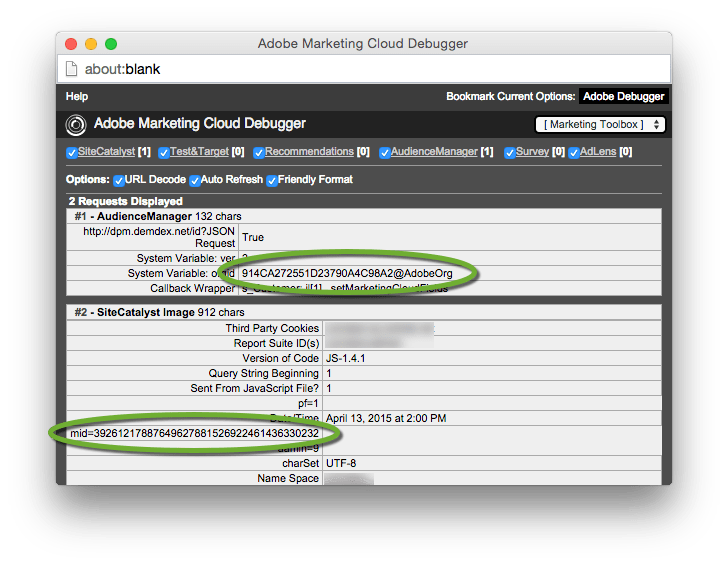
Once you finish, you’re going to see something like this in the Adobe Debugger:

adobe-debugger-amcv


There are two things to notice here. The first is a request for Adobe Audience Manager, and you should see your Marketing Cloud Org ID in it. The other is a new parameter in the Analytics request called “mid” that contains your new Marketing Cloud Visitor ID. Chances are, you’ll see both those. Easy, right? Unfortunately, there’s one more thing to test. After helping a dozen or so of my clients through this transition, I’ve seen a few “gotchas” pop up more than once. The Adobe debugger won’t tell you if everything worked right, so try another tool like Charles Proxy or Firebug, and find the request to “dpm.demdex.net.” The response should look something like this if it worked correctly:

charles-amcv-good

However, you may see something like this:

charles-amcv-bad

If you get the error message “Partner ID is not provisioned in AAM correctly,” stop your testing (hopefully you didn’t test in production!). You’ll need to work with Adobe to make sure your Marketing Cloud Org ID is ”provisioned” correctly. I have no idea how ClientCare does this, but I’ve seen this problem happen enough to know that not everyone at Adobe knows how to fix it, and it may take some time. But where my first 4-5 clients all had the problem the first time they tested, lately it’s been a much smoother process.

If you’ve made it this far, I’ve saved one little thing for last – because it has the potential to become a really big thing. One of the less-mentioned features that the new Marketing Cloud Visitor ID service offers you is the ability to set your own unique IDs. Here are a few examples:

  • The unique ID you give to customers in your loyalty program
  • The unique ID assigned by your lead generation system (like Eloqua, Marketo, or Salesforce)

You can read about how to implement these changes here, but they’re really simple. Right now, there’s not a ton you can do with this new functionality – Adobe doesn’t even store these IDs in its cookie yet, or do anything to link those IDs to its Marketing Cloud Visitor ID. But there’s a lot of potential for things it might do in the future. For example, very few tools I’ve worked with offer a great solution for visitor stitching – the idea that a visitor should look the same to the tool whether they’re visiting your full site, your mobile site, or using your mobile app. Tealium’s AudienceStream is a notable exception, but it has less reporting capability than Adobe or Google Analytics – and those tools still aren’t totally equipped to retroactively change a visitor’s unique ID. But creating an “ID exchange” is just one of many steps that would make visitor stitching a realistic possibility.

I’ve intentionally left out many technical details on this process. The code isn’t that hard to write, and the planning and coordination with deploying it is really where I’ve seen my clients tripped up. But the new Marketing Cloud Visitor ID service is pretty slick – and a lot of the new product integration Adobe is working on depends on it. So if you’re an Adobe customer and you’re not using it, you should investigate what it will take to migrate. And if you’ve already migrated, hopefully you’ve started taking advantage of some of the new features as well!